warning lights Lexus GX460 2018 / LEXUS 2018 GX460 (OM60Q09U) User Guide
[x] Cancel search | Manufacturer: LEXUS, Model Year: 2018, Model line: GX460, Model: Lexus GX460 2018Pages: 640, PDF Size: 11.04 MB
Page 78 of 640
78
GX460_OM_OM60Q09U_(U)2. Instrument cluster
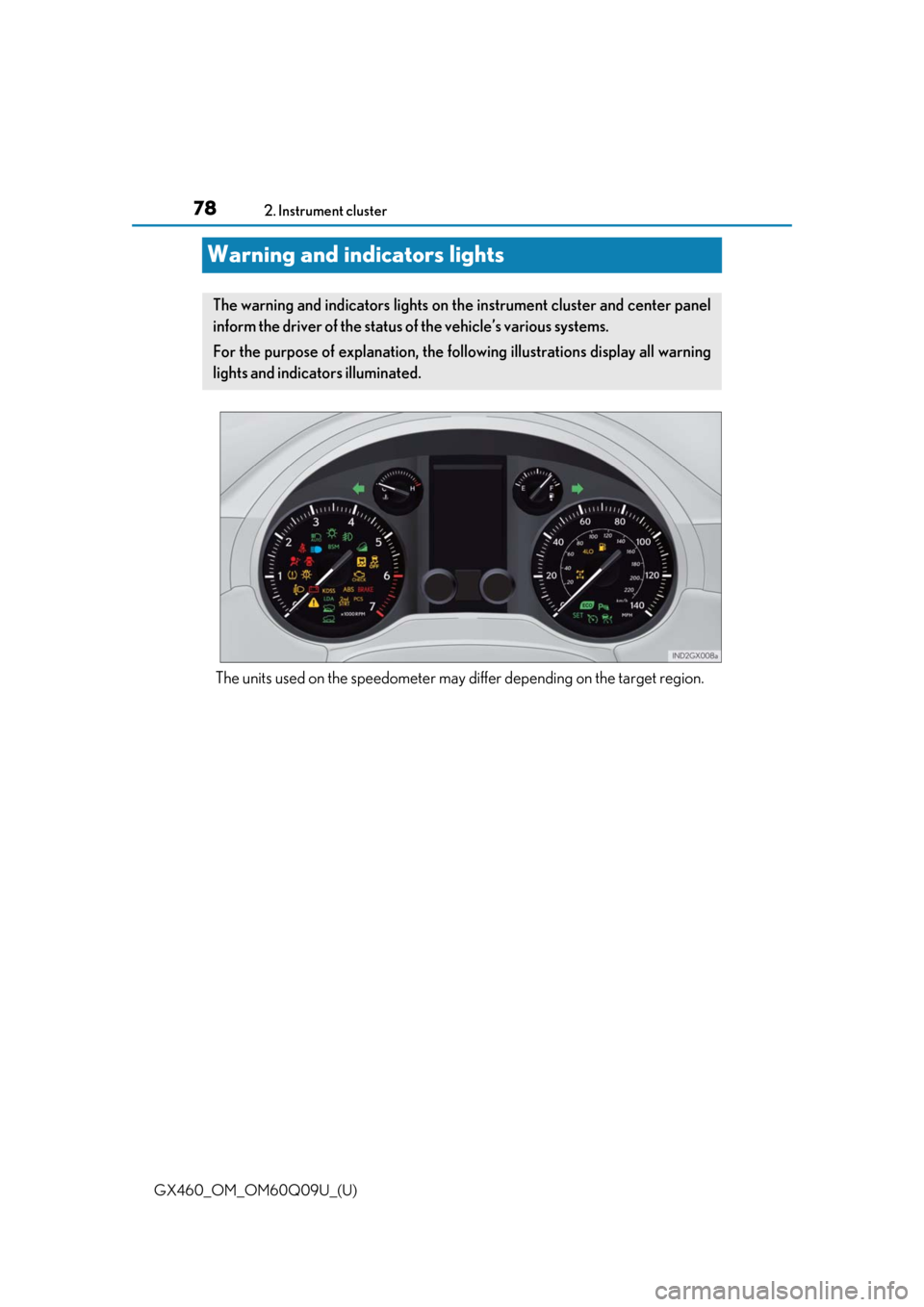
Warning and indicators lights
The units used on the speedometer may di
ffer depending on the target region.
The warning and indicators lights on the instrument cluster and center panel
inform the driver of the status of the vehicle’s various systems.
For the purpose of explanation, the following illustrations display all warning
lights and indicators illuminated.
Page 79 of 640
GX460_OM_OM60Q09U_(U)
792. Instrument cluster
2
Instrument cluster
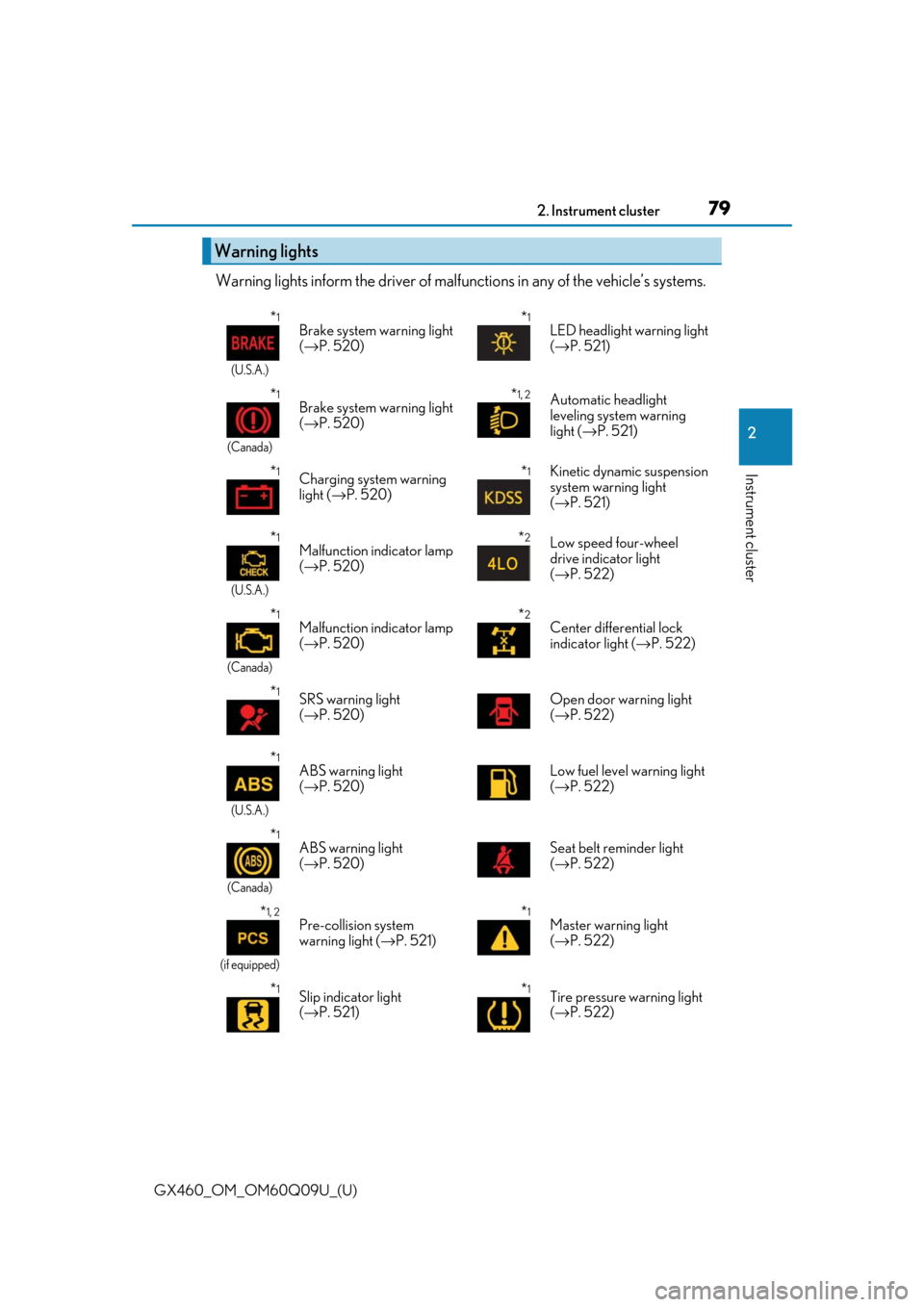
Warning lights inform the driver of malfunctions in any of the vehicle’s systems.
Warning lights
*1
(U.S.A.)
Brake system warning light
(→ P. 520)*1LED headlight warning light
(→ P. 521)
*1
(Canada)
Brake system warning light
(→ P. 520)*1, 2Automatic headlight
leveling system warning
light ( →P. 521)
*1Charging system warning
light ( →P. 520)*1Kinetic dynamic suspension
system warning light
(→ P. 521)
*1
(U.S.A.)
Malfunction indicator lamp
(→ P. 520)*2Low speed four-wheel
drive indicator light
(→ P. 522)
*1
(Canada)
Malfunction indicator lamp
(→ P. 520)*2Center differential lock
indicator light ( →P. 522)
*1SRS warning light
(→ P. 520) Open door warning light
(
→ P. 522)
*1
(U.S.A.)
ABS warning light
(→ P. 520) Low fuel level warning light
(
→ P. 522)
*1
(Canada)
ABS warning light
(→ P. 520) Seat belt reminder light
(
→ P. 522)
*1, 2
(if equipped)
Pre-collision system
warning light ( →P. 521)*1Master warning light
(→ P. 522)
*1Slip indicator light
(→ P. 521)*1Tire pressure warning light
(→ P. 522)
Page 81 of 640
GX460_OM_OM60Q09U_(U)
812. Instrument cluster
2
Instrument cluster
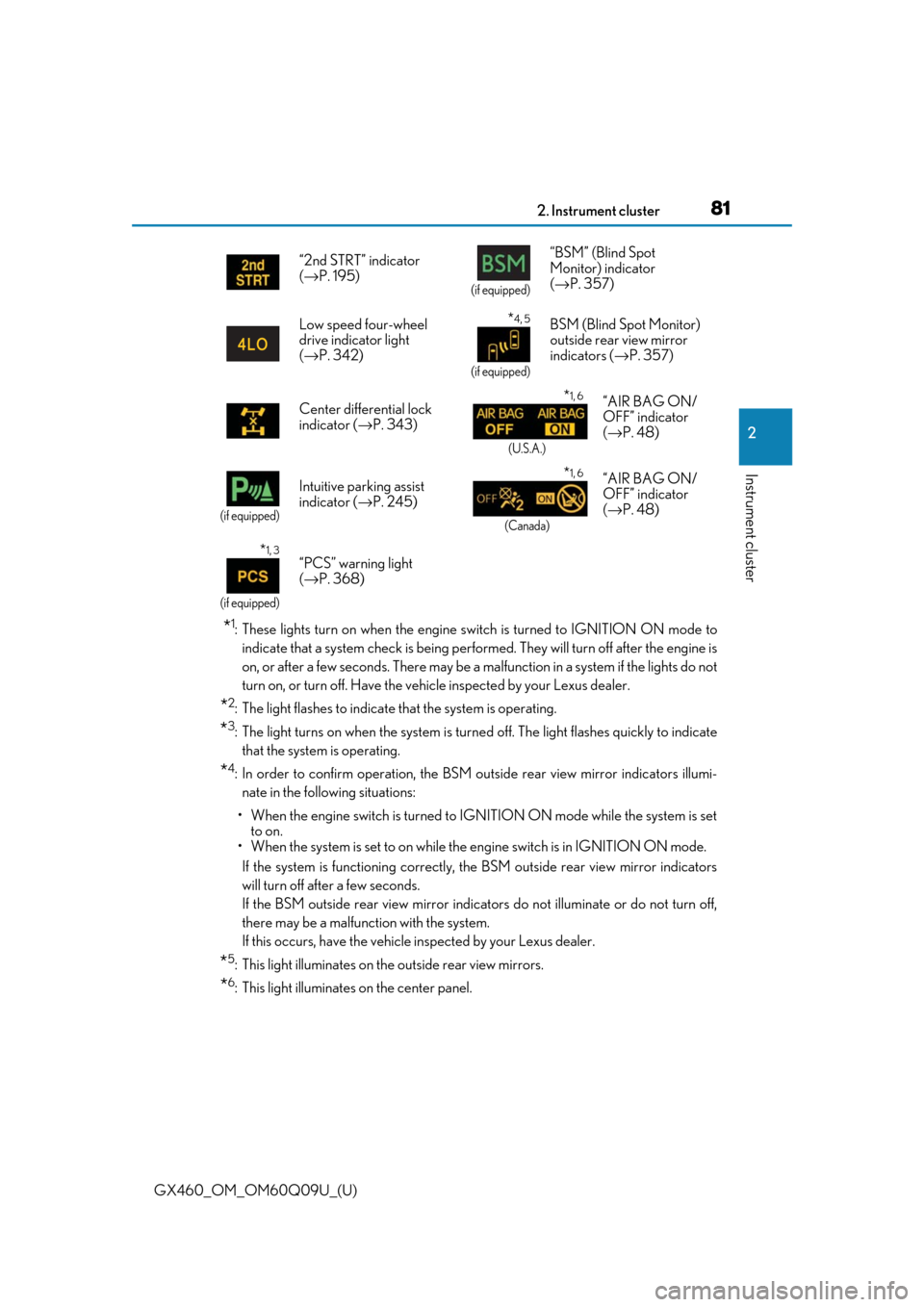
*1: These lights turn on when the engine switch is turned to IGNITION ON mode toindicate that a system check is being perfor med. They will turn off after the engine is
on, or after a few seconds. There may be a ma lfunction in a system if the lights do not
turn on, or turn off. Have the vehi cle inspected by your Lexus dealer.
*2: The light flashes to indicate that the system is operating.
*3: The light turns on when the system is turn ed off. The light flashes quickly to indicate
that the system is operating.
*4: In order to confirm operation, the BSM outside rear view mirror indicators illumi- nate in the following situations:
• When the engine switch is turned to IGNITION ON mode while the system is set to on.
• When the system is set to on while the engine switch is in IGNITION ON mode.
If the system is functioning correctly, th e BSM outside rear view mirror indicators
will turn off after a few seconds.
If the BSM outside rear view mirror indicators do not illuminate or do not turn off,
there may be a malfunction with the system.
If this occurs, have the vehicle inspected by your Lexus dealer.
*5: This light illuminates on the outside rear view mirrors.
*6: This light illuminates on the center panel.“2nd STRT” indicator
(
→ P. 195)
(if equipped)
“BSM” (Blind Spot
Monitor) indicator
(→ P. 357)
Low speed four-wheel
drive indicator light
( → P. 342)
*4, 5
(if equipped)
BSM (Blind Spot Monitor)
outside rear view mirror
indicators ( →P. 357)
Center differential lock
indicator ( →P. 343)
*1, 6
(U.S.A.)
“AIR BAG ON/
OFF” indicator
(→ P. 48)
(if equipped)
Intuitive parking assist
indicator ( →P. 245)*1, 6
(Canada)
“AIR BAG ON/
OFF” indicator
(→ P. 48)
*1, 3
(if equipped)
“PCS” warning light
(→ P. 368)
Page 205 of 640
GX460_OM_OM60Q09U_(U)
2054-3. Operating the lights and wipers
4
Driving
■Automatic headlight leveling system
The level of the headlights is automatically adjusted according to the number of passen-
gers and the loading condition of the vehicle to ensure that the headlights do not inter-
fere with other road users.
■If the automatic headlight levelin g system warning light flashes
It may indicate a malfun ction in the system. Contact your Lexus dealer.
■Welcome lighting
If the headlight switch is turned to AUTO and the surrounding area is dark, unlocking the
doors using the smart access system with pu sh-button start or wireless remote control
will turn the parking lights and tail lights on automatically.
■Customization
Settings (e.g. light sensor sensitivity) can be changed.
(Customizable features: →P. 594)
NOTICE
■To prevent battery discharge
Do not leave the lights on longer than ne cessary when the engine is not running.
Page 242 of 640

242
GX460_OM_OM60Q09U_(U)4-5. Using the driving support systems
■Conditions in which the func
tion may not operate correctly
In the following conditions, the camera sensor may be unable to recognize lane markers
causing the lane departure wa rning function to operate incorrectly. However, this does
not indicate a malfunction.
●When driving through an area with no lane markers, such as a tollbooth, a crossing or
before a ticket checkpoint
●When driving on a sharp curve
●When lane markers are extremely narrow or extremely wide
●When the vehicle leans to one side an unus ual amount due to a heavy load or improper
tire inflation pressure
●When the following distance between your vehicle and the vehicle ahead is extremely
short
●When the lane markers are yellow (These may be more difficult for the system to rec-
ognize compared to white markers.)
●When the lane markers are broken, “Botts’ dots”, “Raised pavement marker” or stones
●When the lane markers are on a curb etc.
●When lane markers are obscured or partially obscured by sand, dirt, etc.
●When there are shadows on the road running parallel with lane markers, or if a shadow
covers the lane markers
●When driving on a particularly bright road surface, such as concrete
●When driving on a road surface that is bright due to reflected light
●When driving in a location where the light level changes rapidly, such as the entrance to
or exit from a tunnel
●When sunlight or the headlight s of oncoming vehicles are shining directly into the cam-
era lens
●When driving on roads that are branching or merging
●When driving on a road surface that is wet du e to rain, previous rainfall, standing water,
etc.
●When the vehicle experiences strong up-and-down motion such as when driving on an
extremely rough road or on a seam in the pavement
●When headlight brightness at nighttime is reduced due to dirt on the lenses, or when
the headlights are misaligned
●When driving on winding road s or roads that are uneven
●When driving on rough or unpaved roads
■When changing the tires
Depending on the tires used, such as snow tire, etc., sufficient performance may not be
maintainable.
■Warning messages and buzzers for LDA system
Warning messages and buzzers are used to indicate a system malfunction or to inform
the driver of the need for caution while driving. ( →P. 531, 532)
Page 372 of 640

372
GX460_OM_OM60Q09U_(U)4-5. Using the driving support systems
■Automatic cancelation of pre-collision system
When a malfunction occurs due to sensor contaminations, etc. that results in the sensors
being unable to detect obstac
les, the pre-collision system will be automatically disabled.
In this case, the system will not activate even if there is a collision possibility.
■Obstacles not detected
The system cannot detect plastic obstacles su ch as pylons. There may also be occasions
when the system cannot detect pedestrians, animals, bicycles, motorcycles, trees, or
snowdrifts.
■Conditions that may trigger th e system even if there is no possibility of a collision
In any of the following situations where the frontal area of the radar sensor is interrupted,
the radar sensor may de tect possibility of a frontal collis ion and the system may be acti-
vated.
●When passing by an oncoming vehicle in a curve or a turn to the right or the left
●When rapidly approaching an obstacle ahead (e.g. preceding vehicle, toll gate barrier,
etc.)
●When there is a structural object (billboar d, low ceiling, fluorescent light, etc.) above
the uphill road ahead
●When driving on a narrow road or throug h under a low overhead structure (bridge,
tunnel, fly-under, etc.)
●When driving on an uneven road surface
●When there is a metal object, bump, or protrusion on the road surface
●When vehicle’s front part is raised or lowered depending on loading conditions
●When the direction of radar sensor is misa ligned by strong impact applied on an area
around the radar sensor, etc.
●When there is an obstacle (guard rail, etc.) by the roadside at the entrance to a curve
●When the front of your vehicle is pointing upwards (caused by towing a trailer, during
emergency towing or putting a heavy lo ad in the luggage compartment etc.)
When the system is activated in the situations described above, there is also a possibility
that the seat belts w ill retract quickly and the brakes ma y be applied with a force greater
than normal. When the seat belt is locked in the restricted position, stop the vehicle in a
safe place, release the seat belt and refasten it.
■When there is a malfunction in the system, or if the system is temporarily unusable
Warning lights will turn on or flash, and warning messages will be displayed.
( → P. 521, 532)
Page 520 of 640
520
GX460_OM_OM60Q09U_(U)7-2. Steps to take in an emergency
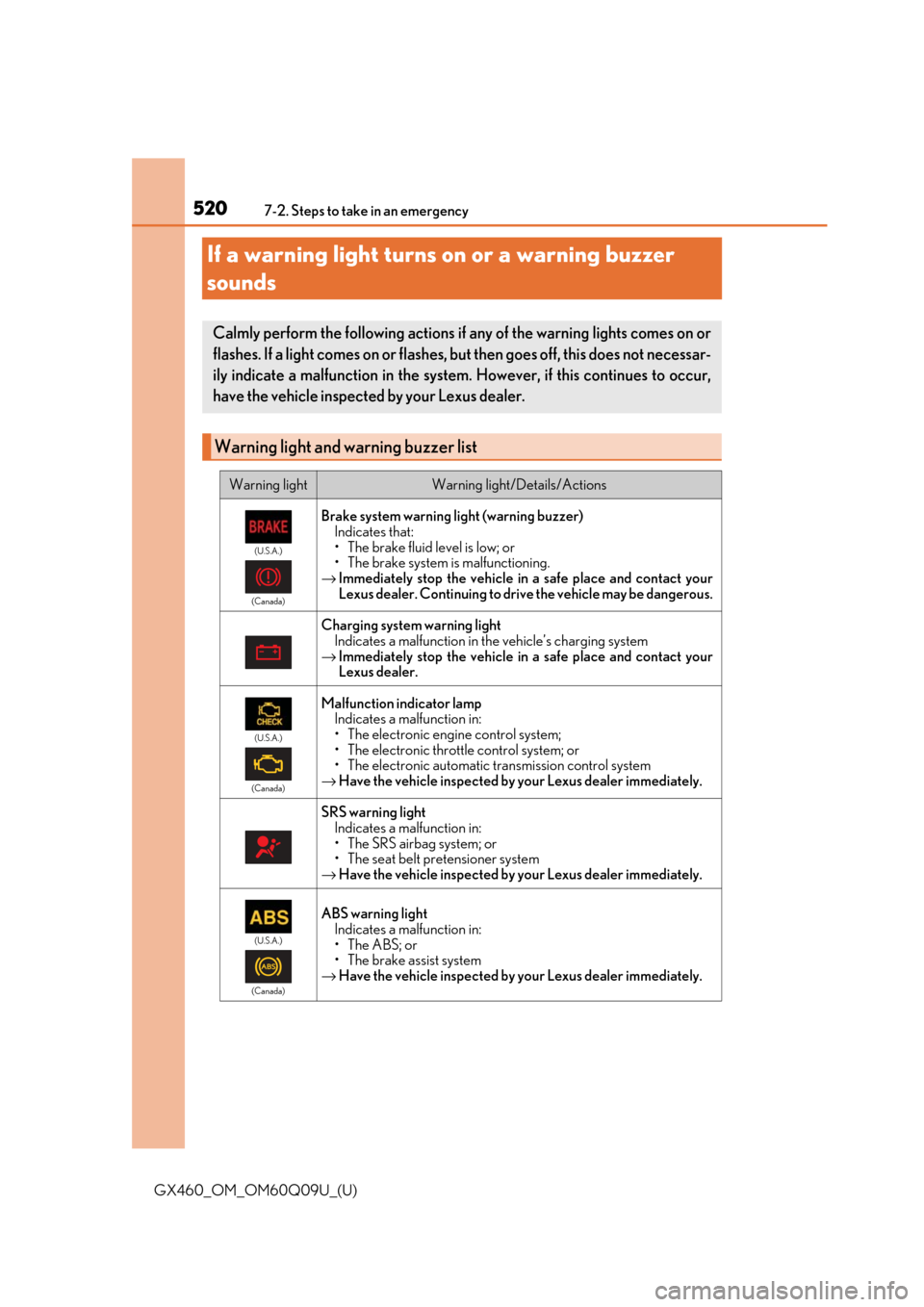
If a warning light turns on or a warning buzzer
sounds
Calmly perform the following actions if any of the warning lights comes on or
flashes. If a light comes on or flashes, but then goes off, this does not necessar-
ily indicate a malfunction in the system
. However, if this continues to occur,
have the vehicle inspecte d by your Lexus dealer.
Warning light and warning buzzer list
Warning lightWarning light/Details/Actions
(U.S.A.)
(Canada)
Brake system warning light (warning buzzer) Indicates that:
• The brake fluid level is low; or
• The brake system is malfunctioning.
→ Immediately stop the vehicle in a safe place and contact your
Lexus dealer. Continuing to drive the vehicle may be dangerous.
Charging system warning light
Indicates a malfunction in the vehicle’s charging system
→ Immediately stop the vehicle in a safe place and contact your
Lexus dealer.
(U.S.A.)
(Canada)
Malfunction indicator lamp Indicates a malfunction in:
• The electronic engine control system;
• The electronic throttle control system; or
• The electronic automatic transmission control system
→ Have the vehicle inspected by your Lexus dealer immediately.
SRS warning light
Indicates a malfunction in:
• The SRS airbag system; or
• The seat belt pretensioner system
→ Have the vehicle inspected by your Lexus dealer immediately.
(U.S.A.)
(Canada)
ABS warning light Indicates a malfunction in:
• The ABS; or
• The brake assist system
→ Have the vehicle inspected by your Lexus dealer immediately.
Page 521 of 640
5217-2. Steps to take in an emergency
GX460_OM_OM60Q09U_(U)
7
When trouble arises
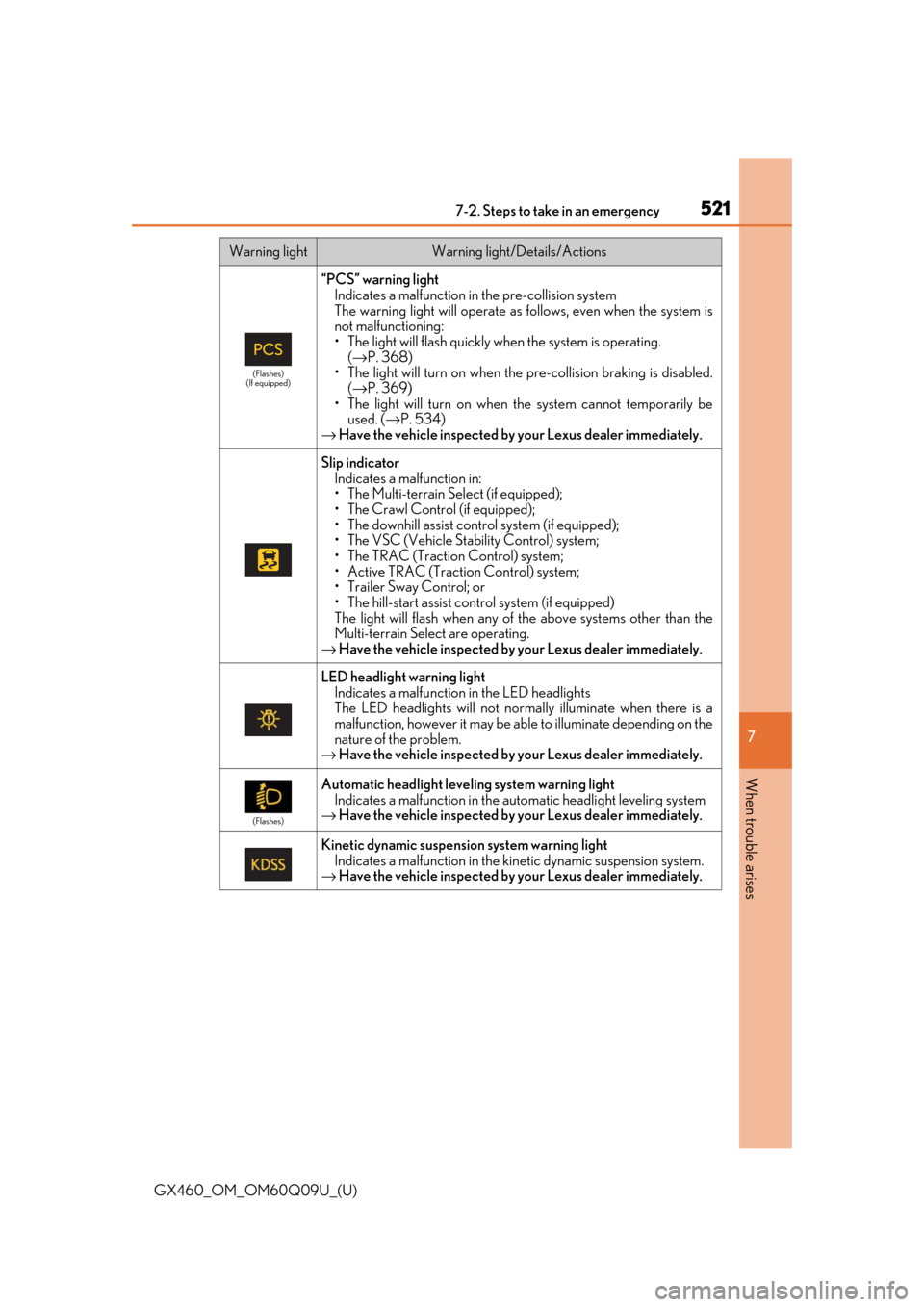
(Flashes)
(If equipped)
“PCS” warning light Indicates a malfunction in the pre-collision system
The warning light will operate as follows, even when the system is
not malfunctioning:
• The light will flash quickly when the system is operating.
(→ P. 368)
• The light will turn on when the pre-collision braking is disabled. (→ P. 369)
• The light will turn on when the system cannot temporarily be
used. ( →P. 534)
→ Have the vehicle inspected by your Lexus dealer immediately.
Slip indicator
Indicates a malfunction in:
• The Multi-terrain Select (if equipped);
• The Crawl Control (if equipped);
• The downhill assist cont rol system (if equipped);
• The VSC (Vehicle Stability Control) system;
• The TRAC (Traction Control) system;
• Active TRAC (Traction Control) system;
• Trailer Sway Control; or
• The hill-start assist control system (if equipped)
The light will flash when any of the above systems other than the
Multi-terrain Select are operating.
→ Have the vehicle inspected by your Lexus dealer immediately.
LED headlight warning light
Indicates a malfunction in the LED headlights
The LED headlights will not normal ly illuminate when there is a
malfunction, however it may be able to illuminate depending on the
nature of the problem.
→ Have the vehicle inspected by your Lexus dealer immediately.
(Flashes)
Automatic headlight leve ling system warning light
Indicates a malfunction in the automatic headlight leveling system
→ Have the vehicle inspected by your Lexus dealer immediately.
Kinetic dynamic suspension system warning light
Indicates a malfunction in the kin etic dynamic suspension system.
→ Have the vehicle inspected by your Lexus dealer immediately.
Warning lightWarning light/Details/Actions
Page 525 of 640
5257-2. Steps to take in an emergency
GX460_OM_OM60Q09U_(U)
7
When trouble arises
CAUTION
■If both the ABS and the brake sy stem warning lights remain on
Stop your vehicle in a safe place immediat ely and contact your Lexus dealer. The vehi-
cle will become extremely unstable during br aking, and the ABS system may fail, which
could cause an accident resultin g in death or serious injury.
■If the tire pressure warning light comes on
Be sure to observe the following precautions. Failure to do so could cause loss of vehi-
cle control and result in death or serious injury.
●Stop your vehicle in a safe place as soon as possible. Adjust the tire inflation pressure
immediately.
●If the tire pressure warning light comes on even after tire inflation pressure adjust-
ment, it is probable that you have a flat tire. Check the tires. If the tire is flat, change to
the spare tire and have the flat tire repaired by the nearest Lexus dealer.
●Avoid abrupt maneuvering and braking. If the vehicle tires deteriorate, you could lose
control of the steering wheel or the brakes.
■If a blowout or sudden air leakage should occur
The tire pressure warning system may not activate immediately.
Page 528 of 640
528
GX460_OM_OM60Q09U_(U)7-2. Steps to take in an emergency
If a warning message is displayed
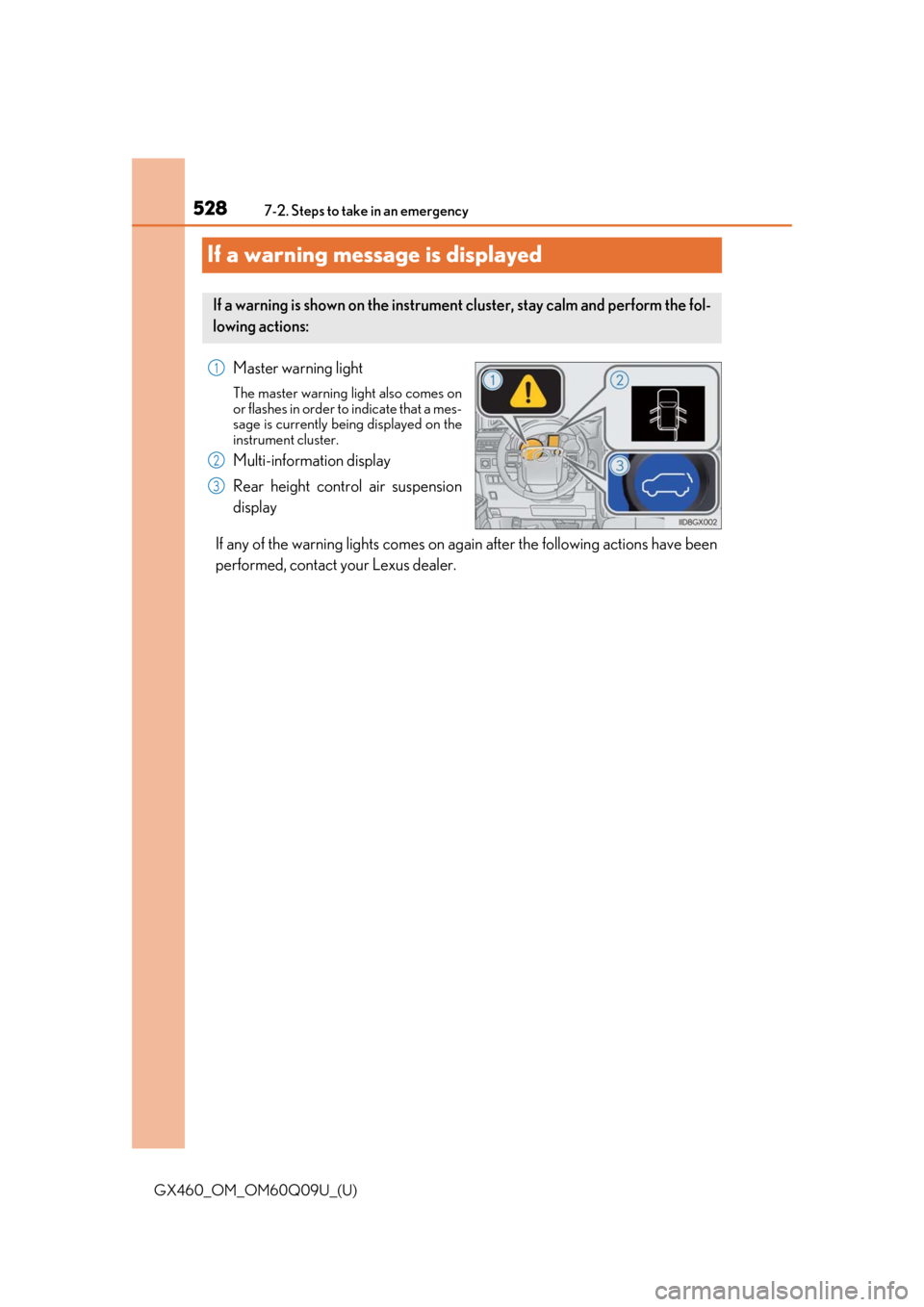
Master warning light
The master warning light also comes on
or flashes in order to
indicate that a mes-
sage is currently being displayed on the
instrument cluster.
Multi-information display
Rear height control air suspension
display
If any of the warning lights comes on ag ain after the following actions have been
performed, contact your Lexus dealer.
If a warning is shown on the instrument cluster, stay calm and perform the fol-
lowing actions:
1
2
3