Cool Lexus GX460 2021 Owner's Manual /
[x] Cancel search | Manufacturer: LEXUS, Model Year: 2021, Model line: GX460, Model: Lexus GX460 2021Pages: 628, PDF Size: 12.51 MB
Page 4 of 628

TABLE OF CONTENTS4
GX460_OM_OM60T19U_(U)
5-1. Using the air conditioning system and defogger
Front automatic air conditioning system ............... 384
Rear air conditioning system.......................................... 394
Heated steering wheel/seat heaters/seat ve ntilators ....... 397
5-2. Using the interior lights Interior lights list .........................400• Personal/interior lights main switch .............................. 401
• Personal/interior lights ...... 401
5-3. Using the storage features List of storage features ............ 403
• Glove box ............................... 404
• Console box .......................... 404
• Coin holder ............................ 406
• Cup holders/bottle holders/door pockets........ 406
• Auxiliary boxes .....................408
Luggage compartment features ........................................ 410 5-4. Using the other interior
features
Other interior features .............. 417 • Cool box.................................... 417
• Sun visors ..................................419
• Vanity mirror ...........................419
• Conversation mirror .......... 420
• Clock ........................................ 420
• Power outlets .......................... 421
• USB charging ports ............ 425
• Armrest.....................................427
• Coat hooks............................. 428
• Assist grips ............................. 428
Compass ....................................... 429
Garage door opener ............... 433
5Interior features
Page 22 of 628
22Pictorial index
GX460_OM_OM60T19U_(U)
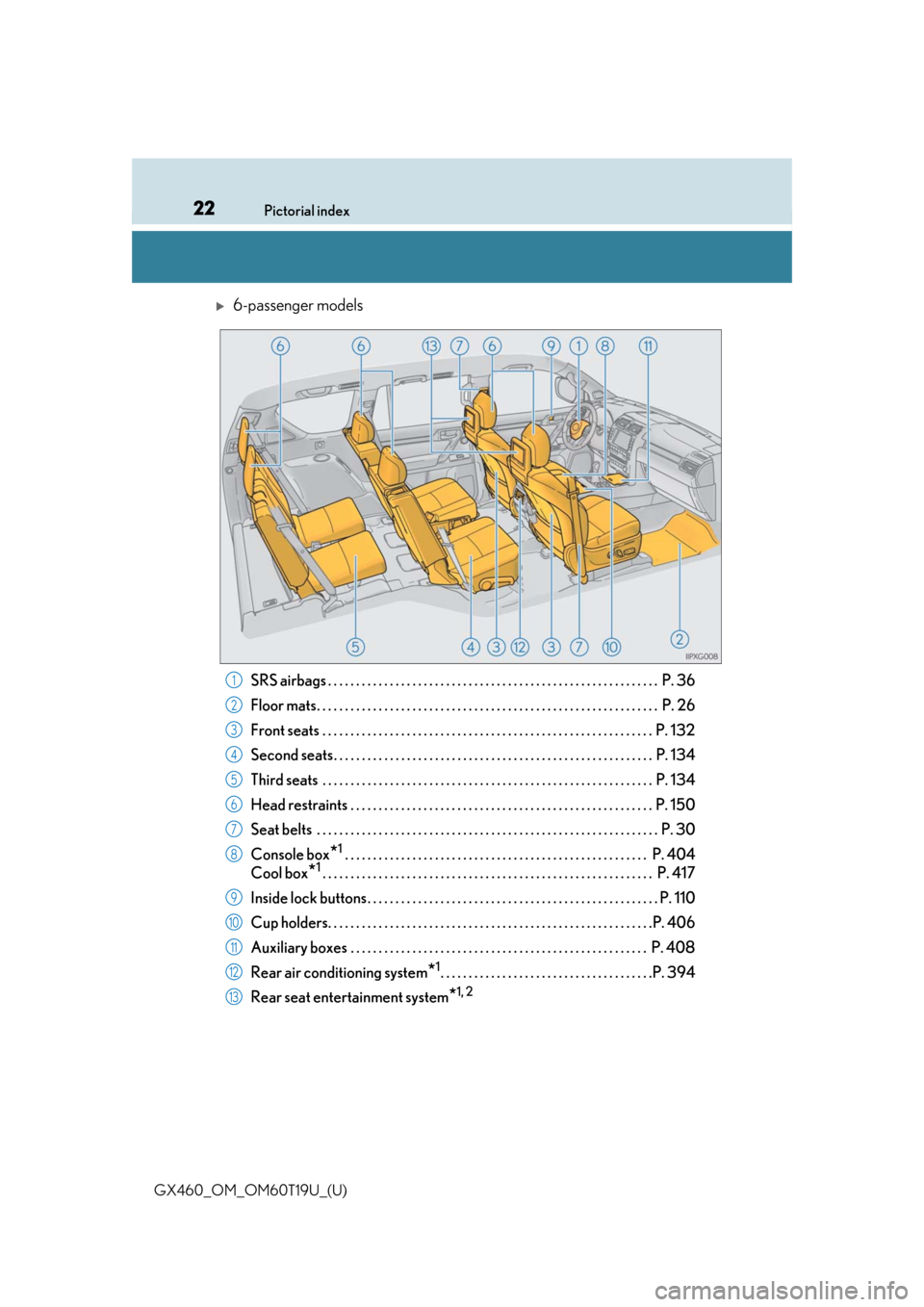
6-passenger models
SRS airbags . . . . . . . . . . . . . . . . . . . . . . . . . . . . . . . . . . . . . . . . . . . . . . . . . . . . . . . . . . . P. 36
Floor mats. . . . . . . . . . . . . . . . . . . . . . . . . . . . . . . . . . . . . . . . . . . . . . . . . . . . . . . . . . . . . P. 26
Front seats . . . . . . . . . . . . . . . . . . . . . . . . . . . . . . . . . . . . . . . . . . . . . . . . . . . . . . . . . . . P. 132
Second seats. . . . . . . . . . . . . . . . . . . . . . . . . . . . . . . . . . . . . . . . . . . . . . . . . . . . . . . . . P . 134
Third seats . . . . . . . . . . . . . . . . . . . . . . . . . . . . . . . . . . . . . . . . . . . . . . . . . . . . . . . . . . . P. 134
Head restraints . . . . . . . . . . . . . . . . . . . . . . . . . . . . . . . . . . . . . . . . . . . . . . . . . . . . . . P. 150
Seat belts . . . . . . . . . . . . . . . . . . . . . . . . . . . . . . . . . . . . . . . . . . . . . . . . . . . . . . . . . . . . . P. 30
Console box
*1 . . . . . . . . . . . . . . . . . . . . . . . . . . . . . . . . . . . . . . . . . . . . . . . . . . . . . . P. 404
Cool box
*1. . . . . . . . . . . . . . . . . . . . . . . . . . . . . . . . . . . . . . . . . . . . . . . . . . . . . . . . . . . P. 417
Inside lock buttons . . . . . . . . . . . . . . . . . . . . . . . . . . . . . . . . . . . . . . . . . . . . . . . . . . . . P. 11 0
Cup holders. . . . . . . . . . . . . . . . . . . . . . . . . . . . . . . . . . . . . . . . . . . . . . . . . . . . . . . . . .P . 406
Auxiliary boxes . . . . . . . . . . . . . . . . . . . . . . . . . . . . . . . . . . . . . . . . . . . . . . . . . . . . . P. 40 8
Rear air conditioning system
*1. . . . . . . . . . . . . . . . . . . . . . . . . . . . . . . . . . . . . .P. 394
Rear seat entertainment system
*1, 2
1
2
3
4
5
6
7
8
9
10
11
12
13
Page 85 of 628
GX460_OM_OM60T19U_(U)
852. Instrument cluster
2
Instrument cluster
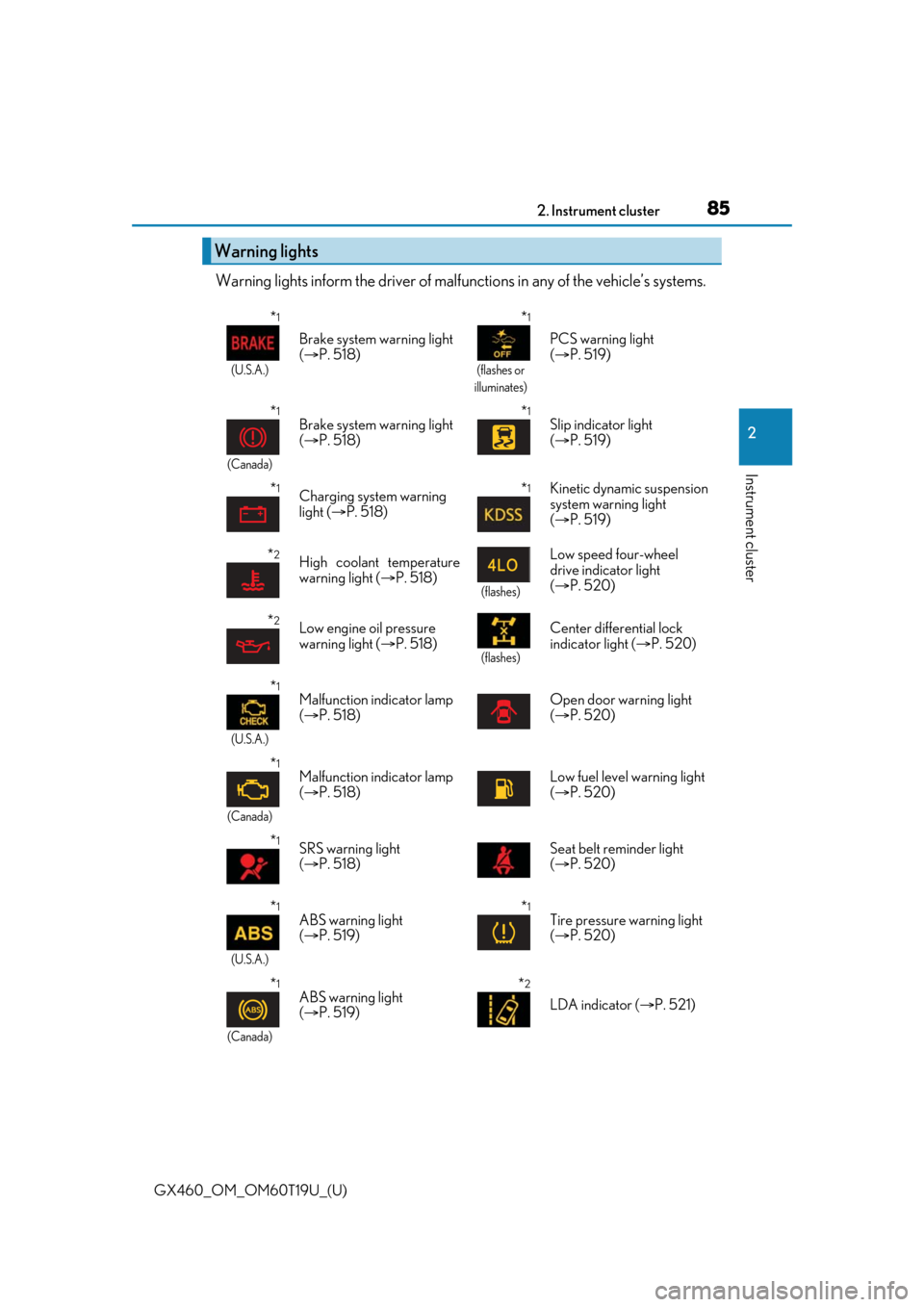
Warning lights inform the driver of malfunctions in any of the vehicle’s systems.
Warning lights
*1
(U.S.A.)
Brake system warning light
( P. 518)
*1
(flashes or
illuminates)
PCS warning light
( P. 519)
*1
(Canada)
Brake system warning light
( P. 518)*1Slip indicator light
( P. 519)
*1Charging system warning
light ( P. 518)*1Kinetic dynamic suspension
system warning light
( P. 519)
*2High coolant temperature
warning light ( P. 518)
(flashes)
Low speed four-wheel
drive indicator light
( P. 520)
*2Low engine oil pressure
warning light ( P. 518)
(flashes)
Center differential lock
indicator light ( P. 520)
*1
(U.S.A.)
Malfunction indicator lamp
( P. 518) Open door warning light
(
P. 520)
*1
(Canada)
Malfunction indicator lamp
( P. 518) Low fuel level warning light
(
P. 520)
*1SRS warning light
( P. 518) Seat belt reminder light
(
P. 520)
*1
(U.S.A.)
ABS warning light
( P. 519)*1Tire pressure warning light
( P. 520)
*1
(Canada)
ABS warning light
( P. 519)*2
LDA indicator ( P. 521)
Page 90 of 628
90
GX460_OM_OM60T19U_(U)2. Instrument cluster
Gauges and meters
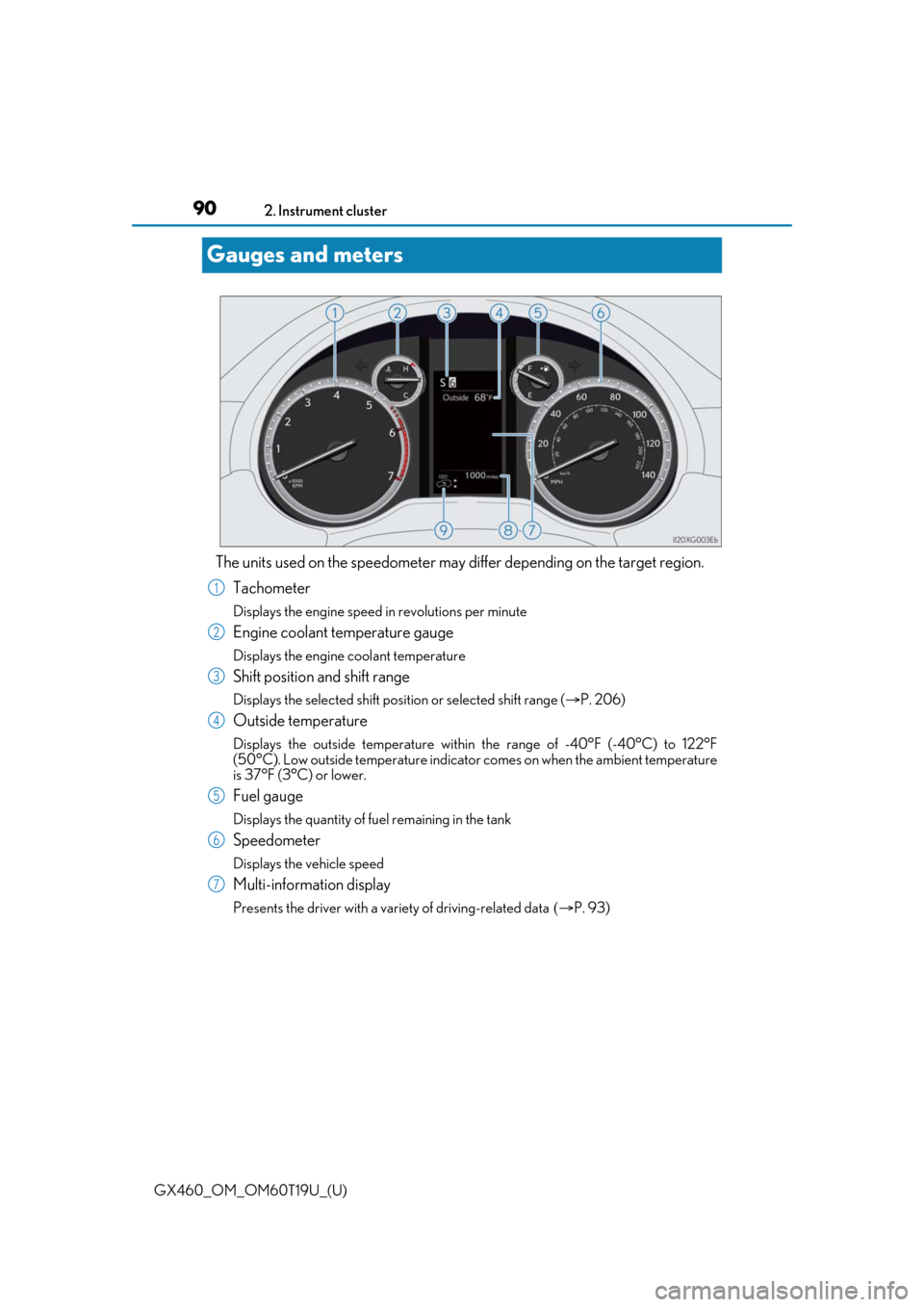
The units used on the speedometer may di
ffer depending on the target region.
Tachometer
Displays the engine speed in revolutions per minute
Engine coolant temperature gauge
Displays the engine coolant temperature
Shift position and shift range
Displays the selected shift posi tion or selected shift range (P. 206)
Outside temperature
Displays the outside temperature within the range of -40°F (-40°C) to 122°F
(50°C). Low outside temperature indicator comes on when the ambient temperature
is 37°F (3°C) or lower.
Fuel gauge
Displays the quantity of fuel remaining in the tank
Speedometer
Displays the vehicle speed
Multi-information display
Presents the driver with a variety of driving-related data P. 93)
1
2
3
4
5
6
7
Page 92 of 628

92
GX460_OM_OM60T19U_(U)2. Instrument cluster
■The meters and display illuminate when
The engine switch is in IGNITION ON mode.
■Instrument cluster brightness adjustment
The instrument cluster brig
htness levels when the tail lights are on and off can be
adjusted.
■The brightness of the in strument cluster lights
When the tail lights are on, the brightness will change. Ho wever, when the surroundings
are bright (daytime, etc.) turn ing on the tail lights will not change the instrument cluster
brightness.
In addition, the brightness of the instrument cluster lights is automatically adjusted based
on the light sensor detecting ho w bright the surroundings are.
■Customization
The meter display can be customized on the multi-information display. (P. 584)
WARNING
■The information display at low temperatures
Allow the interior of the vehicle to warm up before using the liquid crystal information
display. At extremely low temperatures, th e information display monitor may respond
slowly, and display changes may be delayed.
For example, there is a lag between the dr iver’s shifting and the new gear number
appearing on the display. This lag could ca use the driver to downshift again, causing
rapid and excessive engine braking and possibly an accident resulting in death or
injury.
NOTICE
■To prevent damage to the engine and its components
●Do not let the indicator needle of the tachometer enter the red zone, which indicates
the maximum engine speed.
●The engine may be overheating if the engine coolant temperature gauge is in the red
zone (H). In this case, immediately stop the vehicle in a safe place, and check the
engine after it has cooled completely. ( P. 553)
Page 192 of 628

192
GX460_OM_OM60T19U_(U)4-1. Before driving
●Avoid jerky starts or sudden acceleration.
●Avoid jerky steering and sharp turns, an
d slow down before making a turn.
●Note that when making a turn, the trailer wheels will be closer than the vehicle
wheels to the inside of the turn. Compensate by making a wider than normal
turning radius.
●Slow down before making a turn, in crosswinds, on wet or slippery surfaces,
etc.
Increasing vehicle speed can destabilize the trailer.
●Take care when passing other vehicles . Passing requires considerable dis-
tance. After passing a vehicle, do not fo rget the length of your trailer, and be
sure you have plenty of room before changing lanes.
●To maintain engine braking efficien cy and charging system performance
when using engine braking, do not put the transmission in D.
If in the S mode, the transmission shift range position must be in 5 or lower.
●Instability happens more frequently when descending steep or long downhill
grades. Before descending, slow down and downshift. Do not make sudden
downshifts while descending st eep or long downhill grades.
●Avoid holding the brake pedal down too long or applying the brakes too fre-
quently. This could cause the brakes to overheat and result in reduced braking
efficiency.
●Due to the added load of the trailer, yo ur vehicle’s engine may overheat on hot
days (at temperatures over 85°F [30°C]) when driving up a long or steep
grade. If the engine coolant temperat ure gauge indicates overheating, imme-
diately turn off the air conditioning (if in use), pull your vehicle off the road and
stop in a safe spot. ( P. 553)
Page 290 of 628
290
GX460_OM_OM60T19U_(U)4-5. Using the driving support systems
When all of the following conditions are
satisfied, the Multi-terrain Select indica-
tor will come on, the mode select screen will be displayed on the multi-informa-
tion display, and Multi-terr ain Select control will begin.
●The four-wheel drive control switch is in “L4”.
●Both Active TRAC and VSC are not off.
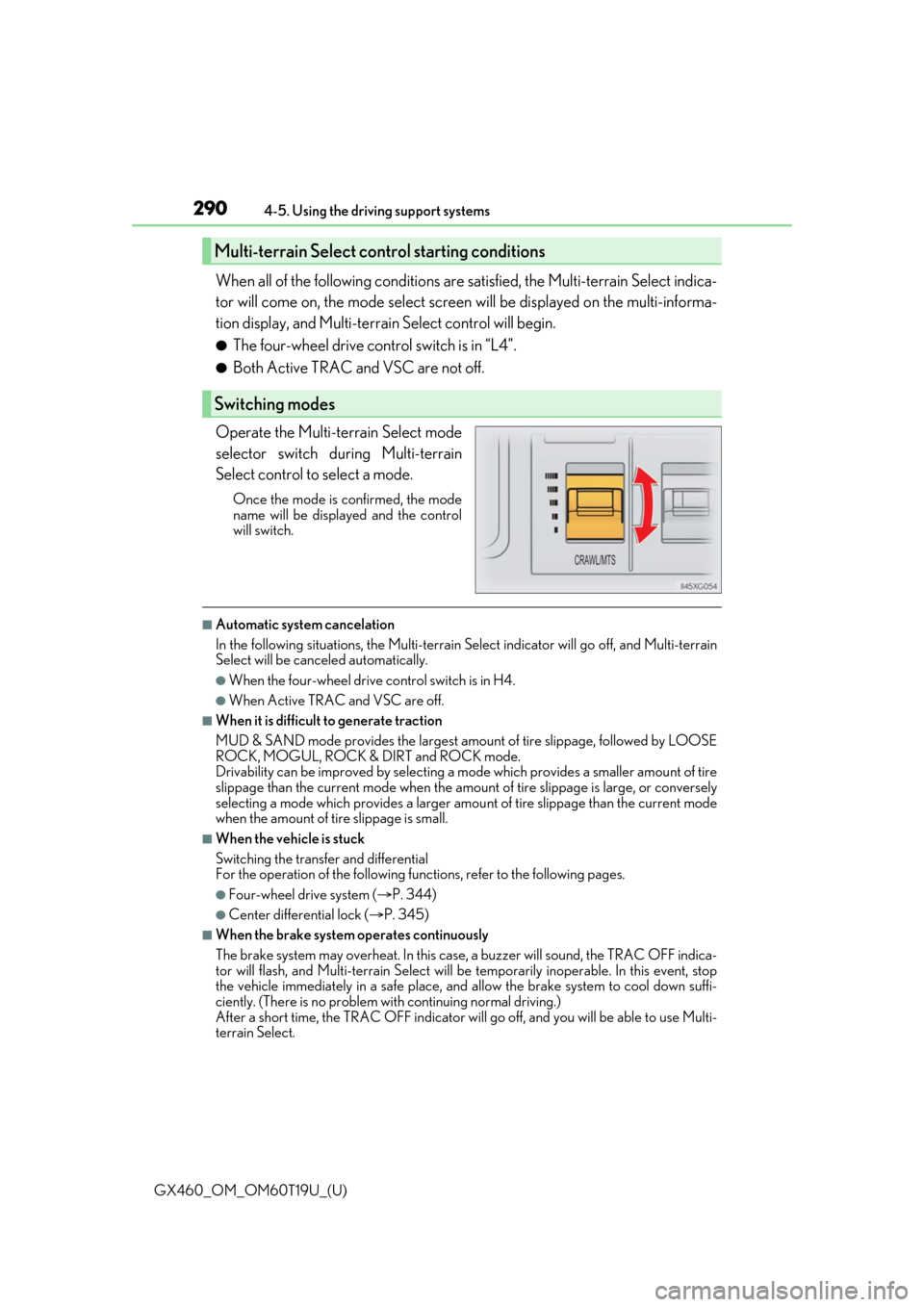
Operate the Multi-terrain Select mode
selector switch du ring Multi-terrain
Select control to select a mode.
Once the mode is confirmed, the mode
name will be displayed and the control
will switch.
■Automatic system cancelation
In the following situations, the Multi-terrain Select indicator will go off, and Multi-terrain
Select will be canceled automatically.
●When the four-wheel drive control switch is in H4.
●When Active TRAC and VSC are off.
■When it is difficult to generate traction
MUD & SAND mode provides the largest amou nt of tire slippage, followed by LOOSE
ROCK, MOGUL, ROCK & DIRT and ROCK mode.
Drivability can be improved by selecting a mo de which provides a smaller amount of tire
slippage than the current mode when the amount of tire slippage is large, or conversely
selecting a mode which provides a larger amou nt of tire slippage than the current mode
when the amount of tire slippage is small.
■When the vehicle is stuck
Switching the transfer and differential
For the operation of the following func tions, refer to the following pages.
●Four-wheel drive system (P. 344)
●Center differential lock ( P. 345)
■When the brake system operates continuously
The brake system may overheat. In this case, a buzzer will sound, the TRAC OFF indica-
tor will flash, and Multi-terrain Select will be temporarily inoperable. In this event, stop
the vehicle immediately in a safe place, and allow the brake system to cool down suffi-
ciently. (There is no problem wi th continuing normal driving.)
After a short time, the TRAC OFF indicator will go off, and you will be able to use Multi-
terrain Select.
Multi-terrain Select control starting conditions
Switching modes
Page 346 of 628

346
GX460_OM_OM60T19U_(U)4-5. Using the driving support systems
■When the four-wheel drive control switch can be operated
●The engine switch is in IGNITION ON mode.
●The shift lever is in the N position.
●The vehicle is stopped completely.
■The low speed four-wheel drive indicator
●The indicator blinks while sw
itching between H4 and L4.
●If the low speed four-wheel drive indicator continues to blink when you operate the
four-wheel drive control switch to the H4 or L4 position, stop the vehicle completely,
shift the shift lever securely into N and then operate the switch again.
●If the shift lever is moved before the low speed four-wheel drive indicator turns on/off,
the transfer mode may not be shifted completely. The transfer mode disengages both
the front and rear drive shafts from the powertrain and allows the vehicle to move
regardless of the shift position. (At this time , the indicator blinks and the buzzer sounds.)
Therefore, the vehicle is free to roll even if the shift lever is in P. You or someone else
could be seriously injured. You must comple te the shifting of the transfer mode and
confirm that the indicator has turned off (H4) or turned on (L4).
●If the engine coolant temperature is too low, the four-wheel drive control system may
not be able to shift. When the engine is warmer operate the switch again.
If the indicator continue to blink even if doing so, have the vehicle inspected by your
Lexus dealer as soon as possible. There may be a trouble in the four-wheel drive system.
■When the transfer mode is switched to L4
VSC is automatically turned off. (T he VSC OFF indicator will come on.)
■When the center differential lock/unlock switch can be operated
The engine switch is in IGNITION ON mode.
■The center differential lock indicator
●The indicator blinks while locking/unlocking the center differential.
●If the center differential lock indicator b links and the buzzer sounds when the center
differential is locked, stop the slipping or spinning and push the switch again.
If the indicator continue to blink even if doing so, have the vehicle inspected by your
Lexus dealer as soon as possible. There may be a trouble in the four-wheel drive system.
Page 351 of 628

GX460_OM_OM60T19U_(U)
3514-5. Using the driving support systems
4
Driving
■When the Crawl Control system is operated continuously
This may cause the brake actuator to overheat . In this case, the Crawl Control system will
stop operating, a buzzer will sound, the Crawl Control indicator will turn off after flashing
and the “TRAC OFF” indicator will come on. In this case, quickly stop the vehicle in a safe
place and give the actuator adequate time to cool off. Refrain from using the system until
the “TRAC OFF” indicator turns off. (The ve hicle can be driven normally during this
time.)
■When depressing the accelerator pedal while the Crawl Control is operating
Multi-terrain Select operates in AUTO mode. ( P. 288)
■If the automatic transmission system overheats
The system will cease operation, a buzzer w ill sound and a warning message will be dis-
played to alert the driver. Stop the vehicle in a safe place until the warning message turns
off. ( P. 528)
■Sounds and vibrations caused by the Crawl Control system
●A sound may be heard from the engine compartment when the engine is started or just
after the vehicle begins to move. This soun d does not indicate that a malfunction has
occurred in Crawl Control system.
●Either of the following conditions may occu r when the Crawl Control system is operat-
ing. None of these are indicators that a malfunction has occurred.
• Vibrations may be felt through the vehicle body and steering.
• A motor sound may be heard afte r the vehicle comes to a stop.
■If the slip indicator comes on...
It may indicate a malfunction in the system. Cons ult your Lexus dealer.
WARNING
■When using Crawl Control
Do not rely solely on the Crawl Control. This function does not extend the vehicle’s
performance limitations. Always thoroughly check the road conditions, and drive
safely.
■These conditions may cause the system not to operate properly
When driving on the following surfaces, the sy stem may not be able to maintain a fixed
low speed, which may re sult in an accident:
●Extremely steep inclines.
●Extremely uneven surfaces.
●Snow-covered roads, or other slippery surfaces.
Page 374 of 628
374
GX460_OM_OM60T19U_(U)4-6. Driving tips
Winter driving tips
●Use fluids that are appropriate to
the prevailing outside temperatures.
•Engine oil
• Engine coolant
• Washer fluid
●Have a service technician inspect the condition of the battery.
●Have the vehicle fitted with four snow tires or purchase a set of tire chains for
the rear tires.
Ensure that all tires are the same size and br and, and that chains match the size of the
tires.
Perform the following according to the driving conditions:
●Do not try to forcibly open a window or move a wiper that is frozen. Pour
warm water over the frozen area to me lt the ice. Wipe away the water imme-
diately to prevent it from freezing.
●To ensure proper operation of the c limate control system fan, remove any
snow that has accumulated on the air inlet vents in front of the windshield.
●Check for and remove any excess ice or snow that may have accumulated on
the exterior lights, vehicle’s roof, chassi s, around the tires or on the brakes.
●Remove any snow or mud from the bottom of your shoes before getting in the
vehicle.
Carry out the necessary preparations an d inspections before driving the vehi-
cle in winter. Always drive the vehicle in a manner appropriate to the prevail-
ing weather conditions.
Pre-winter preparations
Before driving the vehicle