open Lexus GX470 2007 Theft deterrent system /
[x] Cancel search | Manufacturer: LEXUS, Model Year: 2007, Model line: GX470, Model: Lexus GX470 2007Pages: 58, PDF Size: 3.36 MB
Page 28 of 58
Topic 3
When Driving
28
Entering and Exiting
Before DrivingBefore Driving
When DrivingWhen Driving
Rain and
Night Driving
Driving Comfort
Opening and Closing
What to do if ...
Customizing
Yo u r L e x u s
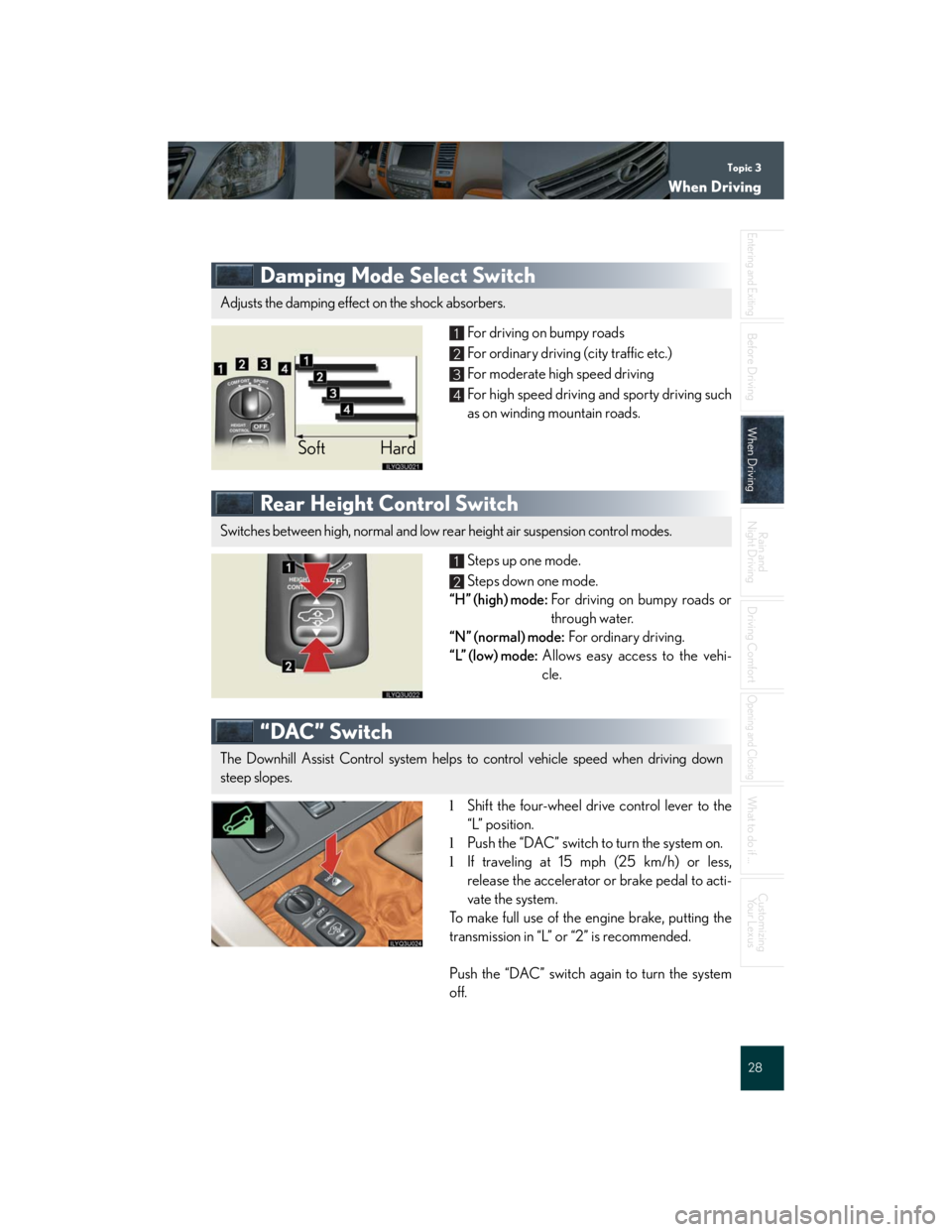
Damping Mode Select Switch
For driving on bumpy roads
For ordinary driving (city traffic etc.)
For moderate high speed driving
For high speed driving and sporty driving such
as on winding mountain roads.
Rear Height Control Switch
Steps up one mode.
Steps down one mode.
“H” (high) mode:For driving on bumpy roads or
through water.
“N” (normal) mode:For ordinary driving.
“L” (low) mode:Allows easy access to the vehi-
cle.
“DAC” Switch
lShift the four-wheel drive control lever to the
“L” position.
lPush the “DAC” switch to turn the system on.
lIf traveling at 15 mph (25 km/h) or less,
release the accelerator or brake pedal to acti-
vate the system.
To make full use of the engine brake, putting the
transmission in “L” or “2” is recommended.
Push the “DAC” switch again to turn the system
off.
Adjusts the damping effect on the shock absorbers.
Soft Hard
1
2
3
4
Switches between high, normal and low rear height air suspension control modes.
1
2
The Downhill Assist Control system helps to control vehicle speed when driving down
steep slopes.
Page 32 of 58

Topic 4
Rain and Night Driving
32
Entering and Exiting
Before DrivingBefore Driving
When Driving
Rain and
Night DrivingRain and
Night Driving
Driving Comfort
Opening and Closing
What to do if ...
Customizing
Yo u r L e x u s
Windshield Wipers and Washers
AUTO: automatic operation*
LO: low speed
HI: high speed
*: Sensitivity can be adjusted by turning the band.
To spray washer fluid, pull the lever.
The wipers will operate automatically.
INT: intermittent operation*
LO: low speed
HI: high speed
*: Wiper speed can be adjusted by turning the
band.
Rear Window Wiper and Washer
Low speed (intermittent) operation
High speed operation
Washer operation
Washer/wiper dual operation
AUTO
LO
HI
INT
LO
HI
1
2
3
4
Page 36 of 58

Topic 5
Driving Comfort
36
Entering and Exiting
When Driving
Rain and
Night Driving
Driving ComfortDriving Comfort
Opening and Closing
What to do if ...
Customizing
Yo u r L e x u s
Before Driving
nUsing the automatic mode
Press .
Adjust the temperature using .
nAdjusting the temperature in “DUAL” mode
In “DUAL” mode, driver and passenger side tem-
perature settings can be adjusted separately.
Press .
Adjust the passenger side temperature using
.
nRear cooler system
Fan speed control
“AUTO” mode: can only be set if the front air
conditioning fan speed is set to “AUTO”.
Rear cooler on/off
Te m p e r a t u r e s e t t i n g1
2
3
Page 38 of 58

Topic 5
Driving Comfort
38
Entering and Exiting
When Driving
Rain and
Night Driving
Driving ComfortDriving Comfort
Opening and Closing
What to do if ...
Customizing
Yo u r L e x u s
Before Driving
nListening to the radio
Press or to choose an AM or
FM band.
Tune to your desired station.
For tuning adjustment and further information,
refer to the Owner’s Manual.
nUsing the CD player
There are two methods available for playing a
CD.
lPress and insert a disc into the disc slot.
lPress with the disc inserted.
Your CD player can store up to 6 discs.
For further information, refer to the Owner’s
Manual.
nUsing the AUX adapter
Connect the portable audio device.
Press .
nRemote control (steering switches)
“MODE”: Turns the audio system on/off, or
changes the audio mode.
“+” or “-”: Adjusts the volume.
“” or “”:
Radio mode — seek tuning or selecting a pre-
set station
CD mode — select a desired track or CD.
Page 40 of 58

Topic 5
Driving Comfort
40
Entering and Exiting
When Driving
Rain and
Night Driving
Driving ComfortDriving Comfort
Opening and Closing
What to do if ...
Customizing
Yo u r L e x u s
Before Driving
Ashtrays
Front
Push the lid to open.
Hold the plate down and pull the ashtray
upwards to remove.
Rear
Raise the lid to open.
Pull the ashtray upwards to remove.
Seat Heaters
Turn the dial toward .1
Page 41 of 58
Topic 5
Driving Comfort
41
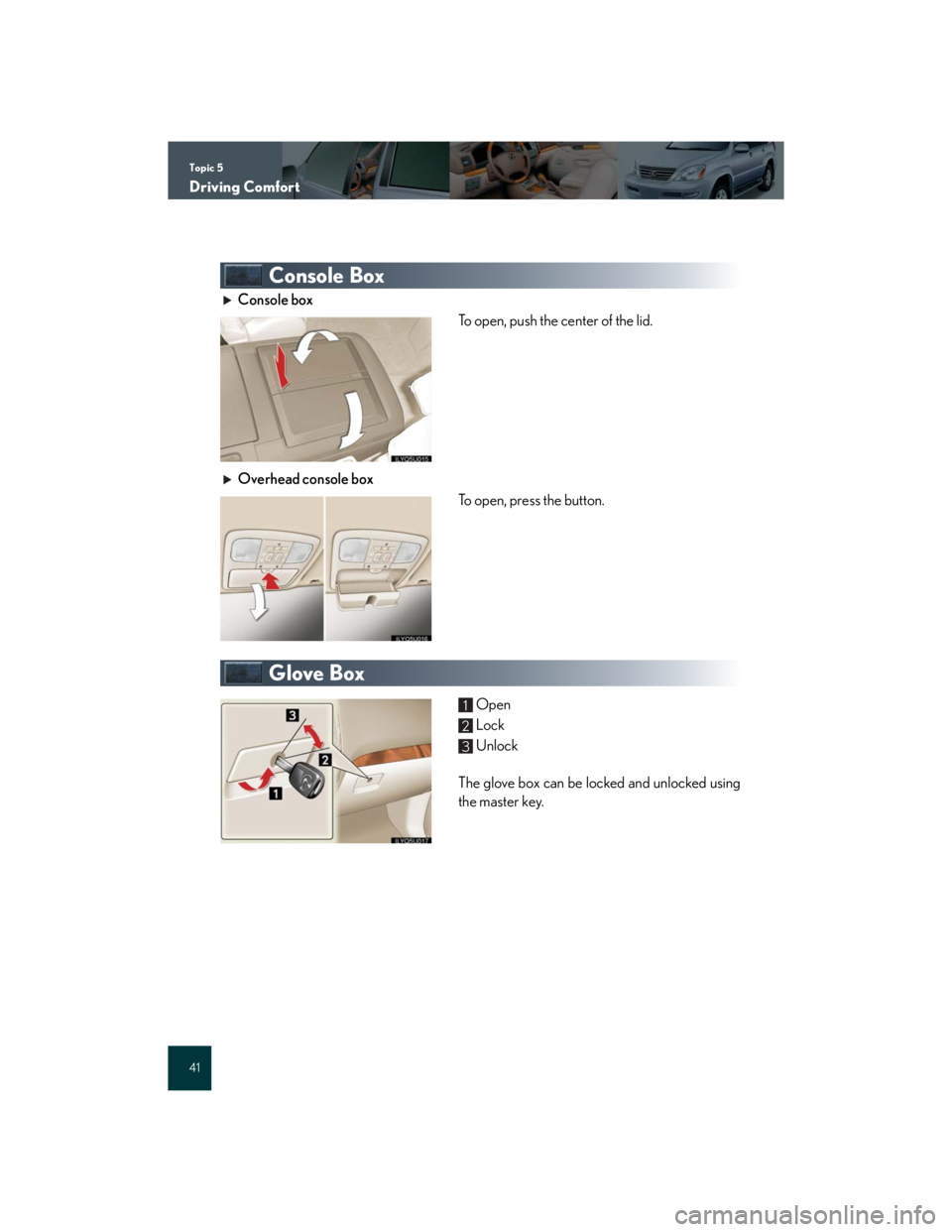
Console Box
Console box
To open, push the center of the lid.
Overhead console box
To open, press the button.
Glove Box
Open
Lock
Unlock
The glove box can be locked and unlocked using
the master key.1
2
3
Page 42 of 58

Topic 5
Driving Comfort
42
Entering and Exiting
When Driving
Rain and
Night Driving
Driving ComfortDriving Comfort
Opening and Closing
What to do if ...
Customizing
Yo u r L e x u s
Before Driving
Cup Holders
In front of the console box
To open, press the lid.
In the console box
To use, open the rear console box and pull down
the cup holder.
Second seat armrest
To open, press in and release the rear cup holder
on the armrest.
Beside the third seat
Page 43 of 58

Topic 5
Driving Comfort
43
Pe r s o n a l L i g h t s
ON
OFF
The light comes on if a door is opened.
Compass
To display the compass, press and hold the button
for 3 or more seconds.
1
2
3
Page 44 of 58

Topic 5
Driving Comfort
44
Entering and Exiting
When Driving
Rain and
Night Driving
Driving ComfortDriving Comfort
Opening and Closing
What to do if ...
Customizing
Yo u r L e x u s
Before Driving
Lexus Link System (If Equipped)
nButtons
Vo i c e k e y p a d b u t t o n
Sends number tones to an automated phone
system for example to access voicemail, dur-
ing a phone call
Vo l u m e c o n t r o l
Adjusts your Lexus Link System audio volume
Phone button
Makes or answers a phone call using the
hands-free personal calling service
Ends a call
“SERVICES” button
Contacts the Lexus Link Call Center for
information, directions or other services
Records a conversation for later playback
Emergency button
Makes a priority call to the Lexus Link Call
Center
nServices
The Lexus Link System offers the following services. For details about the services and sub-
scription, refer to the Owner’s Manual or call the Lexus Link Call Center at 1-800-25-
LEXUS (1-800-255-3987) (toll-free).
lAirbag deployment notification
If an airbag deploys, an emergency call is automatically placed to the Lexus Link Call
Center with your vehicle’s location. You do not need to press any buttons.
lEmergency assistance
When you press the Emergency button, a priority call is placed to the Lexus Link Call
Center with your vehicle’s location. At the Call Center, the Lexus Link Advisor can deter-
mine your vehicle’s location, communicate with you, and, if appropriate, contact the near-
est emergency service provider.
The Lexus Link System is a communication service that uses the GPS (Global Position-
ing System) data and cellular service to provide you with safety, security and conve-
nience. Button operation and voice commands are used to operate the system. To
operate the system, follow the voice guidance instructions.
1
2
3
4
5
Page 46 of 58
Opening and ClosingTopic 6
Door Locks ............................................................. 47
Back Door ............................................................... 48
Power Windows .................................................... 48
Moon Roof .............................................................. 48
Fuel Tank Cap........................................................ 49
Hood ......................................................................... 50