CD player Lexus HS250h 2012 Owner's Guide
[x] Cancel search | Manufacturer: LEXUS, Model Year: 2012, Model line: HS250h, Model: Lexus HS250h 2012Pages: 630, PDF Size: 16.1 MB
Page 339 of 630
338
3-3. Using the Bluetooth® audio system
HS250h_U_75050U
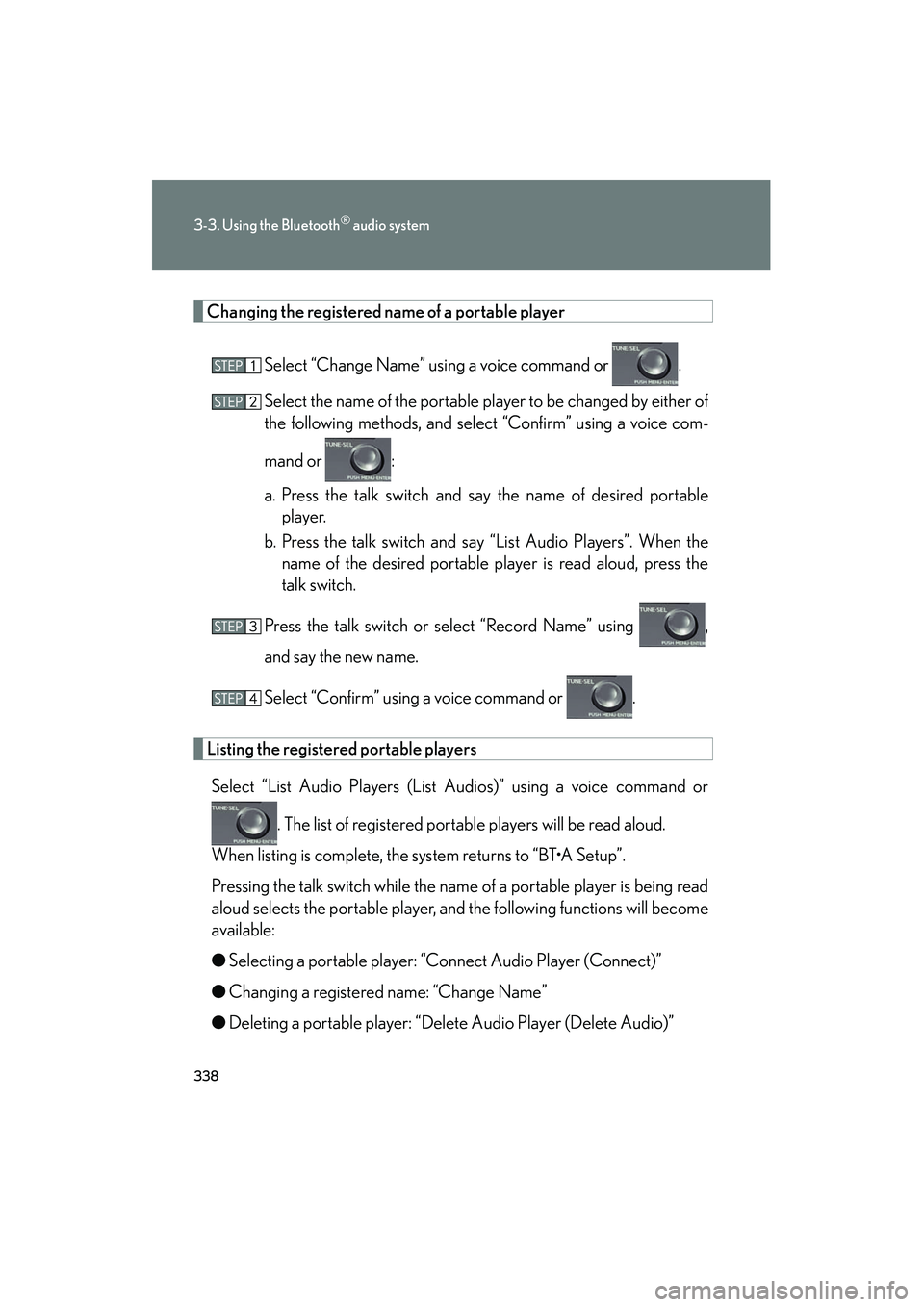
Changing the registered name of a portable playerSelect “Change Name” using a voice command or .
Select the name of the portable player to be changed by either of
the following methods, and select “Confirm” using a voice com-
mand or :
a. Press the talk switch and say the name of desired portableplayer.
b. Press the talk switch and say “List Audio Players”. When the name of the desired portable player is read aloud, press the
talk switch.
Press the talk switch or select “Record Name” using ,
and say the new name.
Select “Confirm” using a voice command or .
Listing the registered portable players Select “List Audio Players (List Audios)” using a voice command or
. The list of registered portable players will be read aloud.
When listing is complete, the system returns to “BT•A Setup”.
Pressing the talk switch while the name of a portable player is being read
aloud selects the portable player, and the following functions will become
available:
● Selecting a portable player: “Connect Audio Player (Connect)”
● Changing a registered name: “Change Name”
● Deleting a portable player: “Delete Audio Player (Delete Audio)”
Page 341 of 630
340
3-3. Using the Bluetooth® audio system
HS250h_U_75050U
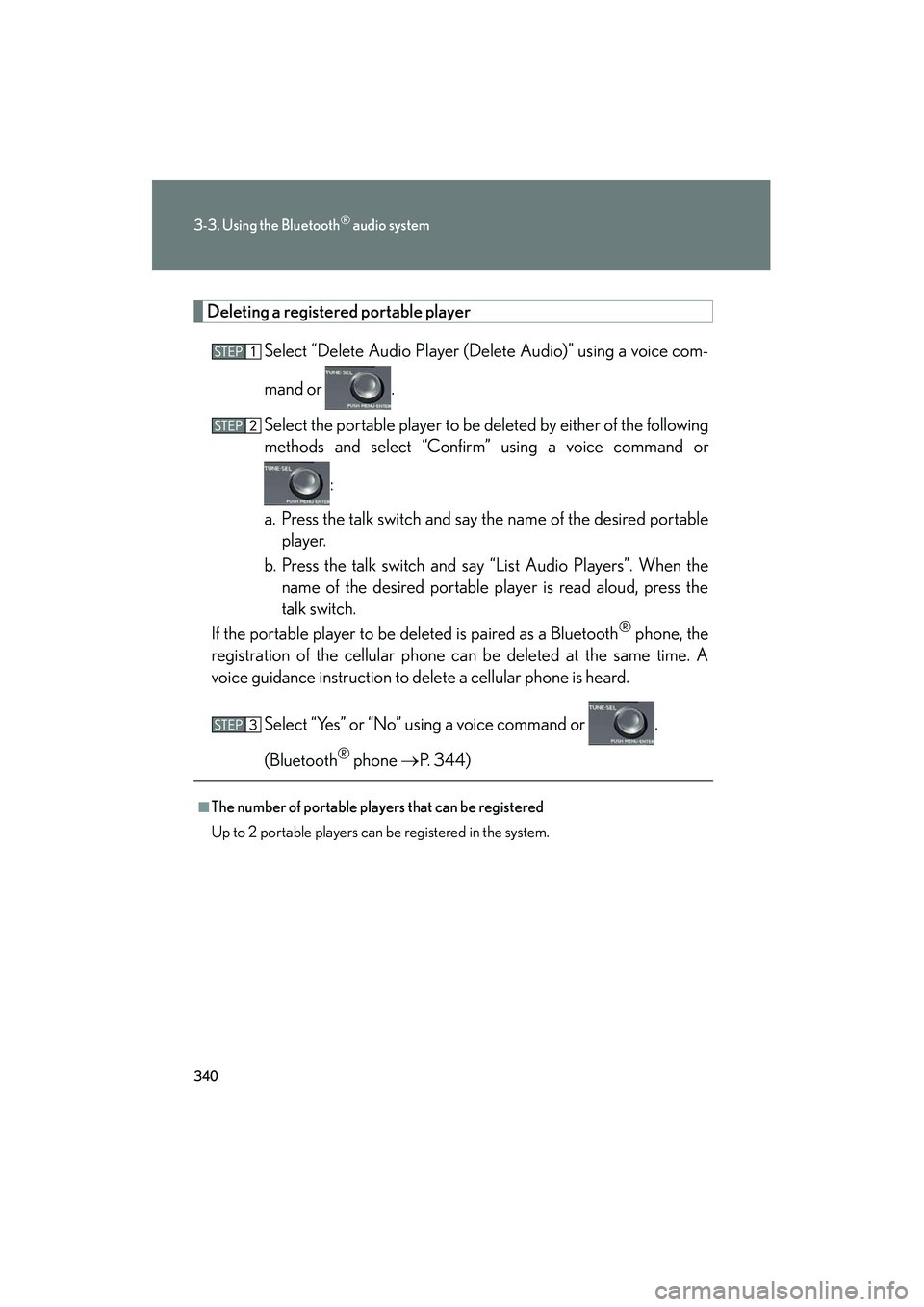
Deleting a registered portable playerSelect “Delete Audio Player (Delete Audio)” using a voice com-
mand or .
Select the portable player to be deleted by either of the following
methods and select “Confirm” using a voice command or :
a. Press the talk switch and say the name of the desired portable player.
b. Press the talk switch and say “List Audio Players”. When the name of the desired portable player is read aloud, press the
talk switch.
If the portable player to be deleted is paired as a Bluetooth
® phone, the
registration of the cellular phone can be deleted at the same time. A
voice guidance instruction to delete a cellular phone is heard.
Select “Yes” or “No” using a voice command or .
(Bluetooth
® phone → P. 3 4 4 )
■The number of portable players that can be registered
Up to 2 portable players can be registered in the system.
Page 350 of 630
349
3-4. Using the hands-free phone system (for cellular phones)
3
Interior features
HS250h_U_75050U
Using the hands-free phone system for the first time
Before using the hands-free phone system, it is necessary to register a
cellular phone in the system. The system will enter phone registration
mode automatically when starting the system with no cellular phone reg-
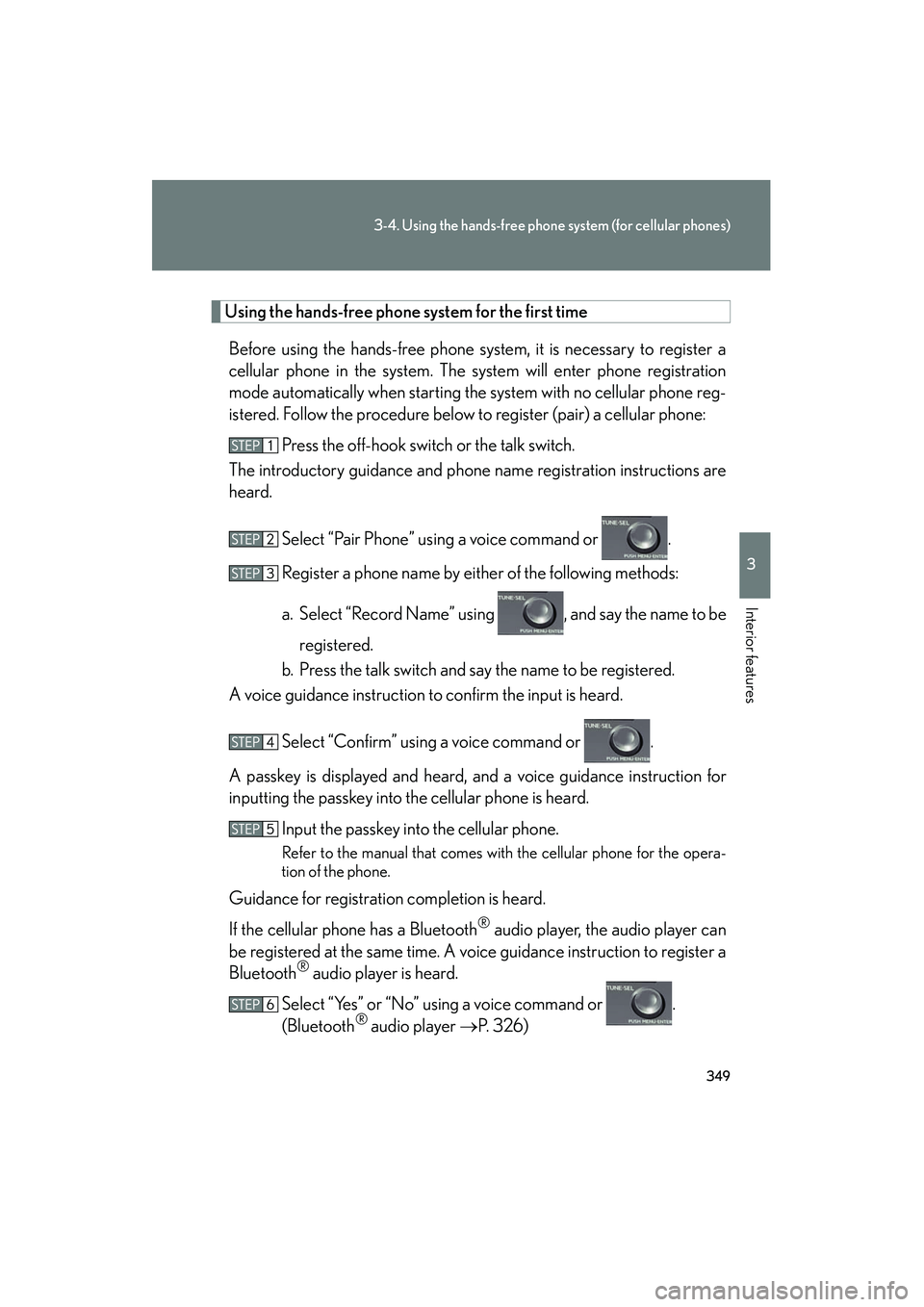
istered. Follow the procedure below to register (pair) a cellular phone: Press the off-hook switch or the talk switch.
The introductory guidance and phone name registration instructions are
heard.
Select “Pair Phone” using a voice command or .
Register a phone name by either of the following methods:
a. Select “Record Name” using , and say the name to beregistered.
b. Press the talk switch and say the name to be registered.
A voice guidance instruction to confirm the input is heard.
Select “Confirm” using a voice command or .
A passkey is displayed and heard, and a voice guidance instruction for
inputting the passkey into the cellular phone is heard. Input the passkey into the cellular phone.
Refer to the manual that comes with the cellular phone for the opera-
tion of the phone.
Guidance for registration completion is heard.
If the cellular phone has a Bluetooth
® audio player, the audio player can
be registered at the same time. A voice guidance instruction to register a
Bluetooth
® audio player is heard.
Select “Yes” or “No” using a voice command or .
(Bluetooth
® audio player →P. 326)
Page 363 of 630
362
3-4. Using the hands-free phone system (for cellular phones)
HS250h_U_75050U
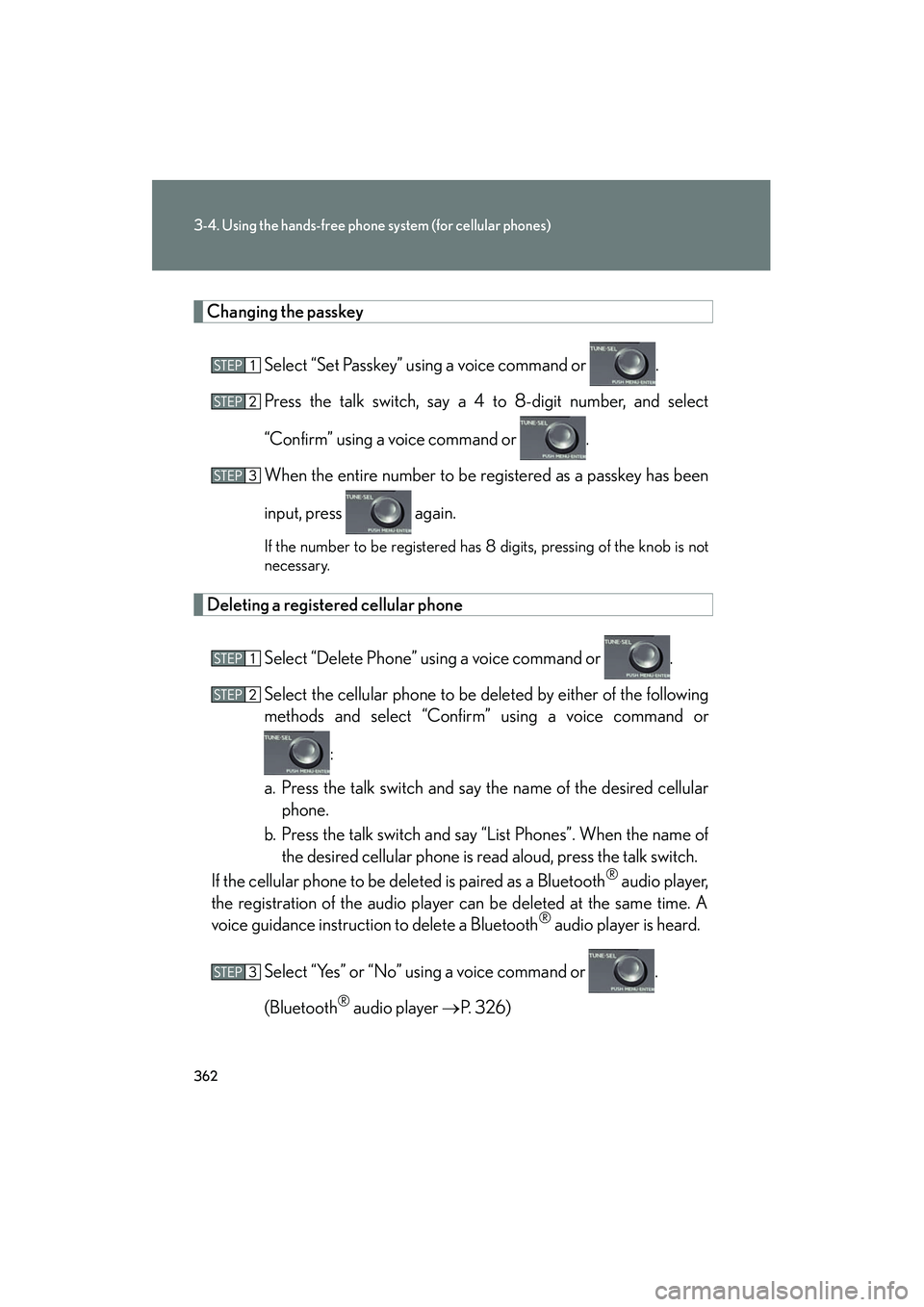
Changing the passkeySelect “Set Passkey” using a voice command or .
Press the talk switch, say a 4 to 8-digit number, and select
“Confirm” using a voice command or .
When the entire number to be registered as a passkey has been
input, press again.
If the number to be registered has 8 digits, pressing of the knob is not
necessary.
Deleting a registered cellular phoneSelect “Delete Phone” using a voice command or .
Select the cellular phone to be deleted by either of the following
methods and select “Confirm” using a voice command or :
a. Press the talk switch and say the name of the desired cellular phone.
b. Press the talk switch and say “List Phones”. When the name of the desired cellular phone is read aloud, press the talk switch.
If the cellular phone to be deleted is paired as a Bluetooth
® audio player,
the registration of the audio player can be deleted at the same time. A
voice guidance instruction to delete a Bluetooth
® audio player is heard.
Select “Yes” or “No” using a voice command or .
(Bluetooth
® audio player → P. 326)
Page 368 of 630
367
3-4. Using the hands-free phone system (for cellular phones)
3
Interior features
HS250h_U_75050U
■Initialization
●The following data in the system can be initialized:
• Phone book
• Outgoing and incoming call history
• Speed dials
• Registered cellular phone data
•Security code
• Registered Bluetooth
® enabled portable player data
• Passkey for the cellular phones
• Passkey for the Bluetooth
® audio players
•Guidance volume
• Receiver volume
•Ring tone volume
●Once the initialization has been completed, the data cannot be restored to its
original state.
■When the phone book is locked
The following functions cannot be used:
●Dialing by inputting a name
●Speed dialing
●Dialing a number stored in the call history memory
●Using the phone book
Page 615 of 630
614
HS250h_U_75050U
Alphabetical index
Alphabetical index
A/C*Air conditioning filter ....................... 464
Automatic air conditioning system .................................................. 266
ABS.............................................................238
AFS .............................................................. 193
Adaptive front lighting system ......... 193
Air conditioning filter .......................... 464
Air conditioning system* Air conditioning filter ....................... 464
Automatic air conditioning system .................................................. 266
Airbags Airbag operating
conditions...............................................112
Airbag precautions for your
child.......................................................... 116
Airbag warning light ........................503
Curtain shield airbag operating conditions...............................................113
Curtain shield airbag precautions .......................................... 116
Front passenger occupant classification system..........................121
General airbag pr ecautions ........... 116
Locations of airbags.......................... 109
Modification and disposal of airbags ...................................................120
Proper driving posture ............ 107, 116
Side airbag operating conditions...............................................113
Side airbag precautions .................... 116
Side and curtain shield airbags operating conditions ........................113
Side and curtain shield airbags precautions .......................................... 116
SRS airbags ........................................... 109 Alarm.......................................................... 103
Antenna .................................................... 284
Anti-lock brake system ...................... 238
Armrest ......................................................391
Audio input* .............................................321
Audio remote control switches*
Audio system*
Antenna.................................................. 284
Audio input............................................. 321
Audio visual input................................ 321
AUX port ................................................ 321
CD player ..............................................287
CD player/changer ..........................287
iPod .......................................................... 302
MP3/WMA disc............................... 295
Optimal use ........................................... 318
Portable music player ....................... 321
Radio ........................................................279
Steering wheel audio switch......... 322
USB memory ........................................ 310
Audio/video system*
Audio visual input* .................................321
Automatic air conditioning system* Air conditioning filter ....................... 464
Air conditioning system ................. 266
Automatic air conditioning
system.................................................. 266
Automatic headlight leveling
system ..................................................... 195
Automatic light control system.......... 191
AUX port* ................................................321
Auxiliary box .......................................... 384A
Page 616 of 630
615
Alphabetical index
HS250h_U_75050U
Back-up lightsReplacing light bulbs .........................481
Wattage .................................................568
Battery
Checking ................................................447
If the vehicle has a discharged 12-volt battery .................................. 547
Preparing and checking
before winter.................................... 258
Bluetooth
®* ........................................... 325
Bottle holders ........................................ 383
Brake Fluid .......................................................... 566
Parking brake ........................................ 167
Brake assist ............................................. 238
Break-in tips ............................................. 143
Brightness control Instrument panel light
control ................................................... 170
Care Exterior ..................................................... 416
Interior..................................................... 420
Seat belts ................................................. 421
Cargo capacity ......................................257
CD changer* ..........................................287
CD player* ..............................................287
Chains....................................................... 259
Child restraint system Booster seats, definition................... 126
Booster seats, installation ................130
Convertible seats, definition .......... 126
Convertible seats, installation .......130
Front passenger occupant
classification system ......................... 121 Infant seats, definition .........................126
Infant seats, installation ..................... 130
Installing CRS with LATCH
anchors................................................... 131
Installing CRS with seat belts ........ 133
Installing CRS with top tether straps ......................................................137
Child safety
Airbag precautions .............................. 116
Child restraint system ........................126
Child-protectors ................................... 62
How your child should wear the seat belt .......................................... 79
Installing child restraints................... 130
Moon roof precautions......................96
Power window lock switch ..............90
Power window precautions ............ 92
Removed electronic key battery
precautions....................................... 468
Seat belt extender precautions...... 82
Seat belt precautions ......................... 80
Seat heater precautions................. 390
Trunk precautions.................................66
12-volt battery precautions ...........449
Child-protectors ...................................... 62
Cleaning Exterior..................................................... 416
Interior .....................................................420
Seat belts ..................................................421
Climate control*
Clock* ....................................................... 387
Coin holder ............................................ 380
Compass ..................................................404
Condenser .............................................. 444
Console box ........................................... 379
B
*: For vehicles with a navigation system, refer to “Navigation System Owner’s Manual”.
C