audio Lexus HS250h 2012 Manual PDF
[x] Cancel search | Manufacturer: LEXUS, Model Year: 2012, Model line: HS250h, Model: Lexus HS250h 2012Pages: 630, PDF Size: 16.1 MB
Page 334 of 630
333
3-3. Using the Bluetooth® audio system
3
Interior features
HS250h_U_75050U
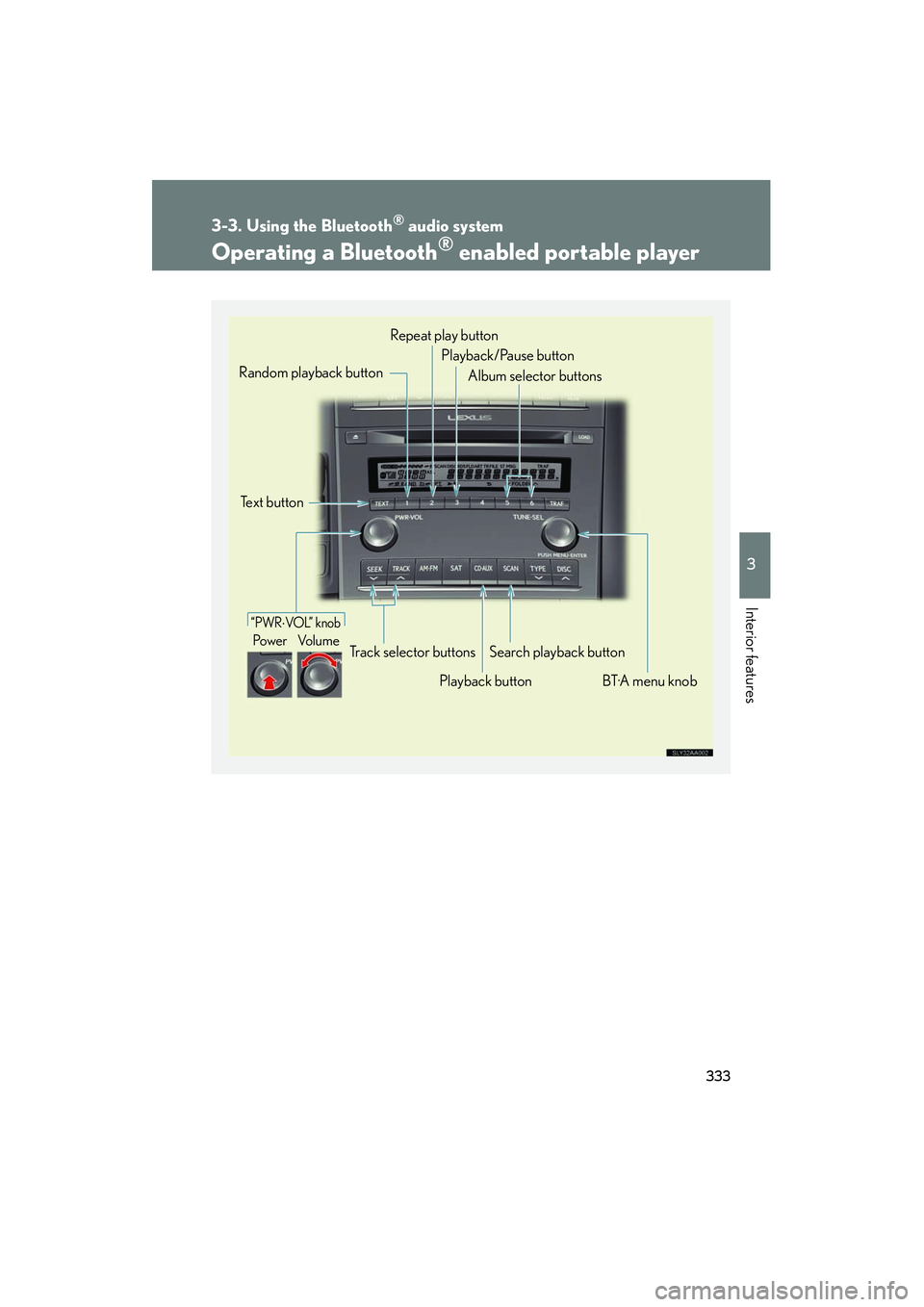
Operating a Bluetooth® enabled portable player
“PWR⋅VOL” knob
Po we r Vo l u m e
Text button
Playback buttonSearch playback button
Random playback button
BT·A menu knob
Repeat play button
Track selector buttons Playback/Pause button
Album selector buttons
Page 335 of 630
334
3-3. Using the Bluetooth® audio system
HS250h_U_75050U
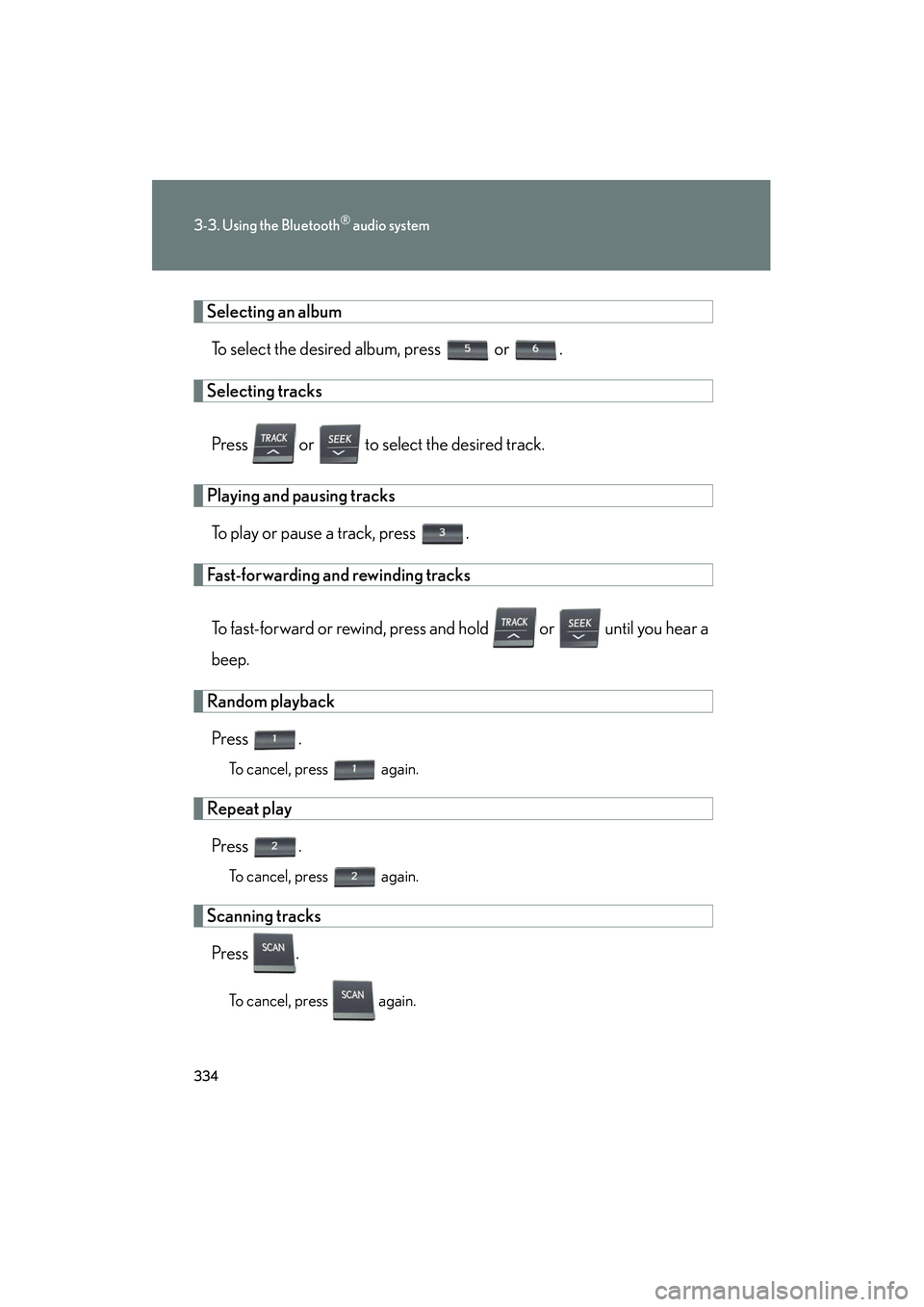
Selecting an albumTo select the desired album, press or .
Selecting tracks
Press or to select the desired track.
Playing and pausing tracksTo play or pause a track, press .
Fast-forwarding and rewinding tracks
To fast-forward or rewind, press and hold or until you hear a
beep.
Random playbackPress .
To cancel, press again.
Repeat playPress .
To cancel, press again.
Scanning tracksPress .
To cancel, press again.
Page 336 of 630
335
3-3. Using the Bluetooth® audio system
3
Interior features
HS250h_U_75050U
Switching the displayPress .
Each time the button is pressed, the display changes in the following order:
Elapsed time → Album title → Track title → Artist name
Using the steering wh eel audio switches
→ P. 322
■Bluetooth® audio system functions
Depending on the portable player that is connected to the system, certain functions
may not be available.
■Display
→ P. 2 9 1
■Error messages
“Memory Error”: This indicates a problem in the system.
Page 337 of 630
336
3-3. Using the Bluetooth® audio system
HS250h_U_75050U
Setting up a Bluetooth® enabled portable player
Registering a portable player in the Bluetooth® audio system allows the
system to function. The following functions can be used for registered por-
table players:
■ Functions and operation procedures
To enter the menu for each function, follow the steps below using a
voice command or :
●Registering a portable player
1. “Bluetooth Audio Setup (BT•A Setup)” →
2. “Pair Audio Player (Pair Audio)”
● Selecting a portable player to be used
1. “Bluetooth Audio Setup (BT•A Setup)” →
2. “Connect Audio Player (Connect)”
● Changing the registered name of a portable player
1. “Bluetooth Audio Setup (BT•A Setup)” → 2. “Change Name”
● Listing the registered portable players
1. “Bluetooth Audio Setup (BT•A Setup)” →
2. “List Audio Players (List Audios)”
● Changing the passkey
1. “Bluetooth Audio Setup (BT•A Setup)” → 2 “Set Passkey”
● Deleting a registered portable player
1. “Bluetooth Audio Setup (BT•A Setup)” →
2. “Delete Audio Player (Delete Audio)”
Page 338 of 630
337
3-3. Using the Bluetooth® audio system
3
Interior features
HS250h_U_75050U
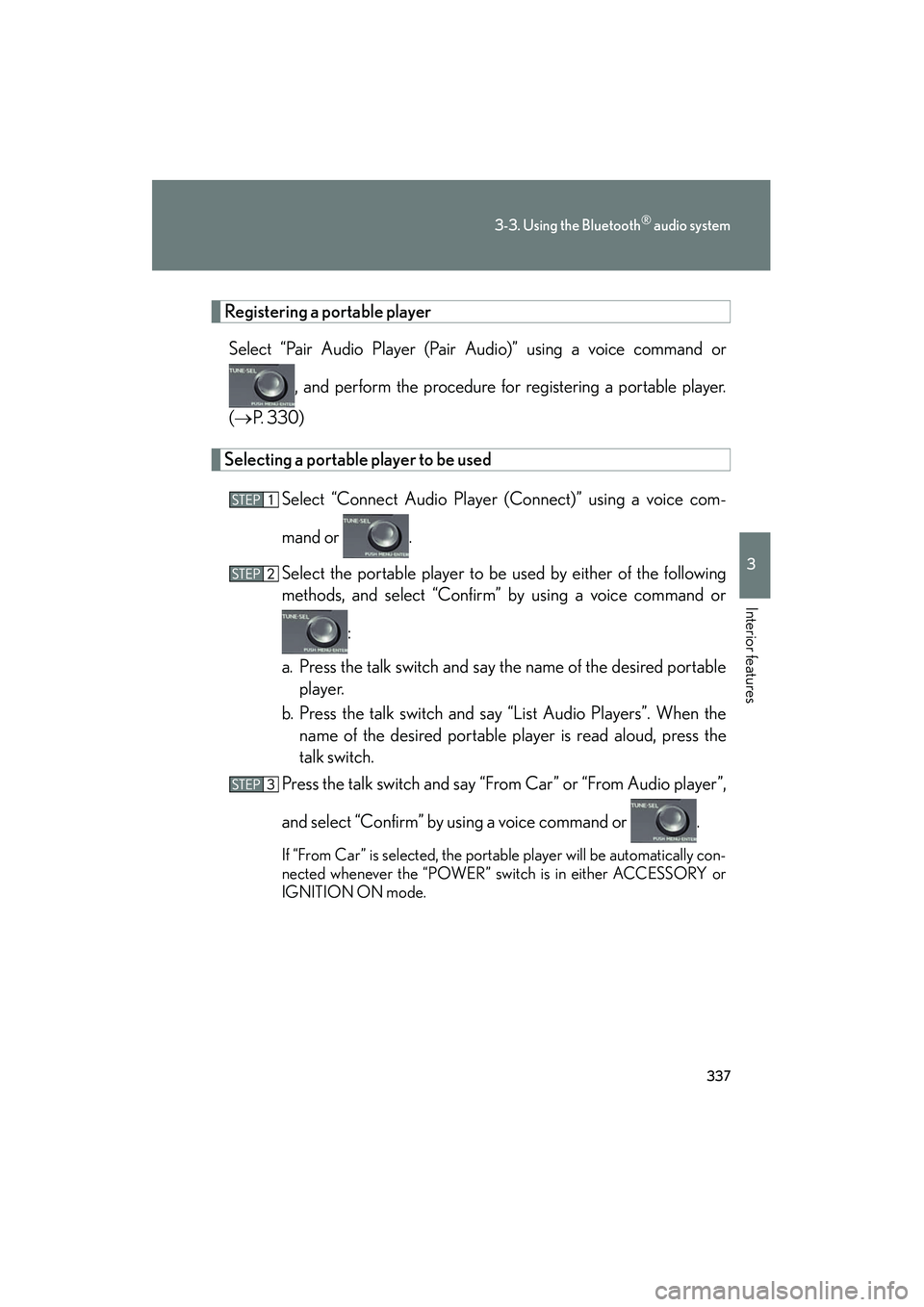
Registering a portable playerSelect “Pair Audio Player (Pair Audio)” using a voice command or
, and perform the procedure for registering a portable player.
( → P. 3 3 0 )
Selecting a portable player to be used
Select “Connect Audio Player (Connect)” using a voice com-
mand or .
Select the portable player to be used by either of the following
methods, and select “Confirm” by using a voice command or :
a. Press the talk switch and say the name of the desired portable player.
b. Press the talk switch and say “List Audio Players”. When the name of the desired portable player is read aloud, press the
talk switch.
Press the talk switch and say “From Car” or “From Audio player”,
and select “Confirm” by using a voice command or .
If “From Car” is selected, the portable player will be automatically con-
nected whenever the “POWER” switch is in either ACCESSORY or
IGNITION ON mode.
Page 339 of 630
338
3-3. Using the Bluetooth® audio system
HS250h_U_75050U
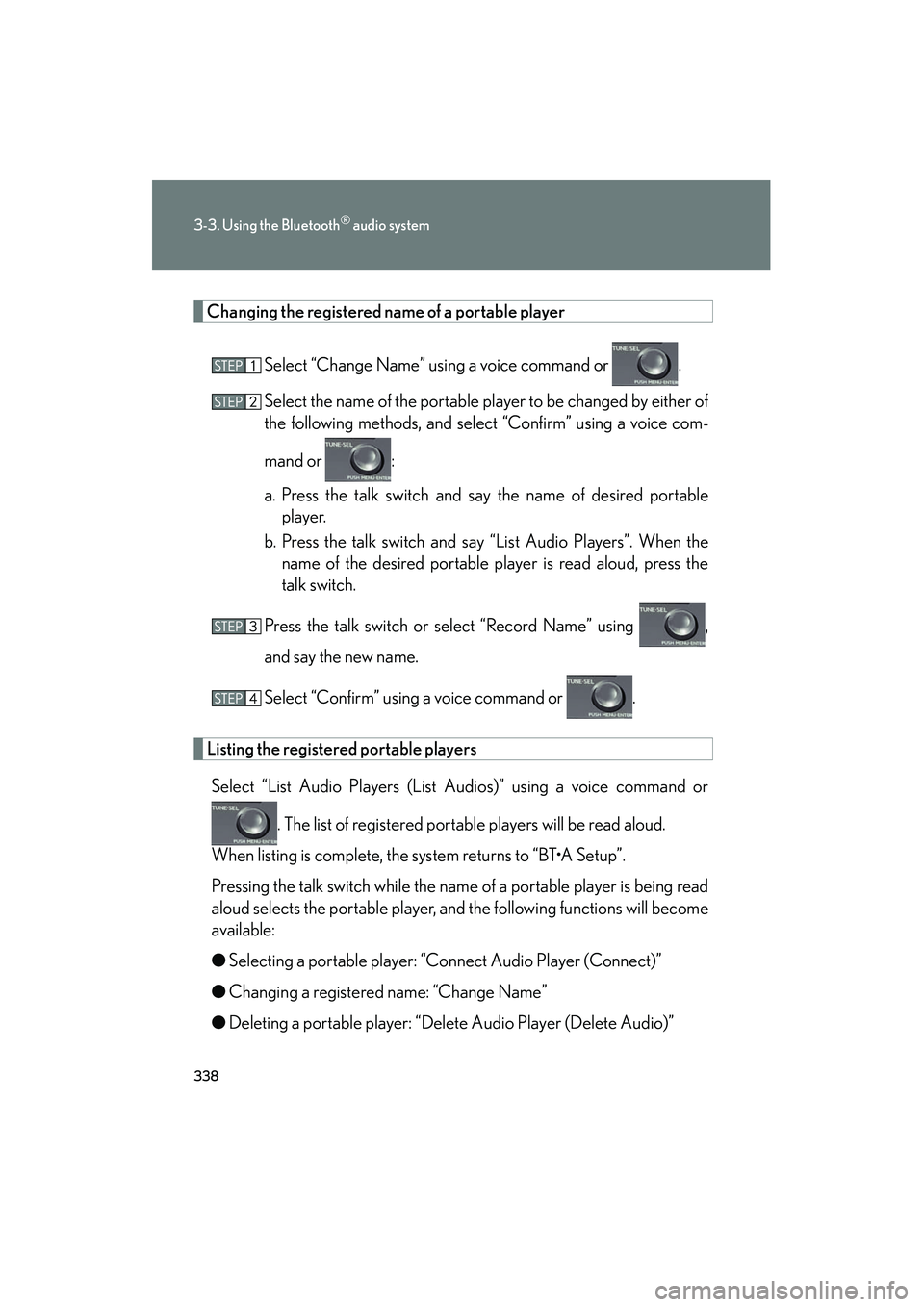
Changing the registered name of a portable playerSelect “Change Name” using a voice command or .
Select the name of the portable player to be changed by either of
the following methods, and select “Confirm” using a voice com-
mand or :
a. Press the talk switch and say the name of desired portableplayer.
b. Press the talk switch and say “List Audio Players”. When the name of the desired portable player is read aloud, press the
talk switch.
Press the talk switch or select “Record Name” using ,
and say the new name.
Select “Confirm” using a voice command or .
Listing the registered portable players Select “List Audio Players (List Audios)” using a voice command or
. The list of registered portable players will be read aloud.
When listing is complete, the system returns to “BT•A Setup”.
Pressing the talk switch while the name of a portable player is being read
aloud selects the portable player, and the following functions will become
available:
● Selecting a portable player: “Connect Audio Player (Connect)”
● Changing a registered name: “Change Name”
● Deleting a portable player: “Delete Audio Player (Delete Audio)”
Page 340 of 630
339
3-3. Using the Bluetooth® audio system
3
Interior features
HS250h_U_75050U
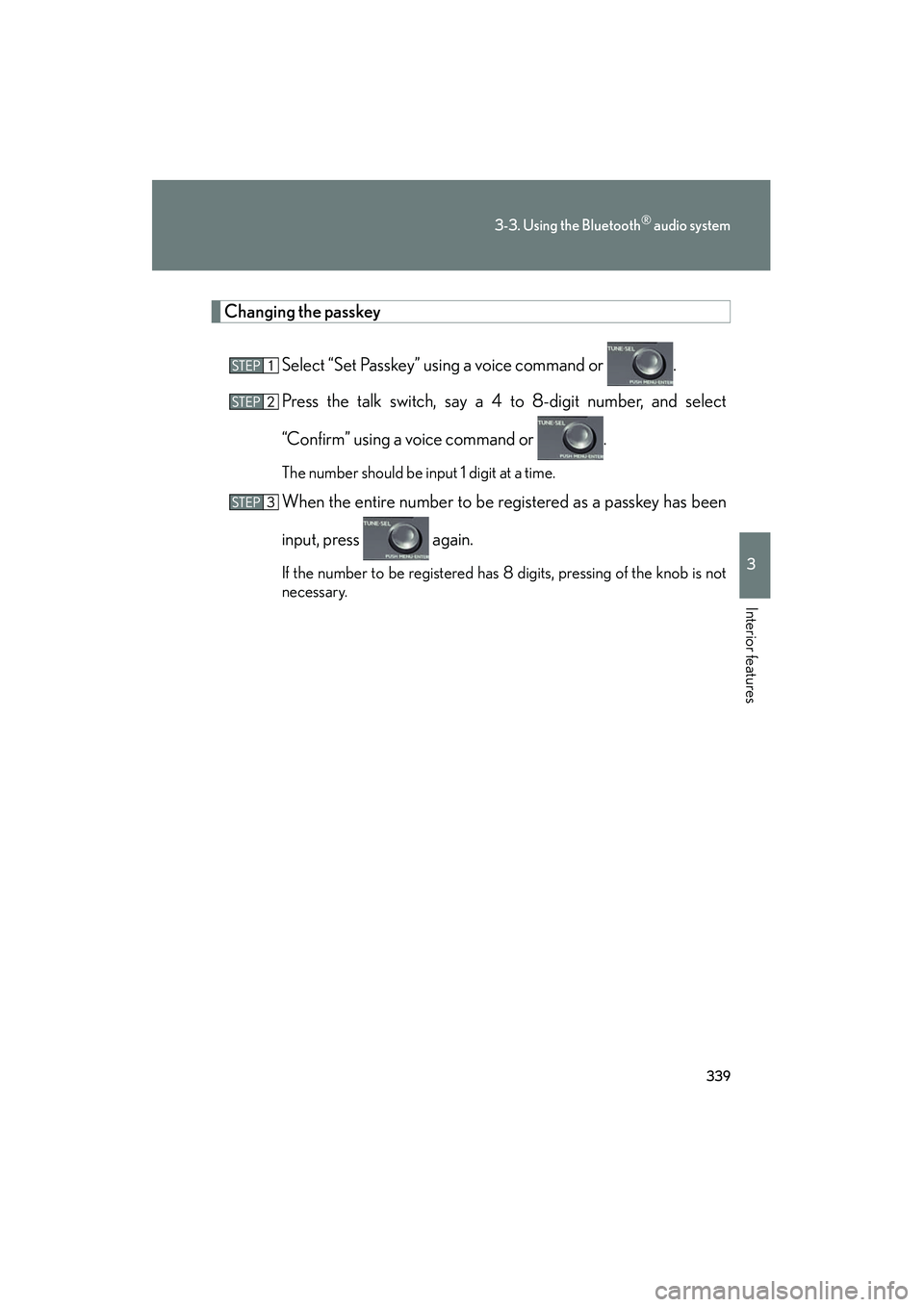
Changing the passkeySelect “Set Passkey” using a voice command or .
Press the talk switch, say a 4 to 8-digit number, and select
“Confirm” using a voice command or .
The number should be input 1 digit at a time.
When the entire number to be registered as a passkey has been
input, press again.
If the number to be registered has 8 digits, pressing of the knob is not
necessary.
Page 341 of 630
340
3-3. Using the Bluetooth® audio system
HS250h_U_75050U
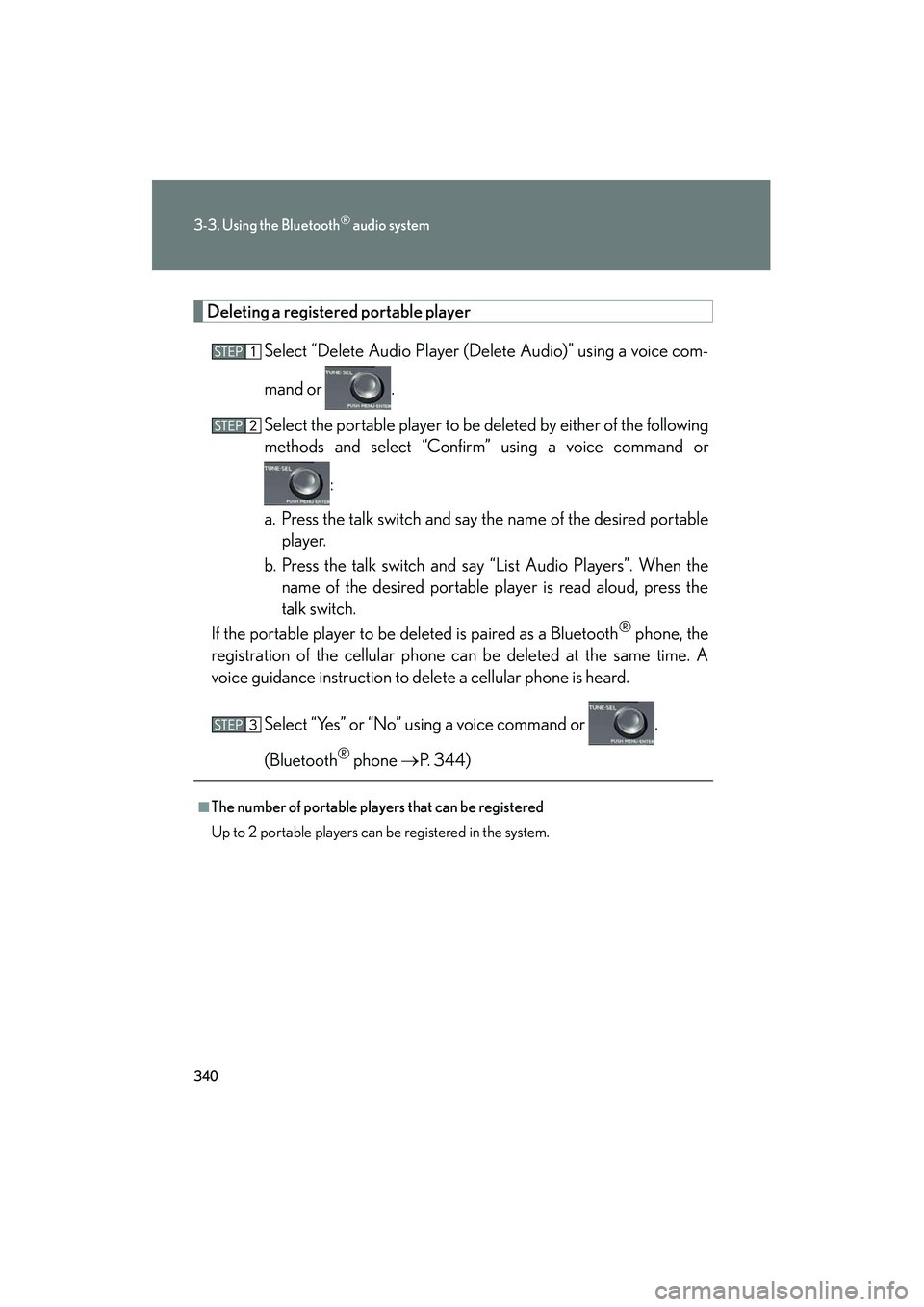
Deleting a registered portable playerSelect “Delete Audio Player (Delete Audio)” using a voice com-
mand or .
Select the portable player to be deleted by either of the following
methods and select “Confirm” using a voice command or :
a. Press the talk switch and say the name of the desired portable player.
b. Press the talk switch and say “List Audio Players”. When the name of the desired portable player is read aloud, press the
talk switch.
If the portable player to be deleted is paired as a Bluetooth
® phone, the
registration of the cellular phone can be deleted at the same time. A
voice guidance instruction to delete a cellular phone is heard.
Select “Yes” or “No” using a voice command or .
(Bluetooth
® phone → P. 3 4 4 )
■The number of portable players that can be registered
Up to 2 portable players can be registered in the system.
Page 342 of 630
341
3-3. Using the Bluetooth® audio system
3
Interior features
HS250h_U_75050U
Bluetooth® audio system setup
■System setup items and operation procedures
To enter the menu for each function, follow the steps below using a
voice command or :
(→ P. 364)
● Setting voice guidance volume
“Guidance Vol” (
→P. 366)
● Displaying the Bluetooth
® device address and name
“Device Name” (
→P. 366)
● Initializing the system
“Initialize” (
→P. 366)
Page 344 of 630
343
3-4. Using the hands-free phone system (for cellular phones)
3
Interior features
HS250h_U_75050U
■Conditions under which the system will not operate
●If using a cellular phone that does not support Bluetooth®
●If the cellular phone is switched off
●If you are outside service range
●If the cellular phone is not connected
●If the cellular phone’s battery is low
●If the cellular phone is behind the seat or in the glove box or console box
●If metal is covering or touching the phone
■When using the hands-free system
●The audio system and voice guidance are muted when making a call.
●If both parties speak at the same time, it may be difficult to hear.
●If the incoming call volume is overly loud, an echo may be heard.
●Try to face toward the microphone as much as possible when speaking.
●In the following circumstances, it may be difficult to hear the other party:
• When driving on unpaved roads
• When driving at high speeds
• When a window is open
• When the air conditioning is blowing directly on the microphone
• When the air conditioning is set to high
■When transferring ownership of the vehicle
Be sure to initialize the system to prevent personal data from being improperly
accessed. (→P. 3 6 7 )
■For detailed information about Handsfree Phone System
For assistance with pairing and operating your cell phone, go to the website
www.lexus.letstalk.com.