lock Lexus IS F 2010 Repair Manual
[x] Cancel search | Manufacturer: LEXUS, Model Year: 2010, Model line: IS F, Model: Lexus IS F 2010Pages: 542, PDF Size: 6.77 MB
Page 153 of 542
152
2-3. Operating the lights and windshield wipers
10_IS F_U
■Automatic light off system
●When the headlights come on: The headlights and tail lights turn off 30 seconds
after a door is opened and closed if the “ENGINE START STOP” switch has
been switched to ACCESSORY mode or turned OFF. (The lights turn off
immediately if on the key is pressed after all doors are locked.)
●When only the tail lights come on: The tail lights turn off automatically if the
“ENGINE START STOP” switch is switched to ACCESSORY mode or turned
OFF and driver’s door is opened.
To turn the lights on again, switch to IGNITION ON mode, or turn the light switch
off once and then back to
or .
■Automatic headlight leveling system
The level of the headlights is automatically adjusted according to the number of
passengers and the loading condition of the vehicle to ensure that the headlights do
not interfere with other road users.
■If the “AFS OFF” indicator flashes...
It may indicate a malfunction in the system. Contact your Lexus dealer.
■Customization that can be configured at Lexus dealer
Settings (e.g. light sensor sensitivity) can be changed.
(Customizable features →P. 5 1 4 )
NOTICE
■To prevent battery discharge
Do not leave the lights on longer than necessary when the engine is not running.
Page 157 of 542

156
2-3. Operating the lights and windshield wipers
10_IS F_U
■If no windshield washer fluid sprays
Check that the washer nozzles are not blocked if there is washer fluid in the wind-
shield washer fluid reservoir.
■Customization that can be configured at Lexus dealer
Settings (e.g. drip prevention function) can be changed.
(Customizable features →P. 5 1 4 )
CAUTION
■Caution regarding the use of windshield wipers in “AUTO” mode
The windshield wipers may operate unexpectedly if the sensor is touched or the
windshield is subject to vibration in “AUTO” mode. Take care that your fingers etc.
do not become caught in the windshield wipers.
NOTICE
■When the windshield is dry
Do not use the wipers, as they may damage the windshield.
■When a nozzle becomes blocked
Do not try to clear it with a pin or other object. The nozzle will be damaged.
■When there is no washer fluid spray from the nozzle
Damage to the washer fluid pump may be caused if the lever is pulled toward you
and held continually.
Page 178 of 542

177
2-4. Using other driving systems
2
When driving
10_IS F_U
Driving assist systems
To help enhance driving safety and performance, the following systems
operate automatically in response to various driving situations. Be aware,
however, that these systems are supplementary and should not be relied
upon too heavily when operating the vehicle.
■ ABS (Anti-lock Brake System)
Helps to prevent wheel lock when the brakes are applied suddenly, or if
the brakes are applied while driving on a slippery road surface.
■Brake assist
Generates an increased level of braking force after the brake pedal is
depressed, when the system detects a panic stop situation.
■VSC (Vehicle Stability Control)
Helps the driver to control skidding when swerving suddenly or turning on
slippery road surfaces.
■TRAC (Traction Control)
Helps to maintain drive power and prevent the rear wheels from spinning
when starting the vehicle or accelerating on slippery roads.
■Hill-start assist control
Helps to prevents the vehicle from rolling backwards when starting on an
incline or slippery slope.
■EPS (Electric Power Steering)
Employs an electric motor to reduce the amount of effort needed to turn
the steering wheel.
■VDIM (Vehicle Dynamics Integrated Management)
Provides integrated control of the ABS, brake assist, TRAC, VSC, hill-start
assist control, and EPS systems.
Maintains vehicle stability when swerving on slippery road surfaces by
controlling the brakes and engine output.
When the “SPORT” side of the F-sport mode total control switch is
pressed, “Sport” mode is activated. (→ P. 1 8 0 )
■PCS (Pre-Collision System) (if equipped)
→ P. 1 8 4
Page 186 of 542

185
2-4. Using other driving systems
2
When driving
10_IS F_U
■The pre-collision system is operational when
●Pre-collision seat belt (linked to the radar sensor)
• Vehicle speed is above 3 mph (5 km/h).
• The speed at which your vehicle is approaching the obstacle or oncomingvehicle exceeds about 18 mph (30 km/h).
• The front occupants are wearing a seat belt.
●Pre-collision seat belts (linked to brake operation)
• Vehicle speed exceeds 18 mph (30 km/h).
• The system detects sudden braking or skidding.
• The front occupants are wearing a seat belt.
●Pre-collision brake assist
• Vehicle speed is above 18 mph (30 km/h).
• The speed at which your vehicle is approaching the obstacle or the vehicle is greater than 18 to 24 mph (30 to 40 km/h).
• The brake pedal is depressed.
■Conditions that may trigger the system even if there is no danger of collision
●When there is an object by the roadside at the entrance to a curve
●When passing an oncoming vehicle on a curve
●When driving over a narrow iron bridge
●When there is a metal object on the road surface
●When driving on an uneven road surface
●When passing an oncoming vehicle on a left-turn
●When your vehicle rapidly closes on the vehicle in front
When the system is activated in the situations described above there is also a possi-
bility that the seat belts will retract quickly and the brakes will be applied with a force
greater than normal. When the seat belt is locked in the retracted position, stop the
vehicle in a safe place, release the seat belt and refasten.
■When there is a malfunction in the system
Warning lights and/or warning messages will turn on or flash. ( →P. 441, 451)
Page 191 of 542
190
2-5. Driving information
10_IS F_U
CAUTION
■Things that must not be carried in the trunk
The following things may cause a fire if loaded in the trunk.
●Receptacles containing gasoline
●Aerosol cans
■Storage precautions
Observe the following precautions.
Failing to do so may result in death or serious injury.
●Do not place cargo or luggage in or on the following locations as the item may
get under the brake or accelerator pedal and prevent pedals from being
depressed properly, block the driver's vision, or hit the driver or passengers,
causing an accident.
• At the feet of the driver
• On the front passenger or rear seats (when stacking items)
• Package tray (behind the rear seatback)
• Instrument panel
•Dashboard
●Secure all items in the occupant compartment, as they may shift and injure some-
one during sudden braking, sudden swerving or an accident.
■Luggage capacity and distribution
Observe the following precautions. Failure to do so will not only put load on the
tires, but also reduce steering and braking performance. This could lead to an acci-
dent resulting in serious injury or even death.
●Do not overload the vehicle.
●Do not apply load to the vehicle unevenly.
Page 194 of 542
193
2-5. Driving information
2
When driving
10_IS F_U
CAUTION
■Driving with snow tires
Observe the following precautions to reduce the risk of accidents.
Failing to do so may result in a loss of vehicle control and cause death or serious
injury.
●Use tires of the size specified for your vehicle.
●Maintain the recommended level of air pressure.
●Do not drive in excess of 75 mph (120 km/h), regardless of the type of snow tires
being used.
●Use snow tires on all, not just some wheels.
NOTICE
■Driving with tire chains
Do not fit tire chains. Tire chains may damage the vehicle body and adversely affect
driving performance.
■Repairing or replacing snow tires
Request repairs of and obtain replacement snow tires from Lexus dealers or legiti-
mate tire retailers.
This is because the removal and attachment of snow tires affects the operation of
the tire pressure warning system.
■When driving the vehicle
Accelerate the vehicle slowly and drive at a reduced speed suitable
to road conditions.
■ When parking the vehicle
Park the vehicle and move the shift lever to P without setting the
parking brake. The parking brake may freeze up, preventing it from
being released. If necessary, block the wheels to prevent inadvert-
ent sliding or creeping.
Page 198 of 542
Interior features3
197
10_IS F_U
3-3. Using the Bluetooth®
audio system
Bluetooth
® audio system .... 257
Using the Bluetooth®
audio system ......................... 260
Operating a Bluetooth
®
enabled portable player .... 265
Setting up a Bluetooth
®
enabled portable player .... 268
Bluetooth
® audio system
setup ......................................... 274
3-4. Using the hands-free phone system
(for mobile phones)
Hands-free system for mobile phones ...................... 275
Using the hands-free system (for mobile phones)............. 279
Making a phone call .............. 287
Setting a mobile phone.......... 291
Security and system setup ........................................ 296
Using the phone book.......... 300
3-5. Using the interior lights Interior lights list ..................... 306
• Interior lights ....................... 308
• Personal lights ..................... 308 3-6. Using the storage features
List of storage features.......... 310
• Glove box ............................... 310
• Console box ........................... 311
• Overhead console............... 312
• Cup holders ........................... 313
• Bottle holders/door pockets ......................... 315
3-7. Other interior features Sun visors .................................. 316
Vanity mirrors .......................... 317
Clock .......................................... 318
Satellite switches .................... 319
Ashtrays.................................... 322
Cigarette lighter .................... 323
Power outlet ............................ 324
Seat heaters ............................ 325
Armrest .................................... 327
Trunk storage extension ...... 328
Coat hooks .............................. 330
Floor mat ................................... 331
Trunk features ......................... 332
Garage door opener ............ 335
Compass ................................... 341
Safety Connect ...................... 345
Page 206 of 542
205
3-1. Using the air conditioning system and defogger
3
Interior features
10_IS F_U
CAUTION
■To prevent the windshield from fogging up
Do not use during cool air operation in extremely humid weather. The dif-
ference between the temperature of the outside air and that of the windshield can
cause the outer surface of the windshield to fog up, blocking your vision.
NOTICE
■To prevent battery discharge
Do not leave the air conditio ning system on longer than necessary when the engine
is off.
Page 285 of 542
284
3-4. Using the hands-free phone system (for mobile phones)
10_IS F_U
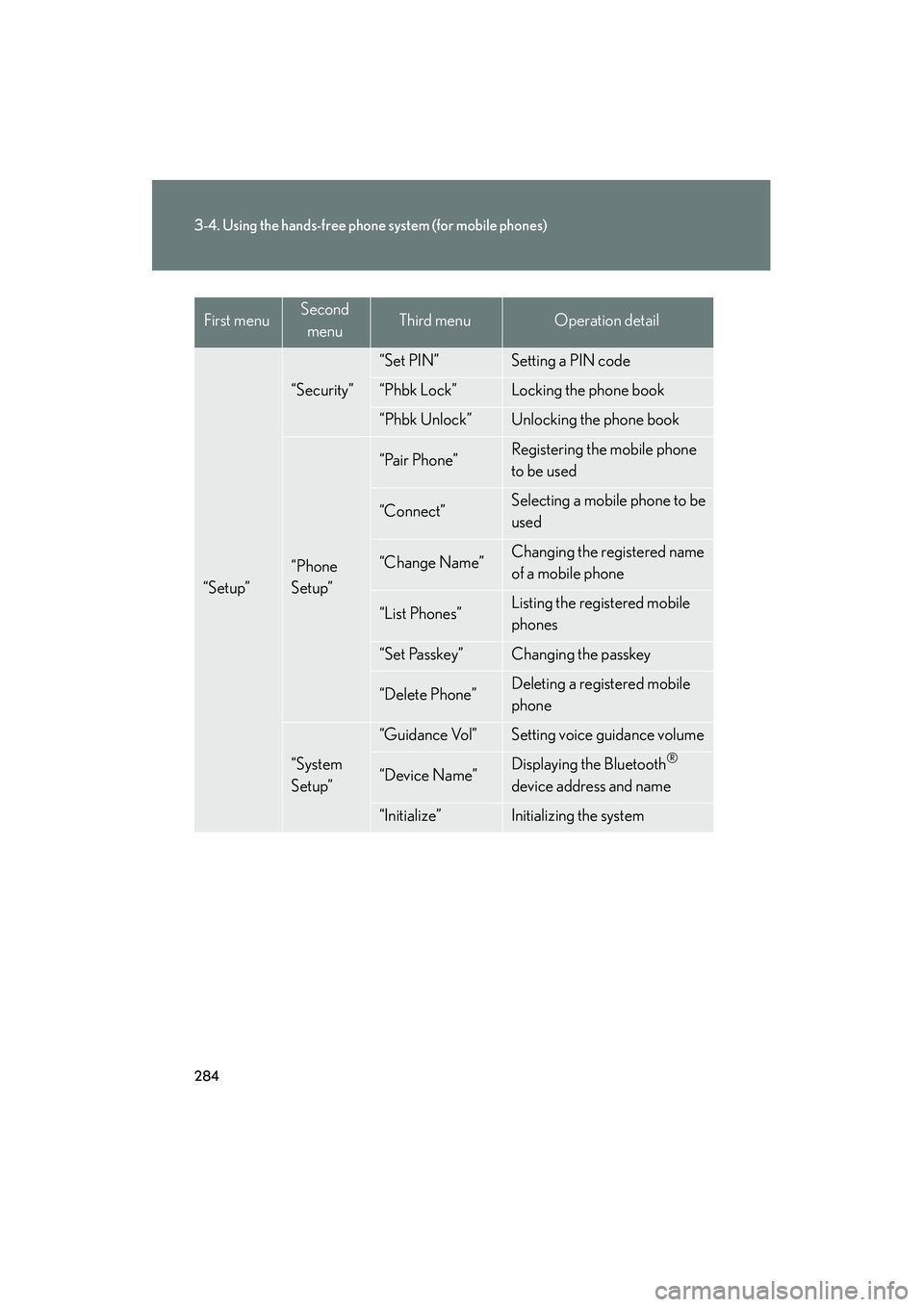
“Setup”
“Security”
“Set PIN”Setting a PIN code
“Phbk Lock”Locking the phone book
“Phbk Unlock”Unlocking the phone book
“Phone
Setup”
“Pair Phone”Registering the mobile phone
to be used
“Connect”Selecting a mobile phone to be
used
“Change Name”Changing the registered name
of a mobile phone
“List Phones”Listing the registered mobile
phones
“Set Passkey”Changing the passkey
“Delete Phone”Deleting a registered mobile
phone
“System
Setup”
“Guidance Vol”Setting voice guidance volume
“Device Name”Displaying the Bluetooth®
device address and name
“Initialize”Initializing the system
First menuSecond menuThird menuOperation detail
Page 286 of 542
285
3-4. Using the hands-free phone system (for mobile phones)
3
Interior features
10_IS F_U■
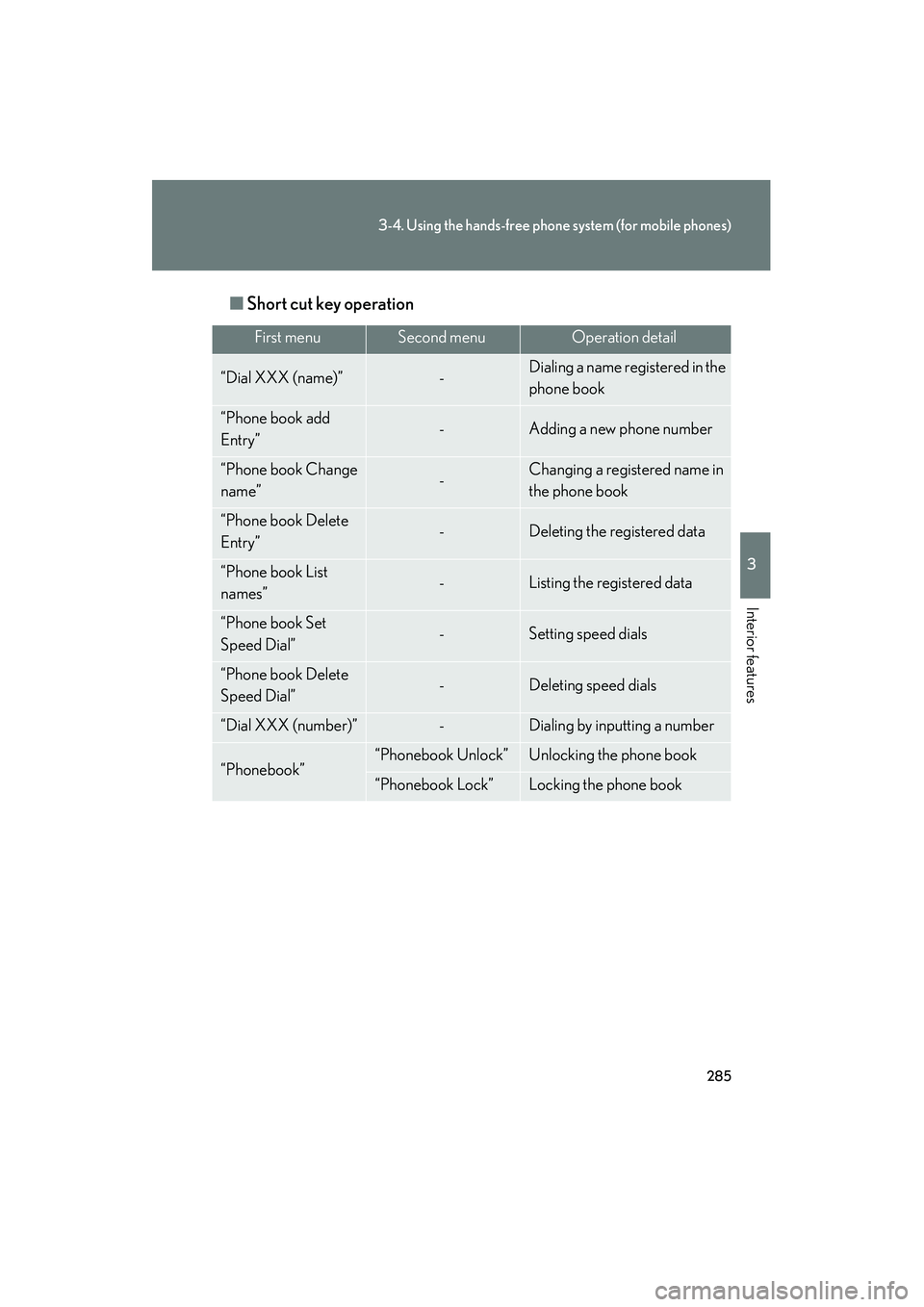
Short cut key operation
First menuSecond menuOperation detail
“Dial XXX (name)”-Dialing a name registered in the
phone book
“Phone book add
Entry”-Adding a new phone number
“Phone book Change
name”-Changing a registered name in
the phone book
“Phone book Delete
Entry”-Deleting the registered data
“Phone book List
names”-Listing the registered data
“Phone book Set
Speed Dial”-Setting speed dials
“Phone book Delete
Speed Dial”-Deleting speed dials
“Dial XXX (number)”-Dialing by inputting a number
“Phonebook”“Phonebook Unlock”Unlocking the phone book
“Phonebook Lock”Locking the phone book