lock Lexus IS200t 2015 Owner's Manual
[x] Cancel search | Manufacturer: LEXUS, Model Year: 2015, Model line: IS200t, Model: Lexus IS200t 2015Pages: 612, PDF Size: 132.21 MB
Page 479 of 612
4797-3. Do-it-yourself maintenance
7
Maintenance and care
IS200t_EE(OM53D19E)
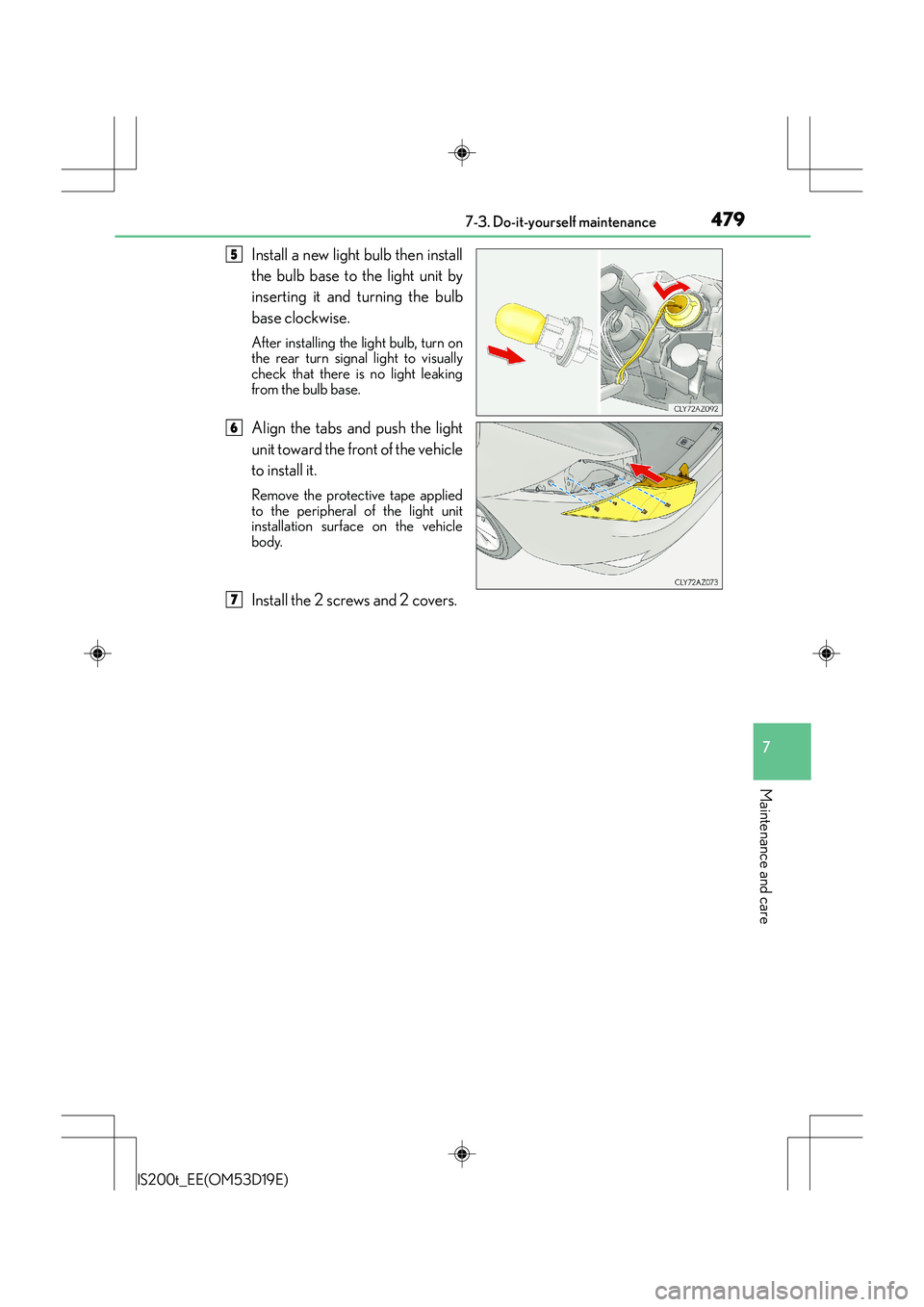
Install a new light bulb then install
the bulb base to the light unit by
inserting it and turning the bulb
base clockwise.
After installing the light bulb, turn on
the rear turn signal light to visually
check that there is no light leaking
from the bulb base.
Align the tabs and push the light
unit toward the front of the vehicle
to install it.
Remove the protective tape applied
to the peripheral of the light unit
installation surface on the vehicle
body.
Install the 2 screws and 2 covers.
5
6
7
Page 480 of 612
4807-3. Do-it-yourself maintenance
IS200t_EE(OM53D19E)
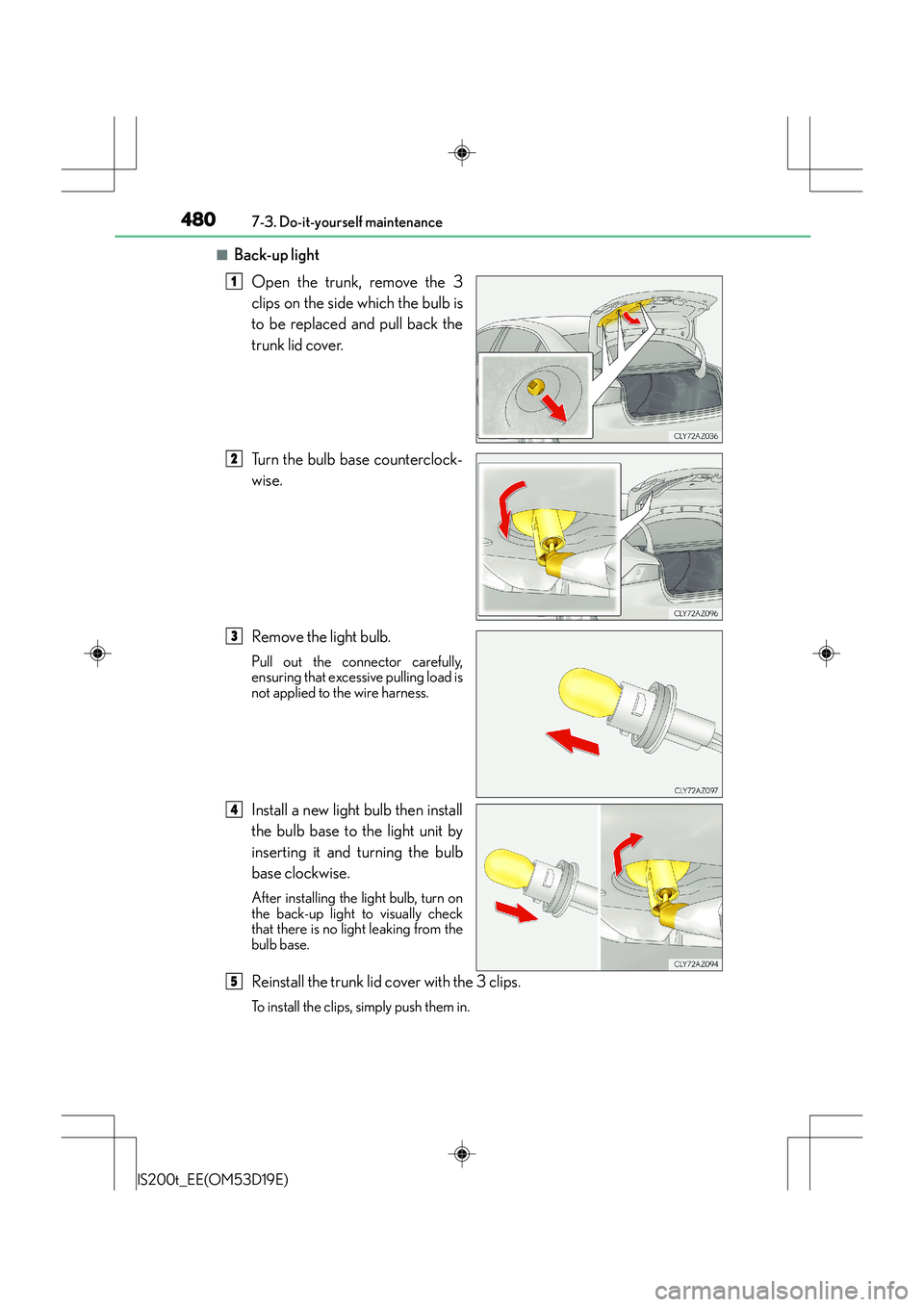
■Back-up lightOpen the trunk, remove the 3
clips on the side which the bulb is
to be replaced and pull back the
trunk lid cover.
Turn the bulb base counterclock-
wise.
Remove the light bulb.
Pull out the connector carefully,
ensuring that excessive pulling load is
not applied to the wire harness.
Install a new light bulb then install
the bulb base to the light unit by
inserting it and turning the bulb
base clockwise.
After installing the light bulb, turn on
the back-up light to visually check
that there is no light leaking from the
bulb base.
Reinstall the trunk lid cover with the 3 clips.
To install the clips, simply push them in.
1
2
3
4
5
Page 482 of 612
4827-3. Do-it-yourself maintenance
IS200t_EE(OM53D19E)
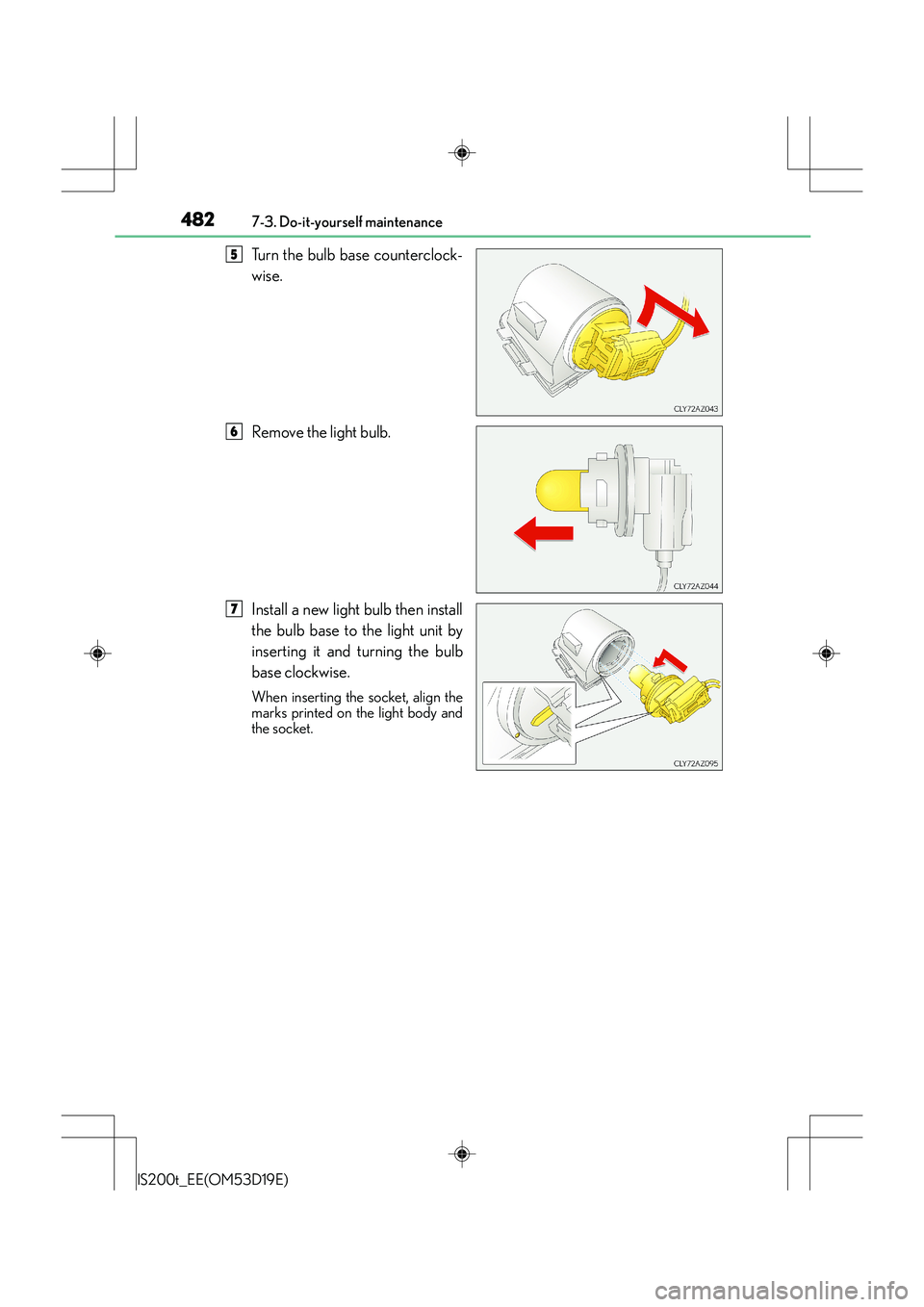
Turn the bulb base counterclock-
wise.
Remove the light bulb.
Install a new light bulb then install
the bulb base to the light unit by
inserting it and turning the bulb
base clockwise.
When inserting the socket, align the
marks printed on the light body and
the socket.
5
6
7
Page 483 of 612
4837-3. Do-it-yourself maintenance
7
Maintenance and care
IS200t_EE(OM53D19E)
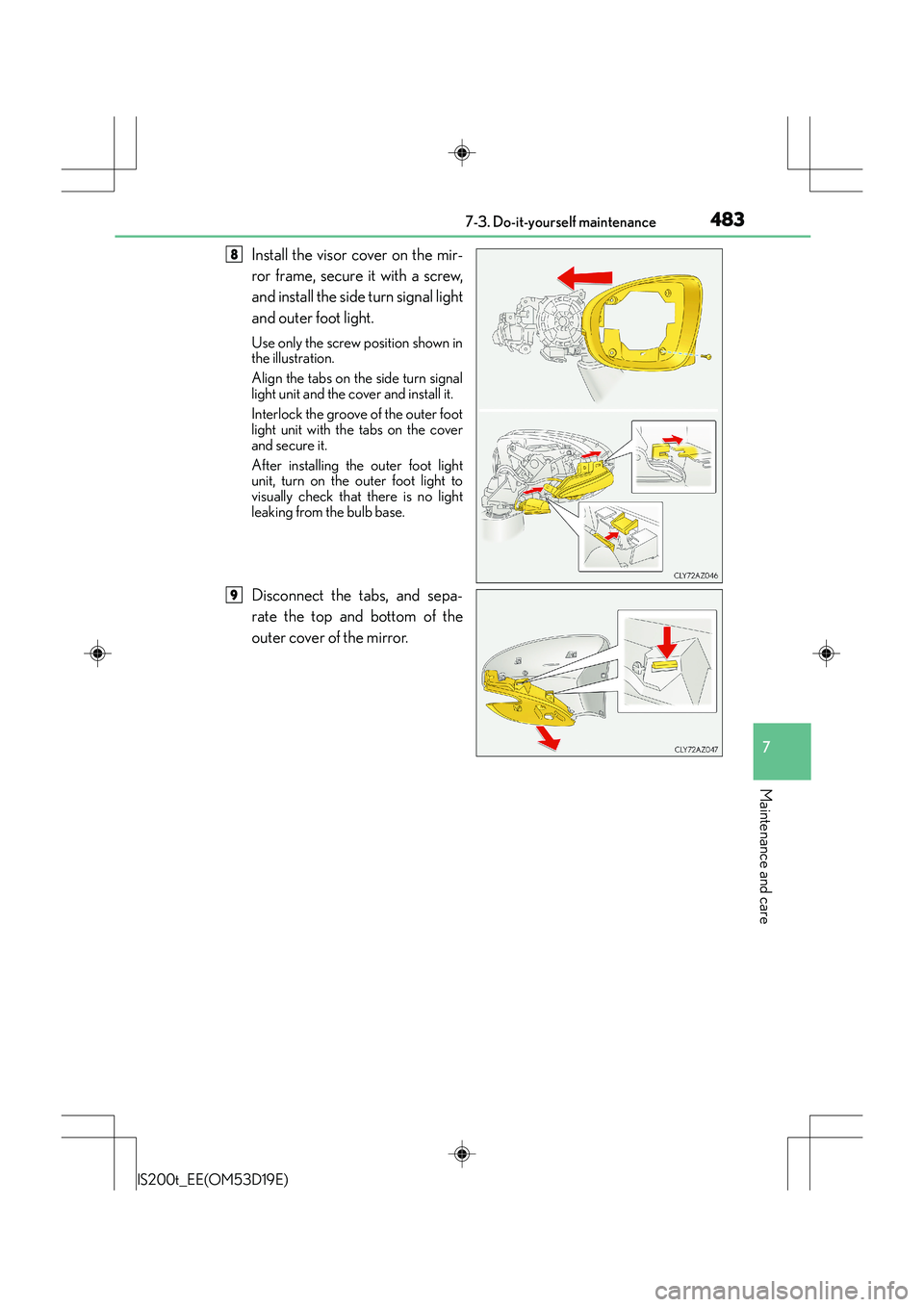
Install the visor cover on the mir-
ror frame, secure it with a screw,
and install the side turn signal light
and outer foot light.
Use only the screw position shown in
the illustration.
Align the tabs on the side turn signal
light unit and the cover and install it.
Interlock the groove of the outer foot
light unit with the tabs on the cover
and secure it.
After installing the outer foot light
unit, turn on the outer foot light to
visually check that there is no light
leaking from the bulb base.
Disconnect the tabs, and sepa-
rate the top and bottom of the
outer cover of the mirror.
8
9
Page 486 of 612
4867-3. Do-it-yourself maintenance
IS200t_EE(OM53D19E)
CAUTION
■Replacing light bulbs
●Turn off the lights. Do not attempt to replace the bulb immediately after turning off the
lights.
The bulbs become very hot and may cause burns.
●Do not touch the glass portion of the light bu lb with bare hands. When it is unavoid-
able to hold the glass portion, use and hold with a clean dry cloth to avoid getting
moisture and oils on the bulb.
Also, if the bulb is scratched or dropped, it may blow out or crack.
●Fully install light bulbs and any parts used to secure them. Failure to do so may result
in heat damage, fire, or water entering th e headlight unit. This may damage the head-
lights or cause condensation to build up on the lens.
■Discharge headlights (if equipped)
●Contact any authorized Lexus dealer or repairer, or another duly qualified and
equipped professional before replacing the discharge headlights (including light
bulbs).
●Do not touch the discharge headlight’s high voltage socket when the headlights are
turned on.
An extremely high voltage of 30000 V will be discharged and could result in death
or serious injury by electric shock.
●Do not attempt to take apart or repair the headlight bulbs, connectors, power supply
circuits, or related components.
Doing so could result in electric shock and death or serious injury.
■To prevent damage or fire
●Make sure bulbs are fully seated and locked.
●Check the wattage of the bulb before installing to prevent heat damage.
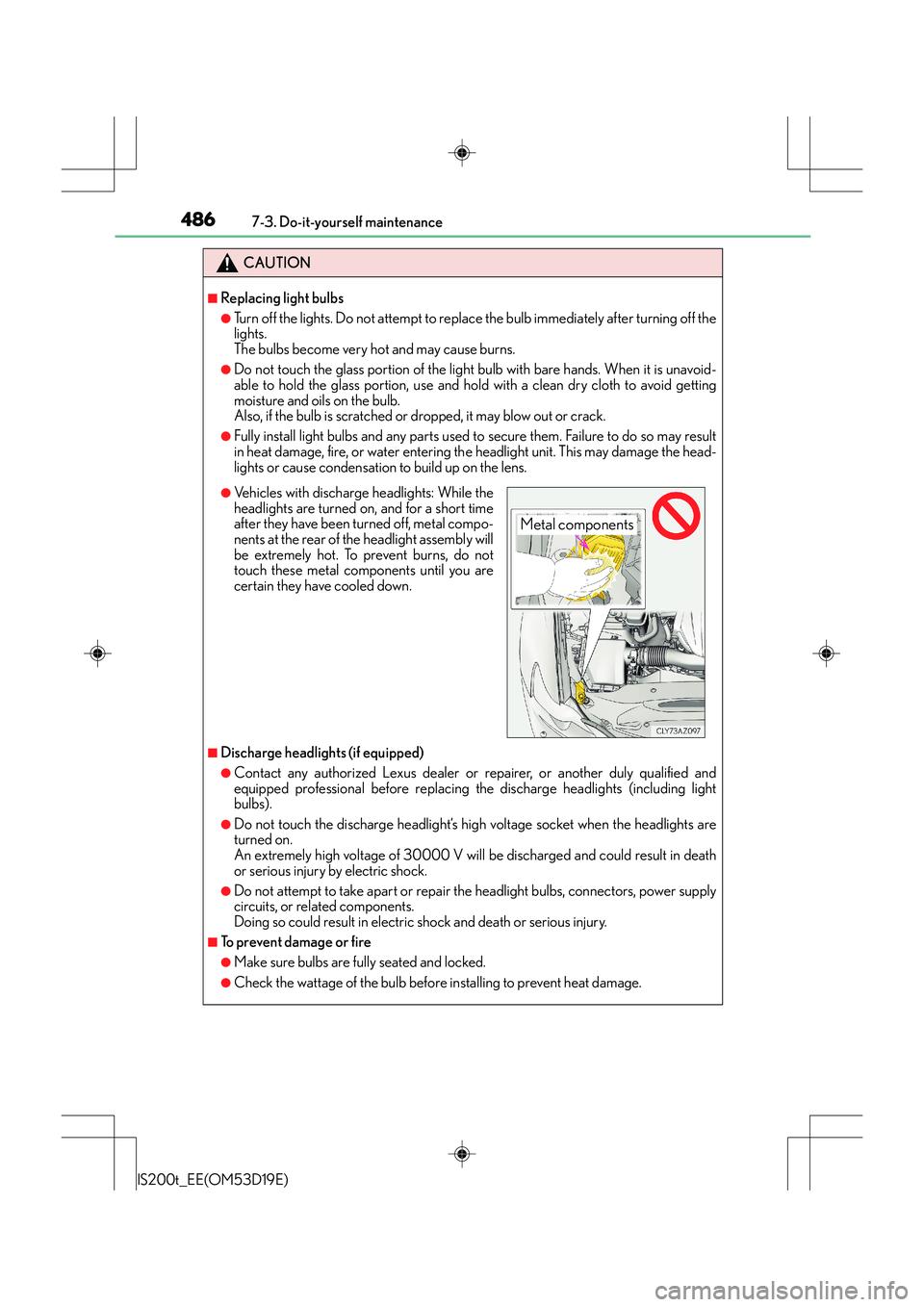
●Vehicles with discharge headlights: While the
headlights are turned on, and for a short time
after they have been turned off, metal compo-
nents at the rear of the headlight assembly will
be extremely hot. To prevent burns, do not
touch these metal components until you are
certain they have cooled down.
Metal components
Page 496 of 612
4968-2. Steps to take in an emergency
IS200t_EE(OM53D19E)
■While towing
If the engine is not running, the power assist for the brakes and steering will not function,
making steering and braking more difficult.
■Wheel nut wrench
Wheel nut wrench is installed in the trunk. ( →P. 5 2 3 , 5 3 4 )
CAUTION
Observe the following precautions.
Failure to do so may result in death or serious injury.
■When towing the vehicle
■While towing
●When towing using cables or chains, avoid sudden starts, etc. which place excessive
stress on the towing eyelets, cables or chains. The towing eyelets, cables or chains
may become damaged, broken debris may hit people, and cause serious damage.
●Do not turn the engine switch off.
There is a possibility that the steering wh eel is locked and cannot be operated.
■Installing towing eyelet to the vehicle
Make sure that towing eyelet is installed securely.
If not securely installed, towing eyelet may come loose during towing.
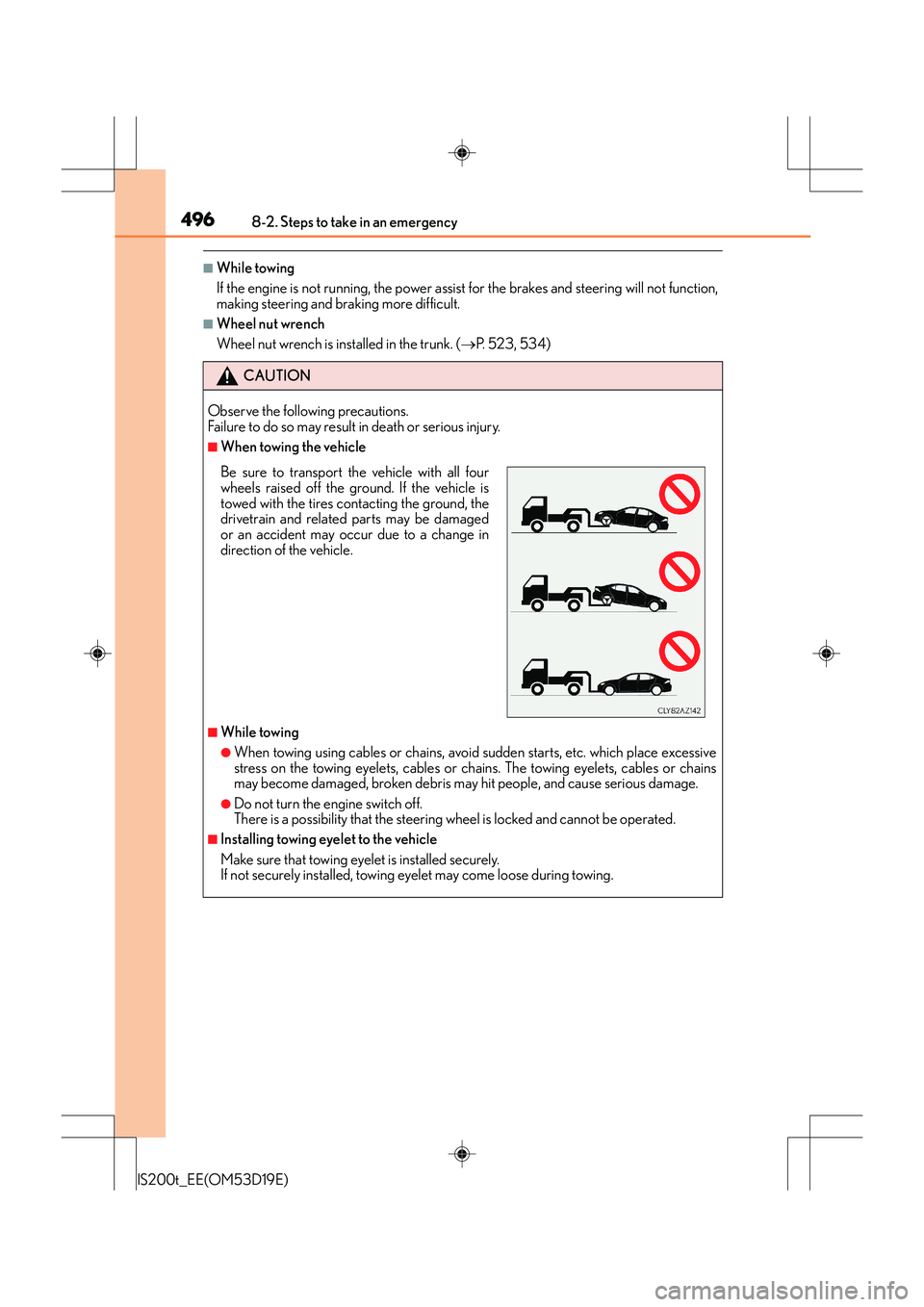
Be sure to transport the vehicle with all four
wheels raised off the ground. If the vehicle is
towed with the tires contacting the ground, the
drivetrain and related parts may be damaged
or an accident may occur due to a change in
direction of the vehicle.
Page 497 of 612
4978-2. Steps to take in an emergency
8
When trouble arises
IS200t_EE(OM53D19E)
NOTICE
■To prevent damage to the vehicle when towing using a wheel-lift type truck
●Do not tow the vehicle from the rear when the engine switch is off. The steering lock
mechanism is not strong enough to hold the front wheels straight.
●When raising the vehicle, ensure adequate ground clearance for towing at the oppo-
site end of the raised vehicle. Without adequate clearance, the vehicle could be dam-
aged while being towed.
■To prevent damage to the vehicle when towing with a sling-type truck
Do not tow with a sling-type truck, either from the front or rear.
■To prevent damage to the vehicle during emergency towing
Do not secure cables or chains to the suspension components.
■Before towing the vehicle (vehicles with a Stop & Start system)
To protect components of the Stop & Start system, before towing the vehicle, turn the
engine switch off and then restart the engine. If the engine cannot be started, turn the
engine switch to IGNITION ON mode.
Page 517 of 612
5178-2. Steps to take in an emergency
8
When trouble arises
IS200t_EE(OM53D19E)
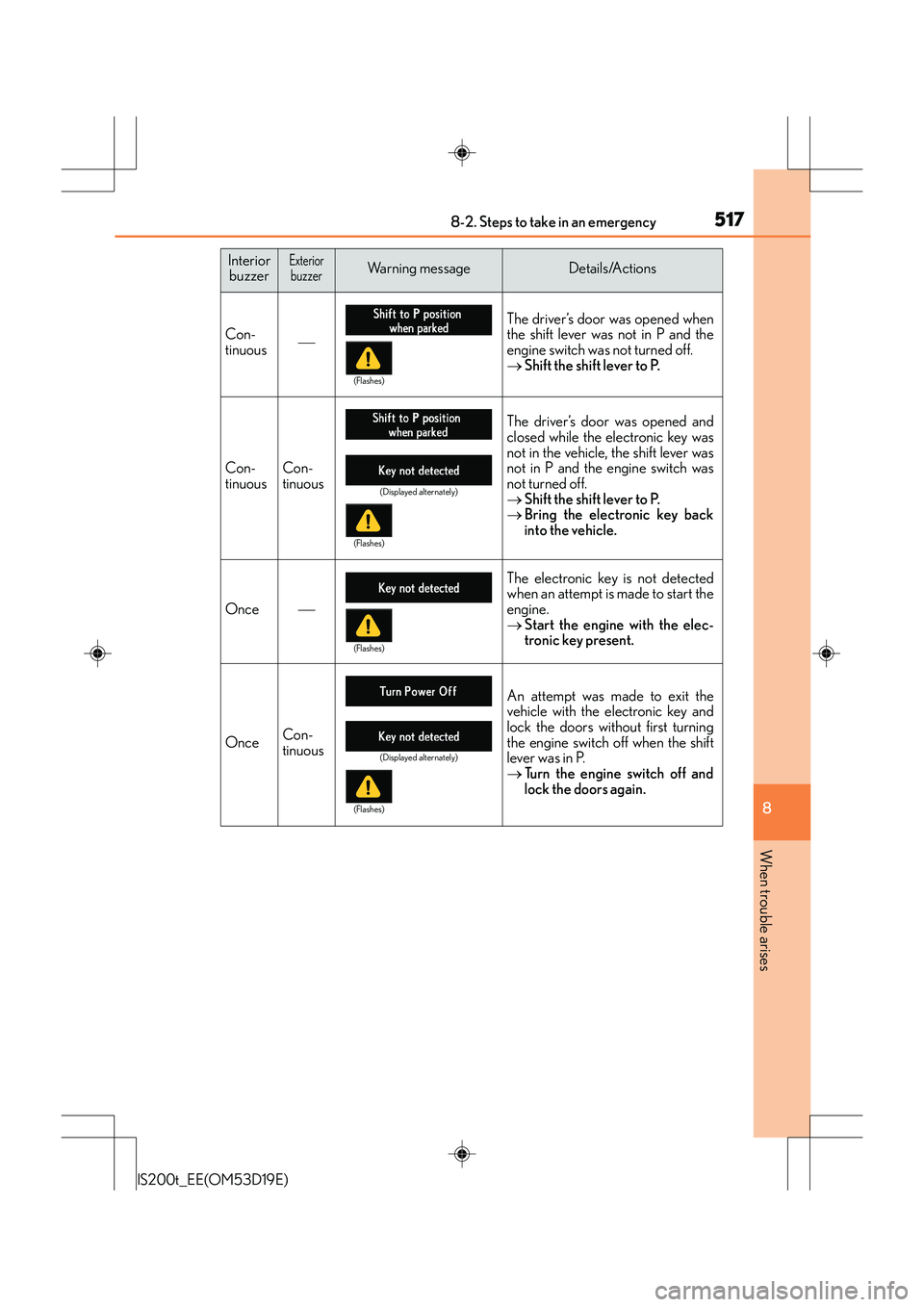
InteriorbuzzerExteriorbuzzerWarning messageDetails/Actions
Con-
tinuous The driver’s door was opened when
the shift lever was not in P and the
engine switch was not turned off.
→
Shift the shift lever to P.
Con-
tinuousCon-
tinuous
The driver’s door was opened and
closed while the electronic key was
not in the vehicle, the shift lever was
not in P and the engine switch was
not turned off.
→Shift the shift lever to P.
→ Bring the electronic key back
into the vehicle.
Once
The electronic key is not detected
when an attempt is made to start the
engine.
→Start the engine with the elec-
tronic key present.
OnceCon-
tinuous
An attempt was made to exit the
vehicle with the electronic key and
lock the doors without first turning
the engine switch off when the shift
lever was in P.
→Turn the engine switch off and
lock the doors again.
(Flashes)
(Displayed alternately)
(Flashes)
(Flashes)
(Displayed alternately)
(Flashes)
Page 518 of 612
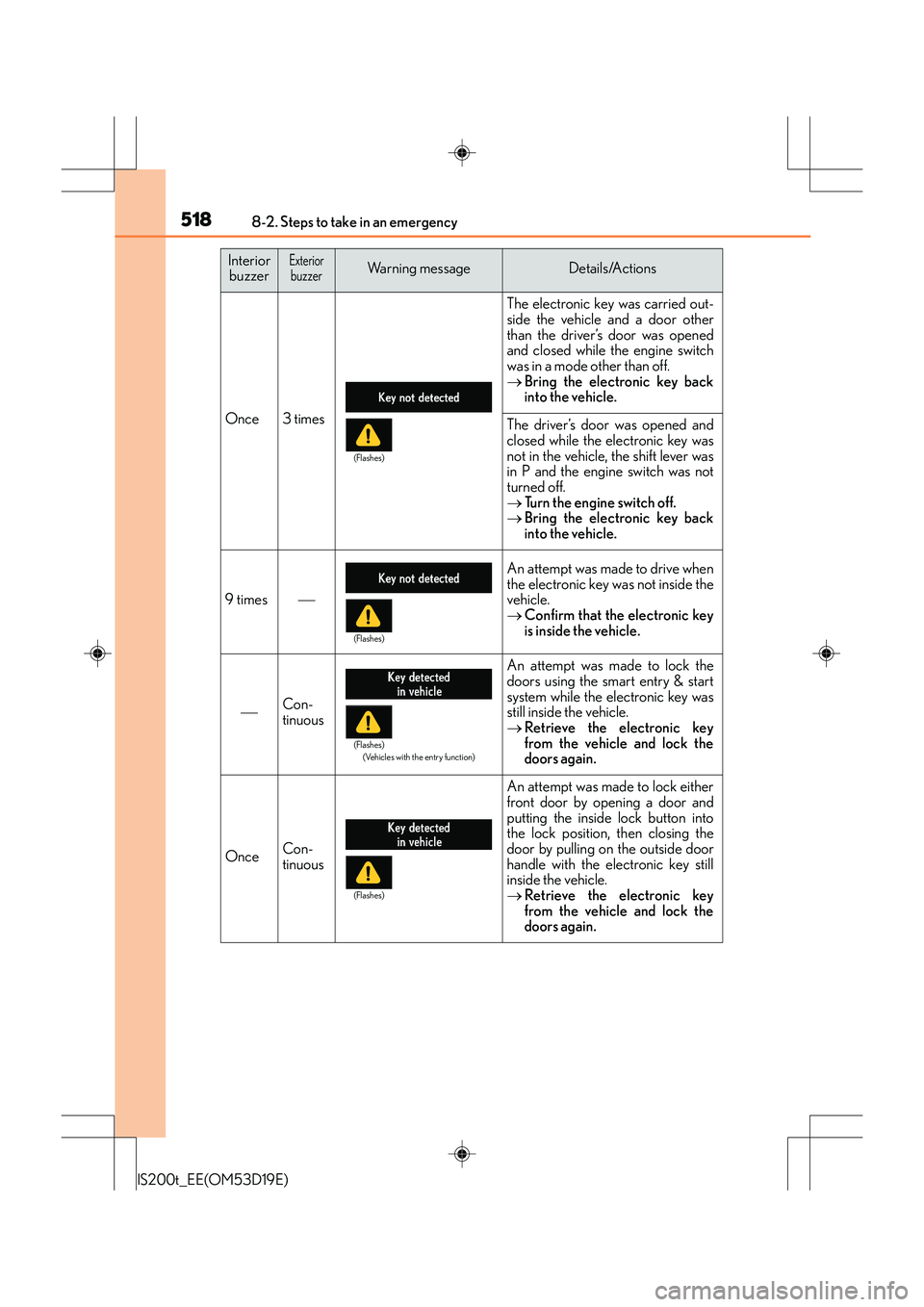
5188-2. Steps to take in an emergency
IS200t_EE(OM53D19E)
Once3 times
The electronic key was carried out-
side the vehicle and a door other
than the driver’s door was opened
and closed while the engine switch
was in a mode other than off.
→Bring the electronic key back
into the vehicle.
The driver’s door was opened and
closed while the electronic key was
not in the vehicle, the shift lever was
in P and the engine switch was not
turned off.
→Turn the engine switch off.
→ Bring the electronic key back
into the vehicle.
9 times
An attempt was made to drive when
the electronic key was not inside the
vehicle.
→Confirm that the electronic key
is inside the vehicle.
Con-
tinuous
An attempt was made to lock the
doors using the smart entry & start
system while the electronic key was
still inside the vehicle.
→Retrieve the electronic key
from the vehicle and lock the
doors again.
OnceCon-
tinuous
An attempt was made to lock either
front door by opening a door and
putting the inside lock button into
the lock position, then closing the
door by pulling on the outside door
handle with the electronic key still
inside the vehicle.
→Retrieve the electronic key
from the vehicle and lock the
doors again.
Interior
buzzerExteriorbuzzerWarning messageDetails/Actions
(Flashes)
(Flashes)
(Flashes)
(Vehicles with the entry function)
(Flashes)
Page 519 of 612
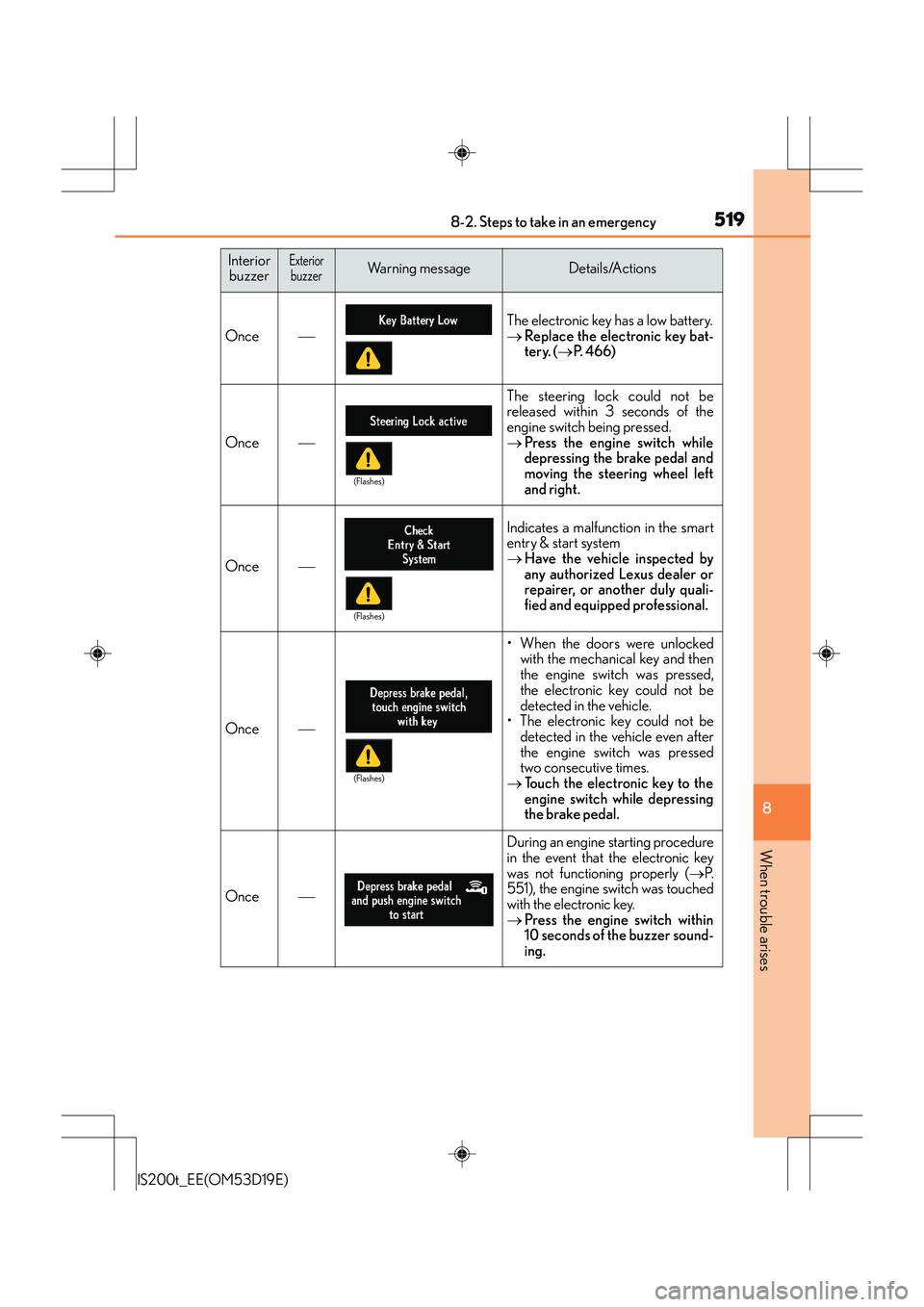
5198-2. Steps to take in an emergency
8
When trouble arises
IS200t_EE(OM53D19E)
Once
The electronic key has a low battery.
→Replace the electronic key bat-
tery. ( →P. 4 6 6 )
Once
The steering lock could not be
released within 3 seconds of the
engine switch being pressed.
→ Press the engine switch while
depressing the brake pedal and
moving the steering wheel left
and right.
Once
Indicates a malfunction in the smart
entry & start system
→Have the vehicle inspected by
any authorized Lexus dealer or
repairer, or another duly quali-
fied and equipped professional.
Once
• When the doors were unlocked
with the mechanical key and then
the engine switch was pressed,
the electronic key could not be
detected in the vehicle.
• The electronic key could not be detected in the vehicle even after
the engine switch was pressed
two consecutive times.
→ Touch the electronic key to the
engine switch while depressing
the brake pedal.
Once
During an engine starting procedure
in the event that the electronic key
was not functioning properly ( →P.
551), the engine switch was touched
with the electronic key.
→ Press the engine switch within
10 seconds of the buzzer sound-
ing.
Interior
buzzerExteriorbuzzerWarning messageDetails/Actions
(Flashes)
(Flashes)
(Flashes)