wheel Lexus IS200t 2015 Service Manual
[x] Cancel search | Manufacturer: LEXUS, Model Year: 2015, Model line: IS200t, Model: Lexus IS200t 2015Pages: 612, PDF Size: 132.21 MB
Page 264 of 612
2644-5. Using the driving support systems
IS200t_EE(OM53D19E)
●When sunlight or the headlights of oncoming vehicles are shining directly into the cam-
era lens
●When driving on roads that are branching or merging
●When driving on a road surface that is wet due to rain, previous rainfall, standing water,
etc.
●When the vehicle experiences strong up-and-down motion such as when driving on an
extremely rough road or on a seam in the pavement
●When headlight brightness at nighttime is reduced due to dirt on the lenses, or when
the headlights are misaligned
●When driving on wi nding roads or roads that are uneven
●When driving on rough or unpaved roads
■When changing the tires
Depending on the tires used, sufficient performance may not be maintainable.
■Warning messages for the LDA system
Warning messages are used to indicate a system malfunction or to inform the driver of
the need for caution while driving. ( →P. 511)
CAUTION
■Before using the LDA system
Do not rely solely on the LDA system. The LDA system does not drive the vehicle auto-
matically, nor does it reduce the amount of care you need to take. As such, the driver
must always assume full responsibility for understanding his/her surroundings, for
operating the steering wheel to correct the driving line, and for driving safely.
Inappropriate or negligent driving could lead to an accident.
■To avoid operating the LDA by mistake
Switch the LDA system off using the LDA switch when not in use.
■Situations unsuitable for LDA system
Do not use the LDA system in any of the following situations.
Otherwise, the system may not function correctly and could result in an accident.
●When driving with tire chains, a spare tire, or similar equipment
●When there are objects or structures along the roadside that might be misinterpreted
as lane markers (such as guardrails, a curb, reflector posts, etc.)
●When driving on snowy roads
●When pavement lane markers are difficult to see due to rain, snow, fog, sand, dirt, etc.
●When there are visible lines on the pavement from road repairs, or if the remains of
old lane markers are still visible on the road
●When driving on a road with lane closures due to maintenance, or when driving in a
temporary lane
Page 281 of 612
2814-5. Using the driving support systems
4
Driving
IS200t_EE(OM53D19E)
CAUTION
■When using the rear view monitor system
The rear view monitor system is a supplemental device intended to assist the driver
when backing up. When backing up, be sure to check visually behind and all around
the vehicle before proceeding.
Observe the following precautions to avoid an accident that could result in death or
serious injuries.
●Never depend on the rear view monitor system entirely when backing up. The image
and the position of the guide lines displayed on the screen may differ from the actual
state.
Use caution, just as you would when backing up any vehicle.
●Be sure to back up slowly, depressing the brake pedal to control vehicle speed.
●The instructions given are only guidelines.
When and how much to turn the steering wheel will vary according to traffic condi-
tions, road surface conditions, vehicle condition, etc. when parking. It is necessary to
be fully aware of this before using the rear view monitor system.
●When parking, be sure to check that the parking space will accommodate your vehi-
cle before maneuvering into it.
●Do not use the rear view monitor system in the following cases:
• On icy or slick road surfaces, or in snow
• When using tire chains or the compact spare tire
• When the trunk lid is not closed completely
• On roads that are not flat or straight, such as curves or slopes.
●In low temperatures, the screen may darken or the image may become faint. The
image could distort when the vehicle is moving, or you may become unable to see the
image on the screen. Be sure to check direct visually and with the mirrors all around
the vehicle before proceeding.
●If the tire sizes are changed, the position of the fixed guide lines displayed on the
screen may change.
●The camera uses a special lens. The dist ances between objects and pedestrians that
appear in the image displayed on the screen will differ from the actual distances.
( → P. 2 7 5 )
Page 285 of 612
2854-5. Using the driving support systems
4
Driving
IS200t_EE(OM53D19E)
◆ABS (Anti-lock Brake System)
Helps to prevent wheel lock when the brakes are applied suddenly, or if the
brakes are applied while driving on a slippery road surface
◆Brake assist
Generates an increased level of braking force after the brake pedal is
depressed when the system detects a panic stop situation
◆VSC (Vehicle Stability Control)
Helps the driver to control skidding when swerving suddenly or turning on
slippery road surfaces
◆VSC+ (Vehicle Stability Control+)
Provides cooperative control of the ABS, TRC, VSC and EPS.
Helps to maintain directional stability when swerving on slippery road sur-
faces by controlling steering performance.
◆TRC (Traction Control)
Helps to maintain drive power and prevent the drive wheels from spinning
when starting the vehicle or accelerating on slippery roads
◆Hill-start assist control
Prevents the vehicle from rolling backward when starting on an incline or slip-
pery slope
◆EPS (Electric Power Steering)
Employs an electric motor to reduce the amount of effort needed to turn the
steering wheel
Driving assist systems
To help enhance driving safety and performance, the following systems oper-
ate automatically in response to various driving situations. Be aware, however,
that these systems are supplementary and should not be relied upon too
heavily when operating the vehicle.
Page 287 of 612
2874-5. Using the driving support systems
4
Driving
IS200t_EE(OM53D19E)
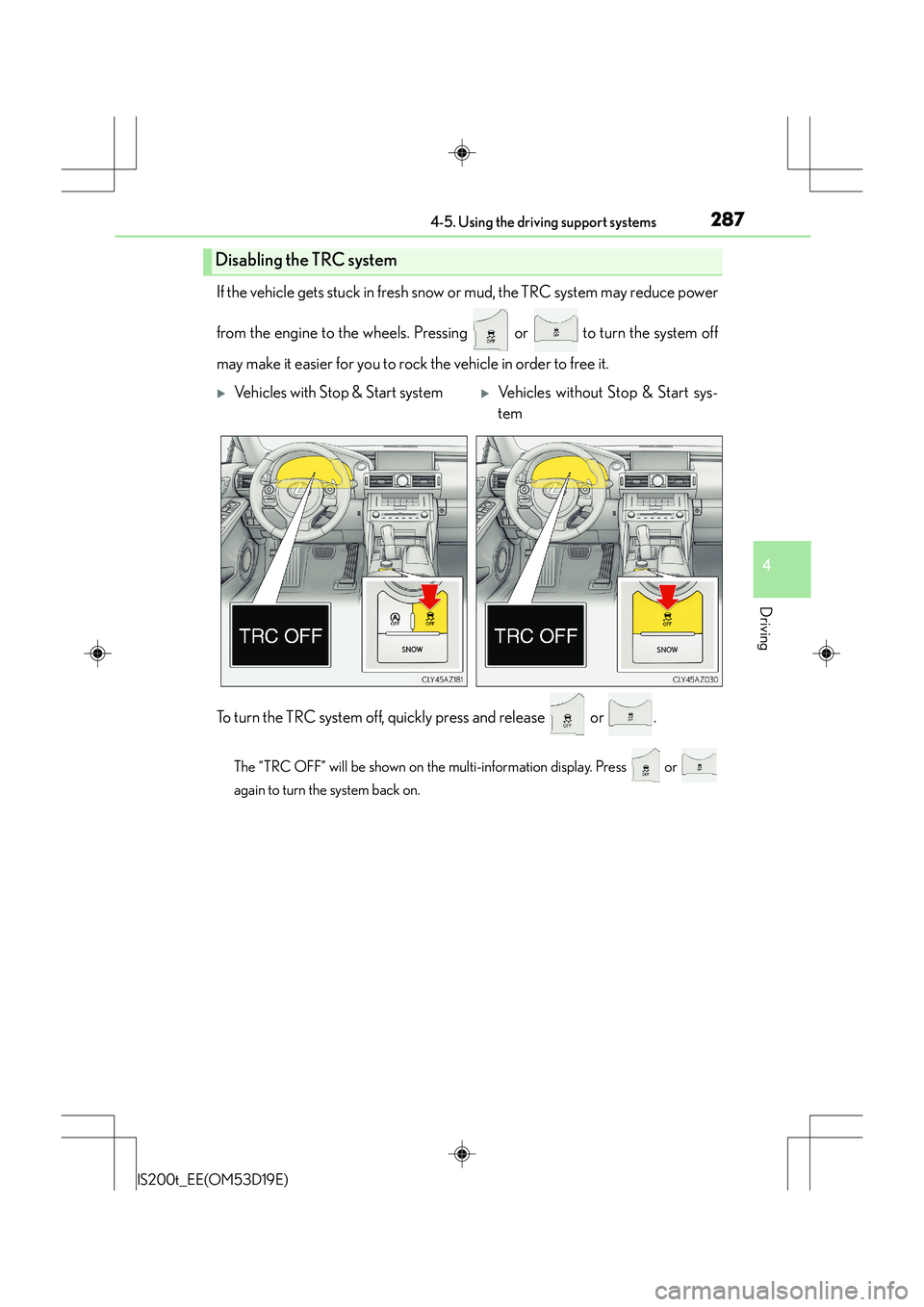
If the vehicle gets stuck in fresh snow or mud, the TRC system may reduce power
from the engine to the wheels. Pressing or to turn the system off
may make it easier for you to rock the vehicle in order to free it.
To turn the TRC system off, quickly press and release or .
The “TRC OFF” will be shown on the multi-information display. Press or
again to turn the system back on.
Disabling the TRC system
XVehicles with Stop & Start systemXVehicles without Stop & Start sys-
tem
Page 288 of 612
2884-5. Using the driving support systems
IS200t_EE(OM53D19E)
■Turning off both TRC and VSC systems
To turn the TRC and VSC systems off, press and hold or for more than 3
seconds while the vehicle is stopped.
The VSC OFF indicator light will come on and the “TRC OFF” will be shown on the
multi-information display.
*
Press or again to turn the systems back on.
*: On vehicles with pre-crash safety system, pre-crash brake assist and pre-crash brak-
ing will also be disabled. The pre-crash safe ty system warning light will come on and
the message will be shown on the multi-information display. ( →P. 2 9 1 )
■When the message is displayed on the mult i-information display showing that TRC has
been disabled even if the VSC OFF switch has not been pressed
TRC cannot be operated. Contact any authorized Lexus dealer or repairer, or another
duly qualified and equipped professional.
■When the battery is disconnected
The steering wheel may move from its straight forward position, but this will be corrected
automatically when driving.
■Sounds and vibrations caused by the ABS, brake assist, TRC, VSC and hill-start assist
control systems
●A sound may be heard from the engine compartment when the brake pedal is
depressed repeatedly, when the engine is started or just after the vehicle begins to
move. This sound does not indicate that a ma lfunction has occurred in any of these sys-
tems.
●Any of the following conditions may occu r when the above systems are operating.
None of these indicates that a malfunction has occurred.
• Vibrations may be felt through the vehicle body and steering.
• A motor sound may be heard after the vehicle comes to a stop.
• The brake pedal may pulsate slig htly after the ABS is activated.
• The brake pedal may move down s lightly after the ABS is activated.
■EPS operation sound
When the steering wheel is operated, a motor sound may be heard. This does not indi-
cate a malfunction.
■Automatic reactivation of TRC and VSC systems
After turning the TRC and VSC systems off, the systems will be automatically re-enabled
in the following situations:
●When the engine switch is turned off
●If only the TRC system is turned off, the TRC will turn on when vehicle speed increases
If both the TRC and VSC systems are turned off, automatic re-enabling will not occur
when vehicle speed increases.
Page 289 of 612
2894-5. Using the driving support systems
4
Driving
IS200t_EE(OM53D19E)
■Reduced effectiveness of the EPS system
The effectiveness of the EPS system is reduced to prevent the system from overheating
when there is frequent steering input over an extended period of time. The steering
wheel may feel heavy as a result. Should this occur, refrain from excessive steering input
or stop the vehicle and turn the engine off. The EPS system should return to normal
within 10 minutes.
■Operating conditions of hill-start assist control
When the following four conditions are met, the hill-start assist control will operate:
●The shift lever is in a position other than P or N (when starting off forward/backward on
an upward incline).
●The vehicle is stopped.
●The accelerator pedal is not depressed.
●The parking brake is not engaged.
■Automatic system cancelation of hill-start assist control
The hill-start assist control will turn off in any of the following situations:
●The shift lever is moved to P or N.
●The accelerator pedal is depressed.
●The parking brake is engaged.
●Approximately 2 seconds elapse after the brake pedal is released.
■Operating conditions of emergency brake signal
When the following three conditions are me t, the emergency brake signal will operate:
●The emergency flashers are off.
●Actual vehicle speed is over 55 km/h (35 mph).
●The brake pedal is depressed in a manner that cause the system to judge from the vehi-
cle deceleration that this is a sudden braking operation.
■Automatic system cancelation of emergency brake signal
The emergency brake signal will turn off in any of the following situations:
●The emergency flashers are turned on.
●The brake pedal is released.
●The system judges from the vehicle deceleration that is not a sudden braking operation.
Page 290 of 612
2904-5. Using the driving support systems
IS200t_EE(OM53D19E)
CAUTION
■The ABS does not operate effectively when
●The limits of tire gripping performance have been exceeded (such as excessively
worn tires on a snow covered road).
●The vehicle hydroplanes while driving at high speed on wet or slick roads.
■Stopping distance when the ABS is operating may exceed that of normal conditions
The ABS is not designed to shorten the vehi cle’s stopping distance. Always maintain a
safe distance from the vehicle in front of you, especially in the following situations:
●When driving on dirt, gravel or snow-covered roads
●When driving with tire chains
●When driving over bumps in the road
●When driving over roads with potholes or uneven surfaces
■TRC may not operate effectively when
Directional control and power may not be achievable while driving on slippery road
surfaces, even if the TRC system is operating.
Drive the vehicle carefully in conditions where stability and power may be lost.
■Hill- start assist control does not operate effectively when
●Do not overly rely on hill-start assist control. Hill-start assist control may not operate
effectively on steep inclines and roads covered with ice.
●Unlike the parking brake, hill-start assist co ntrol is not intended to hold the vehicle
stationary for an extended period of time. Do not attempt to use hill-start assist con-
trol to hold the vehicle on an incline, as doing so may lead to an accident.
■When the VSC is activated
The slip indicator light flashes. Always dr ive carefully. Reckless driving may cause an
accident. Exercise particular care when the indicator light flashes.
■When the TRC/VSC systems are turned off
Be especially careful and drive at a speed appropriate to the road conditions. As these
are the systems to help ensure vehicle stability and driving force, do not turn the TRC/
VSC systems off unless necessary.
■Replacing tires
Make sure that all tires are of the specif ied size, brand, tread pattern and total load
capacity. In addition, make sure that the tires are inflated to the recommended tire infla-
tion pressure level.
The ABS, TRC and VSC systems will not function correctly if different tires are installed
on the vehicle.
Contact any authorized Lexus dealer or repairer, or another duly qualified and
equipped professional for further information when replacing tires or wheels.
■Handling of tires and the suspension
Using tires with any kind of problem or modi fying the suspension will affect the driving
assist systems, and may cause a system to malfunction.
Page 294 of 612
2944-5. Using the driving support systems
IS200t_EE(OM53D19E)
■Obstacles not detected
The sensor cannot detect plastic obstacles such as traffic cones. There may also be occa-
sions when the sensor cannot detect pedestri ans, animals, bicycles, motorcycles, trees,
or snowdrifts.
■Situations in which the pre-crash safe ty system does not function properly
The system may not function effectively in situations such as the following:
●On roads with sharp bends or uneven surfaces
●If a vehicle suddenly moves in front of your vehicle, such as at an intersection
●If a vehicle suddenly cuts in front of your vehicle, such as when overtaking
●In inclement weather such as heavy rain, fog, snow or sand storms
●If the vehicle is skidding when VSC is not operating
●When your vehicle is steeply inclined
●When only part of your vehicle’s front end collides with, or contacts, a vehicle or object
in a frontal collision
●When the radar sensor moves off position due to its surrounding area being subjected
to a strong impact
●When an obstacle suddenly appears in front of the vehicle due to the steering wheel
being turned sharply or another cause
■Automatic cancelation of the pre-crash safety system
When a malfunction occurs due to sensor contamination, etc. that results in the sensors
being unable to detect obstacles, the pre-crash safety system will be automatically dis-
abled. In this case, the system will not activa te even if there is a collision possibility.
■When there is a malfunction in the system or if the system is temporarily unusable
The pre-crash safety system warning light will flash and warning messages will be dis-
played. ( →P. 5 0 1 , 5 1 1 )
Page 297 of 612
2974-5. Using the driving support systems
4
Driving
IS200t_EE(OM53D19E)
CAUTION
■Limitations of the pre-crash safety system
●The driver is solely responsible for safe driving. Always drive safely, taking care to
observe your surroundings.
Do not use the pre-crash safety system instead of normal braking operations under
any circumstances. This system will not prevent collisions or lessen damage or inju-
ries in all cases. Do not overly rely on this system. Failure to do so may cause an acci-
dent, resulting in death or serious injury.
This system has been designed to help avoid and reduce the impact of collisions.
However, the system operates differently depending on the situation ( →P. 2 9 3 ,
294). As a result, the same level of performance may not be expected in all cases.
Also, the pre-crash safety brakes may not operate if the driver is depressing the
brake pedal or turning the steering wheel, as the system will determine such condi-
tions as collision avoidance operations.
●As the pre-crash safety system is designed to assist the driver in safe driving, it may
operate under sporty driving conditions, which may cause an accident. For this rea-
son under sporty driving conditions, it is recommended that this system be disabled
by using the PCS OFF switch.
■Handling the radar sensor
Observe the following to ensure the pre-cras h safety system can function effectively.
Otherwise, the system may not function correctly and could result in an accident.
●Keep the sensor and grille cover clean at all times.
Clean the sensor and grille cover with a soft cloth so you do not mark or damage
them.
●Do not subject the sensor or surrounding area to a strong impact.
If the sensor moves even slightly off position, the system may become inaccurate or
malfunction. If the sensor or surrounding area is subject to a strong impact, always
have the area inspected and adjusted by any authorized Lexus dealer or repairer, or
another duly qualified and equipped professional.
●Do not disassemble the sensor.
●Do not attach accessories or stickers to the sensor, grille cover or surrounding area.
●Do not modify or paint the sensor and grille cover.
●If the radar sensor needs to be replaced, contact any authorized Lexus dealer or
repairer, or another duly qualified and equipped professional.
Page 310 of 612
3104-6. Driving tips
IS200t_EE(OM53D19E)
Park the vehicle and move the shift lever to P without setting the parking brake.
The parking brake may freeze up, preventing it from being released. If necessary,
block the wheels to prevent inadvertent sliding or creeping.
XExcept vehicles with 18-inch tires
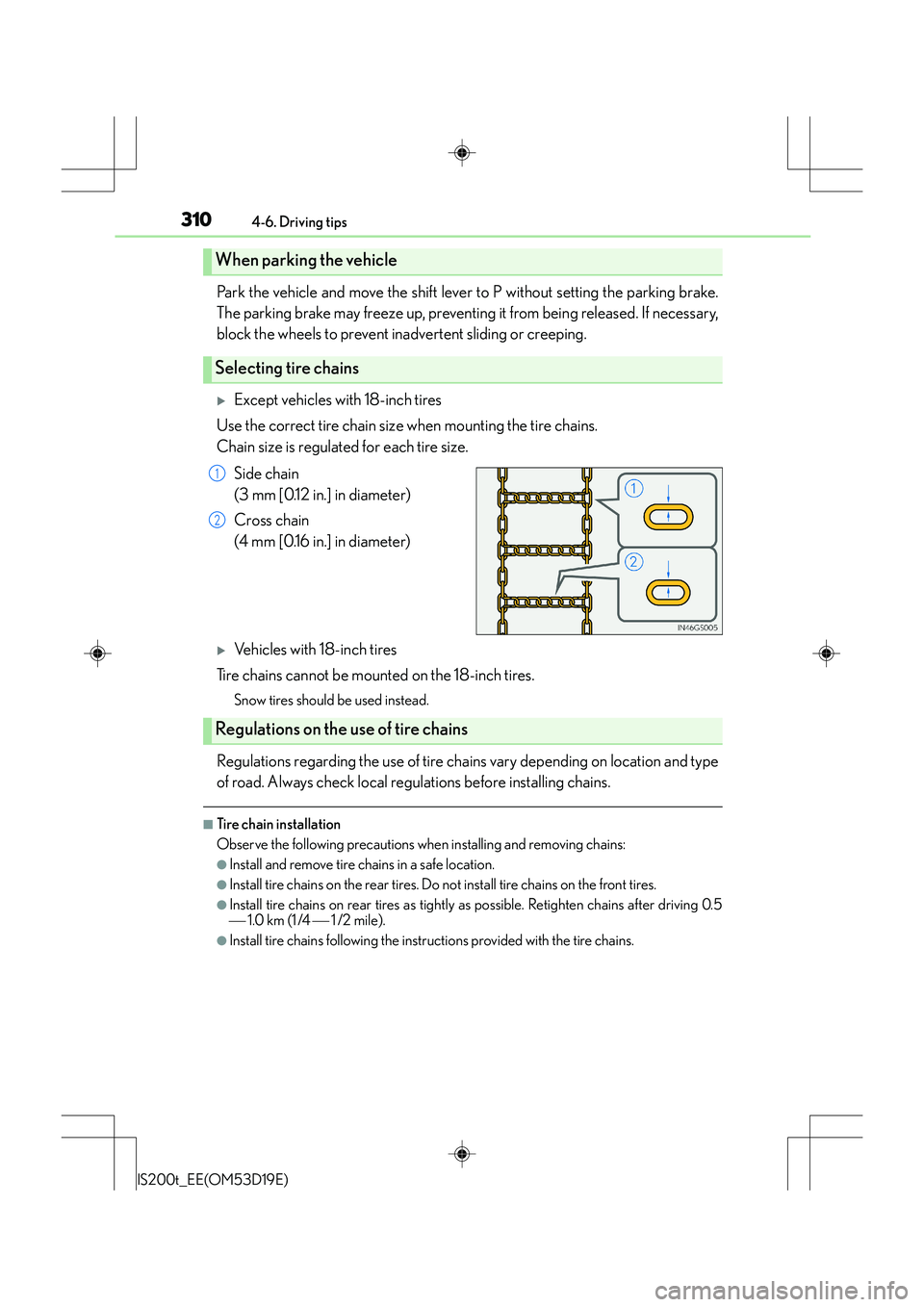
Use the correct tire chain size when mounting the tire chains.
Chain size is regulated for each tire size.
Side chain
(3 mm [0.12 in.] in diameter)
Cross chain
(4 mm [0.16 in.] in diameter)
XVehicles with 18-inch tires
Tire chains cannot be mounted on the 18-inch tires.
Snow tires should be used instead.
Regulations regarding the use of tire chains vary depending on location and type
of road. Always check local regulations before installing chains.
■Tire chain installation
Observe the following precautions when installing and removing chains:
●Install and remove tire chains in a safe location.
●Install tire chains on the rear tires. Do not install tire chains on the front tires.
●Install tire chains on rear tires as tightly as possible. Retighten chains after driving 0.5
1.0 km (1 /4 1 /2 mile).
●Install tire chains following the instructions provided with the tire chains.
When parking the vehicle
Selecting tire chains
1
2
Regulations on the use of tire chains