charging Lexus IS200t 2015 Owner's Manual
[x] Cancel search | Manufacturer: LEXUS, Model Year: 2015, Model line: IS200t, Model: Lexus IS200t 2015Pages: 612, PDF Size: 132.21 MB
Page 85 of 612
851-2. Theft deterrent system
1
For safety and security
IS200t_EE(OM53D19E)
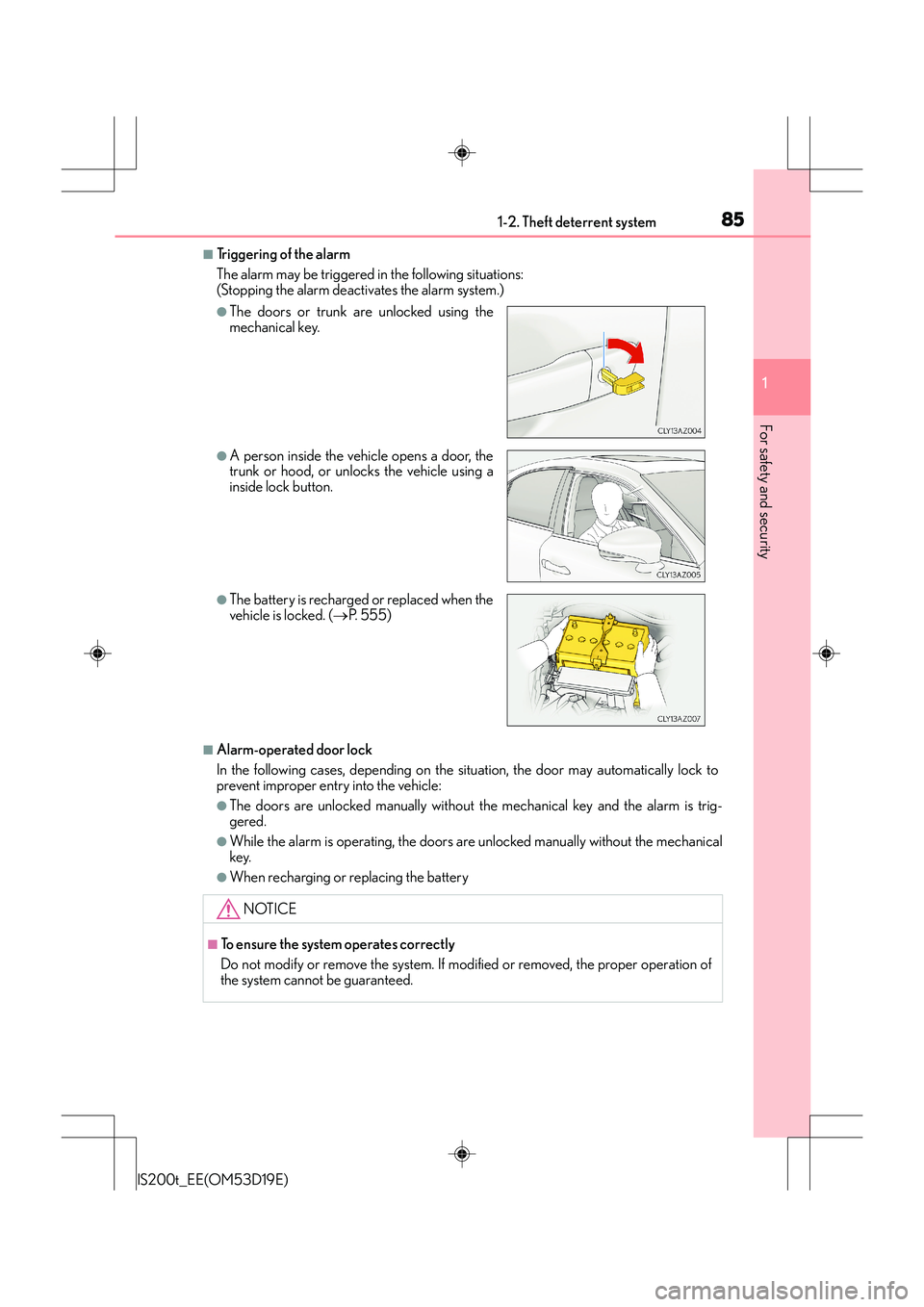
■Triggering of the alarm
The alarm may be triggered in the following situations:
(Stopping the alarm deactivates the alarm system.)
■Alarm-operated door lock
In the following cases, depending on the situation, the door may automatically lock to
prevent improper entry into the vehicle:
●The doors are unlocked manually without the mechanical key and the alarm is trig-
gered.
●While the alarm is operating, the doors ar e unlocked manually without the mechanical
key.
●When recharging or replacing the battery
●The doors or trunk are unlocked using the
mechanical key.
●A person inside the vehicle opens a door, the
trunk or hood, or unlocks the vehicle using a
inside lock button.
●The battery is recharged or replaced when the
vehicle is locked. ( →P. 5 5 5 )
NOTICE
■To ensure the system operates correctly
Do not modify or remove the system. If modified or removed, the proper operation of
the system cannot be guaranteed.
Page 91 of 612
912. Instrument cluster
2
Instrument cluster
IS200t_EE(OM53D19E)
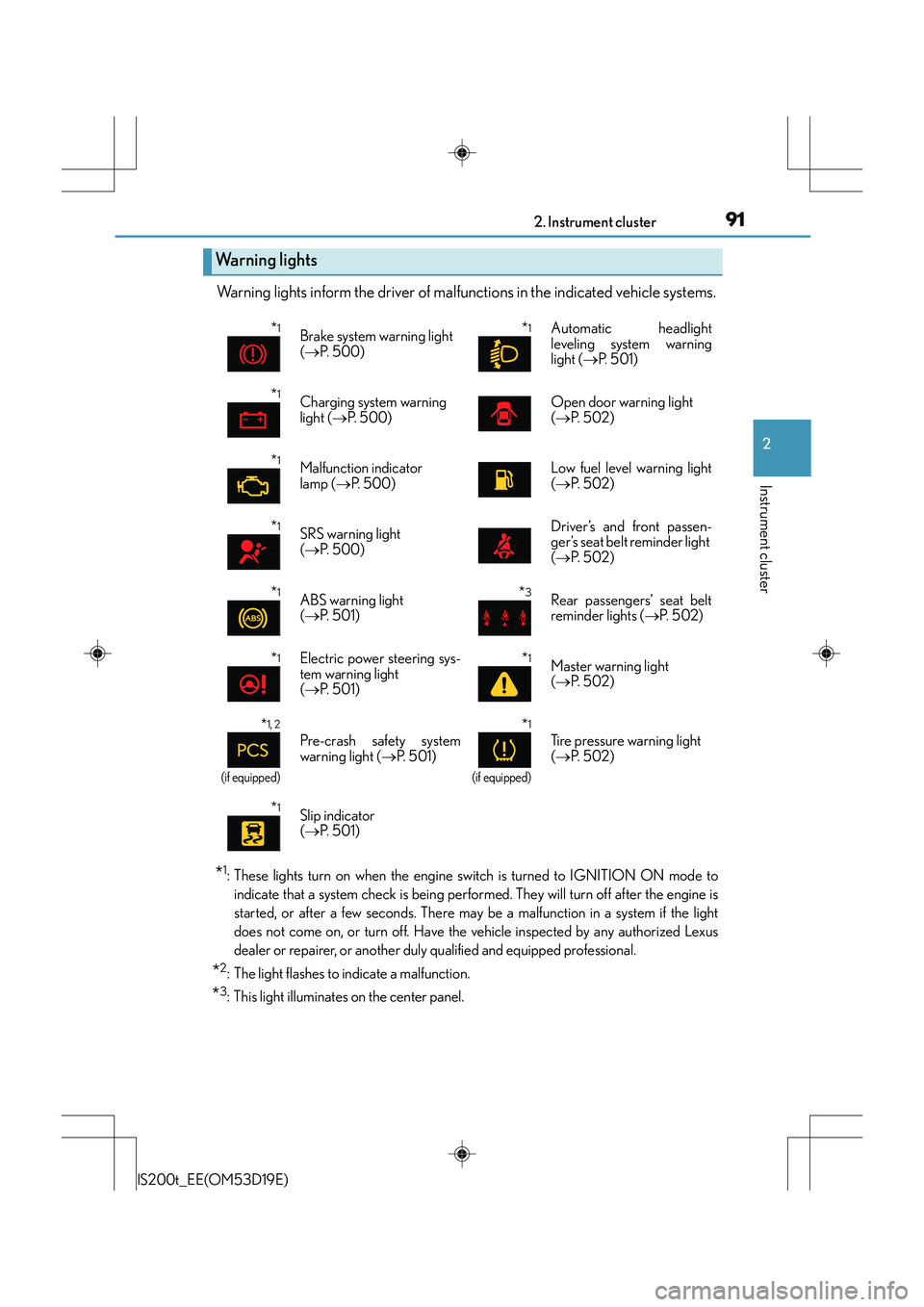
Warning lights inform the driver of malfunctions in the indicated vehicle systems.
*1: These lights turn on when the engine switch is turned to IGNITION ON mode toindicate that a system check is being perfor med. They will turn off after the engine is
started, or after a few seconds. There may be a malfunction in a system if the light
does not come on, or turn off. Have the vehicle inspected by any authorized Lexus
dealer or repairer, or another duly qualified and equipped professional.
*2: The light flashes to indicate a malfunction.
*3: This light illuminates on the center panel.
Wa r n i n g l i g h t s
*1Brake system warning light
(→ P. 5 0 0 )*1 Automatic headlight
leveling system warning
light ( →P. 5 0 1 )
*1Charging system warning
light ( →P. 5 0 0 )Open door warning light
(→ P. 5 0 2 )
*1Malfunction indicator
lamp ( →P. 500)Low fuel level warning light
(→ P. 5 0 2 )
*1SRS warning light
(→ P. 5 0 0 )Driver’s and front passen-
ger’s seat belt reminder light
(→ P. 5 0 2 )
*1ABS warning light
(→ P. 5 0 1 )*3Rear passengers’ seat belt
reminder lights ( →P. 5 0 2 )
*1Electric power steering sys-
tem warning light
(→ P. 5 0 1 )*1Master warning light
(→ P. 5 0 2 )
*1, 2
(if equipped)
Pre-crash safety system
warning light ( →P. 5 0 1 )
*1
(if equipped)
Tire pressure warning light
(→ P. 5 0 2 )
*1Slip indicator
(→ P. 5 0 1 )
Page 119 of 612
1193-1. Key information
3
Operation of each component
IS200t_EE(OM53D19E)
■When riding in an aircraft
When bringing an electronic key onto an aircraft, make sure you do not press any but-
tons on the electronic key while inside the aircraft cabin. If you are carrying an electronic
key in your bag etc., ensure that the buttons are not likely to be pressed accidentally.
Pressing a button may cause the electronic key to emit radio waves that could interfere
with the operation of the aircraft.
■Electronic key battery depletion
●The standard battery life is 1 to 2 years. (The card key battery life is about a year and a
half.)
●If the battery becomes low, an alarm will sound in the cabin when the engine is stopped.
( → P. 5 1 9 )
●As the electronic key always receives radio waves, the battery will become depleted
even if the electronic key is not used. The following symptoms indicate that the elec-
tronic key battery may be depleted. Replace the battery when necessary. ( →P. 4 6 6 )
• The smart entry & start system or the wireless remote control does not operate.
• The detection area becomes smaller.
• The LED indicator on the key surface does not turn on.
●To avoid serious deterioration, do not leave the electronic key within 1 m (3 ft.) of the
following electrical appliances that produce a magnetic field:
•TVs
• Personal computers
• Cellular phones, cordless phones and battery chargers
• Recharging cellular phones or cordless phones
• Table lamps
• Induction cookers
■Replacing the battery
→ P. 4 6 6
■Confirmation of the registered key number
The number of keys already registered to the vehicle can be confirmed. Ask any autho-
rized Lexus dealer or repairer, or another duly qualified and equipped professional for
details.
■If a wrong key is used
The key cylinder rotates freely to isolate inside mechanism.
Page 237 of 612
2374-5. Using the driving support systems
4
Driving
IS200t_EE(OM53D19E)
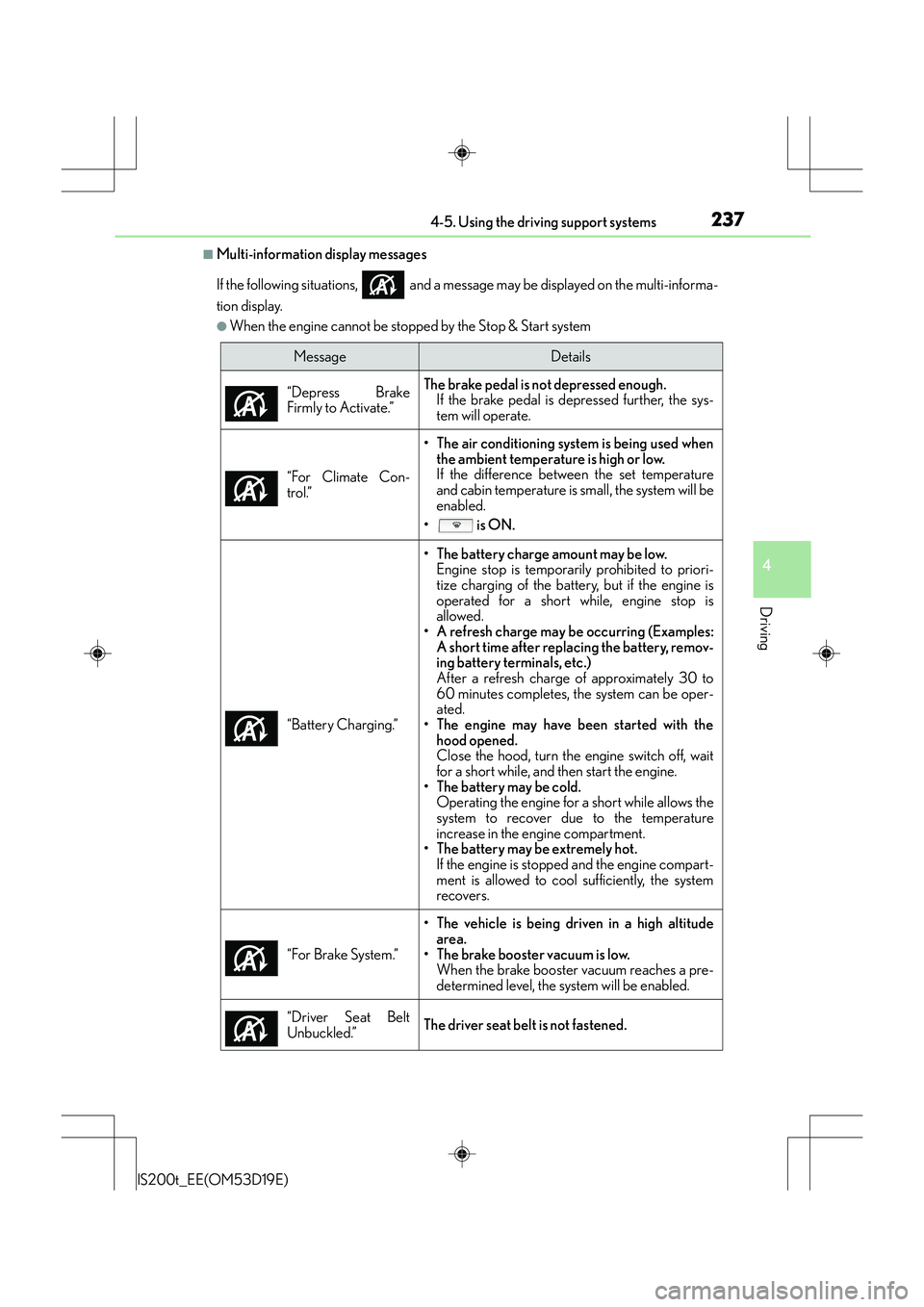
■Multi-information display messages
If the following situations, and a message may be displayed on the multi-informa-
tion display.
●When the engine cannot be stopped by the Stop & Start system
MessageDetails
“Depress Brake
Firmly to Activate.”
The brake pedal is not depressed enough. If the brake pedal is depressed further, the sys-
tem will operate.
“For Climate Con-
trol.”
• The air conditioning system is being used when the ambient temperature is high or low.
If the difference between the set temperature
and cabin temperature is small, the system will be
enabled.
• is ON.
“Battery Charging.”
• The battery charge amount may be low. Engine stop is temporarily prohibited to priori-
tize charging of the battery, but if the engine is
operated for a short while, engine stop is
allowed.
• A refresh charge may be occurring (Examples: A short time after replacing the battery, remov-
ing battery terminals, etc.)
After a refresh charge of approximately 30 to
60 minutes completes, the system can be oper-
ated.
• The engine may have been started with the hood opened.
Close the hood, turn the engine switch off, wait
for a short while, and then start the engine.
• The battery may be cold. Operating the engine for a short while allows the
system to recover due to the temperature
increase in the engine compartment.
• The battery may be extremely hot.
If the engine is stopped and the engine compart-
ment is allowed to cool sufficiently, the system
recovers.
“For Brake System.”
• The vehicle is being driven in a high altitude area.
• The brake booster vacuum is low. When the brake booster vacuum reaches a pre-
determined level, the system will be enabled.
“Driver Seat Belt
Unbuckled.”
The driver seat belt is not fastened.
Page 238 of 612
2384-5. Using the driving support systems
IS200t_EE(OM53D19E)
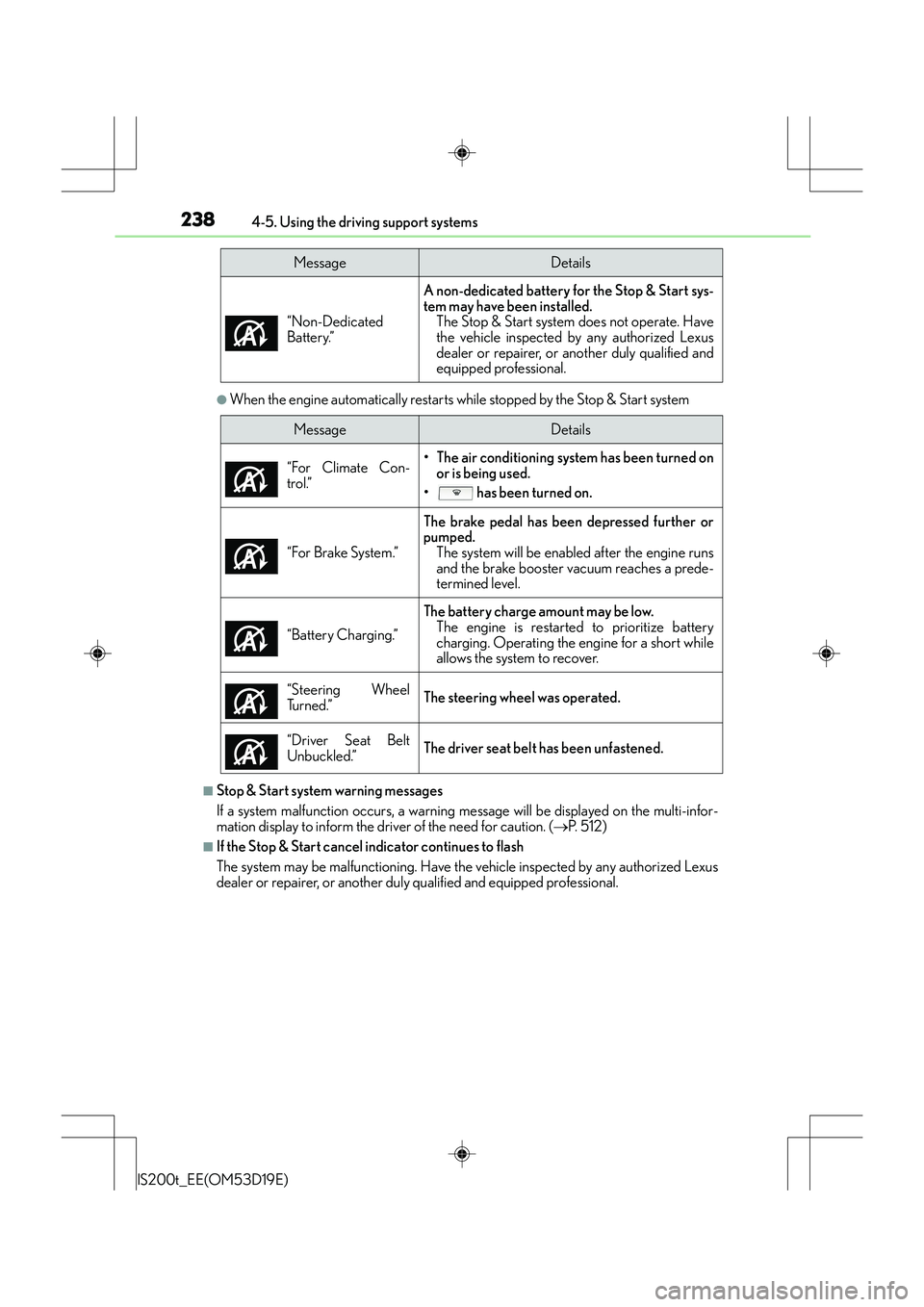
●When the engine automatically restarts while stopped by the Stop & Start system
■Stop & Start system warning messages
If a system malfunction occurs, a warning message will be displayed on the multi-infor-
mation display to inform the driver of the need for caution. ( →P. 5 1 2 )
■If the Stop & Start cancel indicator continues to flash
The system may be malfunctioning. Have the vehicle inspected by any authorized Lexus
dealer or repairer, or another duly qualified and equipped professional. “Non-Dedicated
Battery.”
A non-dedicated battery for the Stop & Start sys-
tem may have been installed.
The Stop & Start system does not operate. Have
the vehicle inspected by any authorized Lexus
dealer or repairer, or another duly qualified and
equipped professional.
MessageDetails
MessageDetails
“For Climate Con-
trol.”
• The air conditioning system has been turned on or is being used.
• has been turned on.
“For Brake System.”
The brake pedal has been depressed further or
pumped. The system will be enabled after the engine runs
and the brake booster vacuum reaches a prede-
termined level.
“Battery Charging.”
The battery charge amount may be low. The engine is restarted to prioritize battery
charging. Operating the engine for a short while
allows the system to recover.
“Steering Wheel
Tu r n e d . ”
The steering wheel was operated.
“Driver Seat Belt
Unbuckled.”
The driver seat belt has been unfastened.
Page 385 of 612
3855-11. Bluetooth®
5
Lexus Display Audio system
IS200t_EE(OM53D19E)
■Bluetooth® antenna
The antenna is built into the display.
If the portable audio player is behind the seat or in the glove box or console box, or is
touching or covered by metal objects, the connection status may deteriorate.
If the cellular phone is behind the seat or in the console box, or touching or covered by
metal objects, the connection status may deteriorate.
■Battery charge/signal status
●This display may not correspond exactly with the portable audio player or cellular
phone itself.
●This system does not have a charging function.
●The portable audio player or cellular phon e battery will be depleted quickly when the
device is connected to Bluetooth®.
■When using the Bluetooth® audio and hands-free system at the same time
The following problems may occur.
●The Bluetooth® audio connection may be interrupted.
●Noise may be heard during Bluetooth® audio playback.
■About the contact in this system
The following data is stored for every regi stered cellular phone. When another phone is
connecting, you cannot read the registered data.
●Contact data
●Call history
●Favorite
When removing a Bluetooth® phone from the system, the above-mentioned data is also
deleted.
■About Bluetooth®
Bluetooth® is a registered trademark of
Bluetooth SIG, Inc.
The Bluetooth
® word mark and logos are
owned by the Bluetooth SIG, Inc. and any use of
such marks by FUJITSU TEN LIMITED is under
license. Other trademarks and trade names are
those of their respective owners.
Page 448 of 612
4487-3. Do-it-yourself maintenance
IS200t_EE(OM53D19E)
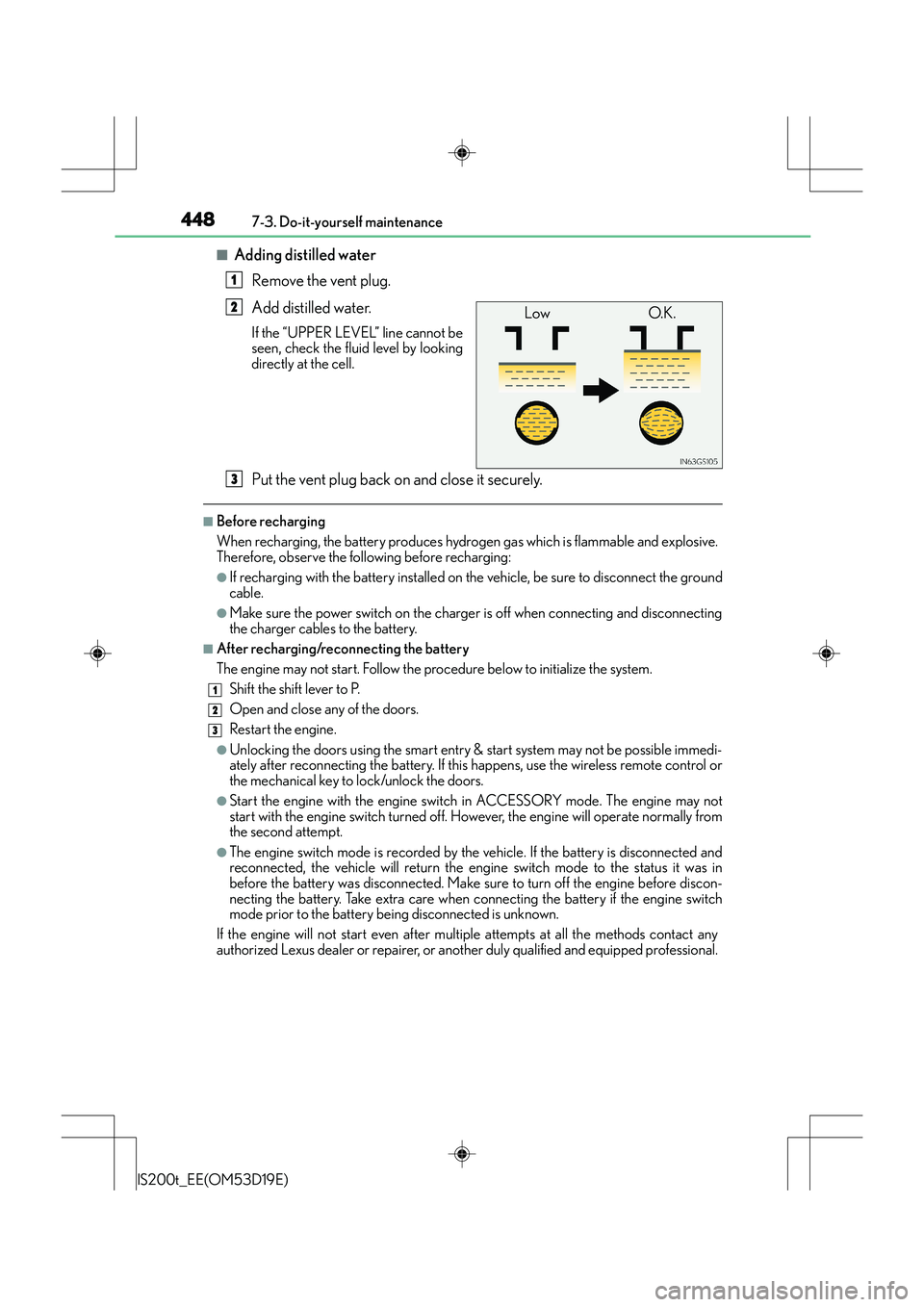
■Adding distilled waterRemove the vent plug.
Add distilled water.
If the “UPPER LEVEL” line cannot be
seen, check the fluid level by looking
directly at the cell.
Put the vent plug back on and close it securely.
■Before recharging
When recharging, the battery produces hydrogen gas which is flammable and explosive.
Therefore, observe the following before recharging:
●If recharging with the battery installed on the vehicle, be sure to disconnect the ground
cable.
●Make sure the power switch on the charger is off when connecting and disconnecting
the charger cables to the battery.
■After recharging/reconnecting the battery
The engine may not start. Follow the procedure below to initialize the system.Shift the shift lever to P.
Open and close an y of the doors.
Restart the engine.
●Unlocking the doors using the smart entry & start system may not be possible immedi-
ately after reconnecting the battery. If this happens, use the wireless remote control or
the mechanical key to lock/unlock the doors.
●Start the engine with the engine switch in ACCESSORY mode. The engine may not
start with the engine switch turned off. Ho wever, the engine will operate normally from
the second attempt.
●The engine switch mode is recorded by the vehicle. If the battery is disconnected and
reconnected, the vehicle will return the engine switch mode to the status it was in
before the battery was disconnected. Make sure to turn off the engine before discon-
necting the battery. Take extra care when connecting the battery if the engine switch
mode prior to the battery being disconnected is unknown.
If the engine will not start even after multip le attempts at all the methods contact any
authorized Lexus dealer or repairer, or another duly qualified and equipped professional.
1
Low O.K.2
3
1
2
3
Page 449 of 612
4497-3. Do-it-yourself maintenance
7
Maintenance and care
IS200t_EE(OM53D19E)
CAUTION
■Chemicals in the battery
Batteries contain poisonous and corrosive sulfuric acid and may produce hydrogen
gas which is flammable and explosive. To reduce the risk of death or serious injury, take
the following precautions while working on or near the battery:
●Do not cause sparks by touching the battery terminals with tools.
●Do not smoke or light a match near the battery.
●Avoid contact with eyes, skin and clothes.
●Never inhale or swallow electrolyte.
●Wear protective safety glasses when working near the battery.
●Keep children away from the battery.
■Where to safely charge the battery
Always charge the battery in an open area. Do not charge the battery in a garage or
closed room where there is insufficient ventilation.
■Emergency measures regarding electrolyte
●If electrolyte gets in your eyes
Flush your eyes with clean water for at least 15 minutes and get immediate medical
attention. If possible, continue to apply water with a sponge or cloth while traveling to
the nearest medical facility.
●If electrolyte gets on your skin
Wash the affected area thoroughly. If you feel pain or burning, get medical attention
immediately.
●If electrolyte gets on your clothes
It can soak through clothing on to your skin. Immediately take off the clothing and fol-
low the procedure above if necessary.
●If you accidentally swallow electrolyte
Drink a large quantity of water or milk . Get emergency medical attention immedi-
ately.
NOTICE
■When recharging the battery
Never recharge the battery while the engine is running. Also, be sure all accessories
are turned off.
■When adding distilled water
Avoid overfilling. Water spilled during battery recharging may cause corrosion.
Page 500 of 612
5008-2. Steps to take in an emergency
IS200t_EE(OM53D19E)
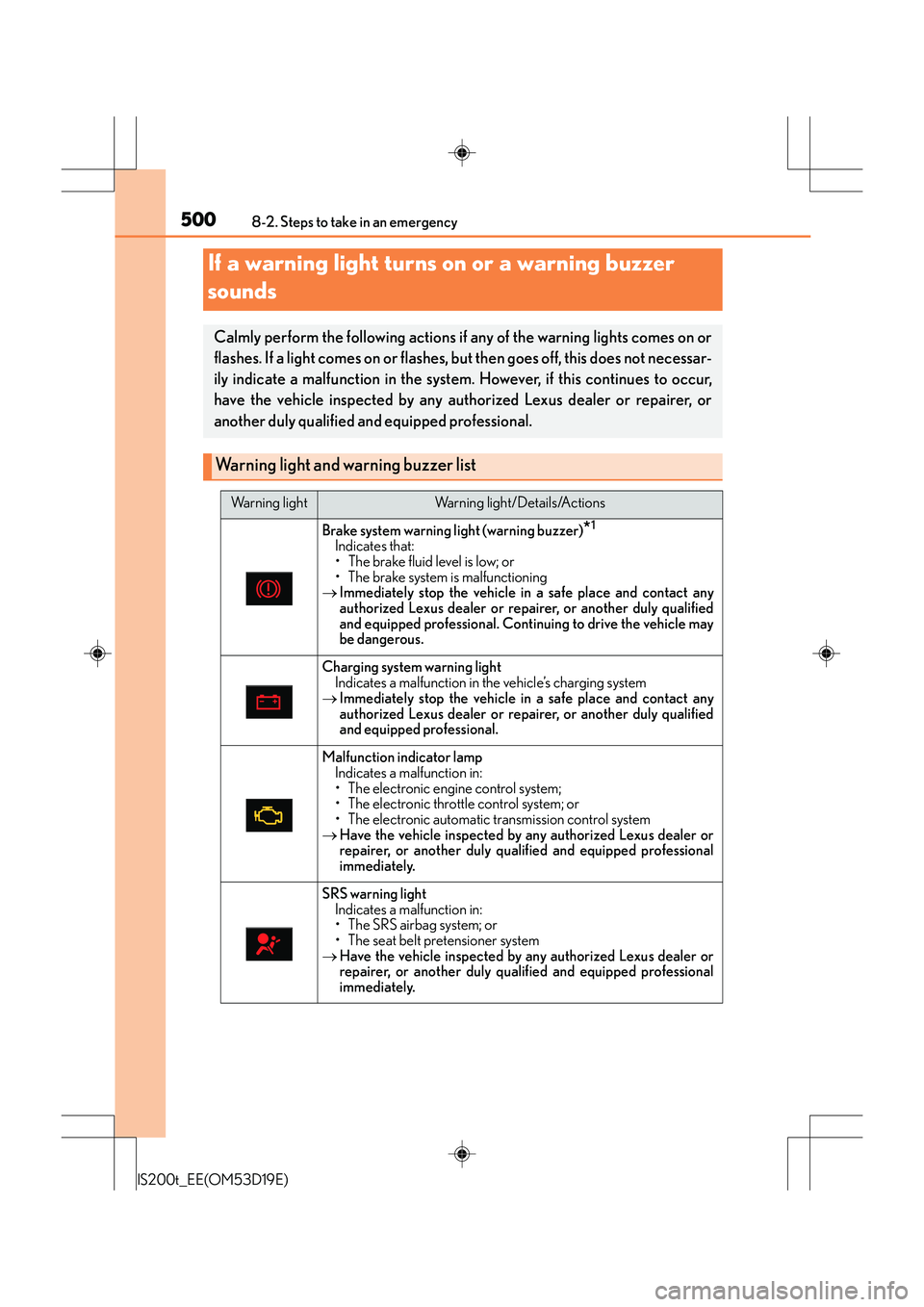
If a warning light turns on or a warning buzzer
sounds
Calmly perform the following actions if any of the warning lights comes on or
flashes. If a light comes on or flashes, but then goes off, this does not necessar-
ily indicate a malfunction in the system. However, if this continues to occur,
have the vehicle inspected by any authorized Lexus dealer or repairer, or
another duly qualified and equipped professional.
Warning light and warning buzzer list
Warning lightWarning light/Details/Actions
Brake system warning light (warning buzzer)*1
Indicates that:
• The brake fluid level is low; or
• The brake system is malfunctioning
→ Immediately stop the vehicle in a safe place and contact any
authorized Lexus dealer or repairer, or another duly qualified
and equipped professional. Continuing to drive the vehicle may
be dangerous.
Charging system warning light
Indicates a malfunction in the vehicle’s charging system
→ Immediately stop the vehicle in a safe place and contact any
authorized Lexus dealer or repairer, or another duly qualified
and equipped professional.
Malfunction indicator lamp
Indicates a malfunction in:
• The electronic engine control system;
• The electronic throttle control system; or
• The electronic automatic transmission control system
→ Have the vehicle inspected by any authorized Lexus dealer or
repairer, or another duly qualified and equipped professional
immediately.
SRS warning light
Indicates a malfunction in:
• The SRS airbag system; or
• The seat belt pretensioner system
→ Have the vehicle inspected by any authorized Lexus dealer or
repairer, or another duly qualified and equipped professional
immediately.
Page 555 of 612
5558-2. Steps to take in an emergency
8
When trouble arises
IS200t_EE(OM53D19E)
Once the engine starts, have the vehicle inspected at any authorized Lexus
dealer or repairer, or another duly qualified and equipped professional as soon
as possible.
■Starting the engine when the battery is discharged
The engine cannot be started by push-starting.
■To prevent battery discharge
●Turn off the headlights and the audio system while the engine is stopped. (Vehicles with
a Stop & Start system: except when the engine is stopped by the Stop & Start system.)
●Turn off any unnecessary electrical components when the vehicle is running at a low
speed for an extended period, such as in heavy traffic.
■Charging the battery
The electricity stored in the battery will disc harge gradually even when the vehicle is not
in use, due to natural discharge and the draining effects of certain electrical appliances. If
the vehicle is left for a long time, the battery may discharge, and the engine may be
unable to start. (The battery recharges automatically during driving.)
■When recharging or replacing the battery
●In some cases, it may not be possible to un lock the doors using the smart entry & start
system when the battery is discharged. Use the wireless remote control or the mechan-
ical key to lock or unlock the doors.
●The engine may not start on the first attempt after the battery has recharged but will
start normally after the second attempt. This is not a malfunction.
●The engine switch mode is memorized by the vehicle. When the battery is recon-
nected, the system will return to the mode it was in before the battery was discharged.
Before disconnecting the battery, turn the engine switch off.
If you are unsure what mode the engine switch was in before the battery discharged, be
especially careful when reconnecting the battery.
●Vehicles with Stop & Start system:
After charging the battery or reconnecting the battery terminals, the Stop & Start sys-
tem may not automatically stop the engine for approximately 30 to 60 minutes.
■When exchanging the battery (vehicles with Stop & Start system)
Use a battery specified for use with the Stop & Start system and equivalent to a genuine
battery. If an unsupported battery is used, Stop & Start system functions may be
restricted to protect the battery.
Also, battery performance may decrease and the engine may not be able to restart.
Contact any authorized Lexus dealer or Lexus authorized repairers, or any reliable
repairers for details.