lock Lexus IS200t 2017 s Owners Manual
[x] Cancel search | Manufacturer: LEXUS, Model Year: 2017, Model line: IS200t, Model: Lexus IS200t 2017Pages: 676, PDF Size: 149.78 MB
Page 368 of 676

3685-2. Setup
IS200t_EE(OM53D77E)
Select “General” or “Camera” on the “Display” screen or select “Display” on
audio menu screen. ( P. 375)
Adjust the display as desired by turning the controller clockwise (+) or coun-
terclockwise (-).
To select “Contrast”, “Brightness”, “Colour” or “Tone”, move the controller to the left.
(“Colour” and “Tone” are available when “D isplay” on the audio settings screen for
each audio source is selected.)
■Changing the sample image (when “General” is selected)
Move the controller to the right and select the desired sample image.
Adjusting the screen contrast/brightness/color/tone
1
2
Page 436 of 676
4365-12. Other function
IS200t_EE(OM53D77E)
■Operational conditions
●When MirrorLink™ is activated, previous applications, run with a USB, are closed, and
vice versa.
●Compatible devices
Smartphones, which passed the Car Connectivity Consortium certification program
ver1.1 or later. Confirm with the smartphone manufacture or the distributor for the
MirrorLink
™ compatibility.
●Compatible applications
Applications, which are certified by Car Connectivity Consortium as MirrorLink™Base-Certified or Drive-Certified applications.
■About MirrorLink™
MirrorLink is a registered trademark of Car Connectivity Consortium, Inc.
■When using MirrorLink™
●Check that the smartphone screen is unlocked. Unlock the smartphone screen before
connecting it to the Lexus Display Audio system. (Some smartphones may not be able
to be connected via MirrorLink
™ if the screen is locked.)
●Make sure that the smartphone has been connected via Bluetooth®. (Some smart-
phones may not be able to perform hands-free calls using the MirrorLink™ function if it
has not been connected to the vehicle via Bluetooth®.)
●If a MirrorLink™ application cannot be started, check that the MirrorLink™ applica-
tion certificate has not expired. The certificates of MirrorLink™ applications have an
expiration date. (An internet connection is required to automatically update the certifi-
cate.) If a MirrorLink
™ application becomes unavailable, it may be due to the certifi-
cate expiring. In this case, the certificat e must be updated manually. Check with the
smartphone manufacturer or application developer for how to update the certificate.
●Make sure the volume of the smartphone is set to an appropriate level. If the Mirror-
Link™ application volume is excessively low even when the volume of the Lexus Dis-
play Audio system is increased, check the vo lume of the smartphone and increase it as
necessary.
WARNING
■While driving
Do not connect smartphone or operate the controls.
Page 443 of 676

443
6Interior features
IS200t_EE(OM53D77E)
6-1. Basic operation of the Remote Touch screen
Remote Touch ............................. 444
10.3-inch display ........................448
6-2. Using the air conditioning system
Automatic air conditioning system ......................................... 450
Heated steering wheel/ seat heaters/
seat ventilators .........................463
6-3. Using the interior lights Interior lights list..........................465• Interior lights ..........................466
• Personal lights ....................... 466
6-4. Using the storage features List of storage features ............468• Glove box ...............................469
• Console box...........................469
•Cup holders/Bottle holders ........................470
Trunk features.............................. 472 6-5. Using the other interior
features
Other interior features ............ 475 • Sun visors ................................ 475
• Vanity mirrors ....................... 475
• Clock ........................................ 475
• Power outlet........................... 476
• Armrest.....................................477
• Rear sunshade .......................477
• Assist grips ............................. 479
• Coat hooks ............................. 479
ERA-GLONASS ......................480
Page 461 of 676
4616-2. Using the air conditioning system
6
Interior features
IS200t_EE(OM53D77E)
■Registering air conditioning settings to electronic keys (vehicles with driving position
memory)
●Unlocking the vehicle using an electronic ke y and turning the engine switch to IGNI-
TION ON mode will recall that key's registered air conditioning settings.
●When the engine switch is turned off, the current air conditioning settings will automat-
ically be registered to the electronic key that was used to unlock the vehicle.
●The system may not operate correctly if more than one electronic key is in the vicinity or
if the smart entry & start system is used to unlock a passenger door.
●The doors that can recall the air conditioni ng setting when unlocked using the smart
entry & start system can be changed.* For details, contact any authorized Lexus
retailer or Lexus authorized repa irer, or any reliable repairer.
*: The doors that can recall the driving position memory are changed at the same time.
■Using automatic mode
Fan speed is adjusted automatically according to the temperature setting and the ambi-
ent conditions.
Therefore, the fan may stop for a while until wa rm or cool air is ready to flow immediately
after is pressed or “AUTO” is selected.
■Fogging up of the windows
The windows will easily fog up when the hu midity in the vehicle is high. Turning
(“A/C”) on will dehumidify the air from the ou tlets and defog the windshield effectively.
●If you turn (“A/C”) off, the windows may fog up more easily.
●The windows may fog up if the recirculated air mode is used.
■Outside/recirculated air mode
●When driving on dusty roads such as tunnels or in heavy traffic, set the outside/recircu-
lated air mode button to the recirculated air mode. This is effective in preventing out-
side air from entering the vehicle interior . During cooling operation, setting the
recirculated air mode will also cool the vehicle interior effectively.
●Outside/recirculated air mode may automati cally switch depending on the tempera-
ture setting or the inside temperature.
■Operation of the air conditioning system in Eco drive mode
In Eco drive mode, the air conditioning system is controlled as follows to prioritize fuel
efficiency:
●Engine speed and compressor operation controlled to restrict heating/cooling capac-
ity
●Fan speed restricted when automatic mode is selected
To improve air conditioning performanc e, perform the following operations:
●Adjust the fan speed
●Turn off Eco drive mode
■When the outside temperature falls to nearly 0 C (32 F)
The dehumidification function may not operate even when is pressed or “A/C” is
selected.
Page 462 of 676
4626-2. Using the air conditioning system
IS200t_EE(OM53D77E)
■Ventilation and air conditioning odors
●To let fresh air in, set the air conditioning system to the outside air mode.
●During use, various odors from inside and outside the vehicle may enter into and accu-
mulate in the air conditioning system. This may then cause odor to be emitted from the
vents.
●To reduce potential odors from occurring:
• It is recommended that the air conditioning system be set to outside air mode prior
to turning the vehicle off.
• The start timing of the blower may be dela yed for a short period of time immediately
after the air conditioning system is started in automatic mode.
■Air conditioning filter
P. 525
■Customization
Settings (e.g. A/C Auto switch operation) can be changed.
(Customizable features: P. 647)
WARNING
■To prevent the windshield from fogging up
●Do not use during cool air operation in extremely humid weather. The differ-
ence between the temperature of the outside air and that of the windshield can cause
the outer surface of the windshield to fog up, blocking your vision.
■To prevent burns
●Do not touch the rear view mirror surfaces when the outside rear view mirror defog-
gers are on.
●Do not touch the glass at lower part of the windshield or to the side of the front pillars
when the windshield wiper de-icer is on.
NOTICE
■To prevent battery discharge
Do not leave the air conditioning system on longer than necessary when the engine is
off.
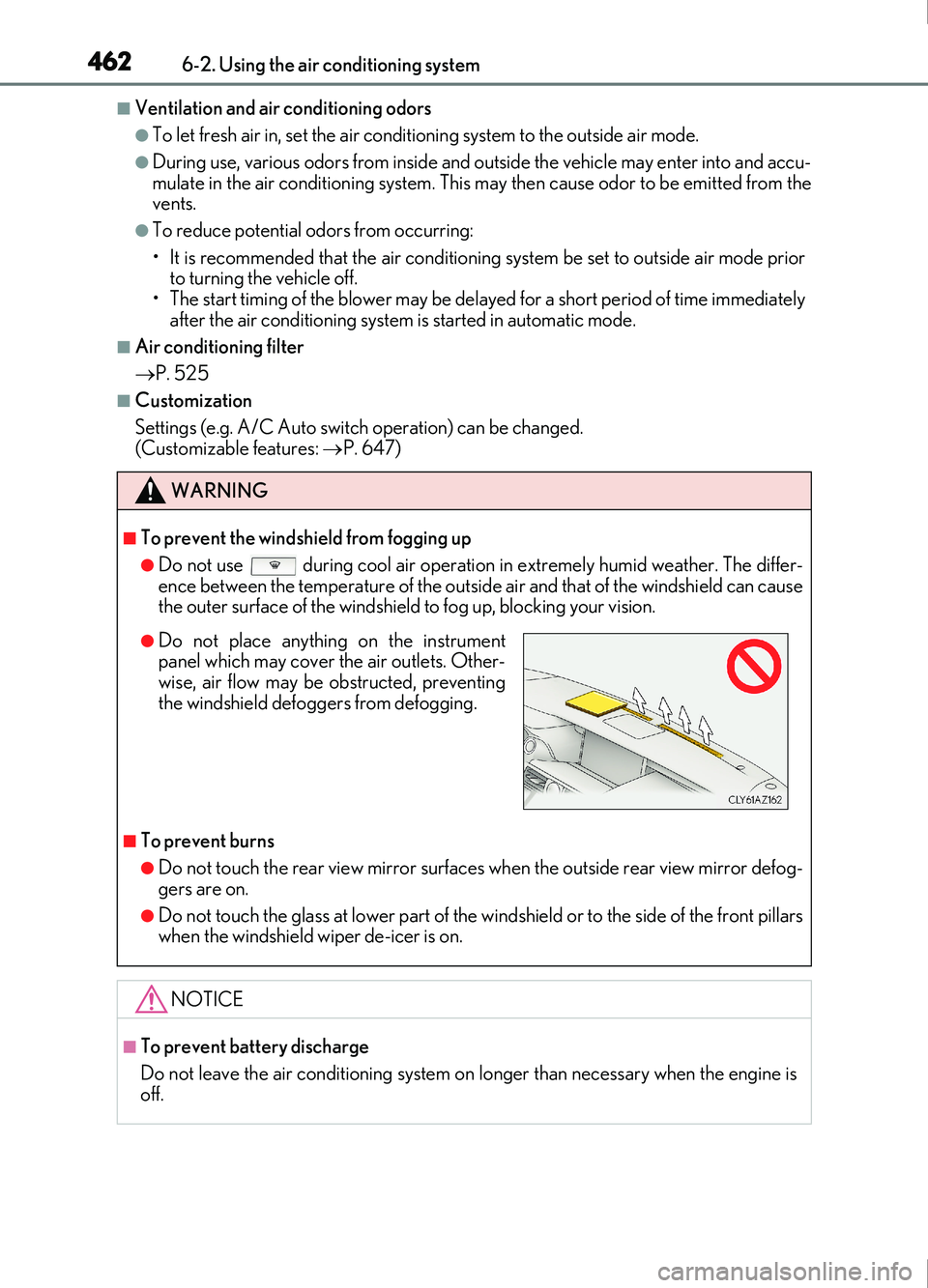
●Do not place anything on the instrument
panel which may cover the air outlets. Other-
wise, air flow may be obstructed, preventing
the windshield defoggers from defogging.
Page 467 of 676
4676-3. Using the interior lights
6
Interior features
IS200t_EE(OM53D77E)
■The interior lights and personal lights can be operated when
The interior lights and personal lights can be used regardless of the engine switch mode.
However, when the engine switch is turned off, they can be used only when the battery
protection function is not operating.
■Battery protection function
To prevent the battery from being discharged, approximately 20 minutes after the
engine switch is turned off, the power supplie d to the interior lights, personal lights, and
other lights will be cut off automatically. (If th e interior lights, etc. are left on when the
engine switch is turned off, they will be turned off automatically.)
To turn the interior lights, etc. back on, tu rn the engine switch to ACCESSORY or IGNI-
TION ON mode or operate the interior light switch until the interior lights turn on.
If any of the lights are illuminated automati cally due to the illuminated entry system, the
battery protection function will be canceled.
■Illuminated entry system
The lights automatically turn on/off according to engine switch mode, the presence of the
electronic key, whether the doors are locked/unlocked, and whether the doors are
opened/closed.
■Customization
Setting (e.g. the time elapsed before lights turn off) can be changed.
(Customizable features: P. 641)
NOTICE
To prevent battery discharge, do not leave th e lights on longer than necessary when the
engine is off.
Page 469 of 676
4696-4. Using the storage features
6
Interior features
IS200t_EE(OM53D77E)
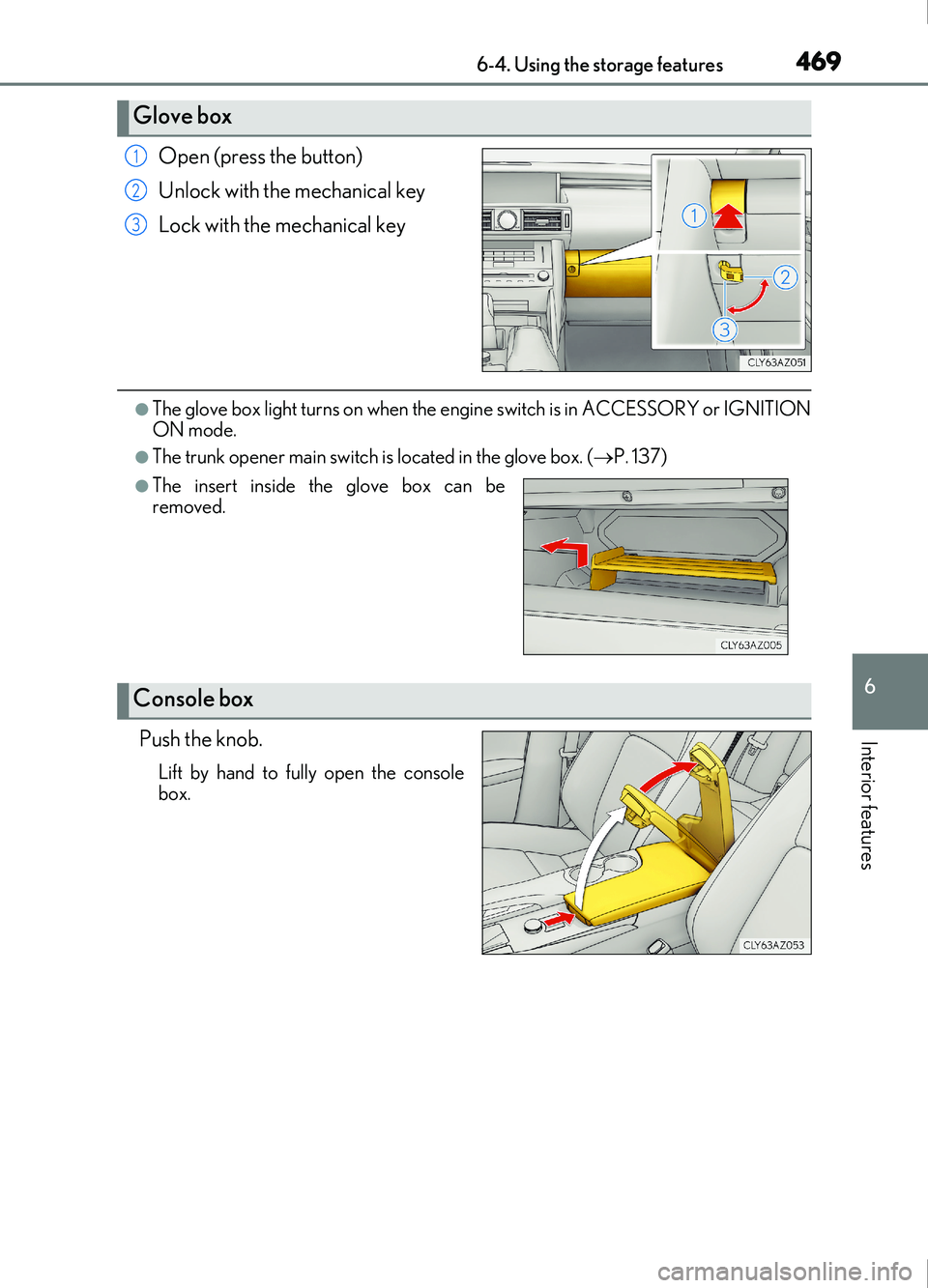
Open (press the button)
Unlock with the mechanical key
Lock with the mechanical key
●The glove box light turns on when the engine switch is in ACCESSORY or IGNITION
ON mode.
●The trunk opener main switch is located in the glove box. (P. 137)
Push the knob.
Lift by hand to fully open the console
box.
Glove box
1
2
3
●The insert inside the glove box can be
removed.
Console box
Page 475 of 676

475
IS200t_EE(OM53D77E)
6
Interior features
6-5. Using the other interior features
To set the visor in the forward posi-
tion, flip it down.
To set the visor in the side position,
flip down, unhook, and swing it to the
side.
Slide the cover to open.
The light turns on when the cover is
opened.
The clock can be adjusted. Pressing and holding will move the
clock hands backward.
Pressing and holding will move the
clock hands forward.
Other interior features
Sun visors
1
2
Vanity mirrors
Clock
1
2
Page 487 of 676
4877-1. Maintenance and care
7
Maintenance and care
IS200t_EE(OM53D77E)
■When using a car wash (vehicles with entry function)
If the door handle becomes wet while the electronic key is within the effective range, the
door may lock and unlock repeatedly. In that case, follow the following correction proce-
dures to wash the vehicle:
●Place the key in a position 2 m (6 ft.) or more separate from the vehicle while the vehi-
cle is being washed. (Take care to ensure that the key is not stolen.)
●Set the electronic key to battery-saving mode to disable the smart entry & start system.
( P. 142)
■Aluminum wheels
●Remove any dirt immediately by using a neutral detergent. Do not use hard brushes or
abrasive cleaners. Do not use strong or harsh chemical cleaners.
Use the same mild detergent and wax as used on the paint.
●Do not use detergent on the wheels when they are hot, for example after driving a long
distance in hot weather.
●Wash detergent from the wheels immediately after use.
■Bumpers
Do not scrub with abrasive cleaners.
■Front side windows water-repellent coating
●The following precautions can extend the effectiveness of the water-repellent coating.
• Remove any dirt, etc. from the front side windows regularly.
• Do not allow dirt and dust to accumulate on the windows for a long period.
Clean the windows with a soft, damp cloth as soon as possible.
• Do not use wax or glass cleaners that co ntain abrasives when cleaning the windows.
• Do not use any metallic objects to remove condensation build up.
●When the water-repellent performance has become insufficient, the coating can be
repaired. Contact any authorized Lexus reta iler or Lexus authorized repairer, or any
reliable repairer.
Page 497 of 676
4977-3. Do-it-yourself maintenance
7
Maintenance and care
IS200t_EE(OM53D77E)
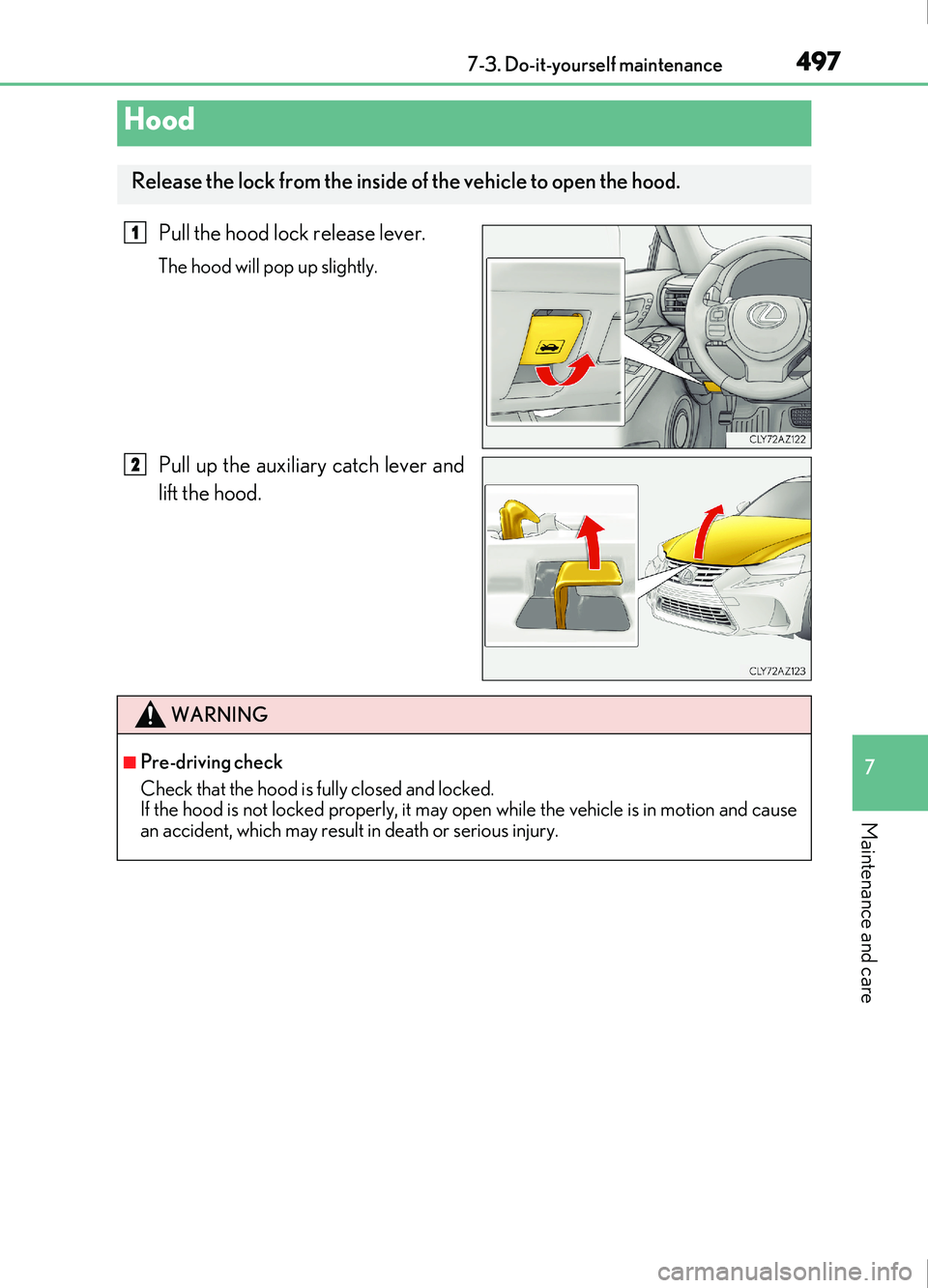
Pull the hood lock release lever.
The hood will pop up slightly.
Pull up the auxiliary catch lever and
lift the hood.
Hood
Release the lock from the inside of the vehicle to open the hood.
1
2
WARNING
■Pre-driving check
Check that the hood is fully closed and locked.
If the hood is not locked properly, it may open while the vehicle is in motion and cause
an accident, which may result in death or serious injury.