change time Lexus IS200t 2017 s Owner's Guide
[x] Cancel search | Manufacturer: LEXUS, Model Year: 2017, Model line: IS200t, Model: Lexus IS200t 2017Pages: 676, PDF Size: 149.78 MB
Page 272 of 676

2724-5. Using the driving support systems
IS200t_EE(OM53D77E)
*1: If the turn signal indicator is not operated when changing lanes, the mark does not dis-play.
*2: Vehicles with a navigation system
In the following situations, the RSA system alerts the driver using a warning dis-
play.
●When the vehicle speed exceeds the speed warning threshold applied to the
speed limit of the sign displayed on the multi-information display, the sign
color becomes inverted.
●If it is detected that your vehicle is overtaking when a no overtaking sign is dis-
played on the multi-information display, the sign flashes.
●Vehicles with a navigation system: When the RSA system recognizes a no-
entry sign and detects that the vehicle has entered a no-entry area based on
the map information of the navigation system, the no-entry sign flashes.
Depending on the situation, traffic environment (traffic direction, speed, unit)
may be detected incorrectly and a warning display may not operate properly.
■Automatic turn-off of RSA sign display
One or more signs automatically turn off in the following situations.
●A new sign is not recognized for a certain distance.
●The road changes due to a left or right turn, etc.
■Conditions in which the function may not operate or detect correctly
In the following situations, RSA does not op erate normally and may not recognize signs,
display the incorrect sign, etc. However, this does not indicate a malfunction.
●The camera sensor is misaligned due to a strong impact being applied to the sensor,
etc.
●Dirt, snow, stickers, etc. are on the windshield near the camera sensor.
●In inclement weather such as heavy rain, fog, snow or sand storms
●Light from an oncoming vehicle, the sun, etc. enters the camera sensor.
●The sign is dirty, faded, tilted or bent, and if an electronic sign, the contrast is poor.
●All or part of the sign is hidden by the leaves of a tree, a pole, etc.
●The sign is only visible to the camera sensor for a short amount of time.
●The driving scene (turning, lane change, etc.) is judged incorrectly.
●Even if it is a sign not appropriate for the currently traveled lane, such a sign exists
directly after a freeway branches, or in an adjacent lane just before merging.
●Stickers are attached to the rear of the preceding vehicle.
●A sign resembling a system compatible sign is recognized.
●The vehicle is driven in a country with a different direction of traffic.
Warning display
Page 277 of 676
2774-5. Using the driving support systems
4
Driving
IS200t_EE(OM53D77E)
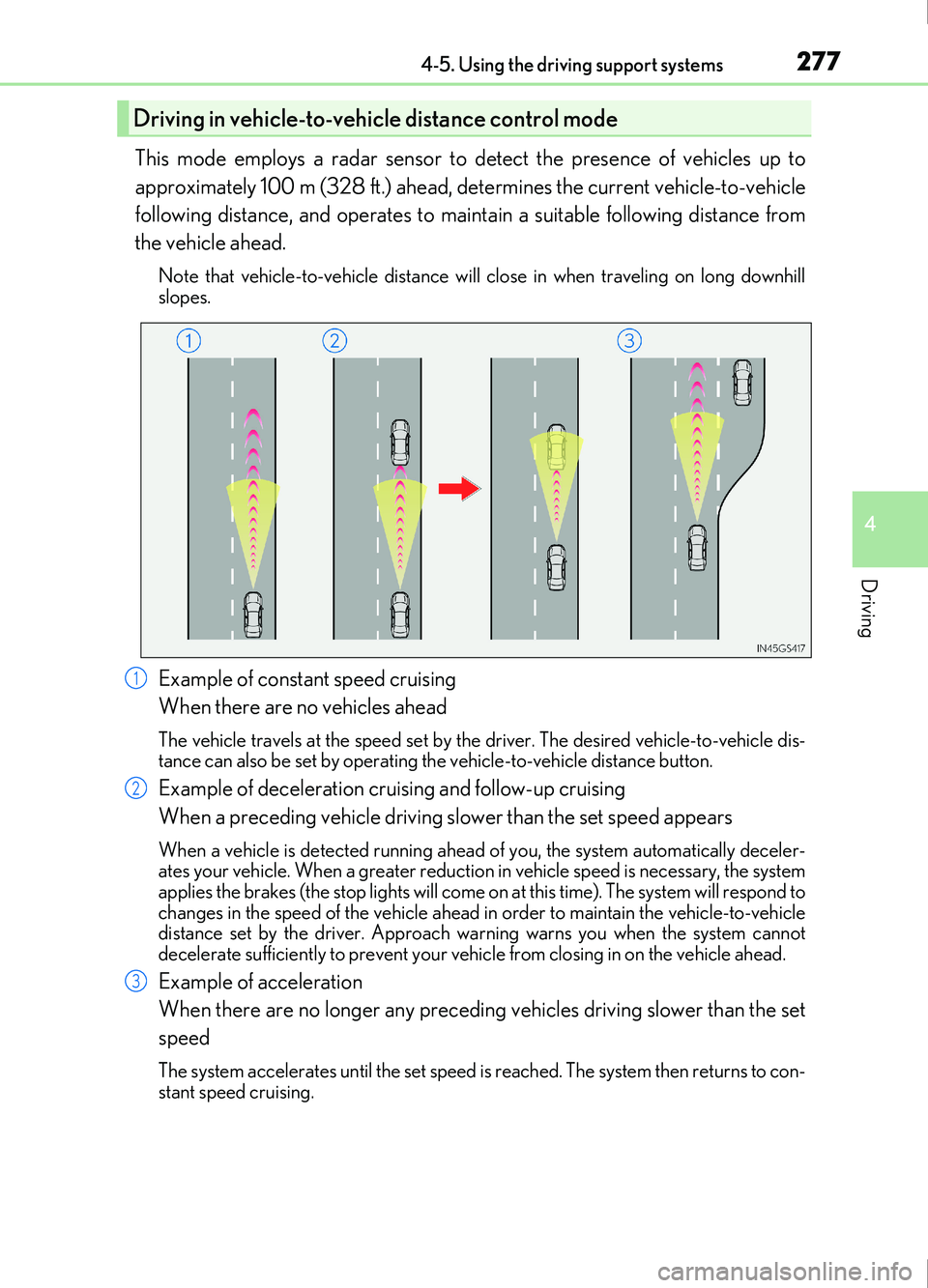
This mode employs a radar sensor to detect the presence of vehicles up to
approximately 100 m (328 ft.) ahead, determines the current vehicle-to-vehicle
following distance, and operates to maintain a suitable following distance from
the vehicle ahead.
Note that vehicle-to-vehicle distance will close in when traveling on long downhill
slopes.
Example of constant speed cruising
When there are no vehicles ahead
The vehicle travels at the speed set by the driver. The desired vehicle-to-vehicle dis-
tance can also be set by operating the vehicle-to-vehicle distance button.
Example of deceleration cruising and follow-up cruising
When a preceding vehicle driving slower than the set speed appears
When a vehicle is detected running ahead of you, the system automatically deceler-
ates your vehicle. When a greater reductio n in vehicle speed is necessary, the system
applies the brakes (the stop lights will come on at this time). The system will respond to
changes in the speed of the vehicle ahead in order to maintain the vehicle-to-vehicle
distance set by the driver. Approach wa rning warns you when the system cannot
decelerate sufficiently to prevent your vehicle from closing in on the vehicle ahead.
Example of acceleration
When there are no longer any preceding vehicles driving slower than the set
speed
The system accelerates until the set speed is reached. The system then returns to con-
stant speed cruising.
Driving in vehicle-to-vehicle distance control mode
1
2
3
Page 279 of 676
2794-5. Using the driving support systems
4
Driving
IS200t_EE(OM53D77E)
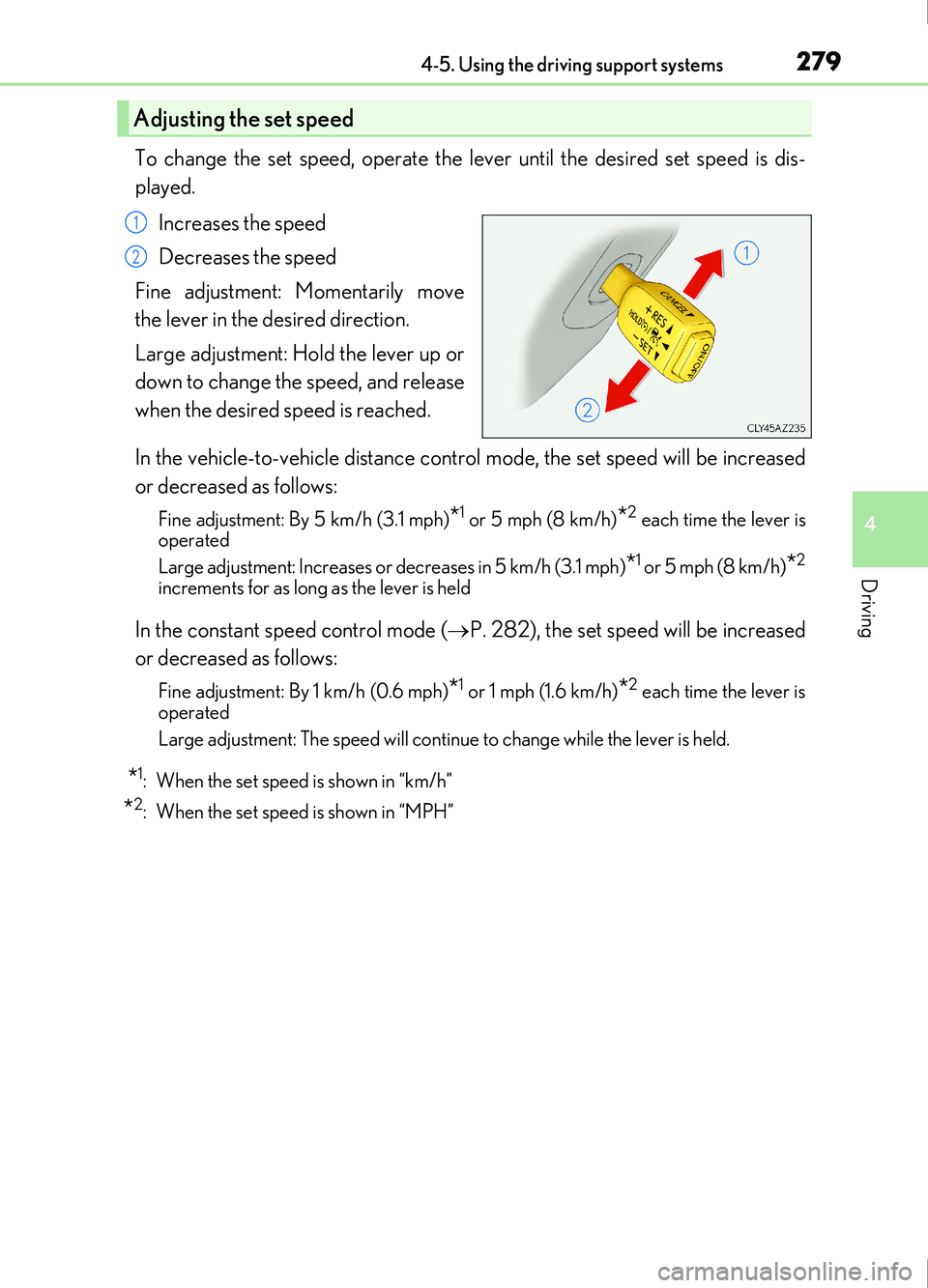
To change the set speed, operate the lever until the desired set speed is dis-
played.Increases the speed
Decreases the speed
Fine adjustment: Momentarily move
the lever in the desired direction.
Large adjustment: Hold the lever up or
down to change the speed, and release
when the desired speed is reached.
In the vehicle-to-vehicle distance control mode, the set speed will be increased
or decreased as follows:
Fine adjustment: By 5 km/h (3.1 mph)*1 or 5 mph (8 km/h)*2 each time the lever is
operated
Large adjustment: Increases or decreases in 5 km/h (3.1 mph)
*1 or 5 mph (8 km/h)*2
increments for as long as the lever is held
In the constant speed control mode ( P. 282), the set speed will be increased
or decreased as follows:
Fine adjustment: By 1 km/h (0.6 mph)*1 or 1 mph (1.6 km/h)*2 each time the lever is
operated
Large adjustment: The speed will continue to change while the lever is held.
*1: When the set speed is shown in “km/h”
*2: When the set speed is shown in “MPH”
Adjusting the set speed
1
2
Page 287 of 676
2874-5. Using the driving support systems
4
Driving
IS200t_EE(OM53D77E)
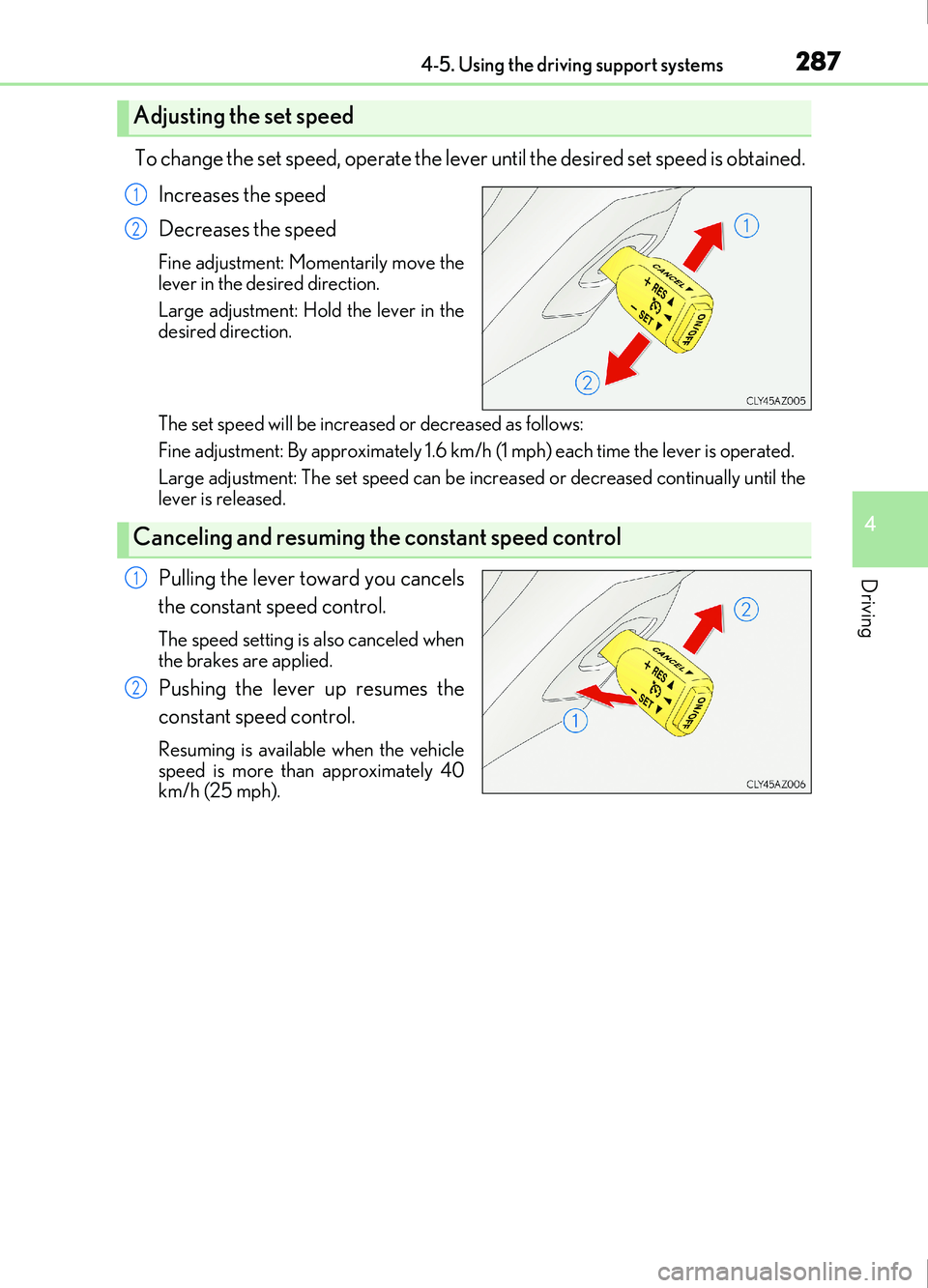
To change the set speed, operate the lever until the desired set speed is obtained.Increases the speed
Decreases the speed
Fine adjustment: Momentarily move the
lever in the desired direction.
Large adjustment: Hold the lever in the
desired direction.
The set speed will be increased or decreased as follows:
Fine adjustment: By approximately 1.6 km/h (1 mph) each time the lever is operated.
Large adjustment: The set speed can be incr eased or decreased continually until the
lever is released.
Pulling the lever toward you cancels
the constant speed control.
The speed setting is also canceled when
the brakes are applied.
Pushing the lever up resumes the
constant speed control.
Resuming is available when the vehicle
speed is more than approximately 40
km/h (25 mph).
Adjusting the set speed
1
2
Canceling and resuming the constant speed control
1
2
Page 293 of 676
2934-5. Using the driving support systems
4
Driving
IS200t_EE(OM53D77E)
After the engine is stopped by the Stop & Start system when the vehicle is on an
incline, brake force is temporarily maintained to prevent rolling backwards until
the engine is restarted and drive force is generated.
When drive force is generated, the ma intained brake force is automatically
canceled.
●This function operates on flat surfaces as well as steep inclines.
●Sound may be generated from the brak es, but this is not a malfunction.
●Brake pedal response may change and vibration may occur, but these are not
malfunctions.
■Operating conditions
●The Stop & Start system is operational when all of the following conditions are met:
• The brake pedal is being depressed firmly.
• The shift lever is in D or P.
• Normal mode or Eco drive mode is selected as the driving mode.
• is off.
• The driver’s seat belt is fastened.
• The engine is adequately warmed up.
• The driver’s door is closed.
• The accelerator pedal is not being depressed.
• The outside temperature is -5°C (23°F) or higher.
• The hood is closed.
●In the following situations the engine may not be stopped by the Stop & Start system.
This is not a malfunction of the Stop & Start system.
• The air conditioning system is being used when the ambient temperature is high or
low.
• The battery is not sufficiently charged, such as if the vehicle has been parked for a long time and the battery charge has decreased, the electric load is large, the bat-
tery temperature is excessively low or the battery has deteriorated, or is undergoing
a periodic recharge.
• The brake booster vacuum is low.
• The vehicle is stoppe d on a steep incline.
• The steering wheel is being operated.
• Due to traffic or other circumstances the vehicle is stopped repeatedly.
• The vehicle is being driven in a high altitude area.
• Engine coolant temperature or transmissi on fluid temperature is extremely low or
high.
• The battery fluid temperature is extremely low or high.
• For a while after the battery terminals have been disconnected and reconnected.
• For a while after the battery has been replaced.
• Vehicles with a power heater: The power heater is being used.
Hill-start assist control
Page 295 of 676
2954-5. Using the driving support systems
4
Driving
IS200t_EE(OM53D77E)
■If the windshield is fogged up while the engine is stopped by the Stop & Start system
Turn on. (The engine will start due to the automatic engine start function.):
P. 458
If the windshield fogs up frequently, press the Stop & Start cancel switch to disable the
system.
■If an odor comes from the air conditioning system while the engine is stopped by the
Stop & Start system
Press the Stop & Start cancel switch to deactivate the Stop & Start system.
■Air conditioning system operation while the engine is stopped by the Stop & Start sys-
tem
●If the air conditioning system is being us ed in automatic mode, the fan speed may be
reduced or the fan may be stopped while the engine is stopped by the Stop & Start sys-
tem in order to reduce changes in the cabin temperature.
●To ensure air conditioning system performanc e when the vehicle is stopped, disable the
Stop & Start system by pressing the Stop & Start cancel switch.
■Changing the idling stop time with the air conditioning system on
The length of time the Stop & Start system will operate when the air conditioning system
is on can be changed by performing the followi ng operation. (The length of time the Stop
& Start system will operate when the air condit ioning system is off cannot be changed.)
●Setting by pressing and holding the Stop & Start cancel switch
Each time the Stop & Start cancel switch is pressed and held for 3 seconds or more, the
system changes between standard and extended. The system status can be confirmed
on the multi-information display screen. ( P. 97)
●Settings using the multi-information display
( P. 106) or ( P. 107).
■The Stop & Start system protection function
●When the volume of the audio system is ex cessively high, sound output from the audio
system may suddenly be cut of f in order to reduce battery consumption. To prevent the
audio system from being cut off, keep the vo lume of audio system at a moderate level.
If the audio system has been cut off, turn the engine switch off, wait for 3 seconds or
more and then turn it to ACCESSORY mode or IGNITION ON mode to re-enable
the audio system.
●The audio system may not be activated if the battery terminals are disconnected and
then reconnected. If this occurs, turn the engine switch off and then turn it to IGNI-
TION ON mode and then off twice to activate the audio system.
■To prevent damage to the turbocharger
Allow the engine to idle immediately after driving at high speeds or long periods of uphill
driving. To allow the engine idle when the vehicle is stopped, disable the Stop & Start sys-
tem by pressing the Stop & Start cancel switch. ( P. 292)
■Replacing the battery
P. 620
■Displaying the Stop & Start system status
P. 106
Page 369 of 676
369
5
Lexus Display Audio system
IS200t_EE(OM53D77E)5-3. Using the audio system
Press the “AUDIO” button to display the “Source” screen.
If the “Source” screen is not displayed, press the button again.
Select the desired audio source.
The audio source can be selected by pressing the “RADIO” or “MEDIA” button.
Press the “MODE” switch when the audio
system is turned on. The audio source
changes each time the “MODE” switch is pressed.
■Rearranging the list
The listing order of the source list can be rearranged.
Move the controller to the left while on the “Source” screen.
Select “Audio source select”.
Select an item you wish to move and then select where to move the item to.
Selecting the audio source
Switching between audio sources, such as the radio and CD, is explained in
this section.
Changing audio source
Using the steering wheel switches to change audio sources
1
2
1
2
3
Page 375 of 676
3755-3. Using the audio system
5
Lexus Display Audio system
IS200t_EE(OM53D77E)
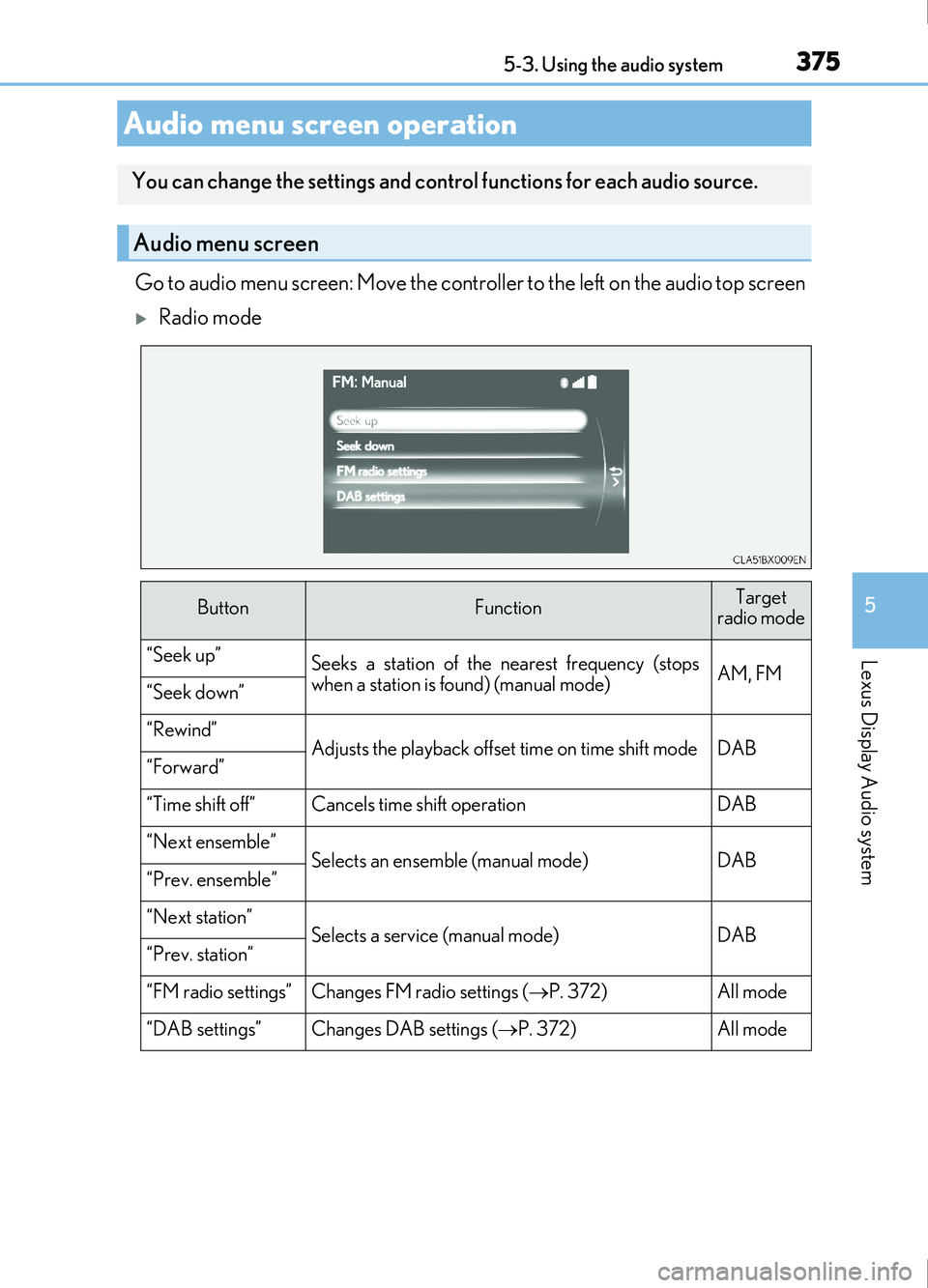
Go to audio menu screen: Move the controller to the left on the audio top screen
Radio mode
Audio menu screen operation
You can change the settings and control functions for each audio source.
Audio menu screen
ButtonFunctionTarget
radio mode
“Seek up”Seeks a station of the nearest frequency (stops
when a station is found) (manual mode)AM, FM“Seek down”
“Rewind”Adjusts the playback offset time on time shift modeDAB“Forward”
“Time shift off”Cancels time shift operationDAB
“Next ensemble”Selects an ensemble (manual mode)DAB“Prev. ensemble”
“Next station”Selects a service (manual mode)DAB“Prev. station”
“FM radio settings”Changes FM radio settings ( P. 372)All mode
“DAB settings”Changes DAB settings ( P. 372)All mode
Page 378 of 676
378
IS200t_EE(OM53D77E)5-4. Using the radio
Pressing the “RADIO” button displays the radio top screen from any screen of
the selected source.
■Menu screen
P. 375
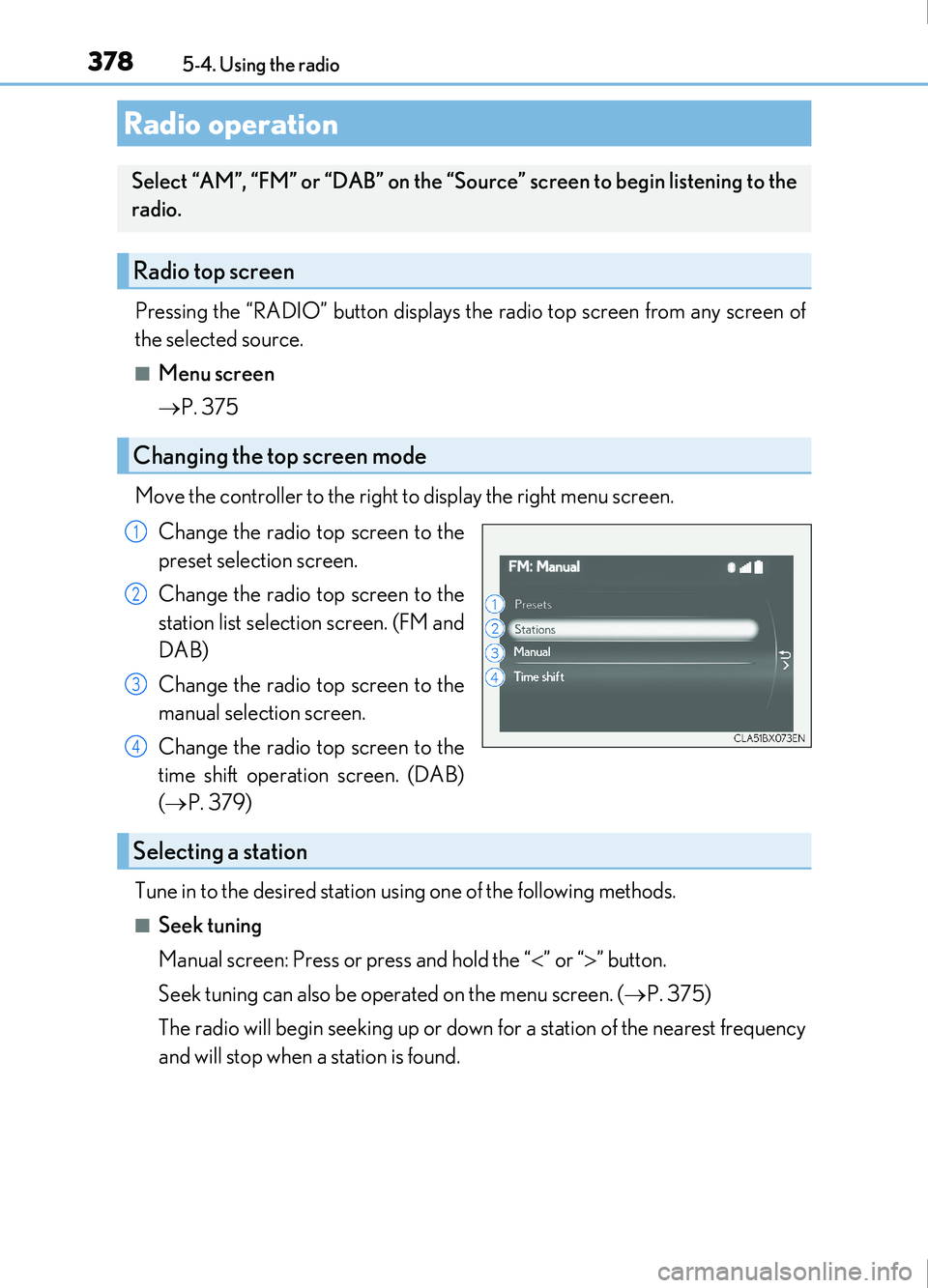
Move the controller to the right to display the right menu screen. Change the radio top screen to the
preset selection screen.
Change the radio top screen to the
station list selection screen. (FM and
DAB)
Change the radio top screen to the
manual selection screen.
Change the radio top screen to the
time shift operation screen. (DAB)
( P. 379)
Tune in to the desired station using one of the following methods.
■Seek tuning
Manual screen: Press or press and hold the “ ” or “ ” button.
Seek tuning can also be operated on the menu screen. ( P. 375)
The radio will begin seeking up or down for a station of the nearest frequency
and will stop when a station is found.
Radio operation
Select “AM”, “FM” or “DAB” on the “Source” screen to begin listening to the
radio.
Radio top screen
Changing the top screen mode
1
2
3
4
Selecting a station
Page 387 of 676
3875-6. Using an external device
5
Lexus Display Audio system
IS200t_EE(OM53D77E)
■About iPod
●“Made for iPod” and “Made for iPhone” mean that an electronic accessory has been
designed to connect specifically to an iPod, or iPhone, respectively, and has been certi-
fied by the developer to meet Apple performance standards.
●Apple is not responsible for the operation of this device or its compliance with safety
and regulatory standards. Please note that th e use of this accessory with iPod or iPhone
may affect wireless performance.
●iPhone, iPod, iPod classic, iPod nano and iPod touch are trademarks of Apple Inc., reg-
istered in the U.S. and other countries.
■iPod cover art
●Depending on the iPod and songs in the iPod, iPod cover art may be displayed.
●This function can be changed to on/off. ( P. 374)
●It may take time to display iPod cover art, and the iPod may not be operated while the
cover art display is in process.
■iPod functions
●When an iPod is connected and the audio sour ce is changed to iPod mode, the iPod will
resume play from the same poin t in which it was last used.
●Depending on the iPod that is connected to the system, certain functions may not be
available. If a function is unavailable due to a malfunction (as opposed to a system spec-
ification), disconnecting the device and reconnecting it may resolve the problem.
●Depending on the iPod, while connected to the system, the iPod cannot be operated
with its own controls. It is necessary to use the controls of the vehicle’s audio system
instead.
●When the battery level of an iPod is very low, the iPod may not operate. If so, charge the
iPod before use.
●Compatible models ( P. 389)