steering Lexus IS200t 2017 s Repair Manual
[x] Cancel search | Manufacturer: LEXUS, Model Year: 2017, Model line: IS200t, Model: Lexus IS200t 2017Pages: 676, PDF Size: 149.78 MB
Page 309 of 676
3094-5. Using the driving support systems
4
Driving
IS200t_EE(OM53D77E)
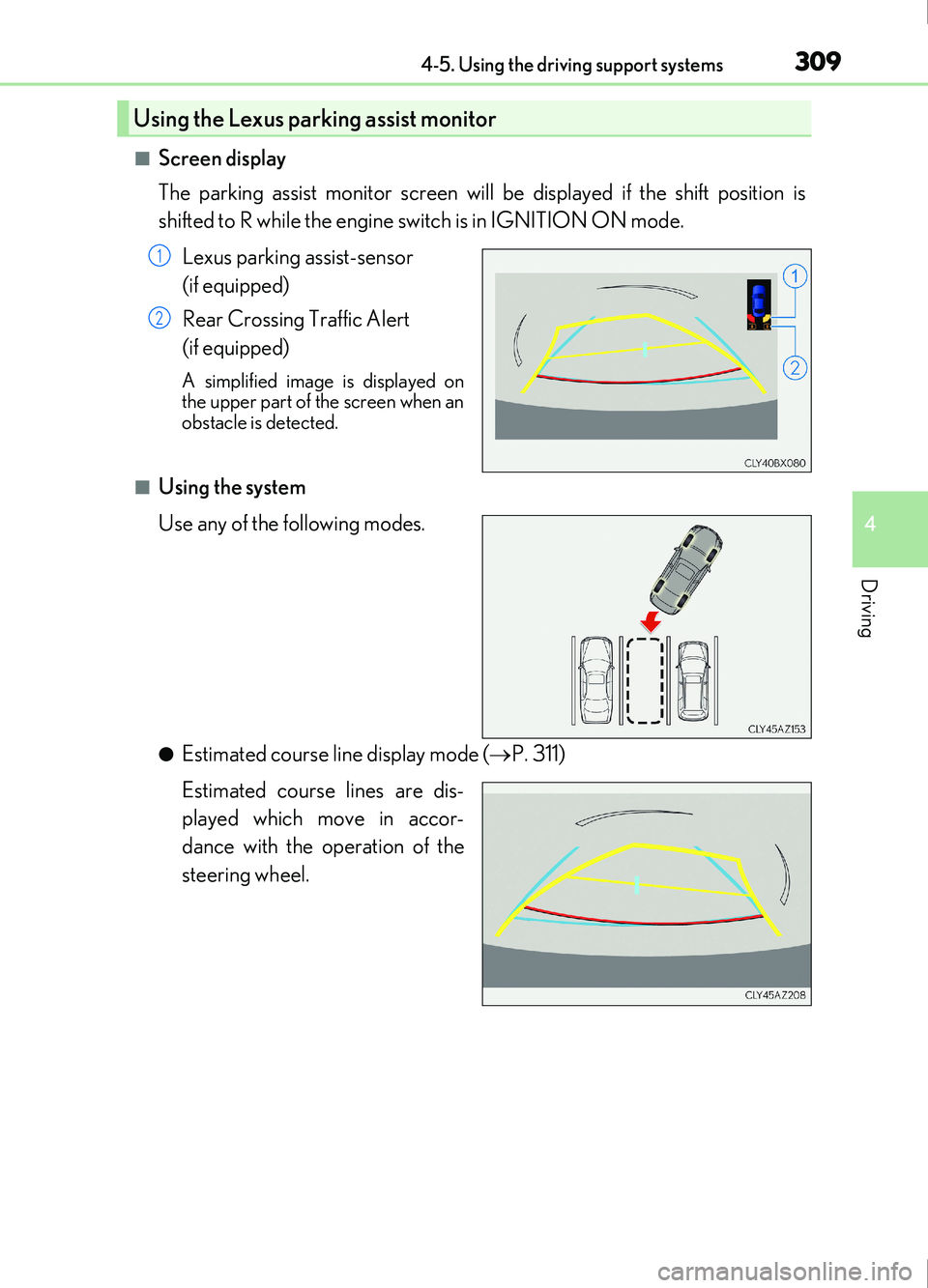
■Screen display
The parking assist monitor screen will be displayed if the shift position is
shifted to R while the engine switch is in IGNITION ON mode.Lexus parking assist-sensor
(if equipped)
Rear Crossing Traffic Alert
(if equipped)
A simplified image is displayed on
the upper part of the screen when an
obstacle is detected.
■Using the system
Use any of the following modes.
●Estimated course line display mode ( P. 311)
Estimated course lines are dis-
played which move in accor-
dance with the operation of the
steering wheel.
Using the Lexus parking assist monitor
1
2
Page 310 of 676
3104-5. Using the driving support systems
IS200t_EE(OM53D77E)
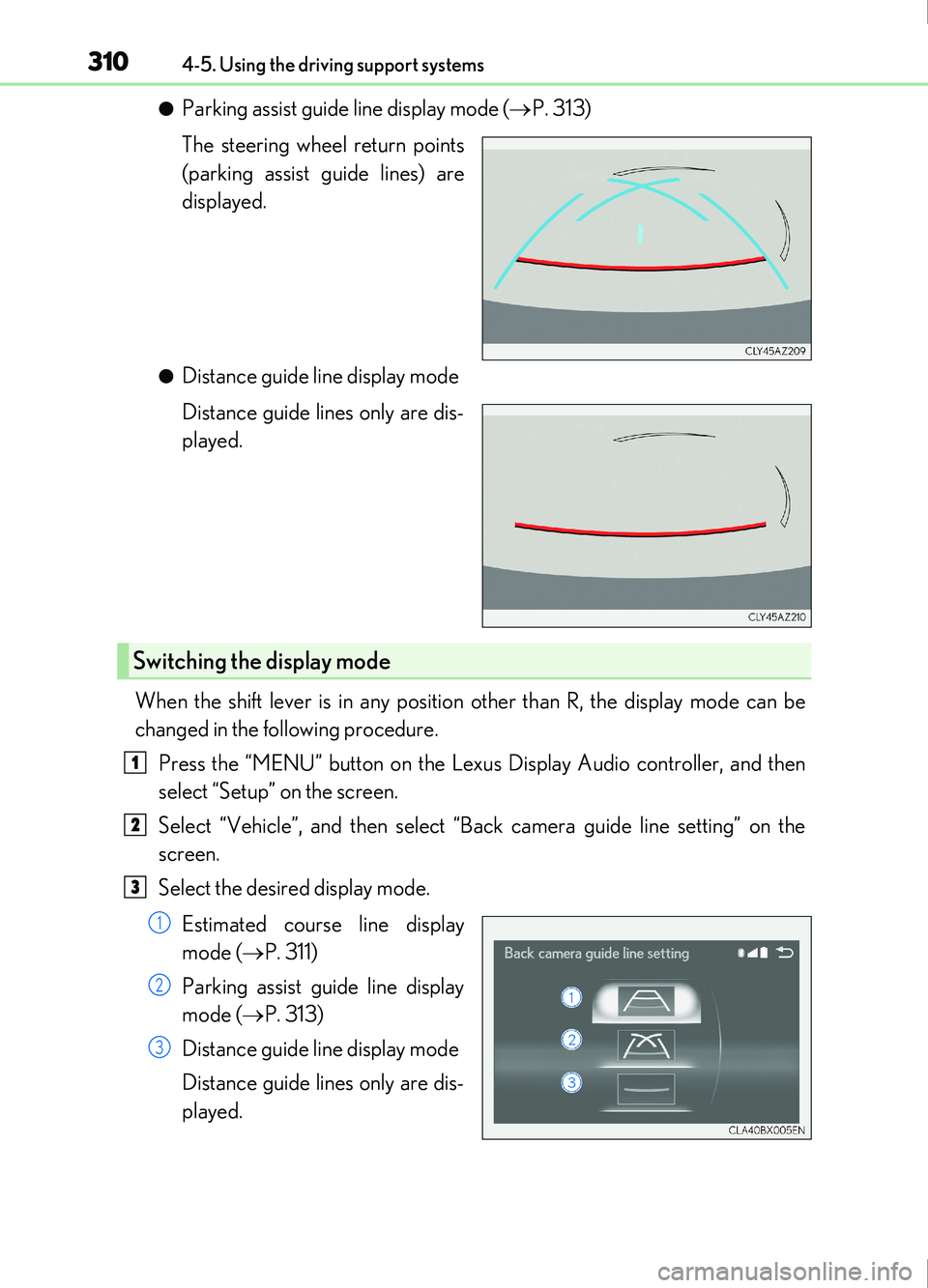
●Parking assist guide line display mode (P. 313)
The steering wheel return points
(parking assist guide lines) are
displayed.
●Distance guide line display mode
Distance guide lines only are dis-
played.
When the shift lever is in any position other than R, the display mode can be
changed in the following procedure. Press the “MENU” button on the Lexus Display Audio controller, and then
select “Setup” on the screen.
Select “Vehicle”, and then select “Back camera guide line setting” on the
screen.
Select the desired display mode.
Estimated course line display
mode ( P. 311)
Parking assist guide line display
mode ( P. 313)
Distance guide line display mode
Distance guide lines only are dis-
played.
Switching the display mode
1
2
3
1
2
3
Page 311 of 676
3114-5. Using the driving support systems
4
Driving
IS200t_EE(OM53D77E)
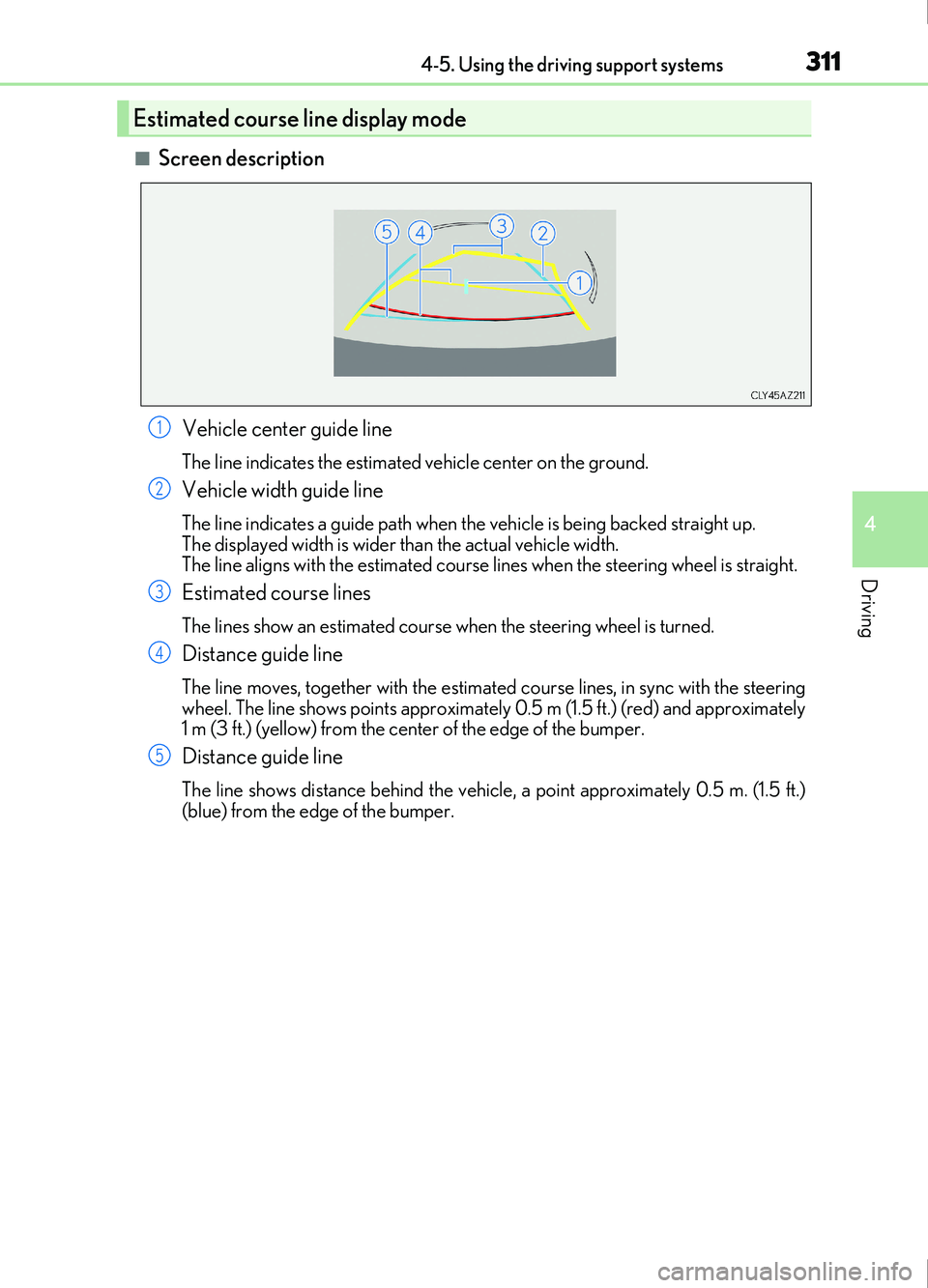
■Screen descriptionVehicle center guide line
The line indicates the estimated vehicle center on the ground.
Vehicle width guide line
The line indicates a guide path when the vehicle is being backed straight up.
The displayed width is wider than the actual vehicle width.
The line aligns with the estimated course lines when the steering wheel is straight.
Estimated course lines
The lines show an estimated course when the steering wheel is turned.
Distance guide line
The line moves, together with the estimated course lines, in sync with the steering
wheel. The line shows points approximately 0.5 m (1.5 ft.) (red) and approximately
1 m (3 ft.) (yellow) from the cent er of the edge of the bumper.
Distance guide line
The line shows distance behind the vehicle, a point approximately 0.5 m. (1.5 ft.)
(blue) from the edge of the bumper.
Estimated course line display mode
1
2
3
4
5
Page 312 of 676
3124-5. Using the driving support systems
IS200t_EE(OM53D77E)
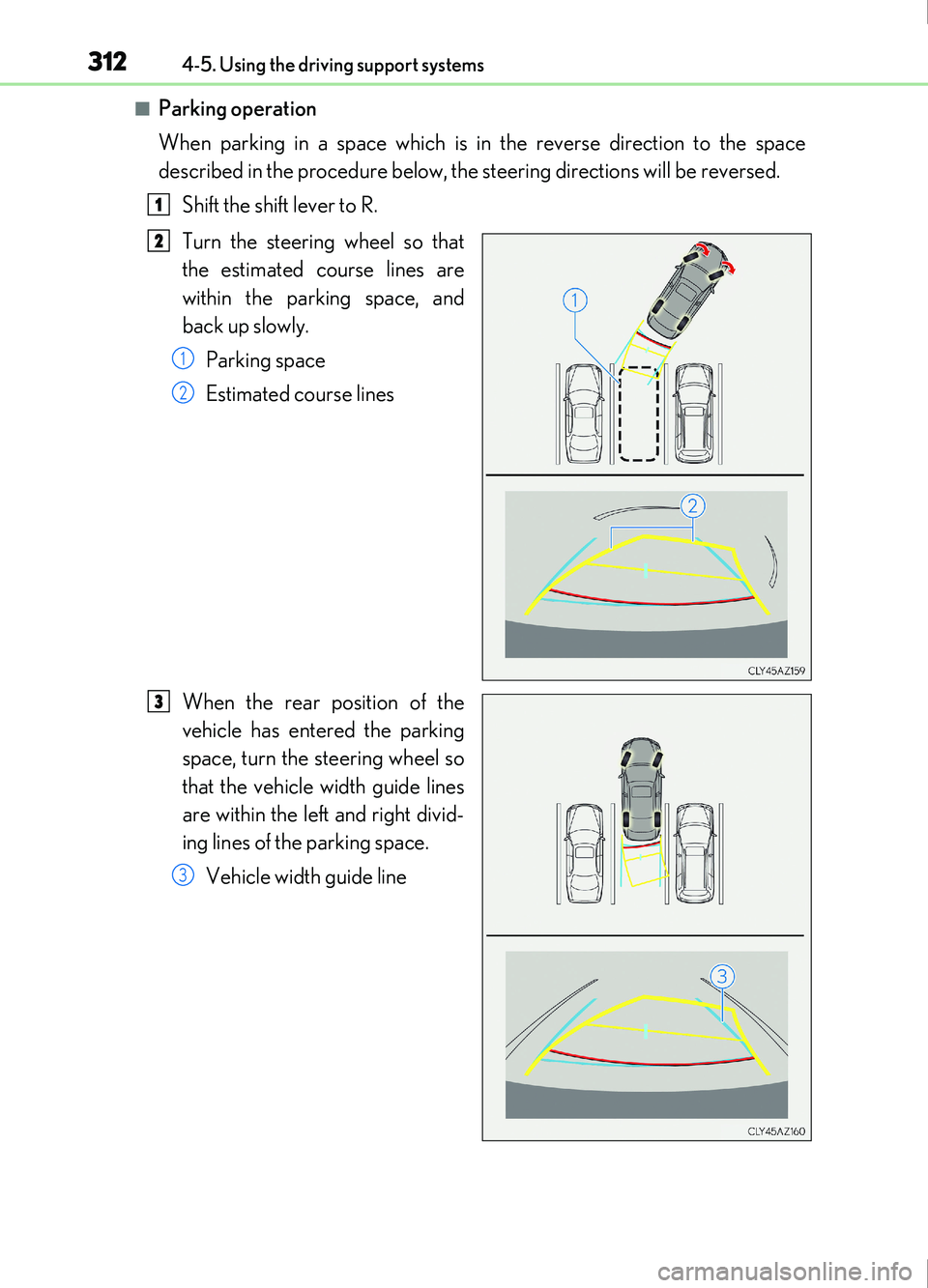
■Parking operation
When parking in a space which is in the reverse direction to the space
described in the procedure below, the steering directions will be reversed.Shift the shift lever to R.
Turn the steering wheel so that
the estimated course lines are
within the parking space, and
back up slowly.Parking space
Estimated course lines
When the rear position of the
vehicle has entered the parking
space, turn the steering wheel so
that the vehicle width guide lines
are within the left and right divid-
ing lines of the parking space. Vehicle width guide line
1
2
1
2
3
3
Page 313 of 676
3134-5. Using the driving support systems
4
Driving
IS200t_EE(OM53D77E)
Once the vehicle width guide lines and the parking space lines are parallel,
straighten the steering wheel and back up slowly until the vehicle has com-
pletely entered the parking space.
Stop the vehicle in an appropriate place, and finish parking.
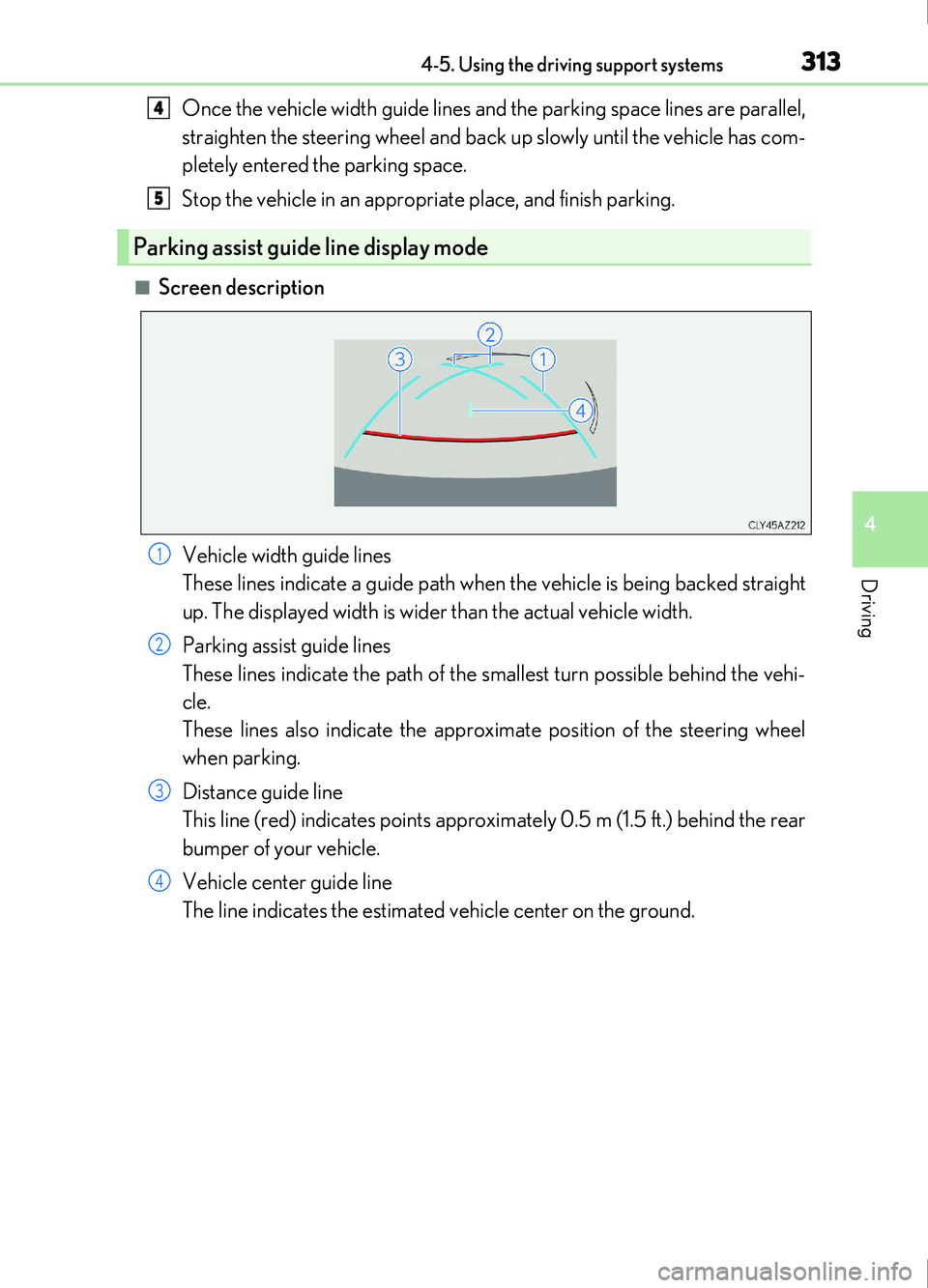
■Screen descriptionVehicle width guide lines
These lines indicate a guide path when the vehicle is being backed straight
up. The displayed width is wider than the actual vehicle width.
Parking assist guide lines
These lines indicate the path of the smallest turn possible behind the vehi-
cle.
These lines also indicate the approximate position of the steering wheel
when parking.
Distance guide line
This line (red) indicates points approximately 0.5 m (1.5 ft.) behind the rear
bumper of your vehicle.
Vehicle center guide line
The line indicates the estimated vehicle center on the ground.
Parking assist guide line display mode
4
5
1
2
3
4
Page 314 of 676
3144-5. Using the driving support systems
IS200t_EE(OM53D77E)
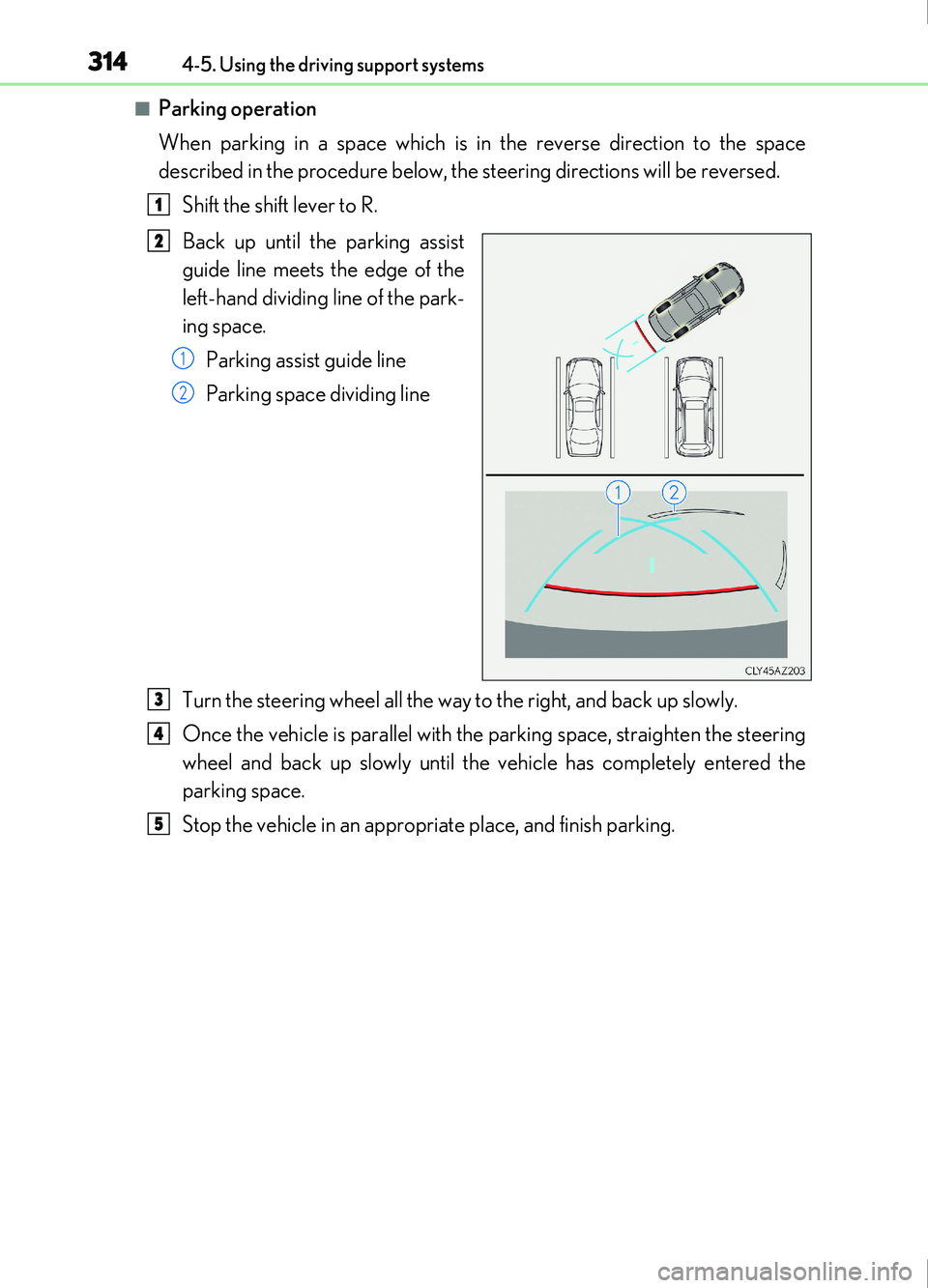
■Parking operation
When parking in a space which is in the reverse direction to the space
described in the procedure below, the steering directions will be reversed.Shift the shift lever to R.
Back up until the parking assist
guide line meets the edge of the
left-hand dividing line of the park-
ing space.Parking assist guide line
Parking space dividing line
Turn the steering wheel all the way to the right, and back up slowly.
Once the vehicle is parallel with the parking space, straighten the steering
wheel and back up slowly until the vehicle has completely entered the
parking space.
Stop the vehicle in an appropriate place, and finish parking.
1
2
1
2
3
4
5
Page 321 of 676
3214-5. Using the driving support systems
4
Driving
IS200t_EE(OM53D77E)
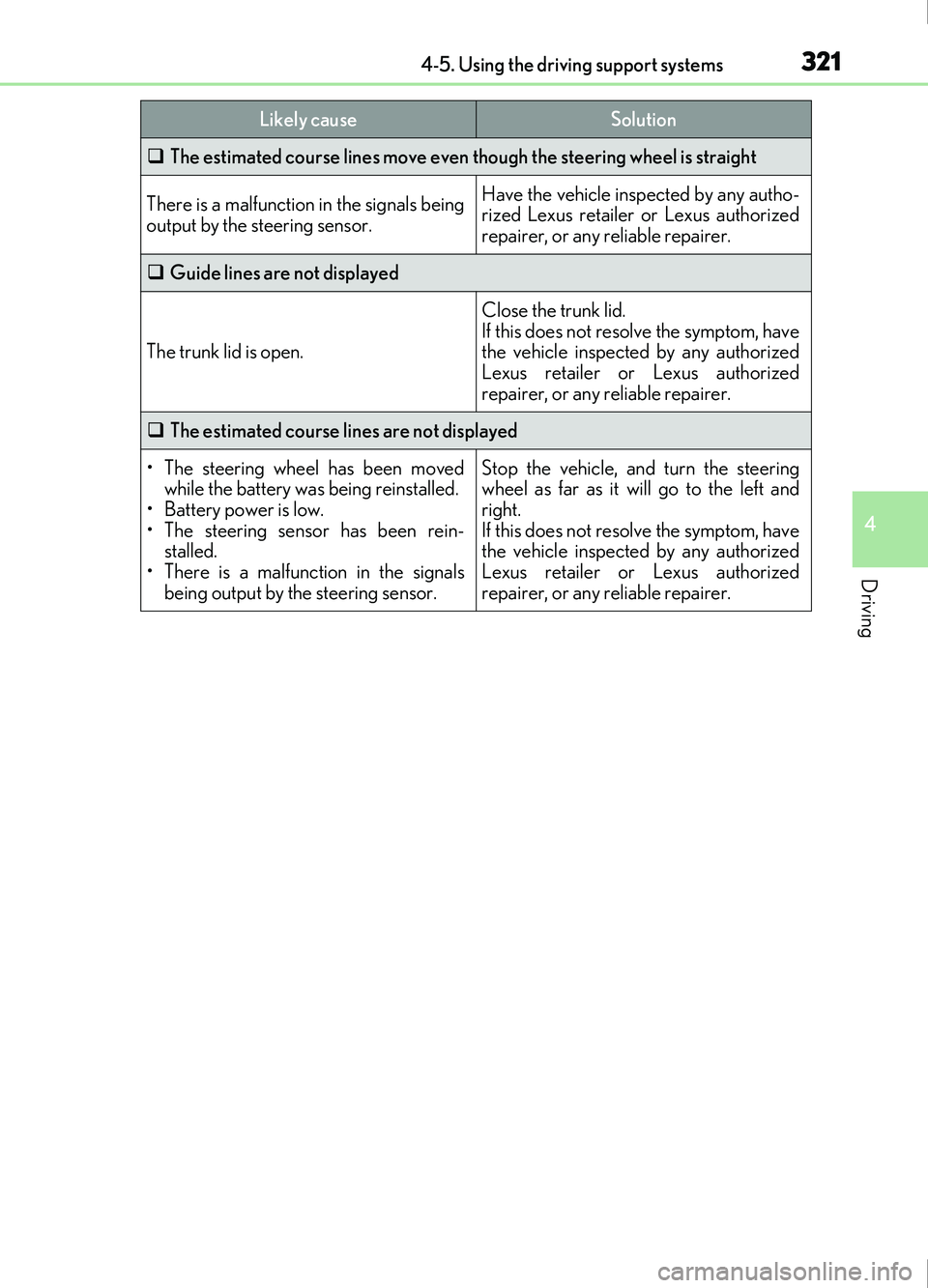
The estimated course lines move even though the steering wheel is straight
There is a malfunction in the signals being
output by the steering sensor.Have the vehicle inspected by any autho-
rized Lexus retailer or Lexus authorized
repairer, or any reliable repairer.
Guide lines are not displayed
The trunk lid is open.
Close the trunk lid.
If this does not resolve the symptom, have
the vehicle inspected by any authorized
Lexus retailer or Lexus authorized
repairer, or any reliable repairer.
The estimated course lines are not displayed
• The steering wheel has been moved
while the battery was being reinstalled.
• Battery power is low.
• The steering sensor has been rein- stalled.
• There is a malfunct ion in the signals
being output by the steering sensor.Stop the vehicle, and turn the steering
wheel as far as it will go to the left and
right.
If this does not resolve the symptom, have
the vehicle inspected by any authorized
Lexus retailer or Lexus authorized
repairer, or any reliable repairer.
Likely causeSolution
Page 322 of 676
3224-5. Using the driving support systems
IS200t_EE(OM53D77E)
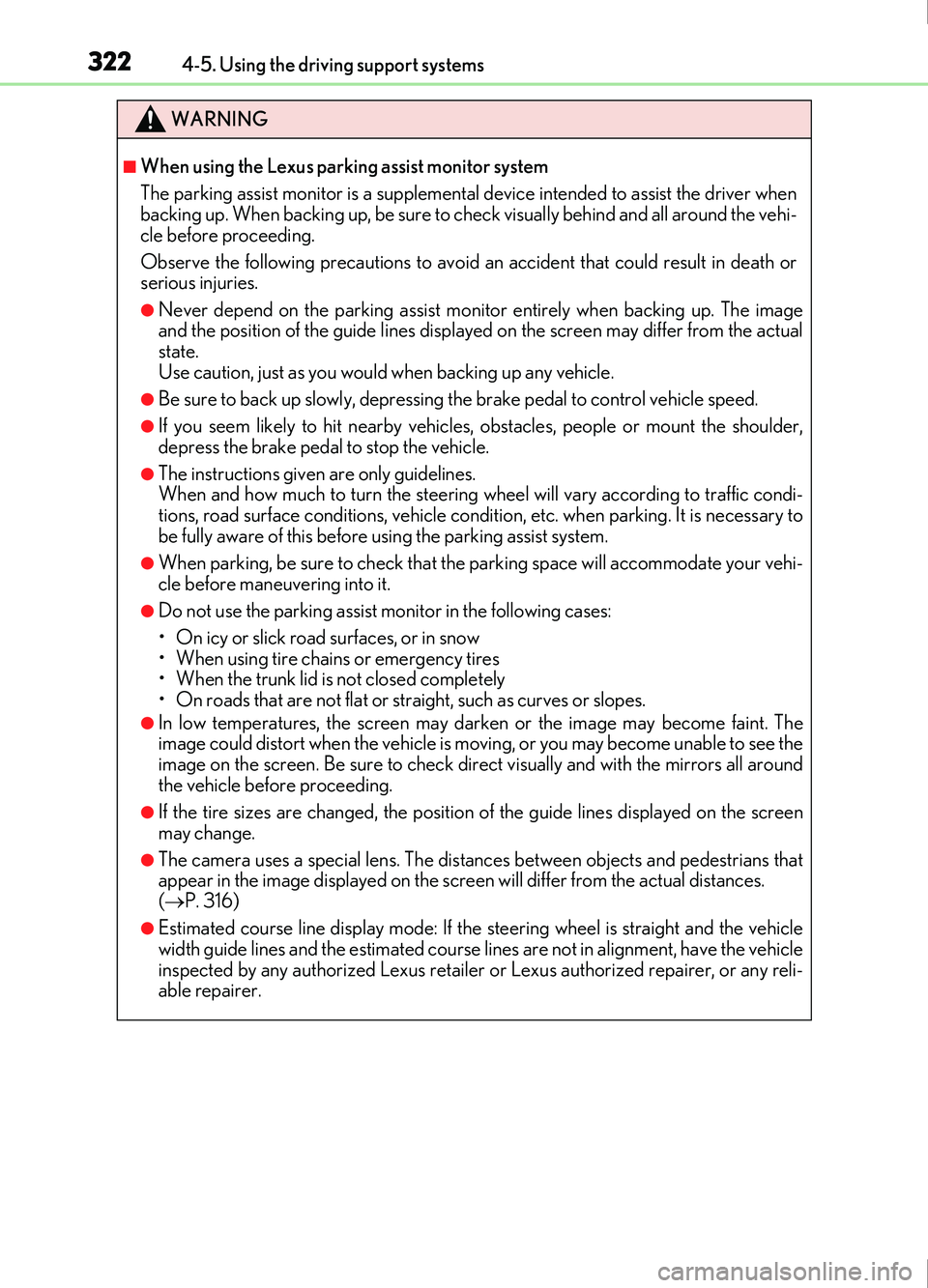
WARNING
■When using the Lexus parking assist monitor system
The parking assist monitor is a supplemental device intended to assist the driver when
backing up. When backing up, be sure to check visually behind and all around the vehi-
cle before proceeding.
Observe the following precautions to avoid an accident that could result in death or
serious injuries.
●Never depend on the parking assist monitor entirely when backing up. The image
and the position of the guide lines displayed on the screen may differ from the actual
state.
Use caution, just as you would when backing up any vehicle.
●Be sure to back up slowly, depressing the brake pedal to control vehicle speed.
●If you seem likely to hit nearby vehicles , obstacles, people or mount the shoulder,
depress the brake pedal to stop the vehicle.
●The instructions given are only guidelines.
When and how much to turn the steering wheel will vary according to traffic condi-
tions, road surface conditions, vehicle condition, etc. when parking. It is necessary to
be fully aware of this before using the parking assist system.
●When parking, be sure to check that th e parking space will accommodate your vehi-
cle before maneuvering into it.
●Do not use the parking assist monitor in the following cases:
• On icy or slick road surfaces, or in snow
• When using tire chains or emergency tires
• When the trunk lid is not closed completely
• On roads that are not flat or straight, such as curves or slopes.
●In low temperatures, the screen may darken or the image may become faint. The
image could distort when the vehicle is moving, or you may become unable to see the
image on the screen. Be sure to check direct visually and with the mirrors all around
the vehicle before proceeding.
●If the tire sizes are changed, the position of the guide lines displayed on the screen
may change.
●The camera uses a special lens. The distances between objects and pedestrians that
appear in the image displayed on the screen will differ from the actual distances.
( P. 316)
●Estimated course line display mode: If the steering wheel is straight and the vehicle
width guide lines and the estimated course lin es are not in alignment, have the vehicle
inspected by any authorized Lexus retailer or Lexus authorized repairer, or any reli-
able repairer.
Page 338 of 676
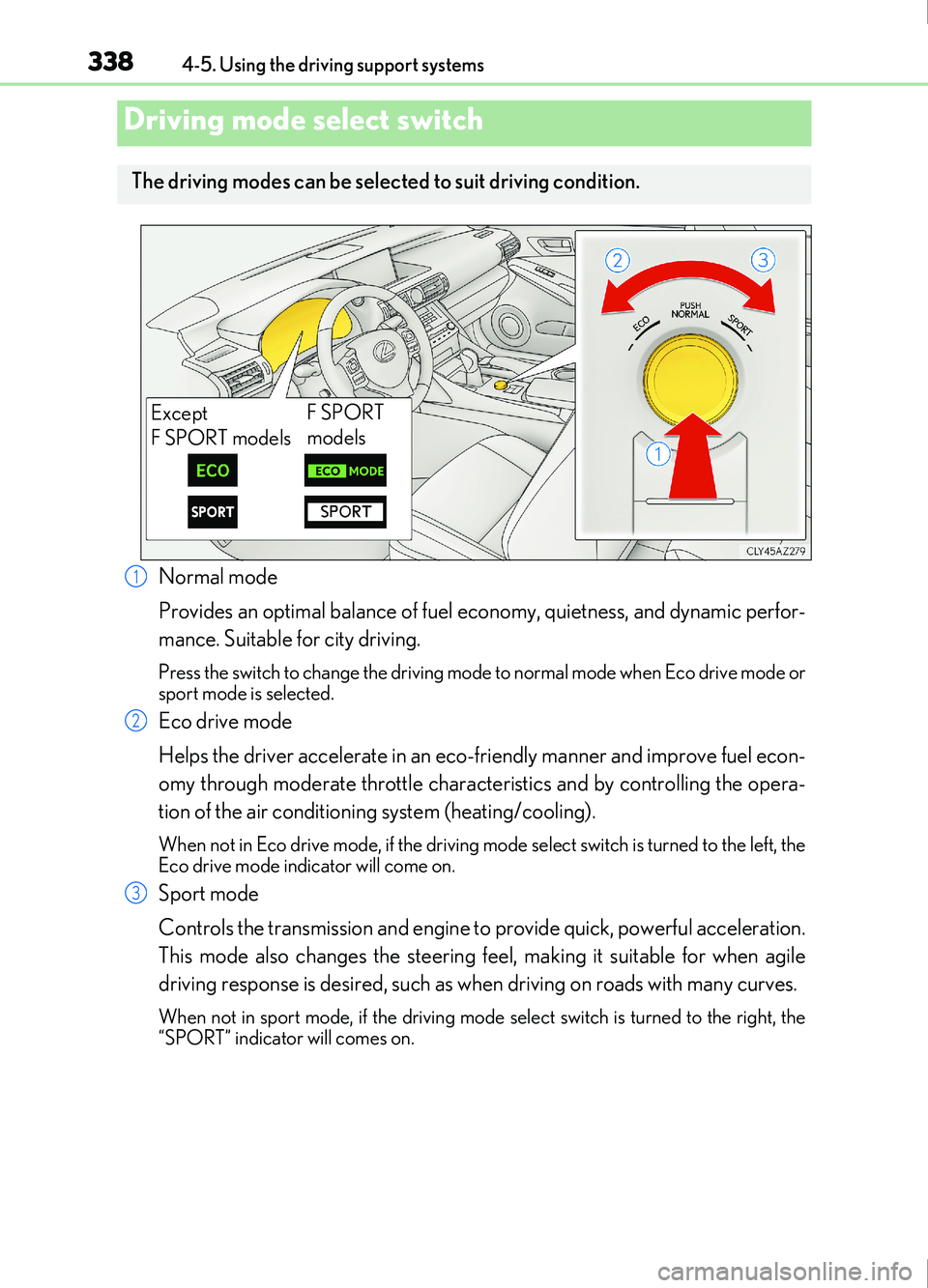
3384-5. Using the driving support systems
IS200t_EE(OM53D77E)
Normal mode
Provides an optimal balance of fuel economy, quietness, and dynamic perfor-
mance. Suitable for city driving.
Press the switch to change the driving mode to normal mode when Eco drive mode or
sport mode is selected.
Eco drive mode
Helps the driver accelerate in an eco-friendly manner and improve fuel econ-
omy through moderate throttle characteristics and by controlling the opera-
tion of the air conditioning system (heating/cooling).
When not in Eco drive mode, if the driving mode select switch is turned to the left, the
Eco drive mode indicator will come on.
Sport mode
Controls the transmission and engine to provide quick, powerful acceleration.
This mode also changes the steering feel, making it suitable for when agile
driving response is desired, such as when driving on roads with many curves.
When not in sport mode, if the driving mode se lect switch is turned to the right, the
“SPORT” indicator will comes on.
Driving mode select switch
The driving modes can be select ed to suit driving condition.
Except
F SPORT modelsF SPORT
models
1
2
3
Page 340 of 676

3404-5. Using the driving support systems
IS200t_EE(OM53D77E)
◆ABS (Anti-lock Brake System)
Helps to prevent wheel lock when the brakes are applied suddenly, or if the
brakes are applied while driving on a slippery road surface
◆Brake assist
Generates an increased level of braking force after the brake pedal is
depressed when the system detects a panic stop situation
◆VSC (Vehicle Stability Control)
Helps the driver to control skidding when swerving suddenly or turning on
slippery road surfaces.
◆VSC+ (Vehicle Stability Control+)
Provides cooperative control of the ABS, TRC, VSC and EPS.
Helps to maintain directional stability when swerving on slippery road sur-
faces by controlling steering performance.
◆TRC (Traction Control)
Helps to maintain drive power and prevent the drive wheels from spinning
when starting the vehicle or accelerating on slippery roads
◆Hill-start assist control
Helps to reduce the backward movement of the vehicle when starting on an
uphill
◆EPS (Electric Power Steering)
Employs an electric motor to reduce the amount of effort needed to turn the
steering wheel.
Driving assist systems
To help enhance driving safety and performance, the following systems oper-
ate automatically in response to various driving situations. Be aware, however,
that these systems are suppl ementary and should not be relied upon too heav-
ily when operating the vehicle.