unlock Lexus IS250 2010 Owner's Guide
[x] Cancel search | Manufacturer: LEXUS, Model Year: 2010, Model line: IS250, Model: Lexus IS250 2010Pages: 578, PDF Size: 30.78 MB
Page 308 of 578
307
3-4. Using the hands-free phone system (for mobile phones)
3
Interior features
IS350/250_U
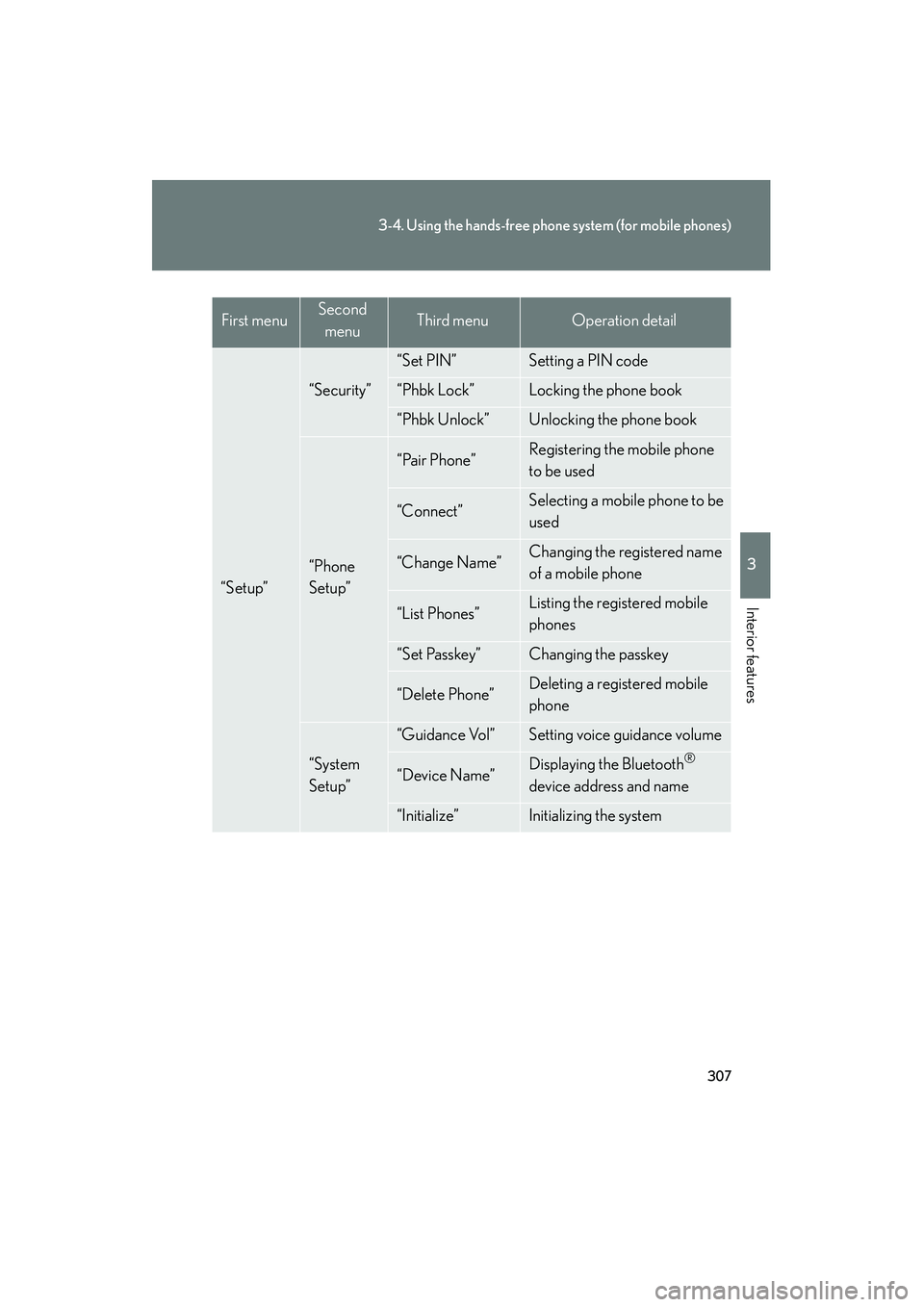
“Setup”
“Security”
“Set PIN”Setting a PIN code
“Phbk Lock”Locking the phone book
“Phbk Unlock”Unlocking the phone book
“Phone
Setup”
“Pair Phone”Registering the mobile phone
to be used
“Connect”Selecting a mobile phone to be
used
“Change Name”Changing the registered name
of a mobile phone
“List Phones”Listing the registered mobile
phones
“Set Passkey”Changing the passkey
“Delete Phone”Deleting a registered mobile
phone
“System
Setup”
“Guidance Vol”Setting voice guidance volume
“Device Name”Displaying the Bluetooth®
device address and name
“Initialize”Initializing the system
First menuSecond menuThird menuOperation detail
Page 309 of 578

308
3-4. Using the hands-free phone system (for mobile phones)
IS350/250_U■
Short cut key operation
First menuSecond menuOperation detail
“Dial XXX (name)”-Dialing a name registered in the
phone book
“Phone book add
Entry”-Adding a new phone number
“Phone book Change
name”-Changing a registered name in
the phone book
“Phone book Delete
Entry”-Deleting the registered data
“Phone book List
names”-Listing the registered data
“Phone book Set
Speed Dial”-Setting speed dials
“Phone book Delete
Speed Dial”-Deleting speed dials
“Dial XXX (number)”-Dialing by inputting a number
“Phonebook”“Phonebook Unlock”Unlocking the phone book
“Phonebook Lock”Locking the phone book
Page 320 of 578
319
3-4. Using the hands-free phone system (for mobile phones)
3
Interior features
IS350/250_U
Security and system setup
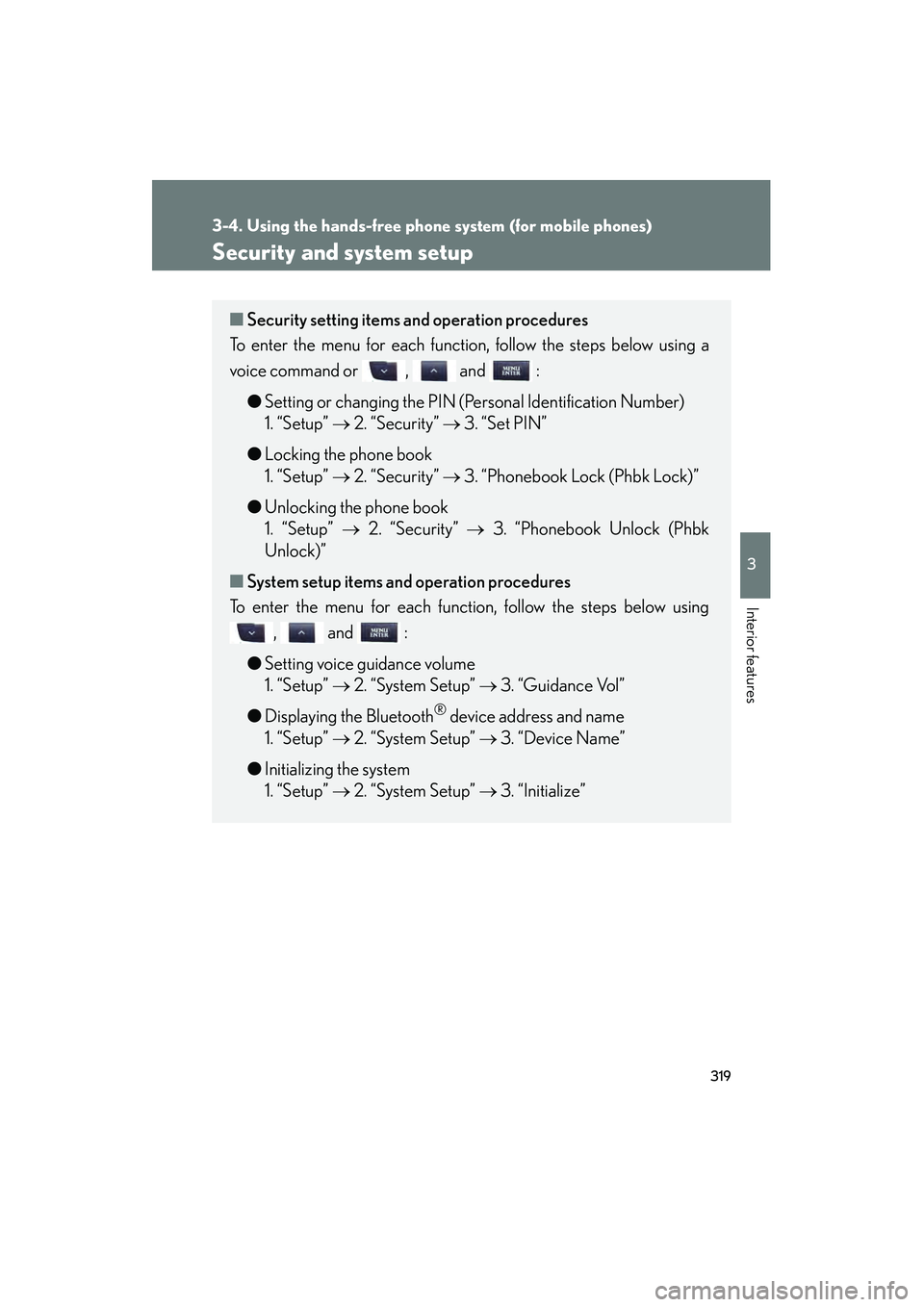
■Security setting items an d operation procedures
To enter the menu for each function, follow the steps below using a
voice command or , and :
●Setting or changing the PIN (Personal Identification Number)
1. “Setup” → 2. “Security” → 3. “Set PIN”
● Locking the phone book
1. “Setup” → 2. “Security” → 3. “Phonebook Lock (Phbk Lock)”
● Unlocking the phone book
1. “Setup” → 2. “Security” → 3. “Phonebook Unlock (Phbk
Unlock)”
■ System setup items and operation procedures
To enter the menu for each function, follow the steps below using
, and :
● Setting voice guidance volume
1. “Setup” → 2. “System Setup” → 3. “Guidance Vol”
● Displaying the Bluetooth
® device address and name
1. “Setup” → 2. “System Setup” → 3. “Device Name”
● Initializing the system
1. “Setup” → 2. “System Setup” → 3. “Initialize”
Page 321 of 578
320
3-4. Using the hands-free phone system (for mobile phones)
IS350/250_U
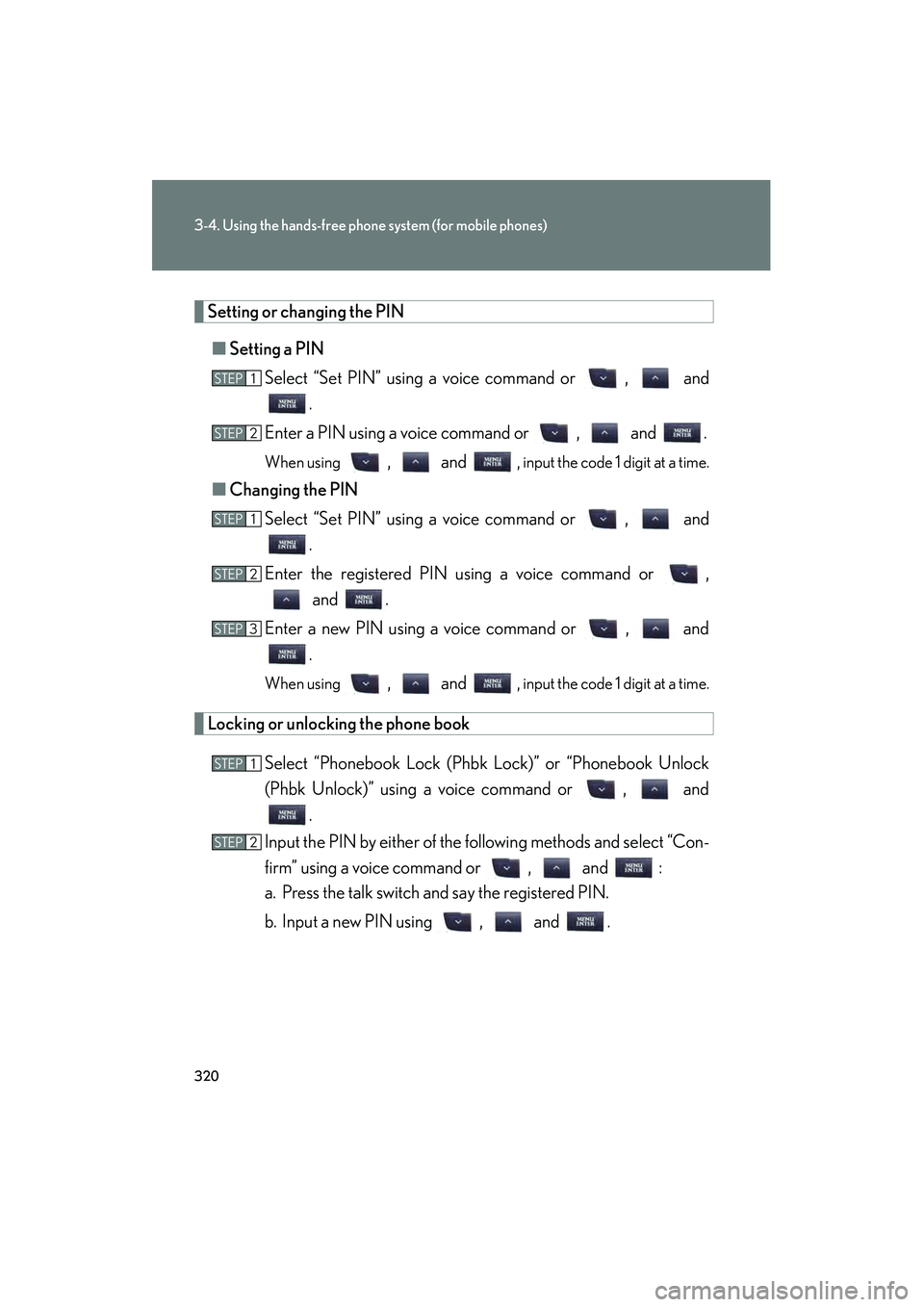
Setting or changing the PIN■ Setting a PIN
Select “Set PIN” using a voice command or , and .
Enter a PIN using a voice command or , and .
When using , and , input the code 1 digit at a time.
■ Changing the PIN
Select “Set PIN” using a voice command or , and .
Enter the registered PIN using a voice command or , and .
Enter a new PIN using a voice command or , and .
When using , and , input the code 1 digit at a time.
Locking or unlocking the phone book
Select “Phonebook Lock (Phbk Lock)” or “Phonebook Unlock
(Phbk Unlock)” using a voice command or , and.
Input the PIN by either of the following methods and select “Con-
firm” using a voice command or , and :
a. Press the talk switch and say the registered PIN.
b. Input a new PIN using , and .
STEP1
STEP2
STEP1
STEP2
STEP3
STEP1
STEP2
Page 330 of 578

329
3
Interior features
IS350/250_U
3-5. Using the interior lights
Interior lights list
Your Lexus is equipped with the illuminated entry system to assist in enter-
ing the vehicle. Owing to the function of the system, the lights shown in the
following illustration automatically turn on/off according to the presence of
the electronic key, whether the door s are locked/unlocked, whether the
doors are opened/closed, and the “ENGINE START STOP” switch mode.
Front personal lights (→P. 3 3 1 )
Front interior lights ( →P. 3 3 1 )
Rear personal lights ( →P. 3 3 1 )
Rear interior light
Rear overhead courtesy light
Shift lever light (when the “ENGINE START STOP” switch is in
ACCESSORY or IGNITION ON mode)
Front footwell lights
Page 334 of 578

333
3
Interior features
IS350/250_U
3-6. Using the storage features
List of storage features
Glove boxOpen (push button)
Lock with the mechanical key
Unlock with the mechanical key
Glove box
Console boxes
Cup holders
Bottle holders/door pockets
Overhead console
Glove box
Page 466 of 578
5
When trouble arises
465
5-1. Essential information
IS350/250_U
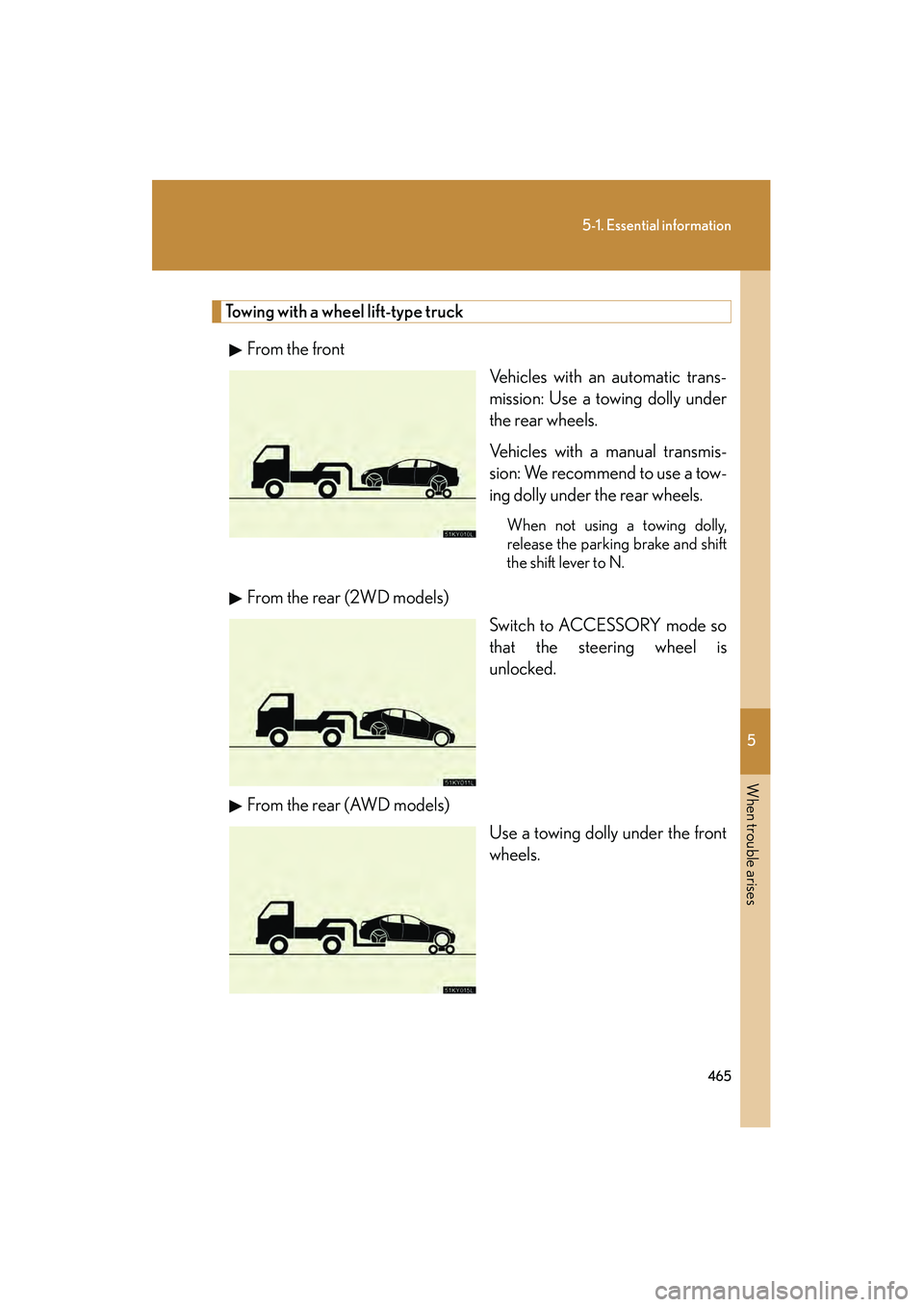
Towing with a wheel lift-type truckFrom the front Vehicles with an automatic trans-
mission: Use a towing dolly under
the rear wheels.
Vehicles with a manual transmis-
sion: We recommend to use a tow-
ing dolly under the rear wheels.
When not using a towing dolly,
release the parking brake and shift
the shift lever to N.
From the rear (2WD models)Switch to ACCESSORY mode so
that the steering wheel is
unlocked.
From the rear (AWD models) Use a towing dolly under the front
wheels.
Page 506 of 578

5
When trouble arises
505
5-2. Steps to take in an emergency
IS350/250_U
If the electronic key does not operate properly
Locking and unlocking the doors, unlocking the trunk and key linked functions
Doors
Remove the cover on the driver’s
door handle using the mechanical
key (→P. 25) in order to perform
the following operations.
Locks all doors
Closes the windows/moon roof
(turn and hold)
Unlocks the door
Turning the key rearward unlocks
the driver's door. Turning the key
once again unlocks the other
doors.
Opens the windows/moon roof
(turn and hold)
Return the cover to the original
position after use.
If communication between the electronic key and vehicle is interrupted
( → P. 32) or the electronic key cann ot be used because the battery is
depleted, the smart access system with push-button start and wireless
remote control cannot be used. In such cases, the doors and trunk can be
opened or the engine can be started by following the procedure below.
Page 550 of 578

549
6
Vehicle specifications
IS350/250_U
6-2. Customization
Customizable features
ItemFunctionDefault settingCustomizedsetting
Smart access
system with
push-button
start
(
→P. 2 8 )
Operation signal
(Emergency flashers)OnOff
Operation signal
(Buzzer)OnOff
Wireless
remote con-
trol
(
→P. 4 0 )
Unlocking operation
Driver's door
unlocked in one
step, all doors
unlocked in two
steps
All doors
unlocked in one step
Automatic door lock
function to be activated if
door is not opened after
being unlocked
OnOff
Your vehicle includes a variety of electr onic features that can be personal-
ized to your preferences. Programming these preferences requires spe-
cialized equipment and may be performed by an authorized Lexus
dealership.
Some function settings are changed simultaneously with other functions
being customized. Contact your Lexus dealer for further details.
Page 551 of 578
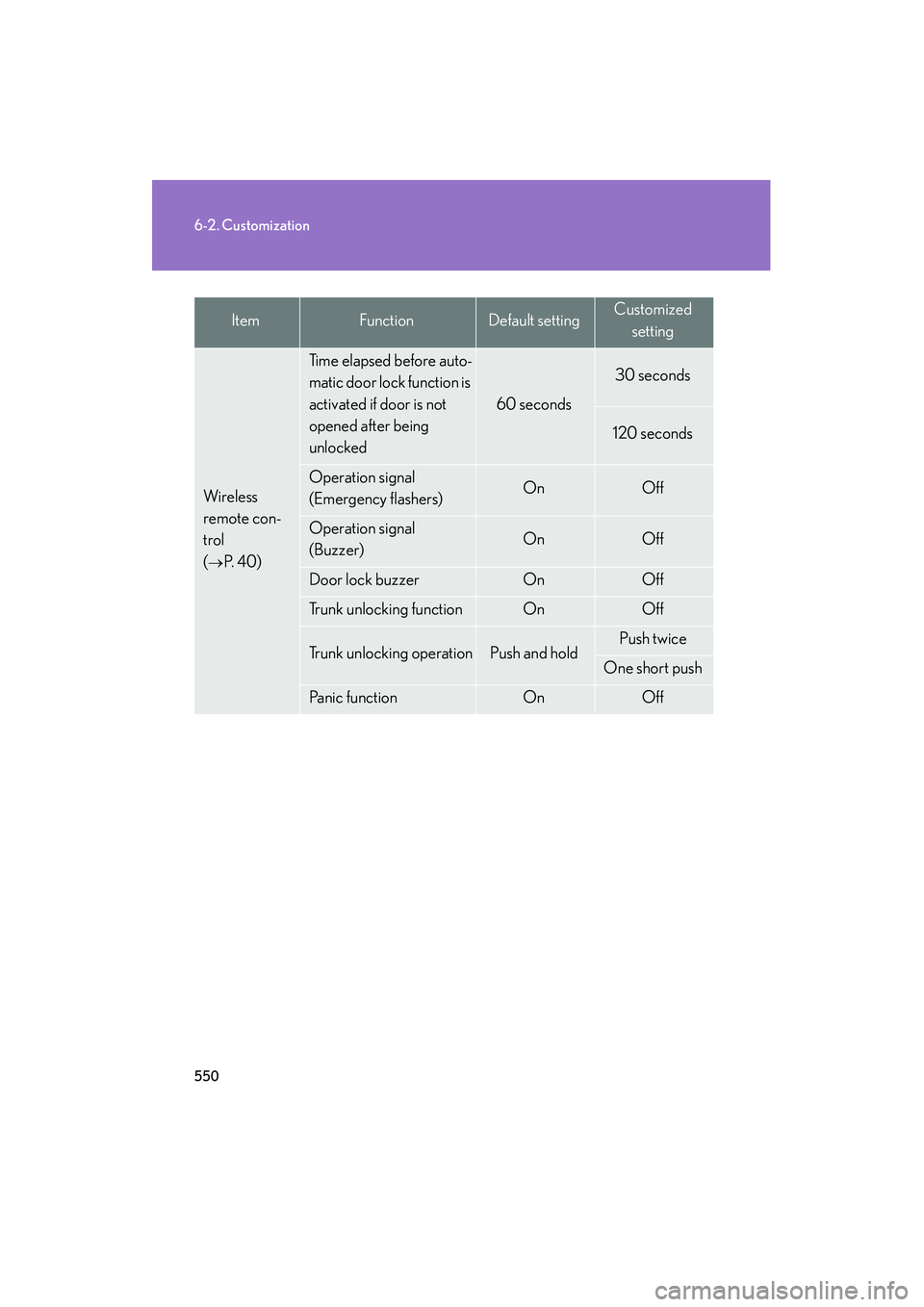
550
6-2. Customization
IS350/250_U
Wi re le ss
remote con-
trol
(
→P. 4 0 )
Time elapsed before auto-
matic door lock function is
activated if door is not
opened after being
unlocked
60 seconds
30 seconds
120 seconds
Operation signal
(Emergency flashers)OnOff
Operation signal
(Buzzer) OnOff
Door lock buzzerOnOff
Trunk unlocking functionOnOff
Trunk unlocking operationPush and holdPush twice
One short push
Panic functionOnOff
ItemFunctionDefault settingCustomizedsetting