ECT Switch Lexus IS250 2011 User Guide
[x] Cancel search | Manufacturer: LEXUS, Model Year: 2011, Model line: IS250, Model: Lexus IS250 2011Pages: 578, PDF Size: 31.12 MB
Page 53 of 578
52
1-3. Adjustable components (seats, mirrors, steering wheel)
IS350/250_U
CAUTION
■Seat adjustment
●Do not recline the seat more than necessary when the vehicle is in motion to
reduce the risk of sliding under the lap belt.
If the seat is too reclined, the lap belt may slide past the hips and apply restraint
forces directly to the abdomen or your neck may contact the shoulder belt,
increasing the risk of death or serious injury in the event of an accident.
●Manual seat only: After adjusting the seat, make sure that the seat is locked in
position.
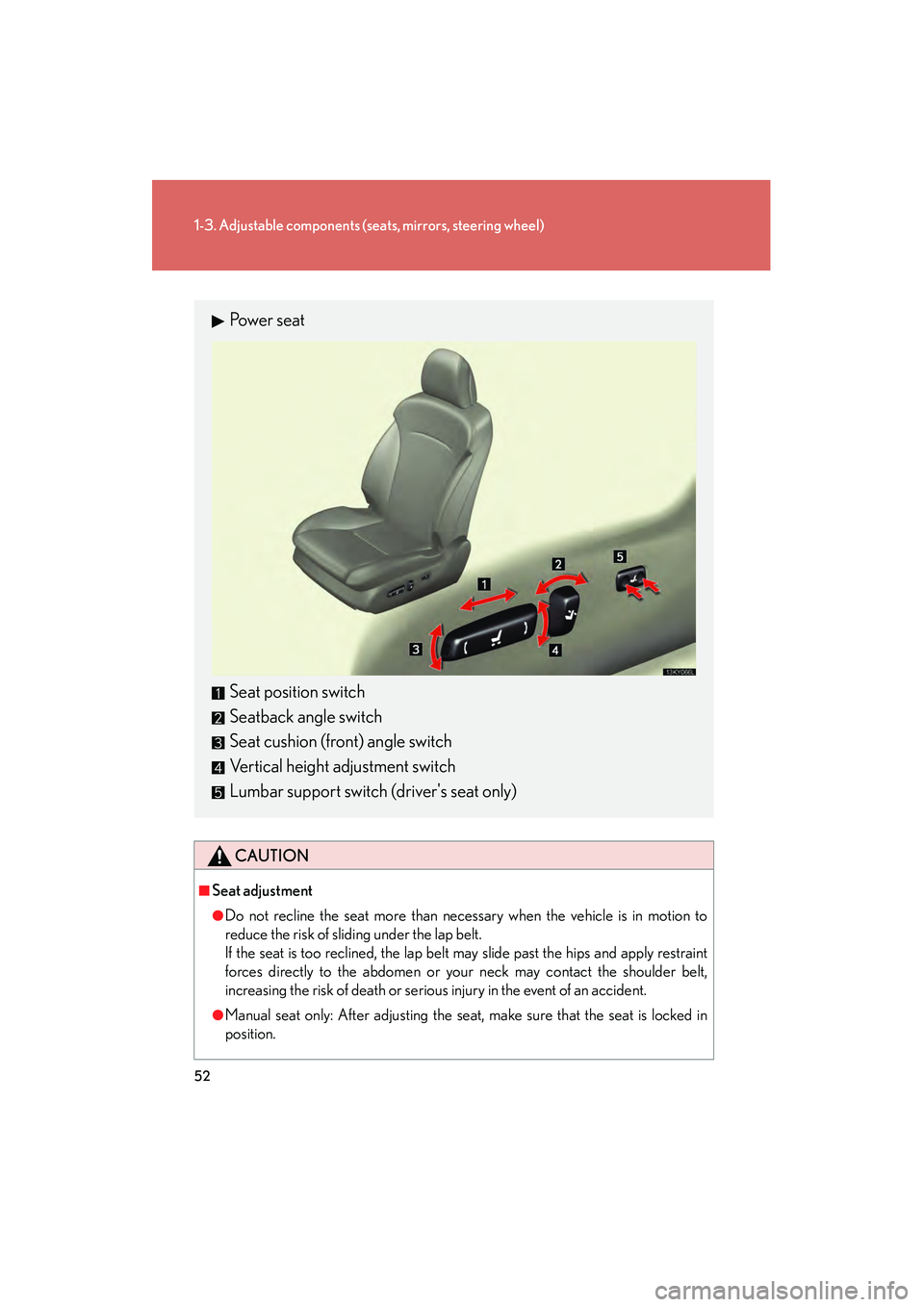
Pow e r s e a t
Seat position switch
Seatback angle switch
Seat cushion (front) angle switch
Vertical height adjustment switch
Lumbar support switch (driver's seat only)
Page 54 of 578
53
1
1-3. Adjustable components (seats, mirrors, steering wheel)
Before driving
IS350/250_U
Driving position memory (driver’s seat)∗
Your preferred driving position (the position of the driver's seat, steering
wheel and outside rear view mirrors) can be memorized and recalled with
the touch of a button. It is also possible to set this function to activate auto-
matically when the doors are unlocked.
Three different driving positions can be entered into memory.
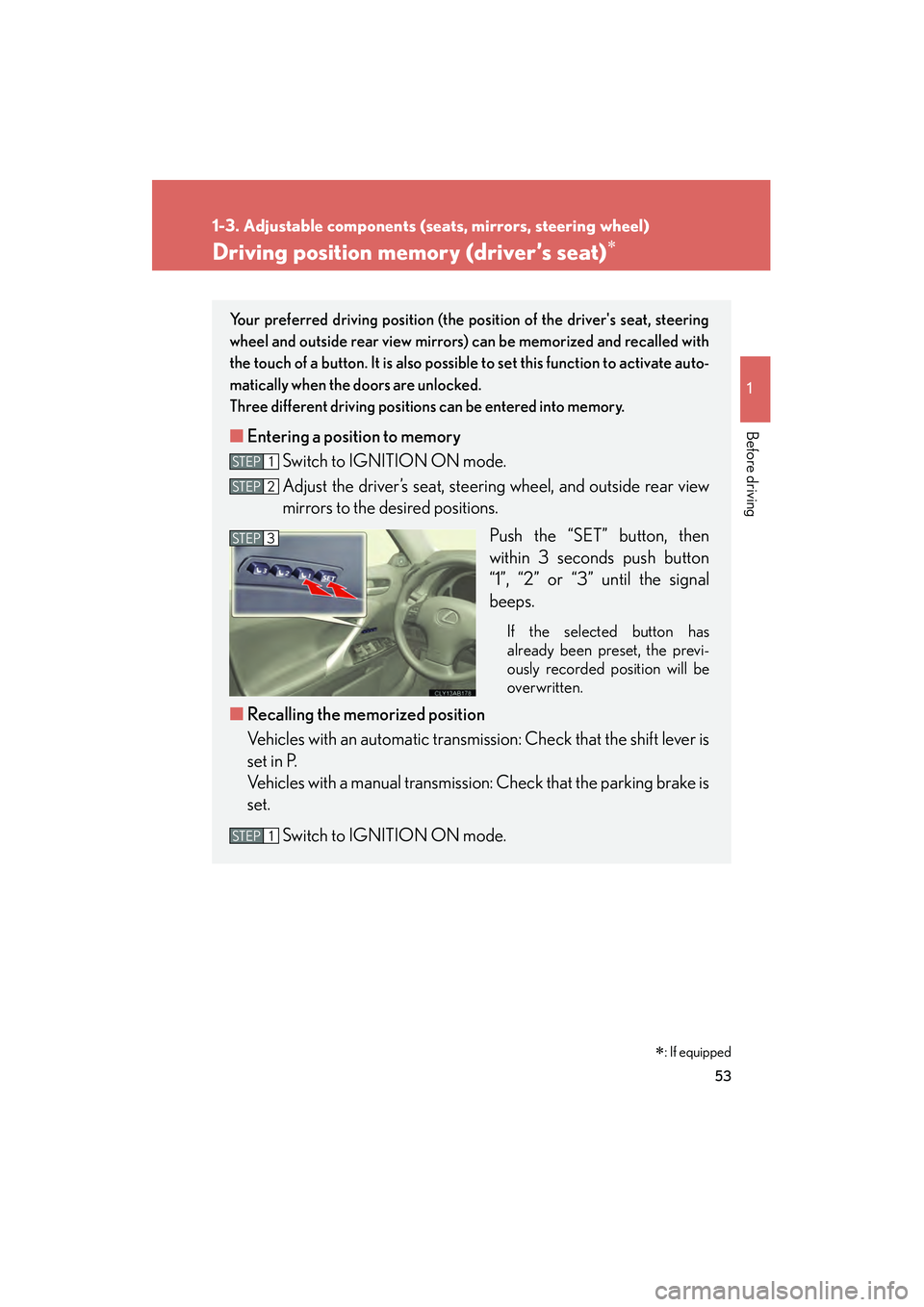
■ Entering a position to memory
Switch to IGNITION ON mode.
Adjust the driver’s seat, steering wheel, and outside rear view
mirrors to the desired positions.
Push the “SET” button, then
within 3 seconds push button
“1”, “2” or “3” until the signal
beeps.
If the selected button has
already been preset, the previ-
ously recorded position will be
overwritten.
■Recalling the memorized position
Vehicles with an automatic transmission: Check that the shift lever is
set in P.
Vehicles with a manual transmission: Check that the parking brake is
set.
Switch to IGNITION ON mode.
STEP1
STEP2
STEP3
STEP1
∗: If equipped
Page 57 of 578
56
1-3. Adjustable components (seats, mirrors, steering wheel)
IS350/250_U
■Canceling the linked door unlock operation
Turn the “ENGINE START STOP” switch OFF and close the driver's door.
Using the wireless remote control: While pushing the “SET” button, press on the wireless remote control until the signal beeps.
Using the door lock switch: While pr essing the “SET” button, press the
lock or unlock side on the door lock switch until the signal beeps.
■Operating the driving position memory after turning the “ENGINE START
STOP” switch OFF
Memorized positions (except for the steering wheel position) can be activated up
to 180 seconds after the driver's door is opened and another 60 seconds after it is
closed again, even after turning the “ENGINE START STOP” switch OFF.
■To cancel seat position recall
Perform any of the following operations.
●Push the “SET” button.
●Push button “1”, “2” or “3”.
●Adjust the seat using the switches (only cancels seat position recall).
■If the battery is disconnected
The memorized positions are erased when the battery is disconnected.
CAUTION
■Seat adjustment caution
Take care during seat adjustment that the seat does not strike the rear passenger or
squeeze your body against the steering wheel.
STEP1
STEP2
Page 71 of 578

70
1-3. Adjustable components (seats, mirrors, steering wheel)
IS350/250_U
Anti-glare inside rear view mirror
In automatic mode, sensors are used to detect the headlights of vehicles
behind and automatically reduce the reflected light.
Vehicles without compassTurns automatic mode on
Turns automatic mode off
The indicator comes on when
automatic mode is turned on.
The anti-glare mirror default
mode is automatic. The anti-
glare mirror is automatically set
to automatic whenever the
“ENGINE START STOP” switch
is turned to IGNITION ON
mode.
Vehicles with compassTurns automatic mode on/off
The indicator comes on when
automatic mode is turned on.
The anti-glare mirror default
mode is automatic. The anti-
glare mirror is automatically set
to automatic whenever the
“ENGINE START STOP” switch
is turned to IGNITION ON
mode.
Page 73 of 578
72
1-3. Adjustable components (seats, mirrors, steering wheel)
IS350/250_U
Outside rear view mirrors
■The mirrors can be adjusted when
The “ENGINE START STOP” switch is in ACCESSORY or IGNITION ON mode.
■When the mirrors are fogged up
Turn on the mirror defoggers to defog the mirrors. (→P. 2 1 4 )
■Folding back the mirrors
■One-touch adjustment of the mirror angle (vehicles with driving position mem-
ory)
A desired mirror face angle can be entered to memory and adjusted with the touch
of a button. (→ P. 5 3 )
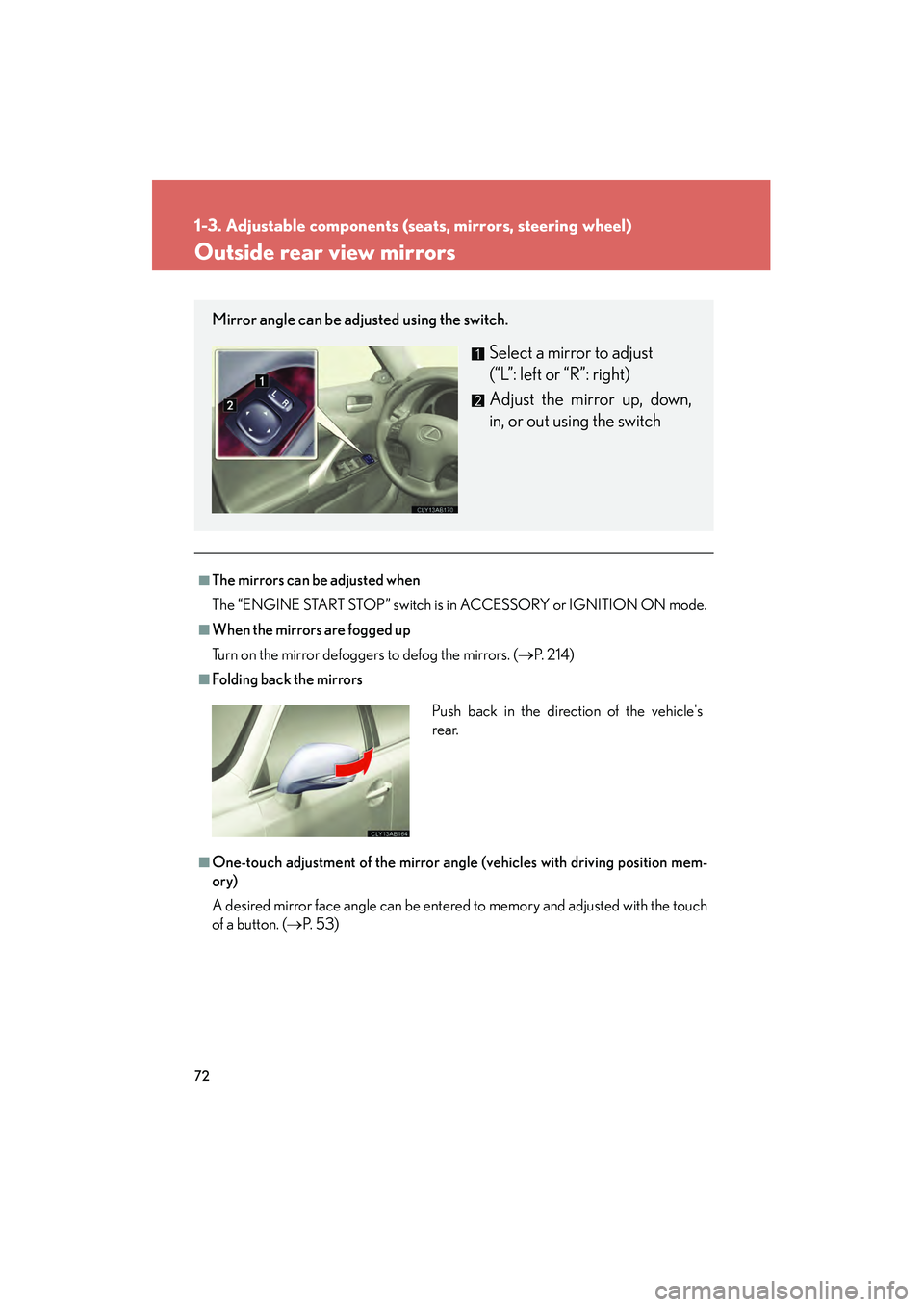
Mirror angle can be adjusted using the switch.
Select a mirror to adjust
(“L”: left or “R”: right)
Adjust the mirror up, down,
in, or out using the switch
Push back in the direction of the vehicle's
rear.
Page 74 of 578
73
1-3. Adjustable components (seats, mirrors, steering wheel)
1
Before driving
IS350/250_U
■Linked mirror function when reversing (vehicles with driving position memory)
The outside rear view mirrors will automatically angle downwards when the vehicle
is reversing in order to give a better view of the ground. However, this function will
not operate when the mirror select switch is in the neutral position (between “L” and
“R”).
■Auto anti-glare function (if equipped)
When the anti-glare inside rear view mirror is set to automatic mode, the outside
rear view mirrors will activate in conjunction with the anti-glare inside rear view mir-
ror to reduce reflected light. ( →P. 7 0 )
■Rain clearing mirrors (if equipped)
When water droplets collects on the mirror surface, for example when it rains, the
rain clearing (hydrophilic) effect of the mirrors causes the droplets to be spread out
into a film making the rear view clearer. In the following cases, the rain clearing
effect will be reduced temporarily, but will return after 1 or 2 days' exposure to
direct sunlight.
●After wiping dirt off the mirrors
●When the mirrors fog up
●After waxing your vehicle in an automatic car wash
●After your vehicle has been parked for a long period in underground parking
lots, etc. where there is no direct sunlight
Page 76 of 578
75
1
Before driving
IS350/250_U
1-4. Opening and closing the windows and moon roof
Power windows
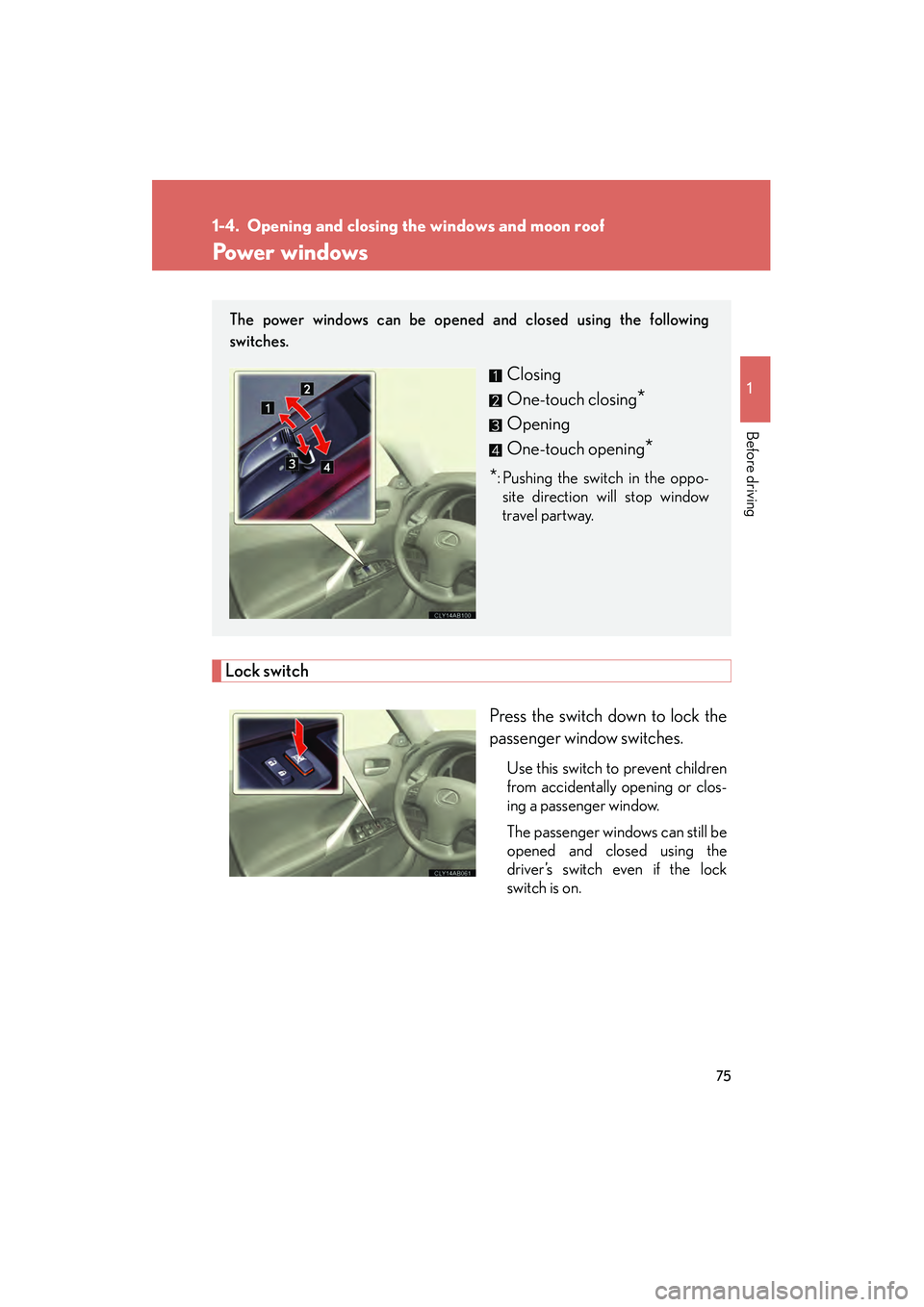
Lock switchPress the switch down to lock the
passenger window switches.
Use this switch to prevent children
from accidentally opening or clos-
ing a passenger window.
The passenger windows can still be
opened and closed using the
driver’s switch even if the lock
switch is on.
The power windows can be opened and closed using the following
switches.
Closing
One-touch closing
*
Opening
One-touch opening
*
*: Pushing the switch in the oppo-site direction will stop window
travel partway.
Page 77 of 578
76
1-4. Opening and closing the windows and moon roof
IS350/250_U
■The power windows can be operated when
The “ENGINE START STOP” switch is in IGNITION ON mode.
■Operating the power windows after turning the “ENGINE START STOP” switch
OFF
The power windows can be operated for approximately 45 seconds even after the
“ENGINE START STOP” switch is switched to ACCESSORY mode or turned
OFF. They cannot, however, be operated once either front door is opened.
■Jam protection function
If an object becomes caught between the window and the window frame, window
travel is stopped and the window is opened slightly.
■When the power window does not close normally
If the jam protection function is operating abnormally and a window cannot be
closed, perform the following operations using the power window switch on the rel-
evant door.
●After stopping the vehicle, the window can be closed by holding the power win-
dow switch in the one-touch closing position while the “ENGINE START
STOP” switch is turned to IGNITION ON mode.
●If the window still cannot be closed even by carrying out the operation
explained above, initialize the function by performing the following procedure.
Hold the power window switch in the one-touch closing position. Con-
tinue holding the switch for a further 6 seconds after the window has
closed.
Hold the power window switch in the one-touch opening position. Con-
tinue holding the switch for a further 2 seconds after the window has
opened completely.
Hold the power window switch in the one-touch closing position once
again. Continue holding the switch for a further 2 seconds after the win-
dow has closed.
If you release the switch while the window is moving, start again from the beginning.
If the window continues to close but then re-open slightly even after performing the
above procedure correctly, have the vehicle inspected by your Lexus dealer.
STEP1
STEP2
STEP3
Page 80 of 578
79
1-4. Opening and closing the windows and moon roof
1
Before driving
IS350/250_U
■The moon roof can be operated when
The “ENGINE START STOP” switch is in IGNITION ON mode.
■Moon roof open warning buzzer
The buzzer sounds and a message is shown on the multi-information display in the
instrument panel when the “ENGINE START STOP” switch is turned OFF and the
driver's door is opened with the moon roof open.
■Door lock linked moon roof operation
The moon roof can be opened and closed using the mechanical key. (→ P. 4 9 3 )
■Operating the moon roof after turning the “ENGINE START STOP” switch OFF
The moon roof can be operated for approximately 45 seconds even after the
“ENGINE START STOP” switch is switched to ACCESSORY mode or turned
OFF. It cannot, however, be operated once either front door is opened.
■Jam protection function
If an object is detected between the moon roof and the frame while closing or tilting
down, travel is stopped and the moon roof opens slightly.
■To reduce moon roof wind noise
Drive with the moon roof opened to slightly before the fully open position as driving
with the moon roof opened fully will cause wind noise.
■Sunshade
The sunshade can be opened and closed manually. However, the sunshade will
open automatically when th e moon roof is opened.
Page 81 of 578
80
1-4. Opening and closing the windows and moon roof
IS350/250_U
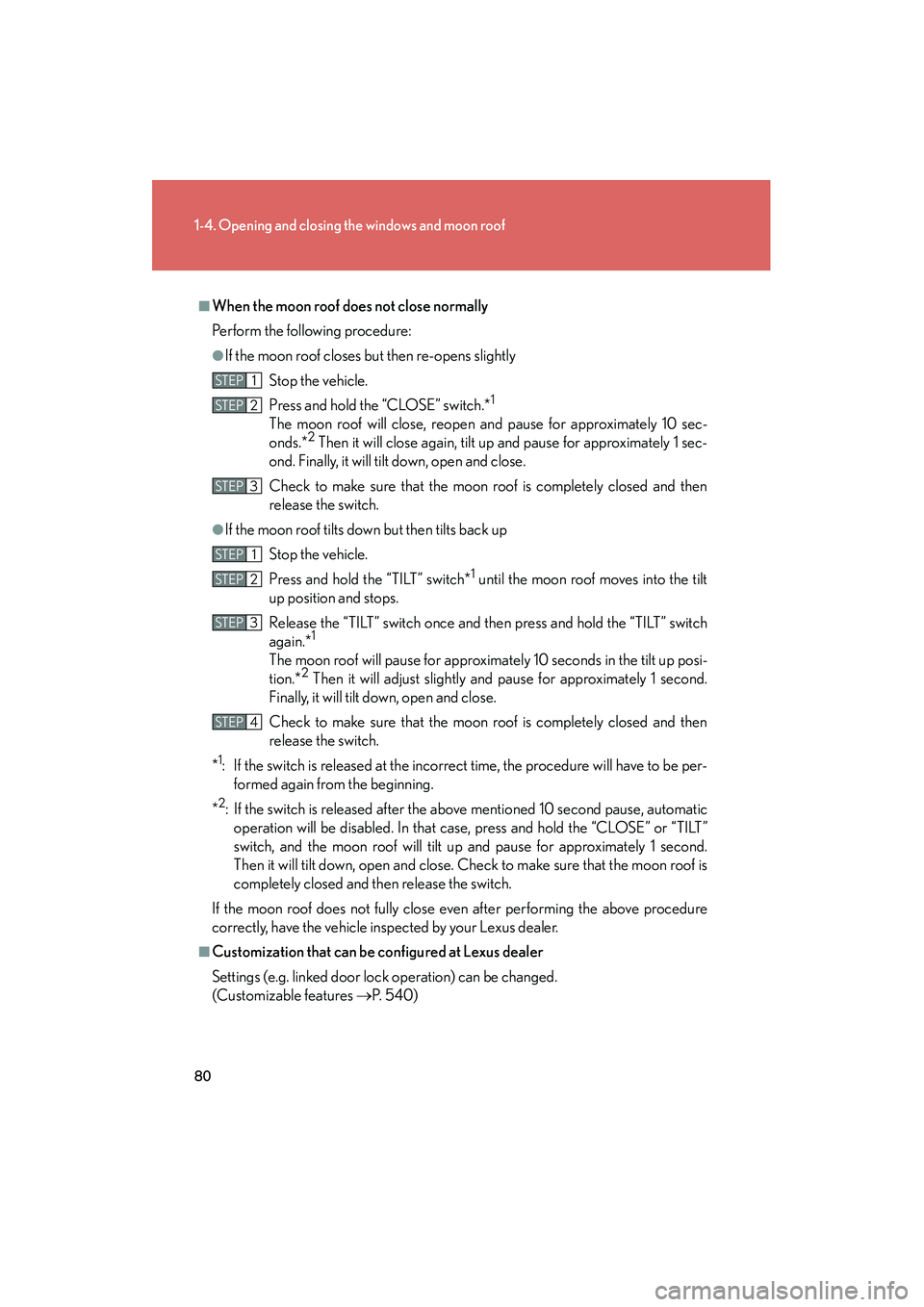
■When the moon roof does not close normally
Perform the following procedure:
●If the moon roof closes but then re-opens slightlyStop the vehicle.
Press and hold the “CLOSE” switch.*
1
The moon roof will close, reopen and pause for approximately 10 sec-
onds.*2 Then it will close again, tilt up and pause for approximately 1 sec-
ond. Finally, it will tilt down, open and close.
Check to make sure that the moon roof is completely closed and then
release the switch.
●If the moon roof tilts down but then tilts back up
Stop the vehicle.
Press and hold the “TILT” switch*
1 until the moon roof moves into the tilt
up position and stops.
Release the “TILT” switch once and then press and hold the “TILT” switch
again.*
1
The moon roof will pause for approximately 10 seconds in the tilt up posi-
tion.*2 Then it will adjust slightly and pause for approximately 1 second.
Finally, it will tilt down, open and close.
Check to make sure that the moon roof is completely closed and then
release the switch.
*
1: If the switch is released at the incorrect time, the procedure will have to be per- formed again from the beginning.
*
2: If the switch is released after the above mentioned 10 second pause, automatic operation will be disabled. In that case, press and hold the “CLOSE” or “TILT”
switch, and the moon roof will tilt up and pause for approximately 1 second.
Then it will tilt down, open and close. Check to make sure that the moon roof is
completely closed and then release the switch.
If the moon roof does not fully close even after performing the above procedure
correctly, have the vehicle inspected by your Lexus dealer.
■Customization that can be configured at Lexus dealer
Settings (e.g. linked door lock operation) can be changed.
(Customizable features →P. 5 4 0 )
STEP1
STEP2
STEP3
STEP1
STEP2
STEP3
STEP4