features Lexus IS250 2015 Owner's Guide
[x] Cancel search | Manufacturer: LEXUS, Model Year: 2015, Model line: IS250, Model: Lexus IS250 2015Pages: 586, PDF Size: 8.66 MB
Page 358 of 586
357
Interior features6
IS350/250_U (OM53C50U)
6-1. Using the air conditioning system
Automatic air conditioning system ..........................................358
Heated steering wheel/ seat heaters/
seat ventilators ......................... 366
6-2. Using the interior lights Interior lights list .........................368• Interior lights .......................... 369
• Personal lights ....................... 369
6-3. Using the storage features List of storage features ............ 370• Glove box .................................371
• Console box.............................371
•Cup holders/bottle holders..........................372
Trunk features ............................... 374
6-4. Using the other interior features
Other interior features .............377
• Sun visors .................................377
• Vanity mirrors .........................377
• Clock .........................................377
• Power outlet ........................... 378
• Armrest .................................... 379
• Rear sunshade....................... 379
• Assist grips............................... 381
• Coat hooks .............................. 381
Garage door opener................382
Compass ....................................... 387
LEXUS Enform Safety Connect......................................390
Page 360 of 586
3596-1. Using the air conditioning system
6
Interior features
IS350/250_U (OM53C50U)
■Fan speed setting
Press to increase the fan speed.
Press to decrease the fan speed.
■Change the airflow mode
To change the airflow, press .
The air outlets used are switched each time the button is pressed.
■Other functions
●Switching between outside air and recirculated air modes ( →P. 3 6 1 )
●Defogging the windshield ( →P. 3 6 2 )
●Defogging the rear window and outside rear view mirrors ( →P. 3 6 2 )
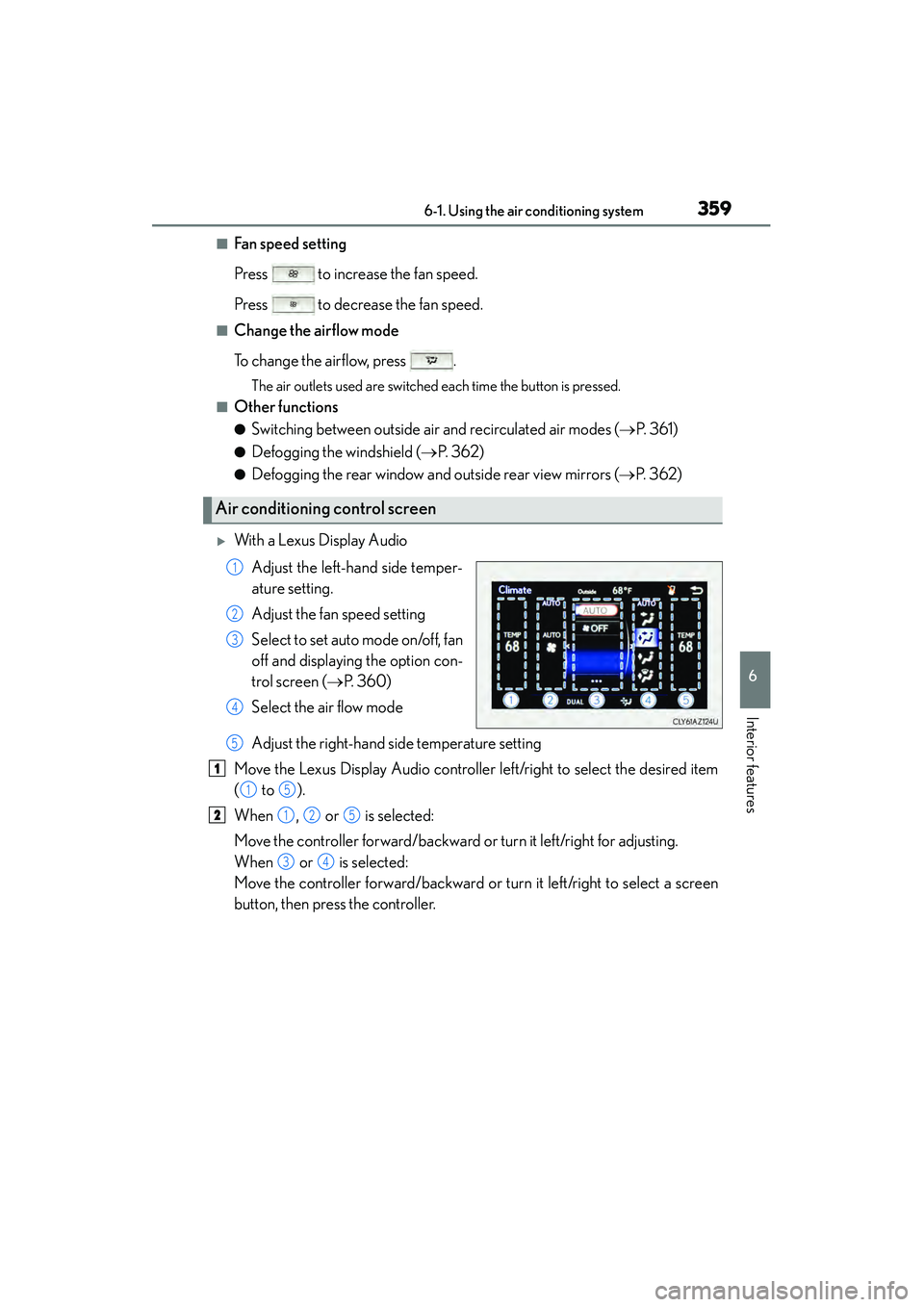
XWith a Lexus Display Audio
Adjust the left-hand side temper-
ature setting.
Adjust the fan speed setting
Select to set auto mode on/off, fan
off and displaying the option con-
trol screen ( →P. 360)
Select the air flow mode
Adjust the right-hand side temperature setting
Move the Lexus Display Audio controller left/right to select the desired item
( to ).
When , or is selected:
Move the controller forward/backward or turn it left/right for adjusting.
When or is selected:
Move the controller forward/backward or turn it left/right to select a screen
button, then press the controller.
Air conditioning control screen
1
2
3
4
5
1
15
2125
34
Page 362 of 586
3616-1. Using the air conditioning system
6
Interior features
IS350/250_U (OM53C50U)
Press , or select “AUTO” on the air conditioning control screen.
Adjust the temperature setting.
To stop the operation, press or select “OFF” on the air conditioning
control screen.
■Automatic mode indicator
If the fan speed setting or air flow modes are operated, the automatic mode
indicator goes off. However, automatic mode for functions other than that
operated are maintained.
■Adjusting the temperature for driv er and passenger seats separately
(“DUAL” mode)
To turn on the “DUAL” mode, perform any of the following procedures:
●Press .
●Select “DUAL” on the option control screen.
●Adjust the passenger’s side temperature setting.
The indicator comes on when the “DUAL” mode is on.
While in “DUAL” mode, the temperature of the rear air outlets is set at the right-
hand side temperature setting.
■Switching between outside air and recirculated air modes
Press to change to recirculated air mode.
Press to change to outside air mode.
The indicator above the selected button comes on.
■Micro dust and pollen filter
Pollen is removed from the air and the air flows to the upper part of the body.
Select on the option control screen.
When the micro dust and pollen filter is on, is displayed on the air condition-
ing control screen.
In order to prevent the windshield from fo gging up when the outside air is cold, the
dehumidification function may operate.
The pollens are filtered out even if the mi cro dust and pollen filter is turned off.
Using automatic mode
Other functions
1
2
3
Page 364 of 586
3636-1. Using the air conditioning system
6
Interior features
IS350/250_U (OM53C50U)
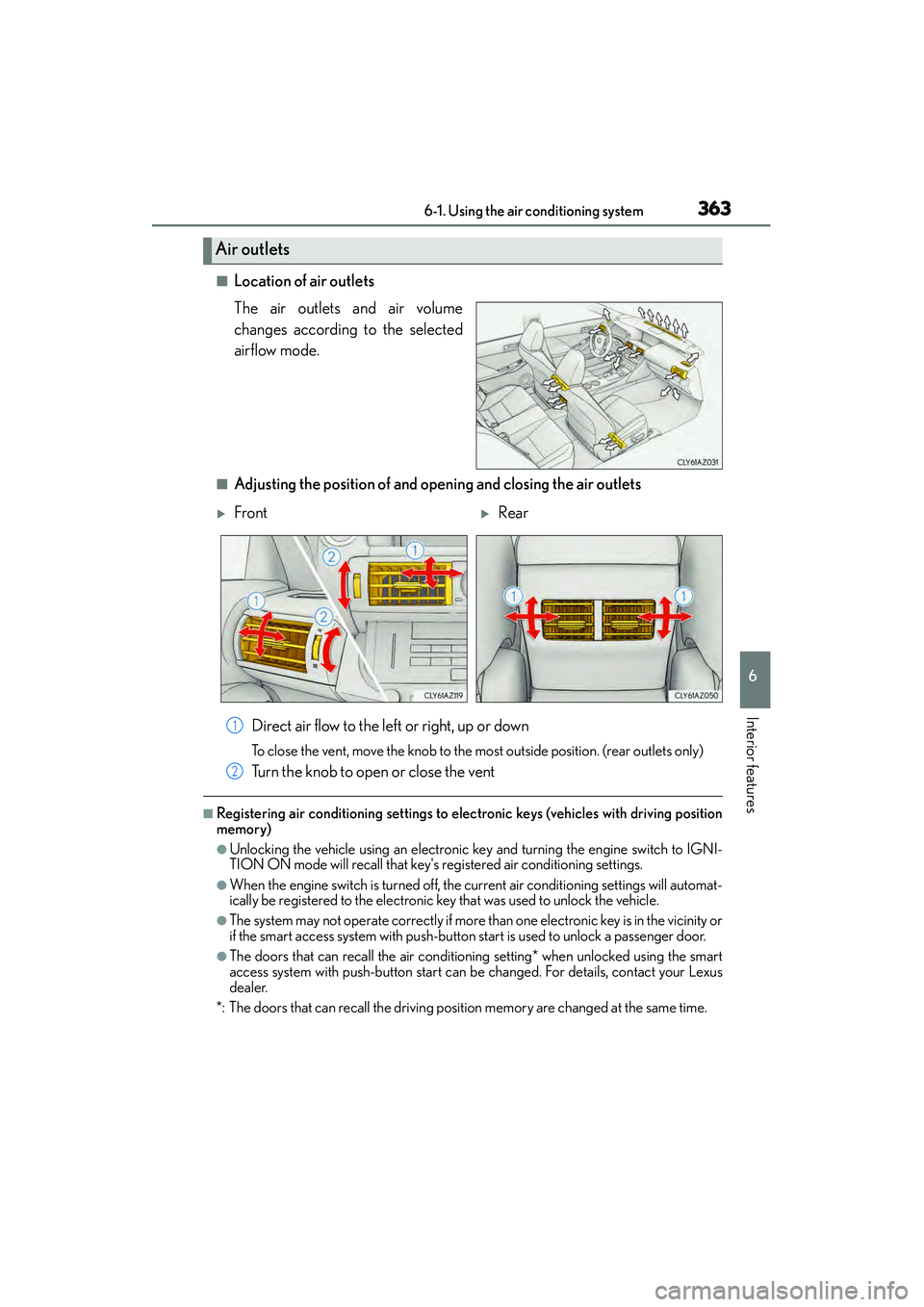
■Location of air outlets
The air outlets and air volume
changes according to the selected
airflow mode.
■Adjusting the position of and opening and closing the air outlets
Direct air flow to the left or right, up or down
To close the vent, move the knob to the most outside position. (rear outlets only)
Turn the knob to open or close the vent
■Registering air conditioning settings to elec tronic keys (vehicles with driving position
memory)
●Unlocking the vehicle using an electronic ke y and turning the engine switch to IGNI-
TION ON mode will recall that key's re gistered air conditioning settings.
●When the engine switch is turned off, the current air conditioning settings will automat-
ically be registered to the electronic key that was used to unlock the vehicle.
●The system may not operate correctly if more than one electronic key is in the vicinity or
if the smart access system with push-button start is used to unlock a passenger door.
●The doors that can recall the air conditioning setting* when unlocked using the smart
access system with push-button start can be changed. For details, contact your Lexus
dealer.
*: The doors that can recall the driving position memory are changed at the same time.
Air outlets
XFrontXRear
1
2
Page 366 of 586
3656-1. Using the air conditioning system
6
Interior features
IS350/250_U (OM53C50U)
■When the outside temperature falls to nearly 32 °F (0 °C)
The dehumidification function may not operate even when is pressed or “A/C” is
selected.
■Ventilation and air conditioning odors
●To let fresh air in, set the air conditioning system to the outside air mode.
●During use, various odors from inside and outside the vehicle may enter into and accu-
mulate in the air conditioning system. This may then cause odor to be emitted from the
vents.
●To reduce potential odors from occurring:
• It is recommended that the air conditioning system be set to outside air mode prior to turning the vehicle off.
• The start timing of the blower may be delayed for a short period of time immediately after the air conditioning system is started in automatic mode.
■Air conditioning filter
→ P. 4 3 7
■Customization
Settings (e.g. A/C Auto switch operation) can be changed.
(Customizable features →P. 5 4 3 )
CAUTION
■To prevent the windshield from fogging up
●Do not use during cool air operation in extremely humid weather. The differ-
ence between the temperature of the outside air and that of the windshield can cause
the outer surface of the windshield to fog up, blocking your vision.
■To prevent burns
●Do not touch the rear view mirror surfaces when the outside rear view mirror defog-
gers are on.
●Do not touch the glass at lower part of the windshield or to the side of the front pillars
when the windshield wiper de-icer is on.
NOTICE
■To prevent battery discharge
Do not leave the air conditioning system on longer than necessary when the engine is
stopped.
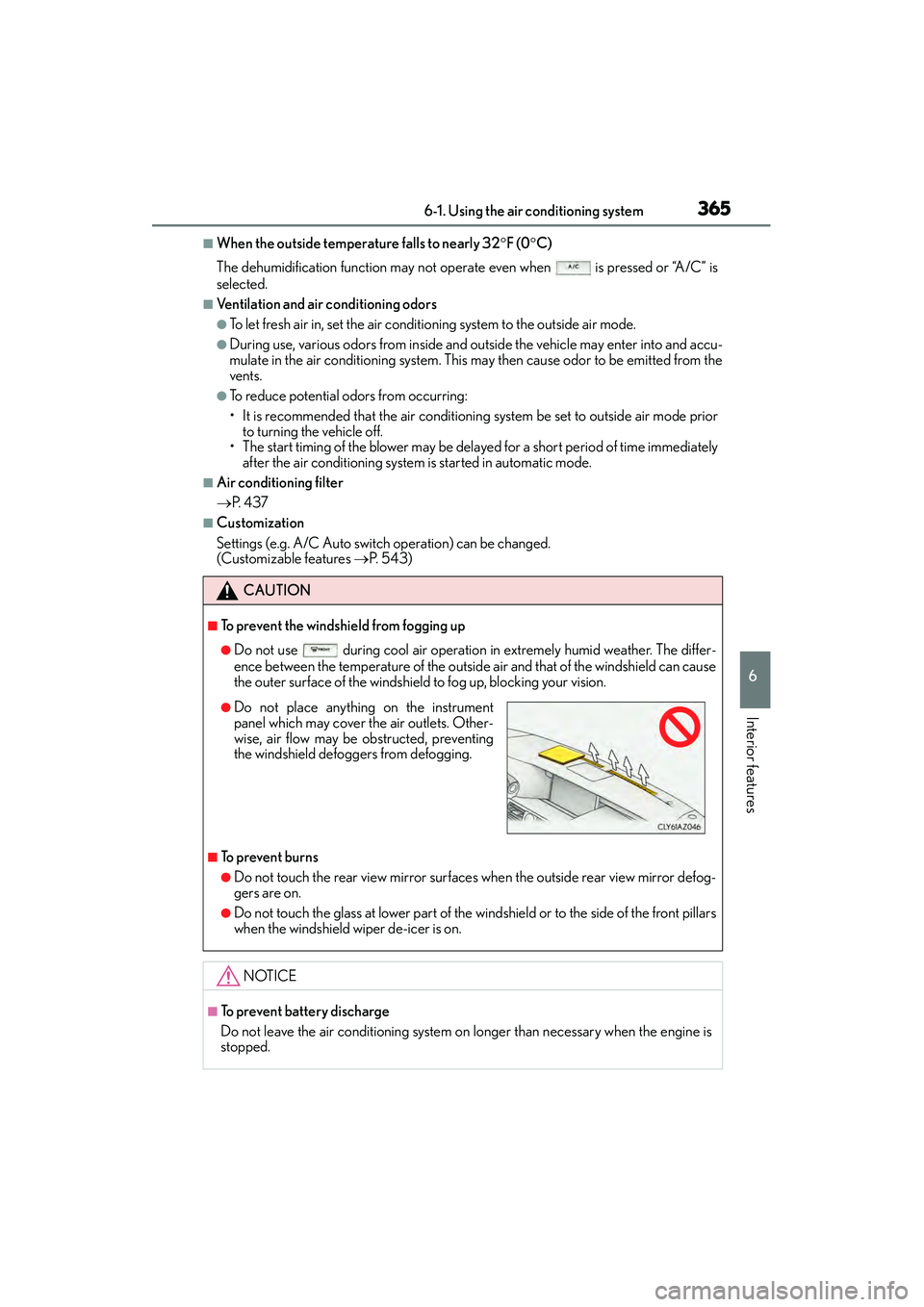
●Do not place anything on the instrument
panel which may cover the air outlets. Other-
wise, air flow may be obstructed, preventing
the windshield defoggers from defogging.
Page 368 of 586
3676-1. Using the air conditioning system
6
Interior features
IS350/250_U (OM53C50U)
●The heated steering wheel can be used when the engine switch is in IGNITION ON
mode.
●The heated steering wheel will automatically turn off after about 30 minutes.
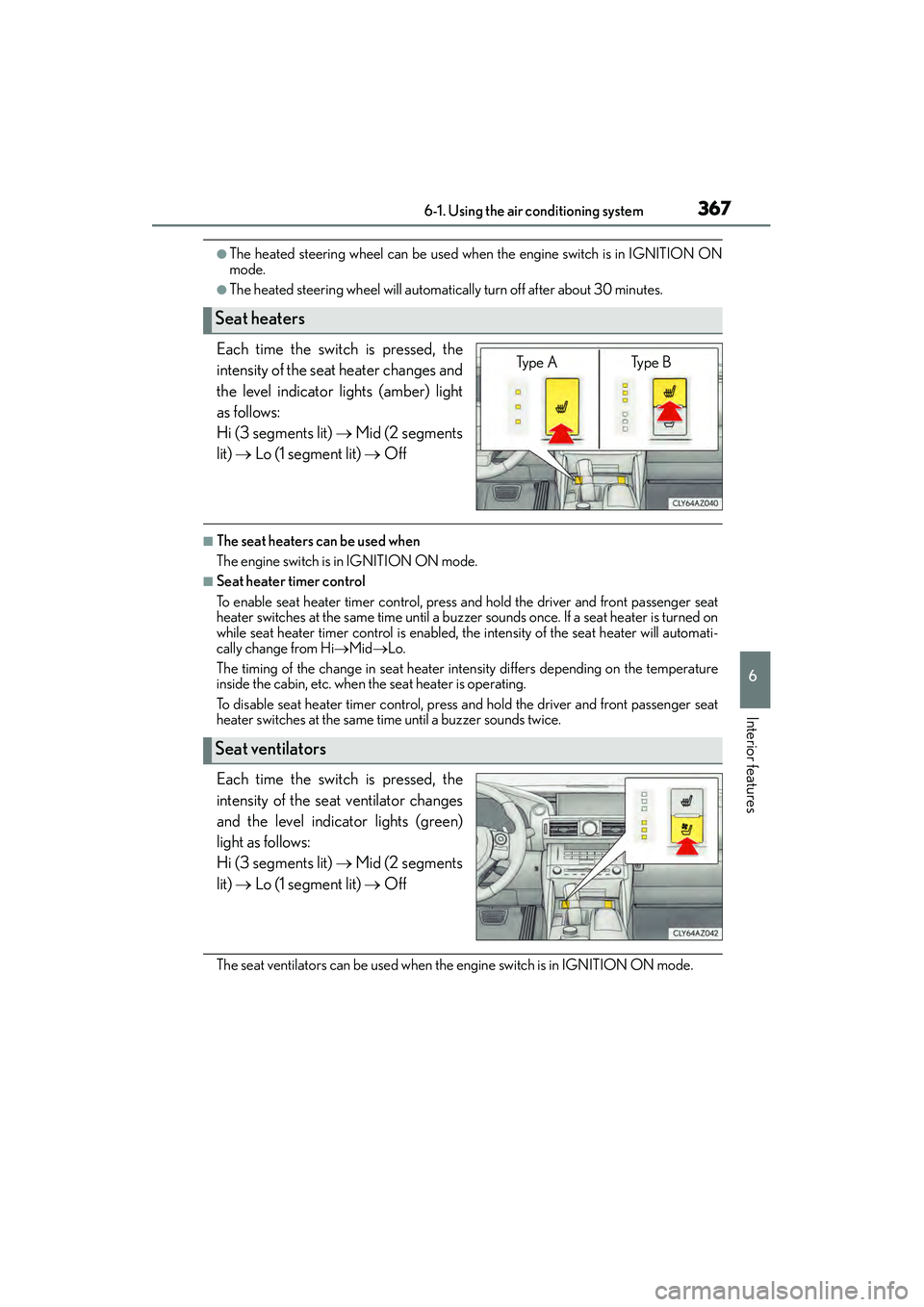
Each time the switch is pressed, the
intensity of the seat heater changes and
the level indicator lights (amber) light
as follows:
Hi (3 segments lit) → Mid (2 segments
lit) → Lo (1 segment lit) → Off
■The seat heaters can be used when
The engine switch is in IGNITION ON mode.
■Seat heater timer control
To enable seat heater timer control, press and hold the driver and front passenger seat
heater switches at the same time until a buzzer sounds once. If a seat heater is turned on
while seat heater timer control is enabled, the intensity of the seat heater will automati-
cally change from Hi →Mid →Lo.
The timing of the change in seat heater intensity differs depending on the temperature
inside the cabin, etc. when the seat heater is operating.
To disable seat heater timer control, press and hold the driver and front passenger seat
heater switches at the same time until a buzzer sounds twice.
Each time the switch is pressed, the
intensity of the seat ventilator changes
and the level indicator lights (green)
light as follows:
Hi (3 segments lit) → Mid (2 segments
lit) → Lo (1 segment lit) → Off
The seat ventilators can be used when the engine switch is in IGNITION ON mode.
Seat heaters
Ty p e A Ty p e B
Seat ventilators
Page 370 of 586
3696-2. Using the interior lights
6
Interior features
IS350/250_U (OM53C50U)
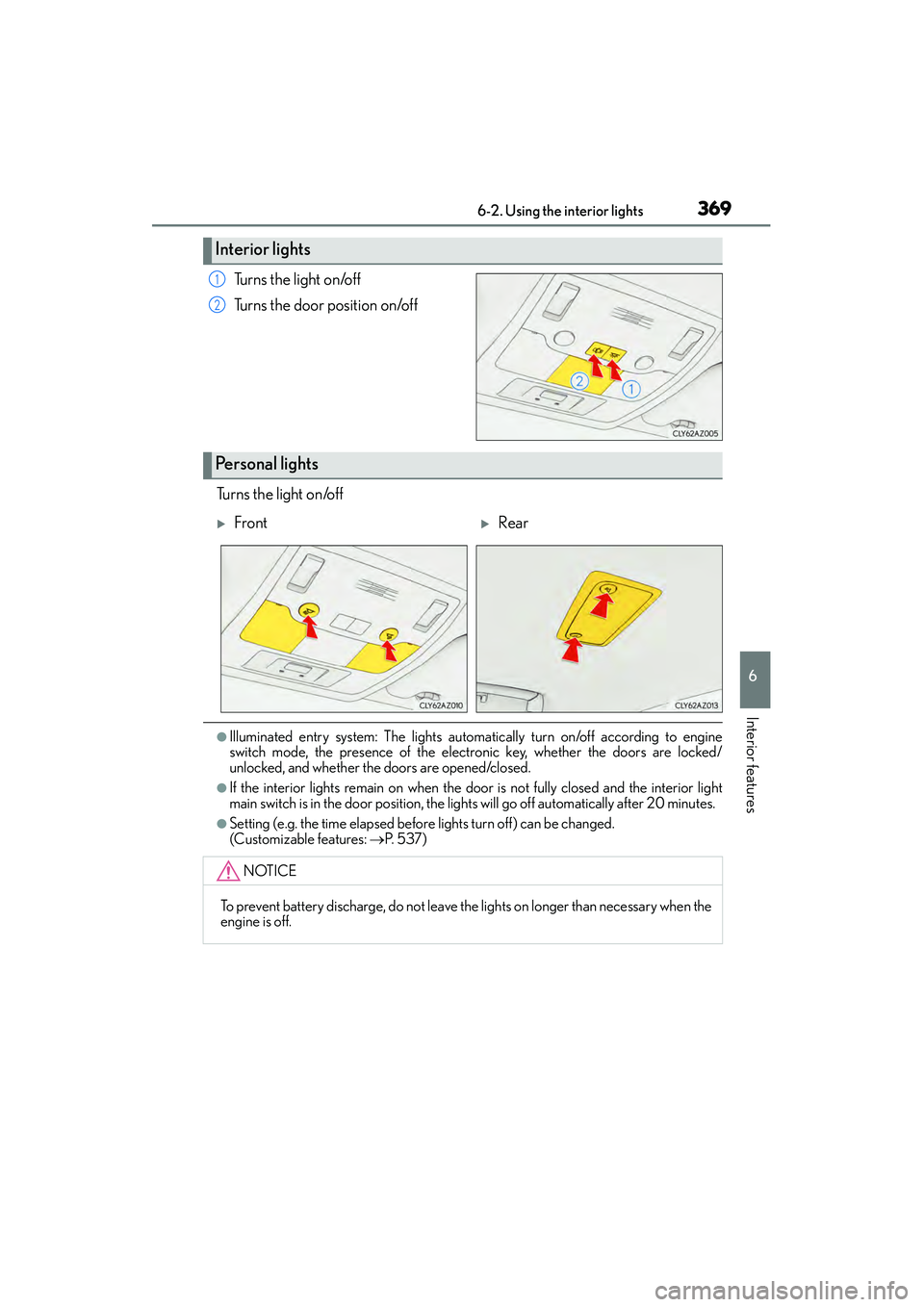
Turns the light on/off
Turns the door position on/off
Turns the light on/off
●Illuminated entry system: The lights automa tically turn on/off according to engine
switch mode, the presence of the electronic key, whether the doors are locked/
unlocked, and whether the doors are opened/closed.
●If the interior lights remain on when the d oor is not fully closed and the interior light
main switch is in the door position, the lights will go off automatically after 20 minutes.
●Setting (e.g. the time elapsed before lights turn off) can be changed.
(Customizable features: →P. 5 3 7 )
Interior lights
1
2
Personal lights
XFrontXRear
NOTICE
To prevent battery discharge, do not leave the lights on longer than necessary when the
engine is off.
Page 371 of 586
370
IS350/250_U (OM53C50U)6-3. Using the storage features
List of storage features
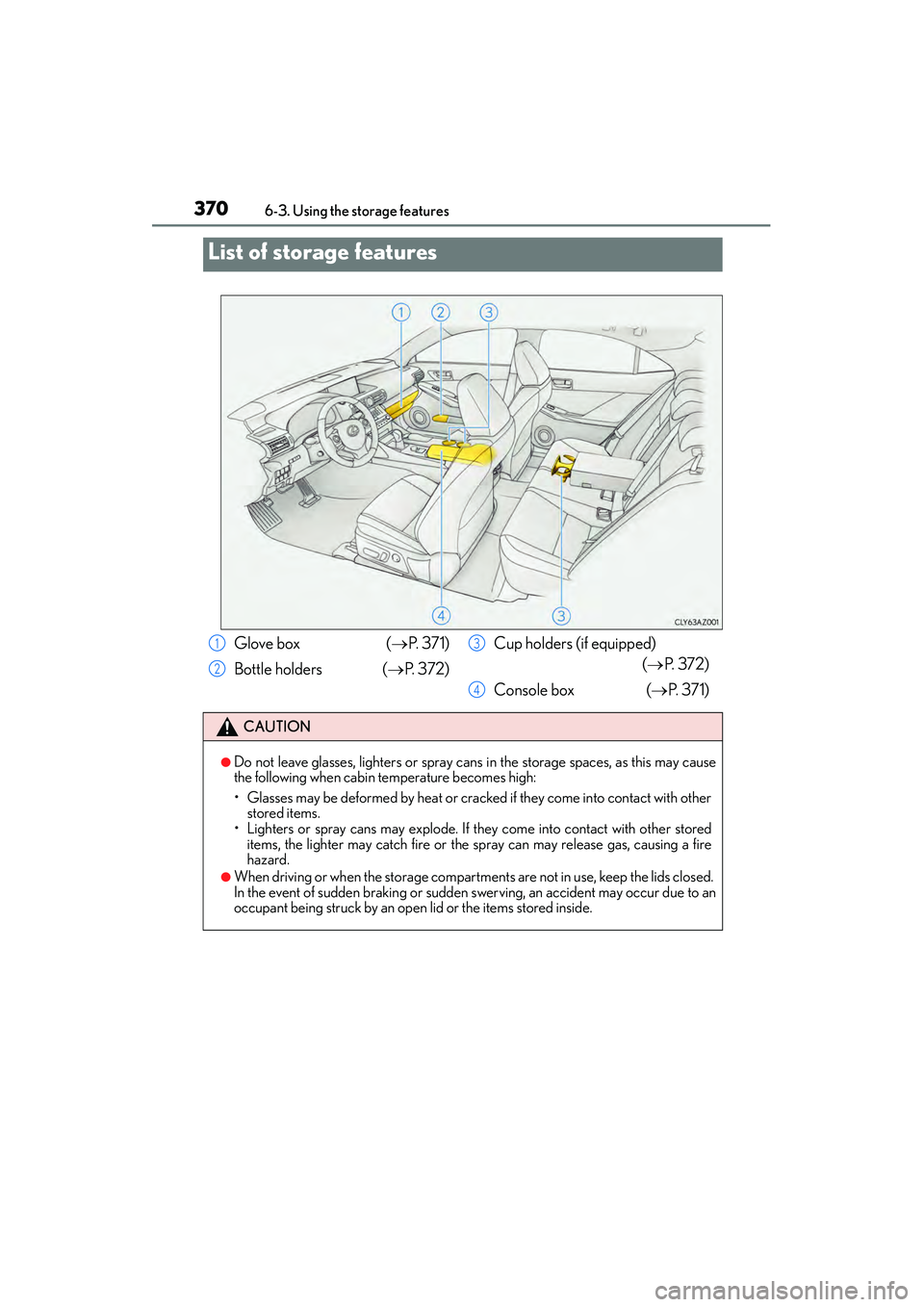
Glove box (
→P. 3 7 1 )
Bottle holders ( →P. 3 7 2 ) Cup holders (if equipped)
(→ P. 3 7 2 )
Console box ( →P. 3 7 1 )
CAUTION
●Do not leave glasses, lighters or spray cans in the storage spaces, as this may cause
the following when cabin temperature becomes high:
• Glasses may be deformed by heat or cracked if they come into contact with other stored items.
• Lighters or spray cans may explode. If they come into contact with other stored
items, the lighter may catch fire or the spray can may release gas, causing a fire
hazard.
●When driving or when the storage compartments are not in use, keep the lids closed.
In the event of sudden braking or sudden swerving, an accident may occur due to an
occupant being struck by an open lid or the items stored inside.
1
2
3
4
Page 372 of 586
3716-3. Using the storage features
6
Interior features
IS350/250_U (OM53C50U)
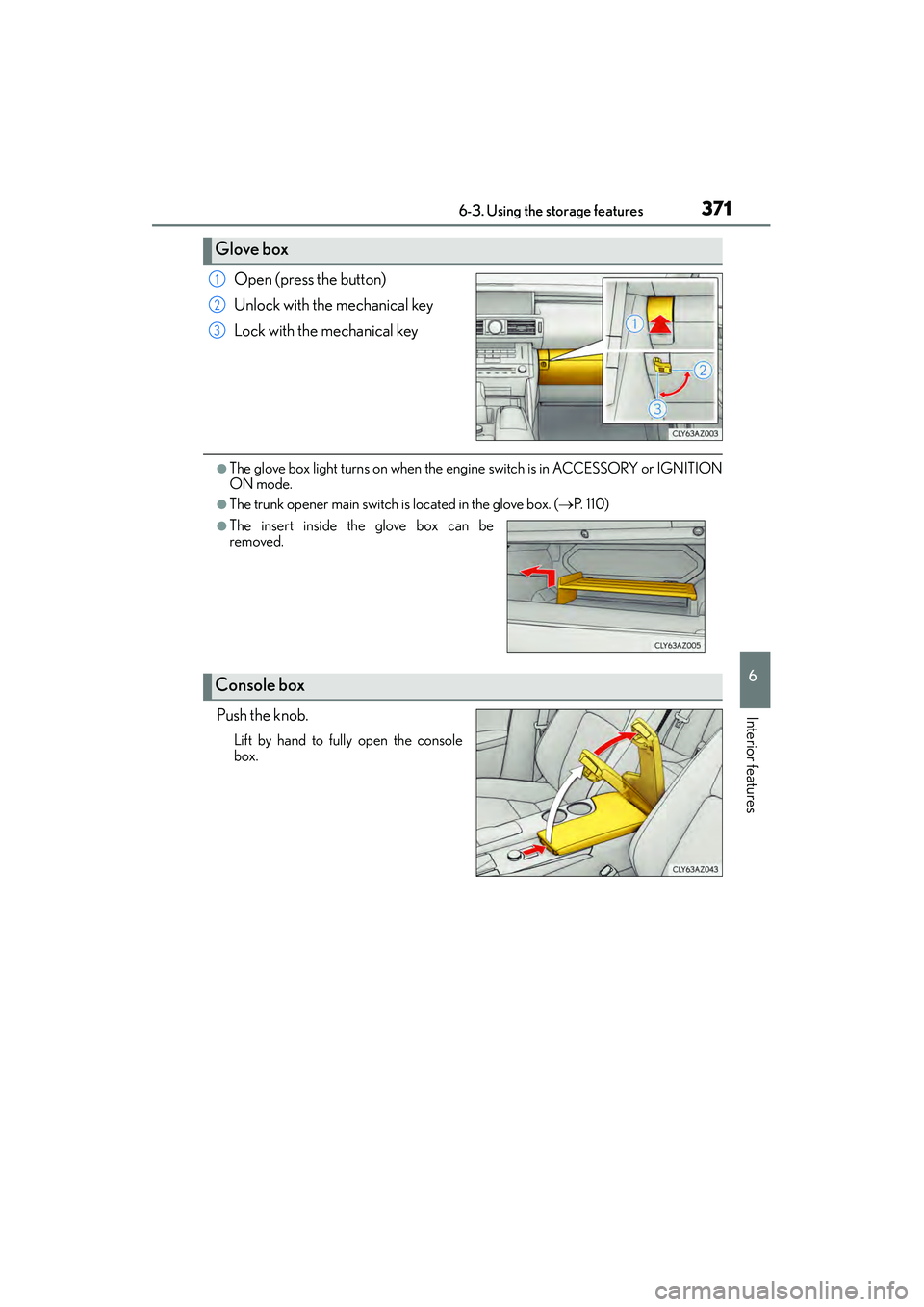
Open (press the button)
Unlock with the mechanical key
Lock with the mechanical key
●The glove box light turns on when the engine switch is in ACCESSORY or IGNITION
ON mode.
●The trunk opener main switch is located in the glove box. (→P. 1 1 0 )
Push the knob.
Lift by hand to fully open the console
box.
Glove box
1
2
3
●The insert inside the glove box can be
removed.
Console box
Page 373 of 586
3726-3. Using the storage features
IS350/250_U (OM53C50U)
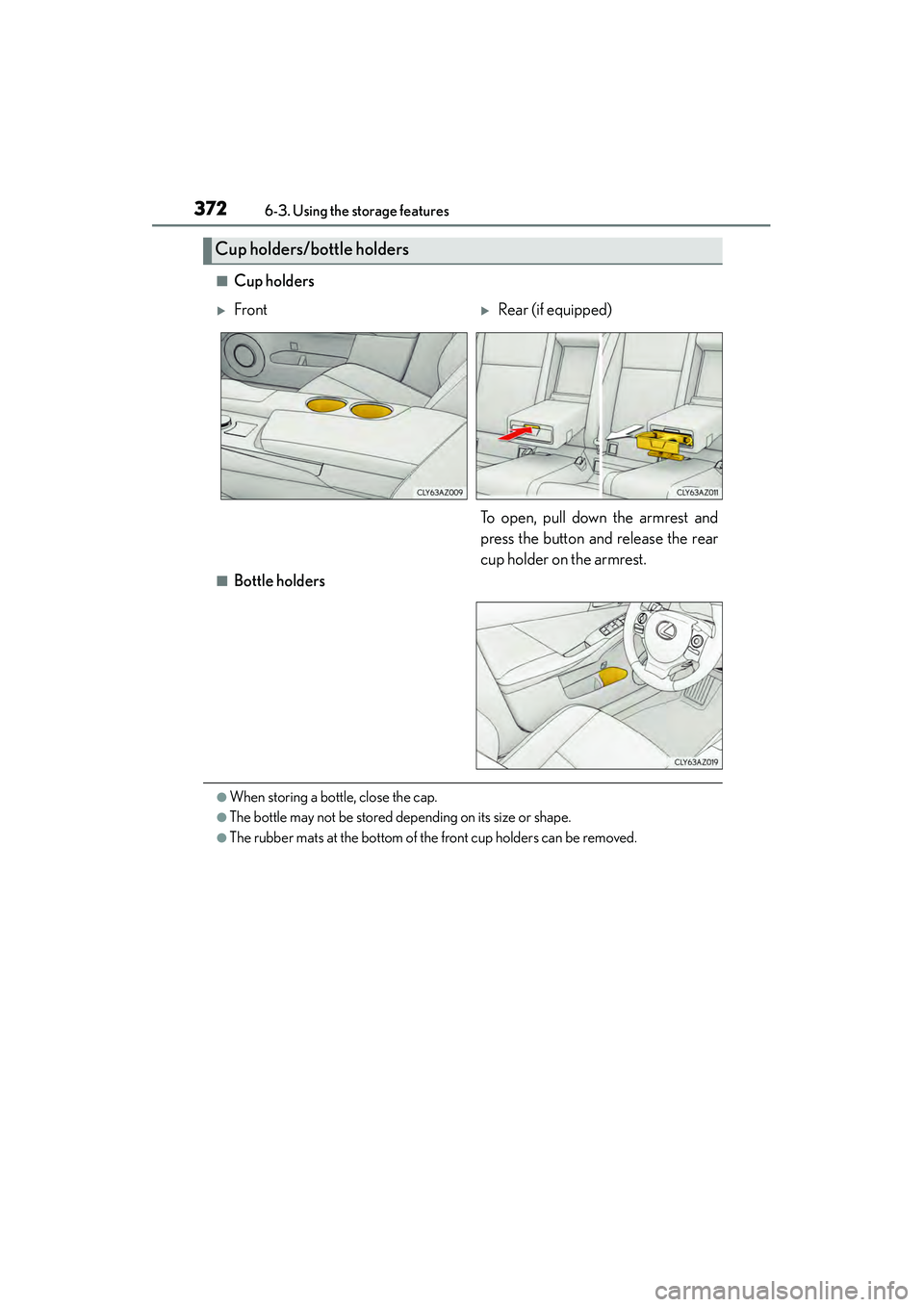
■Cup holders
■Bottle holders
●When storing a bottle, close the cap.
●The bottle may not be stored depending on its size or shape.
●The rubber mats at the bottom of the front cup holders can be removed.
Cup holders/bottle holders
XFrontXRear (if equipped)
To open, pull down the armrest and
press the button and release the rear
cup holder on the armrest.