EV mode Lexus IS300h 2013 Manual PDF
[x] Cancel search | Manufacturer: LEXUS, Model Year: 2013, Model line: IS300h, Model: Lexus IS300h 2013Pages: 628, PDF Size: 20.23 MB
Page 252 of 628
2504-5. Using the driving support systems
IS300h_EE(OM53B95E)
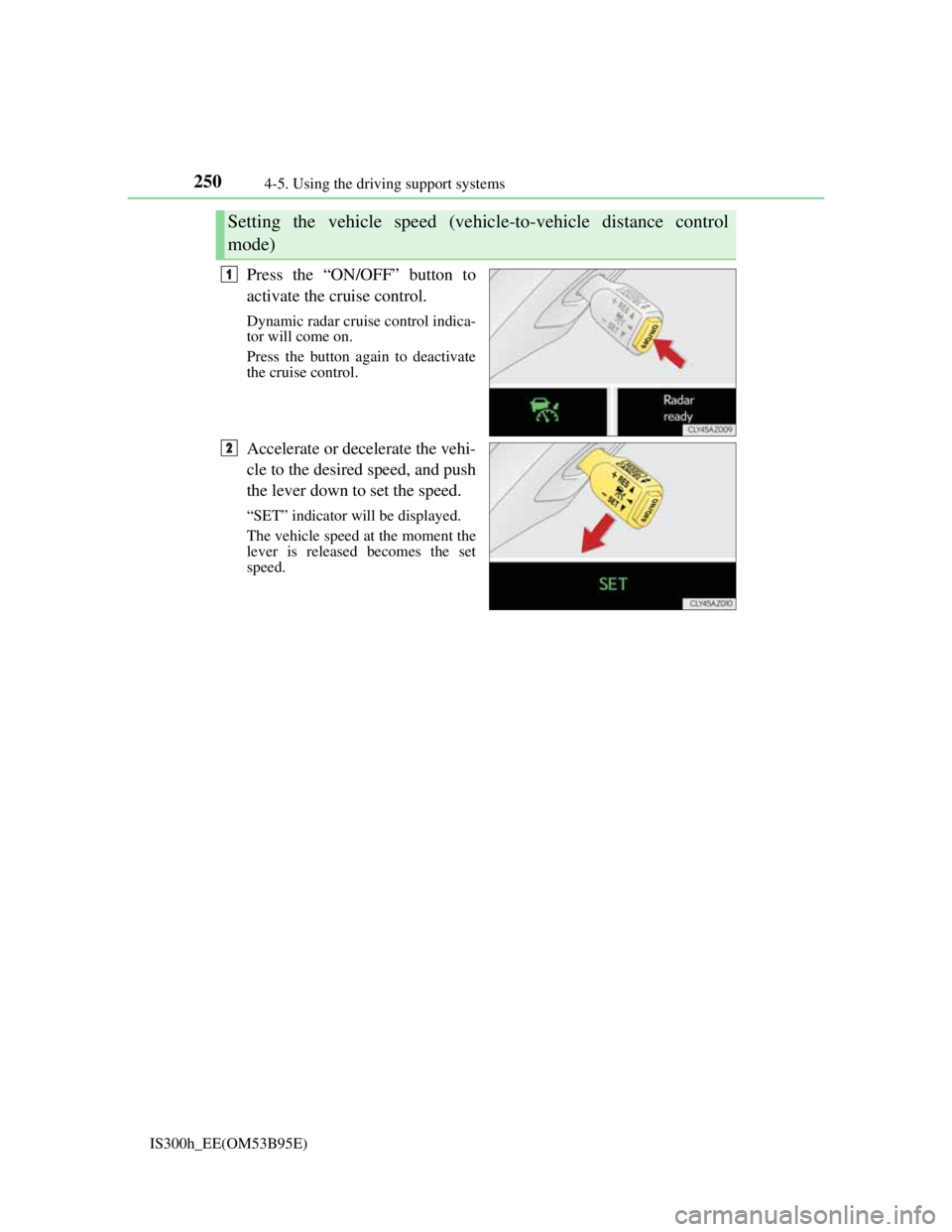
Press the “ON/OFF” button to
activate the cruise control.
Dynamic radar cruise control indica-
tor will come on.
Press the button again to deactivate
the cruise control.
Accelerate or decelerate the vehi-
cle to the desired speed, and push
the lever down to set the speed.
“SET” indicator will be displayed.
The vehicle speed at the moment the
lever is released becomes the set
speed.
Setting the vehicle speed (vehicle-to-vehicle distance control
mode)
1
2
Page 253 of 628
2514-5. Using the driving support systems
4
Driving
IS300h_EE(OM53B95E)
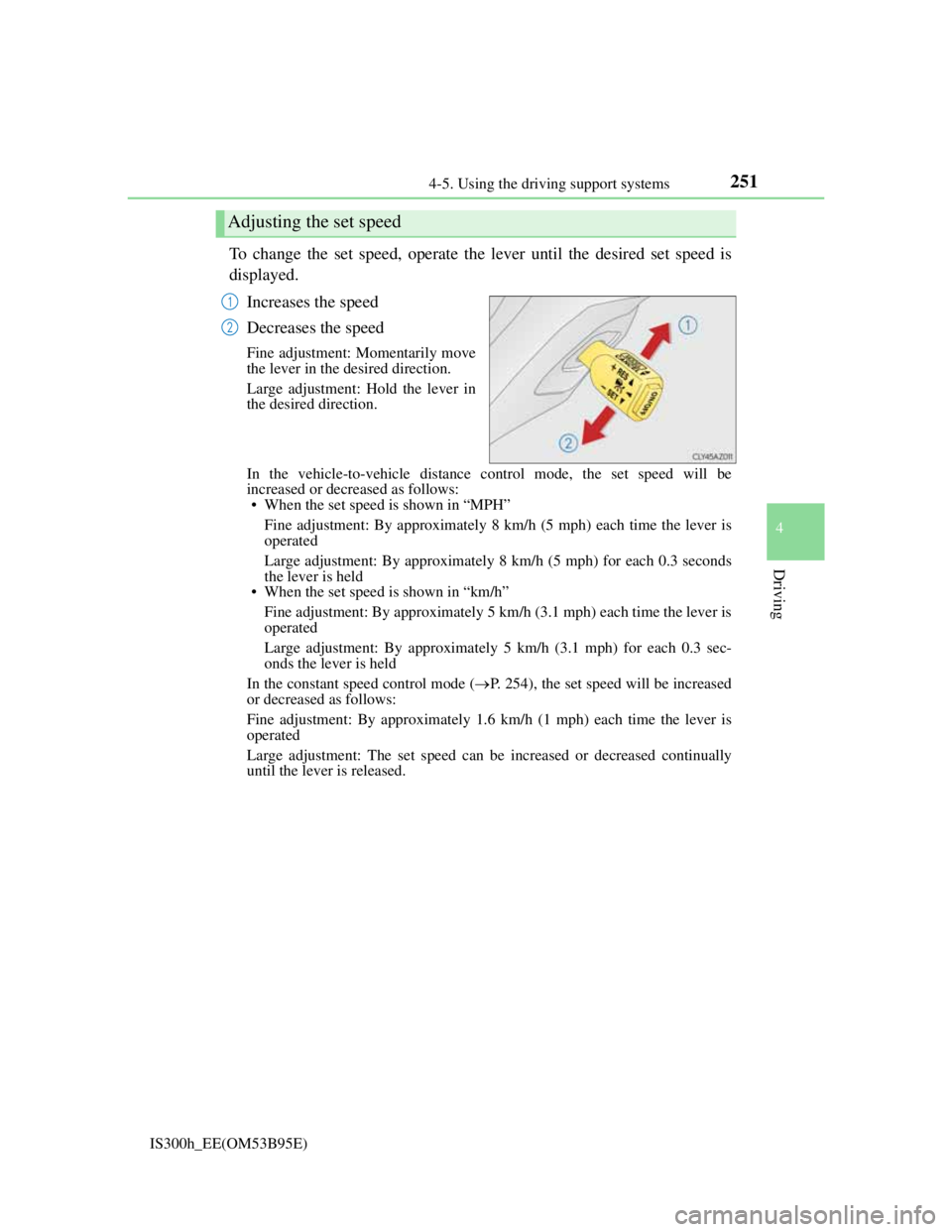
To change the set speed, operate the lever until the desired set speed is
displayed.
Increases the speed
Decreases the speed
Fine adjustment: Momentarily move
the lever in the desired direction.
Large adjustment: Hold the lever in
the desired direction.
In the vehicle-to-vehicle distance control mode, the set speed will be
increased or decreased as follows:
• When the set speed is shown in “MPH”
Fine adjustment: By approximately 8 km/h (5 mph) each time the lever is
operated
Large adjustment: By approximately 8 km/h (5 mph) for each 0.3 seconds
the lever is held
• When the set speed is shown in “km/h”
Fine adjustment: By approximately 5 km/h (3.1 mph) each time the lever is
operated
Large adjustment: By approximately 5 km/h (3.1 mph) for each 0.3 sec-
onds the lever is held
In the constant speed control mode (P. 254), the set speed will be increased
or decreased as follows:
Fine adjustment: By approximately 1.6 km/h (1 mph) each time the lever is
operated
Large adjustment: The set speed can be increased or decreased continually
until the lever is released.
Adjusting the set speed
1
2
Page 254 of 628
2524-5. Using the driving support systems
IS300h_EE(OM53B95E)
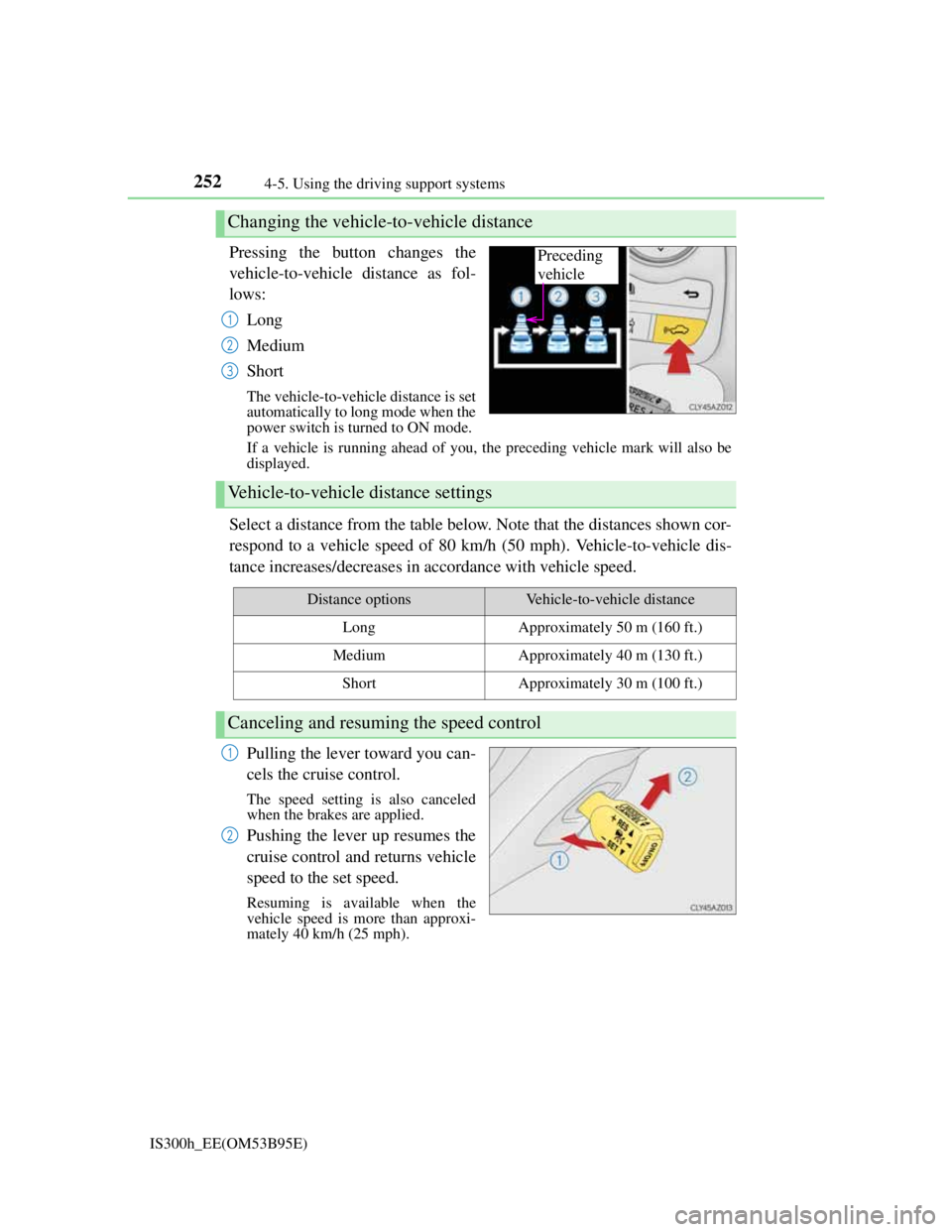
Pressing the button changes the
vehicle-to-vehicle distance as fol-
lows:
Long
Medium
Short
The vehicle-to-vehicle distance is set
automatically to long mode when the
power switch is turned to ON mode.
If a vehicle is running ahead of you, the preceding vehicle mark will also be
displayed.
Select a distance from the table below. Note that the distances shown cor-
respond to a vehicle speed of 80 km/h (50 mph). Vehicle-to-vehicle dis-
tance increases/decreases in accordance with vehicle speed.
Pulling the lever toward you can-
cels the cruise control.
The speed setting is also canceled
when the brakes are applied.
Pushing the lever up resumes the
cruise control and returns vehicle
speed to the set speed.
Resuming is available when the
vehicle speed is more than approxi-
mately 40 km/h (25 mph).
Changing the vehicle-to-vehicle distance
Preceding
vehicle
1
2
3
Vehicle-to-vehicle distance settings
Distance optionsVehicle-to-vehicle distance
LongApproximately 50 m (160 ft.)
MediumApproximately 40 m (130 ft.)
ShortApproximately 30 m (100 ft.)
Canceling and resuming the speed control
1
2
Page 255 of 628
2534-5. Using the driving support systems
4
Driving
IS300h_EE(OM53B95E)
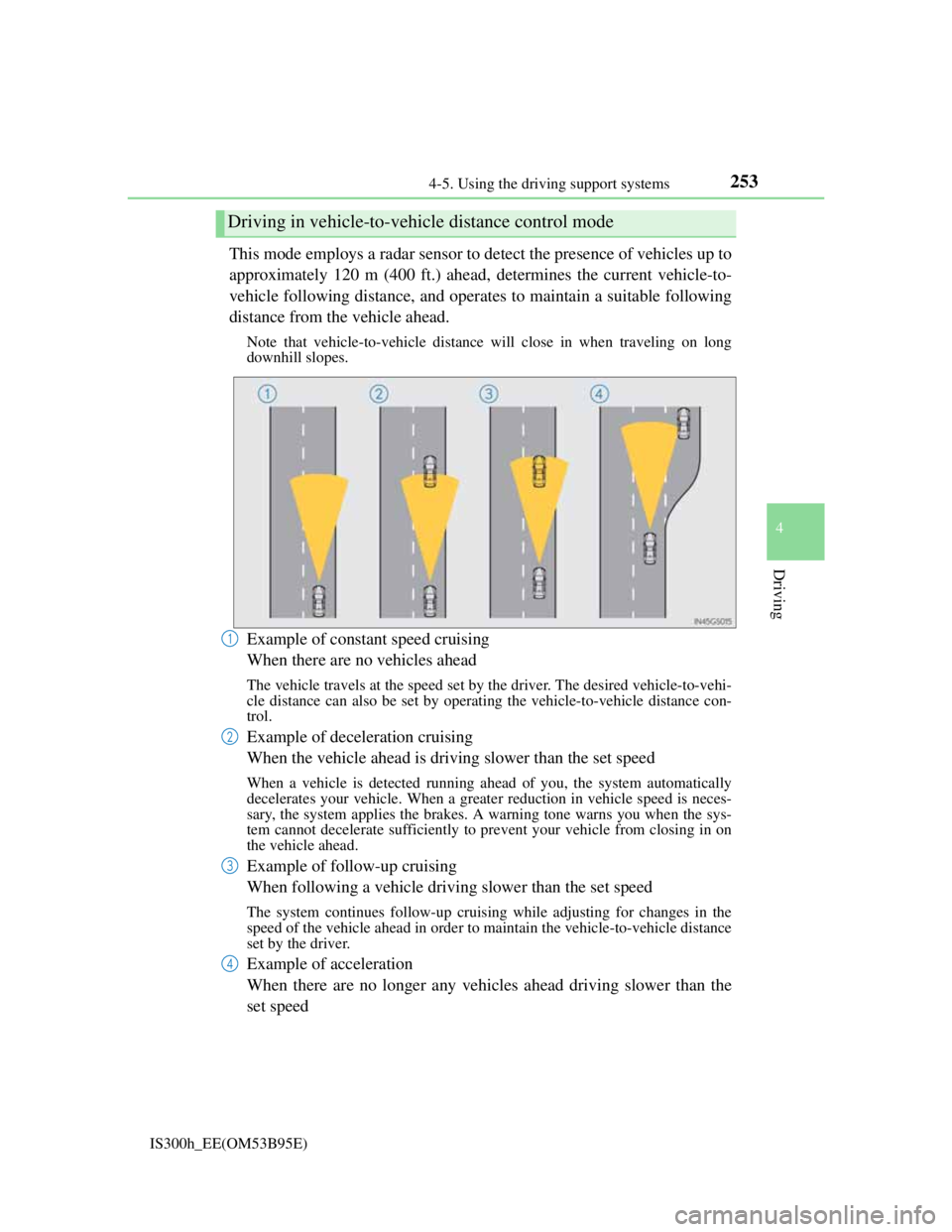
This mode employs a radar sensor to detect the presence of vehicles up to
approximately 120 m (400 ft.) ahead, determines the current vehicle-to-
vehicle following distance, and operates to maintain a suitable following
distance from the vehicle ahead.
Note that vehicle-to-vehicle distance will close in when traveling on long
downhill slopes.
Example of constant speed cruising
When there are no vehicles ahead
The vehicle travels at the speed set by the driver. The desired vehicle-to-vehi-
cle distance can also be set by operating the vehicle-to-vehicle distance con-
trol.
Example of deceleration cruising
When the vehicle ahead is driving slower than the set speed
When a vehicle is detected running ahead of you, the system automatically
decelerates your vehicle. When a greater reduction in vehicle speed is neces-
sary, the system applies the brakes. A warning tone warns you when the sys-
tem cannot decelerate sufficiently to prevent your vehicle from closing in on
the vehicle ahead.
Example of follow-up cruising
When following a vehicle driving slower than the set speed
The system continues follow-up cruising while adjusting for changes in the
speed of the vehicle ahead in order to maintain the vehicle-to-vehicle distance
set by the driver.
Example of acceleration
When there are no longer any vehicles ahead driving slower than the
set speed
Driving in vehicle-to-vehicle distance control mode
1
2
3
4
Page 256 of 628
2544-5. Using the driving support systems
IS300h_EE(OM53B95E)The system accelerates until the set speed is reached. The system then returns
to constant speed cruising.
When your vehicle is too close to a vehicle ahead, and sufficient auto-
matic deceleration via the cruise control is not possible, the display will
flash and the buzzer will sound to alert the driver. An example of this
would be if another driver cuts in front of you while you are following a
vehicle. Apply the brakes to ensure an appropriate vehicle-to-vehicle dis-
tance.
Warnings may not occur when
In the following instances, there is a possibility that the warnings will
not occur:
When the speed of the vehicle ahead matches or exceeds your vehi-
cle speed
When the vehicle ahead is traveling at an extremely slow speed
Immediately after the cruise control speed was set
At the instant the accelerator is applied
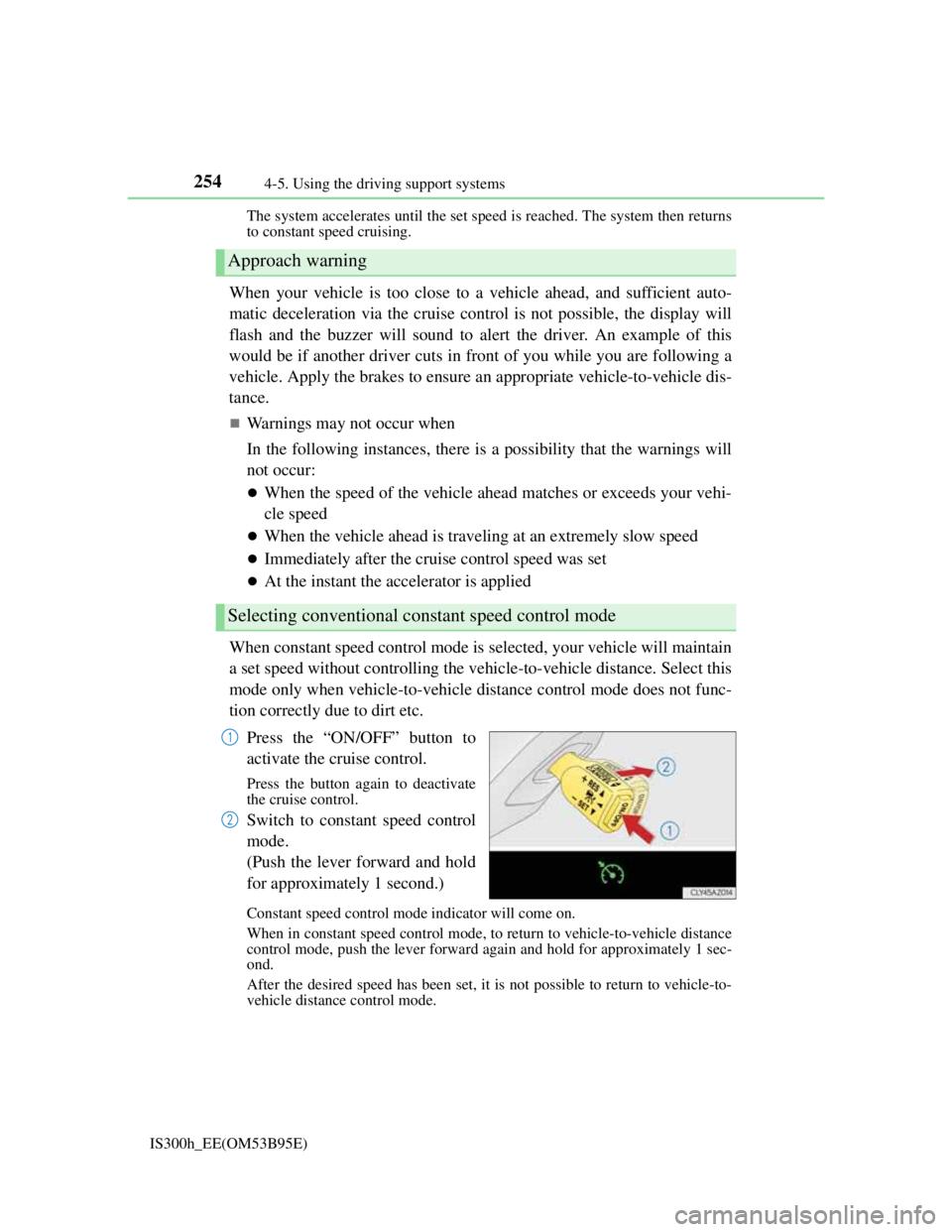
When constant speed control mode is selected, your vehicle will maintain
a set speed without controlling the vehicle-to-vehicle distance. Select this
mode only when vehicle-to-vehicle distance control mode does not func-
tion correctly due to dirt etc.
Press the “ON/OFF” button to
activate the cruise control.
Press the button again to deactivate
the cruise control.
Switch to constant speed control
mode.
(Push the lever forward and hold
for approximately 1 second.)
Constant speed control mode indicator will come on.
When in constant speed control mode, to return to vehicle-to-vehicle distance
control mode, push the lever forward again and hold for approximately 1 sec-
ond.
After the desired speed has been set, it is not possible to return to vehicle-to-
vehicle distance control mode.
Approach warning
Selecting conventional constant speed control mode
1
2
Page 257 of 628

2554-5. Using the driving support systems
4
Driving
IS300h_EE(OM53B95E)If the power switch is turned off and then turned to ON mode again, the vehi-
cle will automatically return to vehicle-to-vehicle distance control mode.
Adjusting the speed setting:P. 246
Canceling and resuming the speed setting: P. 2 4 6
Page 258 of 628
2564-5. Using the driving support systems
IS300h_EE(OM53B95E)
Dynamic radar cruise control can be set when
The shift lever is in D or range 4 or higher of S has been selected.
Range 4 or higher of D has been selected by using the paddle shift.
Vehicle speed is above approximately 50 km/h (30 mph).
Accelerating after setting the vehicle speed
The vehicle can accelerate normally. After acceleration, the set speed resumes.
However, during vehicle-to-vehicle distance control mode, the vehicle speed
may decrease below the set speed in order to maintain the distance to the vehicle
ahead.
Automatic cancelation of vehicle-to-vehicle distance control
Vehicle-to-vehicle distance control driving is automatically canceled in the fol-
lowing situations:
Actual vehicle speed falls below approximately 40 km/h (25 mph).
VSC is activated.
TRC is activated for a period of time.
When the VSC or TRC system is turned off by pressing the VSC OFF switch.
The sensor cannot operate correctly because it is covered in some way.
The windshield wipers are operating at high speed (when the wipers are in
AUTO mode or the high speed wiper operation).
When snow mode is set.
Pre-crash braking is activated.
If vehicle-to-vehicle distance control driving is automatically canceled for any
other reason, there may be a malfunction in the system. Contact any authorized
Lexus dealer or repairer, or another duly qualified and equipped professional.
Automatic cancelation of constant speed control
The cruise control will stop maintaining the vehicle speed in the following situa-
tions:
Actual vehicle speed is more than approximately 16 km/h (10 mph) below the
set vehicle speed.
At this time, the memorized set speed is not retained.
Vehicle speed falls below approximately 40 km/h (25 mph).
VSC is activated.
TRC is activated for a period of time.
When the VSC or TRC system is turned off by pressing the VSC OFF switch.
Pre-crash braking is activated.
Page 267 of 628
2654-5. Using the driving support systems
4
Driving
IS300h_EE(OM53B95E)
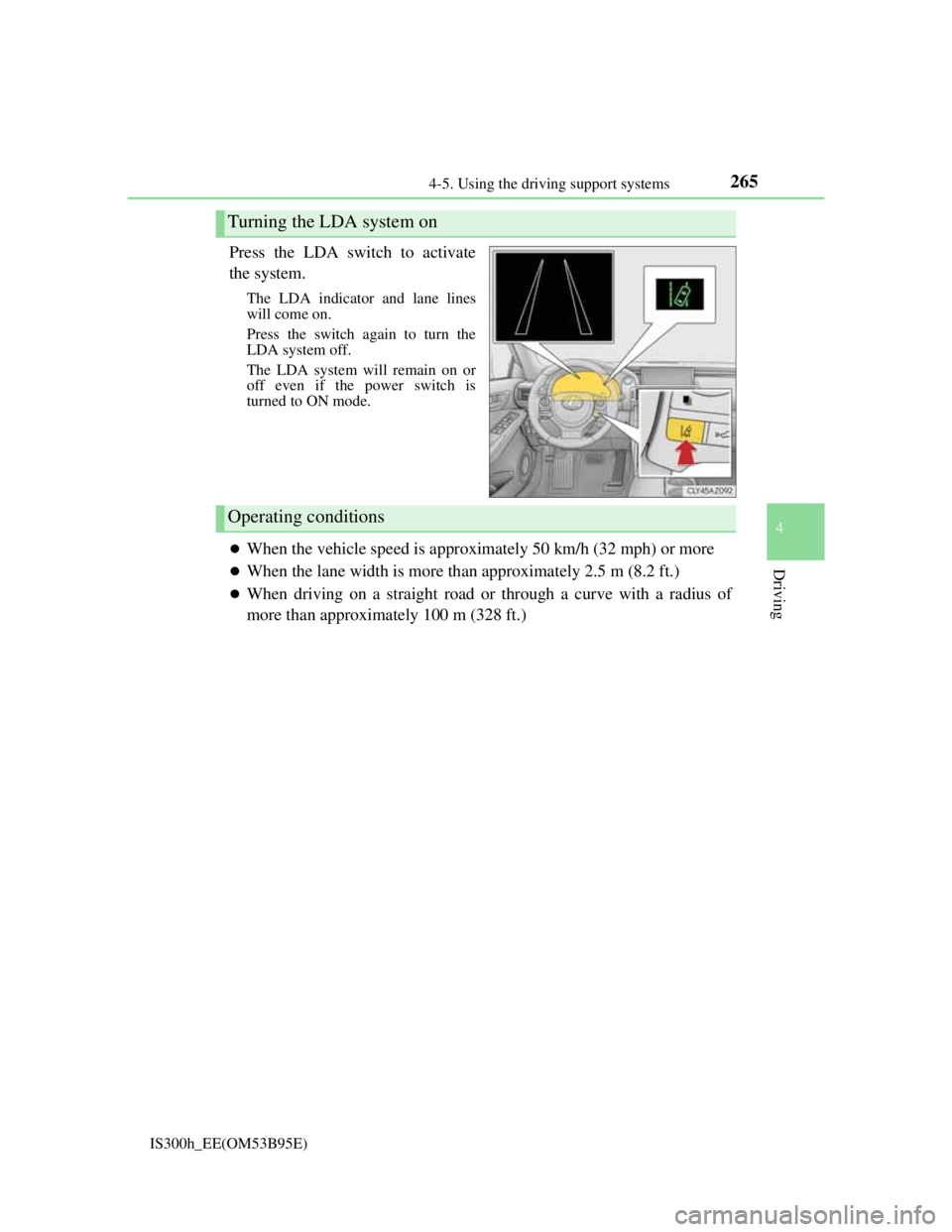
Press the LDA switch to activate
the system.
The LDA indicator and lane lines
will come on.
Press the switch again to turn the
LDA system off.
The LDA system will remain on or
off even if the power switch is
turned to ON mode.
When the vehicle speed is approximately 50 km/h (32 mph) or more
When the lane width is more than approximately 2.5 m (8.2 ft.)
When driving on a straight road or through a curve with a radius of
more than approximately 100 m (328 ft.)
Turning the LDA system on
Operating conditions
Page 277 of 628
2754-5. Using the driving support systems
4
Driving
IS300h_EE(OM53B95E)
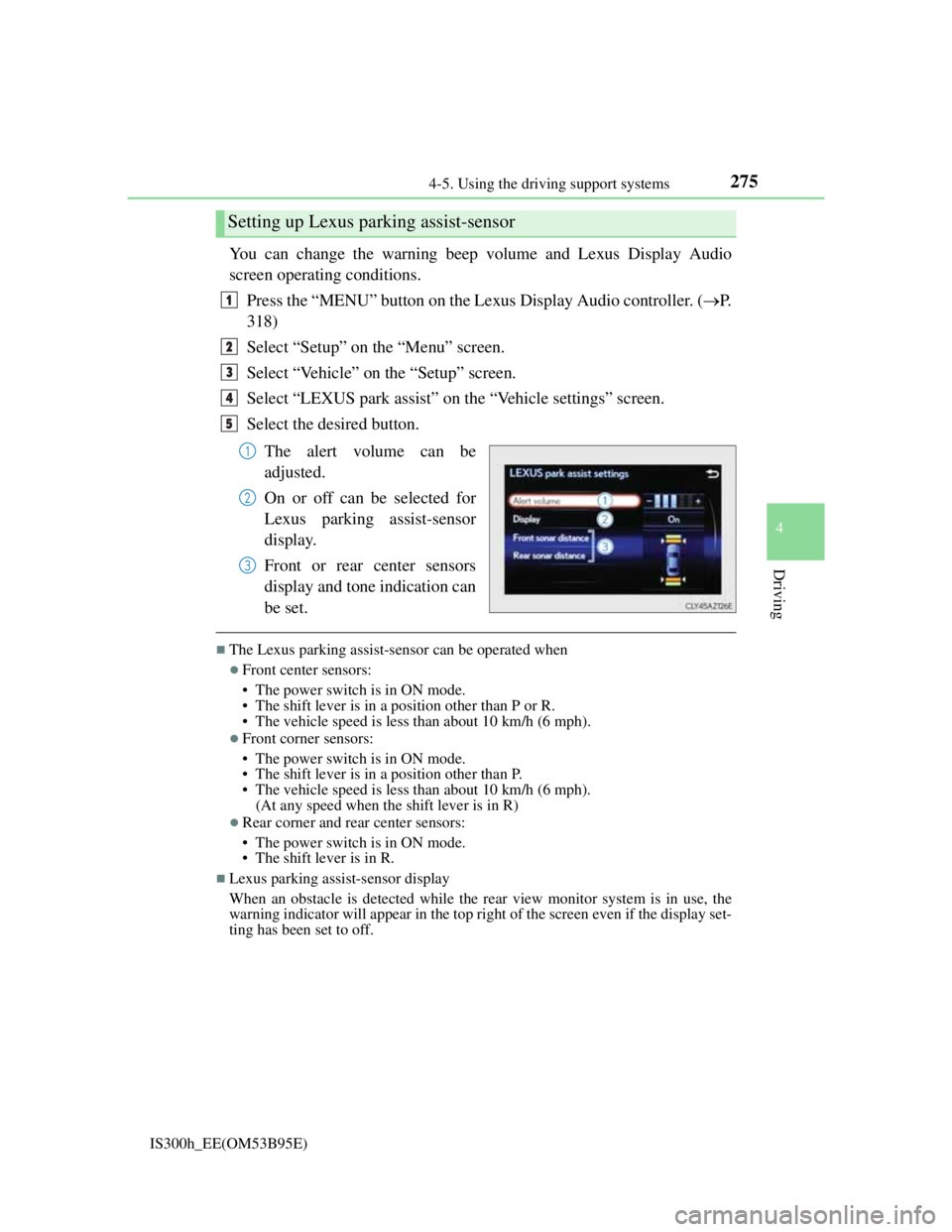
You can change the warning beep volume and Lexus Display Audio
screen operating conditions.
Press the “MENU” button on the Lexus Display Audio controller. (P.
318)
Select “Setup” on the “Menu” screen.
Select “Vehicle” on the “Setup” screen.
Select “LEXUS park assist” on the “Vehicle settings” screen.
Select the desired button.
The alert volume can be
adjusted.
On or off can be selected for
Lexus parking assist-sensor
display.
Front or rear center sensors
display and tone indication can
be set.
The Lexus parking assist-sensor can be operated when
Front center sensors:
• The power switch is in ON mode.
• The shift lever is in a position other than P or R.
• The vehicle speed is less than about 10 km/h (6 mph).
Front corner sensors:
• The power switch is in ON mode.
• The shift lever is in a position other than P.
• The vehicle speed is less than about 10 km/h (6 mph).
(At any speed when the shift lever is in R)
Rear corner and rear center sensors:
• The power switch is in ON mode.
• The shift lever is in R.
Lexus parking assist-sensor display
When an obstacle is detected while the rear view monitor system is in use, the
warning indicator will appear in the top right of the screen even if the display set-
ting has been set to off.
Setting up Lexus parking assist-sensor
1
2
3
4
5
1
2
3
Page 281 of 628
2794-5. Using the driving support systems
4
Driving
IS300h_EE(OM53B95E)
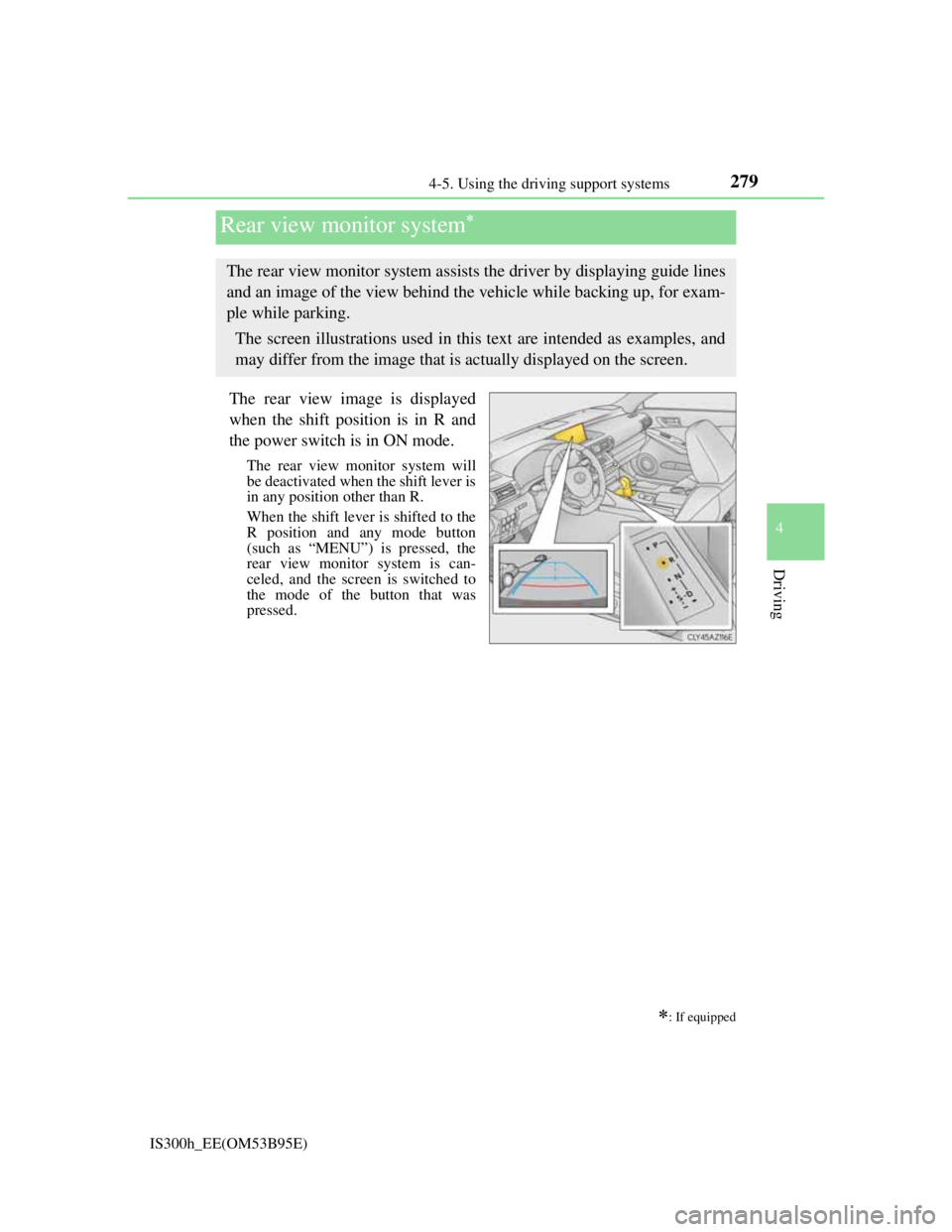
The rear view image is displayed
when the shift position is in R and
the power switch is in ON mode.
The rear view monitor system will
be deactivated when the shift lever is
in any position other than R.
When the shift lever is shifted to the
R position and any mode button
(such as “MENU”) is pressed, the
rear view monitor system is can-
celed, and the screen is switched to
the mode of the button that was
pressed.
Rear view monitor system
: If equipped
The rear view monitor system assists the driver by displaying guide lines
and an image of the view behind the vehicle while backing up, for exam-
ple while parking.
The screen illustrations used in this text are intended as examples, and
may differ from the image that is actually displayed on the screen.