display Lexus IS300h 2013 Manual PDF
[x] Cancel search | Manufacturer: LEXUS, Model Year: 2013, Model line: IS300h, Model: Lexus IS300h 2013Pages: 628, PDF Size: 20.23 MB
Page 297 of 628
2954-5. Using the driving support systems
4
Driving
IS300h_EE(OM53B95E)
If the vehicle gets stuck in fresh snow or mud, the TRC and VSC systems
may reduce power from the hybrid system to the wheels. Pressing VSC
OFF switch to turn the system off may make it easier for you to rock the
vehicle in order to free it.
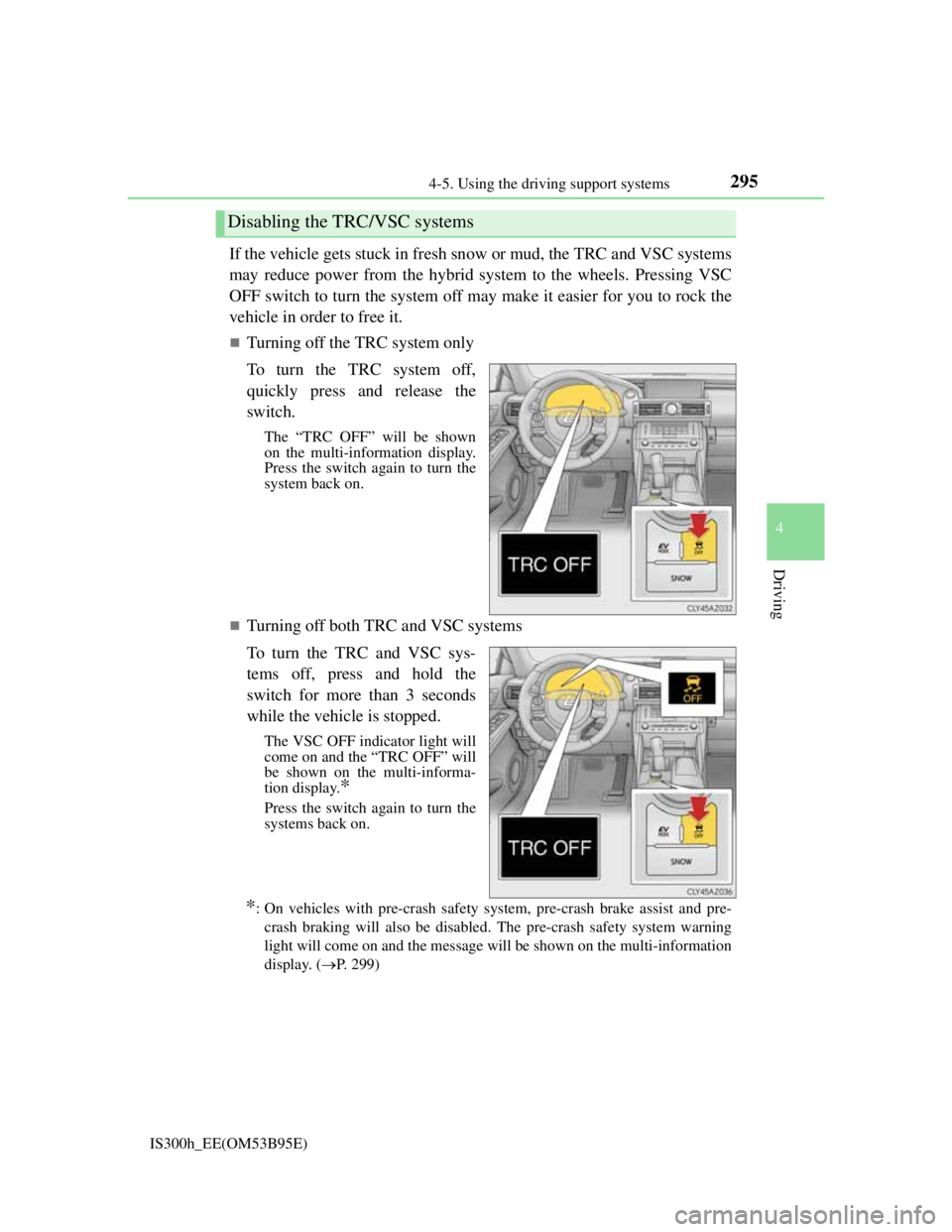
Turning off the TRC system only
To turn the TRC system off,
quickly press and release the
switch.
The “TRC OFF” will be shown
on the multi-information display.
Press the switch again to turn the
system back on.
Turning off both TRC and VSC systems
To turn the TRC and VSC sys-
tems off, press and hold the
switch for more than 3 seconds
while the vehicle is stopped.
The VSC OFF indicator light will
come on and the “TRC OFF” will
be shown on the multi-informa-
tion display.
*
Press the switch again to turn the
systems back on.
*: On vehicles with pre-crash safety system, pre-crash brake assist and pre-
crash braking will also be disabled. The pre-crash safety system warning
light will come on and the message will be shown on the multi-information
display. (P. 299)
Disabling the TRC/VSC systems
Page 301 of 628
2994-5. Using the driving support systems
4
Driving
IS300h_EE(OM53B95E)
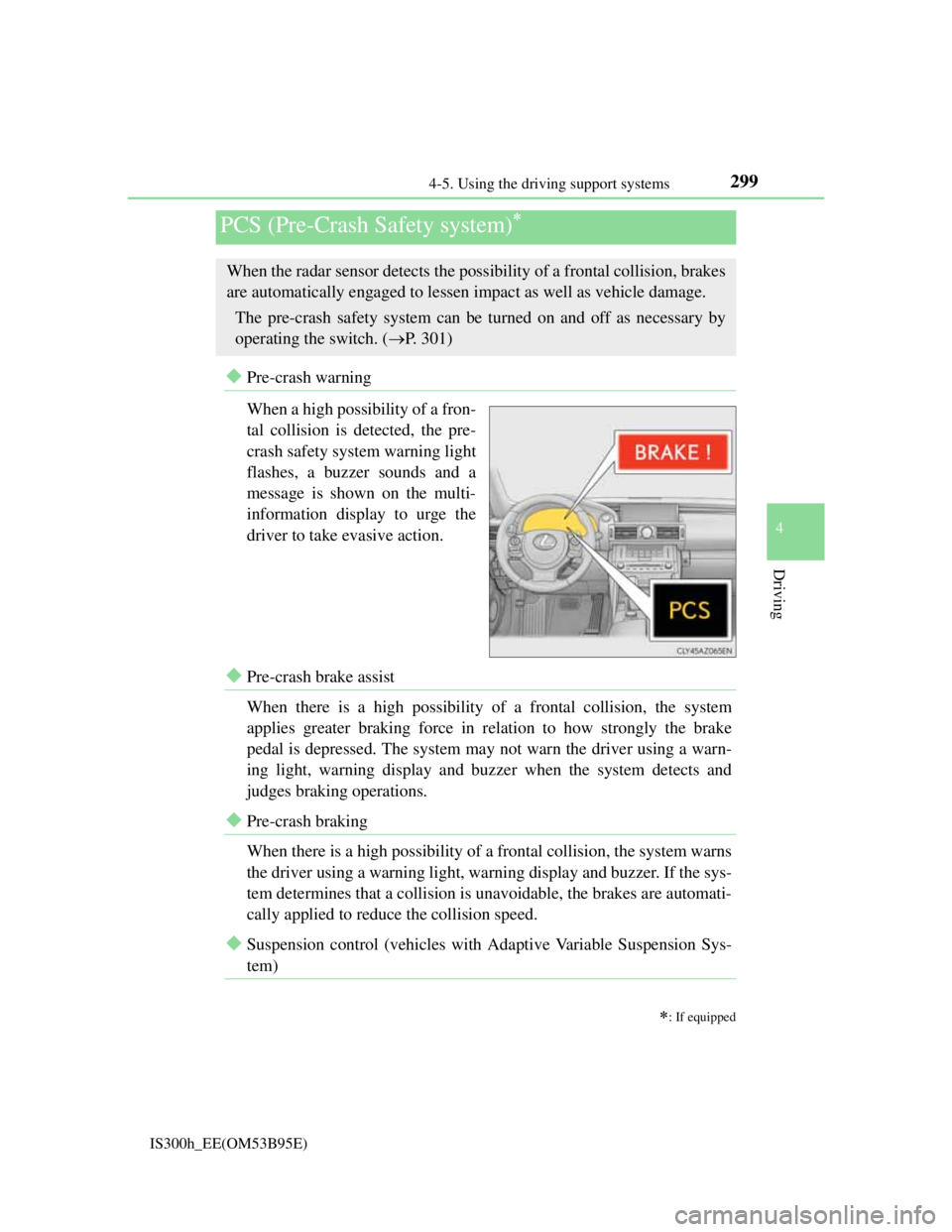
Pre-crash warning
When a high possibility of a fron-
tal collision is detected, the pre-
crash safety system warning light
flashes, a buzzer sounds and a
message is shown on the multi-
information display to urge the
driver to take evasive action.
Pre-crash brake assist
When there is a high possibility of a frontal collision, the system
applies greater braking force in relation to how strongly the brake
pedal is depressed. The system may not warn the driver using a warn-
ing light, warning display and buzzer when the system detects and
judges braking operations.
Pre-crash braking
When there is a high possibility of a frontal collision, the system warns
the driver using a warning light, warning display and buzzer. If the sys-
tem determines that a collision is unavoidable, the brakes are automati-
cally applied to reduce the collision speed.
Suspension control (vehicles with Adaptive Variable Suspension Sys-
tem)
PCS (Pre-Crash Safety system)
: If equipped
When the radar sensor detects the possibility of a frontal collision, brakes
are automatically engaged to lessen impact as well as vehicle damage.
The pre-crash safety system can be turned on and off as necessary by
operating the switch. (P. 301)
Page 305 of 628

3034-5. Using the driving support systems
4
Driving
IS300h_EE(OM53B95E)
Obstacles not detected
The sensor cannot detect plastic obstacles such as traffic cones. There may also
be occasions when the sensor cannot detect pedestrians, animals, bicycles,
motorcycles, trees, or snowdrifts.
Situations in which the pre-crash safety system does not function properly
The system may not function effectively in situations such as the following:
On roads with sharp bends or uneven surfaces
If a vehicle suddenly moves in front of your vehicle, such as at an intersection
If a vehicle suddenly cuts in front of your vehicle, such as when overtaking
In inclement weather such as heavy rain, fog, snow or sand storms
If the vehicle is skidding when VSC is not operating
When an extreme change in vehicle height occurs
When only part of your vehicle’s front end collides with, or contacts, a vehicle
or object in a frontal collision
When the radar sensor moves off position due to its surrounding area being sub-
jected to a strong impact
Automatic cancelation of the pre-crash safety system
When a malfunction occurs due to sensor contamination, etc. that results in the
sensors being unable to detect obstacles, the pre-crash safety system will be auto-
matically disabled. In this case, the system will not activate even if there is a col-
lision possibility.
When there is a malfunction in the system
The pre-crash safety system warning light will flash and warning messages will
be displayed. (P. 508, 519)
Page 312 of 628
3104-5. Using the driving support systems
IS300h_EE(OM53B95E)
The outside rear view mirror indicators visibility
When under strong sunlight, the outside rear view mirror indicator may be diffi-
cult to see.
Rear Crossing Traffic Alert buzzer hearing
Rear Crossing Traffic Alert function may be difficult to hear over loud noises
such as high audio volume.
When there is a malfunction in the Blind Spot Monitor
If a system malfunction is detected due to any of the following reasons, warning
messages will be displayed: (P. 518, 519)
There is a malfunction with the sensors
The sensors have become dirty
The outside temperature is extremely high or low
The sensor voltage has become abnormal
Certification for the Blind Spot Monitor
For vehicles sold in Russia
type approval number : POCC DE.ML05.H01144
For vehicles sold in Ukraine
type approval number : UA1.155.0029691-12
Page 322 of 628

309
4
Driving
IS300h_EE(OM53B95E)4-6. Driving tips
Using Eco drive mode
When using Eco drive mode, the torque corresponding to the accelera-
tor pedal depression amount can be generated more smoothly than it is
in normal conditions. In addition, the operation of the air conditioning
system (heating/cooling) will be minimized, improving the fuel econ-
omy. (P. 290)
Use of Hybrid System Indicator
Eco-friendly driving is possible by keeping the indicator needle
(except F SPORT models) or bar display (F SPORT models) of Hybrid
System Indicator within the Eco area. (P. 1 1 4 )
When braking
Make sure to operate the brakes gently and in good time. A greater
amount of electrical energy can be regenerated when slowing down.
Delays
Repeated acceleration and deceleration, as well as long waits at traffic
lights, will lead to bad fuel economy. Check traffic reports before leav-
ing and avoid delays as much as possible. When driving in a traffic
jam, gently release the brake pedal to allow the vehicle to move for-
ward slightly while avoiding overuse of the accelerator pedal. Doing so
can help control excessive gasoline consumption.
Highway driving
Control your speed and keep at a constant speed. Before stopping at a
toll booth or similar, allow plenty of time to release the accelerator and
gently apply the brakes. A greater amount of electrical energy can be
regenerated when slowing down.
Hybrid vehicle driving tips
For economical and ecological driving, pay attention to the following
points:
Page 327 of 628

314
IS300h_EE(OM53B95E)
5-1. Basic Operations
Lexus Display Audio
System ............................ 316
Steering wheel audio
switches .......................... 322
USB/AUX ports................ 323
5-2. Setup
Setup menu ....................... 324
General settings ................ 325
Voice settings .................... 328
Display settings................. 329
5-3. Using the audio system
Selecting the audio
source.............................. 330
Optimal use of the
audio system ................... 331
Audio settings ................... 332
Audio menu screen
operation ......................... 336
5-4. Using the radio
Radio operation................. 339
Page 328 of 628

315
5
Lexus Display
Audio system
IS300h_EE(OM53B95E)
5-5. Playing an audio CD and
MP3/WMA/AAC discs
CD player operation .......... 341
5-6. Using an external device
Listening to an iPod .......... 348
Using USB memory
device .............................. 351
Using the AUX port .......... 356
5-7. Connecting Bluetooth
®
Steps for using
Bluetooth® devices ......... 357
Registering a Bluetooth
®
device .............................. 359
Selecting a Bluetooth
®
device .............................. 360
Connecting a Bluetooth
®
audio player .................... 361
Connecting a Bluetooth
®
phone............................... 362
Displaying a Bluetooth
®
device details .................. 363
Detailed Bluetooth
®
settings ............................ 3645-8. Bluetooth
® Audio
Listening to Bluetooth
®
Audio .............................. 365
5-9. Bluetooth
® Phone
Using a Bluetooth
®
Phone .............................. 367
Making a call .................... 369
Receiving a call ................ 372
Speaking on the phone...... 373
Using a Bluetooth
®
phone messages .............. 375
Using the steering wheel
switches .......................... 378
Bluetooth
® phone
settings ............................ 379
5-10. Phonebook
Contact settings................. 381
Messaging setting ............. 384
5-11. Bluetooth
®
Bluetooth®....................... 385
5-12. Other function
“Information” screen ........ 390
MirrorLink..................... 391
USB photo ........................ 393
Speech command system .. 395
Page 329 of 628
316
IS300h_EE(OM53B95E)5-1. Basic Operations
Lexus Display Audio System
: If equipped
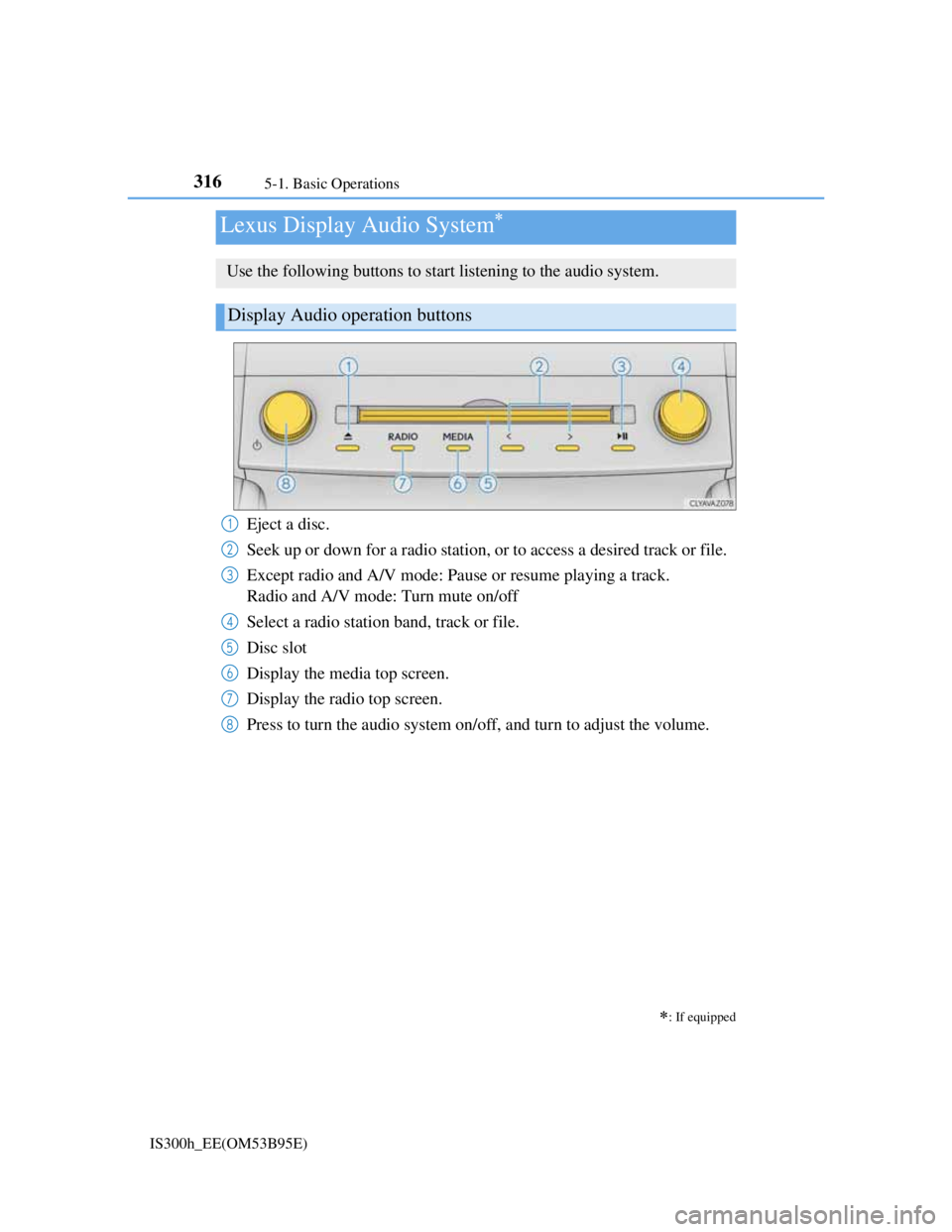
Use the following buttons to start listening to the audio system.
Display Audio operation buttons
Eject a disc.
Seek up or down for a radio station, or to access a desired track or file.
Except radio and A/V mode: Pause or resume playing a track.
Radio and A/V mode: Turn mute on/off
Select a radio station band, track or file.
Disc slot
Display the media top screen.
Display the radio top screen.
Press to turn the audio system on/off, and turn to adjust the volume.1
2
3
4
5
6
7
8
Page 330 of 628
3175-1. Basic Operations
5
Lexus Display Audio system
IS300h_EE(OM53B95E)
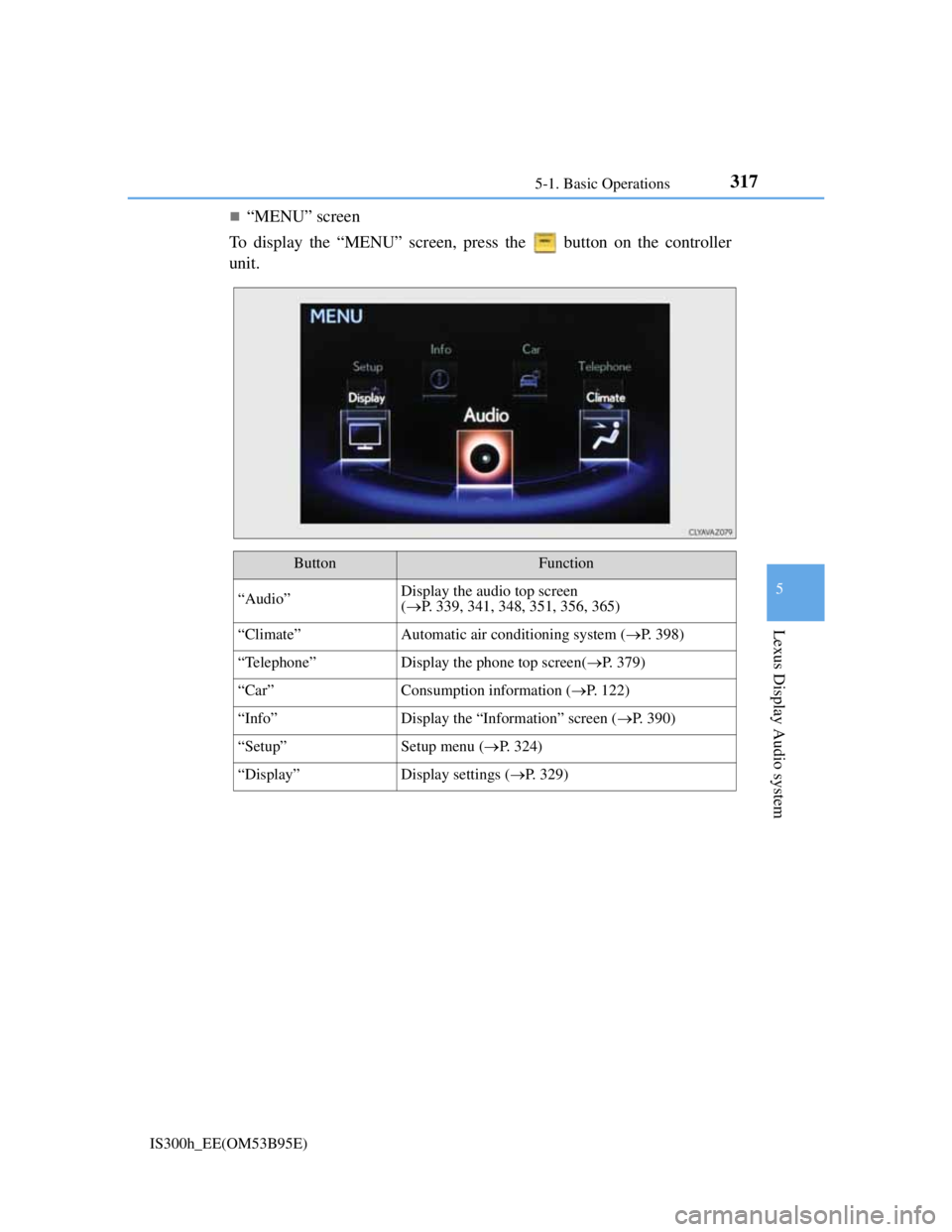
“MENU” screen
To display the “MENU” screen, press the button on the controller
unit.
ButtonFunction
“Audio”Display the audio top screen
(P. 339, 341, 348, 351, 356, 365)
“Climate”Automatic air conditioning system (P. 398)
“Telephone”Display the phone top screen(P. 379)
“Car” Consumption information (P. 122)
“Info”Display the “Information” screen (P. 390)
“Setup”Setup menu (P. 324)
“Display”Display settings (P. 329)
Page 331 of 628
3185-1. Basic Operations
IS300h_EE(OM53B95E)
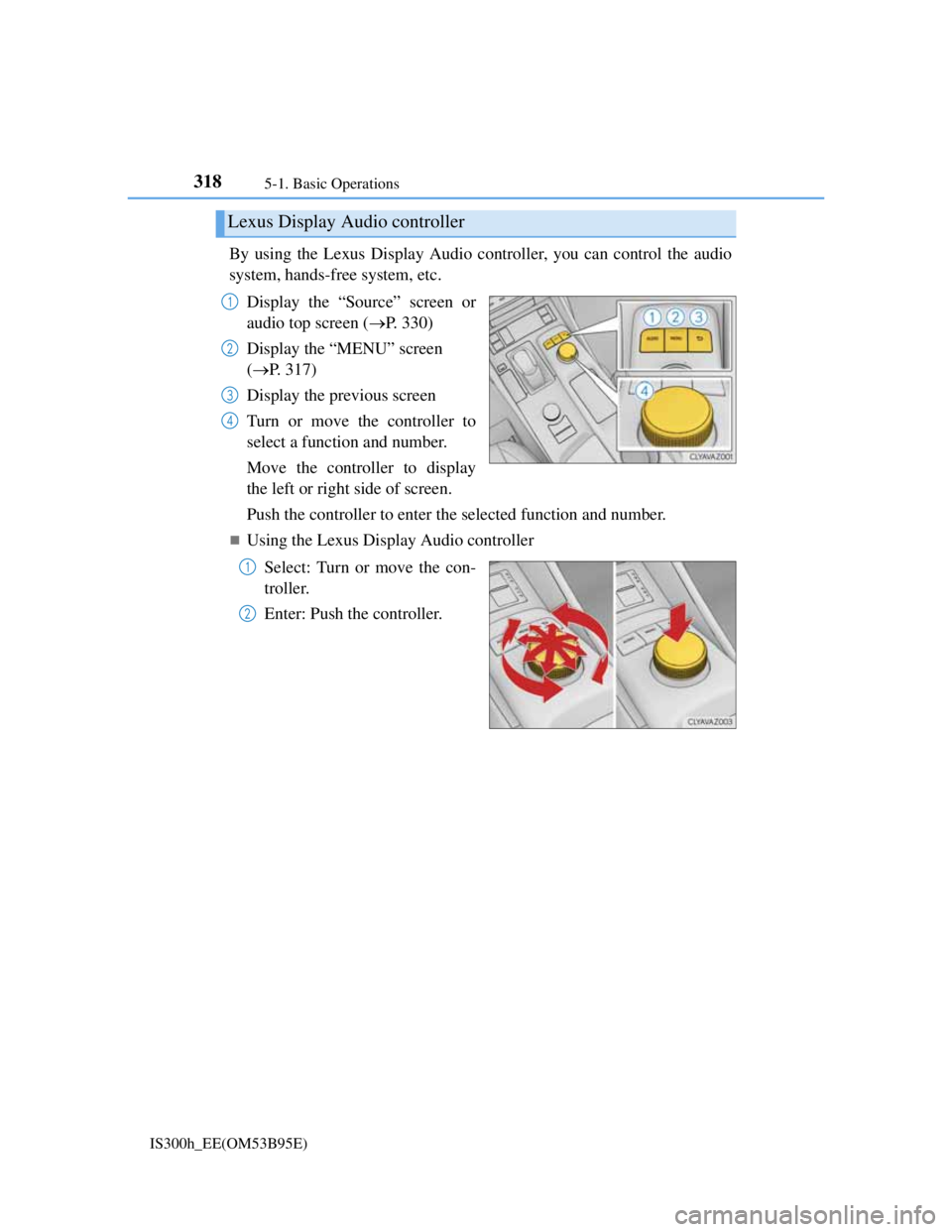
By using the Lexus Display Audio controller, you can control the audio
system, hands-free system, etc.
Display the “Source” screen or
audio top screen (P. 330)
Display the “MENU” screen
(P. 317)
Display the previous screen
Turn or move the controller to
select a function and number.
Move the controller to display
the left or right side of screen.
Push the controller to enter the selected function and number.
Using the Lexus Display Audio controller
Select: Turn or move the con-
troller.
Enter: Push the controller.
Lexus Display Audio controller
1
2
3
4
1
2