display Lexus IS300h 2013 Workshop Manual
[x] Cancel search | Manufacturer: LEXUS, Model Year: 2013, Model line: IS300h, Model: Lexus IS300h 2013Pages: 628, PDF Size: 20.23 MB
Page 251 of 628
2494-5. Using the driving support systems
4
Driving
IS300h_EE(OM53B95E)
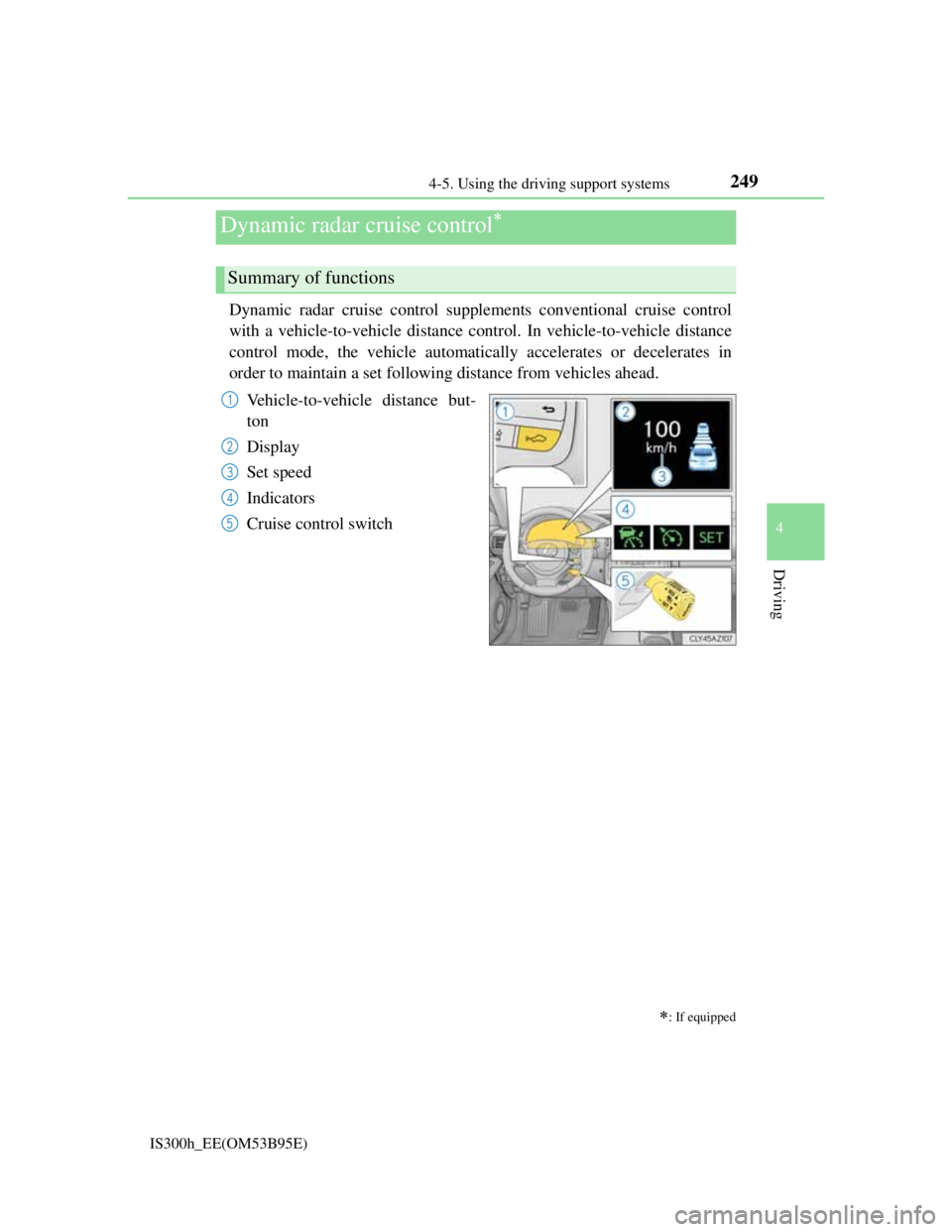
Dynamic radar cruise control supplements conventional cruise control
with a vehicle-to-vehicle distance control. In vehicle-to-vehicle distance
control mode, the vehicle automatically accelerates or decelerates in
order to maintain a set following distance from vehicles ahead.
Vehicle-to-vehicle distance but-
ton
Display
Set speed
Indicators
Cruise control switch
Dynamic radar cruise control
: If equipped
Summary of functions
1
2
3
4
5
Page 252 of 628
2504-5. Using the driving support systems
IS300h_EE(OM53B95E)
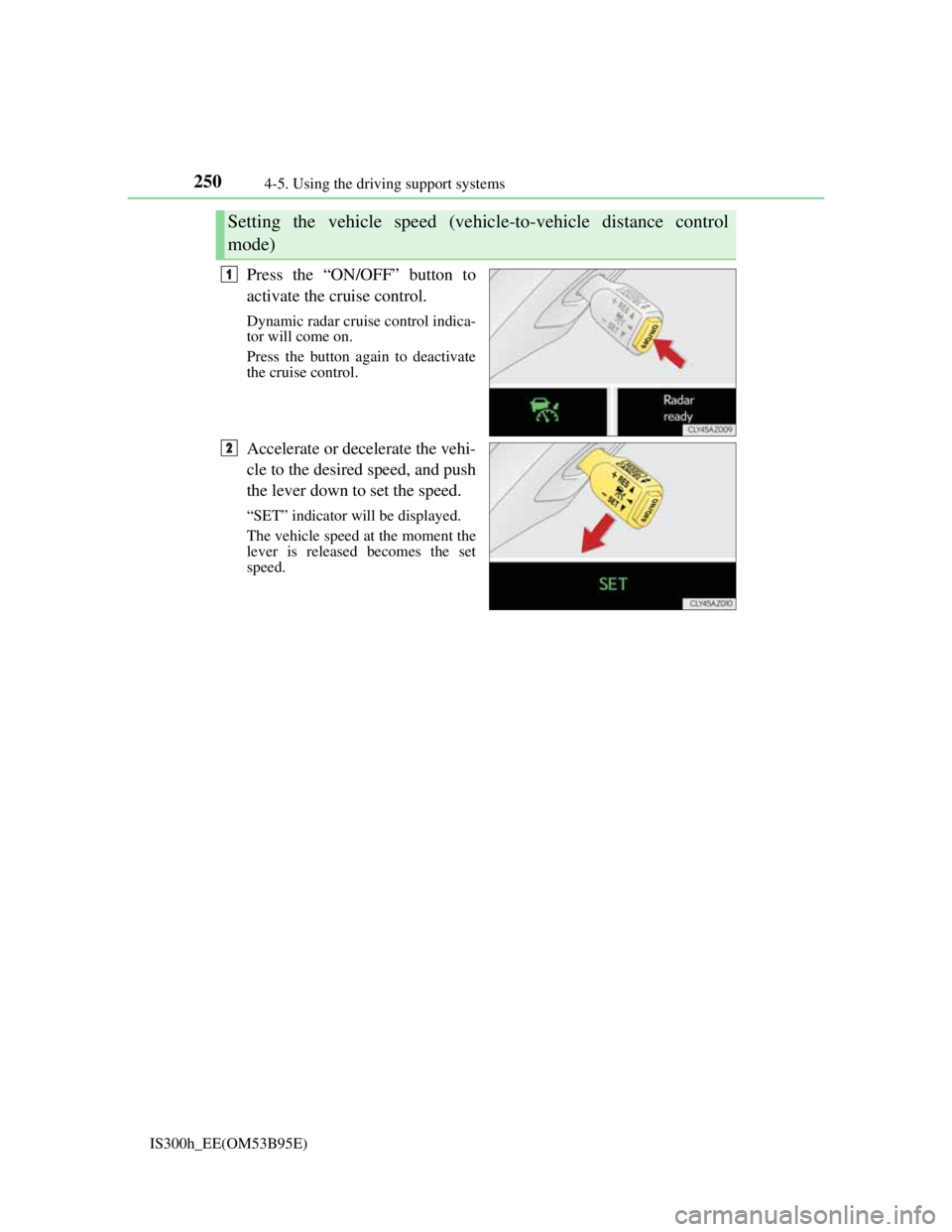
Press the “ON/OFF” button to
activate the cruise control.
Dynamic radar cruise control indica-
tor will come on.
Press the button again to deactivate
the cruise control.
Accelerate or decelerate the vehi-
cle to the desired speed, and push
the lever down to set the speed.
“SET” indicator will be displayed.
The vehicle speed at the moment the
lever is released becomes the set
speed.
Setting the vehicle speed (vehicle-to-vehicle distance control
mode)
1
2
Page 253 of 628
2514-5. Using the driving support systems
4
Driving
IS300h_EE(OM53B95E)
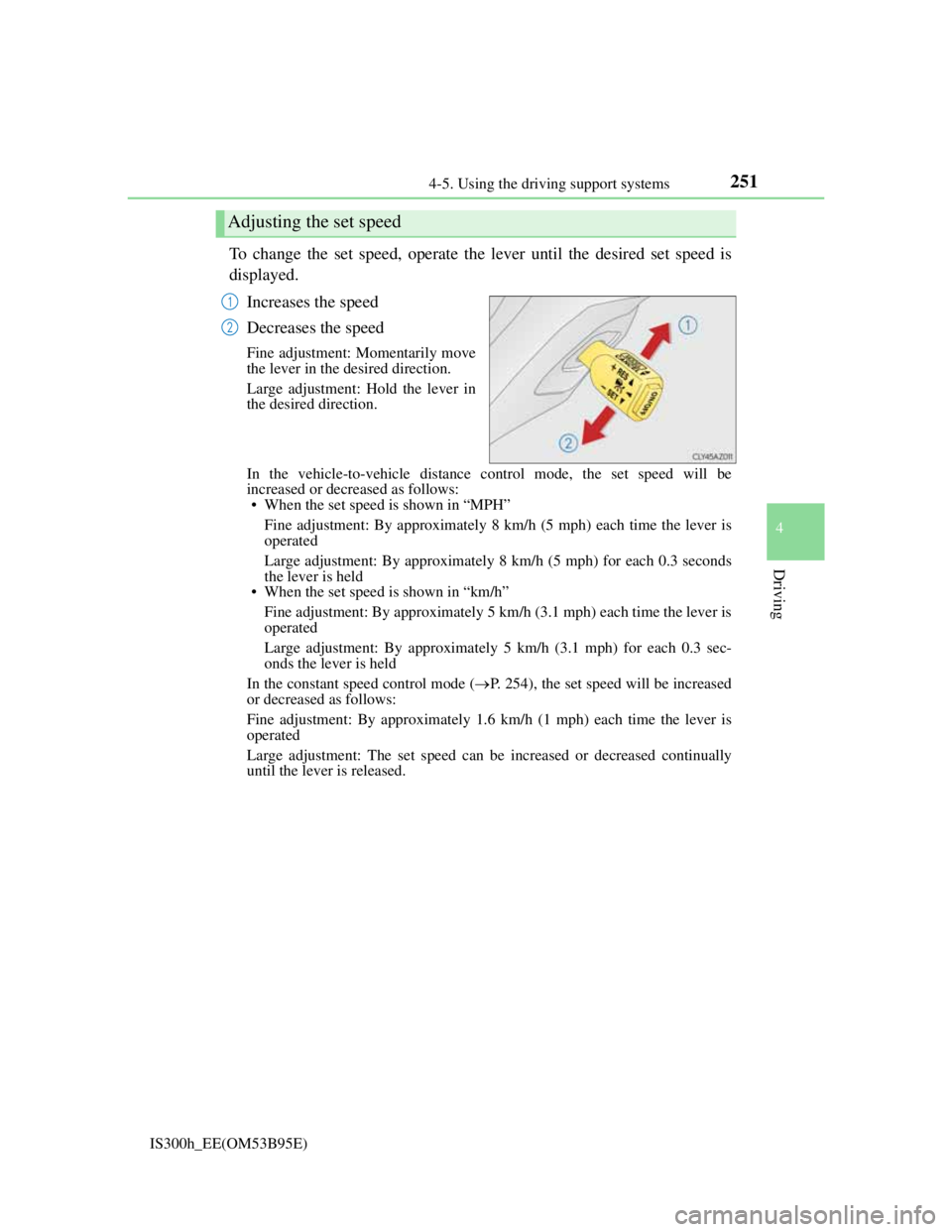
To change the set speed, operate the lever until the desired set speed is
displayed.
Increases the speed
Decreases the speed
Fine adjustment: Momentarily move
the lever in the desired direction.
Large adjustment: Hold the lever in
the desired direction.
In the vehicle-to-vehicle distance control mode, the set speed will be
increased or decreased as follows:
• When the set speed is shown in “MPH”
Fine adjustment: By approximately 8 km/h (5 mph) each time the lever is
operated
Large adjustment: By approximately 8 km/h (5 mph) for each 0.3 seconds
the lever is held
• When the set speed is shown in “km/h”
Fine adjustment: By approximately 5 km/h (3.1 mph) each time the lever is
operated
Large adjustment: By approximately 5 km/h (3.1 mph) for each 0.3 sec-
onds the lever is held
In the constant speed control mode (P. 254), the set speed will be increased
or decreased as follows:
Fine adjustment: By approximately 1.6 km/h (1 mph) each time the lever is
operated
Large adjustment: The set speed can be increased or decreased continually
until the lever is released.
Adjusting the set speed
1
2
Page 254 of 628
2524-5. Using the driving support systems
IS300h_EE(OM53B95E)
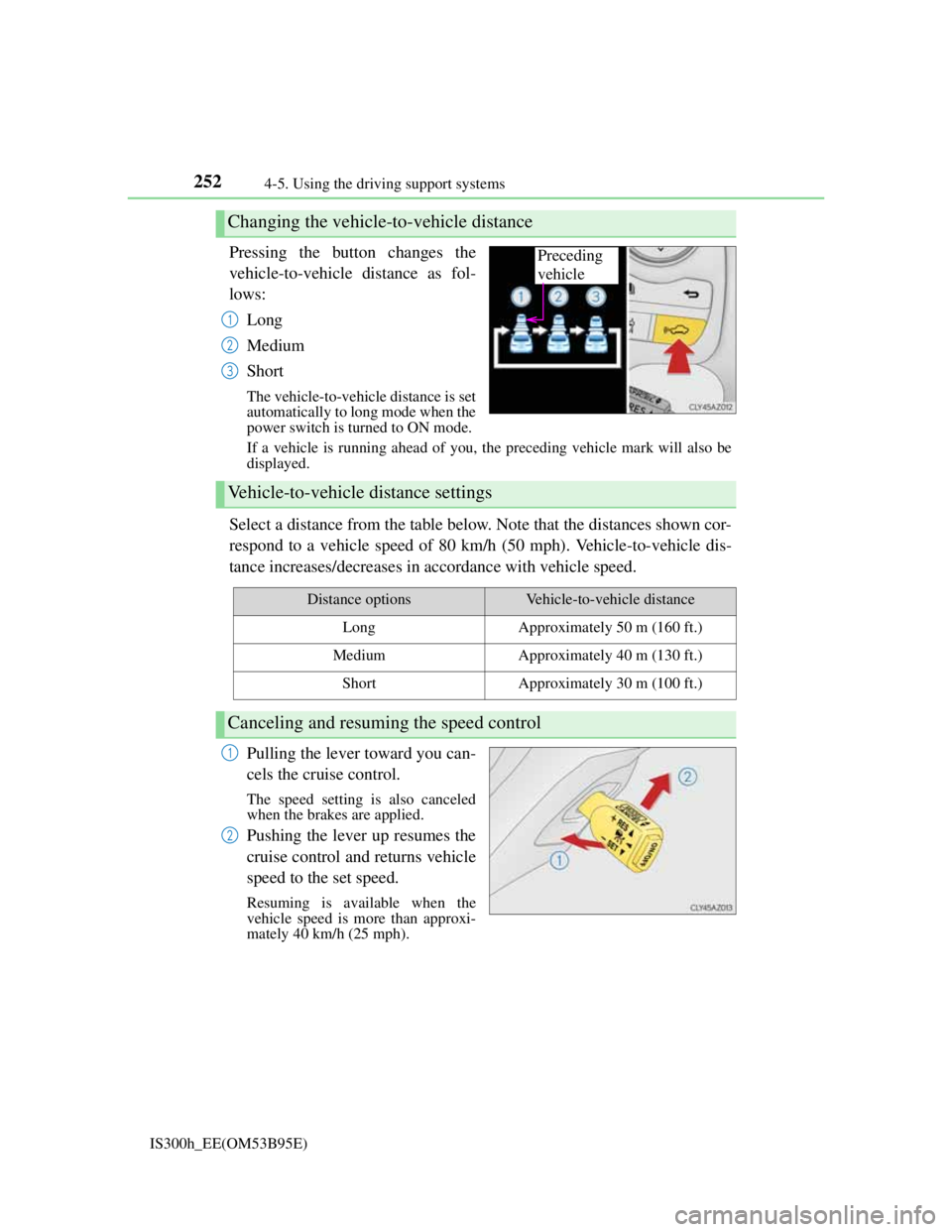
Pressing the button changes the
vehicle-to-vehicle distance as fol-
lows:
Long
Medium
Short
The vehicle-to-vehicle distance is set
automatically to long mode when the
power switch is turned to ON mode.
If a vehicle is running ahead of you, the preceding vehicle mark will also be
displayed.
Select a distance from the table below. Note that the distances shown cor-
respond to a vehicle speed of 80 km/h (50 mph). Vehicle-to-vehicle dis-
tance increases/decreases in accordance with vehicle speed.
Pulling the lever toward you can-
cels the cruise control.
The speed setting is also canceled
when the brakes are applied.
Pushing the lever up resumes the
cruise control and returns vehicle
speed to the set speed.
Resuming is available when the
vehicle speed is more than approxi-
mately 40 km/h (25 mph).
Changing the vehicle-to-vehicle distance
Preceding
vehicle
1
2
3
Vehicle-to-vehicle distance settings
Distance optionsVehicle-to-vehicle distance
LongApproximately 50 m (160 ft.)
MediumApproximately 40 m (130 ft.)
ShortApproximately 30 m (100 ft.)
Canceling and resuming the speed control
1
2
Page 256 of 628
2544-5. Using the driving support systems
IS300h_EE(OM53B95E)The system accelerates until the set speed is reached. The system then returns
to constant speed cruising.
When your vehicle is too close to a vehicle ahead, and sufficient auto-
matic deceleration via the cruise control is not possible, the display will
flash and the buzzer will sound to alert the driver. An example of this
would be if another driver cuts in front of you while you are following a
vehicle. Apply the brakes to ensure an appropriate vehicle-to-vehicle dis-
tance.
Warnings may not occur when
In the following instances, there is a possibility that the warnings will
not occur:
When the speed of the vehicle ahead matches or exceeds your vehi-
cle speed
When the vehicle ahead is traveling at an extremely slow speed
Immediately after the cruise control speed was set
At the instant the accelerator is applied
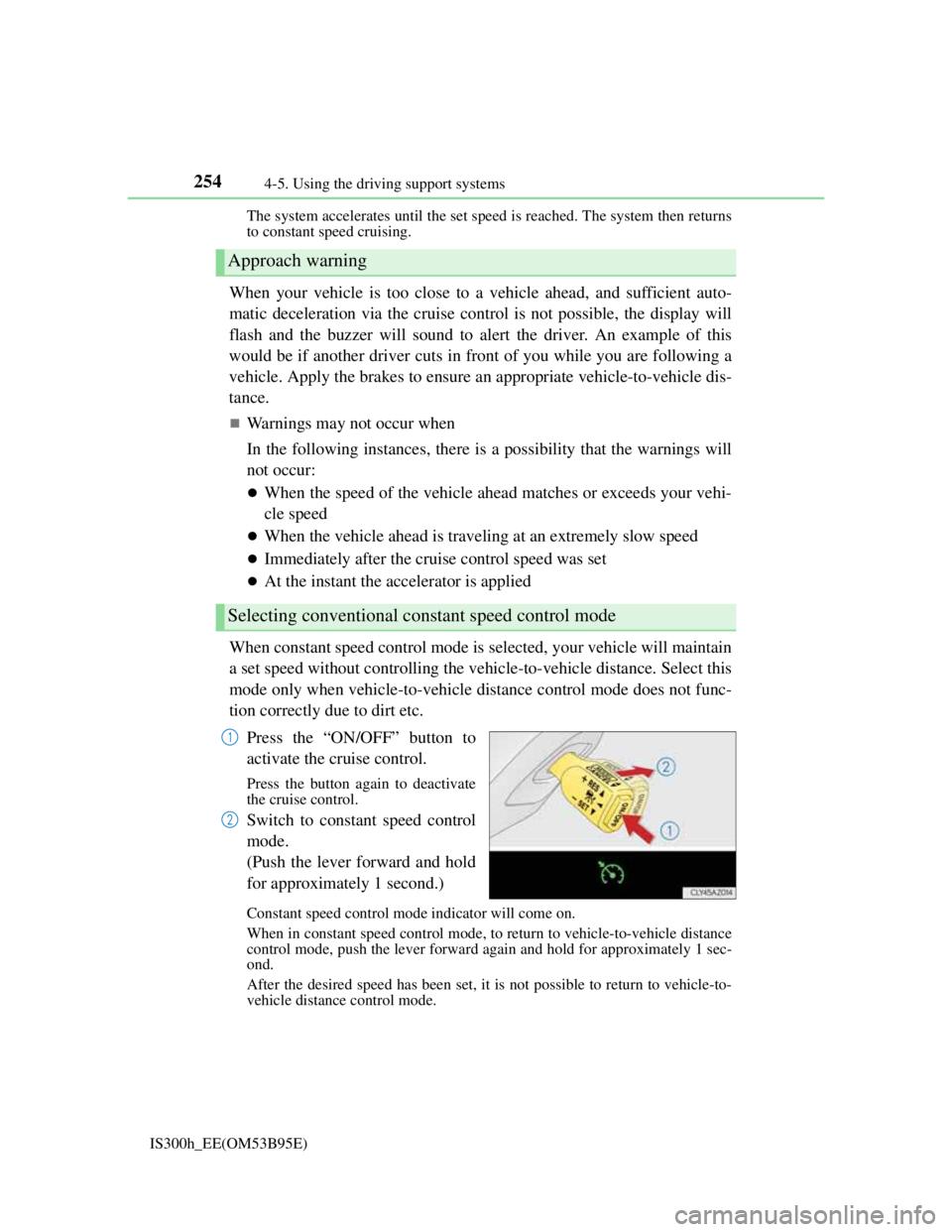
When constant speed control mode is selected, your vehicle will maintain
a set speed without controlling the vehicle-to-vehicle distance. Select this
mode only when vehicle-to-vehicle distance control mode does not func-
tion correctly due to dirt etc.
Press the “ON/OFF” button to
activate the cruise control.
Press the button again to deactivate
the cruise control.
Switch to constant speed control
mode.
(Push the lever forward and hold
for approximately 1 second.)
Constant speed control mode indicator will come on.
When in constant speed control mode, to return to vehicle-to-vehicle distance
control mode, push the lever forward again and hold for approximately 1 sec-
ond.
After the desired speed has been set, it is not possible to return to vehicle-to-
vehicle distance control mode.
Approach warning
Selecting conventional constant speed control mode
1
2
Page 259 of 628
2574-5. Using the driving support systems
4
Driving
IS300h_EE(OM53B95E)
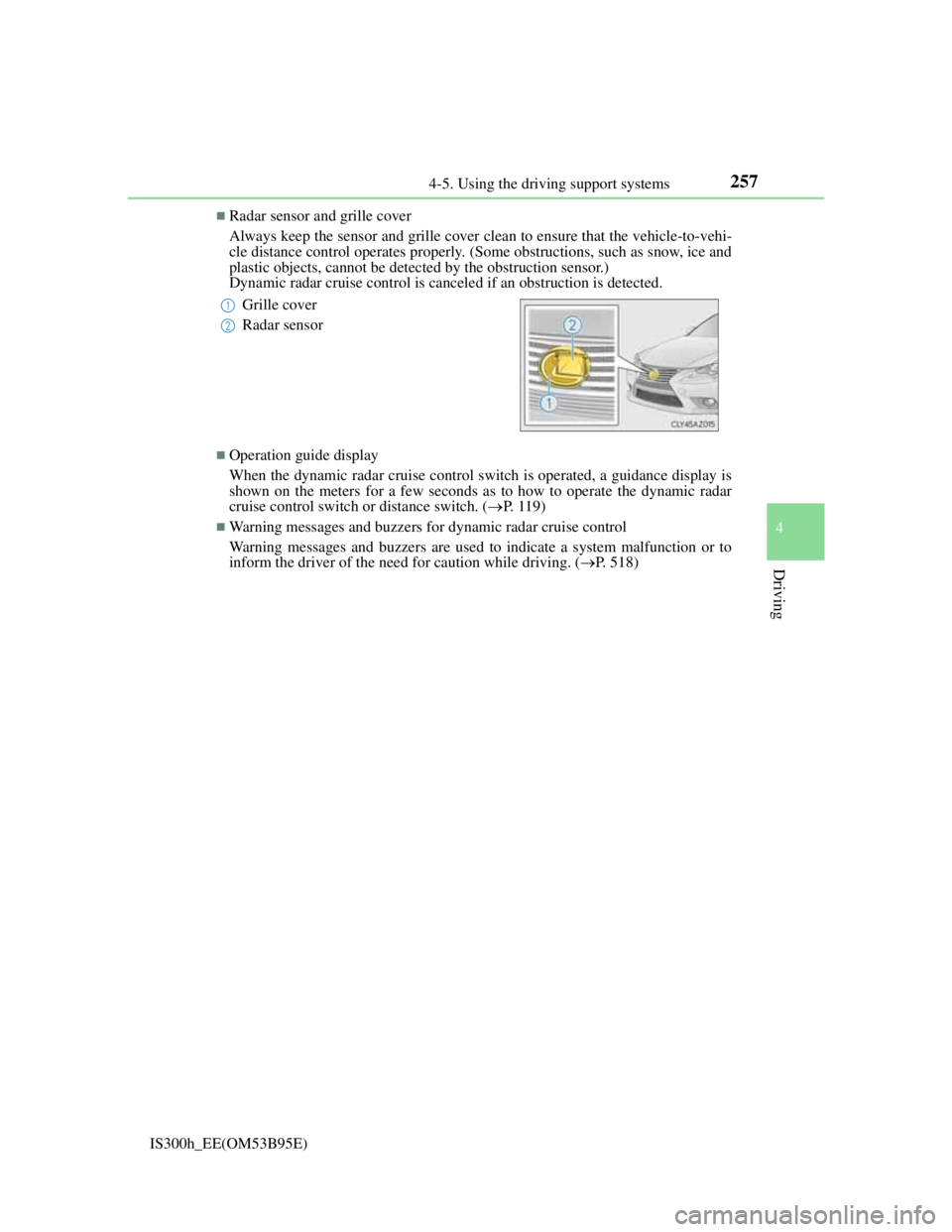
Radar sensor and grille cover
Always keep the sensor and grille cover clean to ensure that the vehicle-to-vehi-
cle distance control operates properly. (Some obstructions, such as snow, ice and
plastic objects, cannot be detected by the obstruction sensor.)
Dynamic radar cruise control is canceled if an obstruction is detected.
Operation guide display
When the dynamic radar cruise control switch is operated, a guidance display is
shown on the meters for a few seconds as to how to operate the dynamic radar
cruise control switch or distance switch. (P. 1 1 9 )
Warning messages and buzzers for dynamic radar cruise control
Warning messages and buzzers are used to indicate a system malfunction or to
inform the driver of the need for caution while driving. (P. 518) Grille cover
Radar sensor
1
2
Page 268 of 628
2664-5. Using the driving support systems
IS300h_EE(OM53B95E)
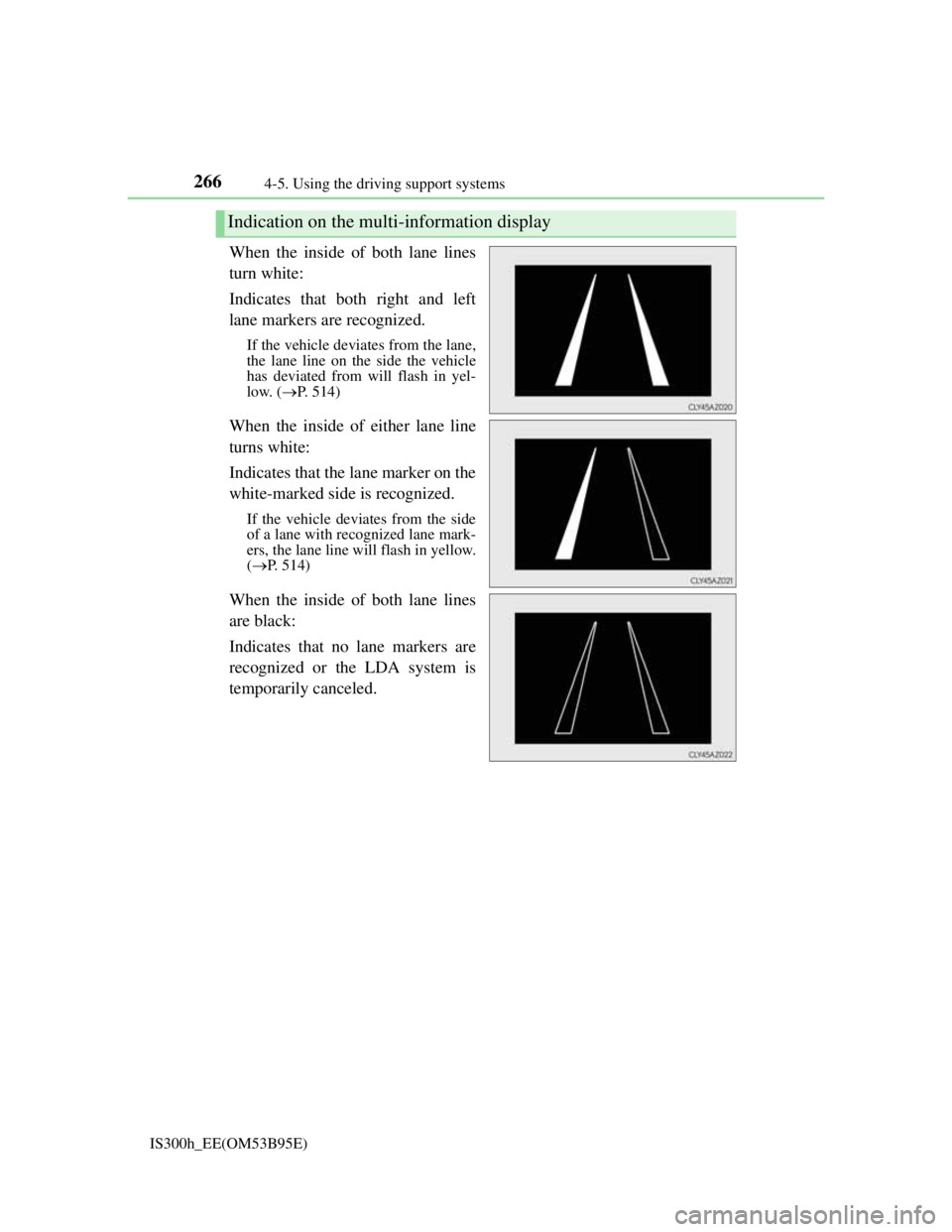
When the inside of both lane lines
turn white:
Indicates that both right and left
lane markers are recognized.
If the vehicle deviates from the lane,
the lane line on the side the vehicle
has deviated from will flash in yel-
low. (P. 514)
When the inside of either lane line
turns white:
Indicates that the lane marker on the
white-marked side is recognized.
If the vehicle deviates from the side
of a lane with recognized lane mark-
ers, the lane line will flash in yellow.
(P. 514)
When the inside of both lane lines
are black:
Indicates that no lane markers are
recognized or the LDA system is
temporarily canceled.
Indication on the multi-information display
Page 269 of 628
2674-5. Using the driving support systems
4
Driving
IS300h_EE(OM53B95E)
Temporary cancelation of the LDA system functions
If any of the following occurs, the LDA system functions will be temporarily
canceled. The functions will resume after the necessary operating conditions
have returned.
The turn signal lever is operated.
The vehicle speed deviates from the operating range of the LDA system func-
tions.
When the lane lines cannot be recognized while driving.
When the lane departure warning sounds.
The lane departure warning function will not operate again for a several sec-
onds after it has been activated, even if the vehicle leaves the lane again.
The lane departure warning
Depending on the audio system sound level or air conditioning fan noise while
the audio system or air conditioning system is in use, it may be difficult to hear
the warning sound.
After the vehicle has been parked in the sun
The LDA system may not be available and a warning message (P. 518) will be
displayed for a while after driving has started. When the temperature in the cabin
decreases and the temperature around the camera sensor (P. 264) becomes suit-
able for its operation, the functions will begin to operate.
If there are lane markers on only one side of the vehicle
The lane departure warning will not operate for the side on which lane markers
could not be recognized.
Conditions in which the function may not operate correctly
In the following situations, the camera sensor may be unable to recognize lane
markers causing the lane departure warning function to operate incorrectly. How-
ever, this does not indicate a malfunction.
When driving through an area with no lane markers, such as a tollbooth, a
crossing or before a ticket checkpoint
When driving on a sharp curve
When lane markers are extremely narrow or extremely wide
When the vehicle leans to one side an unusual amount due to a heavy load or
improper tire inflation pressure
When the following distance between your vehicle and the vehicle ahead is
extremely short
When the lane markers are yellow (These may be more difficult for the system
to recognize compared to white markers.)
When the lane markers are broken, Botts’ dots (raised pavement markers) or
stones
When the lane markers are on a curb etc.
When lane markers are obscured or partially obscured by sand, dirt, etc.
When there are shadows on the road running parallel with lane markers, or if a
shadow covers the lane markers
When driving on a particularly bright road surface, such as concrete
Page 273 of 628
2714-5. Using the driving support systems
4
Driving
IS300h_EE(OM53B95E)
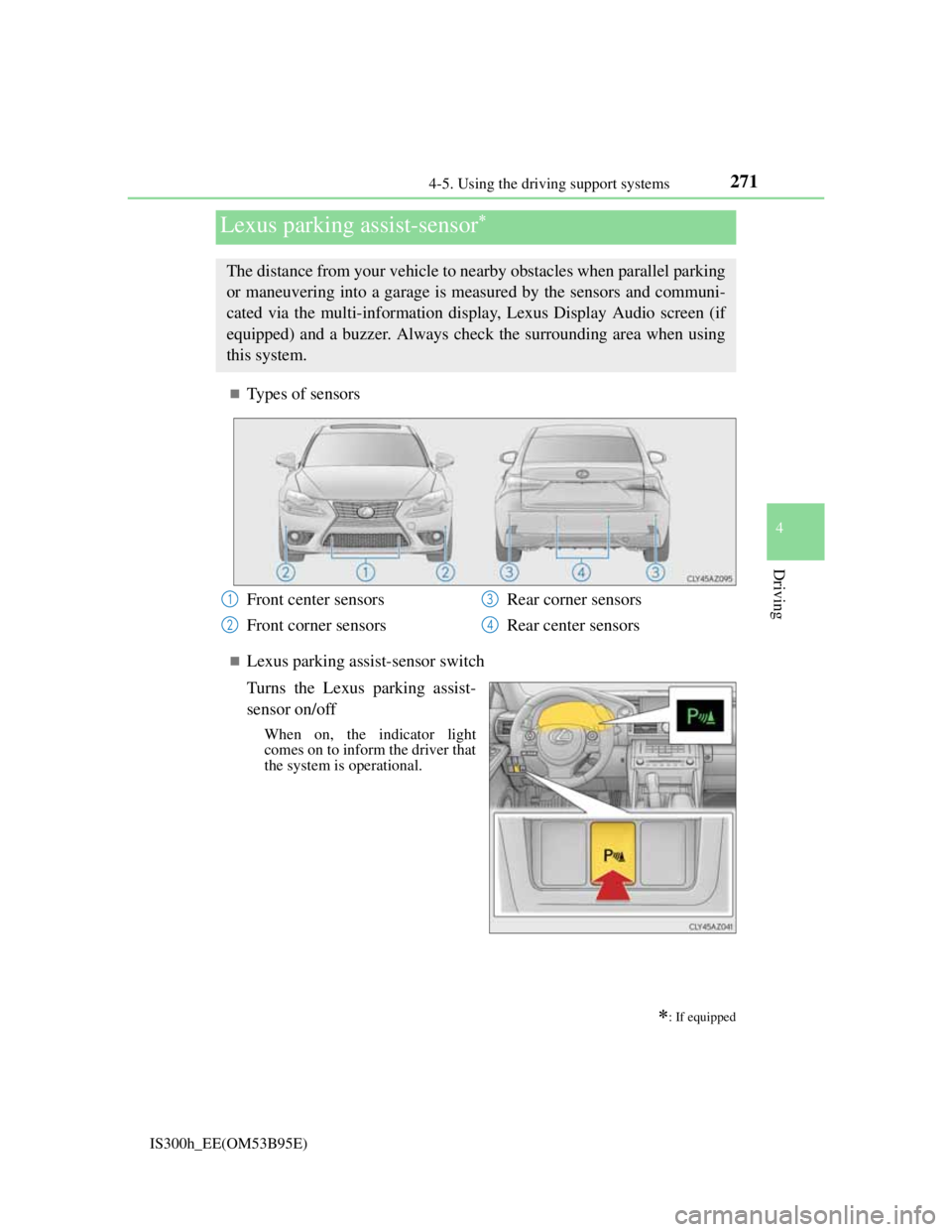
Types of sensors
Lexus parking assist-sensor switch
Turns the Lexus parking assist-
sensor on/off
When on, the indicator light
comes on to inform the driver that
the system is operational.
Lexus parking assist-sensor
: If equipped
The distance from your vehicle to nearby obstacles when parallel parking
or maneuvering into a garage is measured by the sensors and communi-
cated via the multi-information display, Lexus Display Audio screen (if
equipped) and a buzzer. Always check the surrounding area when using
this system.
Front center sensors
Front corner sensorsRear corner sensors
Rear center sensors1
2
3
4
Page 274 of 628
2724-5. Using the driving support systems
IS300h_EE(OM53B95E)
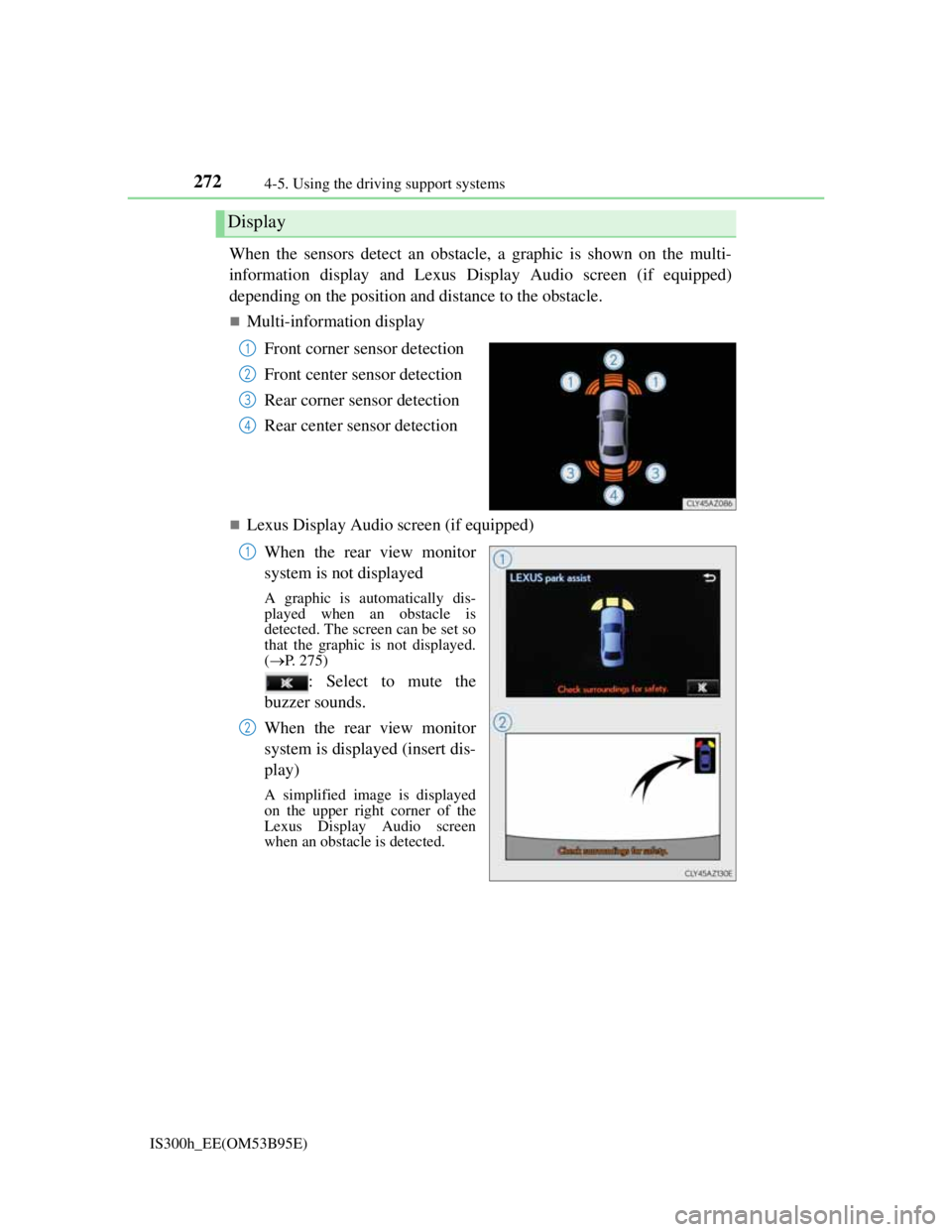
When the sensors detect an obstacle, a graphic is shown on the multi-
information display and Lexus Display Audio screen (if equipped)
depending on the position and distance to the obstacle.
Multi-information display
Front corner sensor detection
Front center sensor detection
Rear corner sensor detection
Rear center sensor detection
Lexus Display Audio screen (if equipped)
When the rear view monitor
system is not displayed
A graphic is automatically dis-
played when an obstacle is
detected. The screen can be set so
that the graphic is not displayed.
(P. 275)
: Select to mute the
buzzer sounds.
When the rear view monitor
system is displayed (insert dis-
play)
A simplified image is displayed
on the upper right corner of the
Lexus Display Audio screen
when an obstacle is detected.
Display
1
2
3
4
1
2