front sensor Lexus IS300h 2015 User Guide
[x] Cancel search | Manufacturer: LEXUS, Model Year: 2015, Model line: IS300h, Model: Lexus IS300h 2015Pages: 628, PDF Size: 137.89 MB
Page 230 of 628
2304-3. Operating the lights and wipers
IS300h_EE(OM53D56E)
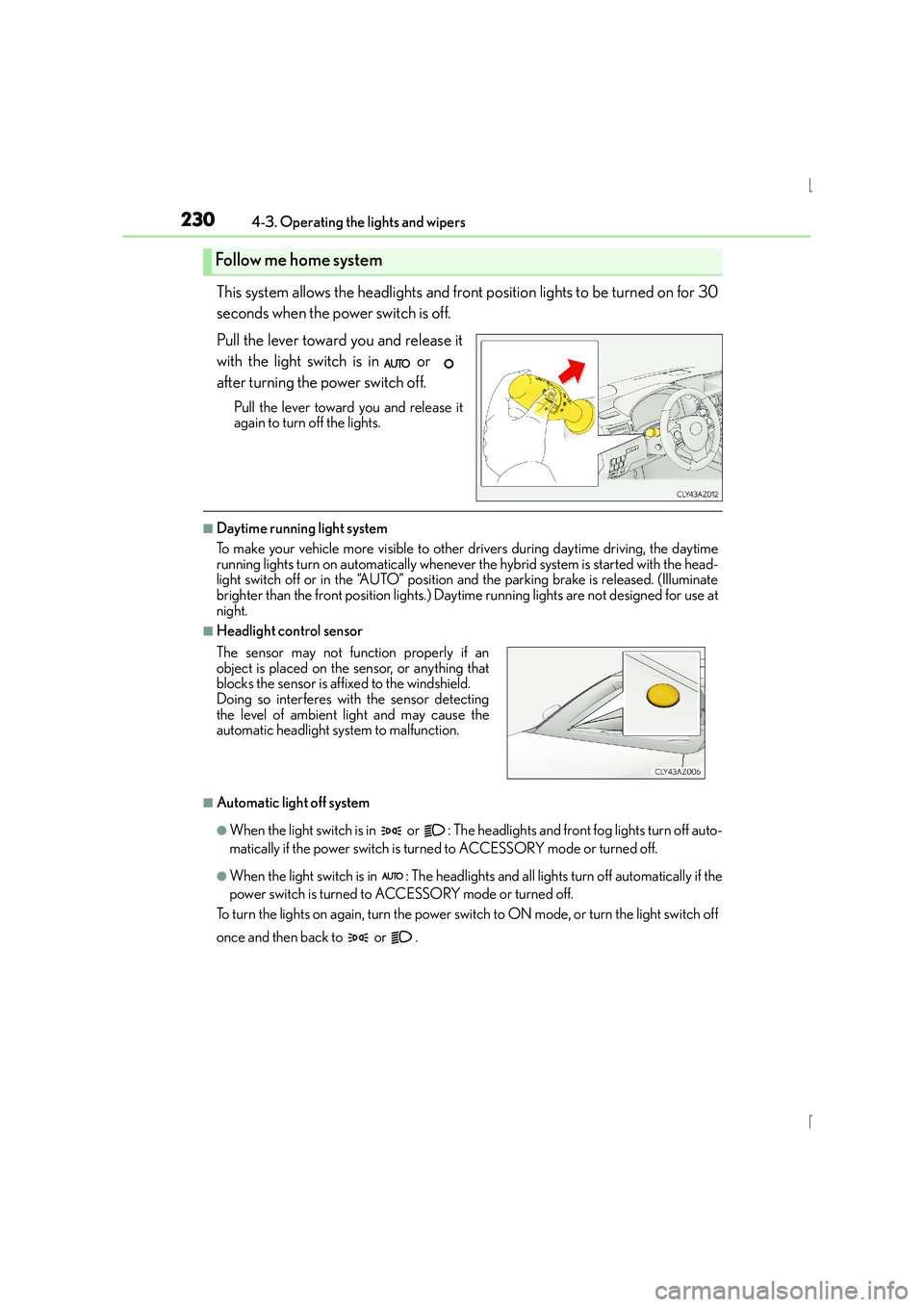
This system allows the headlights and front position lights to be turned on for 30
seconds when the power switch is off.
Pull the lever toward you and release it
with the light switch is in or
after turning the power switch off.
Pull the lever toward you and release it
again to turn off the lights.
■Daytime running light system
To make your vehicle more visible to other drivers during daytime driving, the daytime
running lights turn on automatically whenever the hybrid system is started with the head-
light switch off or in the “AUTO” position and the parking brake is released. (Illuminate
brighter than the front position lights.) Dayt ime running lights are not designed for use at
night.
■Headlight control sensor
■Automatic light off system
●When the light switch is in or : The he adlights and front fog lights turn off auto-
matically if the power switch is turned to ACCESSORY mode or turned off.
●When the light switch is in : The headlights and all lights turn off automatically if the
power switch is turned to ACCESSORY mode or turned off.
To turn the lights on again, turn the power swit ch to ON mode, or turn the light switch off
once and then back to or .
Follow me home system
The sensor may not function properly if an
object is placed on the sensor, or anything that
blocks the sensor is affixed to the windshield.
Doing so interferes with the sensor detecting
the level of ambient light and may cause the
automatic headlight system to malfunction.
Page 234 of 628

2344-3. Operating the lights and wipers
IS300h_EE(OM53D56E)
■The Automatic High Beam can be operated when
The power switch is in ON mode.
■Camera sensor detection information
●High beam may not be automatically turned off in the following situations:
• When oncoming vehicles suddenly appear from a curve
• When the vehicle is cut in front of by another vehicle
• When oncoming or preceding vehicles are hidden from sight due to repeatedcurves, road dividers or roadside trees
●High beam may be turned off if an oncomi ng vehicle that is using fog lights without
using the headlights is detected.
●House lights, street lights, red traffic sign als, and illuminated billboards or signs may
cause the high beam to turn off.
●The following factors may affect the amount of time taken to turn high beam on or off:
• The brightness of headlights, fog lights, and tail lights of oncoming and preceding
vehicles
• The movement and direction of oncoming and preceding vehicles
• When an oncoming or preceding vehicle only has operational lights on one side
• When an oncoming or preceding vehicle is a two-wheeled vehicle
• The condition of the road (gradient, curve, condition of the road surface etc.)
• The number of passengers and amount of luggage
●High beam may be turned on or off when unexpected by the driver.
●Small vehicles, such as bicycles, may not be detected.
●In the situations below, the system may not be able to correctly detect the surrounding
brightness levels, and may flash or expose nearby pedestrians to the high beam. There-
fore, you should consider turning the high be ams on or off manually rather than relying
on the Automatic High Beam system.
• In bad weather (rain, snow, fog, sandstorms etc.)
• The windshield is obscured by fog, mist, ice, dirt etc.
• The windshield is cracked or damaged.
• The camera sensor is deformed or dirty.
• Surrounding brightness levels are equal to th ose of headlights, tail lights or fog lights.
• Vehicles ahead have headlights or tail lights that are either switched off, dirty, chang-
ing color, or have improperly adjusted aim.
• When driving through an area of intermittently changing brightness and darkness.
• When frequently and repeatedly driving ascending/descending roads, or roads with
rough, bumpy or uneven surfaces (such as stone-paved roads, gravel tracks etc.).
• When frequently and repeatedly taking curves or driving on a winding road.
• There is a highly reflective object ahead of the vehicle, such as a sign or a mirror.
• The vehicle’s headlights are damaged or dirty.
• The vehicle is listing or titling, due to a flat tire, a trailer being towed etc.
• The driver believes that the high beam may be causing problems or distress to other drivers or pedestrians nearby.
• The vehicle is used in a territory in which vehicles travel on the opposite side of the
road of the country for which the vehicle is approved, for example using a vehicle
designed for right-hand traffic in a left-hand traffic territory, or vice versa.
Page 275 of 628
2754-5. Using the driving support systems
4
Driving
IS300h_EE(OM53D56E)
NOTICE
■To prevent damage to or incorrect operation of the LDA system
●Do not modify the headlights or attach stickers to the surface of the lights.
●Do not modify the suspension.
If any suspension parts need to be replaced, contact any authorized Lexus dealer or
repairer, or another duly qualified and equipped professional.
●Do not install or place anything on the hood or the grille. Also, do not install a grille
guard (bull bars, kangaroo bar etc.).
●If your windshield needs repairs, contact any authorized Lexus dealer or repairer, or
another duly qualified and equipped professional.
■Camera sensor
Observe the following to ensure that the LDA system functions correctly.
●Keep the windshield clean at all times.
Performance could be affected if the windshie ld is dirty, or if raindrops, condensation
or ice are adhering to the windshield.
●Do not spill liquid onto the camera sensor
●Do not attach window tinting to the windshield.
●Do not install an antenna in front of the camera lens.
●If area of the windshield in front of the camera sensor is fogged up, use the windshield
defogger to remove the fog.
When it is cold, using the heater with air blowing to the feet may allow the upper part
of the windshield to fog up. This will have a negative effect on the images.
●Do not scratch the camera lens, or let it get dirty.
When cleaning the inside of the windshield , be careful not to get any glass cleaner
etc. on the lens. Also, do not touch the lens.
For lens repair, contact any authorized Lexus dealer or repairer, or another duly qual-
ified and equipped professional.
●Do not change the installation position or direction of the camera sensor or remove it.
The direction of the camera sensor is precisely adjusted.
●Do not subject the camera sensor to strong impact or force, and do not disassemble
the camera sensor.
●If the windshield needs to be replaced, contact any authorized Lexus dealer or
repairer, or another duly qualified and equipped professional.
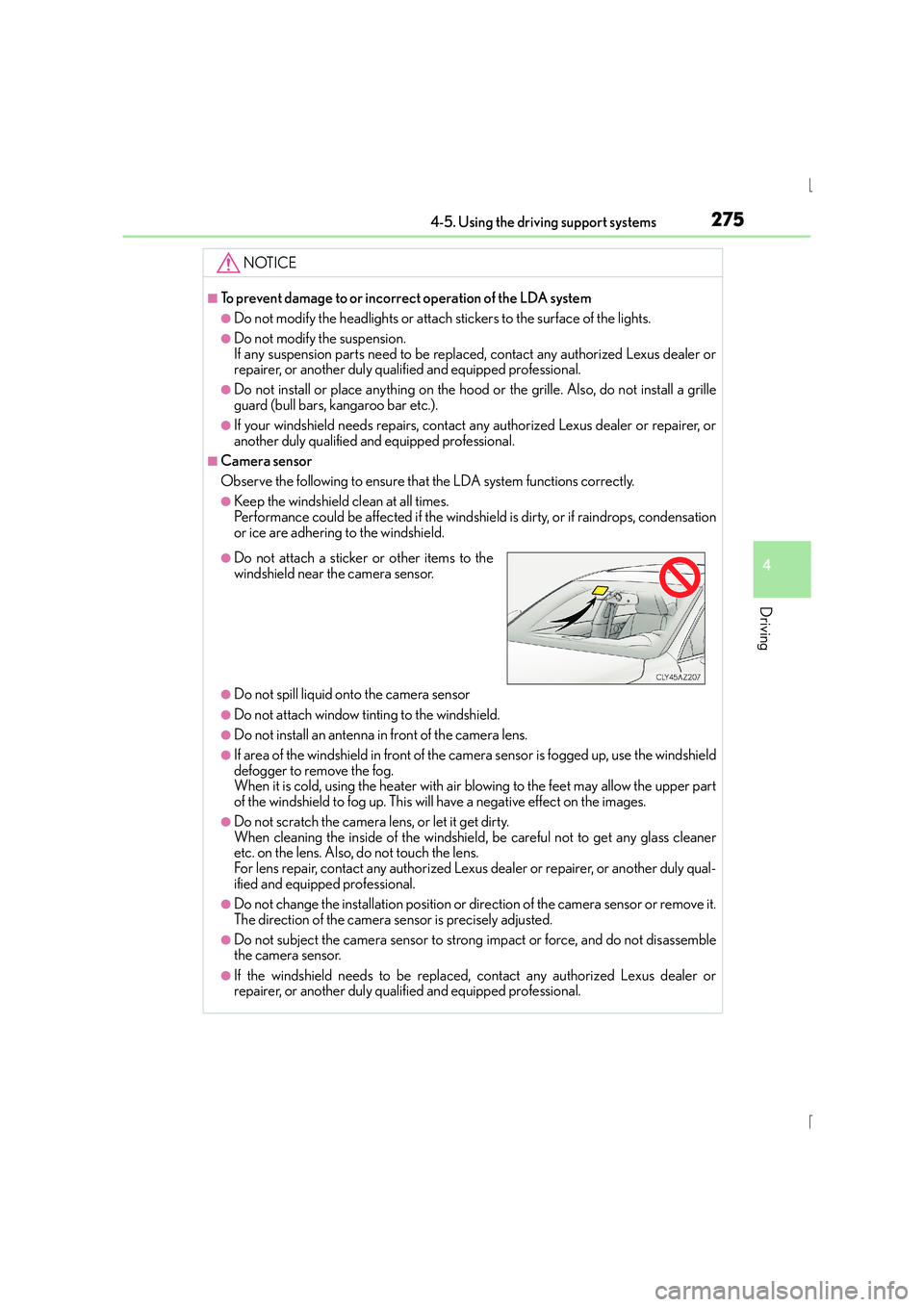
●Do not attach a sticker or other items to the
windshield near the camera sensor.
Page 276 of 628
2764-5. Using the driving support systems
IS300h_EE(OM53D56E)
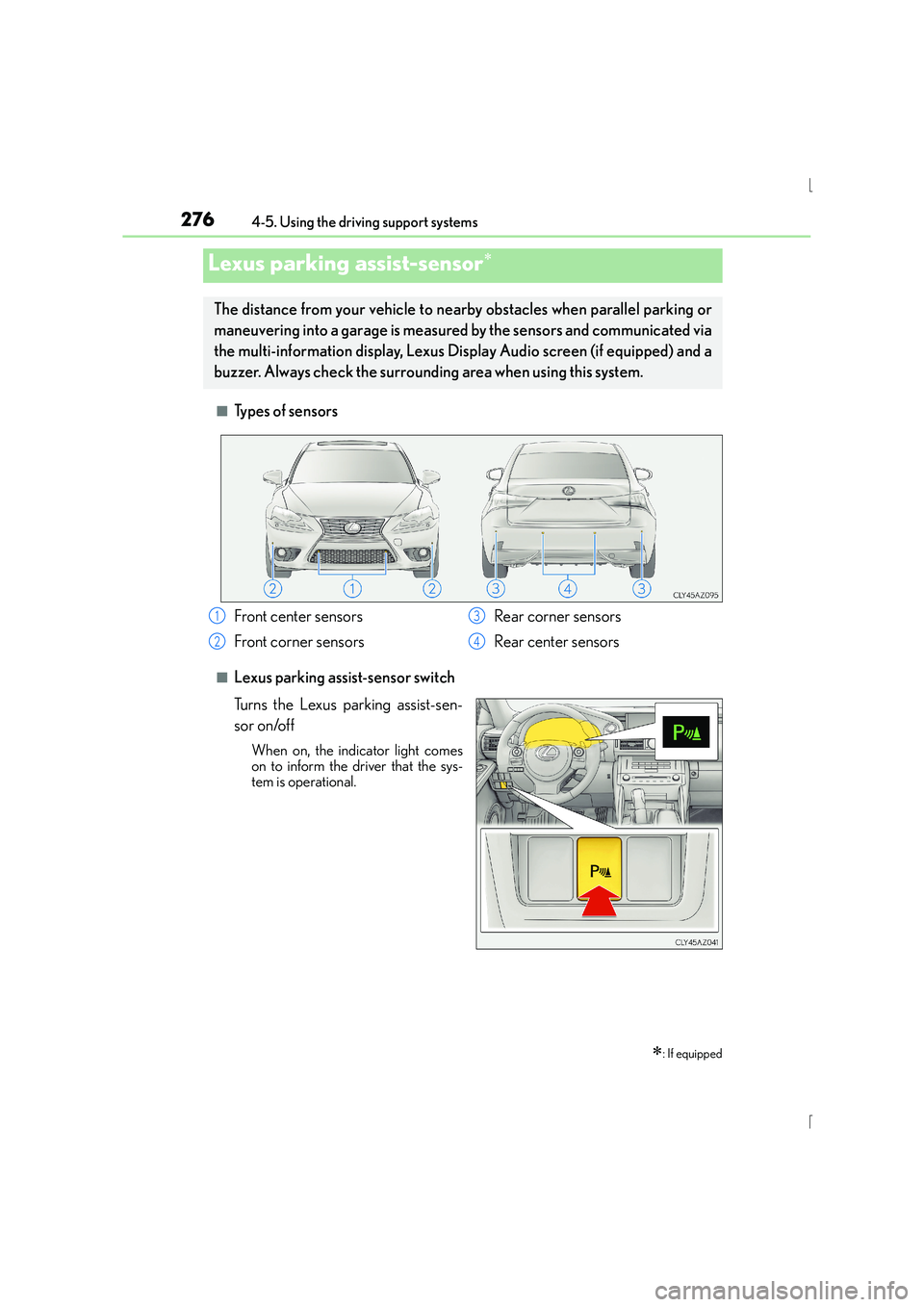
■Types of sensors
■Lexus parking assist-sensor switch
Turns the Lexus parking assist-sen-
sor on/off
When on, the indicator light comes
on to inform the driver that the sys-
tem is operational.
Lexus parking assist-sensor∗
∗: If equipped
The distance from your vehicle to nearby obstacles when parallel parking or
maneuvering into a garage is measured by the sensors and communicated via
the multi-information display, Lexus Display Audio screen (if equipped) and a
buzzer. Always check the surrounding area when using this system.
Front center sensors
Front corner sensors Rear corner sensors
Rear center sensors1
2
3
4
Page 277 of 628
2774-5. Using the driving support systems
4
Driving
IS300h_EE(OM53D56E)
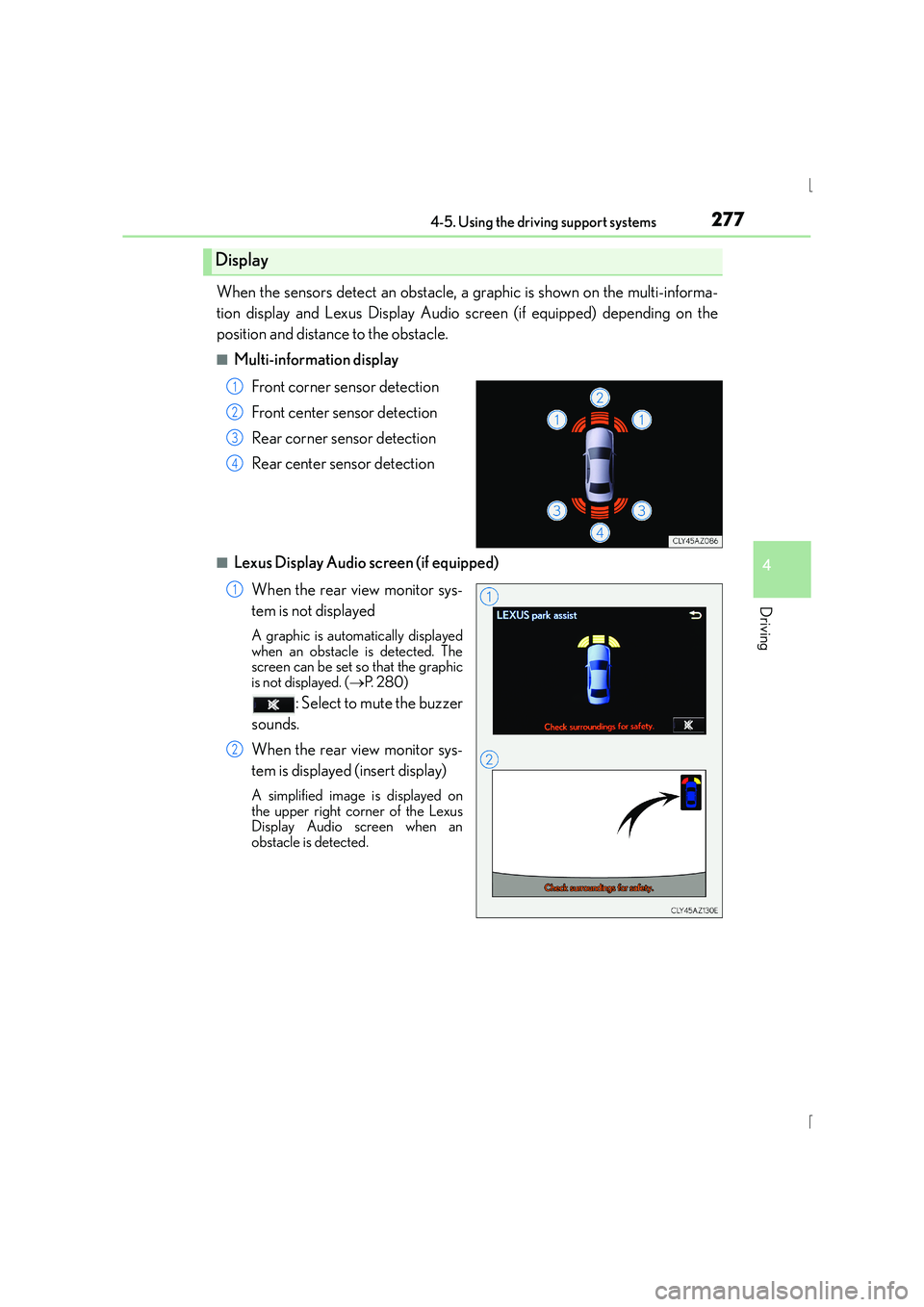
When the sensors detect an obstacle, a graphic is shown on the multi-informa-
tion display and Lexus Display Audio screen (if equipped) depending on the
position and distance to the obstacle.
■Multi-information displayFront corner sensor detection
Front center sensor detection
Rear corner sensor detection
Rear center sensor detection
■Lexus Display Audio screen (if equipped)When the rear view monitor sys-
tem is not displayed
A graphic is automatically displayed
when an obstacle is detected. The
screen can be set so that the graphic
is not displayed. ( →P. 2 8 0 )
: Select to mute the buzzer
sounds.
When the rear view monitor sys-
tem is displayed (insert display)
A simplified image is displayed on
the upper right corner of the Lexus
Display Audio screen when an
obstacle is detected.
Display
1
2
3
4
1
2
Page 278 of 628
2784-5. Using the driving support systems
IS300h_EE(OM53D56E)
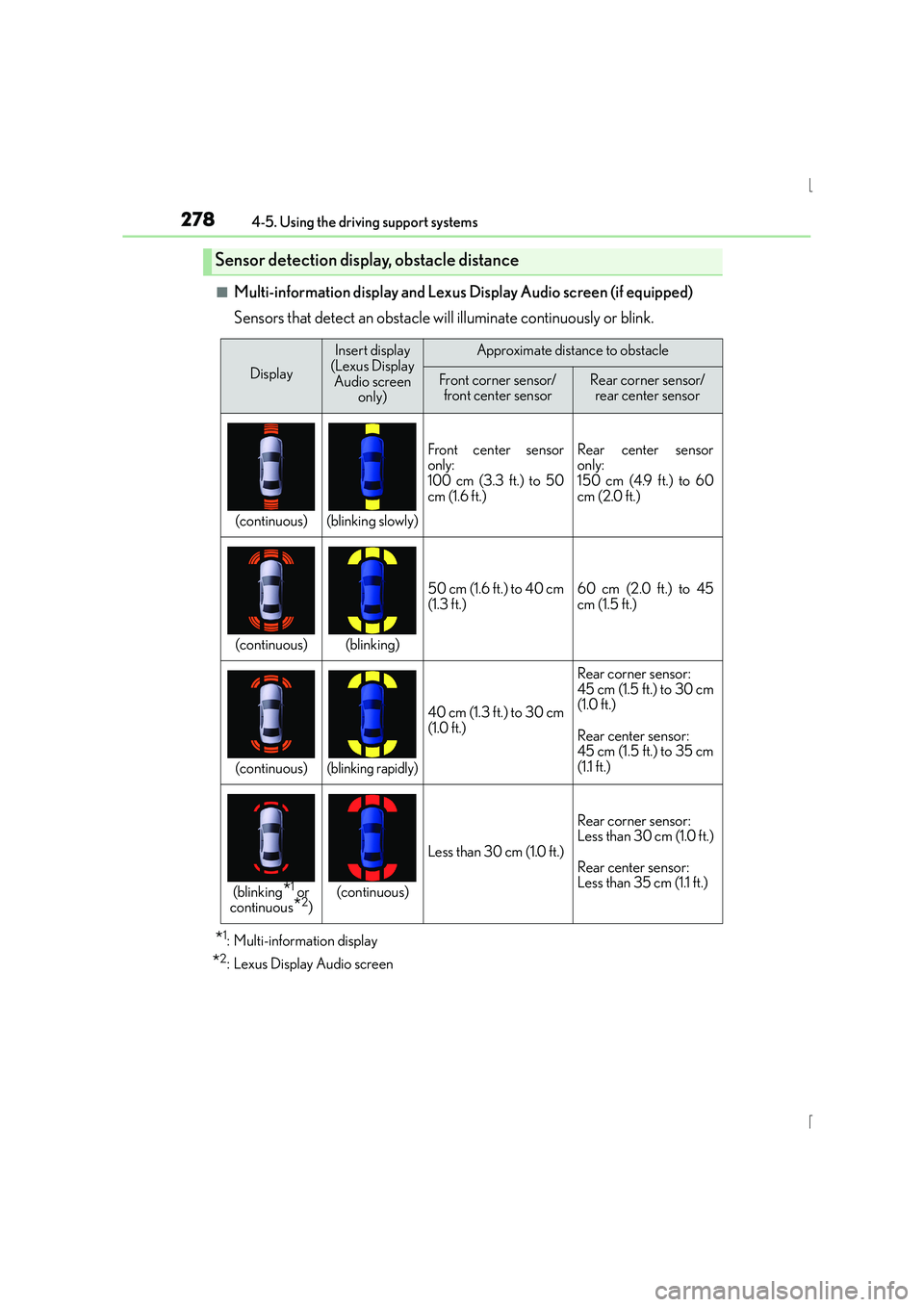
■Multi-information display and Lexus Display Audio screen (if equipped)
Sensors that detect an obstacle will illuminate continuously or blink.
*1: Multi-information display
*2: Lexus Display Audio screen
Sensor detection display, obstacle distance
Display
Insert display
(Lexus Display Audio screen only)Approximate distance to obstacle
Front corner sensor/front center sensorRear corner sensor/ rear center sensor
(continuous)(blinking slowly)
Front center sensor
only:
100 cm (3.3 ft.) to 50
cm (1.6 ft.)Rear center sensor
only:
150 cm (4.9 ft.) to 60
cm (2.0 ft.)
(continuous)(blinking)
50 cm (1.6 ft.) to 40 cm
(1.3 ft.)60 cm (2.0 ft.) to 45
cm (1.5 ft.)
(continuous)(blinking rapidly)
40 cm (1.3 ft.) to 30 cm
(1.0 ft.)
Rear corner sensor:
45 cm (1.5 ft.) to 30 cm
(1.0 ft.)
Rear center sensor:
45 cm (1.5 ft.) to 35 cm
(1.1 ft.)
(blinking*1 or
continuous*2)(continuous)
Less than 30 cm (1.0 ft.)
Rear corner sensor:
Less than 30 cm (1.0 ft.)
Rear center sensor:
Less than 35 cm (1.1 ft.)
Page 279 of 628
2794-5. Using the driving support systems
4
Driving
IS300h_EE(OM53D56E)
■Buzzer operation and distance to an obstacle
A buzzer sounds when the sensors are operating.
●The buzzer beeps faster as the vehicle approaches an obstacle. When the
vehicle comes within the following distance of the obstacle, the buzzer
sounds continuously:• Front center sensors: Approximately 30 cm (1.0 ft.)
• Corner sensors: Approximately 30 cm (1.0 ft.)
• Rear center sensors: Approximately 35 cm (1.1 ft.)
●When 2 or more obstacles are detected simultaneously, the buzzer system
responds to the nearest obstacle. If one or both come within the above dis-
tances, the beep will repeat a long tone, followed by fast beeps.
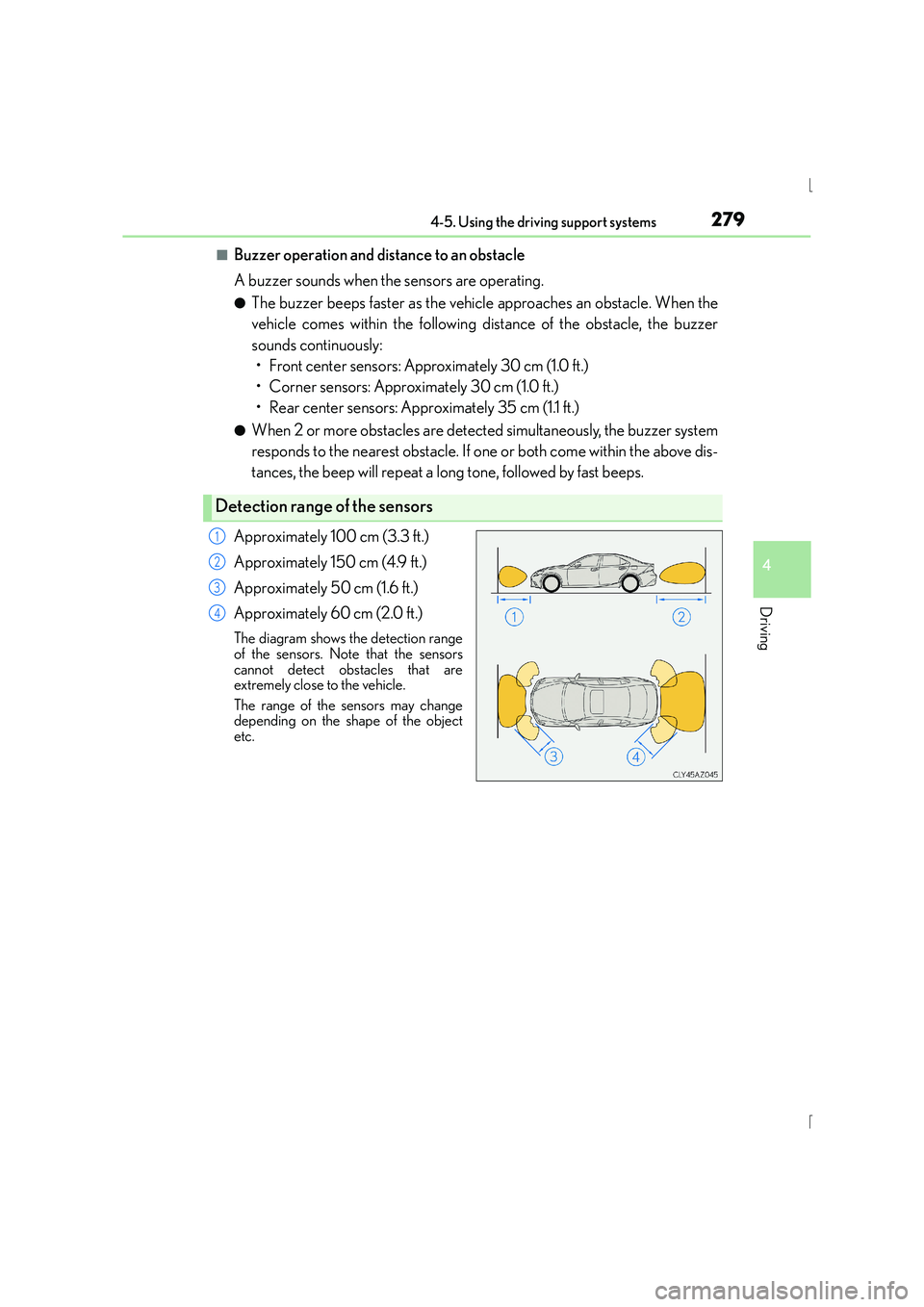
Approximately 100 cm (3.3 ft.)
Approximately 150 cm (4.9 ft.)
Approximately 50 cm (1.6 ft.)
Approximately 60 cm (2.0 ft.)
The diagram shows the detection range
of the sensors. Note that the sensors
cannot detect obstacles that are
extremely close to the vehicle.
The range of the sensors may change
depending on the shape of the object
etc.
Detection range of the sensors
1
2
3
4
Page 280 of 628
2804-5. Using the driving support systems
IS300h_EE(OM53D56E)
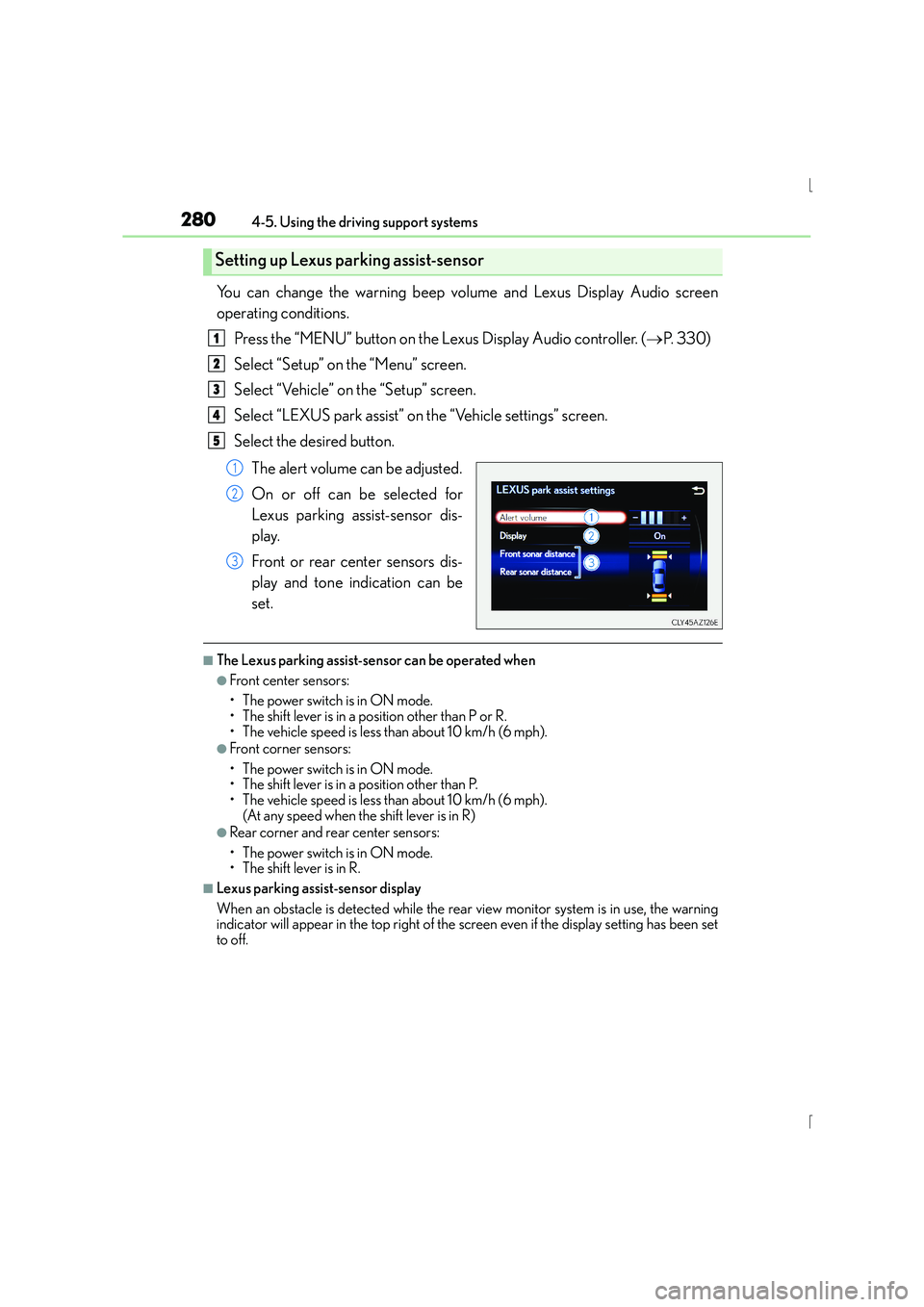
You can change the warning beep volume and Lexus Display Audio screen
operating conditions.Press the “MENU” button on the Lexus Display Audio controller. ( →P. 3 3 0 )
Select “Setup” on the “Menu” screen.
Select “Vehicle” on the “Setup” screen.
Select “LEXUS park assist” on the “Vehicle settings” screen.
Select the desired button.
The alert volume can be adjusted.
On or off can be selected for
Lexus parking assist-sensor dis-
play.
Front or rear center sensors dis-
play and tone indication can be
set.
■The Lexus parking assist-sensor can be operated when
●Front center sensors:
• The power switch is in ON mode.
• The shift lever is in a position other than P or R.
• The vehicle speed is less than about 10 km/h (6 mph).
●Front corner sensors:
• The power switch is in ON mode.
• The shift lever is in a position other than P.
• The vehicle speed is less than about 10 km/h (6 mph). (At any speed when the shift lever is in R)
●Rear corner and rear center sensors:
• The power switch is in ON mode.
• The shift lever is in R.
■Lexus parking assist-sensor display
When an obstacle is detected while the rear view monitor system is in use, the warning
indicator will appear in the top right of the screen even if the display setting has been set
to off.
Setting up Lexus parking assist-sensor
1
2
3
4
5
1
2
3
Page 281 of 628
2814-5. Using the driving support systems
4
Driving
IS300h_EE(OM53D56E)
■Sensor detection information
●The sensor’s detection areas are limited to the areas around the vehicle’s front corner
and rear bumpers.
●Certain vehicle conditions and the surrounding environment may affect the ability of
the sensor to correctly detect obstacles. Particular instances where this may occur are
listed below.
• There is dirt, snow or ice on the sensor. (Wiping the sensors will resolve this prob- lem.)
• The sensor is frozen. (Thawing the area will resolve this problem.)
In especially cold weather, if a sensor is frozen the screen may show an abnormal
display, or obstacles may not be detected.
• The sensor is covered in any way.
• The vehicle is leaning considerably to one side.
• On an extremely bumpy road, on an incline, on gravel, or on grass.
• The vicinity of the vehicle is noisy due to vehicle horns, motorcycle engines, air
brakes of large vehicles, or other loud noises producing ultrasonic waves.
• There is another vehicle equipped with parking assist sensors in the vicinity.
• The sensor is coated with a sheet of spray or heavy rain.
• The vehicle is equipped with a fender pole or wireless antenna.
• Towing eyelets are installed.
• The bumper or sensor receives a strong impact.
• The vehicle is approaching a tall or curved curb.
• In harsh sunlight or intense cold weather.
• The area directly under the bumpers is not detected.
• If obstacles draw too close to the sensor.
• A non-genuine Lexus suspension (low ered suspension etc.) is installed.
• People may not be detected if they are wearing certain types of clothing.
In addition to the examples above, there are instances in which, because of their shape,
signs and other objects may be judged by the sensor to be closer than they are.
●The shape of the obstacle may prevent the sensor from detecting it. Pay particular
attention to the following obstacles:
• Wires, fences, ropes, etc.
• Cotton, snow and other materials that absorb sound waves
• Sharply-angled objects
• Low obstacles
• Tall obstacles with upper sections projecting outwards in the direction of your vehi- cle
●The following situations may occur during use.
• Depending on the shape of the obstacle and other factors, the detection distancemay shorten, or detection may be impossible.
• Obstacles may not be detected if they are too close to the sensor.
• There will be a short delay between obst acle detection and display. Even at slow
speeds, there is a possibility that the obstacl e will come within the sensor’s detection
areas before the display is shown and the warning beep sounds.
• Thin posts or objects lower than the sensor may not be detected when approached, even if they have been detected once.
• It might be difficult to hear beeps due to the volume of the audio system or air flow noise of the air conditioning system.
■If a message is displayed on the multi-information display
→ P. 530, 530
Page 302 of 628
3024-5. Using the driving support systems
IS300h_EE(OM53D56E)
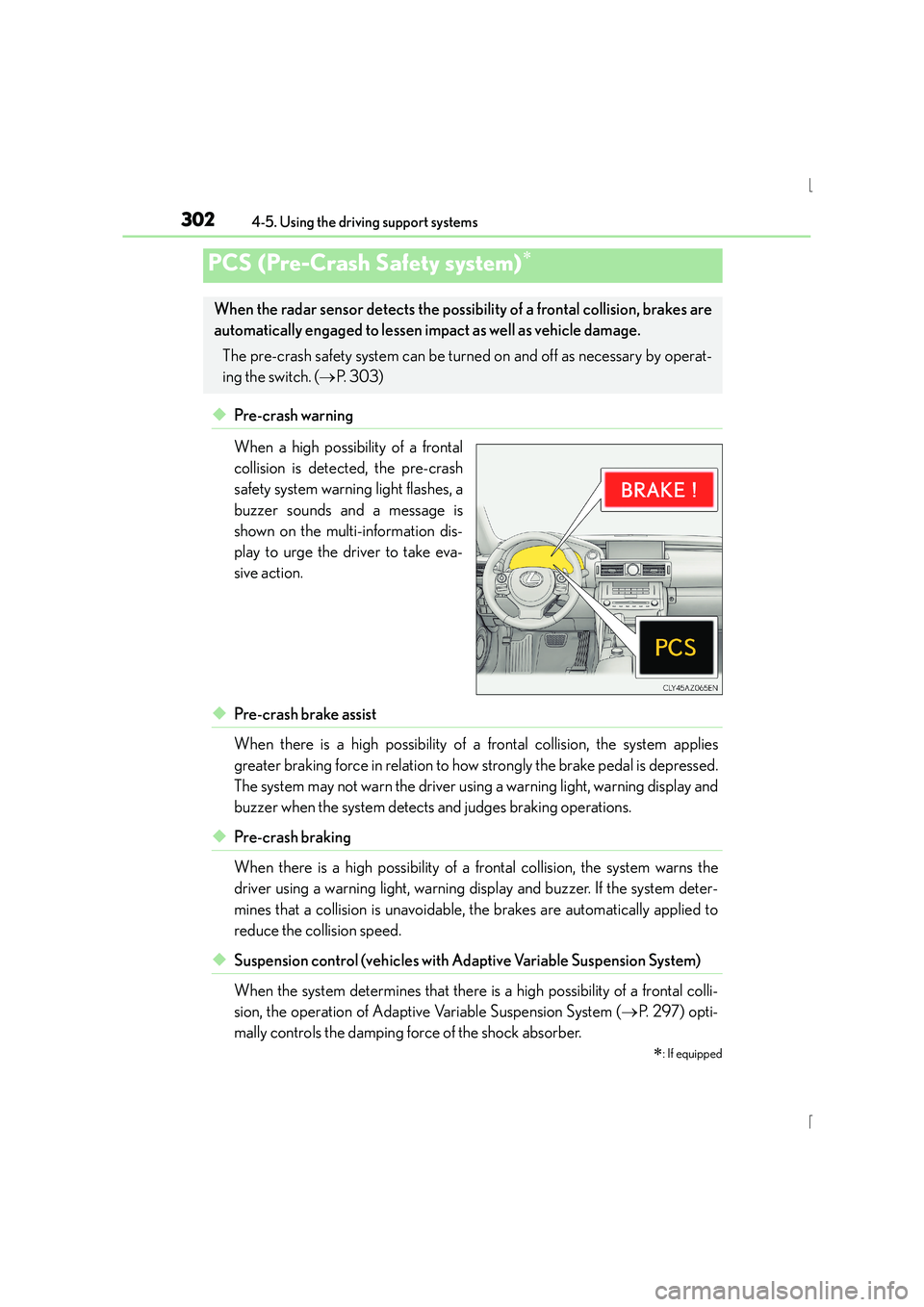
◆Pre-crash warning
When a high possibility of a frontal
collision is detected, the pre-crash
safety system warning light flashes, a
buzzer sounds and a message is
shown on the multi-information dis-
play to urge the driver to take eva-
sive action.
◆Pre-crash brake assist
When there is a high possibility of a frontal collision, the system applies
greater braking force in relation to how strongly the brake pedal is depressed.
The system may not warn the driver using a warning light, warning display and
buzzer when the system detects and judges braking operations.
◆Pre-crash braking
When there is a high possibility of a frontal collision, the system warns the
driver using a warning light, warning display and buzzer. If the system deter-
mines that a collision is unavoidable, the brakes are automatically applied to
reduce the collision speed.
◆Suspension control (vehicles with Ad aptive Variable Suspension System)
When the system determines that there is a high possibility of a frontal colli-
sion, the operation of Adaptive Variable Suspension System ( →P. 2 9 7 ) o p t i -
mally controls the damping force of the shock absorber.
PCS (Pre-Crash Safety system)∗
∗
: If equipped
When the radar sensor detects the possibili ty of a frontal collision, brakes are
automatically engaged to lessen im pact as well as vehicle damage.
The pre-crash safety system can be turned on and off as necessary by operat-
ing the switch. ( →P. 303)