front sensor Lexus IS300h 2015 Owner's Manual
[x] Cancel search | Manufacturer: LEXUS, Model Year: 2015, Model line: IS300h, Model: Lexus IS300h 2015Pages: 628, PDF Size: 137.89 MB
Page 23 of 628
23Pictorial index
IS300h_EE(OM53D56E)
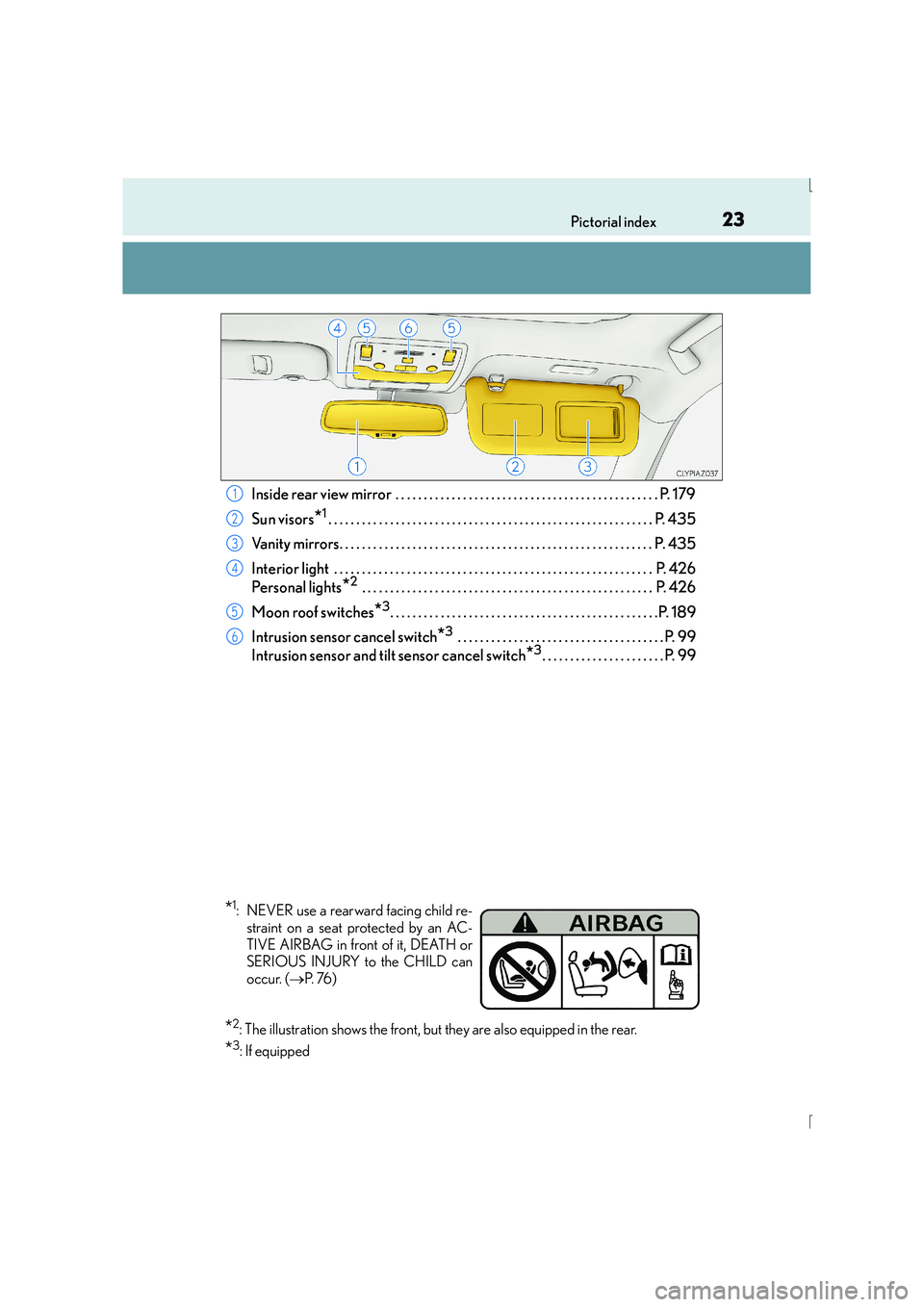
Inside rear view mirror . . . . . . . . . . . . . . . . . . . . . . . . . . . . . . . . . . . . . . . . . . . . . . . P. 179
Sun visors
*1. . . . . . . . . . . . . . . . . . . . . . . . . . . . . . . . . . . . . . . . . . . . . . . . . . . . . . . . . . P. 435
Vanity mirrors. . . . . . . . . . . . . . . . . . . . . . . . . . . . . . . . . . . . . . . . . . . . . . . . . . . . . . . . P . 435
Interior light . . . . . . . . . . . . . . . . . . . . . . . . . . . . . . . . . . . . . . . . . . . . . . . . . . . . . . . . . P. 426
Personal lights
*2 . . . . . . . . . . . . . . . . . . . . . . . . . . . . . . . . . . . . . . . . . . . . . . . . . . . . P. 426
Moon roof switches
*3. . . . . . . . . . . . . . . . . . . . . . . . . . . . . . . . . . . . . . . . . . . . . . . .P. 189
Intrusion sensor cancel switch
*3 . . . . . . . . . . . . . . . . . . . . . . . . . . . . . . . . . . . . . P. 99
Intrusion sensor and tilt sensor cancel switch
*3. . . . . . . . . . . . . . . . . . . . . . P. 99
1
2
3
4
5
6
*1: NEVER use a rearward facing child re- straint on a seat protected by an AC-
TIVE AIRBAG in front of it, DEATH or
SERIOUS INJURY to the CHILD can
occur. ( →P. 76 )
*2: The illustration shows the front, but they are also equipped in the rear.
*3: If equipped
Page 31 of 628
31Pictorial index
IS300h_EE(OM53D56E)
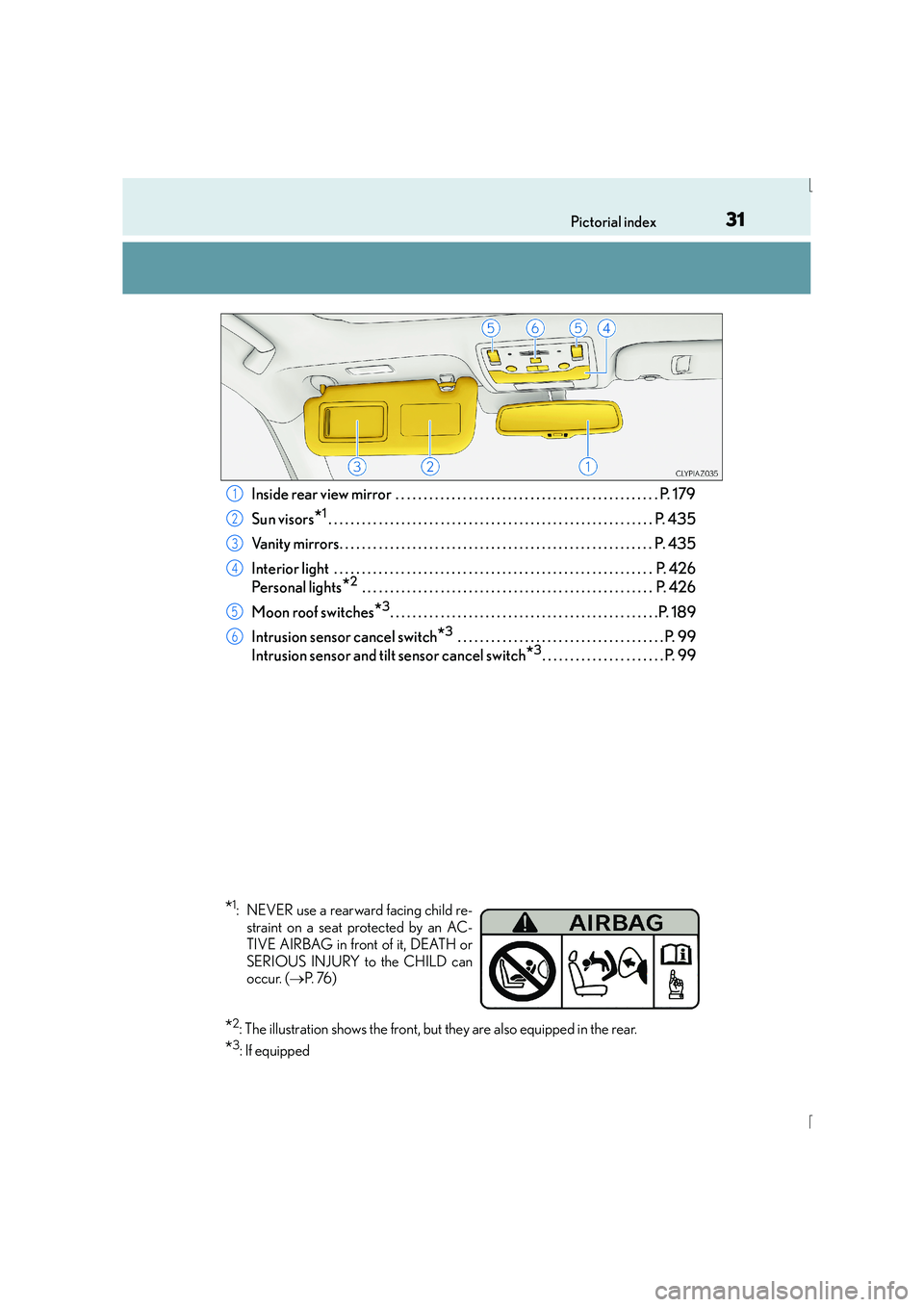
Inside rear view mirror . . . . . . . . . . . . . . . . . . . . . . . . . . . . . . . . . . . . . . . . . . . . . . . P. 179
Sun visors
*1. . . . . . . . . . . . . . . . . . . . . . . . . . . . . . . . . . . . . . . . . . . . . . . . . . . . . . . . . . P. 435
Vanity mirrors. . . . . . . . . . . . . . . . . . . . . . . . . . . . . . . . . . . . . . . . . . . . . . . . . . . . . . . . P . 435
Interior light . . . . . . . . . . . . . . . . . . . . . . . . . . . . . . . . . . . . . . . . . . . . . . . . . . . . . . . . . P. 426
Personal lights
*2 . . . . . . . . . . . . . . . . . . . . . . . . . . . . . . . . . . . . . . . . . . . . . . . . . . . . P. 426
Moon roof switches
*3. . . . . . . . . . . . . . . . . . . . . . . . . . . . . . . . . . . . . . . . . . . . . . . .P. 189
Intrusion sensor cancel switch
*3 . . . . . . . . . . . . . . . . . . . . . . . . . . . . . . . . . . . . . P. 99
Intrusion sensor and tilt sensor cancel switch
*3. . . . . . . . . . . . . . . . . . . . . . P. 99
1
2
3
4
5
6
*1: NEVER use a rearward facing child re- straint on a seat protected by an AC-
TIVE AIRBAG in front of it, DEATH or
SERIOUS INJURY to the CHILD can
occur. ( →P. 76 )
*2: The illustration shows the front, but they are also equipped in the rear.
*3: If equipped
Page 44 of 628
441-1. For safe use
IS300h_EE(OM53D56E)
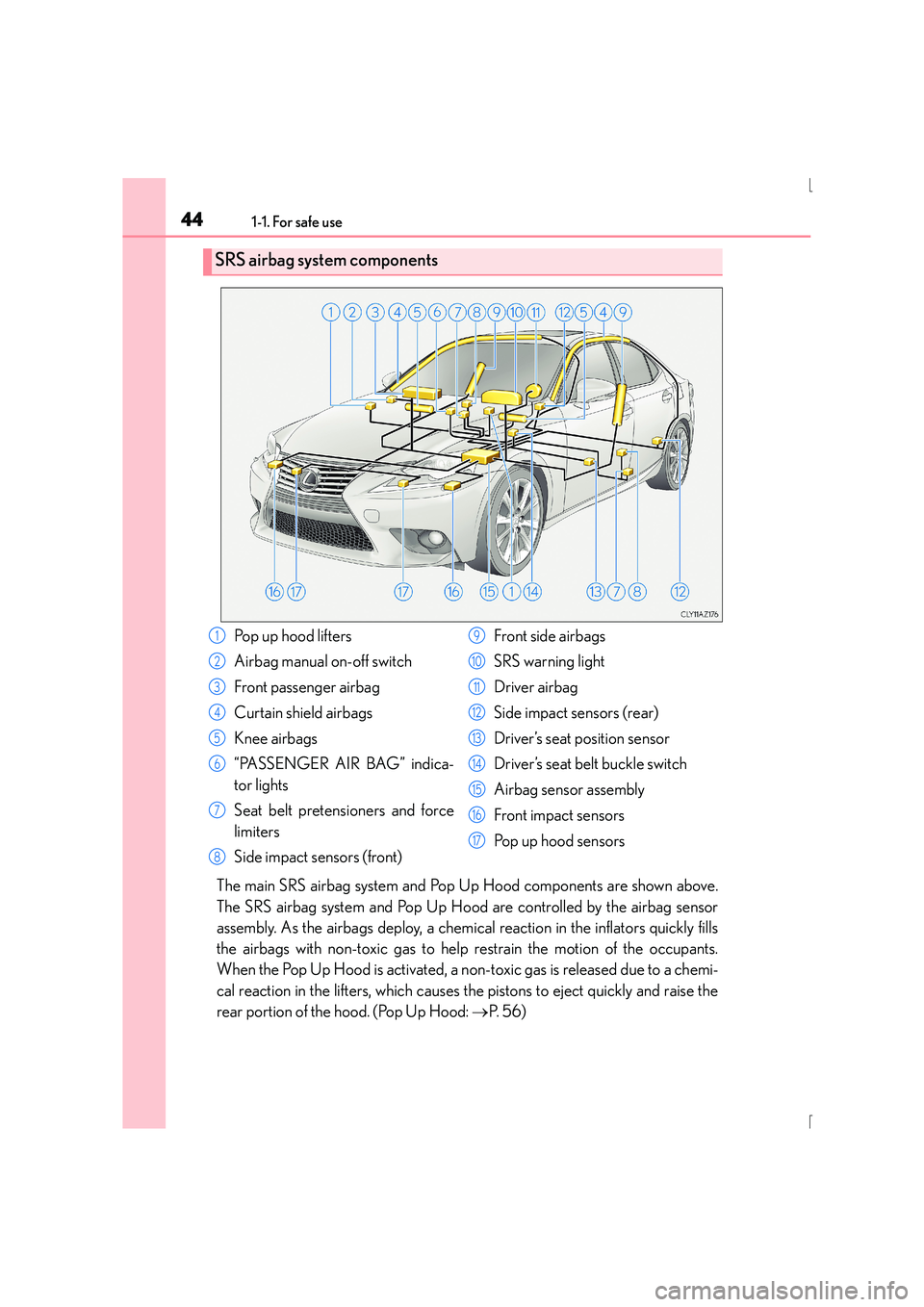
The main SRS airbag system and Pop Up Hood components are shown above.
The SRS airbag system and Pop Up Hood are controlled by the airbag sensor
assembly. As the airbags deploy, a chemical reaction in the inflators quickly fills
the airbags with non-toxic gas to help restrain the motion of the occupants.
When the Pop Up Hood is activated, a non-toxic gas is released due to a chemi-
cal reaction in the lifters, which causes the pistons to eject quickly and raise the
rear portion of the hood. (Pop Up Hood: →P. 5 6 )
SRS airbag system components
Pop up hood lifters
Airbag manual on-off switch
Front passenger airbag
Curtain shield airbags
Knee airbags
“PASSENGER AIR BAG” indica-
tor lights
Seat belt pretensioners and force
limiters
Side impact sensors (front) Front side airbags
SRS warning light
Driver airbag
Side impact sensors (rear)
Driver’s seat position sensor
Driver’s seat belt buckle switch
Airbag sensor assembly
Front impact sensors
Po p u p h o o d s e n s o r s1
2
3
4
5
6
7
8
9
10
11
12
13
14
15
16
17
Page 56 of 628

561-1. For safe use
IS300h_EE(OM53D56E)
When the sensors located at the back of the front bumper detect an impact with
a body, such as a pedestrian, which meets or exceeds the threshold level while
the vehicle is being driven within the operational speed range, the system
becomes operational and raises the rear portion of the hood.
Sensors
Hood
Lifters
Pop Up Hood
In the event of a frontal collision with a body, such as a pedestrian, the Pop Up
Hood system raises the rear portion of the hood to reduce the possibility of a
serious impact to the pedestrian’s head area by adding clearance to the
engine compartment.
Pop Up Hood mechanism
1
2
3
Page 58 of 628
581-1. For safe use
IS300h_EE(OM53D56E)
■Po p U p H o o d p re c a u t i o n s
●Before scrapping your vehicle, make sure to contact any authorized Lexus dealer or
repairer, or another duly qualified and equipped professional.
●The Pop Up Hood system cannot be reused once it has operated. Have it replaced by
any authorized Lexus dealer or repairer, or another duly qualified and equipped profes-
sional.
■Conditions under whic h the Pop Up Hood may not operate properly
The Pop Up Hood may not operate properly under the following conditions:
●If a pedestrian collides with the right or left corner of the front bumper or the side of the
vehicle. As such impacts may be difficult to detect, the system may not operate.
●If the vehicle speed is not detected correctly, such as if the vehicle is sliding sideways,
the system may not operate properly.
■Conditions under wh ich the Pop Up Hood may not operate
The Pop Up Hood may not operate in the following situations:
●Colliding with a lying pedestrian
●A frontal impact applied to the front bump er while driving at speeds outside of the
operational speed range
●A side impact or rear impact
●A vehicle rollover (In some accident situations, the Pop Up Hood may operate.)
NOTICE
■Pop Up Hood precautions
●Make sure to close the hood before driving, as the system may not operate properly if
the hood is not fully closed.
●Make sure that all 4 tires are of the specif ied size and inflated to the specified tire
pressure ( →P. 586). If tires of a different size are used, the system may not operate
properly.
●If something has hit the area around the front bumper, the sensors may be damaged
even if the Pop Up Hood has not operated. Have the vehicle inspected by any autho-
rized Lexus dealer or repairer, or another duly qualified and equipped professional.
●Do not remove or repair the parts or wiring of the Pop Up Hood, as doing so may
cause accidental operation or prevent the system from operating properly. If repair or
replacement is necessary, contact any authorized Lexus dealer or repairer, or
another duly qualified and equipped professional.
●Do not remove such components as th e front bumper, hood or suspension, or
replace them with non-genuine parts, as doing so may prevent the system from oper-
ating properly.
●Do not install anything to the front bumper or hood, as doing so may prevent the sen-
sors from detecting an impact correctly and prevent the system from operating prop-
erly.
●Do not close the hood with force or apply load to the lifters, as doing so may damage
the lifters and prevent the system from operating properly.
●Do not modify the suspension, as changes made to the vehicle height may prevent
the system from operating properly.
Page 95 of 628

951-3. Theft deterrent system
1
For safety and security
IS300h_EE(OM53D56E)
Vehicles employing this system have
labels on the window glass of both front
doors.
Turn the power switch off, have all the passengers exit the vehicle and ensure that
all the doors are closed.
Using the entry function:
Touch the sensor area on the outside door handle twice within 5 seconds.
Using the wireless remote control:
Press twice within 5 seconds.
Using the entry function: Hold the outside door handle.
Using the wireless remote control: Press .
Double locking system
Unauthorized access to the vehicle is prevented by disabling the door unlock-
ing function from both the interior and exterior of the vehicle.
Setting the double locking system
Canceling the double locking system
CAUTION
■Double locking system precaution
Never activate the double locking system when there are people in the vehicle
because all the doors cannot be opened from inside the vehicle.
Page 101 of 628
1011-3. Theft deterrent system
1
For safety and security
IS300h_EE(OM53D56E)
■Tilt sensor detection considerations
The sensor may trigger the alarm in the following situations:
●The vehicle is transported by a ferry, trailer, train, etc.
●The vehicle is parked in a parking garage.
●The vehicle is inside a car wash that moves the vehicle.
●Any of the tires loses air pressure.
●The vehicle is jacked up.
●An earthquake occurs or the road caves in.
NOTICE
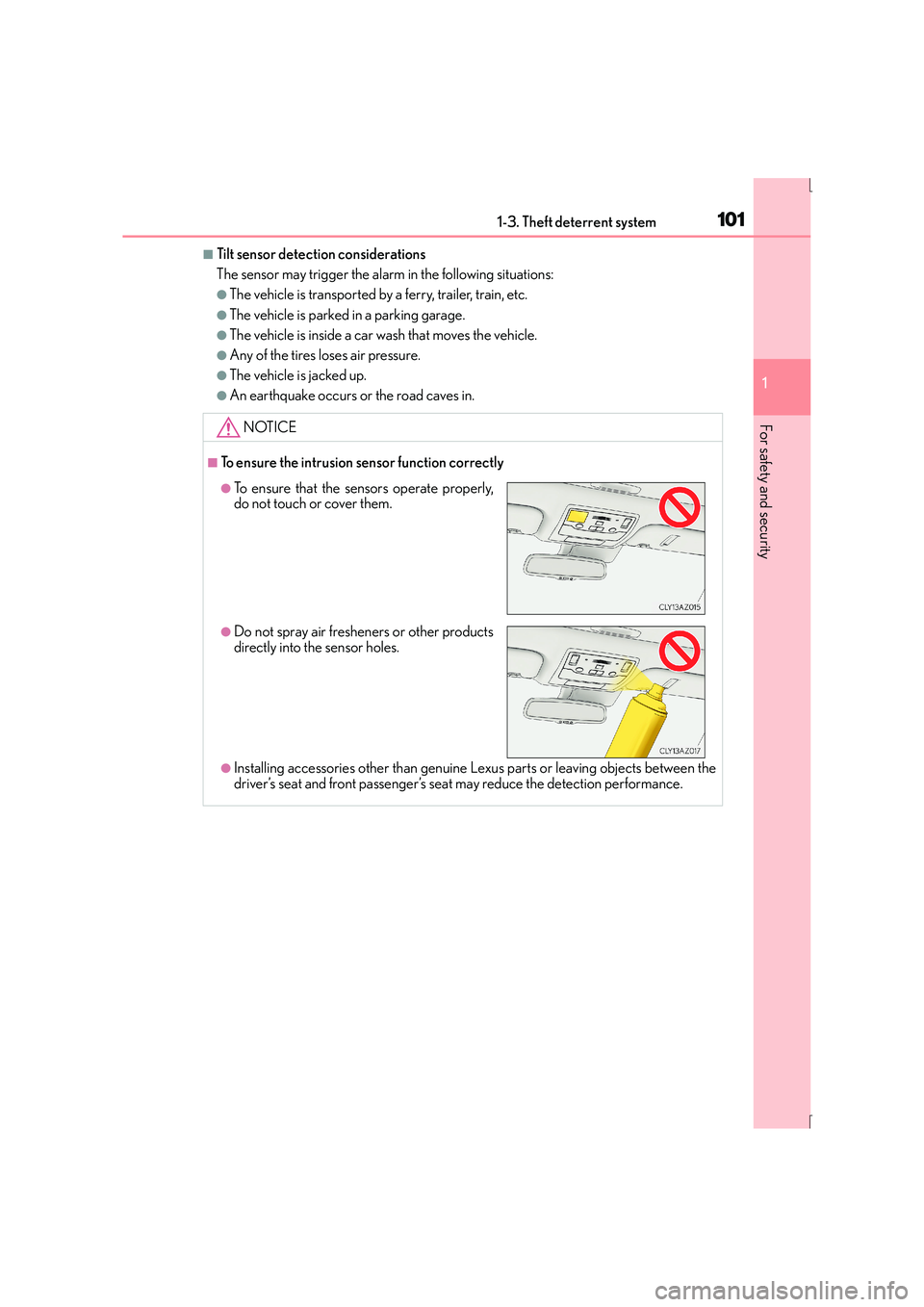
■To ensure the intrusion sensor function correctly
●Installing accessories other than genuine Lexus parts or leaving objects between the
driver’s seat and front passenger’s seat may reduce the detection performance.
●To ensure that the sensors operate properly,
do not touch or cover them.
●Do not spray air fresheners or other products
directly into the sensor holes.
Page 106 of 628
1062. Instrument cluster
IS300h_EE(OM53D56E)
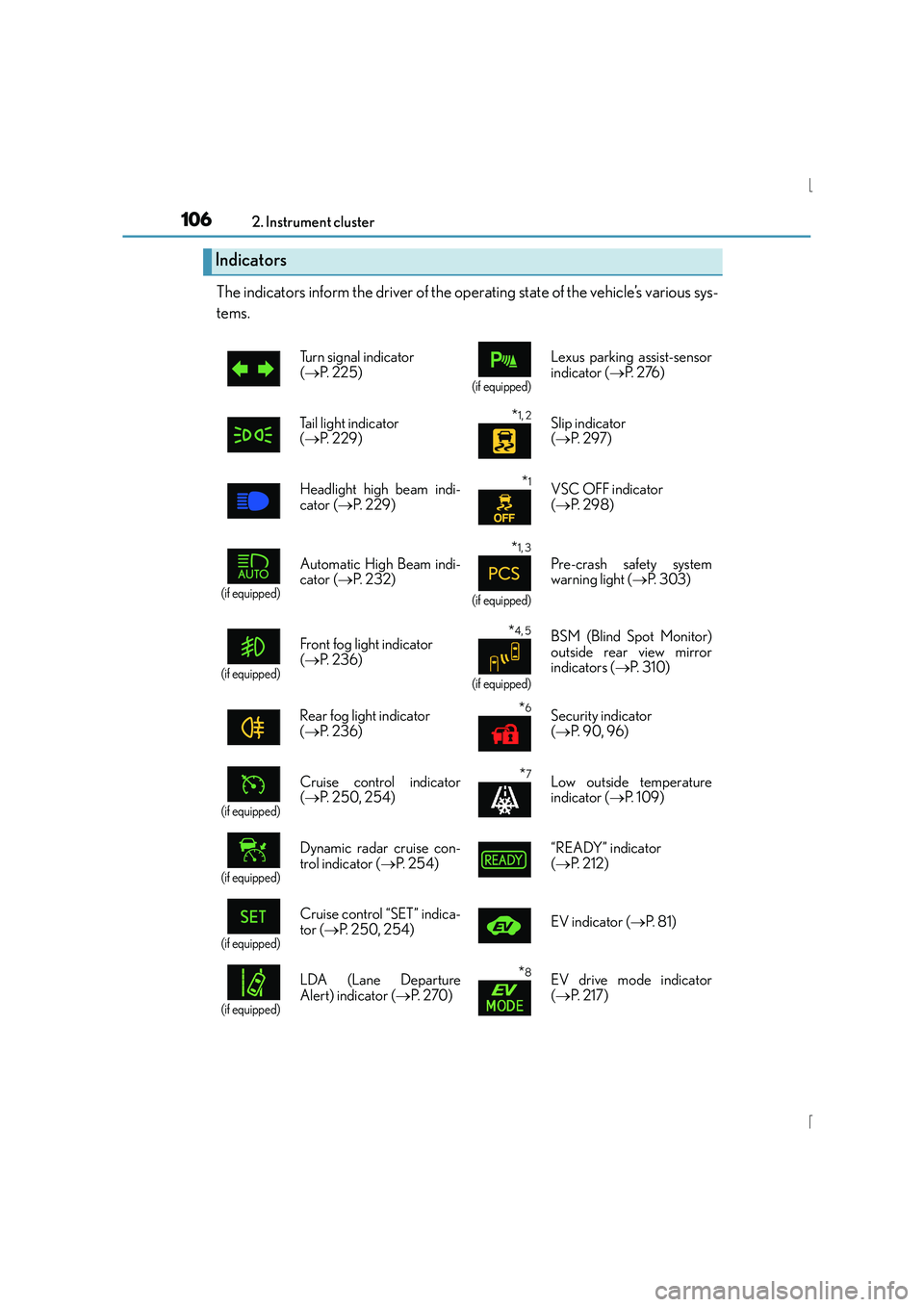
The indicators inform the driver of the operating state of the vehicle’s various sys-
tems.
Indicators
Turn signal indicator
(→ P. 2 2 5 )
(if equipped)
Lexus parking assist-sensor
indicator ( →P. 2 76 )
Tail light indicator
( → P. 229)
*1, 2 Slip indicator
(→ P. 2 9 7 )
Headlight high beam indi-
cator ( →P. 229)
*1VSC OFF indicator
(→ P. 2 9 8 )
(if equipped)
Automatic High Beam indi-
cator ( →P. 232)
*1, 3
(if equipped)
Pre-crash safety system
warning light ( →P. 303)
(if equipped)
Front fog light indicator
(→ P. 2 3 6 )*4, 5
(if equipped)
BSM (Blind Spot Monitor)
outside rear view mirror
indicators ( →P. 3 1 0 )
Rear fog light indicator
( → P. 2 3 6 )
*6Security indicator
(→ P. 9 0 , 9 6 )
(if equipped)
Cruise control indicator
(→ P. 250, 254)*7Low outside temperature
indicator ( →P. 1 0 9 )
(if equipped)
Dynamic radar cruise con-
trol indicator ( →P. 2 5 4 ) “READY” indicator
(
→ P. 212)
(if equipped)
Cruise control “SET” indica-
tor ( →P. 250, 254) EV indicator (
→P. 8 1 )
(if equipped)
LDA (Lane Departure
Alert) indicator ( →P. 2 7 0 )*8EV drive mode indicator
(→ P. 2 1 7 )
Page 137 of 628
1373-2. Opening, closing and locking the doors and trunk
3
Operation of each component
IS300h_EE(OM53D56E)
■Operation signals
The emergency flashers flash to indicate that the doors have been locked/unlocked.
(Locked: once; Unlocked: twice)
A buzzer sounds to indicate that the windows and moon roof are operating.
■Security feature
If a door is not opened within approximately 30 seconds after the vehicle is unlocked, the
security feature automatically locks the vehicle again.
■Welcome light illumination control
The front position, tail and license plate lights automatically turn on at night when the
doors are unlocked using the entry function or wireless remote control if the light switch
is in the “AUTO” position.
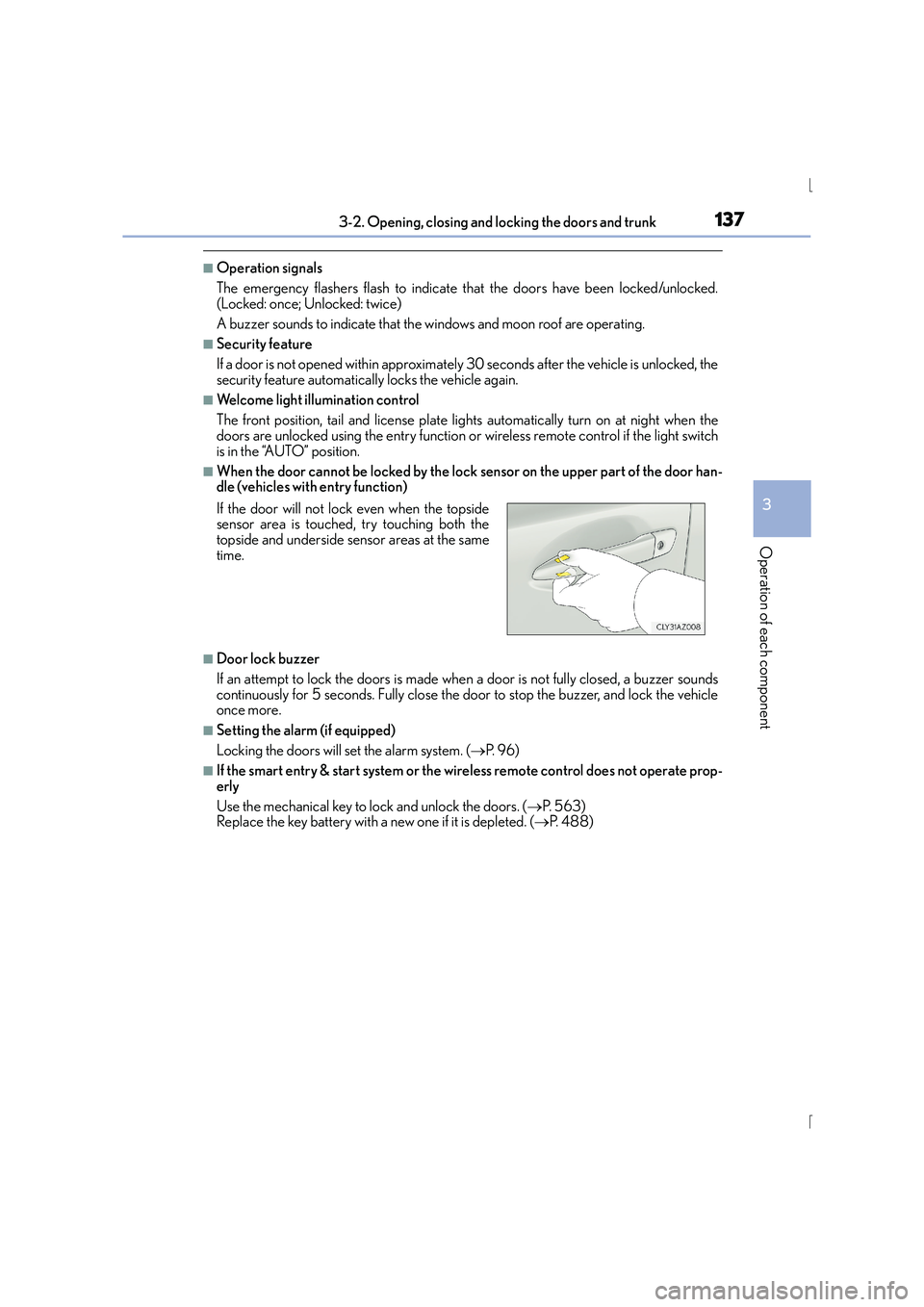
■When the door cannot be locked by the lock sensor on the upper part of the door han-
dle (vehicles with entry function)
■Door lock buzzer
If an attempt to lock the doors is made when a door is not fully closed, a buzzer sounds
continuously for 5 seconds. Fully close the door to stop the buzzer, and lock the vehicle
once more.
■Setting the alarm (if equipped)
Locking the doors will set the alarm system. ( →P. 9 6 )
■If the smart entry & start system or the wireless remote control does not operate prop-
erly
Use the mechanical key to lock and unlock the doors. ( →P. 5 6 3 )
Replace the key battery with a new one if it is depleted. ( →P. 4 8 8 )
If the door will not lock even when the topside
sensor area is touched, try touching both the
topside and underside sensor areas at the same
time.
Page 141 of 628

1413-2. Opening, closing and locking the doors and trunk
3
Operation of each component
IS300h_EE(OM53D56E)
■Switching the door unlock function (vehicles with entry function)
It is possible to set which doors the entry function unlocks using the wireless remote con-
trol. Turn the power switch off.
Cancel the intrusion sensor and tilt sensor of the alarm system to prevent unintended
triggering of the alarm while changing the settings. (if equipped) ( →P. 9 9 )
When the indicator light on the key surface is not on, press and hold , or for approximately 5 seconds while pressing and holding .
The setting changes each time an operation is performed, as shown below. (When
changing the setting continuously, release the buttons, wait for at least 5 seconds, and
repeat step .)
For vehicles with an alarm: To prevent unintended triggering of the alarm, unlock the
doors using the wireless remote control and open and close a door once after the set-
tings have been changed. (If a door is not opened within 30 seconds after is
pressed, the doors will be locked again and the alarm will automatically be set.)
In a case that the alarm is triggered, immediately stop the alarm. ( →P. 9 7 )
1
2
3
3
Multi-information
displayUnlocking functionBeep
(Left-hand drive vehicles)
(Right-hand drive vehicles)
Holding the driver’s door handle
unlocks only the driver’s door.
Exterior: Beeps 3 times
Interior: Pings onceHolding the front passenger’s
door handle unlocks all the
doors.
Holding either front door handle
unlocks all the doors.Exterior: Beeps twice
Interior: Pings once