front sensor Lexus IS300h 2015 Owner's Guide
[x] Cancel search | Manufacturer: LEXUS, Model Year: 2015, Model line: IS300h, Model: Lexus IS300h 2015Pages: 628, PDF Size: 137.89 MB
Page 304 of 628

3044-5. Using the driving support systems
IS300h_EE(OM53D56E)
■The pre-crash safety system is operational when
The pre-crash safety system is enabled and the following conditions are met:
●Pre-crash warning:
• Vehicle speed is greater than about 15 km/h (10 mph).
• The speed at which your vehicle is approaching the obstacle or the vehicle runningahead of you is greater than about 15 km/h (10 mph).
●Pre-crash brake assist:
• The VSC system is not disabled.
• Vehicle speed is greater than about 30 km/h (19 mph).
• The speed at which your vehicle is approaching the obstacle or the vehicle runningahead of you is greater than about 30 km/h (19 mph).
• The brake pedal is depressed.
●Pre-crash braking:
• The VSC system is not disabled.
• Vehicle speed is greater than about 15 km/h (10 mph).
• The speed at which your vehicle is approaching the obstacle or the vehicle running ahead of you is greater than about 15 km/h (10 mph).
●Suspension control (vehicles with Adap tive Variable Suspension System):
• Vehicle speed is greater than about 5 km/h (4 mph).
• The speed at which your vehicle is approaching the obstacle or the vehicle running ahead of you is greater than about 30 km/h (19 mph).
■Conditions that may trigger the system ev en if there is no danger of a collision
In any of the following situations where the frontal area of the radar sensor is interrupted,
the radar sensor may detect possibility of a frontal collision and the system may be acti-
vated.
●When passing by an oncoming vehicle in a curve or a turn to the right or the left.
●When rapidly approaching an obstacle ahead (e.g.preceding vehicle, toll gate barrier,
etc.)
●When there is a structural object (billboard , low ceiling, fluorescent light, etc.) above
the uphill road ahead
●When driving on a narrow road or through under a low overhead structure (bridge,
tunnel, fly-under, etc.)
●When driving on an uneven road surface
●When there is a metal object, bump, or protrusion on the road surface
●When vehicle’s front part is raised or lowered depending on loading conditions
●When the direction of radar sensor is misaligned by strong impact applied on an area
around the radar sensor, etc.
●When there is an obstacle (guard rail, etc.) by the roadside at the entrance to a curve
●When the front of your vehicle is pointing upwards (caused by putting a heavy load in
the trunk etc.)
When the system is activated in the situations described above, there is also a possibility
that the brakes may be applied with a force greater than normal.
Page 305 of 628

3054-5. Using the driving support systems
4
Driving
IS300h_EE(OM53D56E)
■Obstacles not detected
The sensor cannot detect plastic obstacles such as traffic cones. There may also be occa-
sions when the sensor cannot detect pedestri ans, animals, bicycles, motorcycles, trees,
or snowdrifts.
■Situations in which the pre-crash safe ty system does not function properly
The system may not function effectively in situations such as the following:
●On roads with sharp bends or uneven surfaces
●If a vehicle suddenly moves in front of your vehicle, such as at an intersection
●If a vehicle suddenly cuts in front of your vehicle, such as when overtaking
●In inclement weather such as heavy rain, fog, snow or sand storms
●If the vehicle is skidding when VSC is not operating
●When your vehicle is steeply inclined
●When only part of your vehicle’s front end collides with, or contacts, a vehicle or object
in a frontal collision
●When the radar sensor moves off position due to its surrounding area being subjected
to a strong impact
●When an obstacle suddenly appears in front of the vehicle due to the steering wheel
being turned sharply or another cause
■Automatic cancelation of the pre-crash safety system
When a malfunction occurs due to sensor contamination, etc. that results in the sensors
being unable to detect obstacles, the pre-crash safety system will be automatically dis-
abled. In this case, the system will not activa te even if there is a collision possibility.
■When there is a malfunction in the system or if the system is temporarily unusable
The pre-crash safety system warning light will flash and warning messages will be dis-
played. ( →P. 5 2 2 , 5 3 3 )
Page 414 of 628
4146-1. Using the air conditioning system
IS300h_EE(OM53D56E)
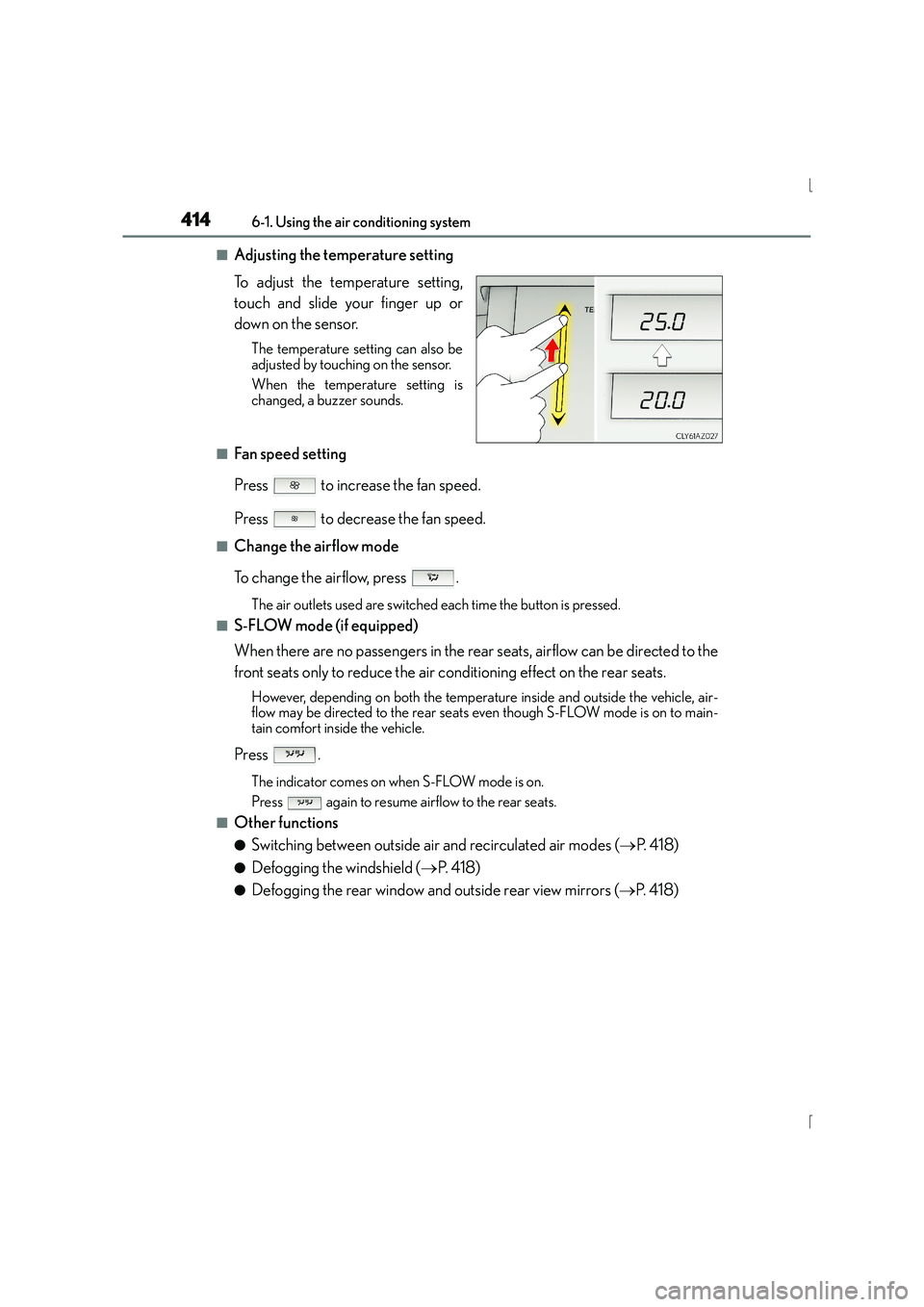
■Adjusting the temperature setting
To adjust the temperature setting,
touch and slide your finger up or
down on the sensor.
The temperature setting can also be
adjusted by touching on the sensor.
When the temperature setting is
changed, a buzzer sounds.
■Fan speed setting
Press to increase the fan speed.
Press to decrease the fan speed.
■Change the airflow mode
To change the airflow, press .
The air outlets used are switched each time the button is pressed.
■S-FLOW mode (if equipped)
When there are no passengers in the rear seats, airflow can be directed to the
front seats only to reduce the air conditioning effect on the rear seats.
However, depending on both the temperature inside and outside the vehicle, air-
flow may be directed to the rear seats even though S-FLOW mode is on to main-
tain comfort inside the vehicle.
Press .
The indicator comes on when S-FLOW mode is on.
Press again to resume airflow to the rear seats.
■Other functions
●Switching between outside air and recirculated air modes (→P. 4 1 8 )
●Defogging the windshield ( →P. 4 1 8 )
●Defogging the rear window and outside rear view mirrors ( →P. 4 1 8 )
Page 524 of 628
5248-2. Steps to take in an emergency
IS300h_EE(OM53D56E)*
1: Parking brake engaged warning buzzer:
→ P. 5 3 1
*2: Open door warning buzzer:
→ P. 5 2 9
*3: Seat belt warning buzzer:
The seat belt warning buzzer sounds to alert the driver, front passenger and rear pas-
sengers that his or her seat belt is not fastened. The buzzer sounds for 30 seconds
after the vehicle reaches a speed of 20 km/h (12 mph). Then, if the seat belt is still
unfastened, the buzzer will sound in a different tone for 90 more seconds.
■Passenger detection sensor, seat belt reminder and warning buzzer
●If luggage is placed on a passenger seat, the passenger detection sensor may cause the
warning light to flash and the warning buzzer to sound even if a passenger is not sitting
in the seat.
●If a cushion is placed on the seat, the sensor may not detect a passenger, and the warn-
ing light may not operate properly.
■If the malfunction indicator lamp comes on while driving
The malfunction indicator lamp will come on if the fuel tank becomes completely empty.
If the fuel tank is empty, refuel the vehicle immediately. The malfunction indicator lamp
will go off after several trips.
If the malfunction indicator lamp does not go off, contact any authorized Lexus dealer or
repairer, or another duly qualified and equipped professional as soon as possible.
■Electric power steering system warning light (warning buzzer)
When the 12-volt battery charge becomes insu fficient or the voltage temporarily drops,
the electric power steering system warning light may come on and the warning buzzer
may sound.
■When the tire pressure warning light comes on
Carry out the following procedure after the tire temperature has lowered sufficiently.
●Check the tire inflation pressure and adjust to the appropriate level.
●If the warning light does not go out even after several minutes, check that the tire infla-
tion pressure is at the specifie d level and carry out initialization.
The warning light may come on again if the above operations are conducted without first
allowing the tire temperature to lower sufficiently.
■The tire pressure warning light may come on due to natural causes
The tire pressure warning light may come on due to natural causes such as natural air
leaks and tire inflation pressure changes caused by temperature. In this case, adjusting
the tire inflation pressure will turn off the warning light (after a few minutes).
■Conditions that the tire pressure warning system may not function properly
→ P. 4 7 1
Page 598 of 628
5989-2. Customization
IS300h_EE(OM53D56E)
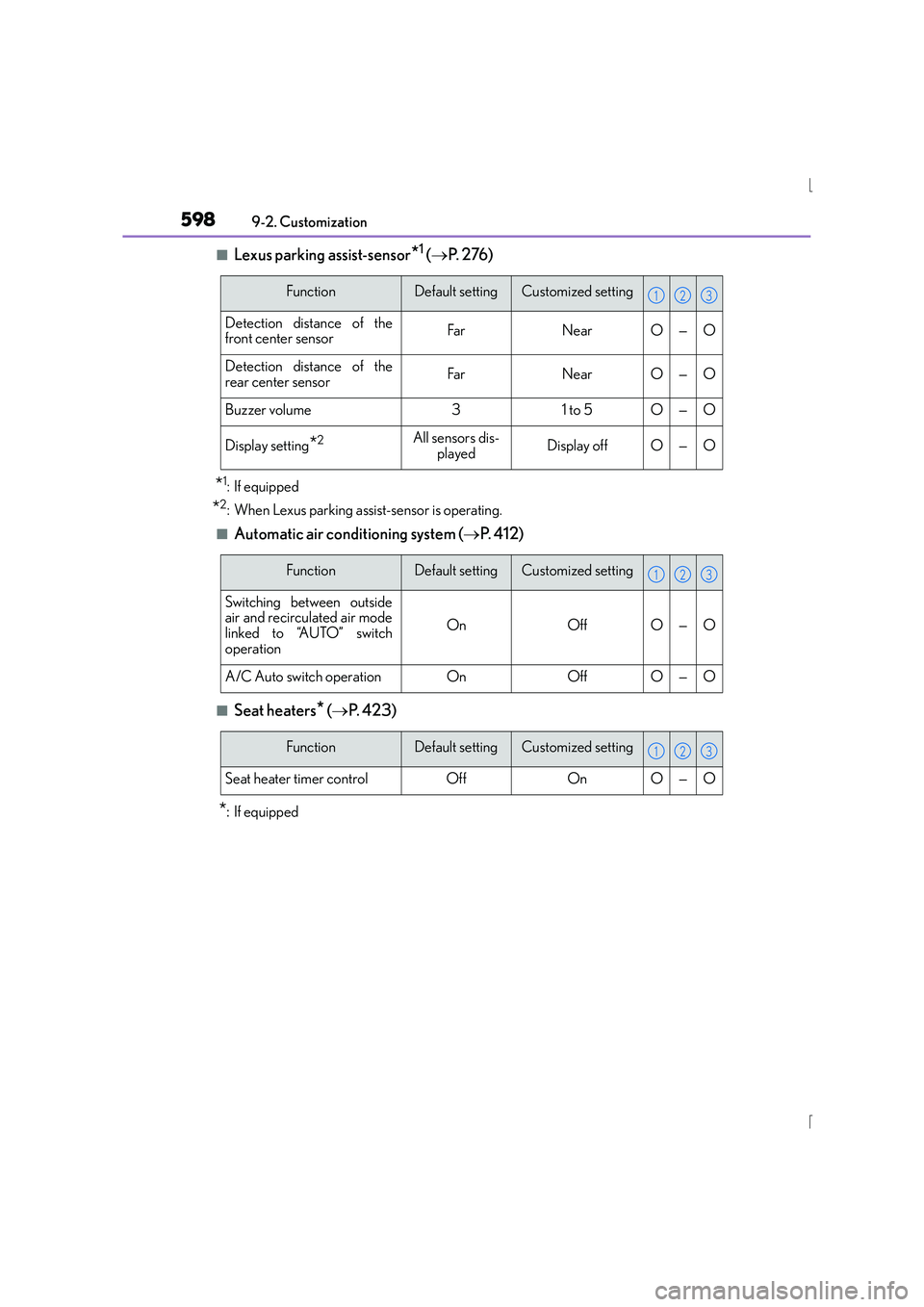
■Lexus parking assist-sensor*1 ( → P. 2 76 )
*1: If equipped
*2: When Lexus parking assist-sensor is operating.
■Automatic air conditioning system ( →P. 4 1 2 )
■Seat heaters* (→ P. 4 2 3 )
*:If equipped
FunctionDefault settingCustomized setting
Detection distance of the
front center sensorFarNearO—O
Detection distance of the
rear center sensorFarNearO—O
Buzzer volume31 to 5O—O
Display setting*2All sensors dis-
playedDisplay offO—O
123
FunctionDefault settingCustomized setting
Switching between outside
air and recirculated air mode
linked to “AUTO” switch
operation
OnOffO—O
A/C Auto switch operationOnOffO—O
123
FunctionDefault settingCustomized setting
Seat heater timer controlOffOnO—O
123
Page 606 of 628

606What to do if... (Troubleshooting)
IS300h_EE(OM53D56E)
●Is the window lock switch pressed?
The power window except for the one at the driver’s seat cannot be operated
if the window lock switch is pressed. ( →P. 1 8 5 )
●The auto power off function will be operated if the vehicle is left in ACCES-
SORY or ON mode (the hybrid system is not operating) for a period of time.
(→ P. 2 1 4 )
●The seat belt reminder light is flashing
Are the driver and the front passenger wearing the seat belts? ( →P. 5 2 3 )
●The parking brake indicator is on
Is the parking brake released? ( →P. 2 2 7 )
Depending on the situation, other types of warning buzzer may also sound.
( → P. 5 2 1 , 5 2 7 )
●Did anyone inside the vehicle open a door or anything move inside the vehicle
during setting the alarm?
The sensor detects them and the alarm sounds. ( →P. 9 6 )
Do one of the following to deactivate or stop the alarm: • Unlock the doors or open the trunk using the entry function or wireless
remote control.
• Start the hybrid system. The windows do not open or close by operating the power window
switches
The power switch is turned off automatically
A warning buzzer sounds during driving
An alarm is activated and th
e horn sounds (if equipped)
Page 622 of 628
622Alphabetical index
IS300h_EE(OM53D56E)
Seats, Front............................................... 165Adjustment............................................. 165
Adjustment precautions .................. 166
Child seats/child restraint
system installation ............................. 69
Cleaning................................................. 446
Driving position memory ................ 169
Head restraints...................................... 174
Power easy access system ............ 169
Properly sitting in the seat ................ 36
Seat heaters .......................................... 424
Seat position memory ...................... 169
Seat ventilators .................................... 424
Seats, Rear.................................................167
Fold down the seatback ...................167
Luggage security system.................145
Sensor Automatic headlight system.........230
Automatic High Beam system.... 235
Inside rear view mirror..................... 180
Intrusion sensor and tilt sensor ...... 99
LDA (Lane Departure Alert)....... 270
Lexus parking assist-sensor ......... 276
Radar sensor ................. 262, 303, 314
Rain-sensing windshield wipers................................................... 244 Service plug ............................................... 83
Service reminder indicators ............. 104
S-FLOW mode ....................................... 414
Shift lever ................................................... 219
Hybrid transmission ........................... 219
If the shift lever cannot be shifted from P................................... 562
Shift lock system ................................... 562
Shift position and shift range............. 109
Side airbags ............................................... 43
Side mirrors ............................................... 181 Adjusting and folding ......................... 181
BSM (Blind Spot Monitor) .............310
Linked mirror function when
reversing ..............................................183
Mirror position memory .................. 169
Side turn signal lights .......................... 225 Replacing light bulbs ....................... 507
Turn signal lever..................................225
Side windows .......................................... 185
Slip indicator........................................... 522
Smart entry & start system .................149
Antenna location ................................. 149
Entry functions ............................136, 143
Starting the hybrid system .............. 212
SMS (Short message service).........388
Page 626 of 628
626Alphabetical index
IS300h_EE(OM53D56E)
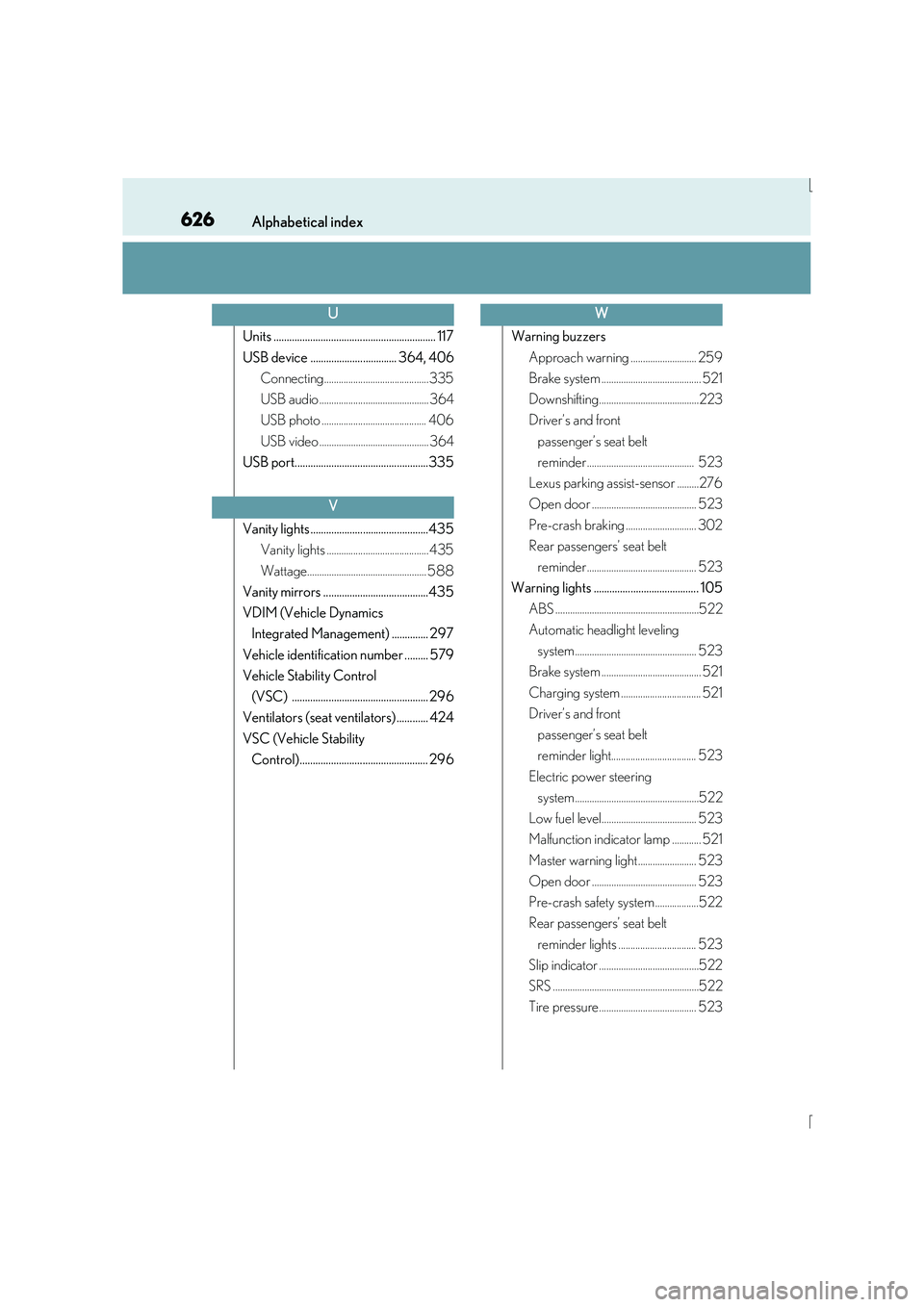
Units .............................................................. 117
USB device ................................. 364, 406Connecting...........................................335
USB audio ............................................. 364
USB photo ........................................... 406
USB video ............................................. 364
USB port...................................................335
Vanity lights .............................................435 Vanity lights .......................................... 435
Wattage................................................. 588
Vanity mirrors ........................................435
VDIM (Vehicle Dynamics Integrated Management) .............. 297
Vehicle identification number ......... 579
Vehicle Stability Control (VSC) .................................................... 296
Ventilators (seat ventilators) ............ 424
VSC (Vehicle Stability Control)................................................. 296 Warning buzzers
Approach warning ........................... 259
Brake system ......................................... 521
Downshifting.........................................223
Driver’s and front passenger’s seat belt
reminder ............................................ 523
Lexus parking assist-sensor .........276
Open door ........................................... 523
Pre-crash braking ............................. 302
Rear passengers’ seat belt reminder ............................................. 523
Warning lights ........................................ 105
ABS ...........................................................522
Automatic headlight leveling system.................................................. 523
Brake system ......................................... 521
Charging system ................................. 521
Driver’s and front
passenger’s seat belt
reminder light................................... 523
Electric power steering system...................................................522
Low fuel level....................................... 523
Malfunction indicator lamp ............ 521
Master warning light ........................ 523
Open door ........................................... 523
Pre-crash safety system ..................522
Rear passengers’ seat belt reminder lights ................................ 523
Slip indicator .........................................522
SRS ............................................................522
Tire pressure........................................ 523
U
V
W