ECO mode Lexus IS300h 2016 Owner's Guide
[x] Cancel search | Manufacturer: LEXUS, Model Year: 2016, Model line: IS300h, Model: Lexus IS300h 2016Pages: 628, PDF Size: 137.89 MB
Page 218 of 628
2184-2. Driving procedures
IS300h_EE(OM53D56E)
■Switching to EV drive mode when the gasoline engine is cold
If the hybrid system is started while the gasoline engine is cold, the gasoline engine will
start automatically after a short period of time in order to warm up. In this case, you will
become unable to switch to EV drive mode.
After the hybrid system has started and the “READY” indicator has illuminated, press the
EV drive mode switch before the gasoline en gine starts to switch to EV drive mode.
■Automatic cancelation of EV drive mode
When driving in EV drive mode, the gasoline engine may automatically restart in the fol-
lowing situations. When EV drive mode is ca nceled, a buzzer will sound and the EV drive
mode indicator will flash and go off.
●The hybrid battery (traction battery) becomes low.
The remaining battery level indicated in the “Energy monitor” display is low.
( → P. 1 2 2 )
●Vehicle speed becomes more than about 45 km/h (28 mph).
●The accelerator pedal is depressed firmly or the vehicle is on a hill, etc.
When it is possible to info rm the driver of automatic cancelation in advance, a prior
notice screen will appear on the multi-information display.
■Possible driving distance when driving in EV drive mode
EV drive mode’s possible driving distance ranges from a few hundred meters to approxi-
mately 2 km (1.2 mile). Driving is possible at speeds of less than approximately 45 km/h
(28 mph). However, depending on vehicle conditions, there are situations when EV drive
mode cannot be used.
(The distance that is possible depends on the hybrid battery [traction battery] level and
driving conditions.)
■Fuel economy
Your Lexus is designed to achieve the best possible fuel economy during normal driving
(using the gasoline engine and electric motor [traction motor]). Driving in EV drive
mode more than necessary may lower fuel economy.
CAUTION
■Caution while driving
When driving in EV drive mode, pay special attention to the area around the vehicle.
Because there is no engine noise, pedestrians, people riding bicycles or other people
and vehicles in the area may not be aware of the vehicle starting off or approaching
them, so take extra care while driving.
Page 220 of 628
2204-2. Driving procedures
IS300h_EE(OM53D56E)
*1: To improve fuel efficiency and reduce noise, shift the shift lever to D for normal driv-ing.
*2: By selecting shift ranges using S mode, you can control accelerating force and enginebraking force.
■Sport mode/Eco drive mode
→ P. 2 9 3
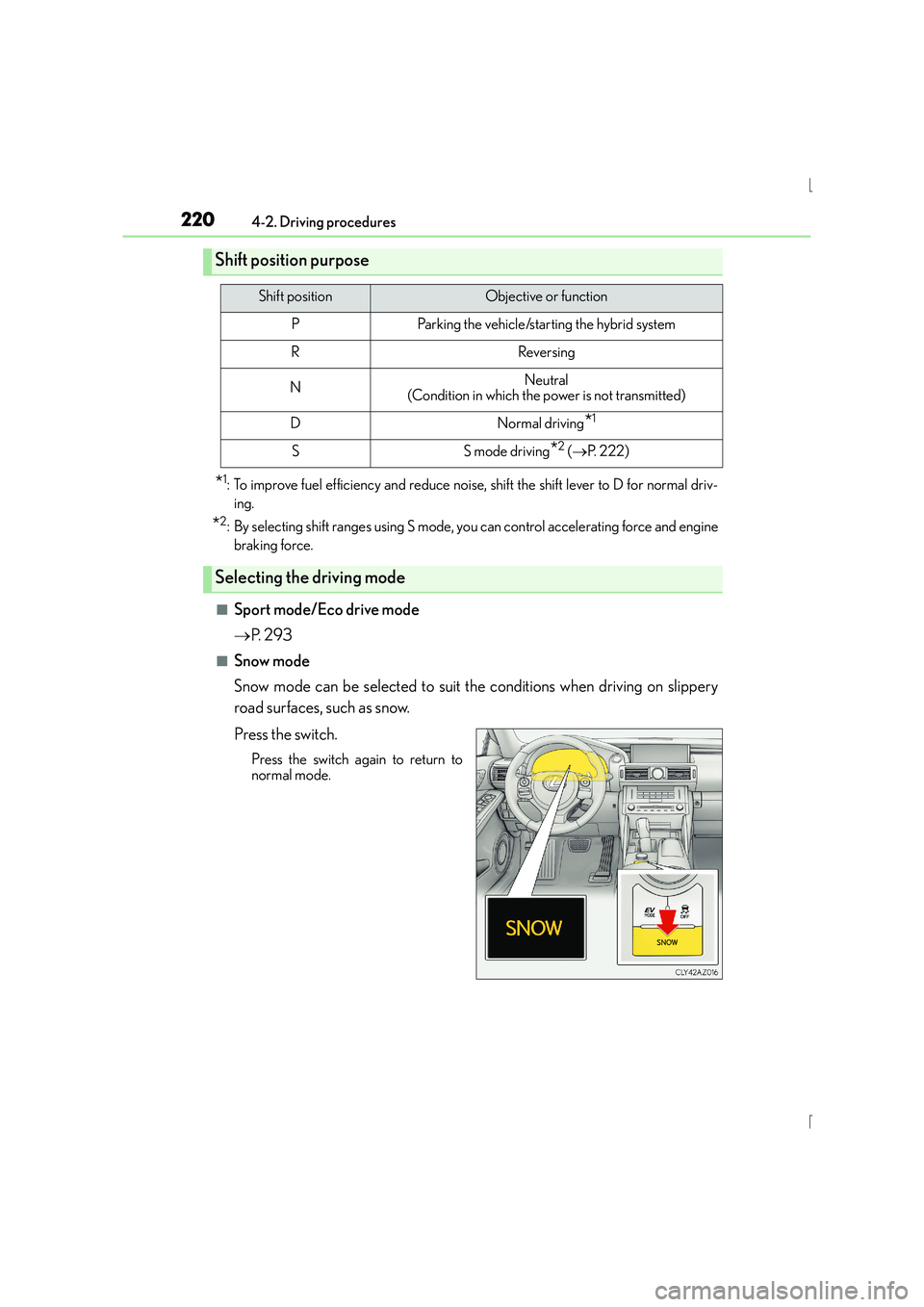
■Snow mode
Snow mode can be selected to suit the conditions when driving on slippery
road surfaces, such as snow.
Press the switch.
Press the switch again to return to
normal mode.
Shift position purpose
Shift positionObjective or function
PParking the vehicle/starting the hybrid system
RReversing
NNeutral
(Condition in which the power is not transmitted)
DNormal driving*1
SS mode driving*2 ( → P. 222)
Selecting the driving mode
Page 230 of 628
2304-3. Operating the lights and wipers
IS300h_EE(OM53D56E)
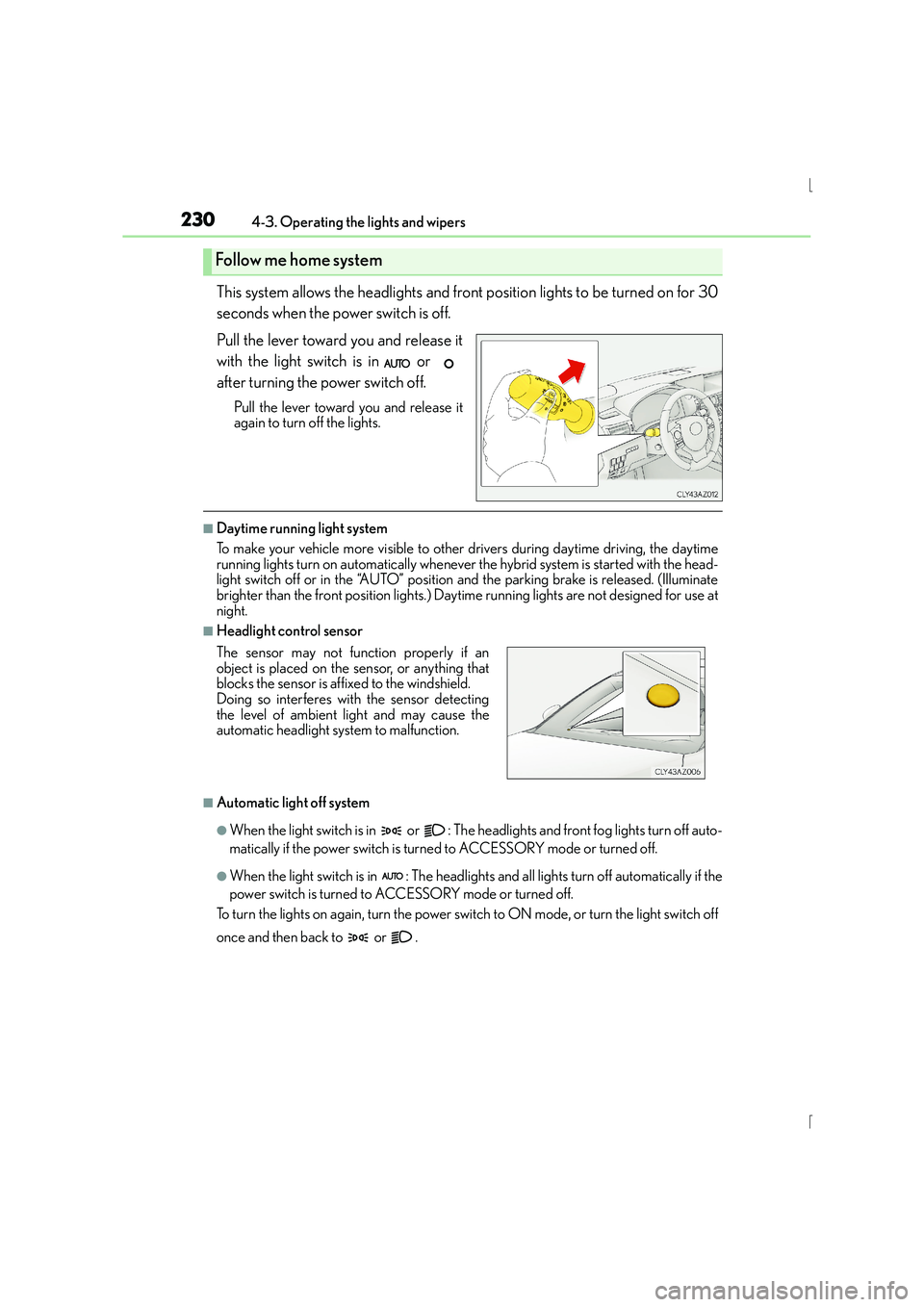
This system allows the headlights and front position lights to be turned on for 30
seconds when the power switch is off.
Pull the lever toward you and release it
with the light switch is in or
after turning the power switch off.
Pull the lever toward you and release it
again to turn off the lights.
■Daytime running light system
To make your vehicle more visible to other drivers during daytime driving, the daytime
running lights turn on automatically whenever the hybrid system is started with the head-
light switch off or in the “AUTO” position and the parking brake is released. (Illuminate
brighter than the front position lights.) Dayt ime running lights are not designed for use at
night.
■Headlight control sensor
■Automatic light off system
●When the light switch is in or : The he adlights and front fog lights turn off auto-
matically if the power switch is turned to ACCESSORY mode or turned off.
●When the light switch is in : The headlights and all lights turn off automatically if the
power switch is turned to ACCESSORY mode or turned off.
To turn the lights on again, turn the power swit ch to ON mode, or turn the light switch off
once and then back to or .
Follow me home system
The sensor may not function properly if an
object is placed on the sensor, or anything that
blocks the sensor is affixed to the windshield.
Doing so interferes with the sensor detecting
the level of ambient light and may cause the
automatic headlight system to malfunction.
Page 239 of 628
2394-3. Operating the lights and wipers
4
Driving
IS300h_EE(OM53D56E)
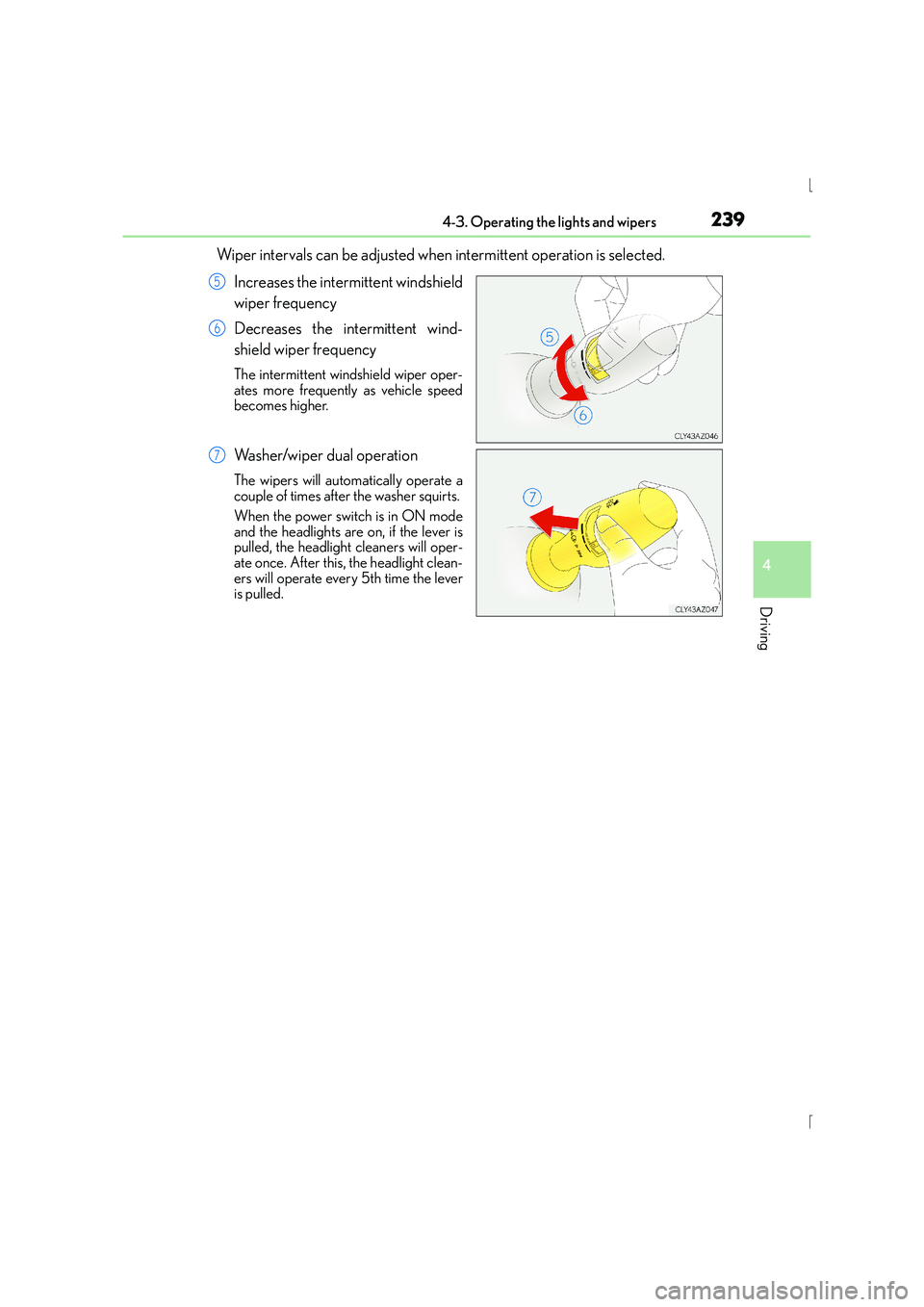
Wiper intervals can be adjusted when intermittent operation is selected.Increases the intermittent windshield
wiper frequency
Decreases the intermittent wind-
shield wiper frequency
The intermittent windshield wiper oper-
ates more frequently as vehicle speed
becomes higher.
Washer/wiper dual operation
The wipers will automatically operate a
couple of times after the washer squirts.
When the power switch is in ON mode
and the headlights are on, if the lever is
pulled, the headlight cleaners will oper-
ate once. After this, the headlight clean-
ers will operate every 5th time the lever
is pulled.
5
6
7
Page 243 of 628

2434-3. Operating the lights and wipers
4
Driving
IS300h_EE(OM53D56E)
Wiper intervals can be adjusted when intermittent operation is selected.Increases the intermittent wind-
shield wiper frequency
Decreases the intermittent wind-
shield wiper frequency
The intermittent windshield wiper
operates more frequently as vehicle
speed becomes higher.
Washer/wiper dual operation
The wipers will automatically operate
a couple of times after the washer
squirts.
When the power switch is in ON
mode and the headlights are on, if the
lever is pulled, the headlight cleaners
will operate once. After this, the
headlight cleaners will operate every
5th time the lever is pulled.
5
6
7
Page 245 of 628

2454-3. Operating the lights and wipers
4
Driving
IS300h_EE(OM53D56E)
CAUTION
■Caution regarding the use of windshield wipers in AUTO mode
The windshield wipers may operate unexpectedly if the sensor is touched or the wind-
shield is subject to vibration in AUTO mode. Take care that your fingers or anything
else do not become caught in the windshield wipers.
■Caution regarding the use of washer fluid
When it is cold, do not use the washer fluid until the windshield becomes warm. The
fluid may freeze on the windshield and cause low visibility. This may lead to an accident,
resulting in death or serious injury.
NOTICE
■When the windshield is dry
Do not use the wipers, as they may damage the windshield.
■When there is no washer fluid spray from the nozzle
Damage to the washer fluid pump may be caused if the lever is pulled toward you and
held continually.
■When a nozzle becomes blocked
In this case, contact any authorized Lexus dealer or repairer, or another duly qualified
and equipped professional.
Do not try to clear it with a pin or other object. The nozzle will be damaged.
Page 256 of 628

2564-5. Using the driving support systems
IS300h_EE(OM53D56E)
Press the “ON/OFF” button to acti-
vate the cruise control.
Radar cruise control indicator will come
on and a message will be displayed on
the multi-information display.
Press the button again to deactivate the
cruise control.
Accelerate or decelerate, with
accelerator pedal operation, to the
desired vehicle speed (above
approximately 50 km/h [30 mph])
and push the lever down to set the
speed.
Cruise control “SET” indicator and set
speed will be displayed.
The vehicle speed at the moment the
lever is released becomes the set speed.
Setting the vehicle speed (vehicle-to-vehicle distance control mode)
1
2
Page 257 of 628

2574-5. Using the driving support systems
4
Driving
IS300h_EE(OM53D56E)
To change the set speed, operate the lever until the desired set speed is dis-
played.Increases the speed
Decreases the speed
Fine adjustment: Momentarily move
the lever in the desired direction.
Large adjustment: Hold the lever in the
desired direction.
In the vehicle-to-vehicle distance control mode, the set speed will be increased
or decreased as follows: • When the set speed is shown in “MPH”
Fine adjustment: By approximately 8 km/h (5 mph) each time the lever is operated
Large adjustment: By approximately 8 km/h (5 mph) for each 0.3 seconds the lever is
held
• When the set speed is shown in “km/h”
Fine adjustment: By approximately 5 km/h (3.1 mph) each time the lever is operated
Large adjustment: By approximately 5 km/h (3.1 mph) for each 0.3 seconds the lever
is held
In the constant speed control mode ( →P. 260), the set speed will be increased
or decreased as follows:
Fine adjustment: By approximately 5 km/h or 5 mph each time the lever is operated
Large adjustment: The set speed can be incr eased or decreased continually until the
lever is released.
Adjusting the set speed
1
2
Page 260 of 628

2604-5. Using the driving support systems
IS300h_EE(OM53D56E)
When constant speed control mode is selected, your vehicle will maintain a set
speed without controlling the vehicle-to-vehicle distance. Select this mode only
when vehicle-to-vehicle distance control mode does not function correctly due
to dirt, etc.
Press the “ON/OFF” button to acti-
vate the cruise control.
Press the button again to deactivate the
cruise control.
Switch to constant speed control
mode.
(Push the lever forward and hold for
approximately 1 second.)
Cruise control indicator will come on.
When in constant speed control mode, to return to vehicle-to-vehicle distance con-
trol mode, push the lever forward again and hold for approximately 1 second.
After the desired speed has been set, it is not possible to return to vehicle-to-vehicle
distance control mode.
If the power switch is turned off and then turned to ON mode again, the vehicle will
automatically return to vehicle-to-vehicle distance control mode.
Adjusting the speed setting: →P. 2 5 1
Canceling and resuming the speed setting: →P. 2 5 1
Selecting constant speed control mode
1
2
Page 262 of 628

2624-5. Using the driving support systems
IS300h_EE(OM53D56E)
■Radar sensor and grille cover
Always keep the sensor and grille cover clean to ensure that the vehicle-to-vehicle dis-
tance control mode operates properly. (Some obstructions, such as snow, ice and plastic
objects, cannot be detected by the obstruction sensor.)
Dynamic radar cruise control is canceled if an obstruction is detected.
■Operation guide display
When the dynamic radar cruise control switch is operated, a guidance display is shown
on the meters for a few seconds as to how to operate the dynamic radar cruise control
switch or distance switch. ( →P. 1 1 8 )
■Warning messages and buzzers for dynamic radar cruise control
Warning messages and buzzers are used to in dicate a system malfunction or to inform
the driver of the need for caution while driving. ( →P. 5 3 2 )
Grille cover
Radar sensor
1
2