custom Lexus IS300h 2016 Owner's Guide
[x] Cancel search | Manufacturer: LEXUS, Model Year: 2016, Model line: IS300h, Model: Lexus IS300h 2016Pages: 628, PDF Size: 137.89 MB
Page 339 of 628
3395-2. Setup
5
Lexus Display Audio system
IS300h_EE(OM53D56E)
Go to “Customize images”: → “Setup” → “General” → “Customize
images”
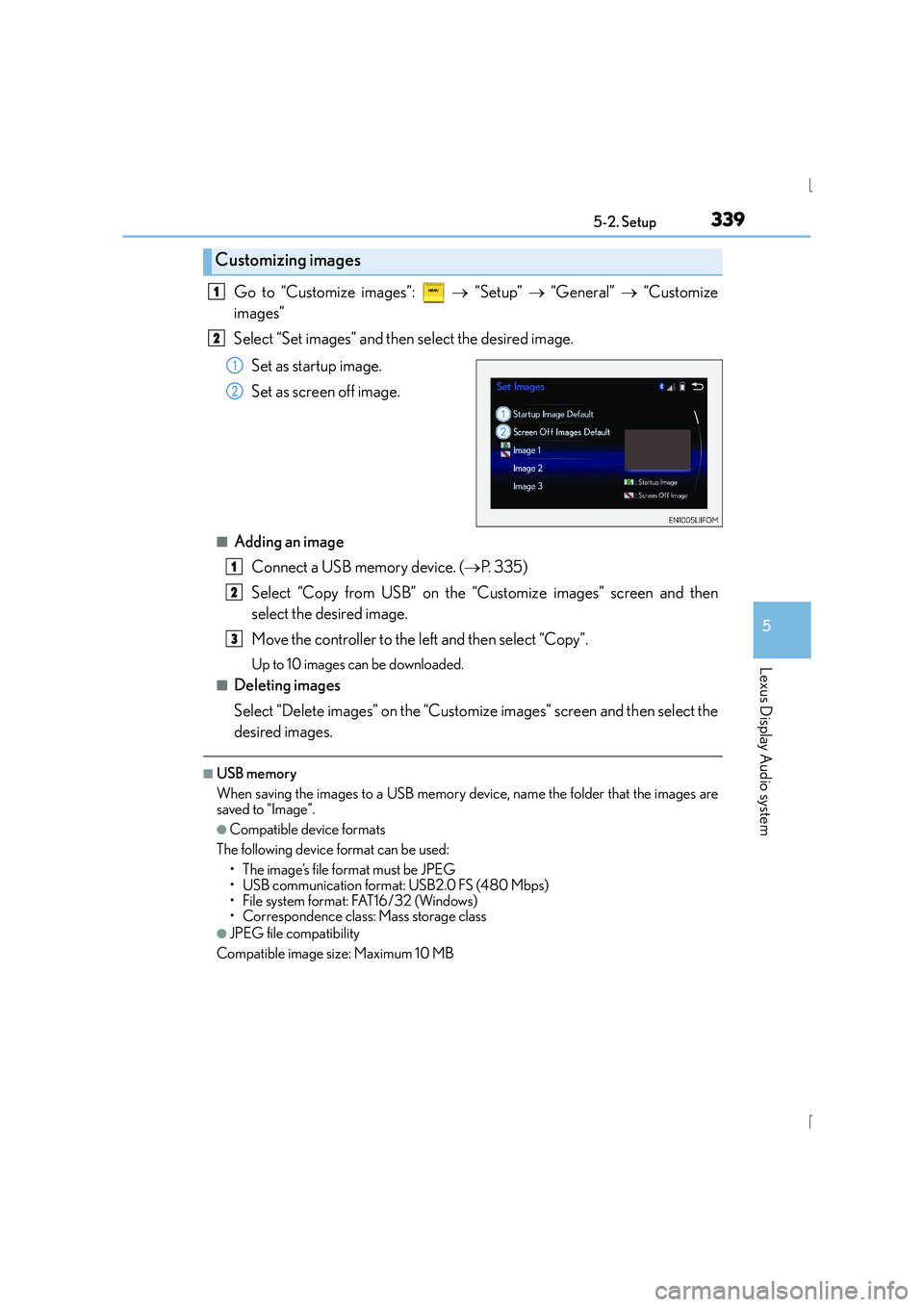
Select “Set images” and then select the desired image.
Set as startup image.
Set as screen off image.
■Adding an imageConnect a USB memory device. ( →P. 3 3 5 )
Select “Copy from USB” on the “C ustomize images” screen and then
select the desired image.
Move the controller to the left and then select “Copy”.
Up to 10 images can be downloaded.
■Deleting images
Select “Delete images” on the “Customize images” screen and then select the
desired images.
■USB memory
When saving the images to a USB memory device, name the folder that the images are
saved to “Image”.
●Compatible device formats
The following device format can be used: • The image’s file format must be JPEG
• USB communication format: USB2.0 FS (480 Mbps)
• File system format: FAT16/32 (Windows)
• Correspondence class: Mass storage class
●JPEG file compatibility
Compatible image size: Maximum 10 MB
Customizing images
1
2
1
2
1
2
3
Page 340 of 628
3405-2. Setup
IS300h_EE(OM53D56E)
→ “Setup” → “General” → “Delete personal data”
Select “Delete”.
Check carefully beforehand, as data cannot be retrieved once deleted.
The following personal data will be deleted or changed to its default settings.
•Phonebook data
•Voice tag
• Call history data
•Favorite data
• Bluetooth
® devices data
• Phone sound settings
• Detailed Bluetooth
® settings
• Audio/video setting
• Preset switch data
• Last used radio station
• Customized image data
•FM info setting
• iPod tagging information
• Software update history
• Software update detail information
• Phone display setting
• Contact/call history setting
• Messaging setting
NOTICE
■If the console box lid cannot be fully closed
→ P. 3 6 8
■To prevent damage to the USB memory device or its terminals
→P. 3 6 8
Deleting personal data
1
2
Page 415 of 628
4156-1. Using the air conditioning system
6
Interior features
IS300h_EE(OM53D56E)
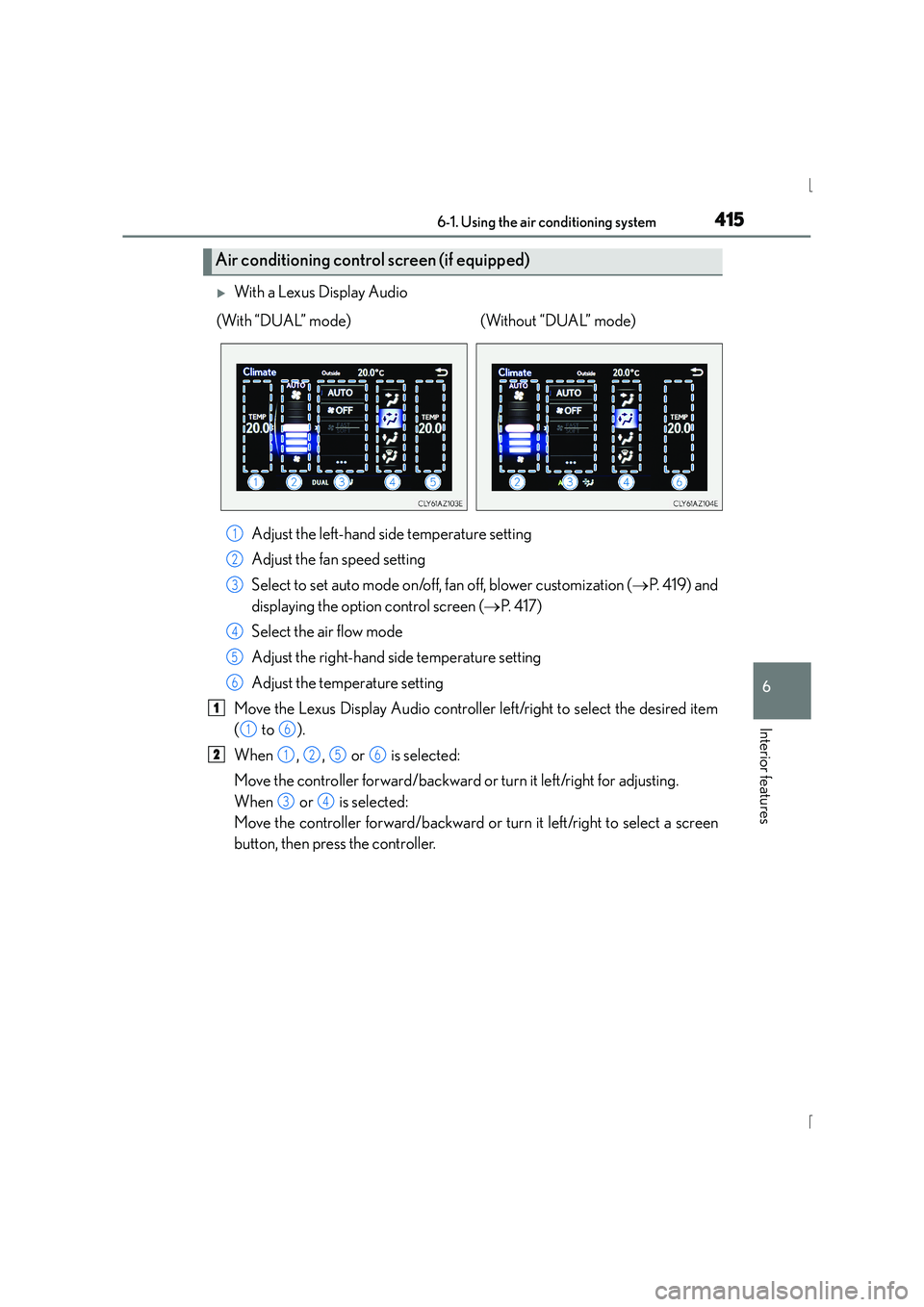
XWith a Lexus Display AudioAdjust the left-hand side temperature setting
Adjust the fan speed setting
Select to set auto mode on/off, fan off, blower customization ( →P. 4 1 9 ) a n d
displaying the option control screen ( →P. 4 1 7 )
Select the air flow mode
Adjust the right-hand side temperature setting
Adjust the temperature setting
Move the Lexus Display Audio controller left/right to select the desired item
( to ).
When , , or is selected:
Move the controller forward/backward or turn it left/right for adjusting.
When or is selected:
Move the controller forward/backward or turn it left/right to select a screen
button, then press the controller.
Air conditioning contro l screen (if equipped)
(With “DUAL” mode) (Without “DUAL” mode)
1
2
3
4
5
6
1
16
21256
34
Page 419 of 628
4196-1. Using the air conditioning system
6
Interior features
IS300h_EE(OM53D56E)
■Windshield wiper de-icer (if equipped)
This feature is used to prevent ice from building up on the windshield and
wiper blades.
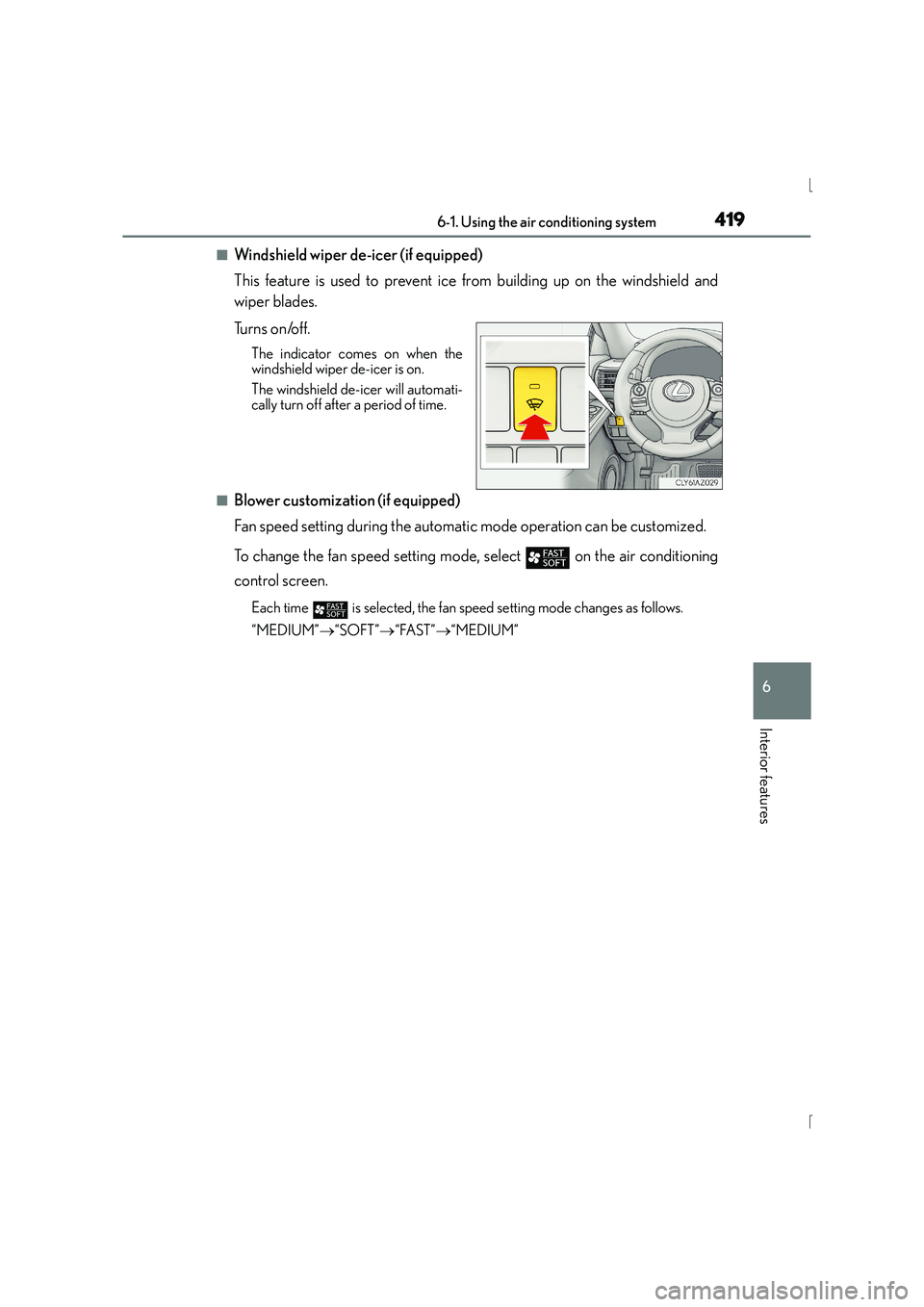
Tu r n s o n /o f f .
The indicator comes on when the
windshield wiper de-icer is on.
The windshield de-icer will automati-
cally turn off after a period of time.
■Blower customization (if equipped)
Fan speed setting during the automatic mode operation can be customized.
To change the fan speed setting mode, select
on the air conditioning
control screen.
Each time is selected, the fan speed setting mode changes as follows.
“MEDIUM” →“SOFT” →“FAST” →“MEDIUM”
Page 422 of 628
4226-1. Using the air conditioning system
IS300h_EE(OM53D56E)
■Ventilation and air conditioning odors
●To let fresh air in, set the air conditioning system to the outside air mode.
●During use, various odors from inside and outside the vehicle may enter into and accu-
mulate in the air conditioning system. This may then cause odor to be emitted from the
vents.
●To reduce potential odors from occurring:
• It is recommended that the air conditioning system be set to outside air mode priorto turning the vehicle off.
• The start timing of the blower may be delayed for a short period of time immediately
after the air conditioning system is started in automatic mode.
■Air conditioning filter
→ P. 4 8 6
■Customization
Settings (e.g. A/C Auto switch operation) can be changed.
(Customizable features →P. 5 9 8 )
CAUTION
■To prevent the windshield from fogging up
●Do not use during cool air operation in extremely humid weather. The differ-
ence between the temperature of the outside air and that of the windshield can cause
the outer surface of the windshield to fog up, blocking your vision.
■To prevent burns
●Do not touch the rear view mirror surfaces when the outside rear view mirror defog-
gers are on.
●Do not touch the glass at lower part of the windshield or to the side of the front pillars
when the windshield wiper de-icer is on.
NOTICE
■To prevent 12-volt battery discharge
Do not leave the air conditioning system on longer than necessary when the hybrid sys-
tem is off.
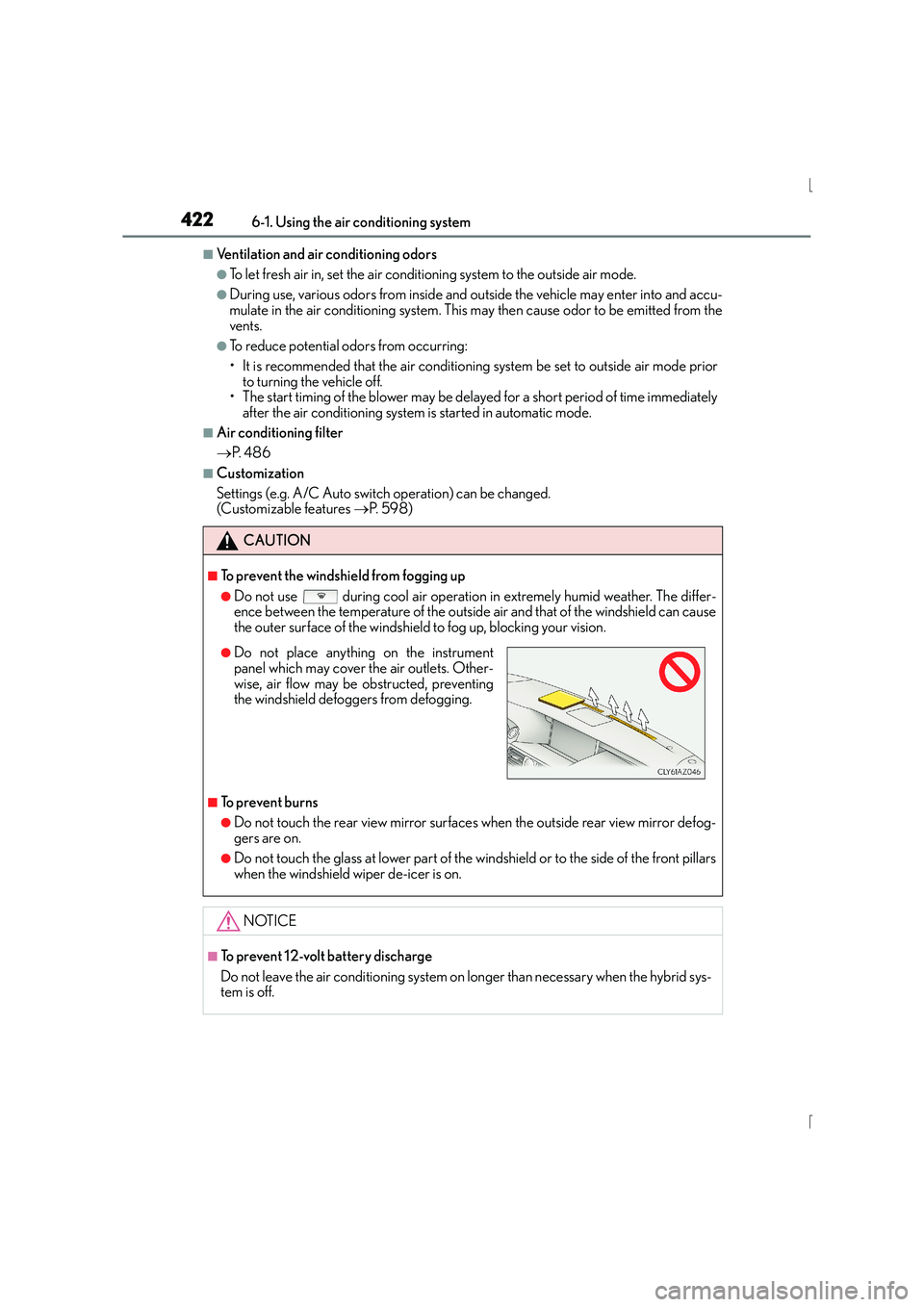
●Do not place anything on the instrument
panel which may cover the air outlets. Other-
wise, air flow may be obstructed, preventing
the windshield defoggers from defogging.
Page 427 of 628
4276-2. Using the interior lights
6
Interior features
IS300h_EE(OM53D56E)
■The interior lights and personal lights can be operated when
The interior lights and personal lights can be used regardless of the power switch mode.
However, when the power switch is turned off, they can be used only when the 12-volt
battery protection function is not operating.
■12-volt battery protection function
To prevent the 12-volt battery from being discharged, approximately 20 minutes after
the power switch is turned off, the power supplied to the interior lights, personal lights,
and other lights will be cut off automatically. (If th e interior lights, etc. are left on when the
power switch is turned off, they will be turned off automatically.)
To turn the interior lights, etc. back on, turn the power switch to ACCESSORY or ON
mode or operate the interior light switch until the interior lights turn on.
If any of the lights are illuminated automatically due to the illuminated entry system, the
12-volt battery protection function will be canceled.
■Illuminated entry system
The lights automatically turn on/off according to power switch mode, the presence of the
electronic key, whether the doors are locked/unlocked, and whether the doors are
opened/closed.
■Customization
Setting (e.g. the time elapsed before lights turn off) can be changed.
(Customizable features: →P. 5 9 1 )
NOTICE
To prevent 12-volt battery discharge, do not leave the lights on longer than necessary
when the hybrid system is off.
Page 563 of 628
5638-2. Steps to take in an emergency
8
When trouble arises
IS300h_EE(OM53D56E)
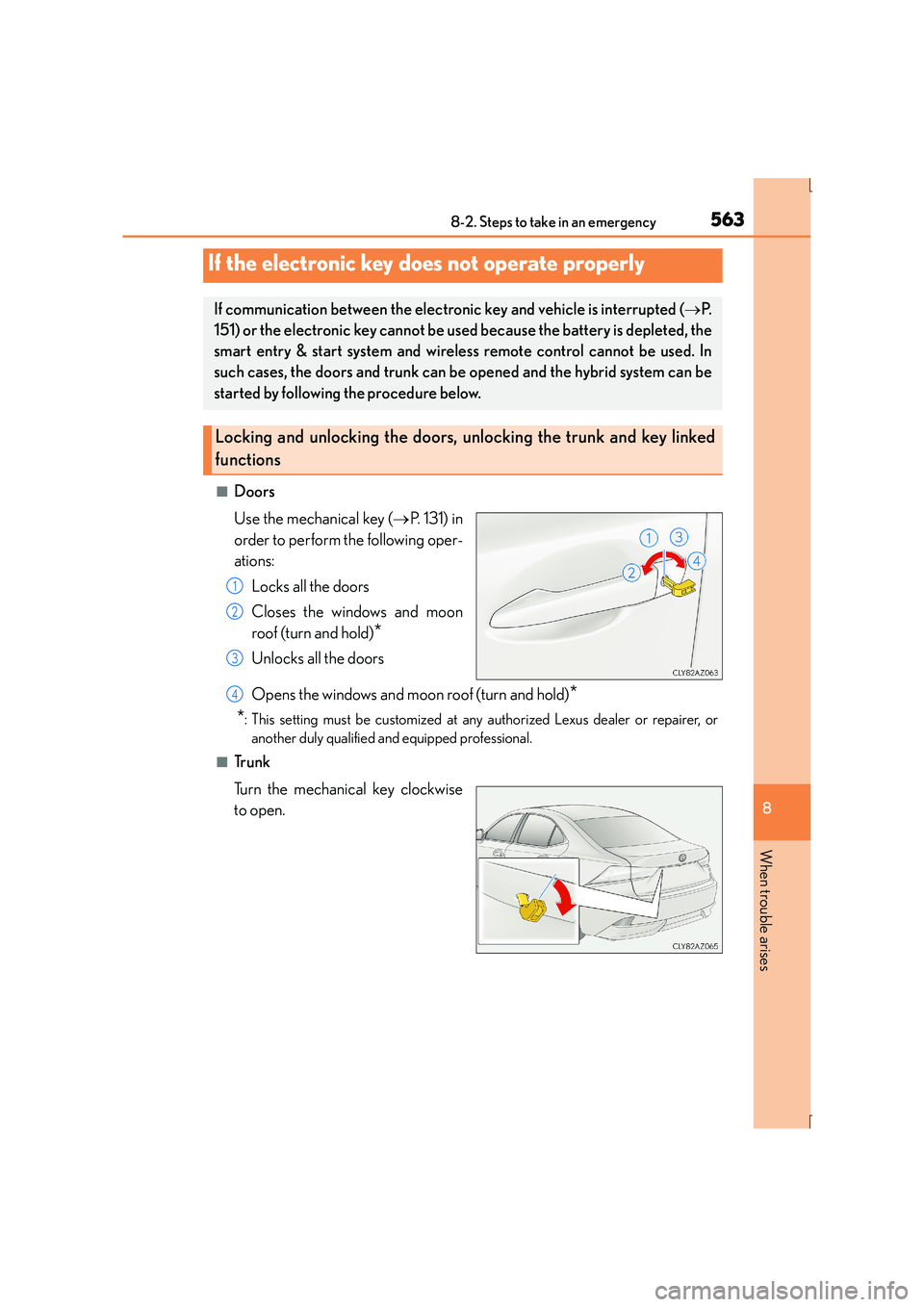
■Doors
Use the mechanical key (→P. 131) in
order to perform the following oper-
ations:
Locks all the doors
Closes the windows and moon
roof (turn and hold)
*
Unlocks all the doors
Opens the windows and moon roof (turn and hold)
*
*
: This setting must be customized at any authorized Lexus dealer or repairer, or another duly qualified and equipped professional.
■Tr u n k
Turn the mechanical key clockwise
to open.
If the electronic key does not operate properly
If communication between the electronic key and vehicle is interrupted ( →P.
151) or the electronic key cannot be us ed because the battery is depleted, the
smart entry & start system and wireless remote control cannot be used. In
such cases, the doors and trunk can be opened and the hybrid system can be
started by following the procedure below.
Locking and unlocking the doors, unlocking the trunk and key linked
functions
1
2
3
4
Page 564 of 628
5648-2. Steps to take in an emergency
IS300h_EE(OM53D56E)
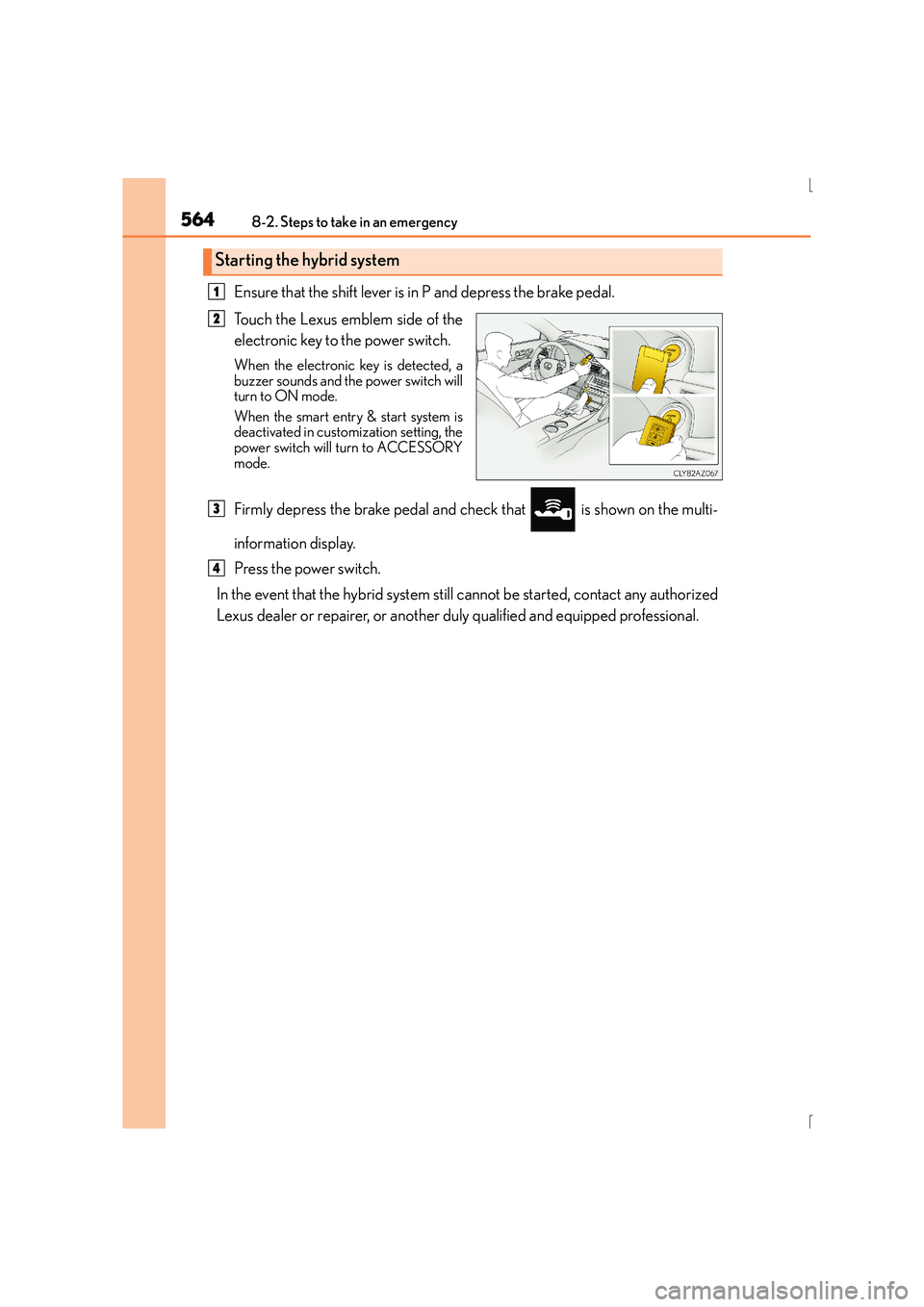
Ensure that the shift lever is in P and depress the brake pedal.
Touch the Lexus emblem side of the
electronic key to the power switch.
When the electronic key is detected, a
buzzer sounds and the power switch will
turn to ON mode.
When the smart entry & start system is
deactivated in customization setting, the
power switch will turn to ACCESSORY
mode.
Firmly depress the brake pedal and check that is shown on the multi-
information display.
Press the power switch.
In the event that the hybrid system still cannot be started, contact any authorized
Lexus dealer or repairer, or another duly qualified and equipped professional.
Starting the hybrid system
1
2
3
4
Page 565 of 628
5658-2. Steps to take in an emergency
8
When trouble arises
IS300h_EE(OM53D56E)
■Stopping the hybrid system
Shift the shift lever to P and press the power switch as you normally do when stopping the
hybrid system.
■Replacing the key battery
As the above procedure is a temporary measure, it is recommended that the electronic
key battery be replaced immediately when the battery is depleted. ( →P. 4 8 8 )
■Alarm (if equipped)
Using the mechanical key to lock the doors will not set the alarm system.
If a door is unlocked using the mechanical key when the alarm system is set, the alarm
may be triggered.
■Changing power switch modes
Release the brake pedal and press the power switch in step above.
The hybrid system does not start and modes will be changed each time the switch is
pressed. ( →P. 2 1 3 )
■When the electronic key does not work properly
●Make sure that the smart entry & start syst em has not been deactivated in the customi-
zation setting. If it is off, turn the function on.
(Customizable features →P. 5 9 1 )
●Check if battery-saving mode is set. If it is set, cancel the function. (→P. 1 5 0 )
CAUTION
■When using the mechanical key and operating the power windows or moon roof
Operate the power window or moon roof after checking to make sure that there is no
possibility of any passenger having any of their body parts caught in the window or
moon roof.
Also, do not allow children to operate the mechanical key. It is possible for children and
other passengers to get caught in the power window or moon roof.
3
Page 577 of 628
577
9Vehicle specifications
IS300h_EE(OM53D56E)
9-1. SpecificationsMaintenance data (fuel, oil level, etc.) .................. 578
Fuel information..........................589
9-2. Customization Customizable features ............. 591
9-3. Initialization Items to initialize .......................... 601