smart key Lexus IS300h 2016 Owner's Guide
[x] Cancel search | Manufacturer: LEXUS, Model Year: 2016, Model line: IS300h, Model: Lexus IS300h 2016Pages: 628, PDF Size: 137.89 MB
Page 542 of 628
5428-2. Steps to take in an emergency
IS300h_EE(OM53D56E)
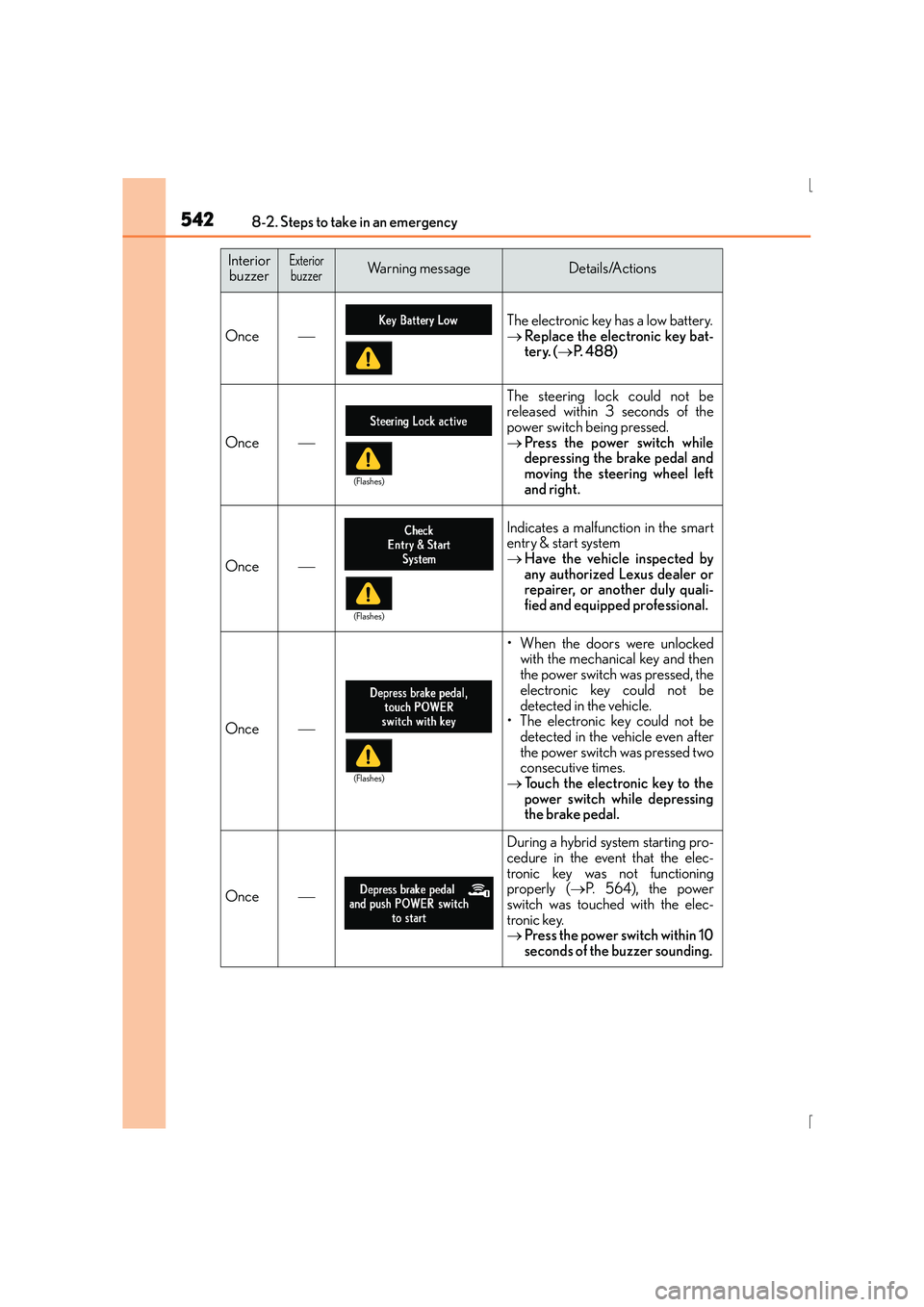
Once
The electronic key has a low battery.
→Replace the electronic key bat-
tery. ( →P. 488)
Once
The steering lock could not be
released within 3 seconds of the
power switch being pressed.
→ Press the power switch while
depressing the brake pedal and
moving the steering wheel left
and right.
Once
Indicates a malfunction in the smart
entry & start system
→Have the vehicle inspected by
any authorized Lexus dealer or
repairer, or another duly quali-
fied and equipped professional.
Once
• When the doors were unlocked
with the mechanical key and then
the power switch was pressed, the
electronic key could not be
detected in the vehicle.
• The electronic key could not be detected in the vehicle even after
the power switch was pressed two
consecutive times.
→ Touch the electronic key to the
power switch while depressing
the brake pedal.
Once
During a hybrid system starting pro-
cedure in the event that the elec-
tronic key was not functioning
properly ( →P. 5 6 4 ) , t h e p o w e r
switch was touched with the elec-
tronic key.
→ Press the power switch within 10
seconds of the buzzer sounding.
Interior
buzzerExteriorbuzzerWarning messageDetails/Actions
(Flashes)
(Flashes)
(Flashes)
Page 563 of 628
5638-2. Steps to take in an emergency
8
When trouble arises
IS300h_EE(OM53D56E)
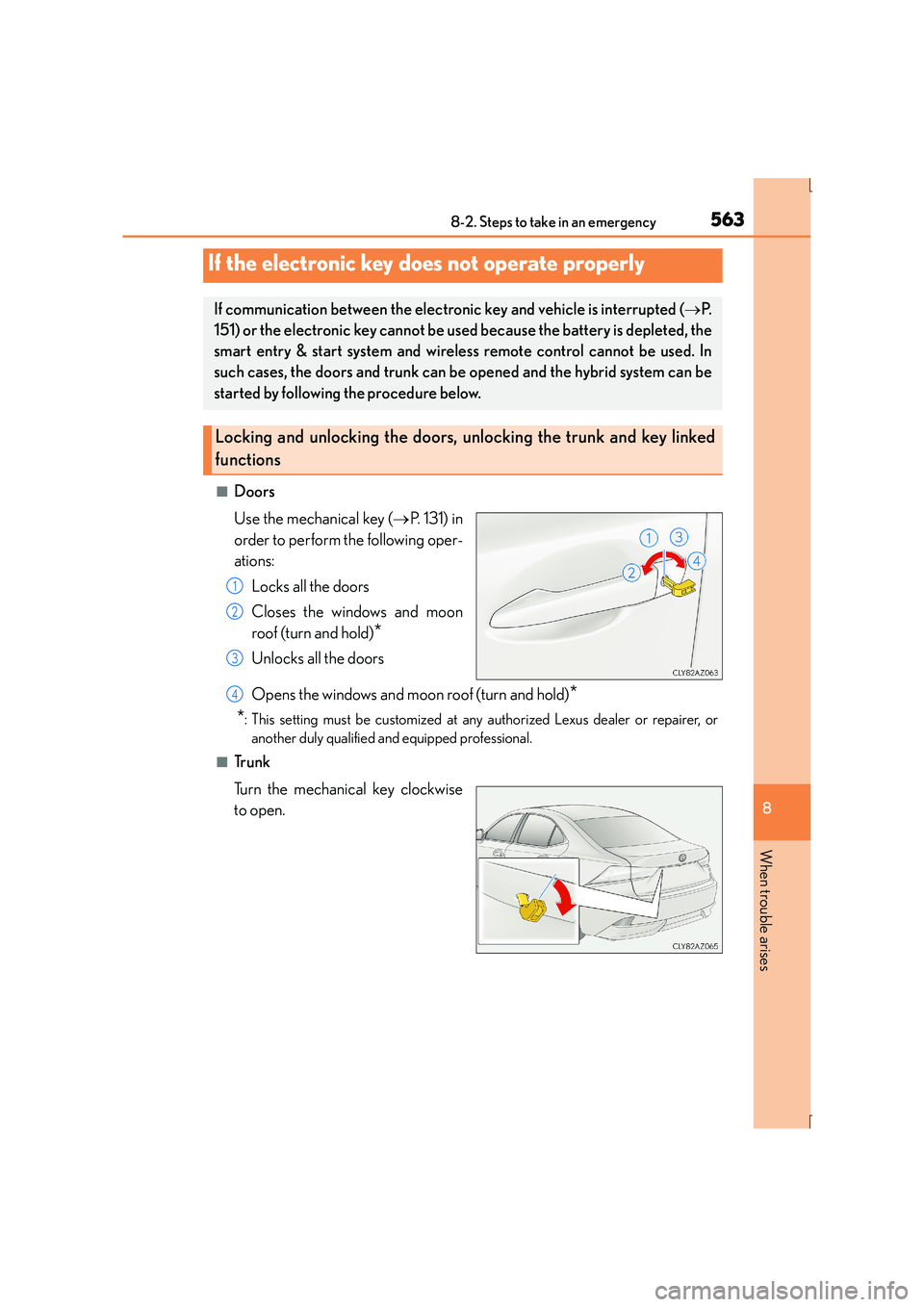
■Doors
Use the mechanical key (→P. 131) in
order to perform the following oper-
ations:
Locks all the doors
Closes the windows and moon
roof (turn and hold)
*
Unlocks all the doors
Opens the windows and moon roof (turn and hold)
*
*
: This setting must be customized at any authorized Lexus dealer or repairer, or another duly qualified and equipped professional.
■Tr u n k
Turn the mechanical key clockwise
to open.
If the electronic key does not operate properly
If communication between the electronic key and vehicle is interrupted ( →P.
151) or the electronic key cannot be us ed because the battery is depleted, the
smart entry & start system and wireless remote control cannot be used. In
such cases, the doors and trunk can be opened and the hybrid system can be
started by following the procedure below.
Locking and unlocking the doors, unlocking the trunk and key linked
functions
1
2
3
4
Page 564 of 628
5648-2. Steps to take in an emergency
IS300h_EE(OM53D56E)
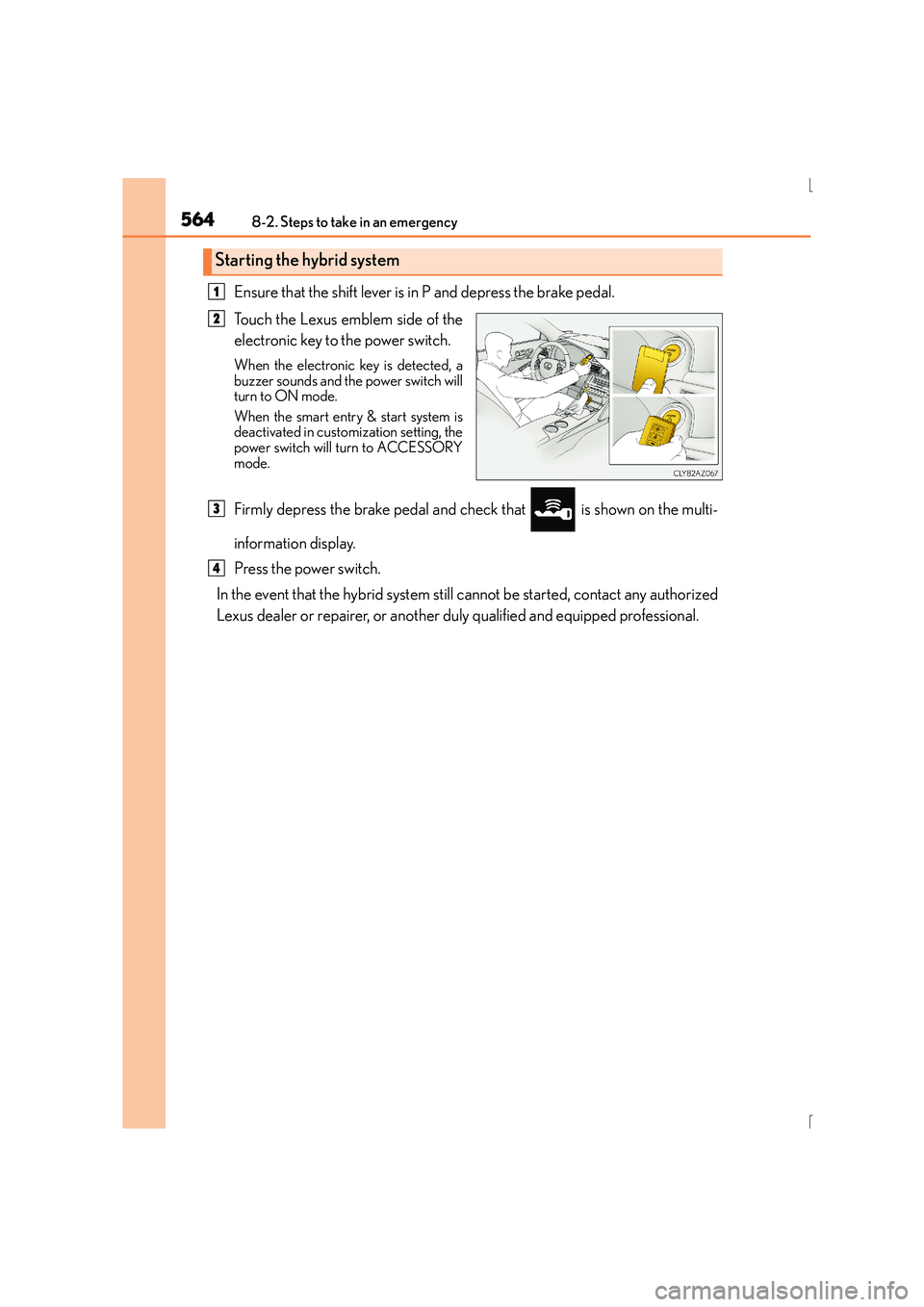
Ensure that the shift lever is in P and depress the brake pedal.
Touch the Lexus emblem side of the
electronic key to the power switch.
When the electronic key is detected, a
buzzer sounds and the power switch will
turn to ON mode.
When the smart entry & start system is
deactivated in customization setting, the
power switch will turn to ACCESSORY
mode.
Firmly depress the brake pedal and check that is shown on the multi-
information display.
Press the power switch.
In the event that the hybrid system still cannot be started, contact any authorized
Lexus dealer or repairer, or another duly qualified and equipped professional.
Starting the hybrid system
1
2
3
4
Page 565 of 628
5658-2. Steps to take in an emergency
8
When trouble arises
IS300h_EE(OM53D56E)
■Stopping the hybrid system
Shift the shift lever to P and press the power switch as you normally do when stopping the
hybrid system.
■Replacing the key battery
As the above procedure is a temporary measure, it is recommended that the electronic
key battery be replaced immediately when the battery is depleted. ( →P. 4 8 8 )
■Alarm (if equipped)
Using the mechanical key to lock the doors will not set the alarm system.
If a door is unlocked using the mechanical key when the alarm system is set, the alarm
may be triggered.
■Changing power switch modes
Release the brake pedal and press the power switch in step above.
The hybrid system does not start and modes will be changed each time the switch is
pressed. ( →P. 2 1 3 )
■When the electronic key does not work properly
●Make sure that the smart entry & start syst em has not been deactivated in the customi-
zation setting. If it is off, turn the function on.
(Customizable features →P. 5 9 1 )
●Check if battery-saving mode is set. If it is set, cancel the function. (→P. 1 5 0 )
CAUTION
■When using the mechanical key and operating the power windows or moon roof
Operate the power window or moon roof after checking to make sure that there is no
possibility of any passenger having any of their body parts caught in the window or
moon roof.
Also, do not allow children to operate the mechanical key. It is possible for children and
other passengers to get caught in the power window or moon roof.
3
Page 568 of 628
5688-2. Steps to take in an emergency
IS300h_EE(OM53D56E)
Maintain the engine speed of the second vehicle and start the hybrid system
of your vehicle by turning the power switch to ON mode.
Make sure the “READY” indicator comes on. If the indicator does not come
on, contact any authorized Lexus dealer or repairer, or another duly qualified
and equipped professional.
Once the hybrid system has started, remove the jumper cables in the exact
reverse order from which they were connected.
Once the hybrid system starts, have the vehicle inspected at any authorized
Lexus dealer or repairer, or another duly qualified and equipped professional as
soon as possible.
■Starting the hybrid system when the 12-volt battery is discharged
The hybrid system cannot be started by push-starting.
■To prevent 12-volt battery discharge
●Turn off the headlights and the audio system while the hybrid system is off.
●Turn off any unnecessary electrical components when the vehicle is running at a low
speed for an extended period, such as in heavy traffic.
■Charging the 12-volt battery
The electricity stored in the 12-volt battery will discharge gradually even when the vehicle
is not in use, due to natural discharge and the draining effects of certain electrical appli-
ances. If the vehicle is left for a long time, the 12-volt battery may discharge, and the
hybrid system may be unable to start. (The 12-volt battery recharges automatically while
the hybrid system is operating.)
■When recharging or replacing the 12-volt battery
●In some cases, it may not be possible to un lock the doors using the smart entry & start
system when the 12-volt battery is discharged. Use the wireless remote control or the
mechanical key to lock or unlock the doors.
●The hybrid system may not start on the first attempt after the 12-volt battery has
recharged but will start normally after the second attempt. This is not a malfunction.
●The power switch mode is memorized by the vehicle. When the 12-volt battery is
reconnected, the system will return to the mo de it was in before the 12-volt battery was
discharged. Before disconnecting the 12-volt battery, turn the power switch off.
If you are unsure what mode the power switch was in before the 12-volt battery dis-
charged, be especially careful when reconnecting the 12-volt battery.
7
8
9
Page 594 of 628
5949-2. Customization
IS300h_EE(OM53D56E)
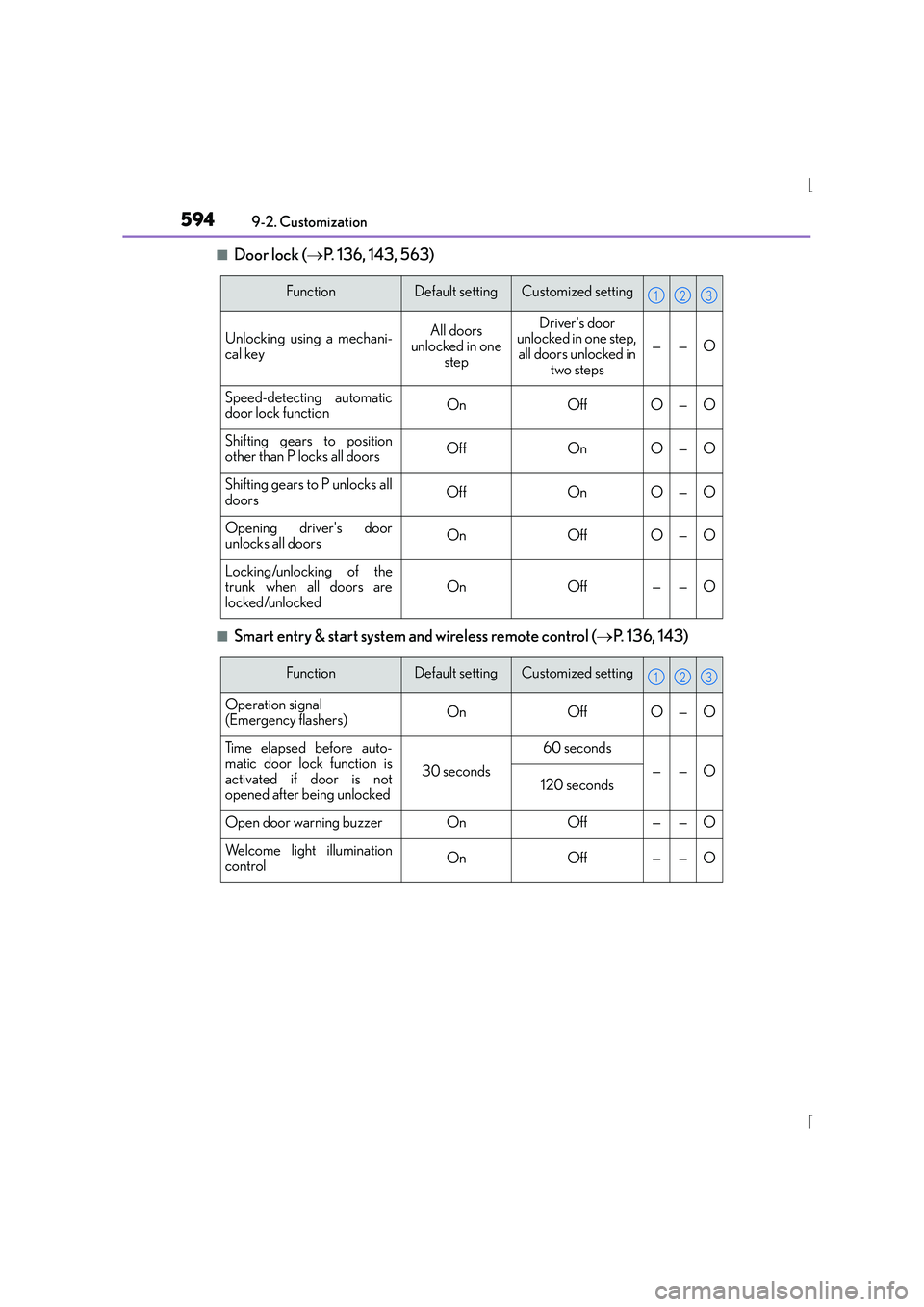
■Door lock ( →P. 136, 143, 563)
■Smart entry & start system and wireless remote control ( →P. 136, 143)
FunctionDefault settingCustomized setting
Unlocking using a mechani-
cal keyAll doors
unlocked in one stepDriver's door
unlocked in one step, all doors unlocked in
two steps
——O
Speed-detecting automatic
door lock functionOnOffO—O
Shifting gears to position
other than P locks all doorsOffOnO—O
Shifting gears to P unlocks all
doorsOffOnO—O
Opening driver's door
unlocks all doorsOnOffO—O
Locking/unlocking of the
trunk when all doors are
locked/unlockedOnOff——O
123
FunctionDefault settingCustomized setting
Operation signal
(Emergency flashers)OnOffO—O
Ti m e e l a p s e d b e f o r e a u t o -
matic door lock function is
activated if door is not
opened after being unlocked
30 seconds
60 seconds
——O120 seconds
Open door warning buzzerOnOff——O
Welcome light illumination
controlOnOff——O
123
Page 617 of 628
617Alphabetical index
IS300h_EE(OM53D56E)
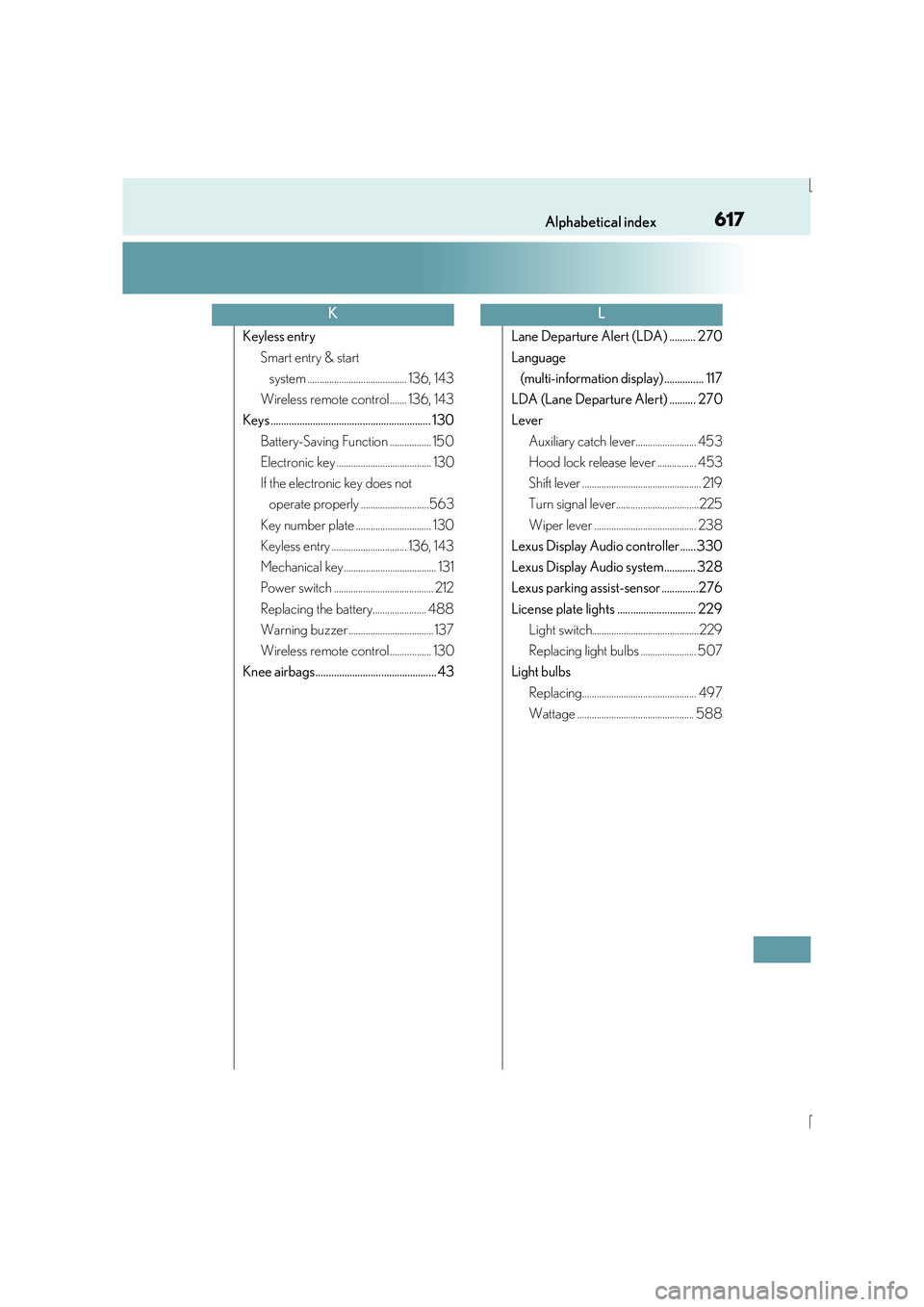
Keyless entrySmart entry & start system ......................................... 136, 143
Wireless remote control ....... 136, 143
Keys ............................................................. 130
Battery-Saving Function ................. 150
Electronic key ....................................... 130
If the electronic key does not operate properly ............................563
Key number plate ............................... 130
Keyless entry ............................... 136, 143
Mechanical key...................................... 131
Power switch ......................................... 212
Replacing the battery...................... 488
Warning buzzer ................................... 137
Wireless remote control ................. 130
Knee airbags.............................................. 43 Lane Departure Alert (LDA) .......... 270
Language
(multi-information display) ............... 117
LDA (Lane Departure Alert) .......... 270
Lever Auxiliary catch lever......................... 453
Hood lock release lever ................ 453
Shift lever ................................................. 219
Turn signal lever..................................225
Wiper lever .......................................... 238
Lexus Display Audio controller...... 330
Lexus Display Audio system............ 328
Lexus parking assist-sensor ..............276
License plate lights .............................. 229 Light switch............................................229
Replacing light bulbs ....................... 507
Light bulbs
Replacing............................................... 497
Wattage ................................................ 588
KL