Head light Lexus IS300h 2016 Owner's Guide
[x] Cancel search | Manufacturer: LEXUS, Model Year: 2016, Model line: IS300h, Model: Lexus IS300h 2016Pages: 628, PDF Size: 137.89 MB
Page 275 of 628
2754-5. Using the driving support systems
4
Driving
IS300h_EE(OM53D56E)
NOTICE
■To prevent damage to or incorrect operation of the LDA system
●Do not modify the headlights or attach stickers to the surface of the lights.
●Do not modify the suspension.
If any suspension parts need to be replaced, contact any authorized Lexus dealer or
repairer, or another duly qualified and equipped professional.
●Do not install or place anything on the hood or the grille. Also, do not install a grille
guard (bull bars, kangaroo bar etc.).
●If your windshield needs repairs, contact any authorized Lexus dealer or repairer, or
another duly qualified and equipped professional.
■Camera sensor
Observe the following to ensure that the LDA system functions correctly.
●Keep the windshield clean at all times.
Performance could be affected if the windshie ld is dirty, or if raindrops, condensation
or ice are adhering to the windshield.
●Do not spill liquid onto the camera sensor
●Do not attach window tinting to the windshield.
●Do not install an antenna in front of the camera lens.
●If area of the windshield in front of the camera sensor is fogged up, use the windshield
defogger to remove the fog.
When it is cold, using the heater with air blowing to the feet may allow the upper part
of the windshield to fog up. This will have a negative effect on the images.
●Do not scratch the camera lens, or let it get dirty.
When cleaning the inside of the windshield , be careful not to get any glass cleaner
etc. on the lens. Also, do not touch the lens.
For lens repair, contact any authorized Lexus dealer or repairer, or another duly qual-
ified and equipped professional.
●Do not change the installation position or direction of the camera sensor or remove it.
The direction of the camera sensor is precisely adjusted.
●Do not subject the camera sensor to strong impact or force, and do not disassemble
the camera sensor.
●If the windshield needs to be replaced, contact any authorized Lexus dealer or
repairer, or another duly qualified and equipped professional.
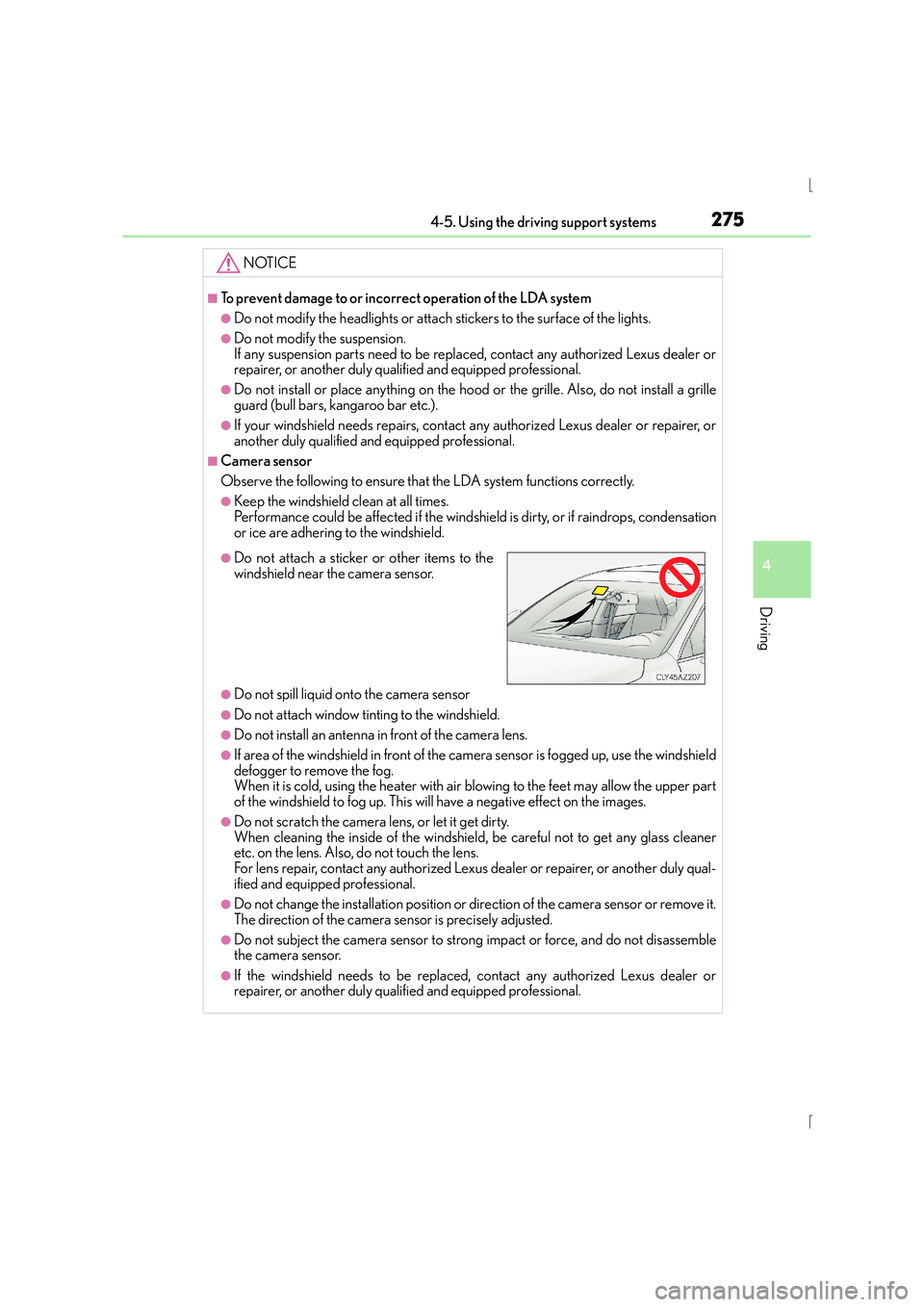
●Do not attach a sticker or other items to the
windshield near the camera sensor.
Page 290 of 628
2904-5. Using the driving support systems
IS300h_EE(OM53D56E)
■If you notice any symptoms
If you notice any of the following symptoms, refer to the likely cause and the
solution, and re-check.
If the symptom is not resolved by the solution, have the vehicle inspected by
any authorized Lexus dealer or repairer, or another duly qualified and
equipped professional.
Things you should know
Likely causeSolution
‰ The image is difficult to see
• The vehicle is in a dark area
• The temperature around the lens is
either high or low
• The outside temperature is low
• There are water droplets on the cam- era
• It is raining or humid
• Foreign matter (mud etc.) is adhering to the camera
• Sunlight or headlights are shining directly into the camera
• The vehicle is under fluorescent lights,
sodium lights, mercury lights etc.
If this happens due to these causes, it
does not indicate a malfunction.
Back up while visually checking the vehi-
cle’s surroundings. (Use the monitor
again once conditions have been
improved.)
To adjust the image on the rear view mon-
itor system screen. ( →P. 3 4 2 )
‰ The image is blurry
Dirt or foreign matter (such as water
droplets, snow, mud etc.) is adhering to
the camera.Flush the camera with a large quantity of
water and wipe the camera lens clean
with a soft and wet cloth.
‰The image is out of alignment
The camera or surrounding area has
received a strong impact.Have the vehicle inspected by any autho-
rized Lexus dealer or repairer, or another
duly qualified and equipped professional.
‰The fixed guide lines are very far out of alignment
• The vehicle is tilted (there is a heavy
load on the vehicle, tire pressure is low
due to a tire puncture, etc.)
• The vehicle is used on an incline.If this happens due to these causes, it
does not indicate a malfunction. Back up
while visually checking the vehicle’s sur-
roundings.
The camera position is out of alignment.
Have the vehicle inspected by any autho-
rized Lexus dealer or repairer, or another
duly qualified and equipped professional.
Page 303 of 628
3034-5. Using the driving support systems
4
Driving
IS300h_EE(OM53D56E)
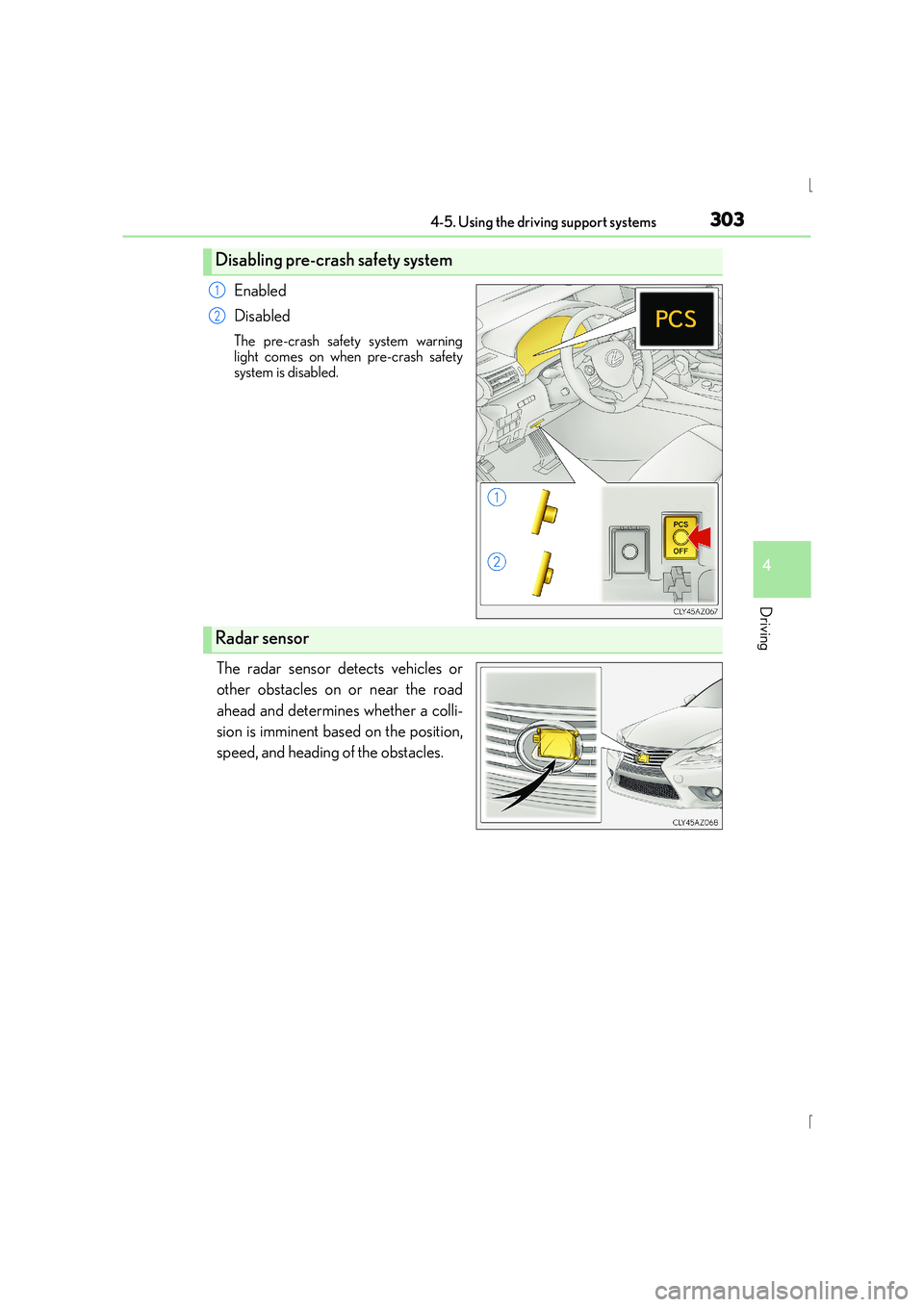
Enabled
Disabled
The pre-crash safety system warning
light comes on when pre-crash safety
system is disabled.
The radar sensor detects vehicles or
other obstacles on or near the road
ahead and determines whether a colli-
sion is imminent based on the position,
speed, and heading of the obstacles.
Disabling pre-crash safety system
1
2
Radar sensor
Page 304 of 628
3044-5. Using the driving support systems
IS300h_EE(OM53D56E)
■The pre-crash safety system is operational when
The pre-crash safety system is enabled and the following conditions are met:
●Pre-crash warning:
• Vehicle speed is greater than about 15 km/h (10 mph).
• The speed at which your vehicle is approaching the obstacle or the vehicle runningahead of you is greater than about 15 km/h (10 mph).
●Pre-crash brake assist:
• The VSC system is not disabled.
• Vehicle speed is greater than about 30 km/h (19 mph).
• The speed at which your vehicle is approaching the obstacle or the vehicle runningahead of you is greater than about 30 km/h (19 mph).
• The brake pedal is depressed.
●Pre-crash braking:
• The VSC system is not disabled.
• Vehicle speed is greater than about 15 km/h (10 mph).
• The speed at which your vehicle is approaching the obstacle or the vehicle running ahead of you is greater than about 15 km/h (10 mph).
●Suspension control (vehicles with Adap tive Variable Suspension System):
• Vehicle speed is greater than about 5 km/h (4 mph).
• The speed at which your vehicle is approaching the obstacle or the vehicle running ahead of you is greater than about 30 km/h (19 mph).
■Conditions that may trigger the system ev en if there is no danger of a collision
In any of the following situations where the frontal area of the radar sensor is interrupted,
the radar sensor may detect possibility of a frontal collision and the system may be acti-
vated.
●When passing by an oncoming vehicle in a curve or a turn to the right or the left.
●When rapidly approaching an obstacle ahead (e.g.preceding vehicle, toll gate barrier,
etc.)
●When there is a structural object (billboard , low ceiling, fluorescent light, etc.) above
the uphill road ahead
●When driving on a narrow road or through under a low overhead structure (bridge,
tunnel, fly-under, etc.)
●When driving on an uneven road surface
●When there is a metal object, bump, or protrusion on the road surface
●When vehicle’s front part is raised or lowered depending on loading conditions
●When the direction of radar sensor is misaligned by strong impact applied on an area
around the radar sensor, etc.
●When there is an obstacle (guard rail, etc.) by the roadside at the entrance to a curve
●When the front of your vehicle is pointing upwards (caused by putting a heavy load in
the trunk etc.)
When the system is activated in the situations described above, there is also a possibility
that the brakes may be applied with a force greater than normal.
Page 322 of 628
3224-6. Driving tips
IS300h_EE(OM53D56E)
●Use fluids that are appropriate to the prevailing outside temperatures. •Engine oil
• Engine/power control unit coolant
•Washer fluid
●Have a service technician inspect the condition of the 12-volt battery.
●Have the vehicle fitted with four snow tires or purchase a set of tire chains for
the rear tires.
*
Ensure that all tires are the specified size and brand, and that chains match the size
of the tires.
*: Tire chains cannot be mounted on the 18-inch tires.
Perform the following according to the driving conditions:
●Do not try to forcibly open a window or move a wiper that is frozen. Pour
warm water over the frozen area to melt the ice. Wipe away the water imme-
diately to prevent it from freezing.
●To ensure proper operation of the climate control system fan, remove any
snow that has accumulated on the air inlet vents in front of the windshield.
●Check for and remove any excess ice or snow that may have accumulated on
the exterior lights, vehicle’s roof, chassis, around the tires or on the brakes.
●Remove any snow or mud from the bottom of your shoes before getting in the
vehicle.
Accelerate the vehicle slowly, keep a safe distance between you and the vehicle
ahead, and drive at a reduced speed suitable to road conditions.
Winter driving tips
Carry out the necessary preparations and inspections before driving the vehi-
cle in winter. Always drive the vehicle in a manner appropriate to the prevail-
ing weather conditions.
Preparation for winter
Before driving the vehicle
When driving the vehicle
Page 342 of 628
3425-2. Setup
IS300h_EE(OM53D56E)
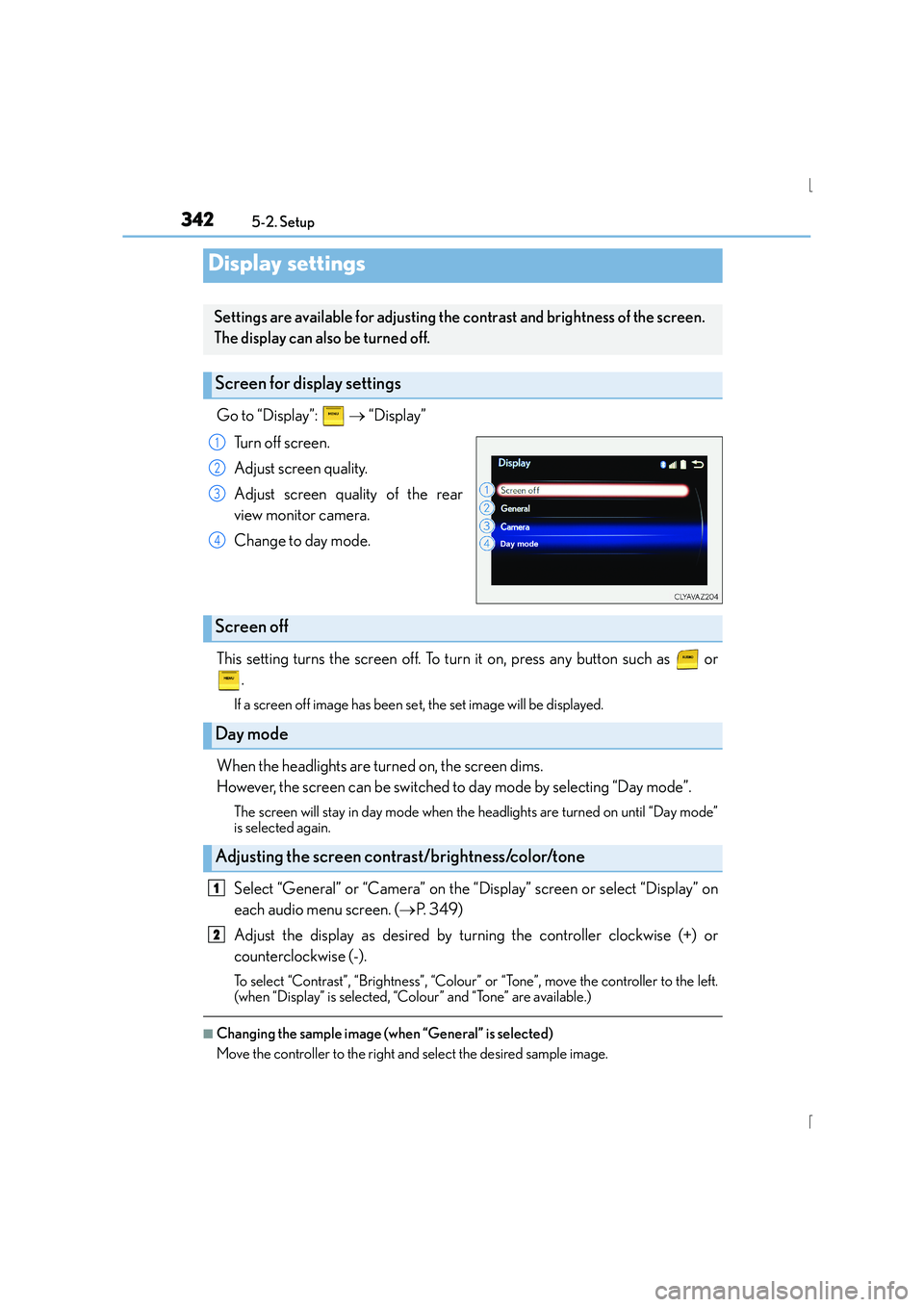
Go to “Display”: → “Display”
Turn off screen.
Adjust screen quality.
Adjust screen quality of the rear
view monitor camera.
Change to day mode.
This setting turns the screen off. To turn it on, press any button such as or .
If a screen off image has been se t, the set image will be displayed.
When the headlights are turned on, the screen dims.
However, the screen can be switched to day mode by selecting “Day mode”.
The screen will stay in day mode when the headlights are turned on until “Day mode”
is selected again.
Select “General” or “Camera” on the “Display” screen or select “Display” on
each audio menu screen. ( →P. 3 4 9 )
Adjust the display as desired by turning the controller clockwise (+) or
counterclockwise (-).
To select “Contrast”, “Brightness”, “Colour” or “Tone”, move the controller to the left.
(when “Display” is selected, “Colour” and “Tone” are available.)
■Changing the sample image (when “General” is selected)
Move the controller to the right and select the desired sample image.
Display settings
Settings are available for adjusting the contrast and brightness of the screen.
The display can also be turned off.
Screen for display settings
1
2
3
4
Screen off
Day mode
Adjusting the screen contrast/brightness/color/tone
1
2
Page 451 of 628
451
7
Maintenance and care
IS300h_EE(OM53D56E)7-3. Do-it-yourself maintenance
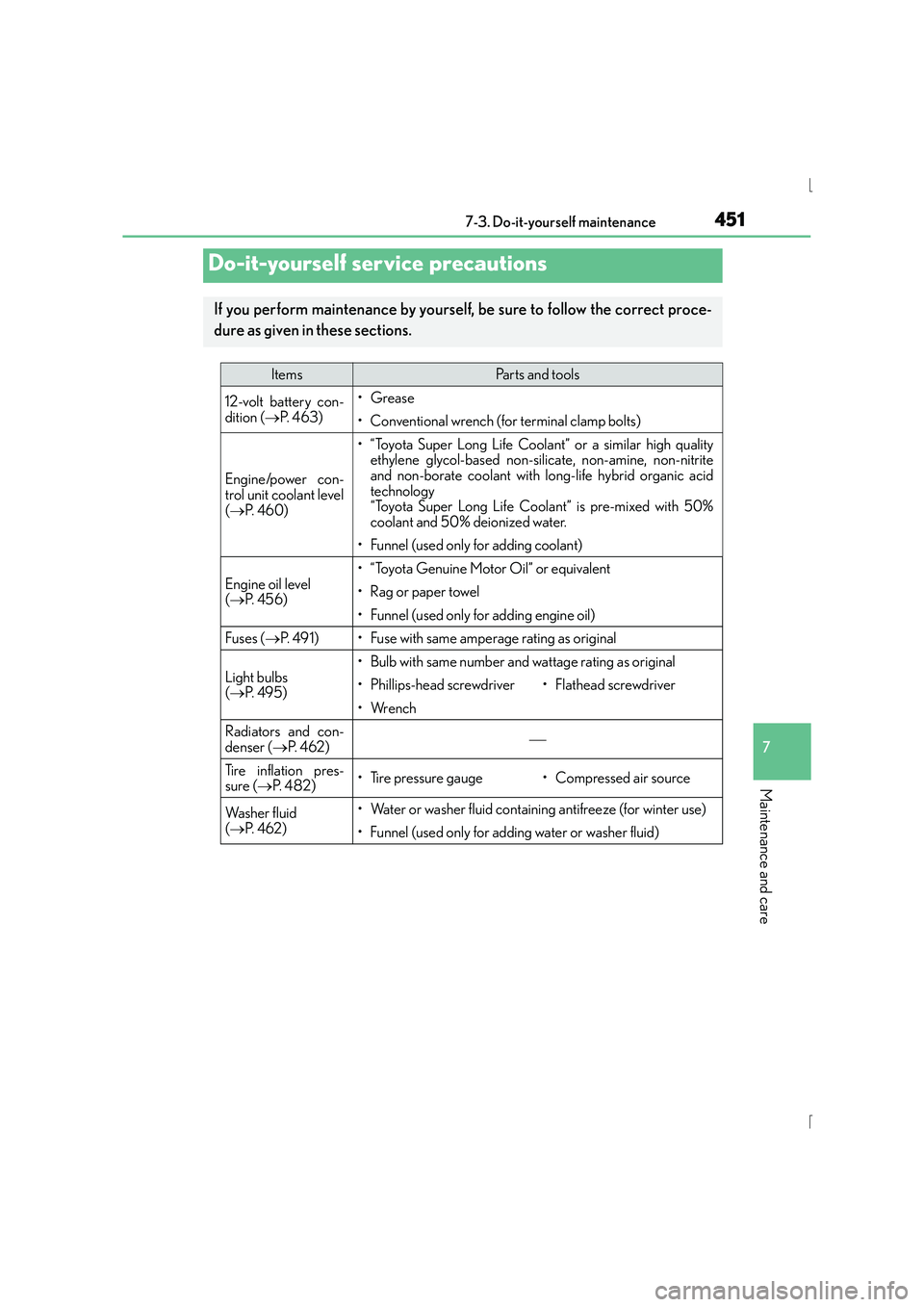
Do-it-yourself service precautions
If you perform maintenance by yourself, be sure to follow the correct proce-
dure as given in these sections.
ItemsParts and tools
12-volt battery con-
dition (
→P. 4 6 3 )•Grease
• Conventional wrench (for terminal clamp bolts)
Engine/power con-
trol unit coolant level
(→ P. 4 6 0 )
• “Toyota Super Long Life Coolant” or a similar high quality
ethylene glycol-based non-silicate, non-amine, non-nitrite
and non-borate coolant with long-life hybrid organic acid
technology
“Toyota Super Long Life Coolant” is pre-mixed with 50%
coolant and 50% deionized water.
• Funnel (used only for adding coolant)
Engine oil level
(→ P. 4 5 6 )
• “Toyota Genuine Motor Oil” or equivalent
• Rag or paper towel
• Funnel (used only for adding engine oil)
Fuses ( →P. 4 9 1 )• Fuse with same amperage rating as original
Light bulbs
(→ P. 4 9 5 )
• Bulb with same number and wattage rating as original
• Phillips-head screwdriver•Flathead screwdriver
•Wrench
Radiators and con-
denser ( →P. 4 6 2 )
Tire inflation pres-
sure ( →P. 4 8 2 )• Tire pressure gauge• Compressed air source
Wa s h e r f l u i d
(→ P. 4 6 2 )• Water or washer fluid containing antifreeze (for winter use)
• Funnel (used only for adding water or washer fluid)
Page 496 of 628
4967-3. Do-it-yourself maintenance
IS300h_EE(OM53D56E)
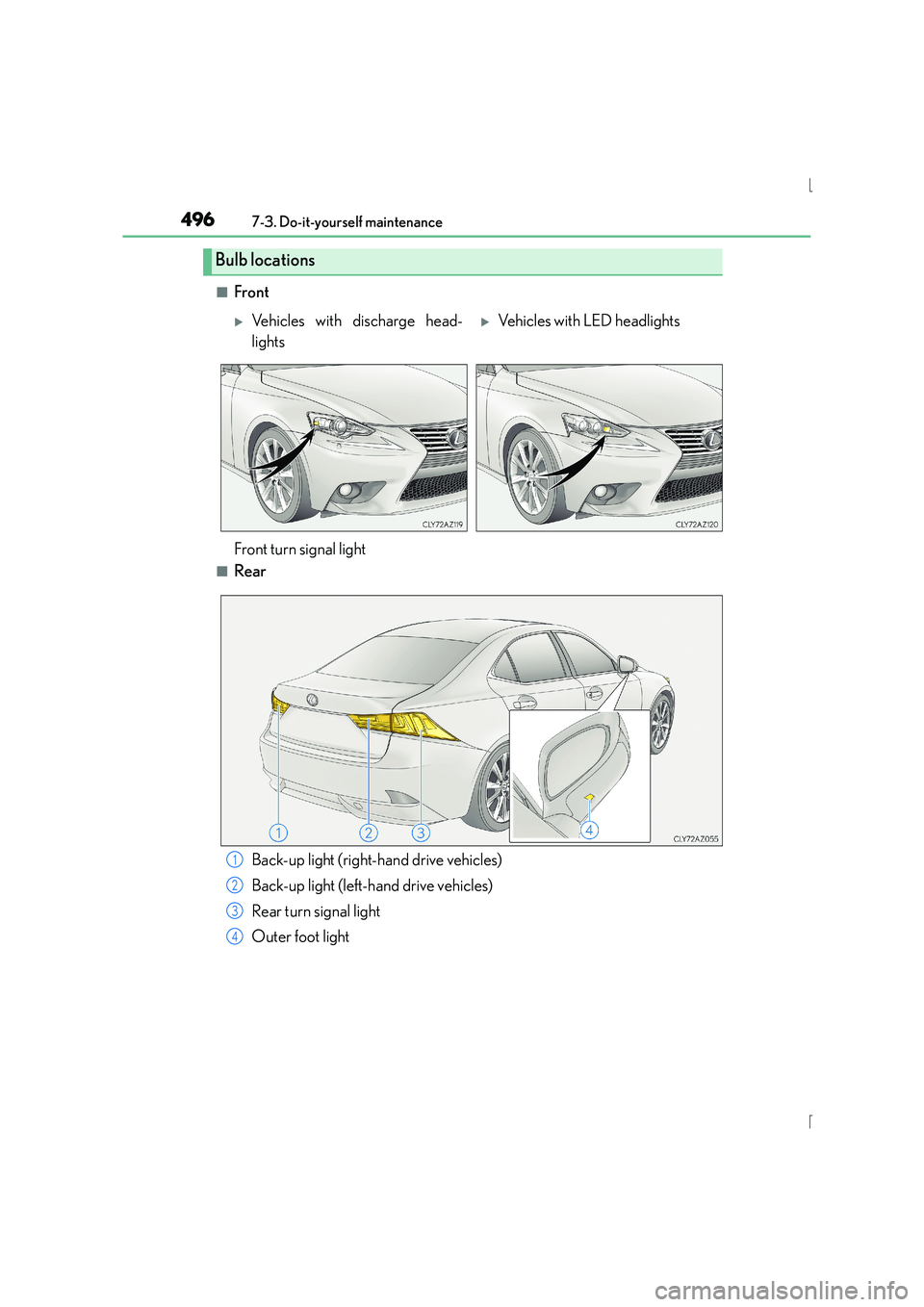
■Front
■Rear
Bulb locations
XVehicles with discharge head-
lightsXVehicles with LED headlights
Front turn signal light
Back-up light (right-hand drive vehicles)
Back-up light (left-hand drive vehicles)
Rear turn signal light
Outer foot light1
2
3
4
Page 497 of 628
4977-3. Do-it-yourself maintenance
7
Maintenance and care
IS300h_EE(OM53D56E)
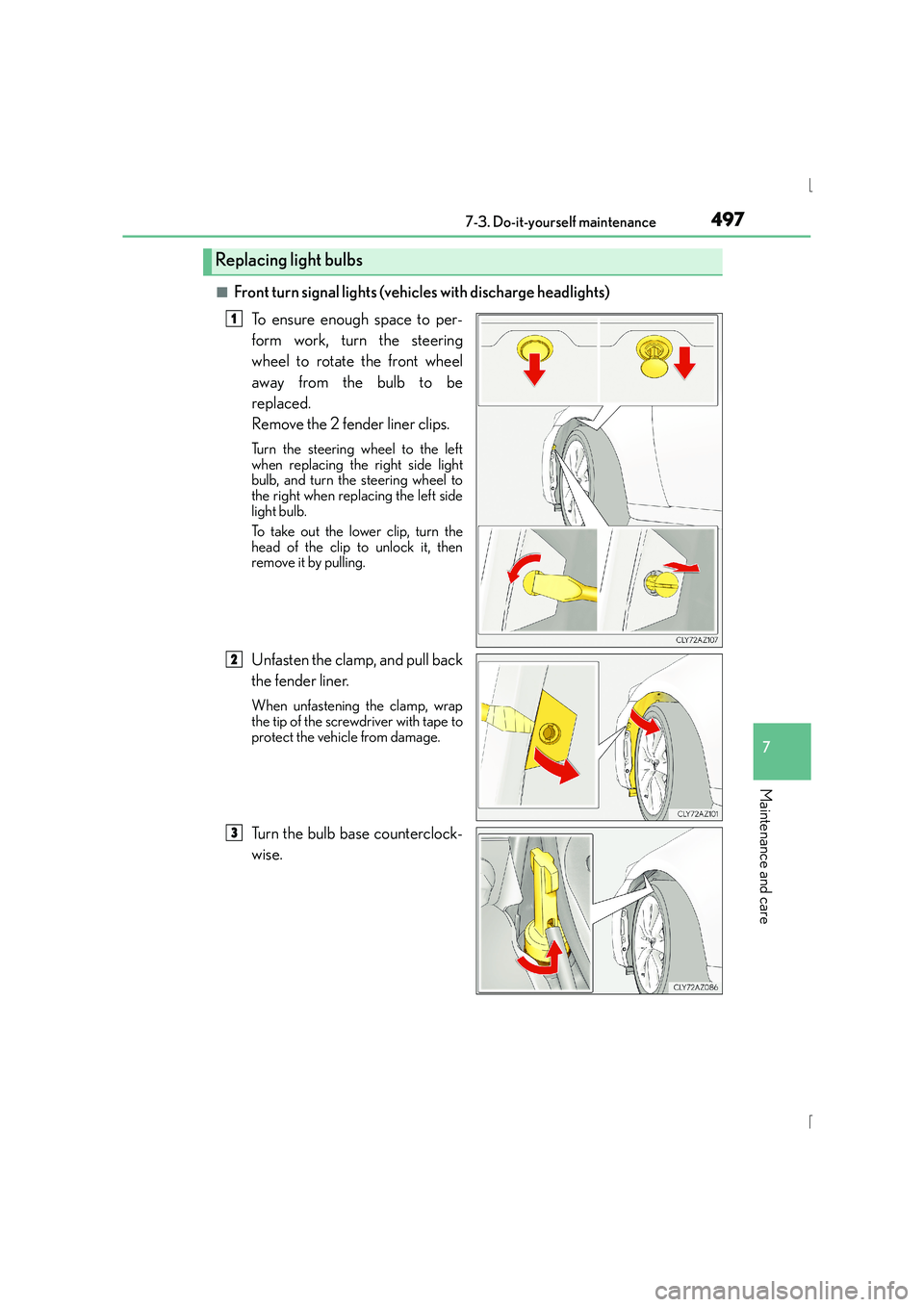
■Front turn signal lights (vehicles with discharge headlights)To ensure enough space to per-
form work, turn the steering
wheel to rotate the front wheel
away from the bulb to be
replaced.
Remove the 2 fender liner clips.
Turn the steering wheel to the left
when replacing the right side light
bulb, and turn the steering wheel to
the right when replacing the left side
light bulb.
To take out the lower clip, turn the
head of the clip to unlock it, then
remove it by pulling.
Unfasten the clamp, and pull back
the fender liner.
When unfastening the clamp, wrap
the tip of the screwdriver with tape to
protect the vehicle from damage.
Turn the bulb base counterclock-
wise.
Replacing light bulbs
1
2
3
Page 499 of 628
4997-3. Do-it-yourself maintenance
7
Maintenance and care
IS300h_EE(OM53D56E)
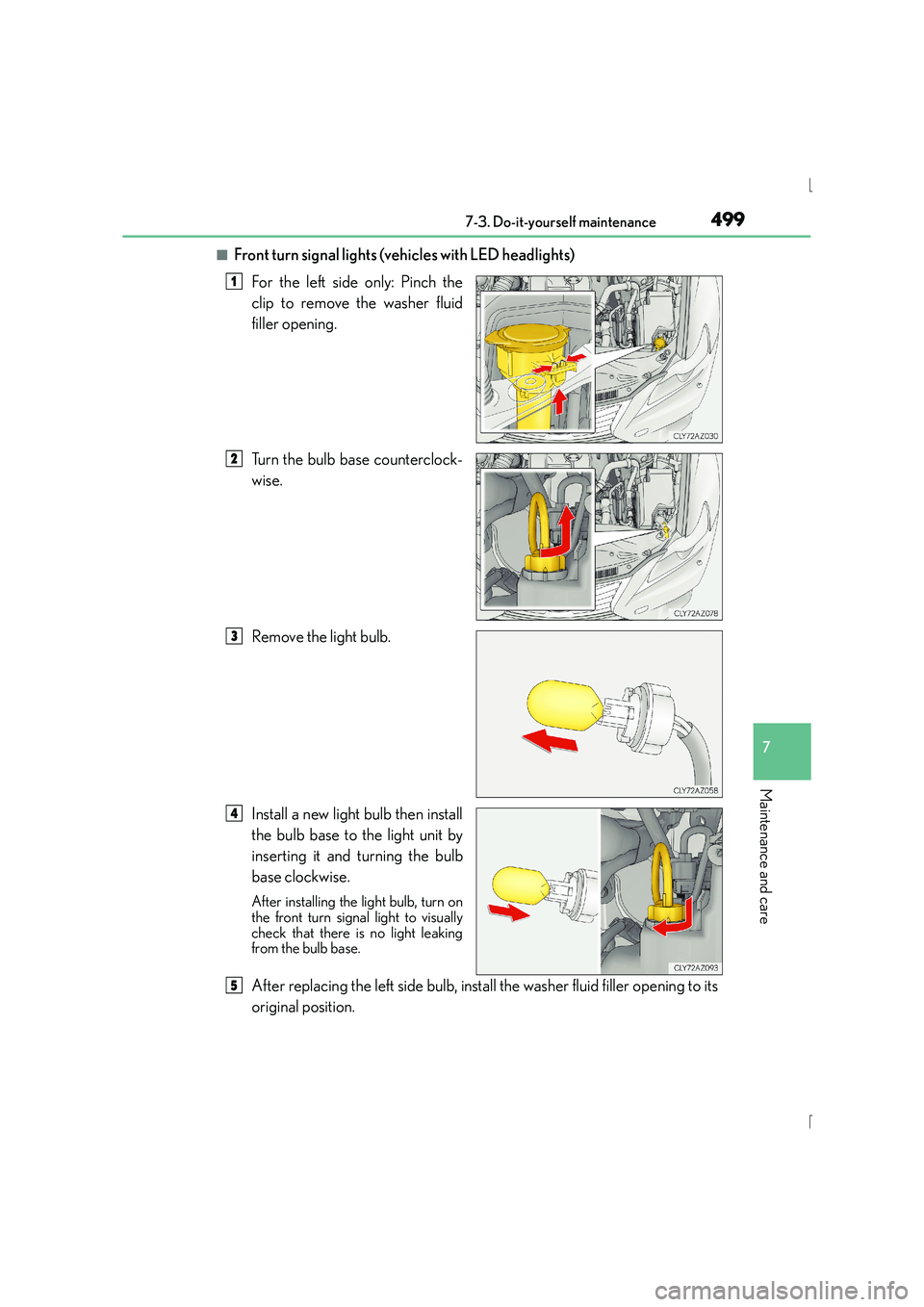
■Front turn signal lights (vehicles with LED headlights)For the left side only: Pinch the
clip to remove the washer fluid
filler opening.
Turn the bulb base counterclock-
wise.
Remove the light bulb.
Install a new light bulb then install
the bulb base to the light unit by
inserting it and turning the bulb
base clockwise.
After installing the light bulb, turn on
the front turn signal light to visually
check that there is no light leaking
from the bulb base.
After replacing the left side bulb, install the washer fluid filler opening to its
original position.
1
2
3
4
5