display Lexus IS300h 2016 Repair Manual
[x] Cancel search | Manufacturer: LEXUS, Model Year: 2016, Model line: IS300h, Model: Lexus IS300h 2016Pages: 628, PDF Size: 137.89 MB
Page 282 of 628
2824-5. Using the driving support systems
IS300h_EE(OM53D56E)
CAUTION
■When using the Lexus parking assist-sensor
Observe the following precautions.
Failing to do so may result in the vehicle being unable to be driven safely and possibly
cause an accident.
●Do not use the sensor at speeds in excess of 10 km/h (6 mph).
●The sensors’ detection areas and reaction times are limited. When moving forward or
reversing, check the areas surrounding the vehicle (especially the sides of the vehi-
cle) for safety, and drive slowly, using the brake to control the vehicle’s speed.
●Do not install accessories within the sensors’ detection areas.
NOTICE
■When using Lexus parking assist-sensor
In the following situations, the system may not function correctly due to a sensor mal-
function etc. Have the vehicle checked by any authorized Lexus dealer or repairer, or
another duly qualified and equipped professional.
●The Lexus parking assist-sensor operation display flashes, and a beep sounds when
no obstacles are detected.
●If the area around a sensor collides with so mething, or is subjected to strong impact.
●If the bumper or grille collides with something.
●If the display shows continuously without beeping, except when the buzzer mute
switch has been turned on.
●If a display error occurs, first check the sensor.
If the error occurs even when there is no ice, snow or mud on the sensor, it is likely that
the sensor is malfunctioning.
■Notes when washing the vehicle
Do not apply intensive bursts of water or steam to the sensor area.
Doing so may result in the sensor malfunctioning.
Page 283 of 628
2834-5. Using the driving support systems
4
Driving
IS300h_EE(OM53D56E)
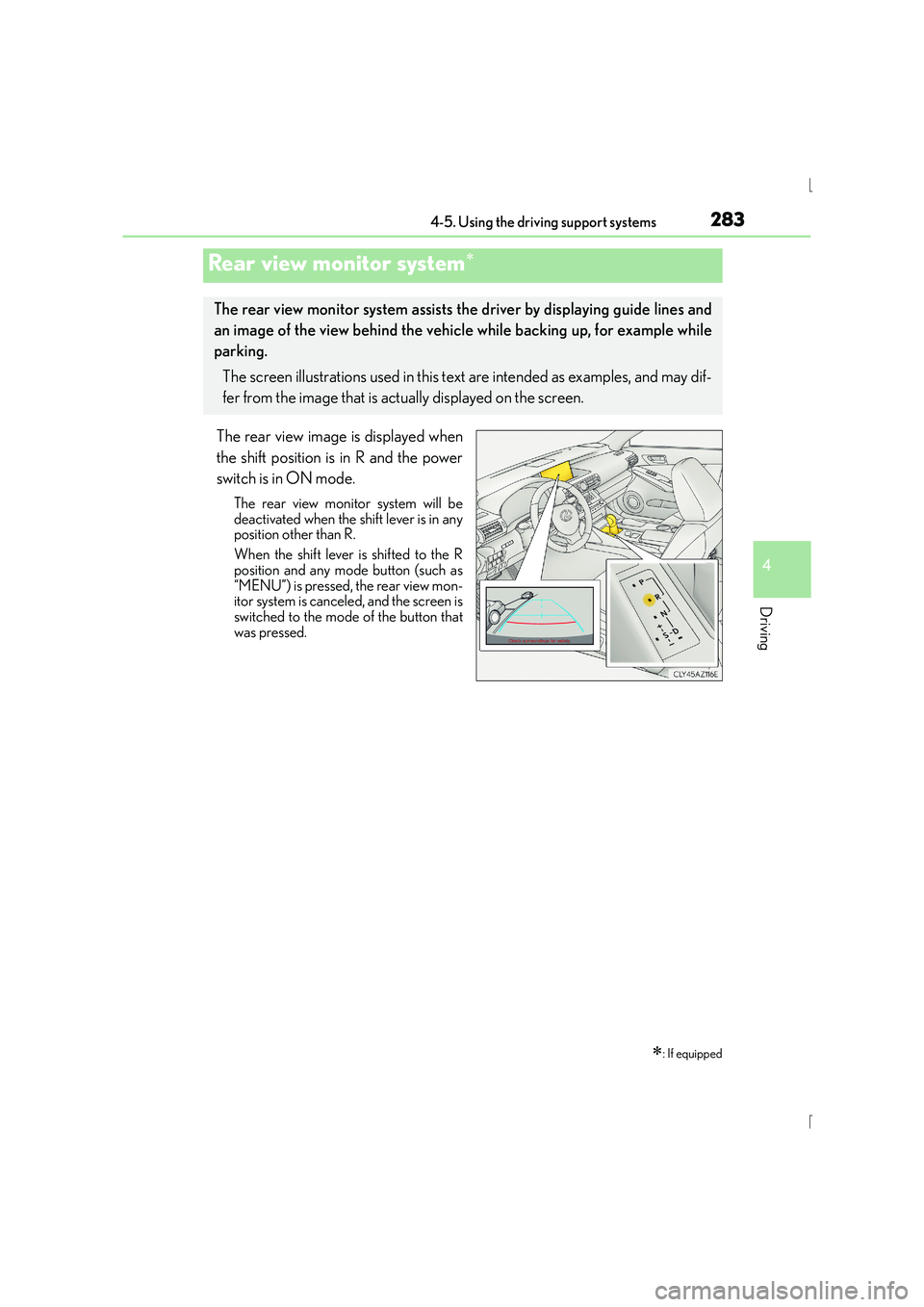
The rear view image is displayed when
the shift position is in R and the power
switch is in ON mode.
The rear view monitor system will be
deactivated when the shift lever is in any
position other than R.
When the shift lever is shifted to the R
position and any mode button (such as
“MENU”) is pressed, the rear view mon-
itor system is canceled, and the screen is
switched to the mode of the button that
was pressed.
Rear view monitor system∗
∗: If equipped
The rear view monitor system assists the driver by displaying guide lines and
an image of the view behind the vehicle while backing up, for example while
parking.
The screen illustrations used in this text are intended as examples, and may dif-
fer from the image that is actually displayed on the screen.
Page 284 of 628
2844-5. Using the driving support systems
IS300h_EE(OM53D56E)
■Screen description
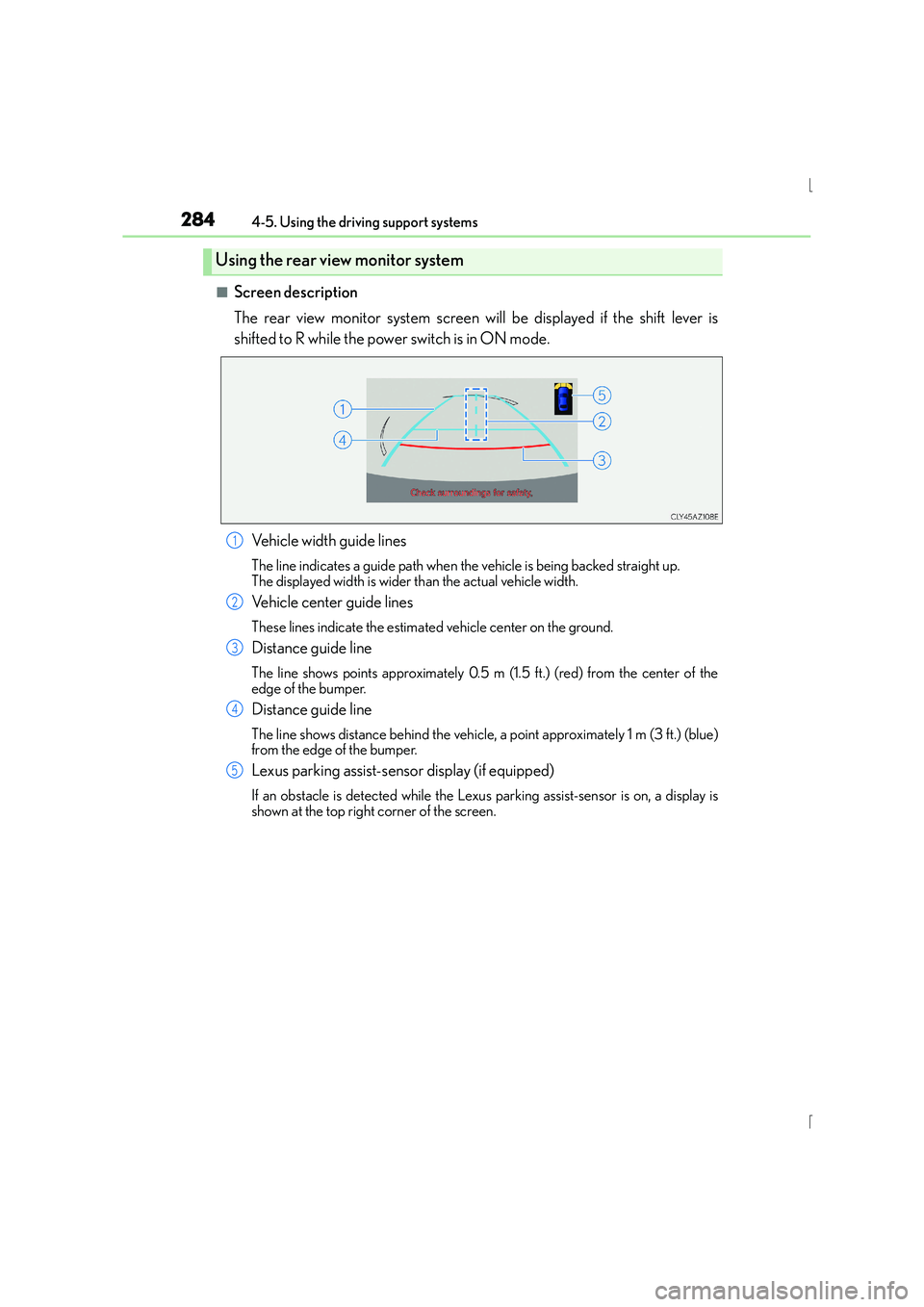
The rear view monitor system screen will be displayed if the shift lever is
shifted to R while the power switch is in ON mode.Vehicle width guide lines
The line indicates a guide path when the vehicle is being backed straight up.
The displayed width is wider than the actual vehicle width.
Vehicle center guide lines
These lines indicate the estimated vehicle center on the ground.
Distance guide line
The line shows points approximately 0.5 m (1.5 ft.) (red) from the center of the
edge of the bumper.
Distance guide line
The line shows distance behind the vehicle, a point approximately 1 m (3 ft.) (blue)
from the edge of the bumper.
Lexus parking assist-sensor display (if equipped)
If an obstacle is detected while the Lexu s parking assist-sensor is on, a display is
shown at the top right corner of the screen.
Using the rear view monitor system
1
2
3
4
5
Page 285 of 628
2854-5. Using the driving support systems
4
Driving
IS300h_EE(OM53D56E)
■Area displayed on screen
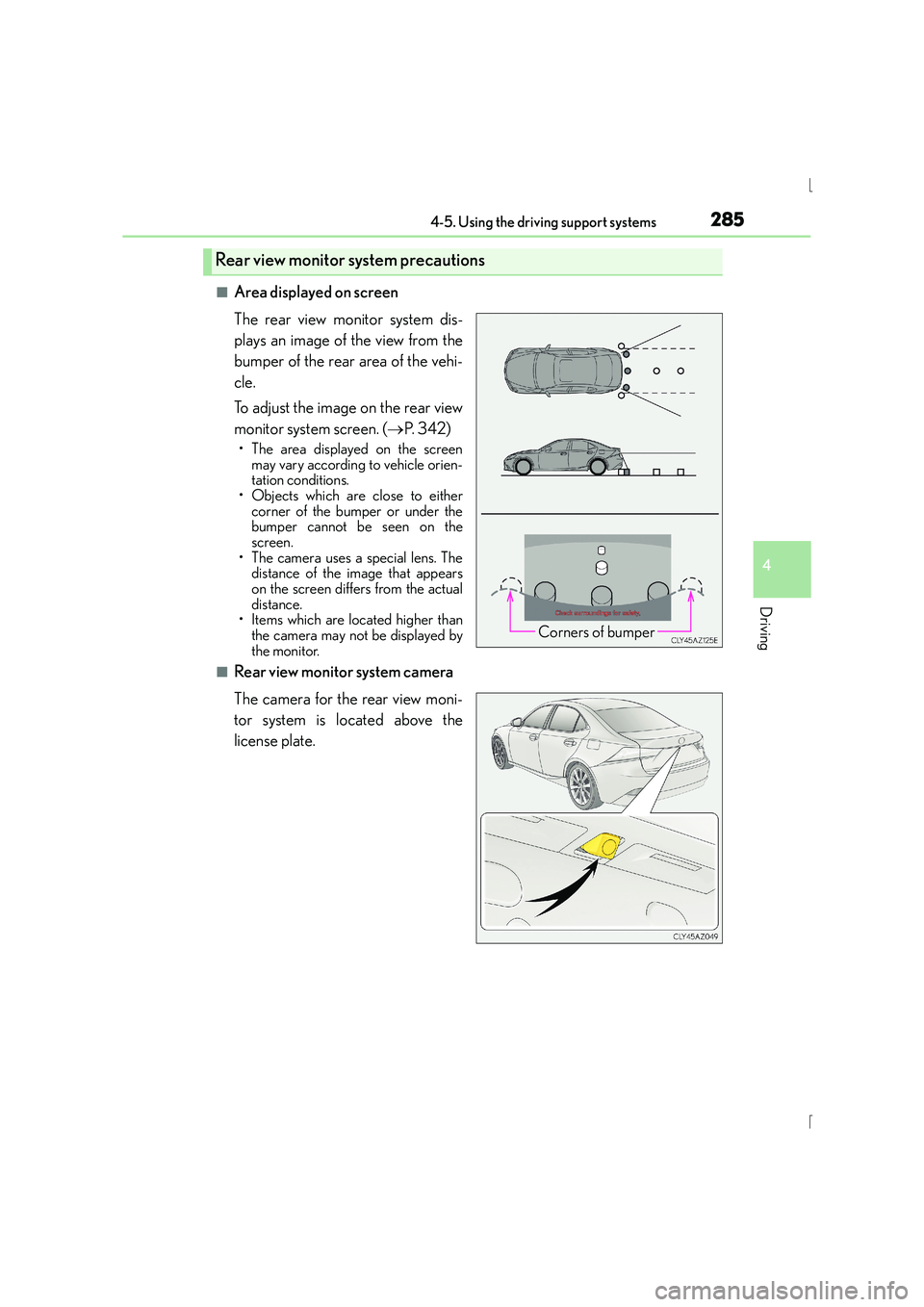
The rear view monitor system dis-
plays an image of the view from the
bumper of the rear area of the vehi-
cle.
To adjust the image on the rear view
monitor system screen. (→P. 3 4 2 )
• The area displayed on the screen
may vary according to vehicle orien-
tation conditions.
• Objects which are close to either corner of the bumper or under the
bumper cannot be seen on the
screen.
• The camera uses a special lens. The distance of the image that appears
on the screen differs from the actual
distance.
• Items which are located higher than
the camera may not be displayed by
the monitor.
■Rear view monitor system camera
The camera for the rear view moni-
tor system is located above the
license plate.
Rear view monitor system precautions
Corners of bumper
Page 288 of 628
2884-5. Using the driving support systems
IS300h_EE(OM53D56E)
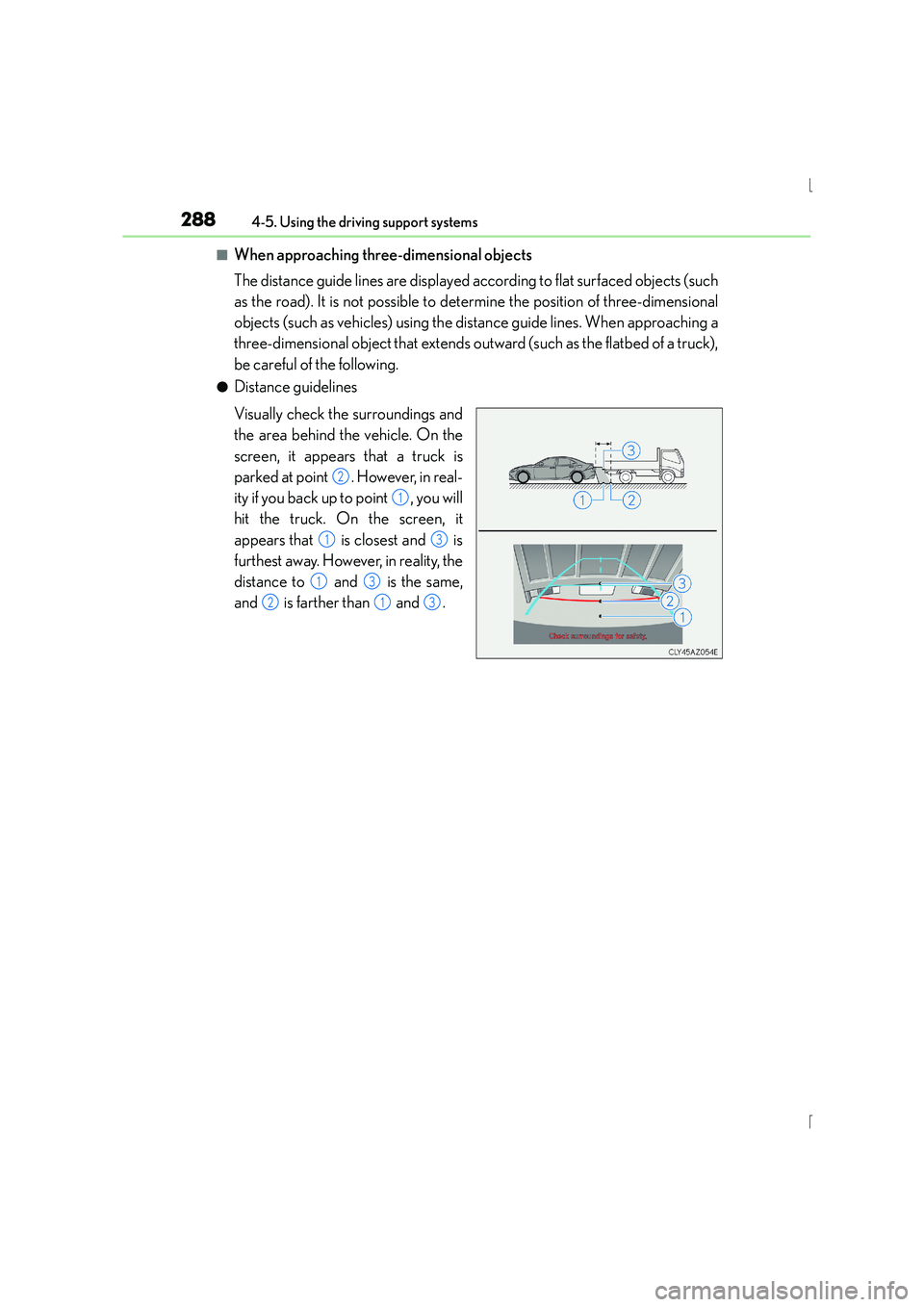
■When approaching three-dimensional objects
The distance guide lines are displayed according to flat surfaced objects (such
as the road). It is not possible to determine the position of three-dimensional
objects (such as vehicles) using the distance guide lines. When approaching a
three-dimensional object that extends outward (such as the flatbed of a truck),
be careful of the following.
●Distance guidelines
Visually check the surroundings and
the area behind the vehicle. On the
screen, it appears that a truck is
parked at point . However, in real-
ity if you back up to point , you will
hit the truck. On the screen, it
appears that is closest and is
furthest away. However, in reality, the
distance to and is the same,
and is farther than and .
2
1
13
13
213
Page 291 of 628
2914-5. Using the driving support systems
4
Driving
IS300h_EE(OM53D56E)
CAUTION
■When using the rear view monitor system
The rear view monitor system is a supplemental device intended to assist the driver
when backing up. When backing up, be sure to check visually behind and all around
the vehicle before proceeding.
Observe the following precautions to avoid an accident that could result in death or
serious injuries.
●Never depend on the rear view monitor system entirely when backing up. The image
and the position of the guide lines displayed on the screen may differ from the actual
state.
Use caution, just as you would when backing up any vehicle.
●Be sure to back up slowly, depressing the brake pedal to control vehicle speed.
●The instructions given are only guidelines.
When and how much to turn the steering wheel will vary according to traffic condi-
tions, road surface conditions, vehicle condition, etc. when parking. It is necessary to
be fully aware of this before using the rear view monitor system.
●When parking, be sure to check that the parking space will accommodate your vehi-
cle before maneuvering into it.
●Do not use the rear view monitor system in the following cases:
• On icy or slick road surfaces, or in snow
• When using tire chains
• When the trunk lid is not closed completely
• On roads that are not flat or straight, such as curves or slopes.
●In low temperatures, the screen may darken or the image may become faint. The
image could distort when the vehicle is moving, or you may become unable to see the
image on the screen. Be sure to check direct visually and with the mirrors all around
the vehicle before proceeding.
●If the tire sizes are changed, the position of the fixed guide lines displayed on the
screen may change.
●The camera uses a special lens. The dist ances between objects and pedestrians that
appear in the image displayed on the screen will differ from the actual distances.
( → P. 2 8 5 )
Page 298 of 628
2984-5. Using the driving support systems
IS300h_EE(OM53D56E)
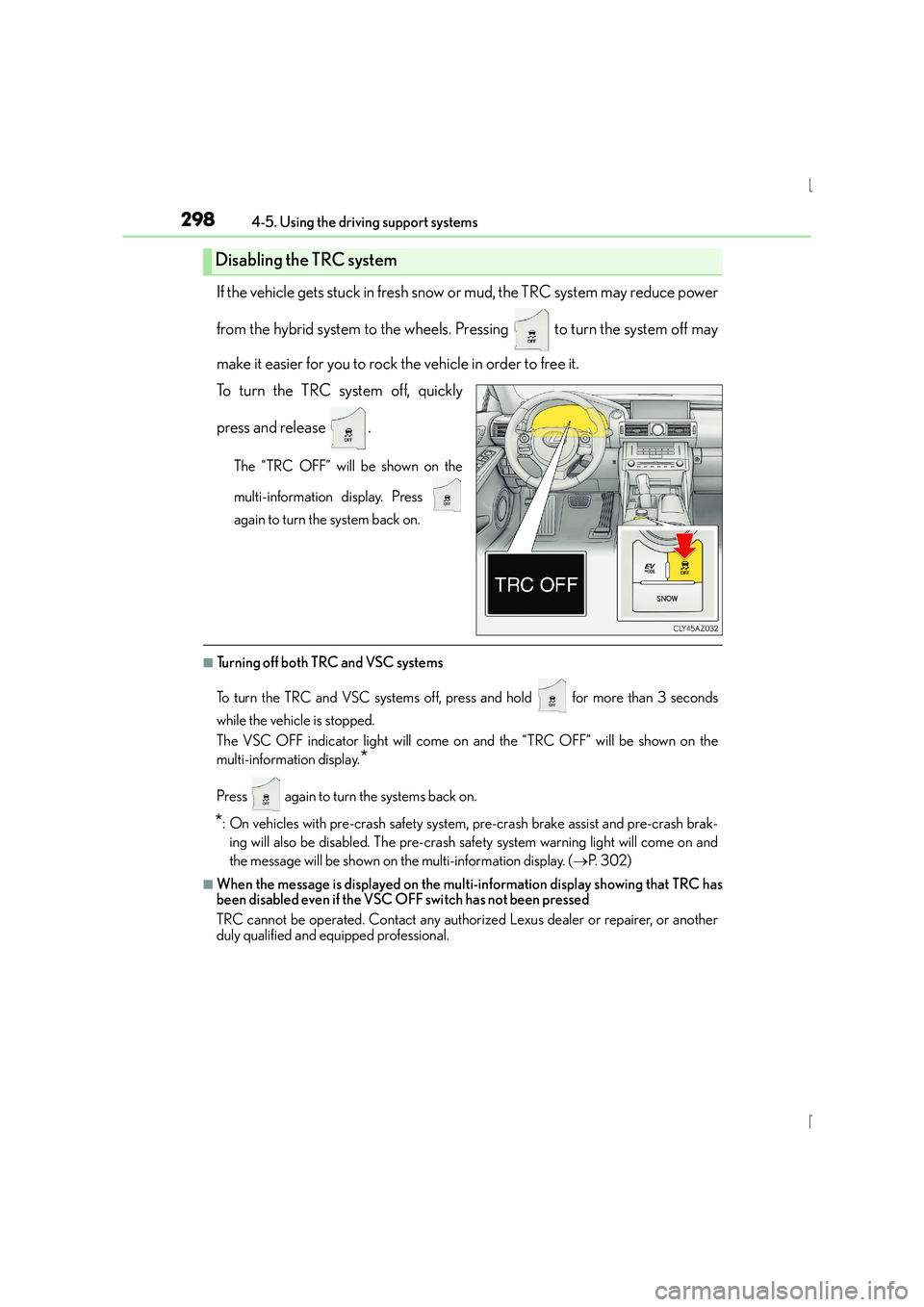
If the vehicle gets stuck in fresh snow or mud, the TRC system may reduce power
from the hybrid system to the wheels. Pressing to turn the system off may
make it easier for you to rock the vehicle in order to free it.
To turn the TRC system off, quickly
press and release .
The “TRC OFF” will be shown on the
multi-information display. Press
again to turn the system back on.
■Turning off both TRC and VSC systems
To turn the TRC and VSC systems off, press and hold for more than 3 seconds
while the vehicle is stopped.
The VSC OFF indicator light will come on and the “TRC OFF” will be shown on the
multi-information display.
*
Press again to turn the systems back on.
*: On vehicles with pre-crash safety system, pre-crash brake assist and pre-crash brak- ing will also be disabled. The pre-crash safe ty system warning light will come on and
the message will be shown on the multi-information display. ( →P. 3 0 2 )
■When the message is displayed on the mult i-information display showing that TRC has
been disabled even if the VSC OFF switch has not been pressed
TRC cannot be operated. Contact any authorized Lexus dealer or repairer, or another
duly qualified and equipped professional.
Disabling the TRC system
Page 302 of 628
3024-5. Using the driving support systems
IS300h_EE(OM53D56E)
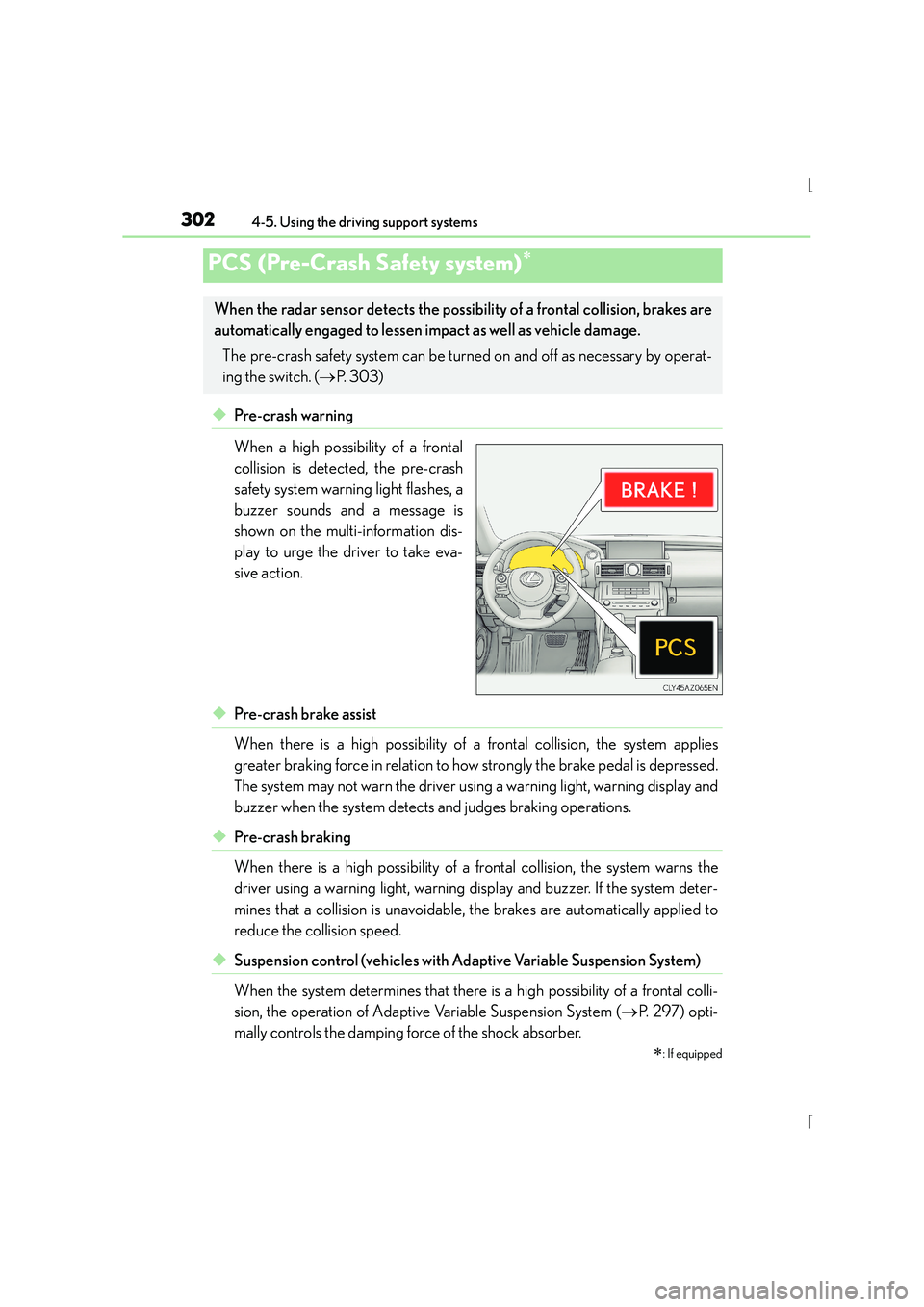
◆Pre-crash warning
When a high possibility of a frontal
collision is detected, the pre-crash
safety system warning light flashes, a
buzzer sounds and a message is
shown on the multi-information dis-
play to urge the driver to take eva-
sive action.
◆Pre-crash brake assist
When there is a high possibility of a frontal collision, the system applies
greater braking force in relation to how strongly the brake pedal is depressed.
The system may not warn the driver using a warning light, warning display and
buzzer when the system detects and judges braking operations.
◆Pre-crash braking
When there is a high possibility of a frontal collision, the system warns the
driver using a warning light, warning display and buzzer. If the system deter-
mines that a collision is unavoidable, the brakes are automatically applied to
reduce the collision speed.
◆Suspension control (vehicles with Ad aptive Variable Suspension System)
When the system determines that there is a high possibility of a frontal colli-
sion, the operation of Adaptive Variable Suspension System ( →P. 2 9 7 ) o p t i -
mally controls the damping force of the shock absorber.
PCS (Pre-Crash Safety system)∗
∗
: If equipped
When the radar sensor detects the possibili ty of a frontal collision, brakes are
automatically engaged to lessen im pact as well as vehicle damage.
The pre-crash safety system can be turned on and off as necessary by operat-
ing the switch. ( →P. 303)
Page 311 of 628
3114-5. Using the driving support systems
4
Driving
IS300h_EE(OM53D56E)
■The outside rear view mirror indicators visibility
When under strong sunlight, the outside rear view mirror indicator may be difficult to
see.
■Rear Crossing Traffic Alert buzzer hearing
Rear Crossing Traffic Alert function may be difficult to hear over loud noises such as high
audio volume.
■When there is a malfunction in the Blind Spot Monitor
If a system malfunction is detected due to any of the following reasons, warning mes-
sages will be displayed: ( →P. 532, 533)
●There is a malfunction with the sensors
●The sensors have become dirty
●The outside temperature is extremely high or low
●The sensor voltage has become abnormal
■Certification for the Blind Spot Monitor
XFor vehicles sold in Ukraine
type approval number : 1O094.000966-13
Page 320 of 628
320
IS300h_EE(OM53D56E)4-6. Driving tips
■Using Eco drive mode
When using Eco drive mode, the torque corresponding to the accelerator
pedal depression amount can be generated more smoothly than it is in normal
conditions. In addition, the operation of the air conditioning system (heating/
cooling) will be minimized, improving the fuel economy. (
→P. 2 9 3 )
■Use of Hybrid System Indicator
Eco-friendly driving is possible by keeping the indicator needle (except F
SPORT models) or bar display (F SPORT models) of Hybrid System Indicator
within the Eco area. ( →P. 1 1 3 )
■When braking
Make sure to operate the brakes gently and in good time. A greater amount
of electrical energy can be regenerated when slowing down.
■Delays
Repeated acceleration and deceleration, as well as long waits at traffic lights,
will lead to bad fuel economy. Check traffic reports before leaving and avoid
delays as much as possible. When driving in a traffic jam, gently release the
brake pedal to allow the vehicle to move forward slightly while avoiding over-
use of the accelerator pedal. Doing so can help control excessive gasoline
consumption.
■Highway driving
Control your speed and keep at a constant speed. Before stopping at a toll
booth or similar, allow plenty of time to release the accelerator and gently
apply the brakes. A greater amount of electrical energy can be regenerated
when slowing down.
Hybrid vehicle driving tips
For economical and ecological driving, pay attention to the following points: