USB port Lexus IS300h 2016 Owner's Manual
[x] Cancel search | Manufacturer: LEXUS, Model Year: 2016, Model line: IS300h, Model: Lexus IS300h 2016Pages: 628, PDF Size: 137.89 MB
Page 4 of 628
TABLE OF CONTENTS4
IS300h_EE(OM53D56E)
5-1. Basic OperationsLexus Display Audio System..........................................328
Steering wheel audio switches.......................................334
USB/AUX ports .........................335
5-2. Setup Setup menu................................... 337
General settings ........................ 338
Voice settings................................ 341
Display settings ...........................342
5-3. Using the audio system Selecting the audio source ..........................................343
Optimal use of the audio system ..........................................344
Audio settings..............................345
Audio menu screen operation ....................................349
5-4. Using the radio Radio operation .......................... 352 5-5. Playing an audio CD and
MP3/WMA/AAC discs
CD player operation ................ 354
5-6. Using an external device Listening to an iPod .................... 361
Using USB memory device...........................................364
Using the AUX port.................. 369
5-7. Connecting Bluetooth
®
Steps for using Bluetooth®
devices......................................... 370
Registering a Bluetooth
®
device........................................... 372
Selecting a Bluetooth
®
device........................................... 373
Connecting a Bluetooth
®
audio player ................................374
Connecting a Bluetooth
®
phone ........................................... 375
Displaying a Bluetooth
®
device details .............................376
Detailed Bluetooth
®
settings......................................... 377
5Lexus Display Audio system
Page 326 of 628
326
IS300h_EE(OM53D56E)
5-1. Basic OperationsLexus Display Audio System ......................................... 328
Steering wheel audio switches....................................... 334
USB/AUX ports ......................... 335
5-2. Setup Setup menu .................................. 337
General settings.........................338
Voice settings ............................... 341
Display settings ........................... 342
5-3. Using the audio system Selecting the audio source ..........................................343
Optimal use of the audio system .......................................... 344
Audio settings ............................. 345
Audio menu screen operation .................................... 349
5-4. Using the radio Radio operation .......................... 352
5-5. Playing an audio CD and MP3/WMA/AAC discs
CD player operation ................ 354
Page 327 of 628
327
5
Lexus DisplayAudio system
IS300h_EE(OM53D56E)
5-6. Using an external device
Listening to an iPod .................... 361
Using USB memory device ...........................................364
Using the AUX port.................. 369
5-7. Connecting Bluetooth
®
Steps for using Bluetooth®
devices......................................... 370
Registering a Bluetooth
®
device ........................................... 372
Selecting a Bluetooth
®
device ........................................... 373
Connecting a Bluetooth
®
audio player ................................374
Connecting a Bluetooth
®
phone ........................................... 375
Displaying a Bluetooth
®
device details .............................376
Detailed Bluetooth
®
settings......................................... 377
5-8. Bluetooth
® Audio
Listening to Bluetooth
®
Audio............................................ 378 5-9. Bluetooth
® Phone
Using a Bluetooth
®
Phone.......................................... 380
Making a call................................382
Receiving a call ...........................385
Speaking on the phone ...........386
Using a Bluetooth
®
phone messages..................... 388
Using the steering wheel switches........................................ 391
Bluetooth
® phone
settings ........................................ 392
5-10. Phonebook Contact settings ......................... 394
Messaging setting...................... 397
5-11. Bluetooth
®
Bluetooth®...................................398
5-12. Other function “Information” screen ................. 403
MirrorLink ................................404
USB photo .................................... 406
Speech command system ......408
Page 335 of 628
3355-1. Basic Operations
5
Lexus Display Audio system
IS300h_EE(OM53D56E)
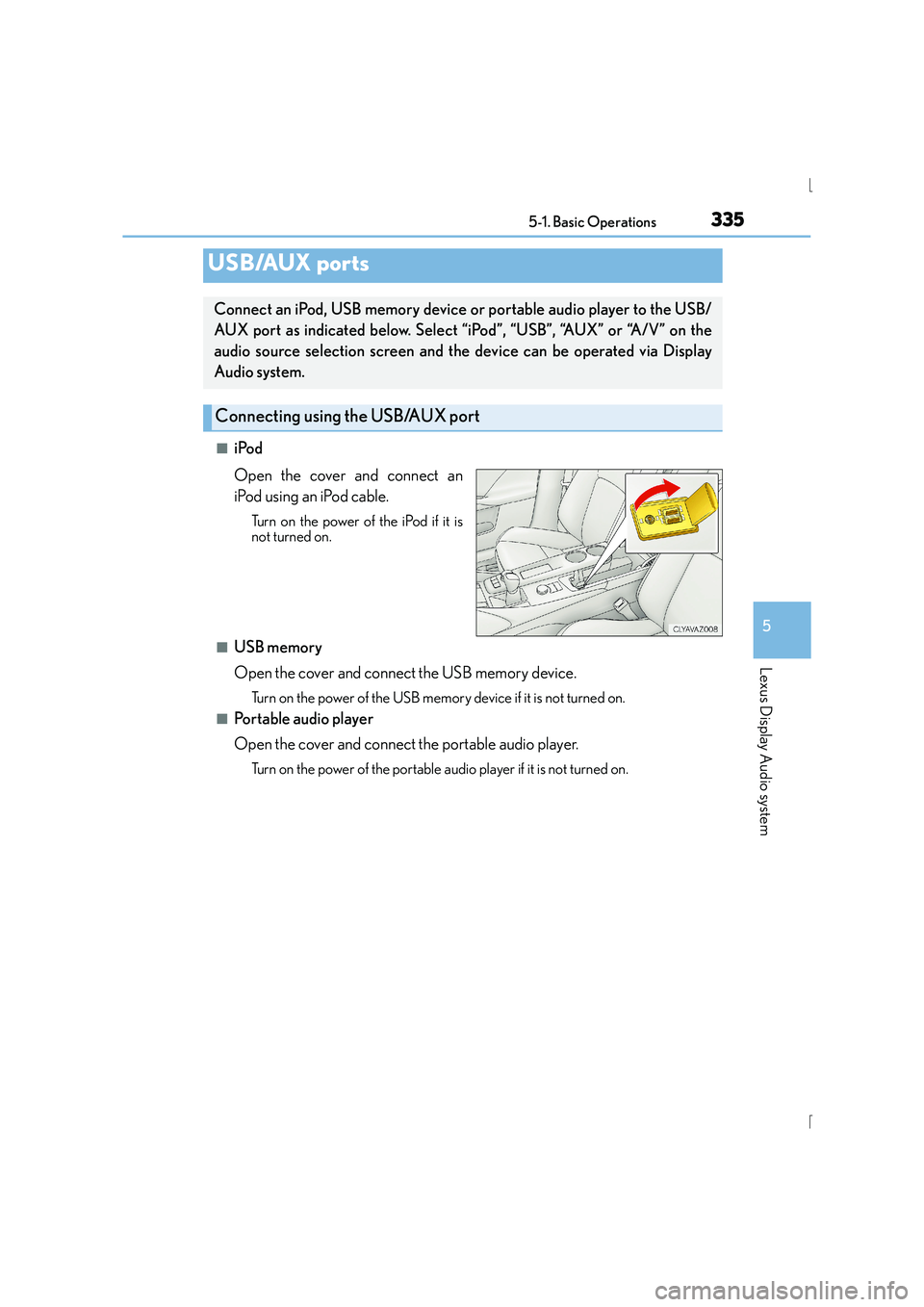
■iPod
Open the cover and connect an
iPod using an iPod cable.
Turn on the power of the iPod if it is
not turned on.
■USB memory
Open the cover and connect the USB memory device.
Turn on the power of the USB memory device if it is not turned on.
■Portable audio player
Open the cover and connect the portable audio player.
Turn on the power of the portable audio player if it is not turned on.
USB/AUX ports
Connect an iPod, USB memory device or portable audio player to the USB/
AUX port as indicated below. Select “iPod”, “USB”, “AUX” or “A/V” on the
audio source selection screen and the device can be operated via Display
Audio system.
Connecting using the USB/AUX port
Page 336 of 628
3365-1. Basic Operations
IS300h_EE(OM53D56E)
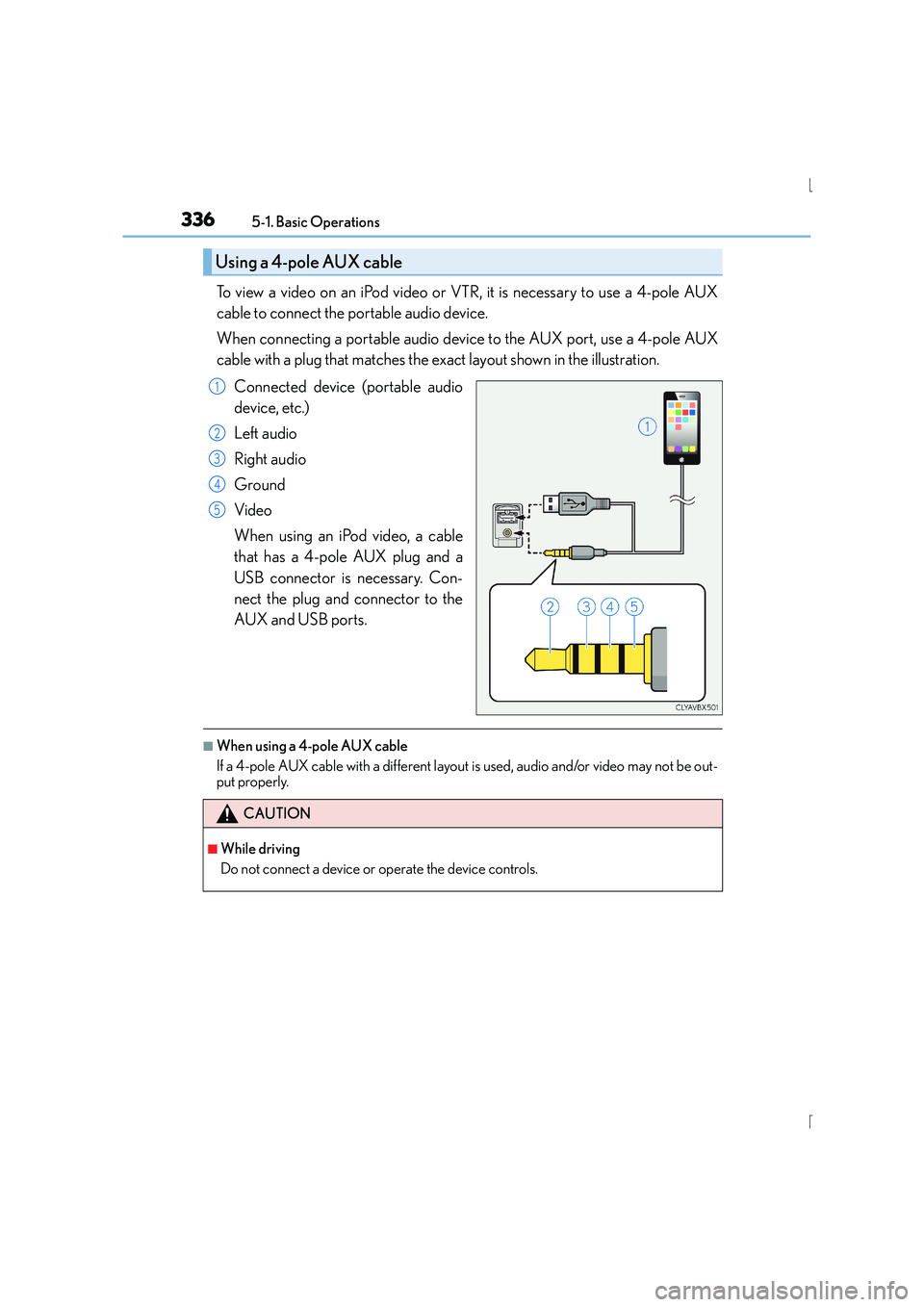
To view a video on an iPod video or VTR, it is necessary to use a 4-pole AUX
cable to connect the portable audio device.
When connecting a portable audio device to the AUX port, use a 4-pole AUX
cable with a plug that matches the exact layout shown in the illustration.
Connected device (portable audio
device, etc.)
Left audio
Right audio
Ground
Video
When using an iPod video, a cable
that has a 4-pole AUX plug and a
USB connector is necessary. Con-
nect the plug and connector to the
AUX and USB ports.
■When using a 4-pole AUX cable
If a 4-pole AUX cable with a different layout is used, audio and/or video may not be out-
put properly.
Using a 4-pole AUX cable
1
2
3
4
5
CAUTION
■While driving
Do not connect a device or operate the device controls.
Page 347 of 628
3475-3. Using the audio system
5
Lexus Display Audio system
IS300h_EE(OM53D56E)
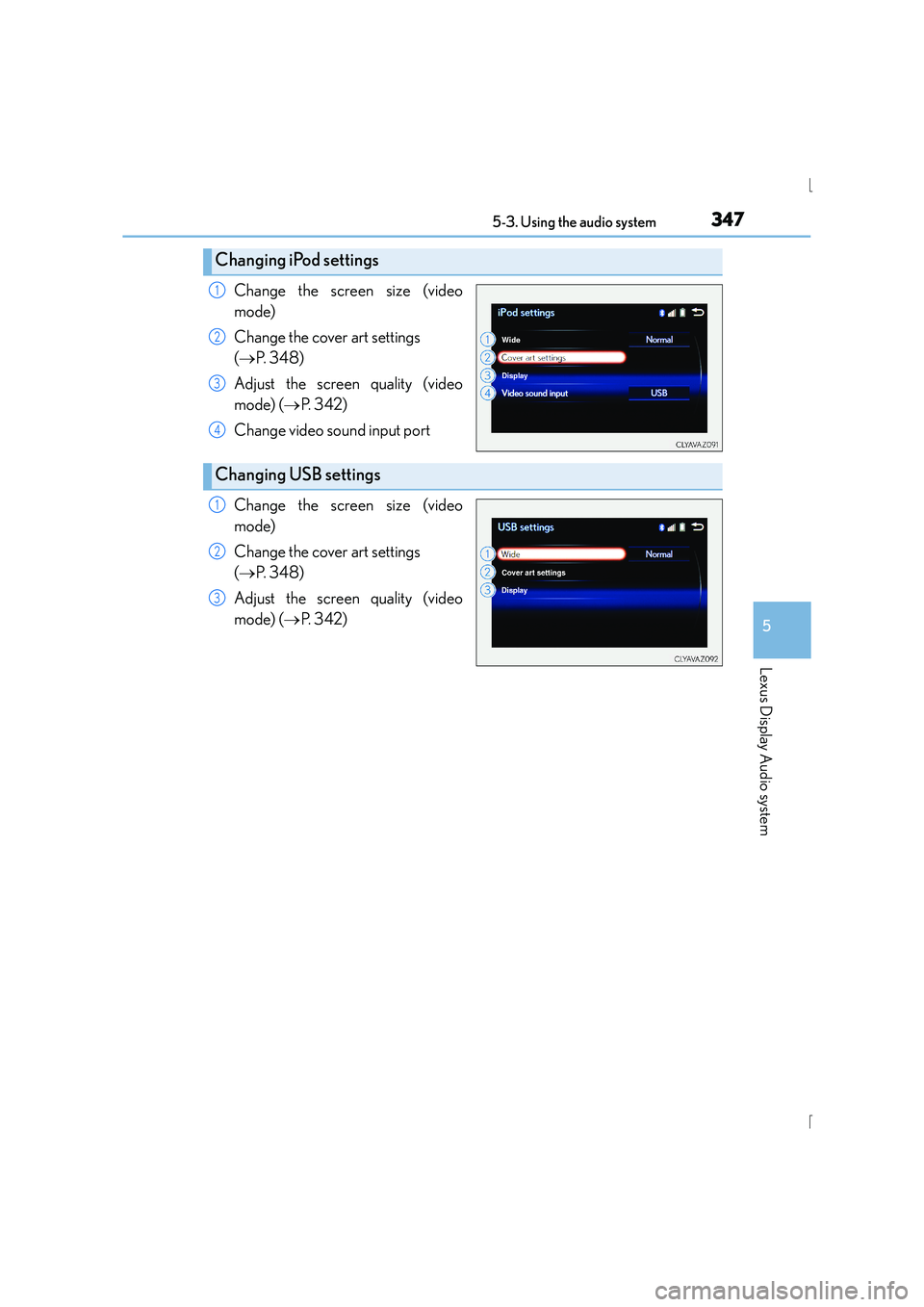
Change the screen size (video
mode)
Change the cover art settings
(→ P. 3 4 8 )
Adjust the screen quality (video
mode) ( →P. 3 4 2 )
Change video so und input port
Change the screen size (video
mode)
Change the cover art settings
( → P. 3 4 8 )
Adjust the screen quality (video
mode) ( →P. 3 4 2 )
Changing iPod settings
1
2
3
4
Changing USB settings
1
2
3
Page 368 of 628
3685-6. Using an external device
IS300h_EE(OM53D56E)
NOTICE
■If the console box lid cannot be fully closed
Depending on the size and shape of the USB memory device that is connected to the
system, the auxiliary box lid may not close fully. In this case, do not forcibly close the lid
as this may damage the USB memory device or the terminals, etc.
■To prevent damage to the USB memory device or its terminals
●Do not leave the USB memory device in the vehicle. The temperature inside the vehi-
cle may become high, resulting in damage to the USB memory device.
●Do not push down on or apply unnecessary pressure to the USB memory device
while it is connected.
●Do not insert foreign objects into the port.
Page 404 of 628
4045-12. Other function
IS300h_EE(OM53D56E)
→P. 335
Go to “MirrorLink
*”: → “Info” → “MirrorLink*”
Select the desired application on the application list screen.
■MirrorLink screen
Follow the specific operation procedures for the smartphone application.
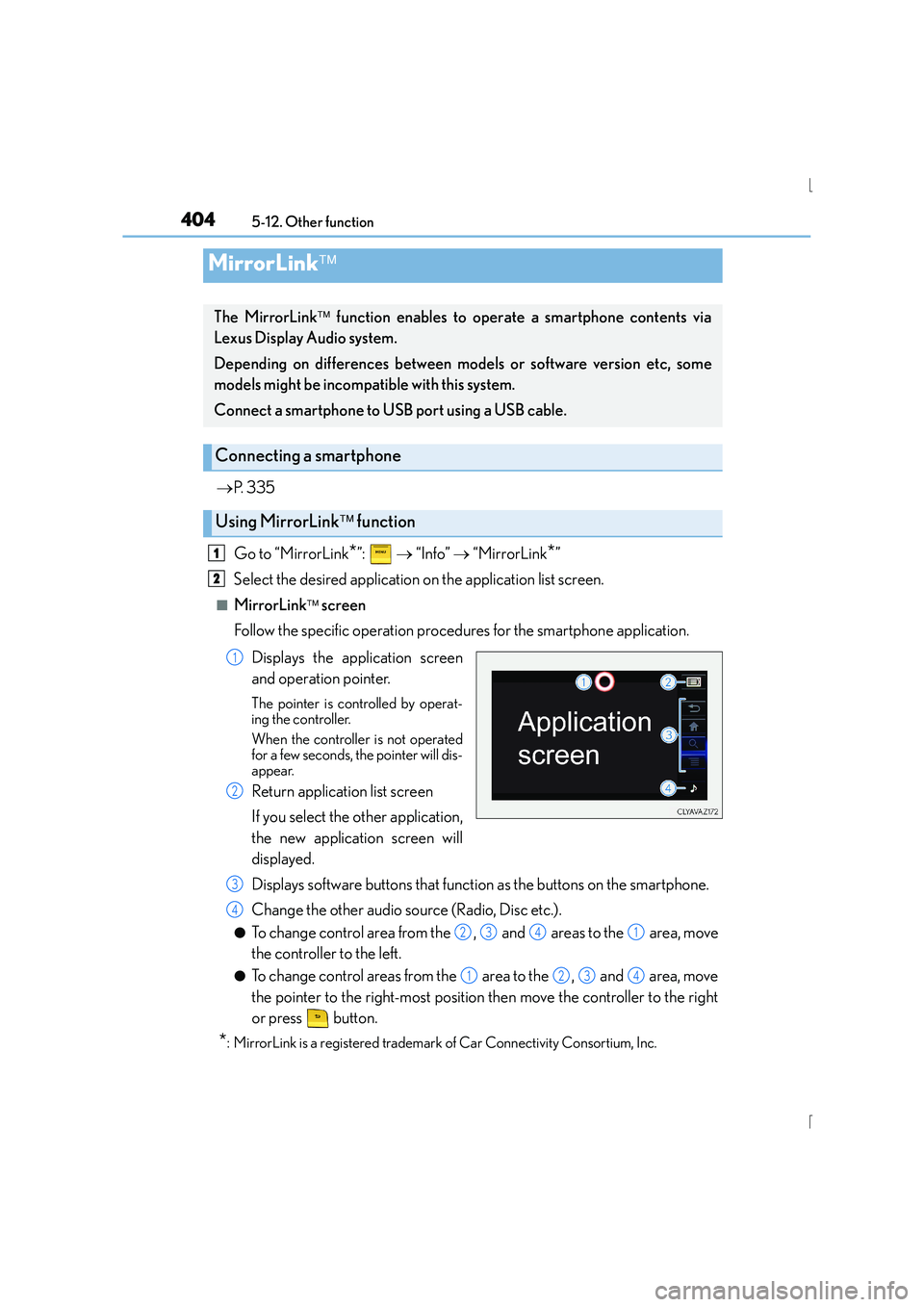
Displays the application screen
and operation pointer.
The pointer is controlled by operat-
ing the controller.
When the controller is not operated
for a few seconds, the pointer will dis-
appear.
Return application list screen
If you select the other application,
the new application screen will
displayed.
Displays software buttons that function as the buttons on the smartphone.
Change the other audio source (Radio, Disc etc.).
●To change control area from the , and areas to the area, move
the controller to the left.
●To change control areas from the area to the , and area, move
the pointer to the right-most position then move the controller to the right
or press button.
*: MirrorLink is a registered trademark of Car Connectivity Consortium, Inc.
MirrorLink
The MirrorLink function enables to operate a smartphone contents via
Lexus Display Audio system.
Depending on differences between models or software version etc, some
models might be incompatible with this system.
Connect a smartphone to USB port using a USB cable.
Connecting a smartphone
Using MirrorLink function
1
2
1
2
3
4
2341
1234
Page 405 of 628
4055-12. Other function
5
Lexus Display Audio system
IS300h_EE(OM53D56E)
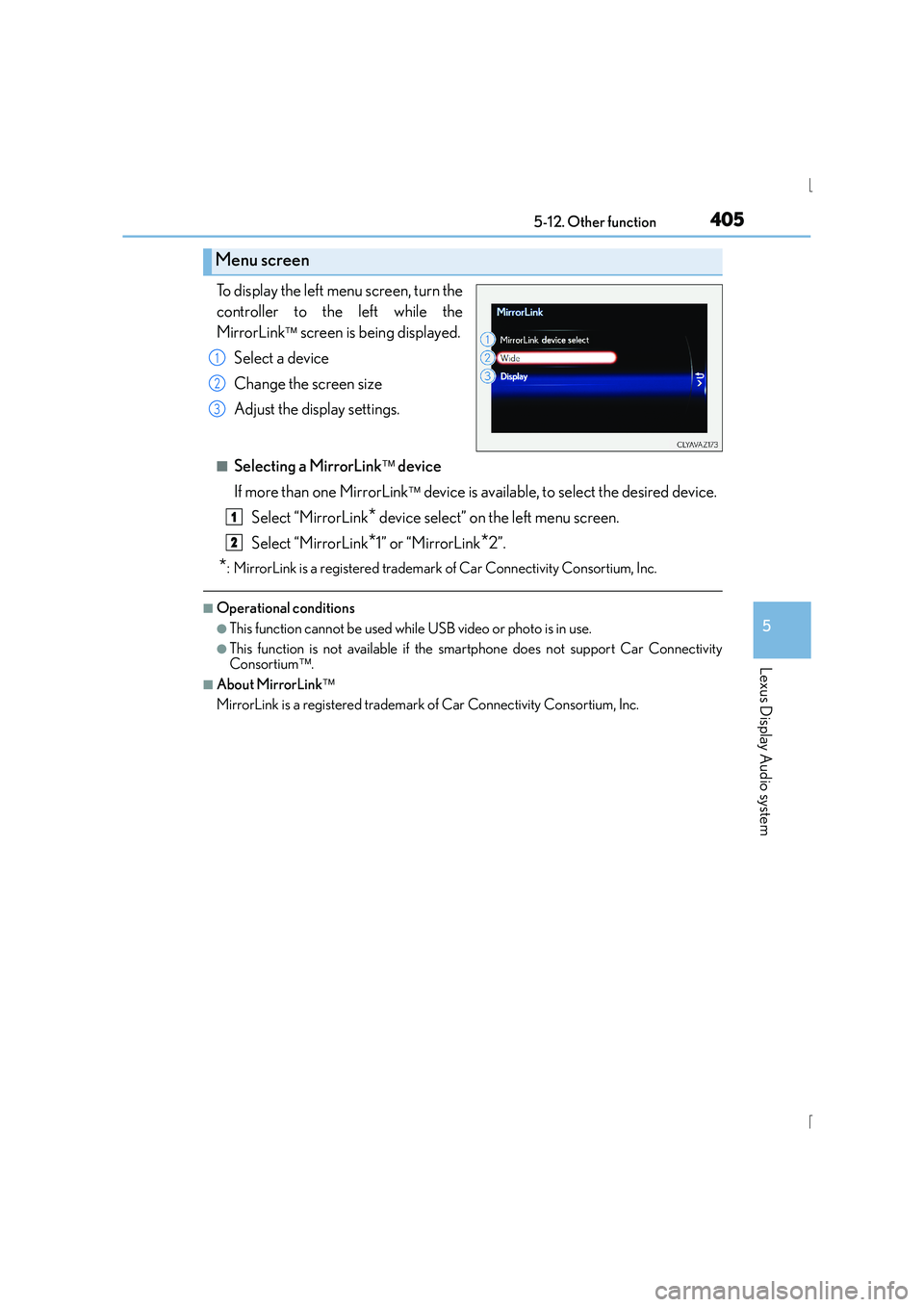
To display the left menu screen, turn the
controller to the left while the
MirrorLink
screen is being displayed.
Select a device
Change the screen size
Adjust the display settings.
■Selecting a MirrorLink device
If more than one MirrorLink
device is available, to select the desired device.
Select “MirrorLink
* device select” on the left menu screen.
Select “MirrorLink
*1” or “MirrorLink*2”.
*: MirrorLink is a registered trademark of Car Connectivity Consortium, Inc.
■Operational conditions
●This function cannot be used while USB video or photo is in use.
●This function is not available if the smartphone does not support Car Connectivity
Consortium.
■About MirrorLink
MirrorLink is a registered trademark of Car Connectivity Consortium, Inc.
Menu screen
1
2
3
1
2
Page 609 of 628
609Alphabetical index
IS300h_EE(OM53D56E)
Airbag manual on-off system ............. 54
Alarm ............................................................ 96
Anchor brackets ...................................... 69
Antennas (smart entry & start system) ......................................... 149
Anti-lock Brake System (ABS) ....... 296
Function ..................................................296
Warning light ....................................... 522
Approach warning ...............................259
Armrest ..................................................... 437
ASC (Active Sound Control).......... 228
Assist grips ..............................................439
Audio input ..............................................335
Audio system ..........................................328 Audio CD player ...............................354
Audio input ...........................................335
AUX port/USB port ............................................335
Bluetooth
® audio ..............................378
iPod.............................................................361
Optimal use .......................................... 344
Portable music player......................369
Radio ........................................................ 352
Steering wheel audio switch ........ 334
USB memory....................................... 364 Automatic headlight leveling
system ..................................................... 231
Warning light....................................... 523
Automatic High Beam ...................... 232
Automatic light control system ...... 229
AUX port................................................. 335
Average fuel economy ......................... 116
Average vehicle speed ......................... 116
Back-up light Replacing light bulb ......................... 502
Wattage ................................................ 588
Battery (12-volt battery) .................... 463
If the 12-volt battery is discharged ........................................ 566
Preparing and checking before winter.....................................322
Warning light......................................... 521
Battery (traction battery) ..................... 83
Blind Spot Monitor (BSM) ............... 310
Blower customization...........................419
Bluetooth
®
Audio system....................................... 378
Hands-free system (for cellular phone) .......................380
Bottle holders......................................... 430
B