seat memory Lexus IS300h 2016 Owner's Manual
[x] Cancel search | Manufacturer: LEXUS, Model Year: 2016, Model line: IS300h, Model: Lexus IS300h 2016Pages: 628, PDF Size: 137.89 MB
Page 2 of 628
TABLE OF CONTENTS2
IS300h_EE(OM53D56E)
For your information ...................................8
Reading this manual .................................. 12
How to search.............................................. 13
Pictorial index .............................................. 14
1-1. For safe useBefore driving .................................34
For safety drive ............................... 36
Seat belts ..........................................38
SRS airbags ..................................... 43
Airbag manual on-off system .............................................54
Pop Up Hood..................................56
Safety information for children........................................... 59
Child restraint systems................60
Installing child restraints ............. 69
Exhaust gas precautions ............ 78
1-2. Hybrid system Hybrid system features ............... 79
Hybrid system precautions .......83
1-3. Theft deterrent system Immobilizer system.......................90
Double locking system................ 95
Alarm ................................................. 96 2. Instrument cluster
Warning lights and indicators ..................................... 104
Gauges and meters ................... 109
Multi-information display...........115
Energy monitor/ consumption screen .................121
3-1. Key information Keys................................................... 130
3-2. Opening, closing and locking the doors and trunk
Doors ............................................... 136
Trunk ................................................. 143
Smart entry & start system ...... 149
3-3. Adjusting the seats Front seats ...................................... 165
Rear seats (folding type) ...........167
Driving position memory ......... 169
Head restraints.............................. 174
3-4. Adjusting the steering wheel and mirrors
Steering wheel ..............................177
Inside rear view mirror ...............179
Outside rear view mirrors ........ 181
1For safety and security
2Instrument cluster
3Operation of
each component
Page 129 of 628
129
3
Operation of
each component
IS300h_EE(OM53D56E)
3-1. Key information
Keys .................................................. 130
3-2. Opening, closing and locking the doors and trunk
Doors ............................................... 136
Trunk ................................................. 143
Smart entry & start system ............................................149
3-3. Adjusting the seats Front seats...................................... 165
Rear seats (folding type) ........... 167
Driving position memory..........169
Head restraints ............................. 174
3-4. Adjusting the steering wheel and mirrors
Steering wheel .............................. 177
Inside rear view mirror...............179
Outside rear view mirrors .........181
3-5. Opening, closing the windows and moon roof
Power windows ............................ 185
Moon roof ...................................... 189
Page 169 of 628
1693-3. Adjusting the seats
3
Operation of each component
IS300h_EE(OM53D56E)
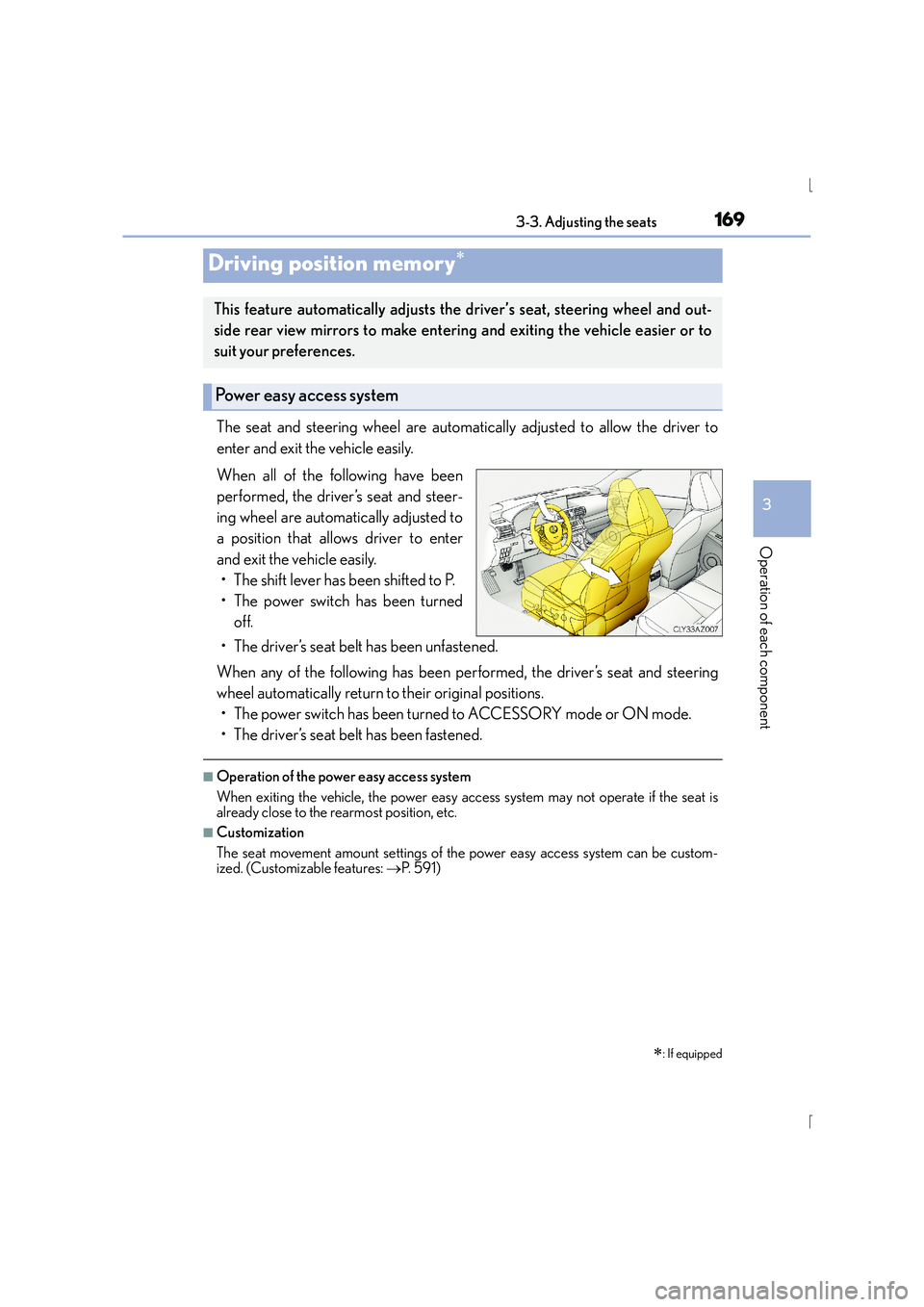
The seat and steering wheel are automatically adjusted to allow the driver to
enter and exit the vehicle easily.
When all of the following have been
performed, the driver’s seat and steer-
ing wheel are automatically adjusted to
a position that allows driver to enter
and exit the vehicle easily.• The shift lever has been shifted to P.
• The power switch has been turned off.
• The driver’s seat belt has been unfastened.
When any of the following has been performed, the driver’s seat and steering
wheel automatically return to their original positions. • The power switch has been turned to ACCESSORY mode or ON mode.
• The driver’s seat belt has been fastened.
■Operation of the power easy access system
When exiting the vehicle, the power easy access system may not operate if the seat is
already close to the rearmost position, etc.
■Customization
The seat movement amount settings of the power easy access system can be custom-
ized. (Customizable features: →P. 5 9 1 )
Driving position memory∗
∗
: If equipped
This feature automatically adjusts the driver’s seat, steering wheel and out-
side rear view mirrors to make entering and exiting the vehicle easier or to
suit your preferences.
Power easy access system
Page 170 of 628
1703-3. Adjusting the seats
IS300h_EE(OM53D56E)
Your preferred driving position (the position of the driver’s seat, steering wheel
and outside rear view mirrors) can be recorded and recalled by pressing a but-
ton.
Three different driving positions can be recorded into memory.
■Recording procedure
Check that the shift lever is in P.
Turn the power switch to ON mode.
Adjust the driver’s seat, steering wheel, and outside rear view mirrors to the
desired positions.
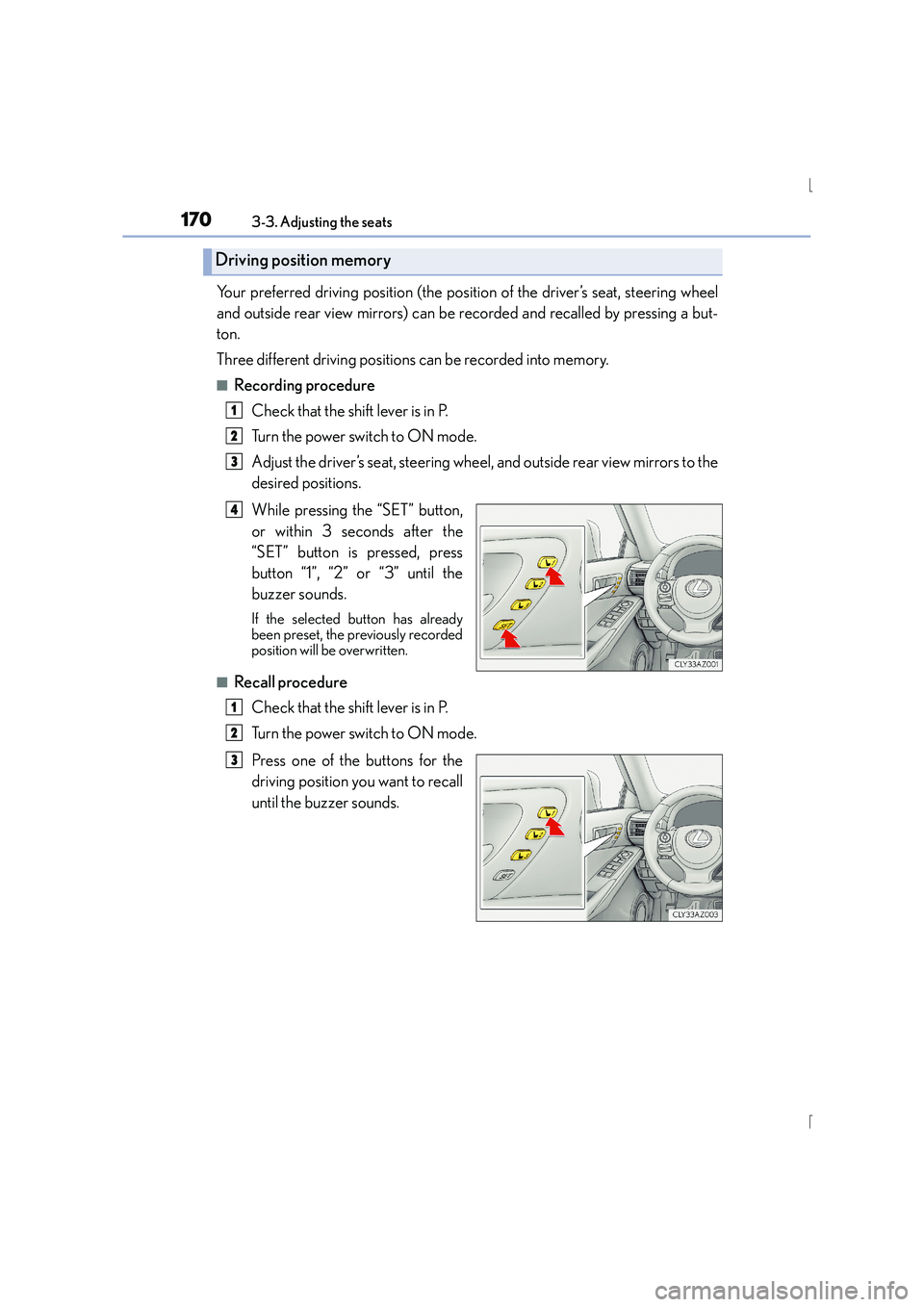
While pressing the “SET” button,
or within 3 seconds after the
“SET” button is pressed, press
button “1”, “2” or “3” until the
buzzer sounds.
If the selected button has already
been preset, the previously recorded
position will be overwritten.
■Recall procedureCheck that the shift lever is in P.
Turn the power switch to ON mode.
Press one of the buttons for the
driving position you want to recall
until the buzzer sounds.
Driving position memory
1
2
3
4
1
2
3
Page 171 of 628
1713-3. Adjusting the seats
3
Operation of each component
IS300h_EE(OM53D56E)
■To stop the position recall operation part-way through
Perform any of the following operations:
●Press the “SET” button.
●Press button “1”, “2” or “3”.
●Operate any of the seat adjustment switches (only cancels seat position recall).
●Operate the tilt and telescopic steering control switch (only cancels steering wheel
position recall).
■Seat positions that can be memorized (→P. 1 6 5 )
The adjusted positions other than the position adjusted by lumbar support switch can be
memorized.
■Operating the driving position memory after turning the power switch off
Recorded seat positions can be activated up to 180 seconds after the driver’s door is
opened and another 60 seconds after it is closed again. Recorded steering wheel posi-
tion can be activated by pressing the power switch.
■In order to correctly use the driving position memory function
If a seat position is already in the furthest po ssible position and the seat is operated in the
same direction, the recorded position may be slightly different when it is recalled.
Page 172 of 628
1723-3. Adjusting the seats
IS300h_EE(OM53D56E)
Each electronic key (including a card key) can be registered to recall your pre-
ferred driving position.
■Registering procedure
Record your driving position to button “1”, “2” or “3” before performing the
following:
Carry only the key you want to register, and then close the driver’s door. If 2 or
more keys are in the vehicle, the driving position cannot be recorded properly.Check that the shift lever is in P.
Turn the power switch to ON mode.
Recall the driving position that you want to record.
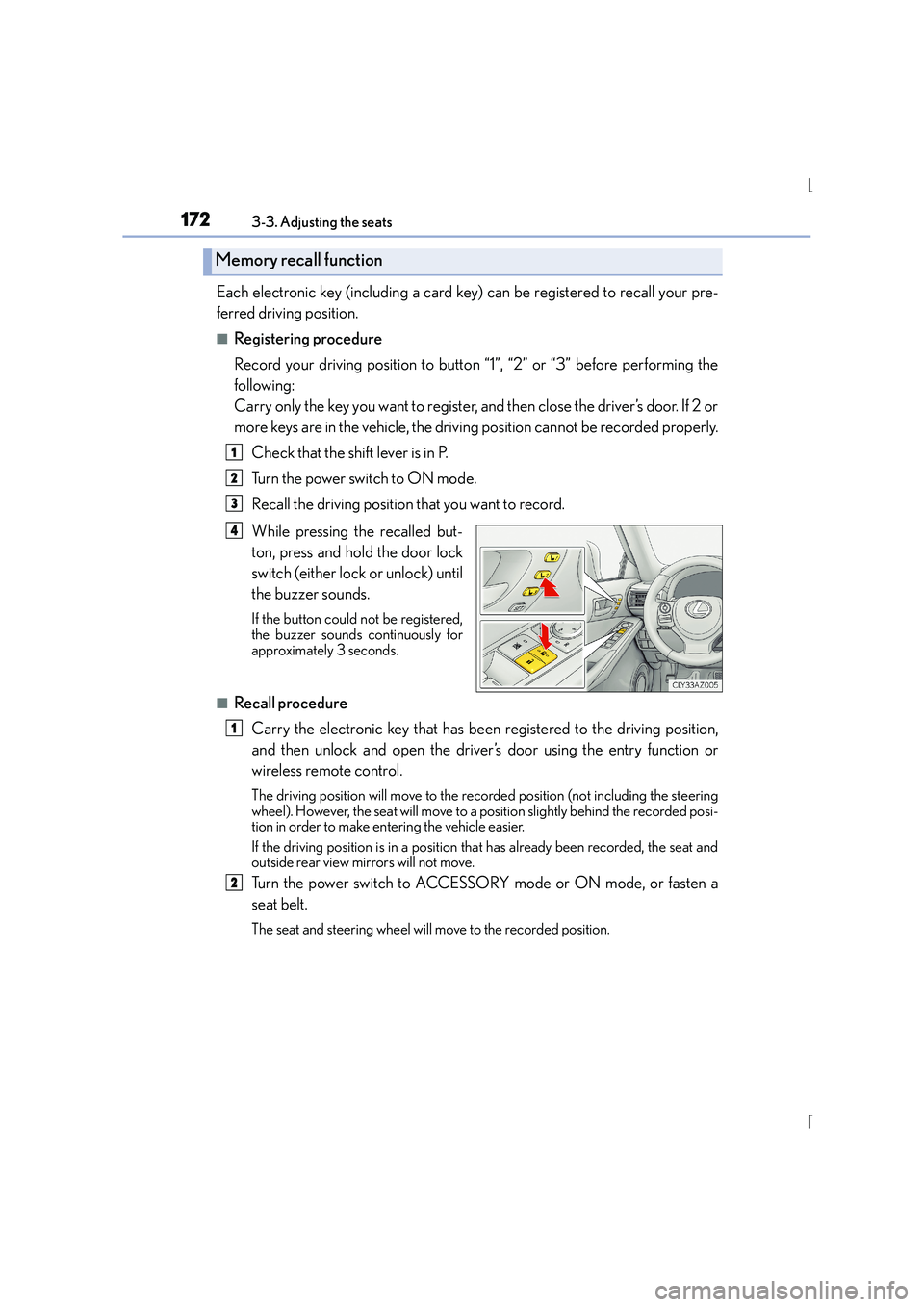
While pressing the recalled but-
ton, press and hold the door lock
switch (either lock or unlock) until
the buzzer sounds.
If the button could not be registered,
the buzzer sounds continuously for
approximately 3 seconds.
■Recall procedureCarry the electronic key that has been registered to the driving position,
and then unlock and open the driver ’s door using the entry function or
wireless remote control.
The driving position will move to the reco rded position (not including the steering
wheel). However, the seat will move to a position slightly behind the recorded posi-
tion in order to make entering the vehicle easier.
If the driving position is in a position that has already been recorded, the seat and
outside rear view mirrors will not move.
Turn the power switch to ACCESSORY mode or ON mode, or fasten a
seat belt.
The seat and steering wheel will move to the recorded position.
Memory recall function
1
2
3
4
1
2
Page 173 of 628
1733-3. Adjusting the seats
3
Operation of each component
IS300h_EE(OM53D56E)
■Cancelation procedure
Carry only the key you want to cancel and then close the driver’s door. If 2 or
more keys are in the vehicle, the driving position cannot be canceled properly.Turn the power switch to ON mode.
While pressing the “SET” button, press and hold the door lock switch
(either lock or unlock) until the buzzer sounds twice.
If the button could not be canceled, the buzzer sounds continuously for approxi-
mately 3 seconds.
■Recalling the driving position us ing the memory recall function
●Different driving positions can be registered for each electronic key. Therefore, the
driving position that is recalled may be di fferent depending on the key being carried.
●If a door other than the driver’s door is unlocked with the smart entry & start system, the
driving position cannot be recalled. In this case, press the driving position button which
has been set.
■Customization
The unlock door settings of the memory recall function can be customized.
(Customizable features: →P. 5 9 1 )
CAUTION
■Seat adjustment caution
Take care during seat adjustment so that the seat does not strike the rear passenger or
squeeze your body against the steering wheel.
1
2
Page 178 of 628
1783-4. Adjusting the steering wheel and mirrors
IS300h_EE(OM53D56E)
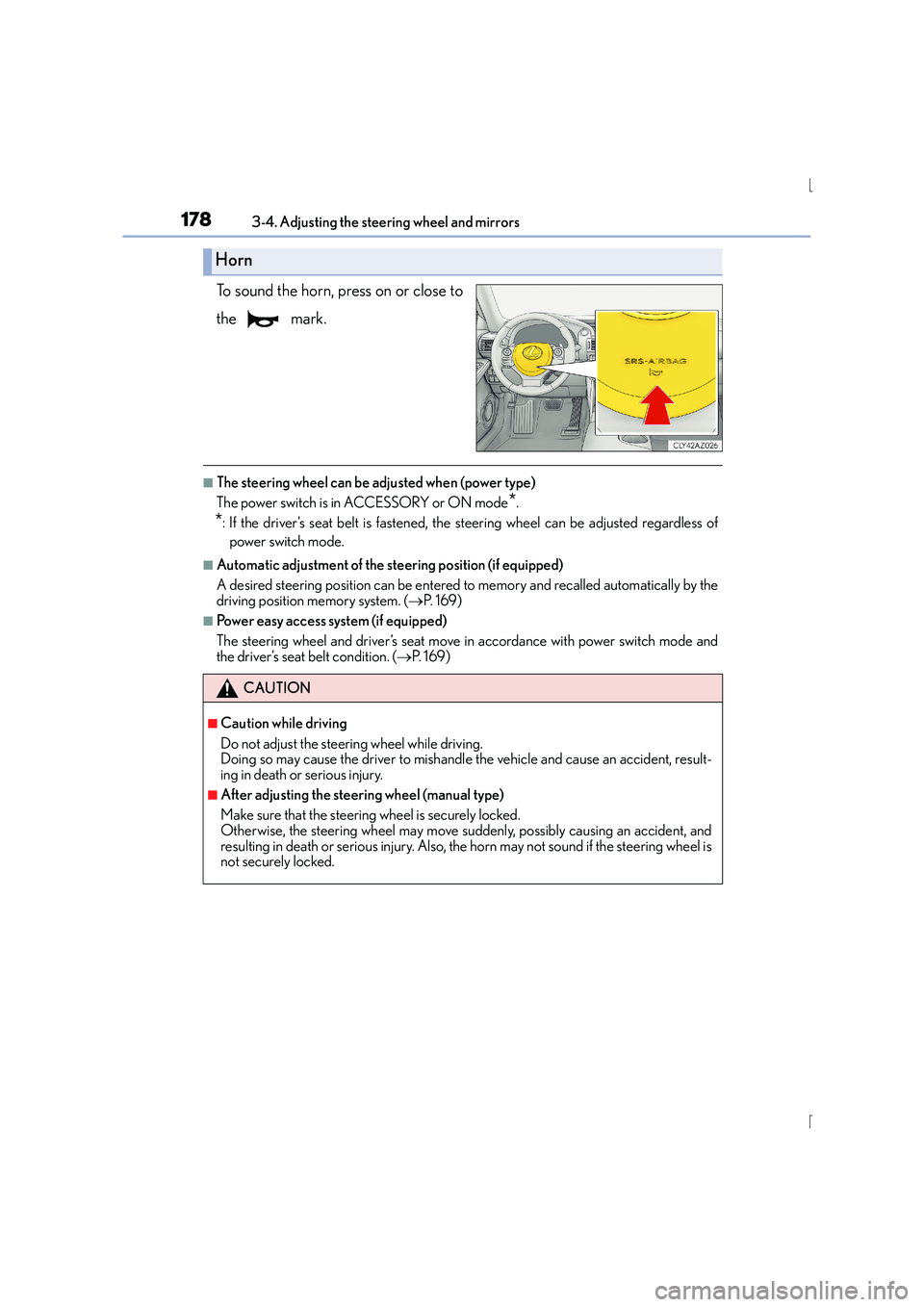
To sound the horn, press on or close to
the mark.
■The steering wheel can be adjusted when (power type)
The power switch is in ACCESSORY or ON mode
*.
*: If the driver’s seat belt is fastened, the steering wheel can be adjusted regardless ofpower switch mode.
■Automatic adjustment of the steering position (if equipped)
A desired steering position can be entered to memory and recalled automatically by the
driving position memory system. ( →P. 1 6 9 )
■Power easy access system (if equipped)
The steering wheel and driver’s seat move in accordance with power switch mode and
the driver’s seat belt condition. ( →P. 1 6 9 )
Horn
CAUTION
■Caution while driving
Do not adjust the steering wheel while driving.
Doing so may cause the driver to mishandle the vehicle and cause an accident, result-
ing in death or serious injury.
■After adjusting the steering wheel (manual type)
Make sure that the steering wheel is securely locked.
Otherwise, the steering wheel may move suddenly, possibly causing an accident, and
resulting in death or serious injury. Also, the horn may not sound if the steering wheel is
not securely locked.
Page 595 of 628
595
9
9-2. Customization
Vehicle specifications
IS300h_EE(OM53D56E)
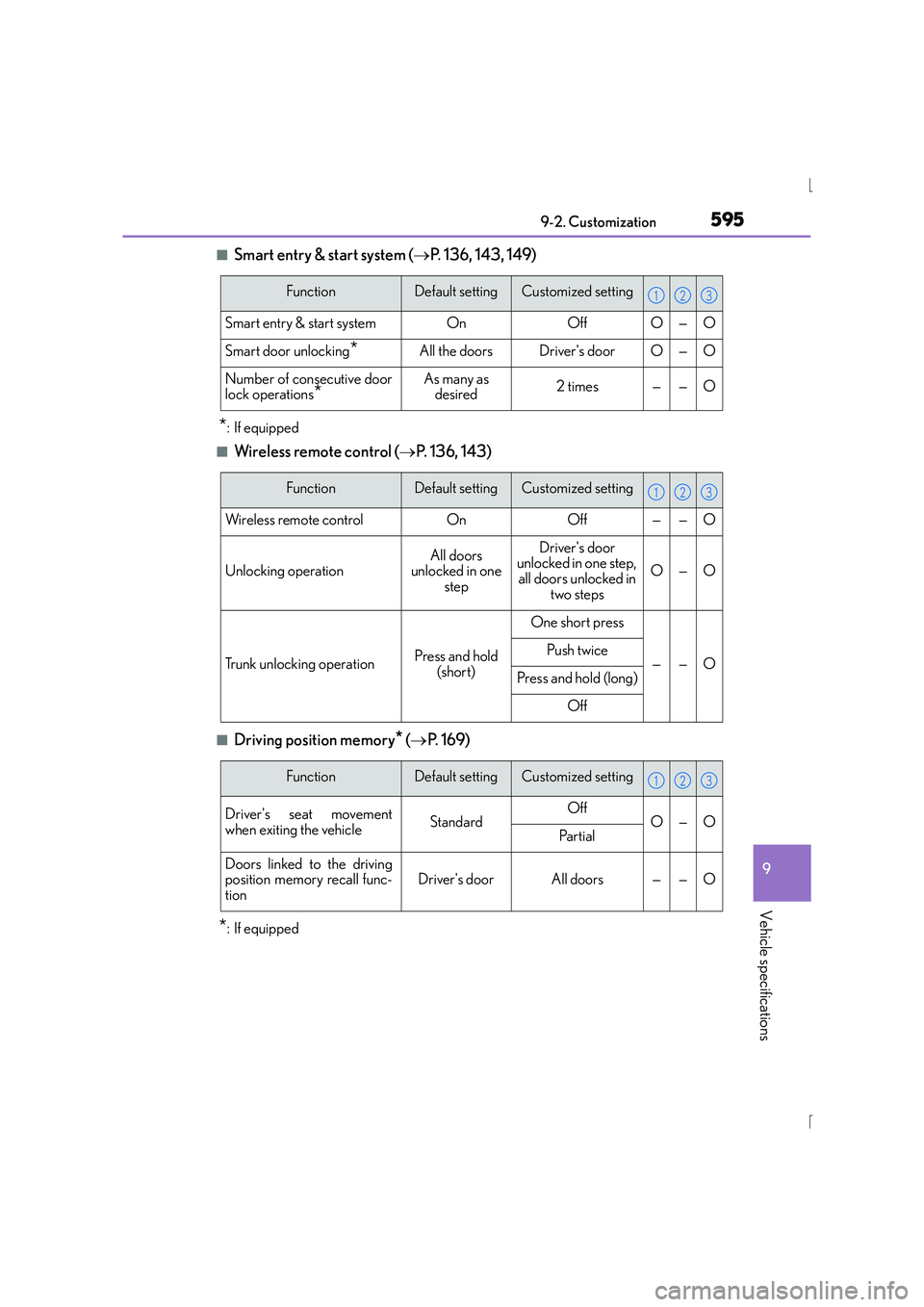
■Smart entry & start system (
→P. 136, 143, 149)
*: If equipped
■Wireless remote control ( →P. 136, 143)
■Driving position memory* (→ P. 1 6 9 )
*: If equipped
FunctionDefault settingCustomized setting
Smart entry & start systemOnOffO—O
Smart door unlocking*All the doorsDriver's doorO—O
Number of consecutive door
lock operations*As many as
desired2 times——O
123
FunctionDefault settingCustomized setting
Wireless remote controlOnOff——O
Unlocking operationAll doors
unlocked in one stepDriver's door
unlocked in one step,
all doors unlocked in two steps
O—O
Trunk unlocking operationPress and hold
(short)
One short press
——OPush twice
Press and hold (long)
Off
123
FunctionDefault settingCustomized setting
Driver's seat movement
when exiting the vehicleStandardOffO—OPa r t i a l
Doors linked to the driving
position memory recall func-
tionDriver's doorAll doors——O
123
Page 612 of 628
612Alphabetical index
IS300h_EE(OM53D56E)
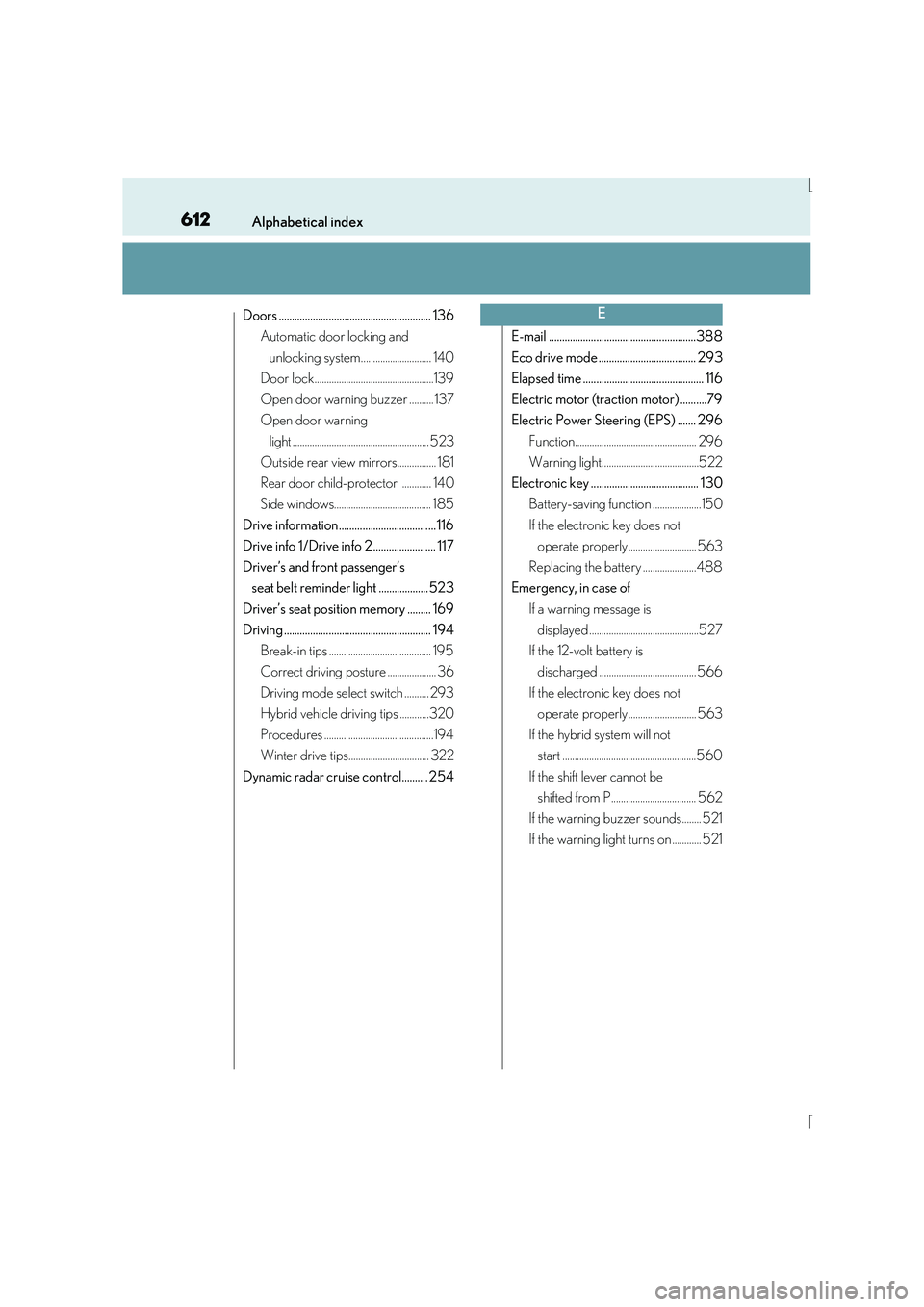
Doors .......................................................... 136Automatic door locking and
unlocking system............................. 140
Door lock.................................................139
Open door warning buzzer .......... 137
Open door warning
light ........................................................ 523
Outside rear view mirrors................ 181
Rear door child-protector ............ 140
Side windows........................................ 185
Drive information..................................... 116
Drive info 1/Drive info 2........................ 117
Driver’s and front passenger’s seat belt reminder light ...................523
Driver’s seat position memory ......... 169
Driving ........................................................ 194 Break-in tips .......................................... 195
Correct driving posture .................... 36
Driving mode select switch .......... 293
Hybrid vehicle driving tips ............320
Procedures .............................................194
Winter drive tips................................. 322
Dynamic radar cruise control.......... 254 E-mail ........................................................388
Eco drive mode ..................................... 293
Elapsed time .............................................. 116
Electric motor (traction motor) ..........79
Electric Power Steering (EPS) ....... 296
Function.................................................. 296
Warning light........................................522
Electronic key ......................................... 130 Battery-saving function ....................150
If the electronic key does not operate properly ............................ 563
Replacing the battery ......................488
Emergency, in case of
If a warning message is displayed .............................................527
If the 12-volt battery is discharged ........................................ 566
If the electronic key does not operate properly ............................ 563
If the hybrid system will not start .......................................................560
If the shift lever cannot be shifted from P................................... 562
If the warning buzzer sounds........ 521
If the warning light turns on ............ 521E