ECO mode Lexus IS300h 2017 User Guide
[x] Cancel search | Manufacturer: LEXUS, Model Year: 2017, Model line: IS300h, Model: Lexus IS300h 2017Pages: 692, PDF Size: 163.7 MB
Page 124 of 692
1242. Instrument cluster
IS300h_EE(OM53D89E)
◆Display items
■Odometer
Displays the total distance the vehicle has been driven.
■Trip meter A/trip meter B
Displays the distance the vehicle has been driven since the meter was last
reset. Trip meters A and B can be used to record and display different dis-
tances independently.
To reset, display the desired trip meter and press and hold the odometer/trip meter
and trip meter reset button.
■ Distance until next engine oil change
Displays the distance the vehicle can be driven until an oil change is neces-
sary.
◆Pop-up display
In some situations the following will be temporarily displayed:
■ Distance until next engine oil change
Displays the distance until the next engi ne oil change. This display will be dis-
played in the following situations:
• When the power switch is turned to ON mode.
• When a warning message indicating that oil maintenance should be performed soon or is required is displayed.
◆Speed warning
When set to on, the vehicl e speed at which the speed warning will start oper-
ating will be displayed. If the vehicle exceeds the set speed, the speed display
will flash and a buzzer will sound.
• To display the odometer, etc. while the sp eed warning is set to on, press the odome-
ter/trip meter and trip meter reset button. (If the button has not been operated for a
certain amount of time, the sp eed warning will be displayed.) • The speed at which the speed warning wi ll start operating can be changed on .
( P. 119)
Odometer/trip meter display area
Page 125 of 692

1252. Instrument cluster
2
Instrument cluster
IS300h_EE(OM53D89E)
■Background color of the indicator/shift position display area (except F SPORT models)
The background color of the indicator/shift po sition display area is changed according to
the driving mode as follows ( P. 348):
●Eco drive mode: Blue
●Sport mode: Red
■G-force display (if equipped)
The G-force values may not be zero even when the vehicle is parked, such as when it is
parked on an incline.
■Suspension of the settings display
●Some settings cannot be changed while driv ing. When changing settings, park the
vehicle in a safe place.
●If a warning message is displayed, operatio n of the settings display will be suspended.
■Liquid crystal display
Small spots or light spots may appear on the display. This phenomenon is characteristic
of liquid crystal displays, and there is no problem continuing to use the display.
■Customization
Some functions can be customized. ( P. 119, 657)
WARNING
■Caution for use while driving
●When operating the multi-information display while driving, pay extra attention to the
safety of the area around the vehicle.
●Do not look continuously at the multi-info rmation display while driving as you may fail to see pedestrians, objects on the road, etc. ahead of the vehicle.
■The information display at low temperatures
Allow the interior of the vehicle to warm up before using the liquid crystal information display. At extremely low temperatures, th e information display monitor may respond
slowly, and display changes may be delayed.
For example, there is a lag between the dr iver’s shifting and the new gear number appearing on the display. This lag could ca use the driver to downshift again, causing
rapid and excessive engine braking and possibly an accident resulting in death or
injury.
■Cautions during setting up the display
As the hybrid system needs to be operating during setting up the display, ensure that
the vehicle is parked in a pl ace with adequate ventilation. In a closed area such as a garage, exhaust gases including harmful carbon monoxide (CO) may collect and enter
the vehicle. This may lead to de ath or a serious health hazard.
Page 131 of 692

1312. Instrument cluster
2
Instrument cluster
IS300h_EE(OM53D89E)
10.3-inch display
Press the “MENU” button on the Remote Touch, and then select on the
“Menu” screen.
If the “Energy monitor” or “Past record” sc reen is displayed, select “Trip informa-
tion”.
Resetting the consumption data
Fuel consumption in the past 15
minutes
Current fuel consumption
Regenerated energy in the past
15 minutes
One symbol indicates 50 Wh.
Up to 5 symbols are shown.
Average vehicle speed since the hybrid system was started.
Elapsed time since the hybrid system was started.
Cruising range ( P. 133)
Average fuel consumption for the past 15 minutes is divided by color into past
averages and averages attained since the power switch was last turned to ON
mode. Use the displayed average fuel consumption as a reference.
The image is an example only.
1
2
3
4
5
6
7
Page 160 of 692
1603-2. Opening, closing and locking the doors and trunk
IS300h_EE(OM53D89E)
■Note for the entry function (if equipped)
●Even when the electronic key is within the effective range (detection areas), the system may not operate properly in the following cases:
• The electronic key is too close to the window or outside door handle, near the
ground, or in a high place when the doors are locked or unlocked. • The electronic key is near the ground or in a high place, or too close to the rear
bumper center when the trunk is opened.
●Do not leave the electronic key on top of th e instrument panel or near the door pockets
when exiting the vehicle. Depending on the radio wave reception conditions, it may be
detected by the antenna outside the cabin an d the doors will become lockable from the outside, possibly trapping the electronic key inside the vehicle.
●As long as the electronic key is within the effective range, the doors may be locked or
unlocked by anyone. However, only the door s detecting the electronic key can be used to unlock the vehicle.
●The doors may unlock or lock if a large amou nt of water splashes on the door handle,
such as in the rain or in a car wash, when t he electronic key is within the effective range. (The doors will automatically be locked af ter approximately 30 seconds if the doors
are not opened and closed.)
●If the wireless remote control is used to lo ck the doors when the electronic key is near the vehicle, there is a possibility that the d oor may not be unlocked by the entry func-
tion. (Use the wireless remote control to unlock the doors.)
●Touching the door lock or unlock sensor while wearing gloves may prevent lock or unlock operation.
●If the door handle becomes wet while the el ectronic key is within the effective range,
the door may lock and unlock repeatedly. In this case, follow the following correction
procedures to wash the vehicle:
• Place the electronic key in a location 2 m (6 ft.) or more away from the vehicle. (Take
care to ensure that the key is not stolen.)
• Set the electronic key to battery-saving mode to disable the smart entry & start sys- tem. ( P. 158)
●If the electronic key is inside the vehicle and a door handle becomes wet during a car wash, a message may be shown on the mult i-information display and a buzzer will
sound outside the vehicle. To turn off the alarm, lock all the doors.
●The lock sensor may not work properly if it comes into contact with ice, snow, mud, etc. Clean the lock sensor and attempt to operate it again, or use the lock sensor on the
lower part of the door handle.
●A sudden handle operation or a handle operation immediately after entering the effec- tive range may prevent the doors from bein g unlocked. Touch the door unlock sensor
and check that the doors are unlocked before pulling the door handle again.
●Unlocking the vehicle may take more time if another electronic key is within the effec- tive range.
Page 174 of 692
1743-3. Adjusting the seats
IS300h_EE(OM53D89E)
■Power easy access system (if equipped)
The driver’s seat and steering wheel move in accordance with power switch mode and
the driver’s seat belt condition. ( P. 177)
■When adjusting the seat
●Take care when adjusting the seat so that the head restraint does not touch the ceiling.
●Vehicles with folding type rear seats: When folding down a rear seatback, if it interferes with a front seatback, adjust the front seat po sition so that the seats no longer interfere
with each other. However, if adjusting the fr ont seat position causes the correct driving
posture to not be maintained, return the rear seatback to its original position. ( P. 175)
WARNING
■When adjusting the seat position
●Take care when adjusting the seat position to ensure that other passengers are not
injured by the moving seat.
●Do not put your hands under the seat or near the moving parts to avoid injury.
Fingers or hands may become jammed in the seat mechanism.
●Make sure to leave enough space around the feet so they do not get stuck.
■Seat adjustment
To reduce the risk of sliding under the lap be lt during a collision, do not recline the seat
more than necessary. If the seat is too reclined, the lap belt may slide past the hips and apply restraint forces
directly to the abdomen, or your neck may contact the shoulder belt, increasing the risk
of death or serious injury in the event of an accident. Adjustments should not be made while drivin g as the seat may unexpectedly move and
cause the driver to lose control of the vehicle.
Page 178 of 692
1783-3. Adjusting the seats
IS300h_EE(OM53D89E)
Your preferred driving position (the position of the driver’s seat, steering wheel
and outside rear view mirrors) can be re corded and recalled by pressing a but-
ton.
Three different driving positions can be recorded into memory.
■Recording procedure
Check that the shift lever is in P.
Turn the power switch to ON mode.
Adjust the driver’s seat, steering wheel, and outside rear view mirrors to the
desired positions.
While pressing the “SET” button,
or within 3 seconds after the
“SET” button is pressed, press
button “1”, “2” or “3” until the
buzzer sounds.
If the selected button has already been preset, the previously recorded
position will be overwritten.
■Recall procedure
Check that the shift lever is in P.
Turn the power switch to ON mode.
Press one of the buttons for the
driving position you want to recall
until the buzzer sounds.
Driving position memory
1
2
3
4
1
2
3
Page 180 of 692
1803-3. Adjusting the seats
IS300h_EE(OM53D89E)
Each electronic key (including a card key) can be registered to recall your pre-
ferred driving position.
■Registering procedure
Record your driving position to button “1”, “2” or “3” before performing the
following:
Carry only the key you want to register, and then close the driver’s door. If 2 or
more keys are in the vehicle, the drivin g position cannot be recorded properly.
Check that the shift lever is in P.
Turn the power switch to ON mode.
Recall the driving position that you want to record.
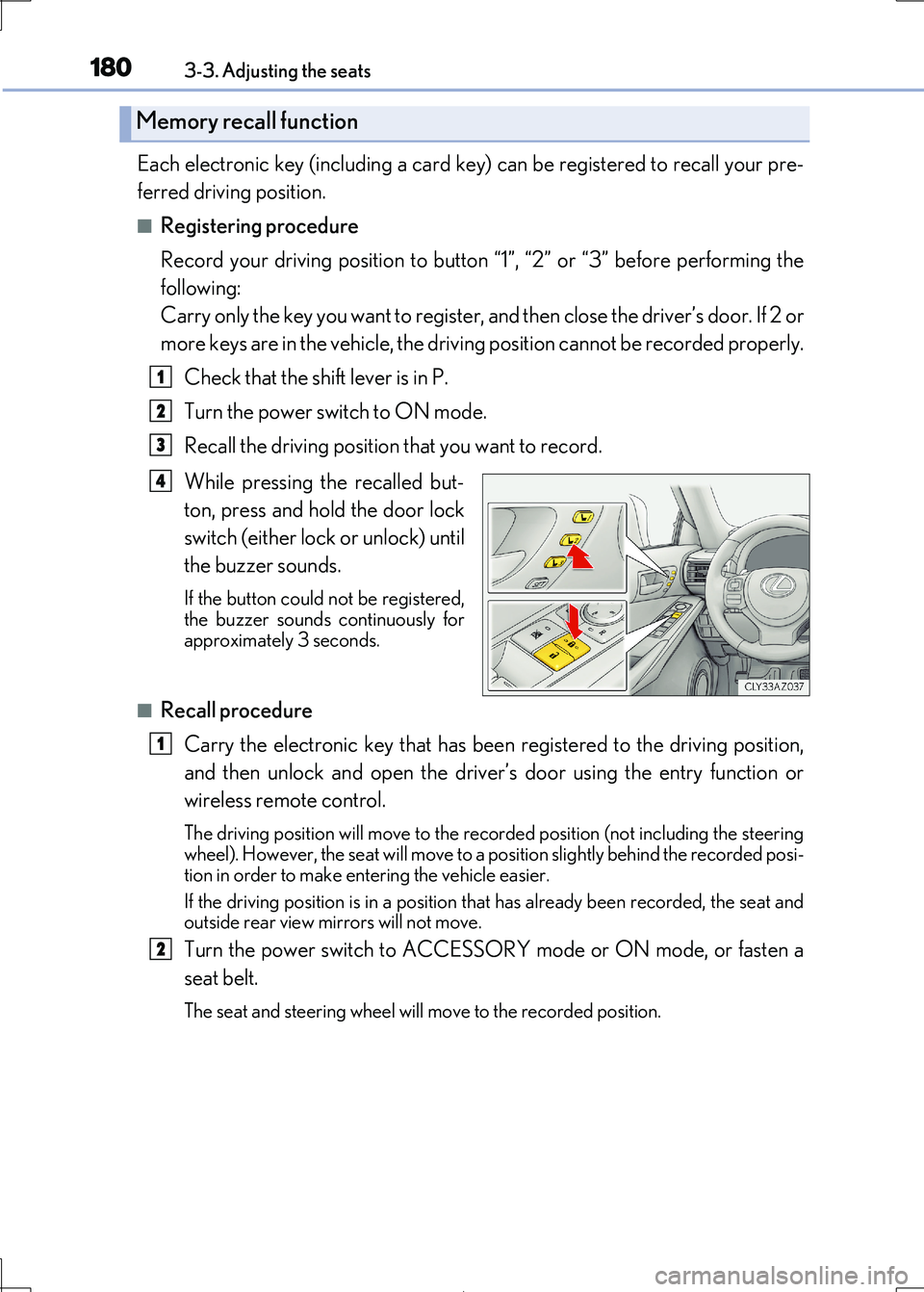
While pressing the recalled but-
ton, press and hold the door lock
switch (either lock or unlock) until
the buzzer sounds.
If the button could not be registered, the buzzer sounds continuously for
approximately 3 seconds.
■Recall procedure
Carry the electronic key that has been registered to the driving position,
and then unlock and open the driver ’s door using the entry function or
wireless remote control.
The driving position will move to the reco rded position (not including the steering
wheel). However, the se at will move to a position slightly behind the recorded posi-
tion in order to make en tering the vehicle easier.
If the driving position is in a position th at has already been recorded, the seat and
outside rear view mirrors will not move.
Turn the power switch to ACCESSORY mode or ON mode, or fasten a
seat belt.
The seat and steering wheel will move to the recorded position.
Memory recall function
1
2
3
4
1
2
Page 181 of 692
1813-3. Adjusting the seats
3
Operation of each component
IS300h_EE(OM53D89E)
■Cancelation procedure
Carry only the key you want to cancel an d then close the driver’s door. If 2 or
more keys are in the vehicle, the driv ing position cannot be canceled properly.
Turn the power switch to ON mode.
While pressing the “SET” button, pr ess and hold the door lock switch
(either lock or unlock) un til the buzzer sounds twice.
If the button could not be canceled, the buzzer sounds continuously for approxi-
mately 3 seconds.
■Recalling the driving position using the memory recall function
●Different driving positions can be registered for each electronic key. Therefore, the driving position that is recalled may be di fferent depending on the key being carried.
●If a door other than the driver’s door is unlocked with the smart entry & start system, the
driving position cannot be recalled. In this case, press the driving position button which has been set.
■Customization
The unlock door settings of the memo ry recall function can be customized. (Customizable features: P. 657)
WARNING
■Seat adjustment caution
Take care during seat adjustme nt so that the seat does not strike the rear passenger or squeeze your body against the steering wheel.
1
2
Page 191 of 692

1913-4. Adjusting the steering wheel and mirrors
3
Operation of each component
IS300h_EE(OM53D89E)
When either “L” or “R” of the mirror select switch is selected, the outside rear
view mirrors will automatically angle down wards when the vehicle is reversing in
order to give a better view of the ground.
To disable this function, select neither “L” nor “R”.
■Adjusting the mirror angle when the vehicle is reversing
With the shift lever in R, adjust th e mirror angle at a desired position.
The adjusted angle will be memorized an d the mirror will automatically tilt to
the memorized angle whenever the shift lever is shifted to R from next time.
The memorized downward tilt position of the mirror is linked to the normal position
(angle adjusted with the shif t lever in other than R). Therefore, if the normal posi- tion is changed after adjustment, th e tilt position will also change.
When the normal position is change d, readjust the angle in reversing.
■Mirror angle can be adjusted when
The power switch is in ACCESSORY or ON mode.
■When disconnecting and reco nnecting battery terminals
The automatic folding/extending mirror function will return to off as default. To turn the
function on, press the switch again to select on.
■When the mirrors are fogged up
The outside rear view mirrors can be cleare d using the mirror defoggers. Turn on the
rear window defogger to turn on the outside rear view mirror defoggers. (P. 474)
■Automatic adjustment of the mirror angle (if equipped)
A desired mirror face angle can be entered to memory and recalled automatically by the
driving position memory. ( P. 177)
■Auto anti-glare function (if equipped)
When the anti-glare inside re ar view mirror is set to automatic mode, the outside rear
view mirrors will activate in conjunction with the anti-glare inside rear view mirror to
reduce reflected light. ( P. 188)
■Using automatic mode in cold weather
When automatic mode is used in cold weat her, the door mirror could freeze up and
automatic stowing and return ma y not be possible. In this case, remove any ice and snow from the door mirror, then either operate th e mirror using manual mode or move the mir-
ror by hand.
■Customization
The automatic mirror folding and extending operation can be changed. (Customizable features: P. 657)
Linked mirror function when reversing (if equipped)
Page 194 of 692
1943-5. Opening, closing the windows and moon roof
IS300h_EE(OM53D89E)
■The power windows can be operated when
The power switch is in ON mode.
■Operating the power windows after turning the hybrid system off
The power windows can be operated for ap proximately 45 seconds after the power
switch is turned to ACCESSORY mode or turned off. They cannot, however, be oper-
ated once either front door is opened.
■Jam protection function
If an object becomes jammed between the window and the window frame while the win-
dow is closing, window movement is stop ped and the window is opened slightly.
■Catch protection function
If an object becomes caught between the door and window while the window is opening,
window movement is stopped.
■When the window cannot be opened or closed
When the jam protection functi on or catch protection function operates unusually and
the door window cannot be opened or closed , perform the following operations with the power window switch of that door.
●Stop the vehicle. With the power switch in ON mode, within 4 seconds of the jam pro-
tection function or catch protection function activating, continuously operate the power window switch in the one-touch clos ing direction or one-touch opening direc-
tion so that the door window can be opened and closed.
●If the door window cannot be opened and closed even when performing the above operations, perform the following pr ocedure for function initialization.
Turn the power switch to ON mode.
Pull and hold the power window switch in the one-touch closing direction and com- pletely close the door window.
Release the power window sw itch for a moment, resume pulling the switch in the
one-touch closing direction, and hold it there for approximately 6 seconds or more.
Press and hold the power window switch in the one-touch opening direction. After
the door window is completely opened, cont inue holding the switch for an additional
1 second or more.
Release the power window switch for a mo ment, resume pushing the switch in the
one-touch opening direction, and hold it there for approximately 4 seconds or
more.
Pull and hold the power window switch in the one-touch closing direction again.
After the door window is completely clos ed, continue holding the switch for a fur-
ther 1 second or more.
If you release the switch wh ile the window is moving, start again from the beginning.
If the window reverses and cannot be fully cl osed or opened, have the vehicle inspected
by any authorized Lexus retailer or Lexus au thorized repairer, or any reliable repairer.
1
2
3
4
5
6