brake light Lexus IS300h 2017 User Guide
[x] Cancel search | Manufacturer: LEXUS, Model Year: 2017, Model line: IS300h, Model: Lexus IS300h 2017Pages: 692, PDF Size: 163.7 MB
Page 270 of 692
2704-5. Using the driving support systems
IS300h_EE(OM53D89E)
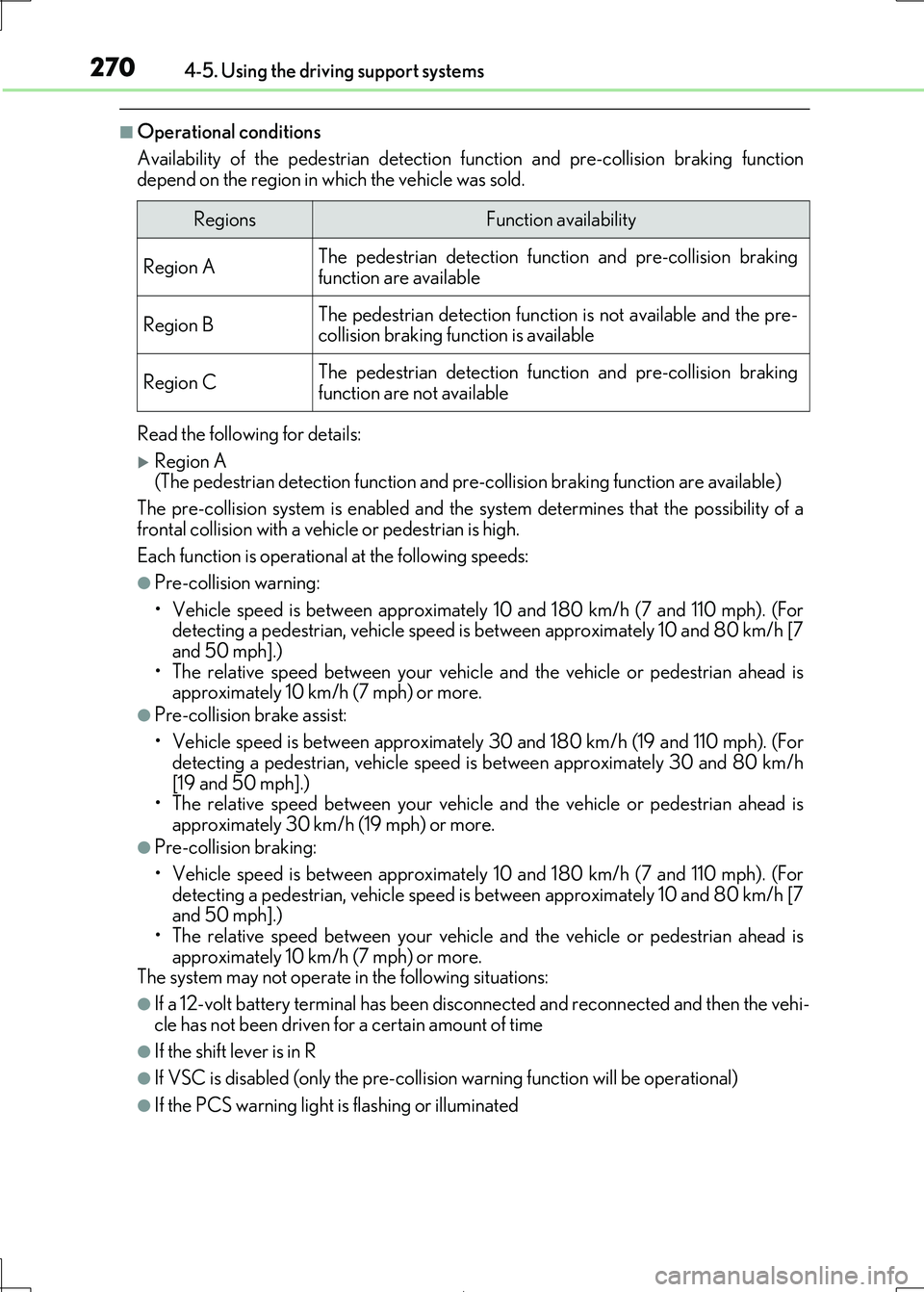
■Operational conditions
Availability of the pedestrian detection function and pre-collision braking function
depend on the region in which the vehicle was sold.
Read the following for details:
Region A (The pedestrian detection function and pre-collision braking function are available)
The pre-collision system is enabled and the sy stem determines that the possibility of a
frontal collision with a vehicle or pedestrian is high.
Each function is operationa l at the following speeds:
●Pre-collision warning:
• Vehicle speed is between approximately 10 and 180 km/h (7 and 110 mph). (For detecting a pedestrian, vehicle speed is between approximately 10 and 80 km/h [7
and 50 mph].)
• The relative speed between your vehicle and the vehicle or pedestrian ahead is approximately 10 km/h (7 mph) or more.
●Pre-collision brake assist:
• Vehicle speed is between approximately 30 and 180 km/h (19 and 110 mph). (For
detecting a pedestrian, vehicle speed is between approximately 30 and 80 km/h
[19 and 50 mph].) • The relative speed between your vehicle and the vehicle or pedestrian ahead is
approximately 30 km/h (19 mph) or more.
●Pre-collision braking:
• Vehicle speed is between approximately 10 and 180 km/h (7 and 110 mph). (For
detecting a pedestrian, vehicle speed is between approximately 10 and 80 km/h [7 and 50 mph].)
• The relative speed between your vehicle and the vehicle or pedestrian ahead is
approximately 10 km/h (7 mph) or more.
The system may not operate in the following situations:
●If a 12-volt battery terminal has been disconnected and reconnected and then the vehi-
cle has not been driven for a certain amount of time
●If the shift lever is in R
●If VSC is disabled (only the pre-collis ion warning function will be operational)
●If the PCS warning light is flashing or illuminated
RegionsFunction availability
Region AThe pedestrian detection function and pre-collision braking function are available
Region BThe pedestrian detection function is not available and the pre-
collision braking function is available
Region CThe pedestrian detection func tion and pre-collision braking
function are not available
Page 271 of 692
2714-5. Using the driving support systems
4
Driving
IS300h_EE(OM53D89E)
Region B
(The pedestrian detection function is not available and the pre-collision braking func- tion is available)
The pre-collision system is enabled and the sy stem determines that the possibility of a
frontal collision with a vehicle is high.
Each function is operationa l at the following speeds:
●Pre-collision warning:
• Vehicle speed is between approximately 15 and 180 km/h (10 and 110 mph). • The relative speed between your vehicle and the vehicle ahead is approximately 10
km/h (7 mph) or more.
●Pre-collision brake assist:
• Vehicle speed is between approximately 30 and 180 km/h (19 and 110 mph).
• The relative speed between your vehicle and the vehicle ahead is approximately 30 km/h (19 mph) or more.
●Pre-collision braking:
• Vehicle speed is between approximately 15 and 180 km/h (10 and 110 mph).
• The relative speed between your vehicle and the vehicle ahead is approximately 10
km/h (7 mph) or more. The system may not operate in the following situations:
●If a 12-volt battery terminal has been disconnected and reconnected and then the vehi-
cle has not been driven for a certain amount of time
●If the shift lever is in R
●If VSC is disabled (only the pre-collis ion warning function will be operational)
●If the PCS warning light is flashing or illuminated
Page 272 of 692
2724-5. Using the driving support systems
IS300h_EE(OM53D89E)
Region C
(The pedestrian dete ction function and pre-collision braking function are not avail- able)
The pre-collision system is enabled and the sy stem determines that the possibility of a
frontal collision with a vehicle is high.
Each function is operationa l at the following speeds:
●Pre-collision warning:
• Vehicle speed is between approximately 15 and 180 km/h (10 and 110 mph). • The relative speed between your vehicle and the vehicle ahead is approximately 10
km/h (7 mph) or more.
●Pre-collision brake assist:
• Vehicle speed is between approximately 30 and 180 km/h (19 and 110 mph).
• The relative speed between your vehicle and the vehicle ahead is approximately 30 km/h (19 mph) or more.
The system may not operate in the following situations:
●If a 12-volt battery terminal has been disconnected and reconnected and then the vehi- cle has not been driven for a certain amount of time
●If the shift lever is in R
●If VSC is disabled (only the pre-collis ion warning function will be operational)
●If the PCS warning light is flashing or illuminated
Page 278 of 692
2784-5. Using the driving support systems
IS300h_EE(OM53D89E)
■If the PCS warning light flashes and a warning message is displayed on the multi-infor-
mation display
The pre-collision system may be temporarily unavailable or there may be a malfunction
in the system.
●In the following situations, the warning light will turn off, the message will disappear and the system will become operational when normal operating conditions return:
• When the radar sensor or camera sensor or the area around either sensor is hot,
such as in the sun • When the radar sensor or came ra sensor or the area around either sensor is cold,
such as in an extremely cold environment
• When the radar sensor or front grille embl em is dirty or covered with snow, etc. • When the part of the windshield in front of the camera sensor is fogged up or cov-
ered with condensation or ic e (Defogging the windshield: P. 474)
• If the camera sensor is obstructed, such as when the hood is open or a sticker is attached to the windshield near the camera sensor
●If the PCS warning light continues to flash or the warning message does not disappear, the system may be malfunctioning. Have the vehicle inspected by any authorized Lexus
retailer or Lexus authoriz ed repairer, or any reliable repairer immediately.
■If VSC is disabled
●If VSC is disabled (P. 354), the pre-collision brake assist and pre-collision braking
functions are also disabled.
●The PCS warning light will turn on and “VSC Turned Off Pre-Collision Brake System Unavailable” will be displayed on the multi-information display.
Page 296 of 692
2964-5. Using the driving support systems
IS300h_EE(OM53D89E)
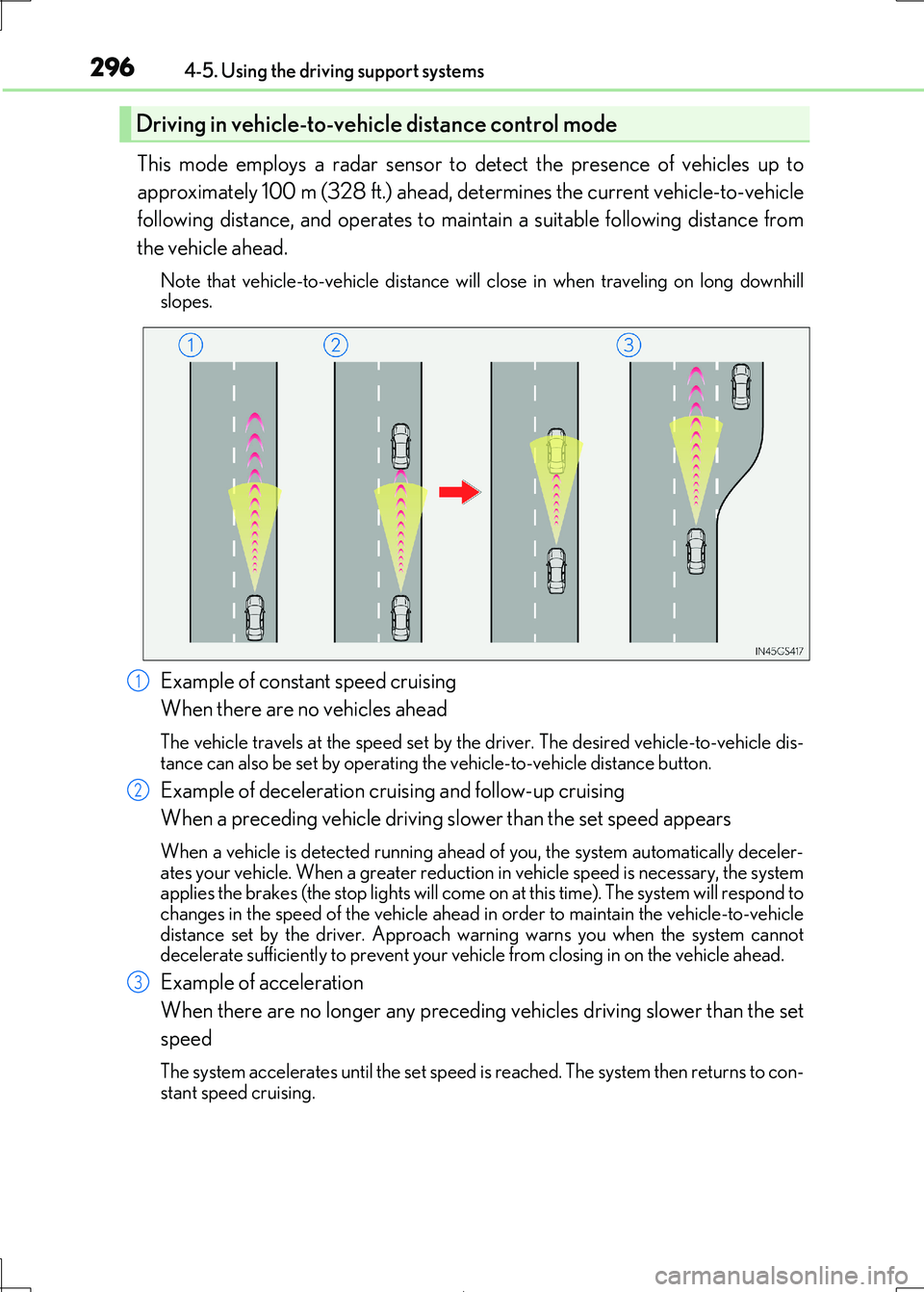
This mode employs a radar sensor to detect the presence of vehicles up to
approximately 100 m (328 ft.) ahead, de termines the current vehicle-to-vehicle
following distance, and operates to main tain a suitable following distance from
the vehicle ahead.
Note that vehicle-to-v ehicle distance will close in when traveling on long downhill
slopes.
Example of constant speed cruising
When there are no vehicles ahead
The vehicle travels at the speed set by the driver. The desired vehicle-to-vehicle dis-
tance can also be set by operating the vehicle-to-vehicle distance button.
Example of deceleration cruising and follow-up cruising
When a preceding vehicle driving sl ower than the set speed appears
When a vehicle is detected running ahead of you, the system automatically deceler- ates your vehicle. When a greater reduction in vehicle speed is necessary, the system
applies the brakes (the stop lights will come on at this time). The system will respond to
changes in the speed of the vehicle ahead in order to maintain the vehicle-to-vehicle distance set by the driver. Approach wa rning warns you when the system cannot
decelerate sufficie ntly to prevent your vehicle from closing in on the vehicle ahead.
Example of acceleration
When there are no longer any preceding vehicles driving slower than the set
speed
The system accelerates until the set speed is reached. The system then returns to con-
stant speed cruising.
Driving in vehicle-to-vehicle distance control mode
1
2
3
Page 316 of 692
3164-5. Using the driving support systems
IS300h_EE(OM53D89E)
WARNING
■Sensor detection information
●The sensor’ detection areas are limited to the areas around the vehicle’ bumper.
●Certain vehicle conditions and surrounding environments, such as the following, may
affect the ability of the sensor s to correctly detect objects. Pay particular attention in the following situations. Failure to do so may result in the vehicle being driven
unsafely, possibly leading to an accident.
• There is dirt, snow or ice on the sensor. (Wiping the sensors will resolve this prob- lem.)
• The sensor is frozen. (Thawing th e area will resolve this problem.)
In especially cold weather, if a sensor is frozen the screen may show an abnormal dis- play, or obstacles may not be detected.
• The sensor is covered in any way.
• The vehicle is leaning considerably to one side. • On an extremely bumpy road, on an incline, on gravel, or on grass.
• The vicinity of the vehicle is noisy due to vehicle horns, motorcycle engines, air
brakes of large vehicles, or other lo ud noises producing ultrasonic waves. • There is another vehicle equipped with parking assist sensors in the vicinity.
• The sensor is coated with a sheet of spray or heavy rain.
• The vehicle is equipped with a fender pole or wireless antenna. • Towing eyelets are installed.
• The bumper or sensor receives a strong impact.
• The vehicle is approaching a tall or curved curb. • In harsh sunlight or intense cold weather.
• The area directly under the bumpers is not detected.
• If obstacles draw too close to the sensor. • A non-genuine Lexus suspension (low ered suspension etc.) is installed.
• People may not be detected if they are wearing certain types of clothing.
In addition to the examples above, there ar e instances in which, because of their shape, signs and other objects may be judged by a sensor to be closer than they are.
●The shape of the obstacle may prevent a sensor from detecting it. Pay particular
attention to the following obstacles:
• Wires, fences, ropes, etc.
• Cotton, snow and other materi als that absorb sound waves
• Sharply-angled objects • Low obstacles
• Tall obstacles with upper sections projec ting outwards in the direction of your
vehicle • People, animals and other moving objects
• People wearing certain types of clothing
Page 353 of 692

3534-5. Using the driving support systems
4
Driving
IS300h_EE(OM53D89E)
◆Adaptive Variable Suspension System (if equipped)
Controls the damping force of the shoc k absorber of each wheel according to
the road and driving conditions, helpin g achieve a comfortable ride, excellent
driveability and a high level of stability.
If SPORT S+ mode is selected using the driving mode select switch, the
damping force will become more suitable for sporty driving. (P. 349)
◆VDIM (Vehicle Dynamics Integrated Management)
Provides integrated control of the AB S, brake assist, TRC, VSC, hill-start
assist control, and EPS systems
Helps to maintain vehicle stability when swerving on slippery road surfaces by
controlling the brakes and hybrid system output
◆Emergency brake signal
When the brakes are applied suddenly, the stop lights automatically flash to
alert the vehicle behind.
The slip indicator light will flash while
the TRC/VSC/ABS systems are oper-
ating.
When the TRC/VSC/ABS systems are operating
Page 354 of 692
3544-5. Using the driving support systems
IS300h_EE(OM53D89E)
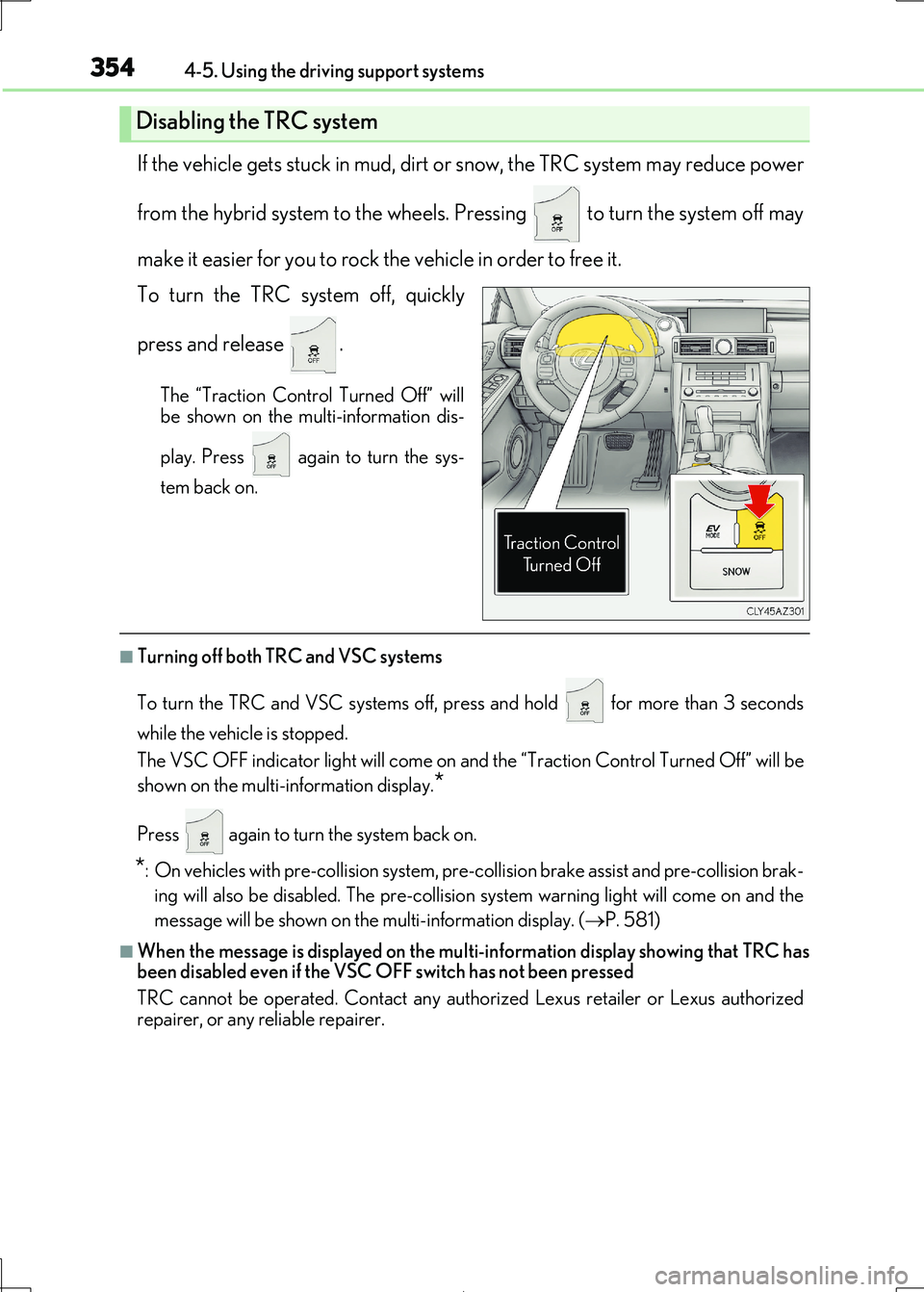
If the vehicle gets stuck in mud, dirt or snow, the TRC system may reduce power
from the hybrid system to the wheels. Pressing to turn the system off may
make it easier for you to rock the vehicle in order to free it.
To turn the TRC system off, quickly
press and release .
The “Traction Control Turned Off” will
be shown on the multi-information dis-
play. Press again to turn the sys-
tem back on.
■Turning off both TRC and VSC systems
To turn the TRC and VSC systems off, pr ess and hold for more than 3 seconds
while the vehicle is stopped.
The VSC OFF indicator light will come on an d the “Traction Control Turned Off” will be
shown on the multi-information display.*
Press again to turn the system back on.
*: On vehicles with pre-collision system, pre-co llision brake assist and pre-collision brak-
ing will also be disabled. The pre-collision sy stem warning light will come on and the
message will be shown on the multi-information display. (P. 581)
■When the message is displayed on the multi-information display showing that TRC has
been disabled even if the VSC OFF switch has not been pressed
TRC cannot be operated. Contact any authorized Lexus retailer or Lexus authorized
repairer, or any reliable repairer.
Disabling the TRC system
Page 357 of 692
3574-5. Using the driving support systems
4
Driving
IS300h_EE(OM53D89E)
WARNING
■The ABS does not operate effectively when
●The limits of tire gripping performance have been exceeded (such as excessively
worn tires on a snow covered road).
●The vehicle hydroplanes while driving at high speed on wet or slick roads.
■Stopping distance when the ABS is operating may exceed that of normal conditions
The ABS is not designed to sh orten the vehicle’s stopping distance. Always maintain a
safe distance from the vehicle in front of you, especially in the following situations:
●When driving on dirt, gravel or snow-covered roads
●When driving with tire chains
●When driving over bumps in the road
●When driving over roads with potholes or uneven surfaces
■TRC/VSC may not operate effectively when
Directional control and power may not be achievable while driving on slippery road surfaces, even if the TRC/VSC system is operating.
Drive the vehicle carefully in conditions where stability and power may be lost.
■Hill- start assist control does not operate effectively when
●Do not overly rely on hill-start assist control. Hill-start assist control may not operate
effectively on steep inclines and roads covered with ice.
●Unlike the parking brake, hill-start assist co ntrol is not intended to hold the vehicle stationary for an extended pe riod of time. Do not attempt to use hill-start assist con-
trol to hold the vehicle on an incline, as doing so may lead to an accident.
■When the VSC is activated
The slip indicator light flashes. Always drive carefully. Reckless driving may cause an
accident. Exercise particular care when the indicator light flashes.
■When the TRC/VSC systems are turned off
Be especially careful and drive at a speed appropriate to the road conditions. As these
are the systems to help ensure vehicle stability and driving force, do not turn the TRC/
VSC systems off unless necessary.
■Replacing tires
Make sure that all tires are of the specif ied size, brand, tread pattern and total load
capacity. In addition, make sure that the tire s are inflated to the recommended tire infla- tion pressure level.
The ABS, TRC and VSC systems will not function correctly if different tires are installed
on the vehicle. Contact any authorized Lexus retailer or Le xus authorized repairer, or any reliable
repairer for further information when replacing tires or wheels.
■Handling of tires and the suspension
Using tires with any kind of problem or modi fying the suspension will affect the driving assist systems, and may cause a system to malfunction.
Page 358 of 692
358
IS300h_EE(OM53D89E)
4-6. Driving tips
◆Using Eco drive mode
When using Eco drive mode, the torq ue corresponding to the accelerator
pedal depression amount can be generate d more smoothly than it is in normal
conditions. In addition, the operation of the air conditioning system (heating/
cooling) will be minimized, im proving the fuel economy. (P. 348)
◆Use of Hybrid System Indicator
The Eco-friendly driving is possible by keeping the indicator needle (except F
SPORT models) or bar display (F SPOR T models) of Hybrid System Indicator
within the Eco area. ( P. 109)
◆Shift lever operation
Shift the shift lever to D wh en stopped at a traffic light, or driving in heavy traf-
fic, etc. Shift the shift lever to P when parking. When using the N, there is no
positive effect on fuel consumption. In the N, the gasoline engine operates but
electricity cannot be genera ted. Also, when using the air conditioning system,
etc., the hybrid battery (tractio n battery) power is consumed.
◆Accelerator pedal/brake pedal operation
●Drive your vehicle smoothly. Avoid abrupt acceleration and deceleration.
Gradual acceleration and deceleration will make more effective use of the
electric motor (traction motor) withou t having to use gasoline engine power.
●Avoid repeated acceleration. Repeated acceleration consumes hybrid bat-
tery (traction battery) power, resulting in poor fuel consumption. Battery
power can be restored by driving with the accelerator pedal slightly released.
◆When braking
Make sure to operate the brakes gently and in a timely manner. A greater
amount of electrical energy can be regenerated when slowing down.
Hybrid vehicle driving tips
For economical and ecological driving, pay attention to the following points: