fuel Lexus IS300h 2017 User Guide
[x] Cancel search | Manufacturer: LEXUS, Model Year: 2017, Model line: IS300h, Model: Lexus IS300h 2017Pages: 692, PDF Size: 163.7 MB
Page 110 of 692

1102. Instrument cluster
IS300h_EE(OM53D89E)
■Tachometer
Hybrid System Indicator switches to the tachometer when driving mode is in sport mode.
The settings of the tachometer display can be changed on the multi-information display.
( P. 119)
■Engine speed
On hybrid vehicles, engine speed is precisely controlled in order to help improve fuel
efficiency and reduce exhaust emissions etc.
There are times when the engine speed that is displayed may differ even when vehicle operation and driving conditions are the same.
■Outside temperature display
In the following situations, the correct outside temperature may not be displayed, or the display may take longer than normal to change.
●When stopped, or driving at low sp eeds (less than 20 km/h [12 mph])
●When the outside temperature has changed suddenly (at the entrance/exit of a garage, tunnel, etc.)
■Pop-up display
●In some situations, such as when a switch operation is performed, a pop-up display will be temporarily displayed on the multi-info rmation display or the odometer/trip meter
screen (F SPORT models).
●Some pop-up displays can be set on/off. ( P. 119)
■Customization
The meter display can be customized on the multi-information display. (P. 119)
NOTICE
■To prevent damage to the engine and its components
●Do not let the indicator needle of the tachometer enter the red zone, which indicates
the maximum engine speed.
●The engine may be overheating if the engine coolant temperature gauge is in the red zone (H). In this case, immediately stop the vehicle in a safe place, and check the
engine after it has cooled completely. ( P. 636)
Page 114 of 692
1142. Instrument cluster
IS300h_EE(OM53D89E)
◆Using the content display area
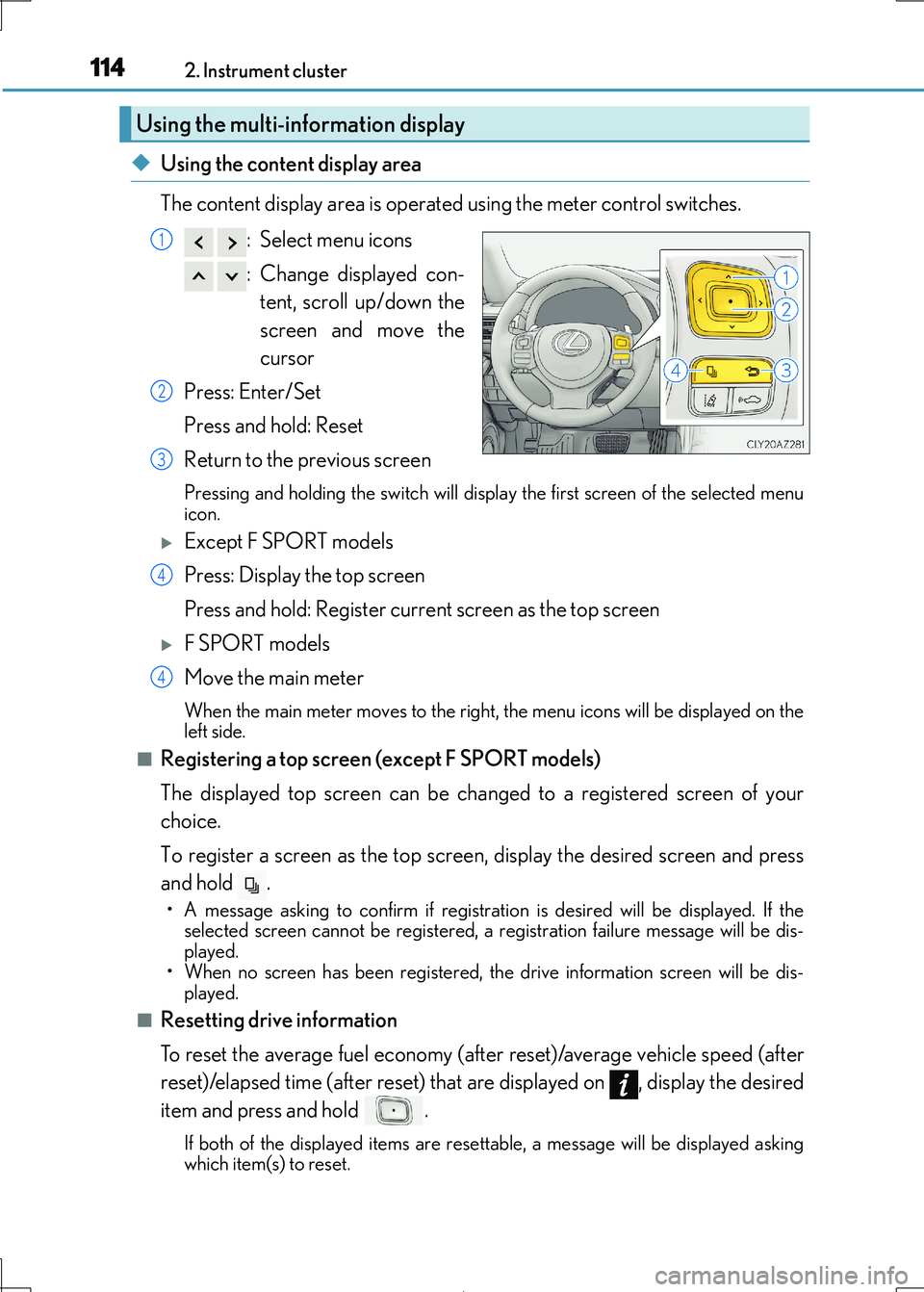
The content display area is operated using the meter control switches.
: Select menu icons
: Change displayed con-
tent, scroll up/down the
screen and move the
cursor
Press: Enter/Set
Press and hold: Reset
Return to the previous screen
Pressing and holding the switch will display the first screen of the selected menu
icon.
Except F SPORT models
Press: Display the top screen
Press and hold: Register current screen as the top screen
F SPORT models
Move the main meter
When the main meter moves to the right, the menu icons will be displayed on the
left side.
■Registering a top screen (except F SPORT models)
The displayed top screen can be changed to a registered screen of your
choice.
To register a screen as the top screen, display the desired screen and press
and hold .
• A message asking to confirm if registrati on is desired will be displayed. If the selected screen canno t be registered, a registration failure message will be dis-
played.
• When no screen has been registered, the drive information screen will be dis-
played.
■Resetting drive information
To reset the average fuel economy (after reset)/average vehicle speed (after
reset)/elapsed time (after reset) that are displayed on , display the desired
item and press and hold .
If both of the disp layed items are resettable, a message will be displayed asking
which item(s) to reset.
Using the multi-information display
1
2
3
4
4
Page 116 of 692
1162. Instrument cluster
IS300h_EE(OM53D89E)
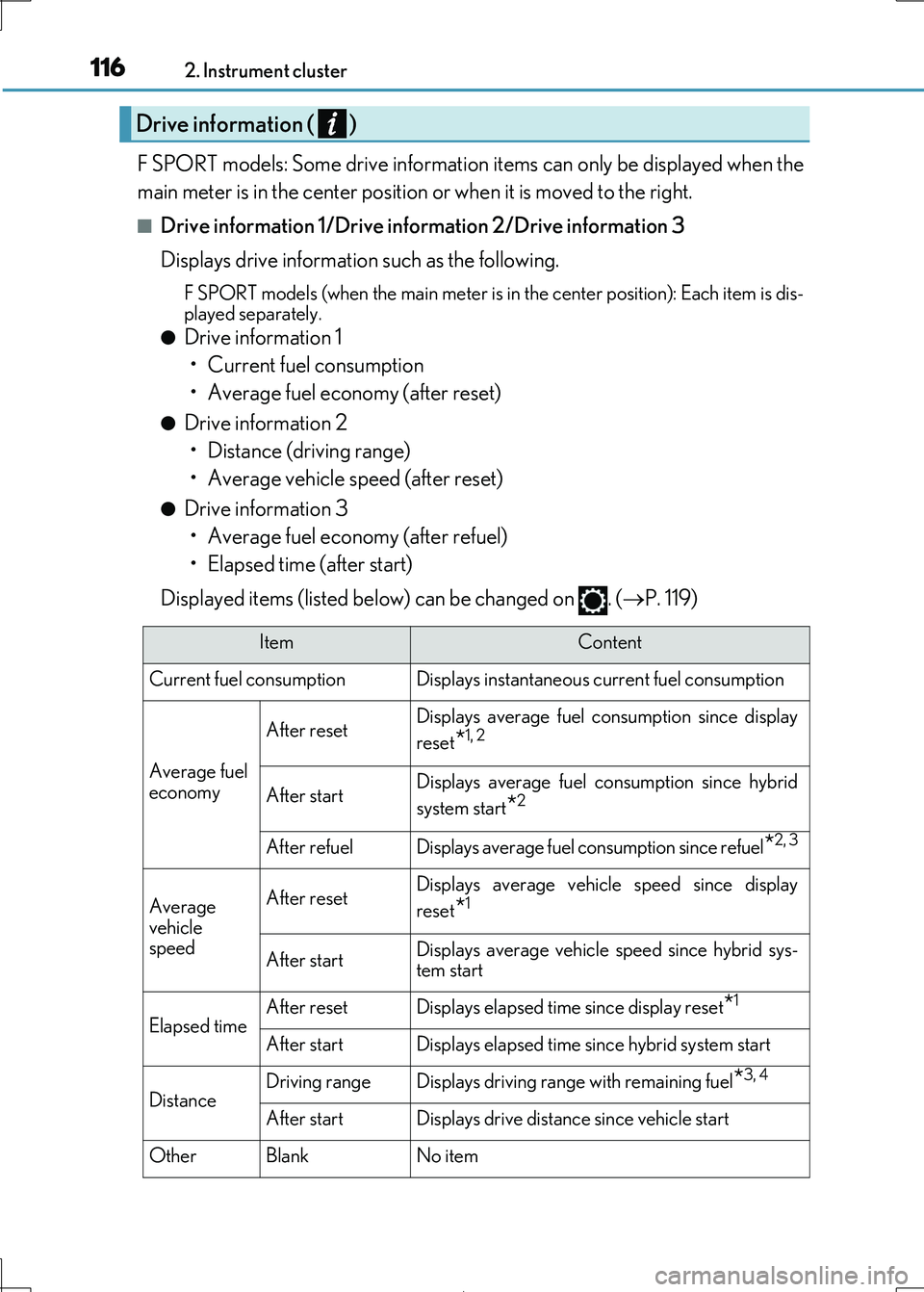
F SPORT models: Some drive information items can only be displayed when the
main meter is in the center position or when it is moved to the right.
■Drive information 1/Drive information 2/Drive information 3
Displays drive information such as the following.
F SPORT models (when the main meter is in the center position): Each item is dis-
played separately.
●Drive information 1
• Current fuel consumption
• Average fuel economy (after reset)
●Drive information 2
• Distance (driving range)
• Average vehicle speed (after reset)
●Drive information 3
• Average fuel economy (after refuel)
• Elapsed time (after start)
Displayed items (listed below) can be changed on . ( P. 119)
Drive information ( )
ItemContent
Current fuel consumption Displays in stantaneous current fuel consumption
Average fuel
economy
After resetDisplays average fuel consumption since display
reset*1, 2
After startDisplays average fuel consumption since hybrid
system start*2
After refuelDisplays average fuel consumption since refuel*2, 3
Average
vehicle speed
After resetDisplays average vehicle speed since display
reset*1
After startDisplays average vehicle speed since hybrid sys-
tem start
Elapsed timeAfter resetDisplays elapsed time since display reset*1
After startDisplays elapsed time since hybrid system start
DistanceDriving rangeDisplays driving range with remaining fuel*3, 4
After startDisplays drive distance since vehicle start
OtherBlankNo item
Page 117 of 692
1172. Instrument cluster
2
Instrument cluster
IS300h_EE(OM53D89E)
*1:Resetting: P. 114
*2: Use the displayed fuel consumption as a reference.
*3: When only a small amount of fuel is added to the tank, the display may not be
updated.
When refueling, turn the power switch off. If the vehicle is refueled without turning the
power switch off, the display may not be updated.
*4: This distance is computed based on your average fuel consumption. As a result, the
actual distance that can be driven may differ from that displayed.
■Energy monitor
P. 127
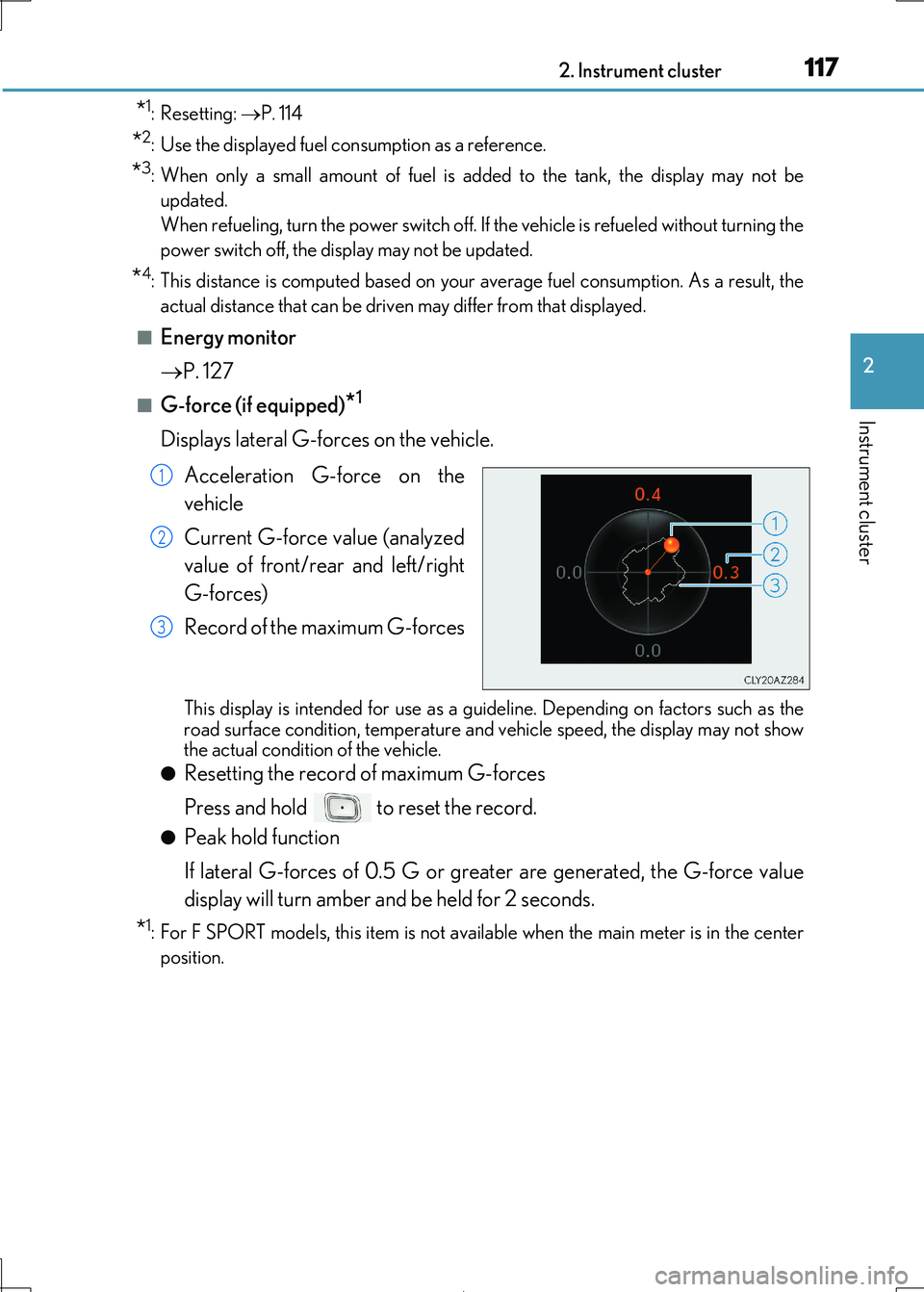
■G-force (if equipped)*1
Displays lateral G-forces on the vehicle.
Acceleration G-force on the
vehicle
Current G-force value (analyzed
value of front/rear and left/right
G-forces)
Record of the maximum G-forces
This display is intended fo r use as a guideline. Depending on factors such as the road surface condition, temperature and vehicle speed, the display may not show
the actual condition of the vehicle.
●Resetting the record of maximum G-forces
Press and hold to reset the record.
●Peak hold function
If lateral G-forces of 0.5 G or greater are generated, the G-force value
display will turn amber and be held for 2 seconds.
*1: For F SPORT models, this item is not ava ilable when the main meter is in the center
position.
1
2
3
Page 130 of 692

1302. Instrument cluster
IS300h_EE(OM53D89E)
■Trip information
Lexus Display Audio screen
Press the “MENU” button on the Lexu s Display Audio controller, and then
select “Car” on the “MENU” screen.
If the “Trip information” screen does not appear, move the controller to the right
and select “Trip information”.
Fuel consumption in the past 15
minutes
Current fuel consumption
Regenerated energy in the past
15 minutes
One symbol indicates 50 Wh.
Up to 5 symbols are shown.
Average vehicle speed since the
hybrid system was started.
Elapsed time since the hybrid system was started.
Cruising range ( P. 133)
Fuel consumption
1
2
3
4
5
6
Page 131 of 692

1312. Instrument cluster
2
Instrument cluster
IS300h_EE(OM53D89E)
10.3-inch display
Press the “MENU” button on the Remote Touch, and then select on the
“Menu” screen.
If the “Energy monitor” or “Past record” sc reen is displayed, select “Trip informa-
tion”.
Resetting the consumption data
Fuel consumption in the past 15
minutes
Current fuel consumption
Regenerated energy in the past
15 minutes
One symbol indicates 50 Wh.
Up to 5 symbols are shown.
Average vehicle speed since the hybrid system was started.
Elapsed time since the hybrid system was started.
Cruising range ( P. 133)
Average fuel consumption for the past 15 minutes is divided by color into past
averages and averages attained since the power switch was last turned to ON
mode. Use the displayed average fuel consumption as a reference.
The image is an example only.
1
2
3
4
5
6
7
Page 132 of 692
1322. Instrument cluster
IS300h_EE(OM53D89E)
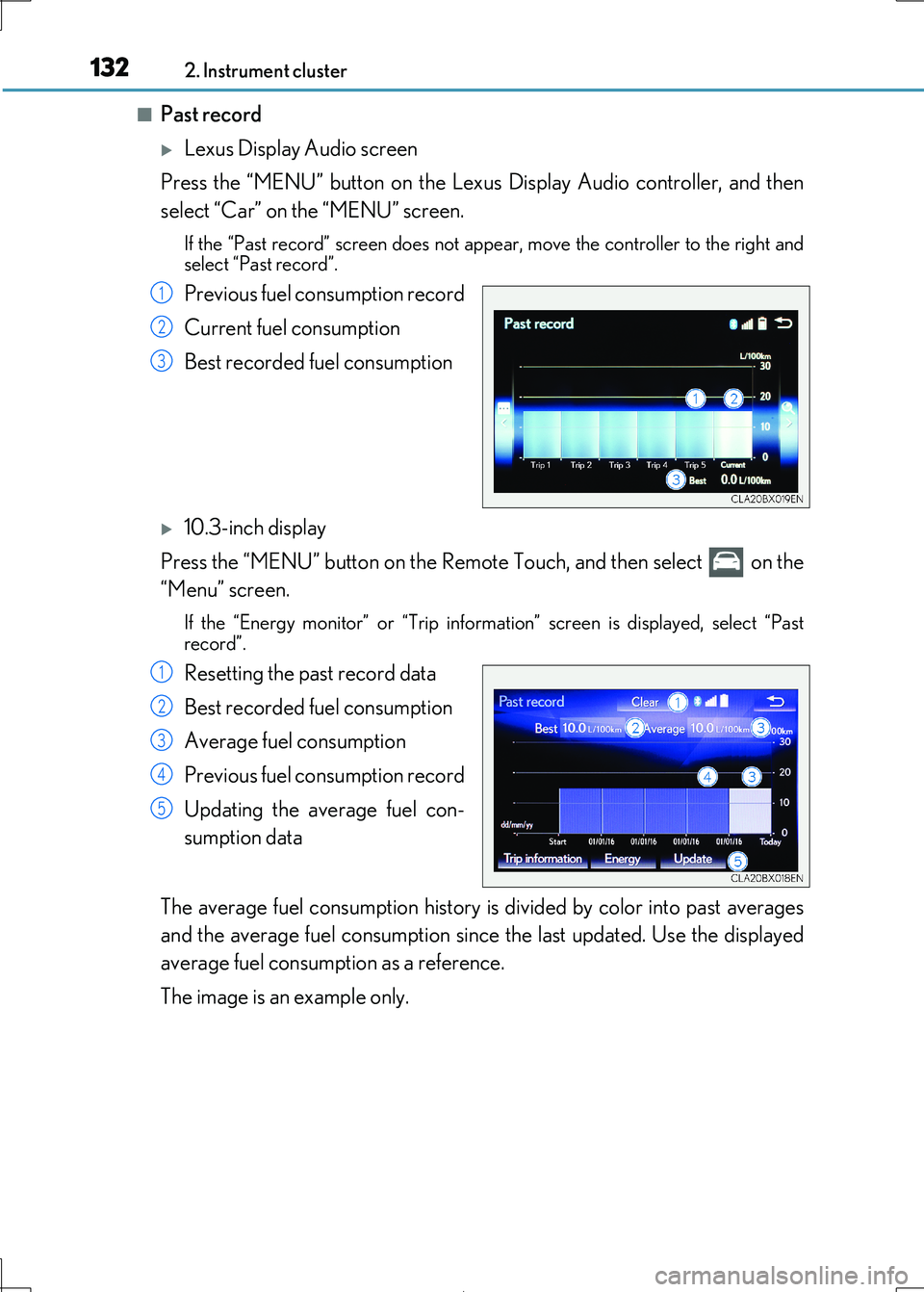
■Past record
Lexus Display Audio screen
Press the “MENU” button on the Lexu s Display Audio controller, and then
select “Car” on the “MENU” screen.
If the “Past record” screen does not appe ar, move the controller to the right and
select “Past record”.
Previous fuel consumption record
Current fuel consumption
Best recorded fuel consumption
10.3-inch display
Press the “MENU” button on the Remote Touch, and then select on the
“Menu” screen.
If the “Energy monitor” or “Trip informat ion” screen is displayed, select “Past
record”.
Resetting the past record data
Best recorded fuel consumption
Average fuel consumption
Previous fuel consumption record
Updating the average fuel con-
sumption data
The average fuel consumption history is divided by color into past averages
and the average fuel consumption since the last updated. Use the displayed
average fuel consumption as a reference.
The image is an example only.
1
2
3
1
2
3
4
5
Page 133 of 692
1332. Instrument cluster
2
Instrument cluster
IS300h_EE(OM53D89E)
■Updating the past record data
Vehicles with a Lexus Display Audio system
Update the average fuel consumption by mo ving the controller to the left and select “Update” to measure the curre nt fuel consumption again.
Vehicles with a 10.3-inch display
Update the average fuel consumption by selecting “Update” to measure the current fuel consumption again.
■Resetting the data
Vehicles with a Lexus Display Audio system
The fuel consumption data can be deleted by moving the controller to the left and select
“Clear”.
Vehicles with a 10.3-inch display
The fuel consumption data can be deleted by selecting “Clear”.
■Cruising range
Displays the estimated maximum distance that can be driven with the quantity of fuel remaining.
This distance is computed based on your average fuel consumption.
As a result, the actual distance that can be driven may differ from that displayed.
Page 134 of 692
1342. Instrument cluster
IS300h_EE(OM53D89E)
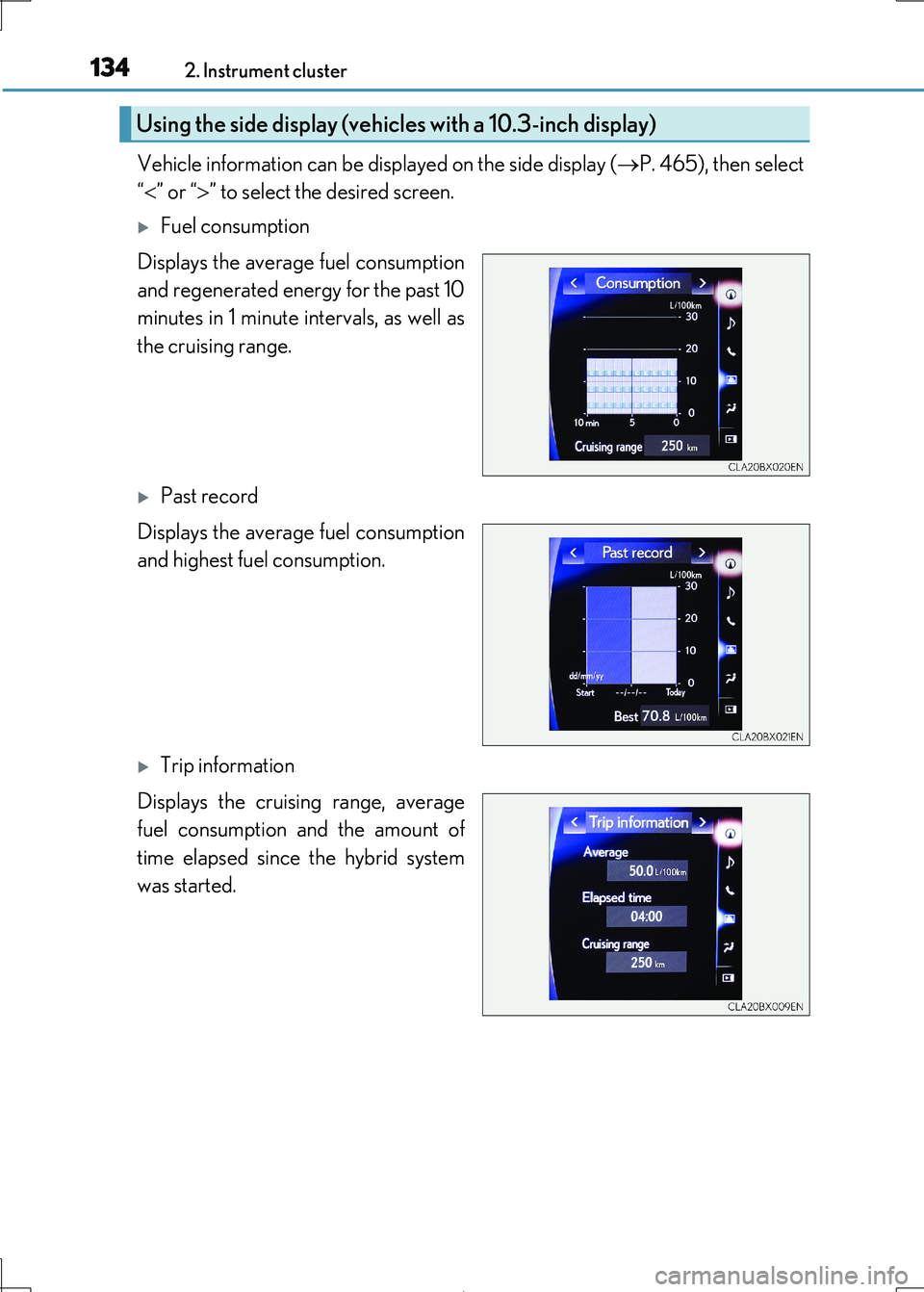
Vehicle information can be displayed on the side display (P. 465), then select
“ ” or “” to select the desired screen.
Fuel consumption
Displays the average fuel consumption
and regenerated energy for the past 10
minutes in 1 minute intervals, as well as
the cruising range.
Past record
Displays the average fuel consumption
and highest fuel consumption.
Trip information
Displays the cruising range, average
fuel consumption and the amount of
time elapsed since the hybrid system
was started.
Using the side display (vehicles with a 10.3-inch display)
Page 201 of 692
201
4Driving
IS300h_EE(OM53D89E)
4-1. Before driving
Driving the vehicle .....................202
Cargo and luggage ...................209
Trailer towing (vehicles
without a towing
package) ...................................... 210
Trailer towing (vehicles with
a towing package) ..................... 211
4-2. Driving procedures
Power (ignition) switch ............. 219
EV drive mode ............................ 224
Hybrid transmission .................. 226
Turn signal lever .........................233
Parking brake ..............................235
ASC
(Active Sound Control)........ 236
4-3. Operating the lights
and wipers
Headlight switch ......................... 237
Automatic High Beam .............240
Fog light switch ........................... 244
Windshield wipers and
washer .........................................245
4-4. Refueling
Opening the fuel tank cap......253
4-5. Using the driving support
systems
Lexus Safety System+ .............. 257
PCS (Pre-Collision
System) ....................................... 265
LDA (Lane Departure Alert
with steering control) ............ 279
RSA (Road Sign Assist) ..........288
Dynamic radar cruise
control ......................................... 293
Cruise control .............................305
Lexus parking
assist-sensor..............................309
Lexus parking assist
monitor ......................................... 318
BSM
(Blind Spot Moni tor) ............. 334
• BSM function.........................340
• RCTA function...................... 343
Driving mode select
switch ...........................................348
Driving assist systems .............. 352
4-6. Driving tips
Hybrid vehicle
driving tips..................................358
Winter driving tips ...................... 361