park sensor Lexus IS300h 2017 User Guide
[x] Cancel search | Manufacturer: LEXUS, Model Year: 2017, Model line: IS300h, Model: Lexus IS300h 2017Pages: 692, PDF Size: 163.7 MB
Page 311 of 692
3114-5. Using the driving support systems
4
Driving
IS300h_EE(OM53D89E)
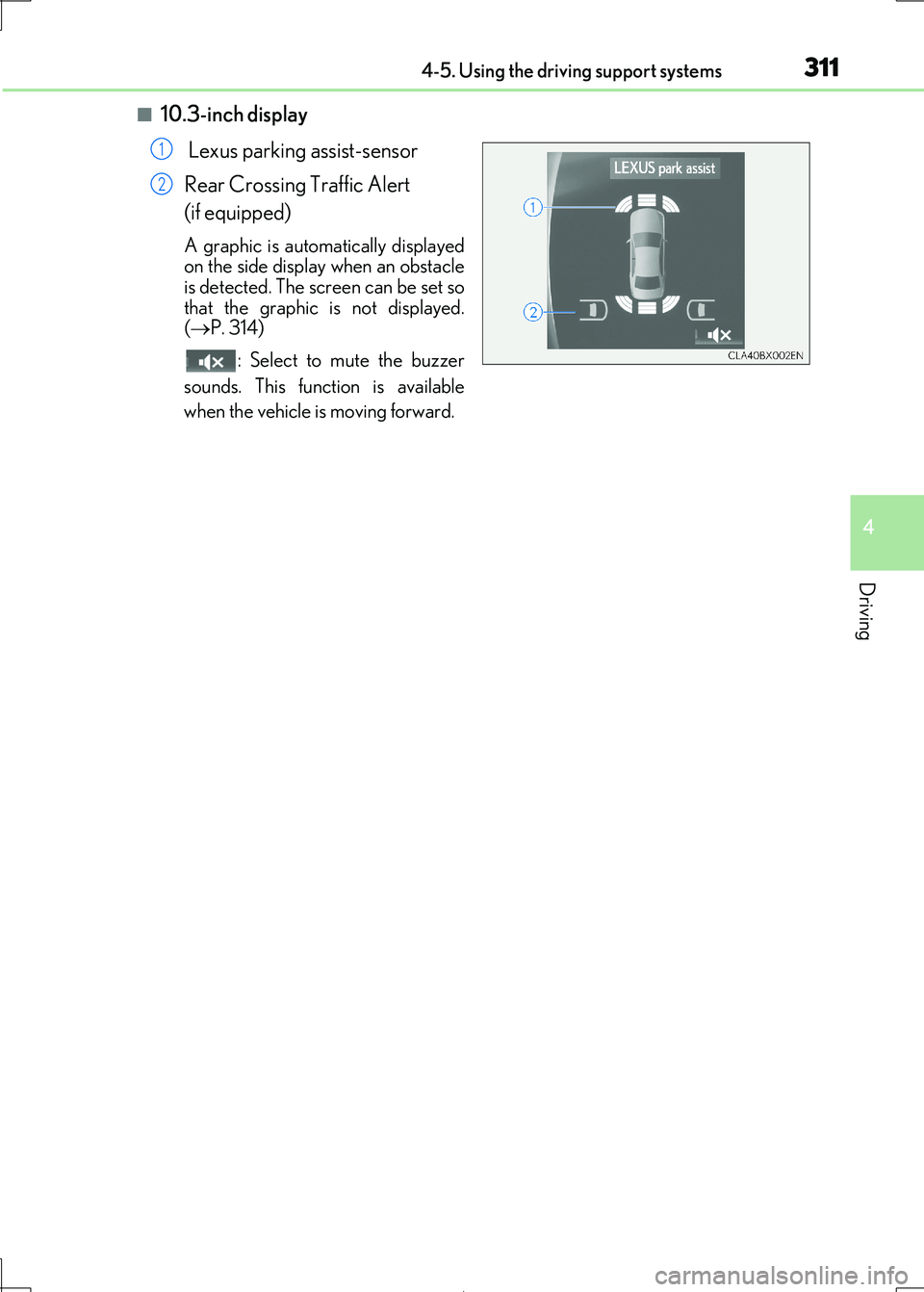
■10.3-inch display
Lexus parking assist-sensor
Rear Crossing Traffic Alert
(if equipped)
A graphic is automatically displayed on the side display when an obstacle
is detected. The screen can be set so
that the graphic is not displayed. ( P. 314)
: Select to mute the buzzer
sounds. This functi on is available
when the vehicle is moving forward.
1
2
Page 312 of 692

3124-5. Using the driving support systems
IS300h_EE(OM53D89E)
■Distance display
Sensors that detect an obstacle w ill illuminate continuously or blink.
Sensor detection display, obstacle distance
Display*1
Insert displayApproximate distance to obstacle
Lexus parking
assist monitor
Front corner sensor/
front center sensor
Rear corner sensor/
rear center sensor
(continuous)(blinking slowly)
Front center sensor only:
100 cm (3.3 ft.) to 50
cm (1.6 ft.)
Rear center sensor only:
150 cm (4.9 ft.) to 60
cm (2.0 ft.)
(continuous)(blinking)
50 cm (1.6 ft.) to 40 cm
(1.3 ft.)
60 cm (2.0 ft.) to 45
cm (1.5 ft.)
(continuous)(blinking
rapidly)
40 cm (1.3 ft.) to 30 cm
(1.0 ft.)
Rear corner sensor: 45 cm (1.5 ft.) to 30 cm
(1.0 ft.)
Rear center sensor:
45 cm (1.5 ft.) to 35 cm
(1.1 ft.)
(blinking*2 or
continuous*3)
(continuous)
Less than 30 cm (1.0 ft.)
Rear corner sensor: Less than 30 cm (1.0 ft.)
Rear center sensor: Less than 35 cm (1.1 ft.)
Page 314 of 692
3144-5. Using the driving support systems
IS300h_EE(OM53D89E)
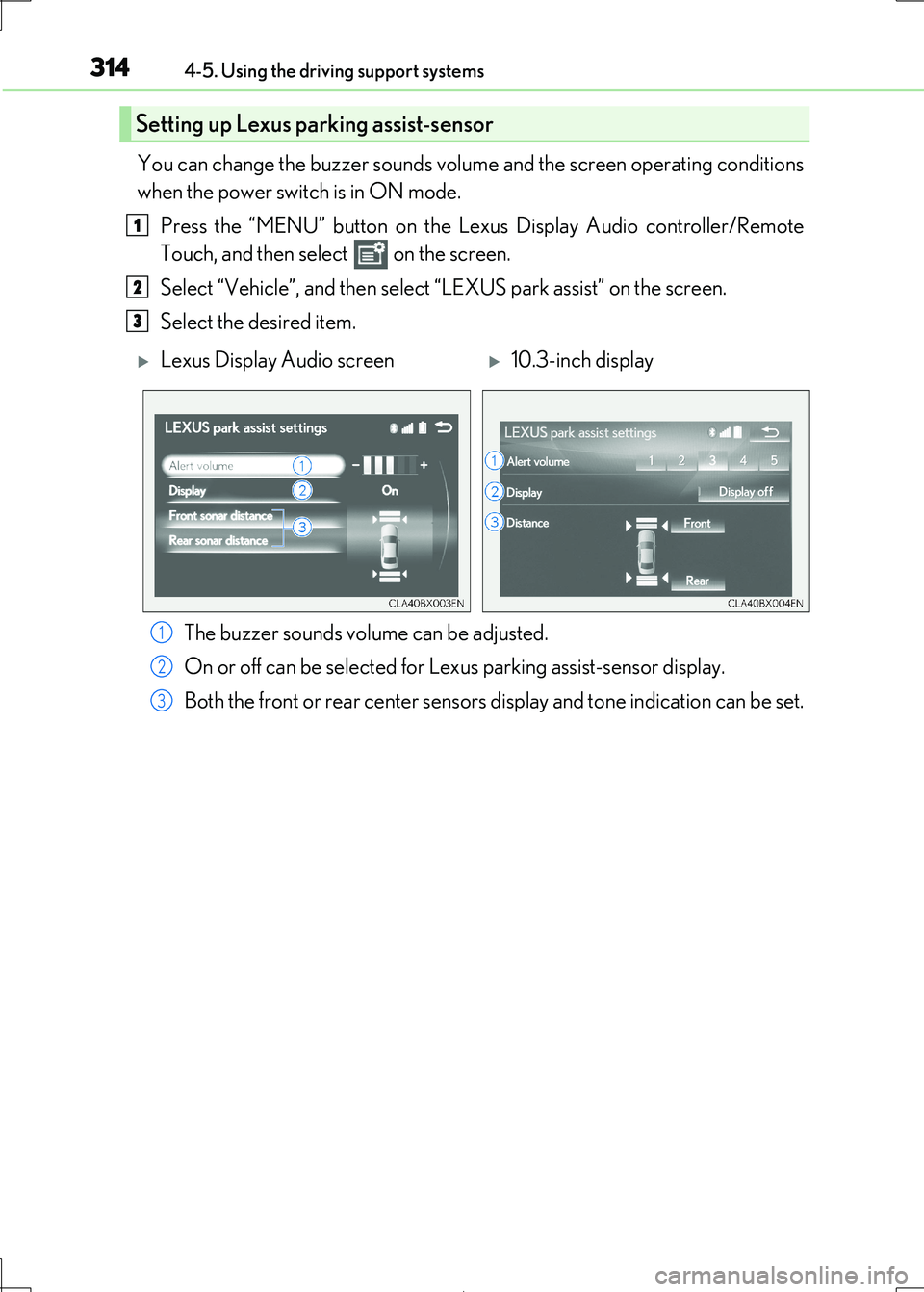
You can change the buzzer sounds volume and the screen operating conditions
when the power switch is in ON mode.
Press the “MENU” button on the Le xus Display Audio controller/Remote
Touch, and then select on the screen.
Select “Vehicle”, and then select “LEXUS park assist” on the screen.
Select the desired item.
The buzzer sounds volume can be adjusted.
On or off can be selected for Le xus parking assist-sensor display.
Both the front or rear center sensors display and tone indication can be set.
Setting up Lexus parking assist-sensor
1
2
3
Lexus Display Audio screen10.3-inch display
1
2
3
Page 315 of 692

3154-5. Using the driving support systems
4
Driving
IS300h_EE(OM53D89E)
■The Lexus parking assist-sensor can be operated when
●Front corner sensors:
• The power switch is in ON mode. • The shift lever is in other than P.
• The vehicle speed is less th an about 10 km/h (6 mph).
(At any speed when the shift lever is in R)
●Front center sensors:
• The power switch is in ON mode. • The shift lever is in other than P or R.
• The vehicle speed is less th an about 10 km/h (6 mph).
●Rear corner and rear center sensors:
• The power switch is in ON mode.
• The shift lever is in R.
■Lexus parking assist-sensor display
Vehicles with a Lexus Display Audio system: When an obstacle is detected while the
Lexus parking assist monitor is in use, the warning indicator will appear in the upper part of the screen even if the disp lay setting has been set to off.
■If a message is displayed on the multi-information display
P. 581
■Customization
Some functions can be customized. ( P. 314,657)
WARNING
■When using the Lexus parking assist-sensor
Observe the following precautions.
Failing to do so may result in the vehicle be ing unable to be driven safely and possibly
cause an accident.
●Do not use the sensor at speeds in excess of 10 km/h (6 mph).
●The sensors’ detection areas and reaction times are limited. When moving forward or
reversing, check the areas surrounding the vehicle (especially the sides of the vehi- cle) for safety, and drive slowly, using the brake to control the vehicle’s speed.
●Do not install accessories within the sensors’ detection areas.
Page 316 of 692
3164-5. Using the driving support systems
IS300h_EE(OM53D89E)
WARNING
■Sensor detection information
●The sensor’ detection areas are limited to the areas around the vehicle’ bumper.
●Certain vehicle conditions and surrounding environments, such as the following, may
affect the ability of the sensor s to correctly detect objects. Pay particular attention in the following situations. Failure to do so may result in the vehicle being driven
unsafely, possibly leading to an accident.
• There is dirt, snow or ice on the sensor. (Wiping the sensors will resolve this prob- lem.)
• The sensor is frozen. (Thawing th e area will resolve this problem.)
In especially cold weather, if a sensor is frozen the screen may show an abnormal dis- play, or obstacles may not be detected.
• The sensor is covered in any way.
• The vehicle is leaning considerably to one side. • On an extremely bumpy road, on an incline, on gravel, or on grass.
• The vicinity of the vehicle is noisy due to vehicle horns, motorcycle engines, air
brakes of large vehicles, or other lo ud noises producing ultrasonic waves. • There is another vehicle equipped with parking assist sensors in the vicinity.
• The sensor is coated with a sheet of spray or heavy rain.
• The vehicle is equipped with a fender pole or wireless antenna. • Towing eyelets are installed.
• The bumper or sensor receives a strong impact.
• The vehicle is approaching a tall or curved curb. • In harsh sunlight or intense cold weather.
• The area directly under the bumpers is not detected.
• If obstacles draw too close to the sensor. • A non-genuine Lexus suspension (low ered suspension etc.) is installed.
• People may not be detected if they are wearing certain types of clothing.
In addition to the examples above, there ar e instances in which, because of their shape, signs and other objects may be judged by a sensor to be closer than they are.
●The shape of the obstacle may prevent a sensor from detecting it. Pay particular
attention to the following obstacles:
• Wires, fences, ropes, etc.
• Cotton, snow and other materi als that absorb sound waves
• Sharply-angled objects • Low obstacles
• Tall obstacles with upper sections projec ting outwards in the direction of your
vehicle • People, animals and other moving objects
• People wearing certain types of clothing
Page 317 of 692
3174-5. Using the driving support systems
4
Driving
IS300h_EE(OM53D89E)
WARNING
●The following situations may occur during use.
• Depending on the shape of the obstacle and other factors, the detection distance
may shorten, or detect ion may be impossible.
• Obstacles may not be detected if they are too close to the sensor. • There will be a short delay between obstac le detection and display. Even at slow
speeds, there is a possibility that the ob stacle will come within the sensor’ detec-
tion areas before the display is shown and the buzzer sounds. • Thin posts or objects lower than th e sensor may not be detected when
approached, even if they have been detected once.
• It might be difficult to hear beeps due to the volume of audio system or air flow noise of the air conditioning system.
NOTICE
■When using Lexus parking assist-sensor
In the following situations, the system may not function correctly due to a sensor mal-
function, etc. Have the vehicle checked by any authorized Lexus retailer or Lexus
authorized repairer, or any reliable repairer.
●The Lexus parking assist-sensor operation display flashes, and a buzzer sounds when
no obstacles are detected.
●If the area around a sensor co llides with something, or is subjected to strong impact.
●If the bumper collides with something.
●If the display shows continuously without beeping, except when the buzzer mute
switch has been turned on.
●If a display error occurs , first check the sensor.
If the error occurs even if there is no ice, sn ow or mud on the sensor, it is likely that the
sensor is malfunctioning.
■Notes when washing the vehicle
Do not apply intensive bursts of wa ter or steam to the sensor area.
Doing so may result in the sensor malfunctioning.
Page 319 of 692
3194-5. Using the driving support systems
4
Driving
IS300h_EE(OM53D89E)
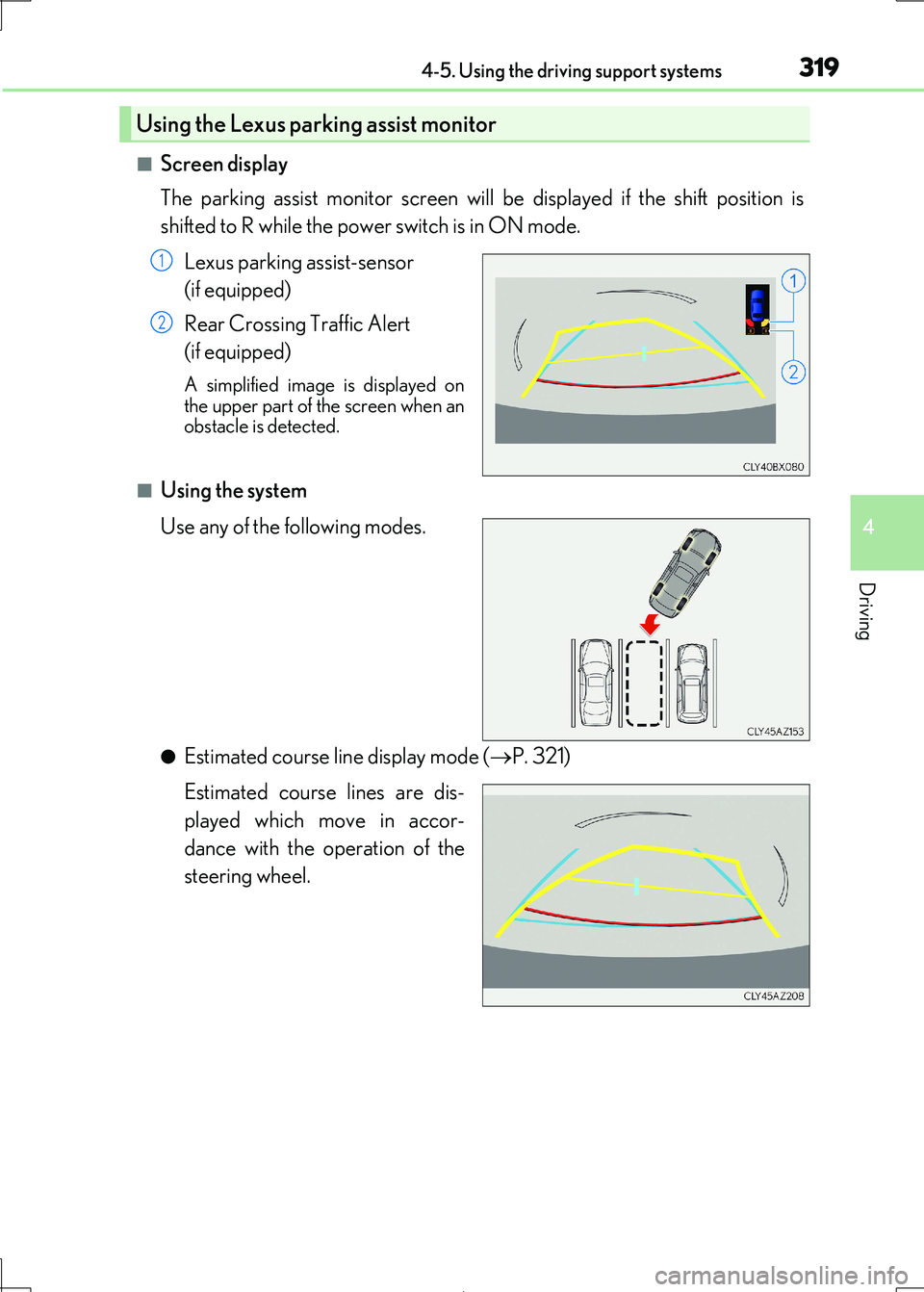
■Screen display
The parking assist monitor screen will be displayed if the shift position is
shifted to R while the power switch is in ON mode.
Lexus parking assist-sensor
(if equipped)
Rear Crossing Traffic Alert
(if equipped)
A simplified image is displayed on the upper part of the screen when an
obstacle is detected.
■Using the system
Use any of the following modes.
●Estimated course line display mode ( P. 321)
Estimated course lines are dis-
played which move in accor-
dance with the operation of the
steering wheel.
Using the Lexus parking assist monitor
1
2
Page 346 of 692

3464-5. Using the driving support systems
IS300h_EE(OM53D89E)
■Conditions under which the RCTA function will not detect a vehicle
The RCTA function is not designed to dete ct the following types of vehicles and/or objects:
●Vehicles approaching from directly behind
●Vehicles backing up in a parking space next to your vehicle
●Guardrails, walls, signs, parked vehi cles and similar stationary objects*
●Small motorcycles, bicycles, pedestrians, etc.*
●Vehicles moving away from your vehicle
●Vehicles approaching from the parking spaces next to your vehicle*
*: Depending on the conditions, detection of a vehicle and/or object may occur.
■Conditions under which the RCTA function may not function correctly
●The RCTA function may not detect vehicles correctly in the following situations:
• When the sensor is misaligned due to a stro ng impact to the sensor or its surround-
ing area • When mud, snow, ice, a sticker, etc. is covering the sensor or surrounding area on
the rear bumper
• When driving on a road surface that is wet with standing water during bad weather,
such as heavy rain, snow, or fog • When multiple vehicles are approaching wi th only a small gap between each vehicle
• When a vehicle is approaching at high speed
• When towing a trailer (vehicles with towing package)
●Vehicles that the sensors cannot detect due to
obstructions
• When backing up on a slope with a sharp
change in grade
Page 347 of 692
3474-5. Using the driving support systems
4
Driving
IS300h_EE(OM53D89E)
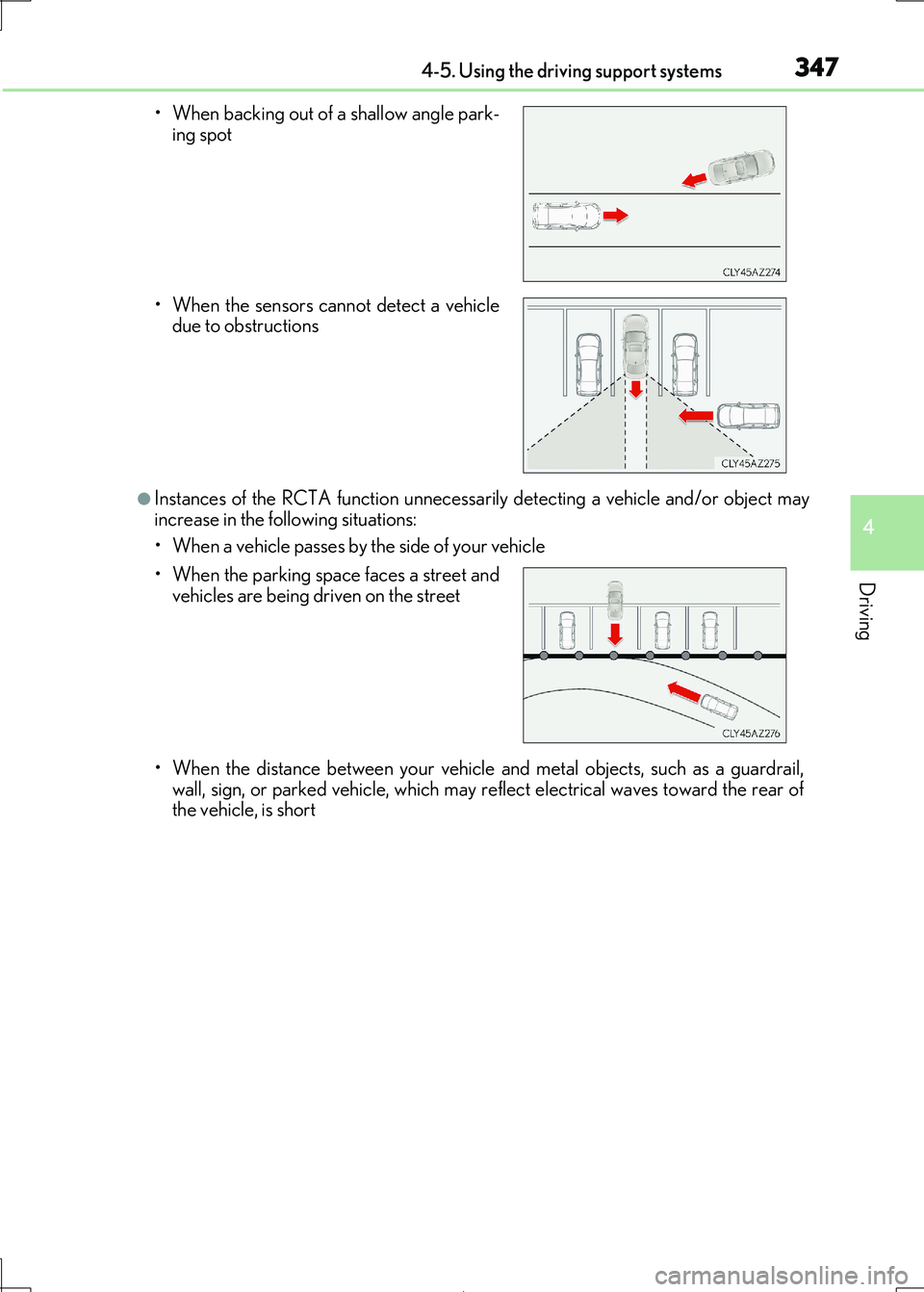
●Instances of the RCTA function unnecessarily detecting a vehicle and/or object may
increase in the following situations:
• When a vehicle passes by the side of your vehicle
• When the distance between your vehicle and metal objects, such as a guardrail,
wall, sign, or parked vehicle, which may re flect electrical waves toward the rear of
the vehicle, is short
• When backing out of a shallow angle park-
ing spot
• When the sensors cannot detect a vehicle due to obstructions
• When the parking space faces a street and vehicles are being driven on the street
Page 465 of 692
4656-1. Basic operation of the Remote Touch screen
6
Interior features
IS300h_EE(OM53D89E)
■Selecting the operation screen
When selecting the main display, move the Remote Touch knob to the left.
When selecting the side display, move the Remote Touch knob to the right.
■ Main display
For details about the functions and operat ion of the main display, refer to the
respective section and “NAVIGATION AND MULTIMEDIA SYSTEM
OWNER’S MANUAL”.
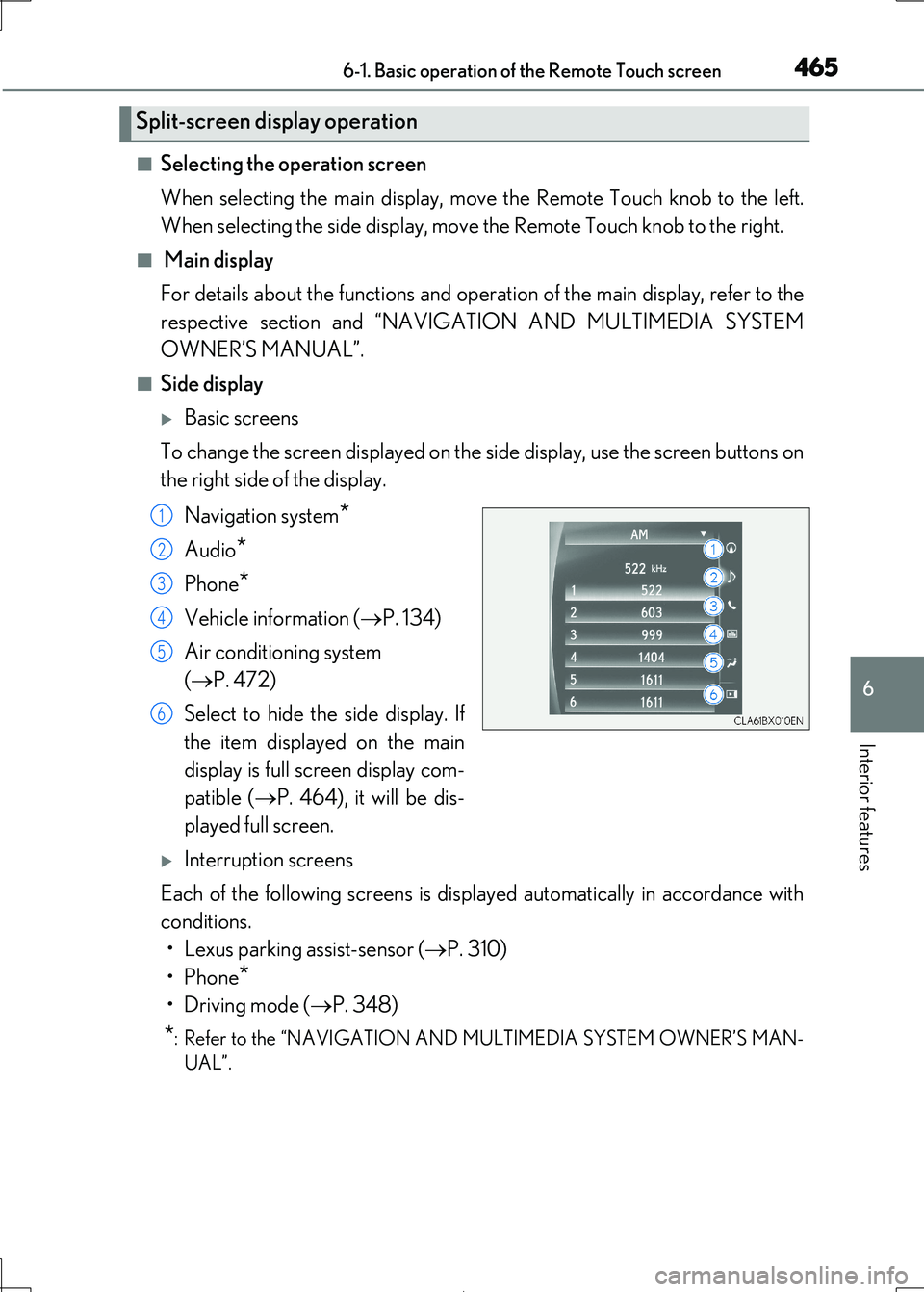
■Side display
Basic screens
To change the screen displayed on the side display, use the screen buttons on
the right side of the display.
Navigation system*
Audio*
Phone*
Vehicle information ( P. 134)
Air conditioning system
( P. 472)
Select to hide the side display. If
the item displayed on the main
display is full screen display com-
patible ( P. 464), it will be dis-
played full screen.
Interruption screens
Each of the following screens is displayed automatically in accordance with
conditions.
• Lexus parking assist-sensor ( P. 310)
•Phone*
•Driving mode ( P. 348)
*: Refer to the “NAVIGATION AND MULTIMEDIA SYSTEM OWNER’S MAN-
UAL”.
Split-screen display operation
1
2
3
4
5
6