change wheel Lexus IS300h 2017 Owner's Manual
[x] Cancel search | Manufacturer: LEXUS, Model Year: 2017, Model line: IS300h, Model: Lexus IS300h 2017Pages: 692, PDF Size: 163.7 MB
Page 45 of 692
451-1. For safe use
1
For safety and security
IS300h_EE(OM53D89E)
WARNING
■SRS airbag precautions
Observe the following precaution s regarding the SRS airbags.
Failure to do so may cause death or serious injury.
●The driver and all passengers in the vehicle must wear their seat belts properly. The SRS airbags are supple mental devices to be used with the seat belts.
●The SRS driver airbag deploys with considerable force, and can cause death or seri-
ous injury especially if the driver is very close to the airbag.
Since the risk zone for the driver’s airbag is the first 50 - 75 mm (2 - 3 in.) of inflation,
placing yourself 250 mm (10 in.) from your driver airbag provides you with a clear
margin of safety. This distance is measured from the center of the steering wheel to your breastbone. If you sit less than 250 mm (10 in.) away now, you can change your
driving position in several ways:
• Move your seat to the rear as far as you can while still reaching the pedals com- fortably.
• Slightly recline the back of the seat.
Although vehicle designs vary, many driv ers can achieve the 250 mm (10 in.) dis- tance, even with the driver seat all the wa y forward, simply by reclining the back of
the seat somewhat. If reclining the back of your seat makes it hard to see the road,
raise yourself by using a firm, non-slippery cushion, or raise the seat if your vehicle has that feature.
• If your steering wheel is ad justable, tilt it downward. This points the airbag toward
your chest instead of your head and neck. The seat should be adjusted as recommen ded above, while still maintaining control
of the foot pedals, steering wheel, and your view of the instrument panel controls.
Page 119 of 692

1192. Instrument cluster
2
Instrument cluster
IS300h_EE(OM53D89E)
◆Changing settings
Use the meter control switches on the steering wheel to change settings.
Press or to select .
Operate the switches to select a desired item.
Change the setting by referring to the message displayed on the screen.
◆Setting items
■ LDA (Lane Departure Alert with steering control) (if equipped)
( P. 279)
The following LDA system settings can be changed:
Settings display ( )
1
2
3
ItemSettingsDetails
Steering assist On Select to enable/disable steering
wheel assistance.Off
Alert
Select to set a vibrator or buzzer as
the notification method used to warn the driver.
Alert sensitivityHighSelect to set the warning sensitivity.Normal
Sway warningOnSelect to enable/disable the vehicle
sway warning.Off
Sway sensitivity
High
Select to set the vehicle sway warning
sensitivity.Medium
Low
Page 191 of 692

1913-4. Adjusting the steering wheel and mirrors
3
Operation of each component
IS300h_EE(OM53D89E)
When either “L” or “R” of the mirror select switch is selected, the outside rear
view mirrors will automatically angle down wards when the vehicle is reversing in
order to give a better view of the ground.
To disable this function, select neither “L” nor “R”.
■Adjusting the mirror angle when the vehicle is reversing
With the shift lever in R, adjust th e mirror angle at a desired position.
The adjusted angle will be memorized an d the mirror will automatically tilt to
the memorized angle whenever the shift lever is shifted to R from next time.
The memorized downward tilt position of the mirror is linked to the normal position
(angle adjusted with the shif t lever in other than R). Therefore, if the normal posi- tion is changed after adjustment, th e tilt position will also change.
When the normal position is change d, readjust the angle in reversing.
■Mirror angle can be adjusted when
The power switch is in ACCESSORY or ON mode.
■When disconnecting and reco nnecting battery terminals
The automatic folding/extending mirror function will return to off as default. To turn the
function on, press the switch again to select on.
■When the mirrors are fogged up
The outside rear view mirrors can be cleare d using the mirror defoggers. Turn on the
rear window defogger to turn on the outside rear view mirror defoggers. (P. 474)
■Automatic adjustment of the mirror angle (if equipped)
A desired mirror face angle can be entered to memory and recalled automatically by the
driving position memory. ( P. 177)
■Auto anti-glare function (if equipped)
When the anti-glare inside re ar view mirror is set to automatic mode, the outside rear
view mirrors will activate in conjunction with the anti-glare inside rear view mirror to
reduce reflected light. ( P. 188)
■Using automatic mode in cold weather
When automatic mode is used in cold weat her, the door mirror could freeze up and
automatic stowing and return ma y not be possible. In this case, remove any ice and snow from the door mirror, then either operate th e mirror using manual mode or move the mir-
ror by hand.
■Customization
The automatic mirror folding and extending operation can be changed. (Customizable features: P. 657)
Linked mirror function when reversing (if equipped)
Page 205 of 692
2054-1. Before driving
4
Driving
IS300h_EE(OM53D89E)
WARNING
Observe the following precautions. Failure to do so may result in death or serious injury.
■When starting the vehicle
●Do not adjust the positions of the steering wheel, the seat, or the inside or outside rearview mirrors while driving.
Doing so may result in a loss of vehicle control.
●Always check that all passeng ers’ arms, heads or other parts of their body are not outside the vehicle.
■When driving on slippery road surfaces
●Sudden braking, acceleration and steering may cause tire slippage and reduce your ability to control the vehicle.
●Sudden acceleration, engine braking due to shifting, or changes in engine speed
could cause the vehicle to skid.
●After driving through a puddle, depress the brake pedal to make sure that the brakes
are functioning properly. Wet brake pads may prevent the brakes from functioning
properly. If the brakes on only one side are wet and not functioning properly, steering control may be affected.
■When shifting the shift lever
●Do not let the vehicle roll backward while the shift lever is in a driving position, or roll forward while the shift lever is in R.
Doing so may result in an acci dent or damage to the vehicle.
●Do not shift the shift lever to P while the vehicle is moving. Doing so can damage the transmission and may result in a loss of vehicle control.
●Do not shift the shift lever to R while the vehicle is moving forward.
Doing so can damage the transmission and may result in a loss of vehicle control.
●Do not shift the shift lever to D while the vehicle is moving backward.
Doing so can damage the transmission and may result in a loss of vehicle control.
●Shifting the shift lever to N while the vehicle is moving will disengage the hybrid sys- tem. Engine braking is not av ailable when N is selected.
●Be careful not to shift the shift lever with the accelerator pedal depressed. Shifting the
shift lever to any position other than P or N may lead to unexpected rapid accelera- tion of the vehicle that may cause an accide nt and result in death or serious injury.
■If you hear a squealing or scraping noise (brake pad wear indicators)
Have the brake pads checked and replaced by any authorized Lexus retailer or Lexus authorized repairer, or any reliable repairer as soon as possible.
Rotor damage may result if the pads are not replaced when needed.
Moderate levels of brake pad and disc wear allow enhanced braking power. As a
result, the discs may wear more quickly than conventional brake discs. Therefore, when replacing the brake pads, Lexus recommends that you also have the thickness of the
discs measured.
It is dangerous to drive the vehicle when the wear limits of the brake pads and/or those of the brake discs are exceeded.
Page 208 of 692
2084-1. Before driving
IS300h_EE(OM53D89E)
NOTICE
■When driving the vehicle
●Do not depress the accelerator and brake pedals at the same time during driving, as
this may restrain the hybrid system output.
●Do not use the accelerator pedal or depress the accelerator and brake pedals at the same time to hold the vehicle on a hill.
■When parking the vehicle
Always set the parking brake, and shift the shift lever to P. Failure to do so may cause the vehicle to move or the vehicle may accelerate suddenly if the accelerator pedal is
accidentally depressed.
■Avoiding damage to vehicle parts
●Do not turn the steering wheel fully in either direction and hold it there for an
extended period of time.
Doing so may damage the power steering motor.
●When driving over bumps in the road, drive as slowly as possible to avoid damaging
the wheels, underside of the vehicle, etc.
■If you get a flat tire while driving
A flat or damaged tire may cause the following situations. Hold the steering wheel
firmly and gradually depress the brake pedal to slow down the vehicle.
●It may be difficult to control your vehicle.
●The vehicle will make abnormal sounds or vibrations.
●The vehicle will lean abnormally.
Information on what to do in case of a flat tire (P. 610, 625)
■When encountering flooded roads
Do not drive on a road that has flooded af ter heavy rain etc. Doing so may cause the
following serious damage to the vehicle:
●Engine stalling
●Short in electrical components
●Engine damage caused by water immersion
In the event that you drive on a flooded road and the vehicle is flooded, be sure to have
any authorized Lexus retailer or Lexus auth orized repairer, or any reliable repairer
check the following:
●Brake function
●Changes in quantity and quality of oil and fluid used for the engine, hybrid transmis-
sion, differential, etc.
●Lubricant condition for the pr opeller shaft, bearings and suspension joints (where
possible), and the function of all joints, bearings, etc.
Page 217 of 692
2174-1. Before driving
4
Driving
IS300h_EE(OM53D89E)
■Important points regarding stability
Vehicle movement resulting from unev en road surfaces and strong cross-
winds will affect handling. The vehicle ma y also be rocked by passing buses or
large trucks. Frequently check behind when moving alongside such vehicles.
As soon as such vehicle movement o ccurs, immediately start to decelerate
smoothly by slowly applying the brakes. Always steer the vehicle straight
ahead while braking.
■Passing other vehicles
Consider the total combined length of your vehicle and trailer and ensure that
the vehicle-to-vehicle distance is su fficient before executing lane changes.
■Transmission information
To maintain engine braking efficiency, when using engine braking when driv-
ing on a long steep downward grade, do not use the transmission in D. The
vehicle must be driven in gear shift position “4” in S mode. (P. 229)
■If the engine overheats
Towing a loaded trailer up a long, steep incline in temperatures exceeding
30 C (85F) may result in the engine overheating. If the engine coolant tem-
perature gauge indicates that the engine is overheating, turn the air condition-
ing off immediately, leave the road and stop the vehicle in a safe place.
( P. 636)
■When parking the vehicle
Always place wheel chocks under the wheels of both the vehicle and trailer.
Firmly set the parking brake an d shift the shift lever to P.
Page 222 of 692
2224-2. Driving procedures
IS300h_EE(OM53D89E)
■Steering lock
After turning the power switch off and openin g and closing the doors, the steering wheel will be locked due to the steering lock func tion. Operating the power switch again auto-
matically cancels the steering lock.
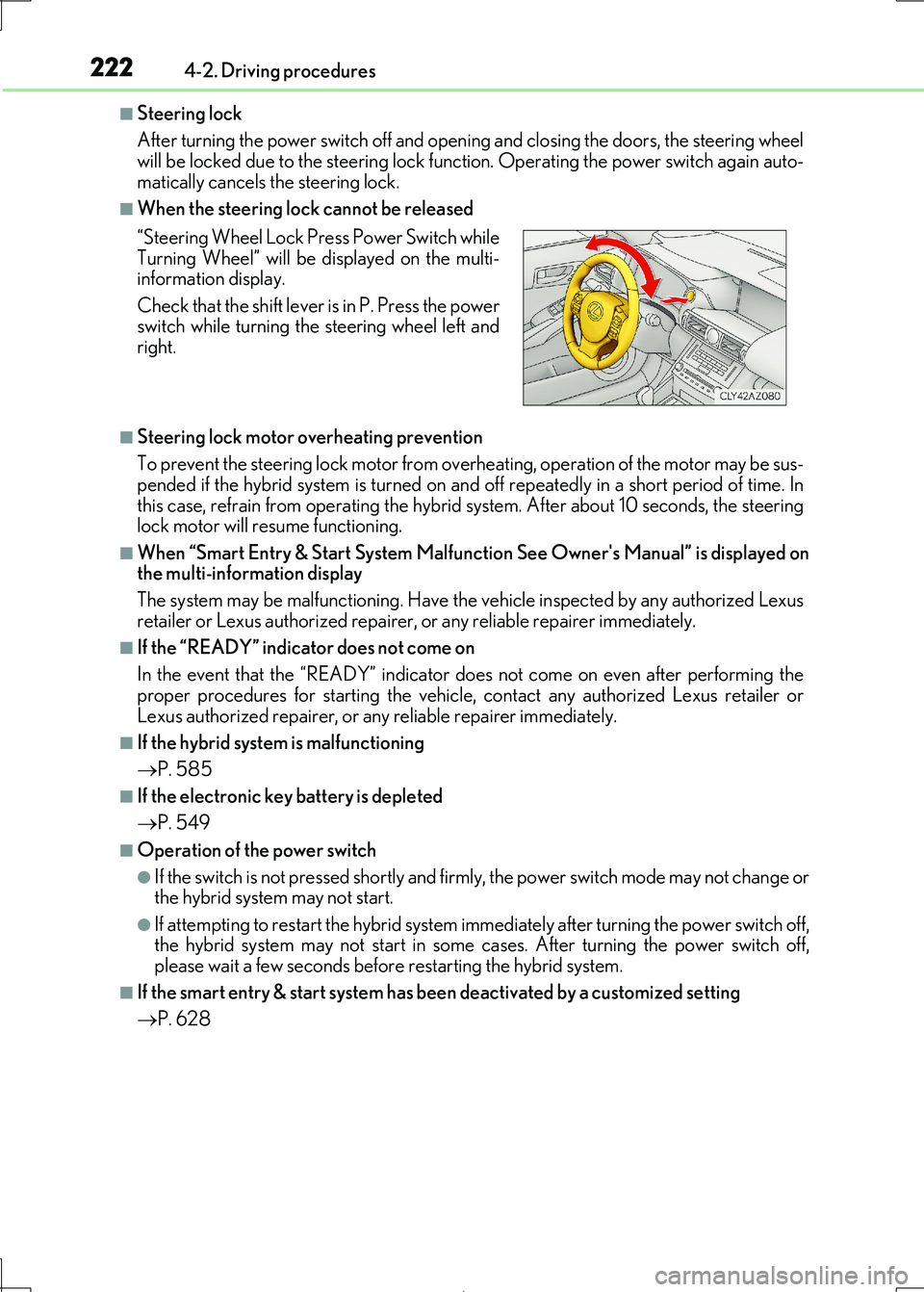
■When the steering lock cannot be released
■Steering lock motor overheating prevention
To prevent the steering lock motor from overheating, operation of the motor may be sus-
pended if the hybrid system is turned on an d off repeatedly in a short period of time. In this case, refrain from operating the hybrid system. After about 10 seconds, the steering
lock motor will resume functioning.
■When “Smart Entry & Start System Malfunction See Owner's Manual” is displayed on the multi-information display
The system may be malfunctioning. Have the vehicle inspected by any authorized Lexus
retailer or Lexus authoriz ed repairer, or any reliable repairer immediately.
■If the “READY” indicator does not come on
In the event that the “READY” indicator does not come on even after performing the
proper procedures for starting the vehicle, contact any authorized Lexus retailer or
Lexus authorized repairer, or any reliable repairer immediately.
■If the hybrid system is malfunctioning
P. 585
■If the electronic key battery is depleted
P. 549
■Operation of the power switch
●If the switch is not pressed shortly and firmly, the power switch mode may not change or the hybrid system may not start.
●If attempting to restart the hybrid system immediately after turning the power switch off,
the hybrid system may not start in some cases. After turning the power switch off, please wait a few seconds before restarting the hybrid system.
■If the smart entry & start system has been deactivated by a customized setting
P. 628
“Steering Wheel Lock Pr ess Power Switch while
Turning Wheel” will be displayed on the multi- information display.
Check that the shift lever is in P. Press the power
switch while turning the steering wheel left and right.
Page 242 of 692
2424-3. Operating the lights and wipers
IS300h_EE(OM53D89E)
■Conditions to turn the high beams on/off automatically
●When all of the following conditions are met, the high beams will be turned on automat-
ically (after approximately 1 second):
• The vehicle speed is approximat ely 40 km/h (25 mph) or more.
• The area ahead of the vehicle is dark.
• There are no vehicles ahead with headlights or tail lights turned on. • There are few streetlights on the road ahead.
●If any of the following conditions is met, the high beams will turn off automatically:
• The vehicle speed is below approximately 30 km/h (19 mph).
• The area ahead of the vehicle is not dark.
• Vehicles ahead have their headli ghts or tail lights turned on. • There are many streetlights on the road ahead.
■Camera sensor dete ction information
●The high beams may not be automatically turned off in the following situations:
• When a vehicle suddenly appears from around a curve
• When the vehicle is cut in front of by another vehicle
• When vehicles ahead cannot be detected due to repeated curves, road dividers or roadside trees
• When vehicles ahead appear in a faraway lane on a wide road
• When the lights of vehicles ahead are not on
●The high beams may be turned off if a vehicle ahead that is using fog lights without its
headlights turned on is detected.
●House lights, street lights, traffic signals, and illuminated billboards or signs and other
reflective objects may cause the high beams to change to the low beams, or the low
beams to remain on.
●The following factors may affect the amount of time taken for the high beams to turn on
or off:
• The brightness of the head lights, fog lights, and tail lights of vehicles ahead • The movement and direction of vehicles ahead
• When a vehicle ahead only has operational lights on one side
• When a vehicle ahead is a two-wheeled vehicle • The condition of the road (gradient, cu rve, condition of the road surface, etc.)
• The number of passengers and am ount of luggage in the vehicle
●The high beams may turn on or off unexpectedly.
Page 267 of 692
2674-5. Using the driving support systems
4
Driving
IS300h_EE(OM53D89E)
WARNING
■Limitations of the pre-collision system
●The driver is solely responsible for safe driving. Always drive safely, taking care to
observe your surroundings.
Do not use the pre-collision sy stem instead of normal braking operations under any circumstances. This system will not preven t collisions or lessen collision damage or
injury in every situation. Do not overly rely on this system. Failure to do so may lead to
an accident, resulting in death or serious injury.
●Although this system is designed to help avoid a collision or help reduce the impact of
the collision, its effectiveness may change according to various conditions, therefore
the system may not always be able to achieve the same level of performance. Read the following cond itions carefully. Do not overly rely on this system and always
drive carefully.
• Conditions under which the system may oper ate even if there is no possibility of a collision: P. 274
• Conditions under which the syst em may not operate properly: P. 276
●Do not attempt to test the operation of the pre-collision system yourself, as the system
may not operate properly, possib ly leading to an accident.
■Pre-collision braking*3
●When the pre-collision braking function is operating, a large amount of braking force
will be applied.
●If the vehicle is stopped by the operation of the pre-collision braking function, the pre- collision braking function operation will be canceled after approximately 2 seconds.
Depress the brake pedal as necessary.
●The pre-collision braking function may no t operate if certain operations are per- formed by the driver. If the accelerator pedal is being depressed strongly or the steer-
ing wheel is being turned, the system may determine that the driver is taking evasive
action and possibly prevent the pre-coll ision braking function from operating.
●In some situations, while the pre-collision braking function is operating, operation of
the function may be canceled if the accelerator pedal is depressed strongly or the
steering wheel is turned and the system dete rmines that the driver is taking evasive action.
●If the brake pedal is being depressed, the system may determine that the driver is tak-
ing evasive action and possibly delay the op eration timing of the pre-collision braking function.
*3: Depending on the region in which the vehicle was sold, the pre-collision braking
function may not be available.
Page 292 of 692
2924-5. Using the driving support systems
IS300h_EE(OM53D89E)
●Side road speed signs may be detected and displayed (if positioned in sight of the cam-
era sensor) while the vehicle is traveling on the main road.
●Roundabout exit road speed signs may be detected and displayed (if positioned in sight
of the camera sensor) while traveling on a roundabout.
■When driving vehicle in country with different speed unit
Since RSA recognizes signs based on the set un it of the meter, it is necessary to change
the set unit of the meter. Adjust the set unit of the meter to the speed unit of signs in the
current location. ( P. 657)
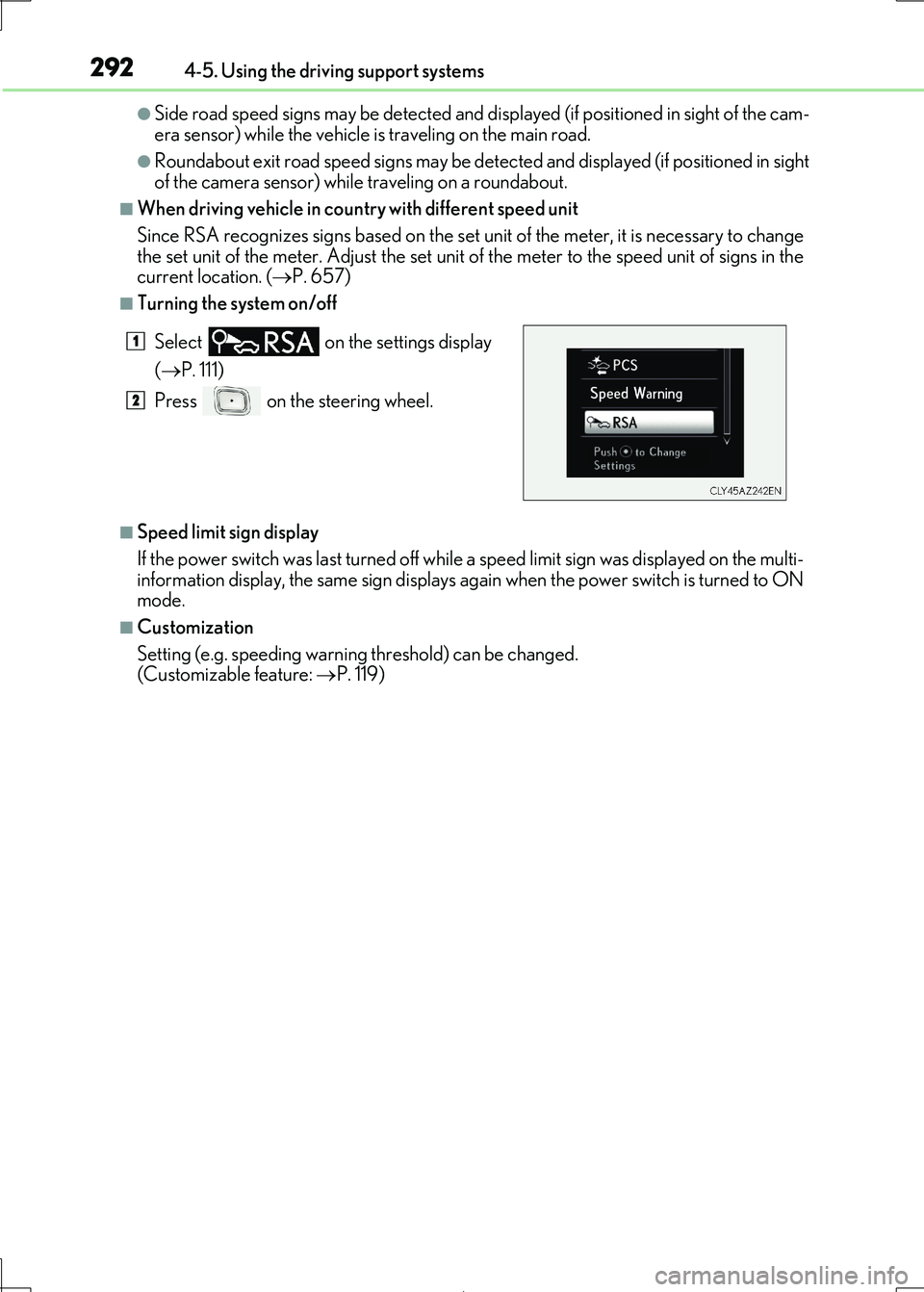
■Turning the system on/off
■Speed limit sign display
If the power switch was last turned off while a speed limit sign was displayed on the multi- information display, the same sign displays again when the power switch is turned to ON
mode.
■Customization
Setting (e.g. speeding warning threshold) can be changed.
(Customizable feature: P. 119)
Select on the settings display
( P. 111)
Press on the steering wheel.
1
2