brake Lexus IS300h 2017 Owner's Guide
[x] Cancel search | Manufacturer: LEXUS, Model Year: 2017, Model line: IS300h, Model: Lexus IS300h 2017Pages: 692, PDF Size: 163.7 MB
Page 219 of 692
219
4
Driving
IS300h_EE(OM53D89E)
4-2. Driving procedures
Check that the parking brake is set.
Check that the shift lever is in P.
Firmly depress the brake pedal.
and a message will be displayed on the multi-information display.
If it is not displayed, the hybrid system cannot be started.
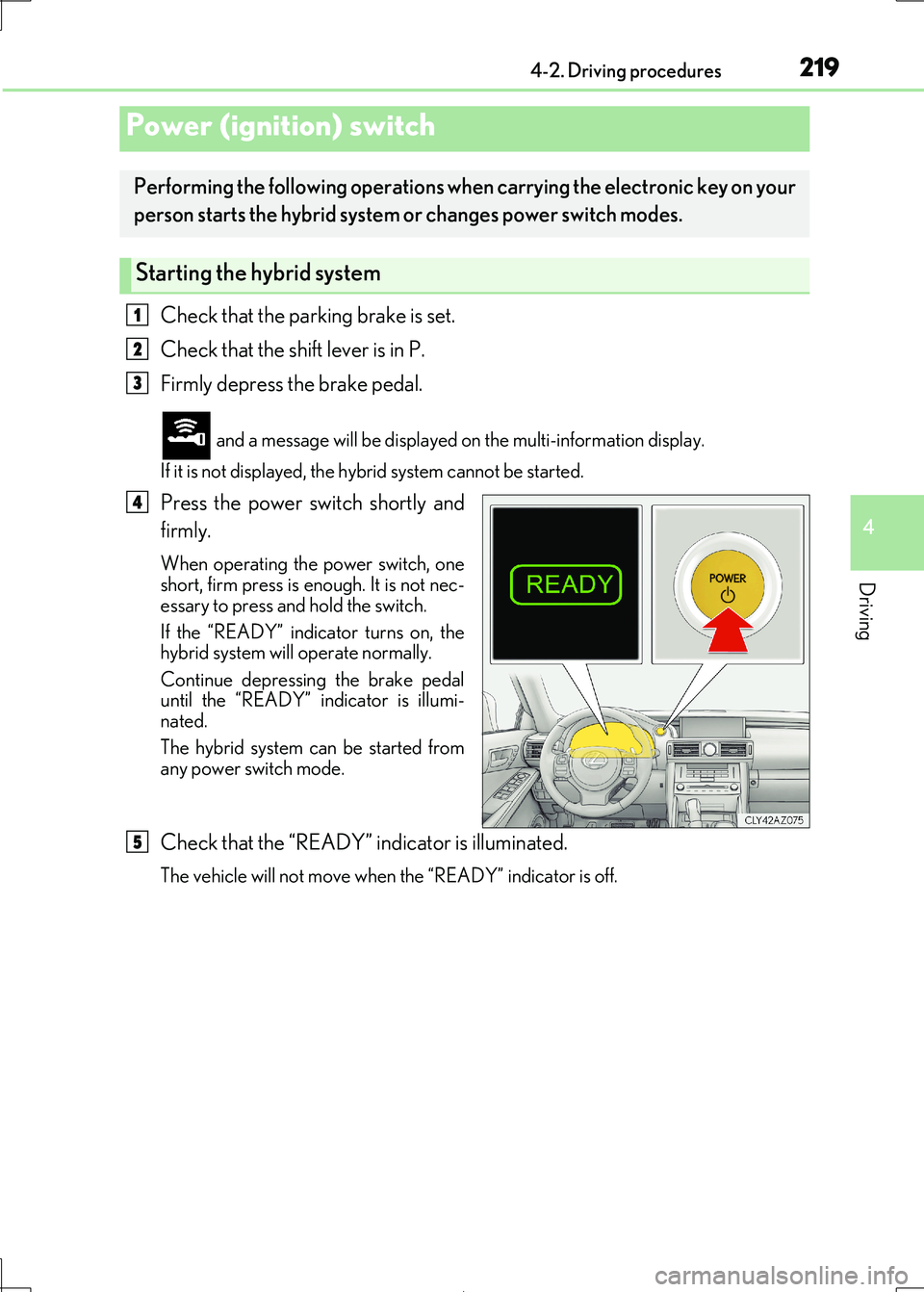
Press the power switch shortly and
firmly.
When operating the power switch, one short, firm press is enough. It is not nec-
essary to press and hold the switch.
If the “READY” indicator turns on, the hybrid system will operate normally.
Continue depressing the brake pedal
until the “READY” indicator is illumi-
nated.
The hybrid system can be started from
any power switch mode.
Check that the “READY” indicator is illuminated.
The vehicle will not move when the “READY” indicator is off.
Power (ignition) switch
Performing the following operations when carrying the electronic key on your
person starts the hybrid system or changes power switch modes.
Starting the hybrid system
1
2
3
4
5
Page 220 of 692
2204-2. Driving procedures
IS300h_EE(OM53D89E)
Stop the vehicle completely.
Set the parking brake ( P. 235), and shift the shift lever to P.
Press the power switch.
Release the brake pedal and check that the display on the meters is off.
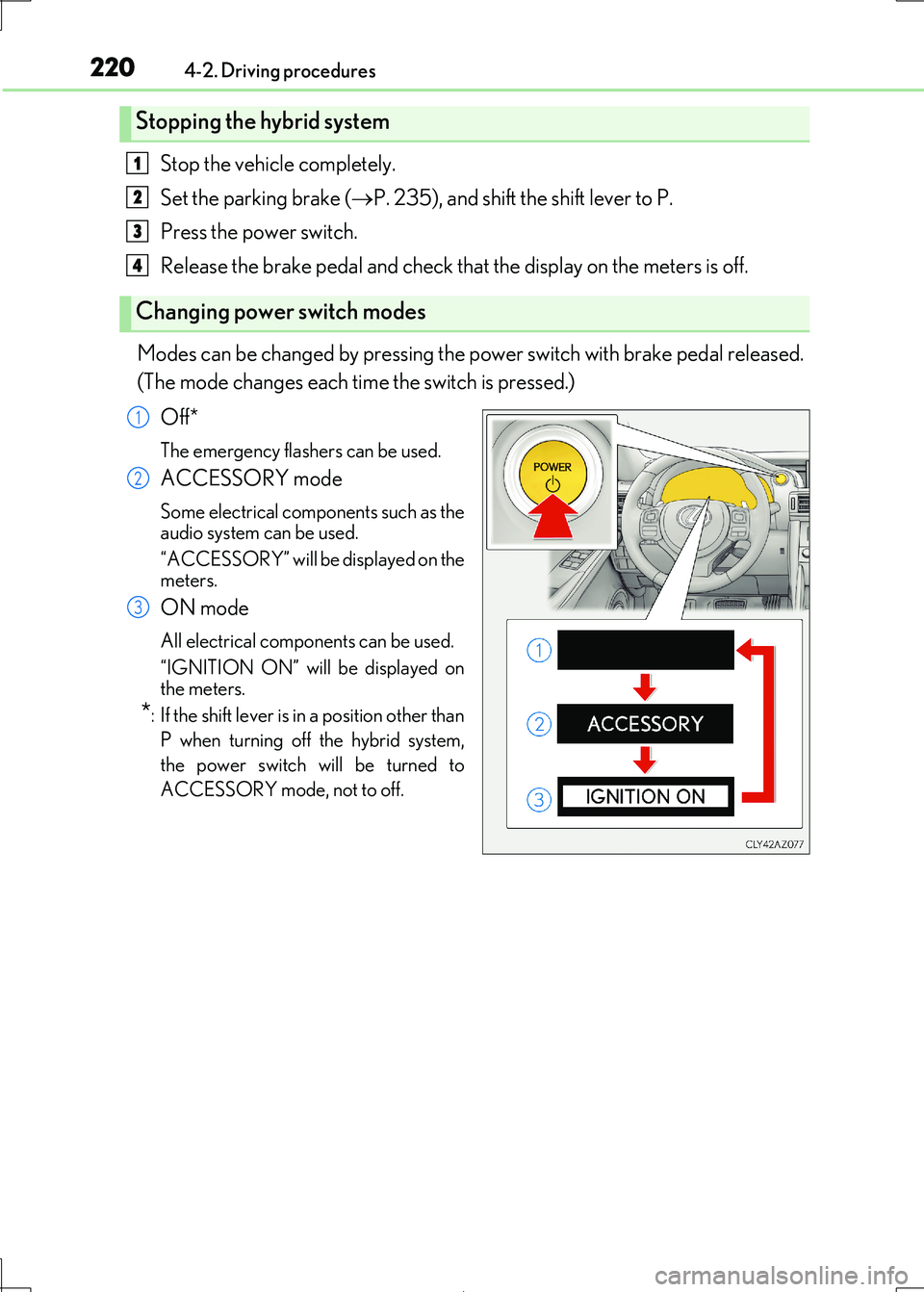
Modes can be changed by pressing the power switch with brake pedal released.
(The mode changes each time the switch is pressed.)
Off*
The emergency flashers can be used.
ACCESSORY mode
Some electrical components such as the audio system can be used.
“ACCESSORY” will be displayed on the
meters.
ON mode
All electrical components can be used.
“IGNITION ON” will be displayed on
the meters.
*: If the shift lever is in a position other than
P when turning off the hybrid system,
the power switch will be turned to
ACCESSORY mode, not to off.
Stopping the hybrid system
Changing power switch modes
1
2
3
4
1
2
3
Page 221 of 692
2214-2. Driving procedures
4
Driving
IS300h_EE(OM53D89E)
If the hybrid system is stopped with the shift lever in a position other than P, the
power switch will not be turned off but instead be turned to ACCESSORY
mode. Perform the following proc edure to turn the switch off:
Check that the parking brake is set.
Shift the shift lever to P.
Check that “Turn Off Vehicle” is disp layed on the multi-information display
and then press the power switch once.
Check that “Turn Off Vehicle” on th e multi-information display is off.
■Auto power off function
If the vehicle is left in ACCESSORY mode for more than 20 minutes or ON mode (the
hybrid system is not operating) for more than an hour with the shift lever in P, the power switch will automatically turn of f. However, this function cannot entirely prevent 12-volt
battery discharge. Do not leave the vehicle with the power switch in ACCESSORY or
ON mode for long periods of time when the hybrid system is not operating.
■Sounds and vibrations specific to a hybrid vehicle
P. 80
■Electronic key battery depletion
P. 141
■When the ambient temperature is low, such as during winter driving conditions
When starting the hybrid system, the flashing time of the “READY” indicator may be long. Leave the vehicle as it is until the “READY” indicator is steady on, as steady means
the vehicle is able to move.
■Conditions affe cting operation
P. 159
■Notes for the entry function
P. 160
■If the hybrid system does not start
●The immobilizer system may not have been deactivated. (P. 86)
Contact any authorized Lexus retailer or Le xus authorized repairer, or any reliable
repairer.
●Check that the shift lever is se curely set in P. The hybrid system may not start if the shift
lever is displaced out of P. “T o Start Vehicle, Put Shift Lever into P” will be displayed on
the multi-information display.
When stopping the hybrid system with the shift lever in a position other
than P
1
2
3
4
Page 226 of 692
2264-2. Driving procedures
IS300h_EE(OM53D89E)
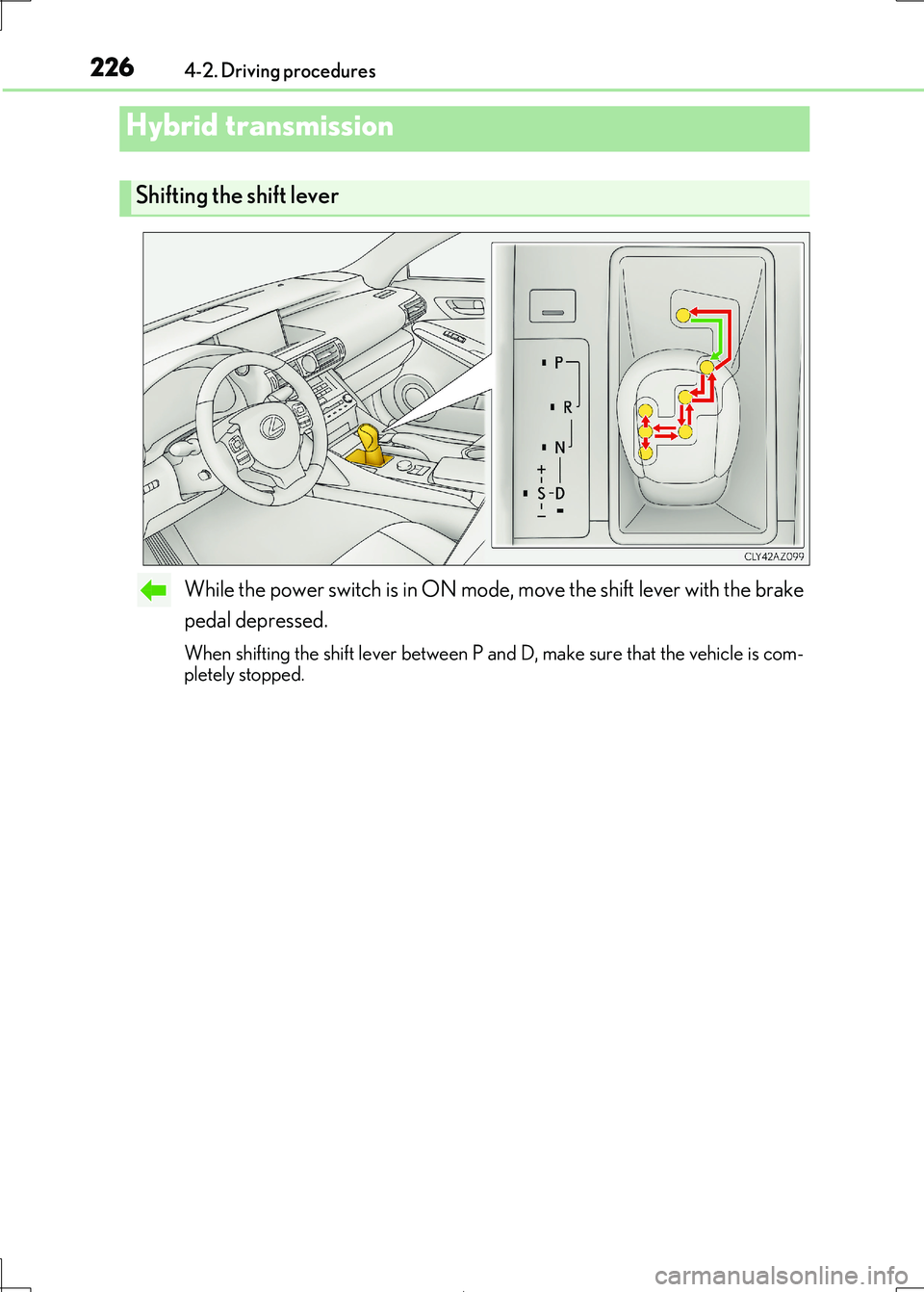
While the power switch is in ON mode, move the shift lever with the brake
pedal depressed.
When shifting the shift lever between P and D, make sure that the vehicle is com-
pletely stopped.
Hybrid transmission
Shifting the shift lever
Page 230 of 692

2304-2. Driving procedures
IS300h_EE(OM53D89E)
■When the “-” paddle shift switch is operated with the shift lever in the D position
The shift range is downshifted to a range that enables engine braking force that is suit-
able to driving conditions.
■Automatic deactivation of shift range selection in the D position
Shift range selection in the D position will be deactivated in the following situations:
●When the vehicle comes to a stop
●If the accelerator pedal is depressed for more than a certain period of time
●When the shift lever is shifted to a position other than D
■Downshifting restriction warning buzzer
To help ensure safety and driving performance, downshifting operation may sometimes
be restricted. In some circum stances, downshifting may not be possible even when the
shift lever or paddle shif t switch is operated. (A buzzer will sound twice.)
■Snow mode automatic deactivation
Snow mode is automatically deactivated if th e power switch is turned off after driving in
snow mode.
■When driving with cruise control or dynamic radar cruise control activated
Even when performing the following actions with the intent of enabling engine braking,
engine braking will not activate because crui se control or dynamic radar cruise control will not be canceled.
●While driving in D or S mode, downshifting to 5 or 4. ( P. 293, 305)
●When switching the driving mode to sport mode while driving in D position. (P. 348)
■Restraining sudden start (Drive-Start Control)
When the following unusual operation is performed, the hybrid system output may be
restrained.
●When the shift lever is shifted from R to D, D to R, N to R, P to D, or P to R (D includes S)
with the accelerator pedal depressed, a wa rning message appears on the multi-infor-
mation display. If a warning message is shown on the multi-information display, read the message and follow the instructions.
●When the accelerator pedal is depressed too while the vehicle is in reverse.
■Shift lock system
The shift lock system is a system to prevent ac cidental operation of the shift lever in start-
ing.
The shift lever can be shifted from P only wh en the power switch is in ON mode and the brake pedal is being depressed.
Page 231 of 692
2314-2. Driving procedures
4
Driving
IS300h_EE(OM53D89E)
■If the shift lever cannot be shifted from P
First, check whether the brake pedal is being depressed.
If the shift lever cannot be shifted with your foot on the brake pedal, there may be a prob-
lem with the shift lock syst em. Have the vehicle inspected by any authorized Lexus
retailer or Lexus authoriz ed repairer, or any reliable repairer immediately. The following steps may be used as an emergency measure to ensure that the shift lever
can be shifted.
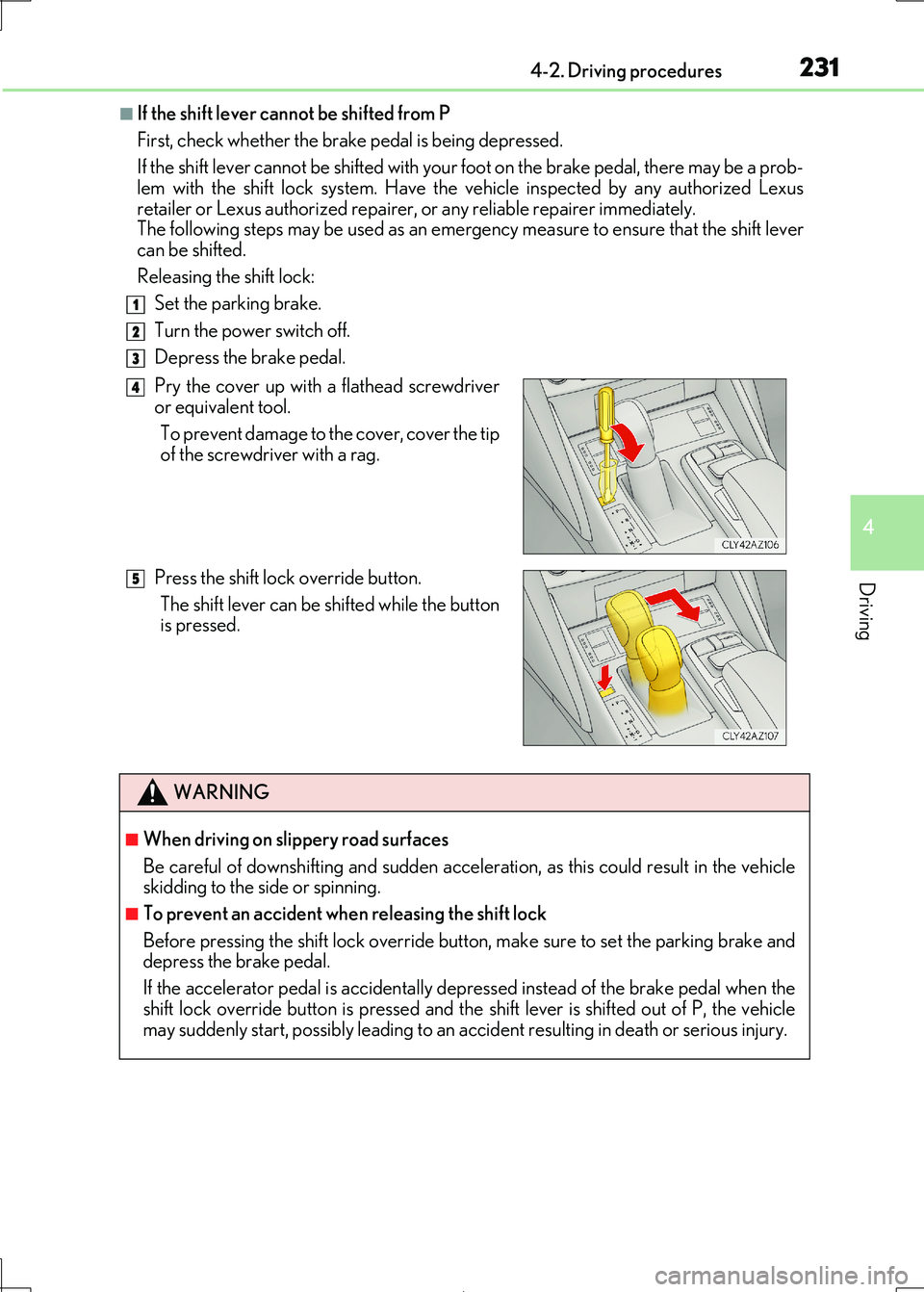
Releasing the shift lock:
Set the parking brake.
Turn the power switch off.
Depress the brake pedal.
Pry the cover up with a flathead screwdriver
or equivalent tool.
To prevent damage to the cover, cover the tip
of the screwdri ver with a rag.
Press the shift lock override button.
The shift lever can be shifted while the button
is pressed.
WARNING
■When driving on slippery road surfaces
Be careful of downshifting an d sudden acceleration, as this could result in the vehicle skidding to the side or spinning.
■To prevent an accident wh en releasing the shift lock
Before pressing the shift lock override button, make sure to set the parking brake and depress the brake pedal.
If the accelerator pedal is accidentally depressed instead of the brake pedal when the
shift lock override button is pressed and the shift lever is shifted out of P, the vehicle may suddenly start, possibly leading to an a ccident resulting in death or serious injury.
1
2
3
4
5
Page 235 of 692
2354-2. Driving procedures
4
Driving
IS300h_EE(OM53D89E)
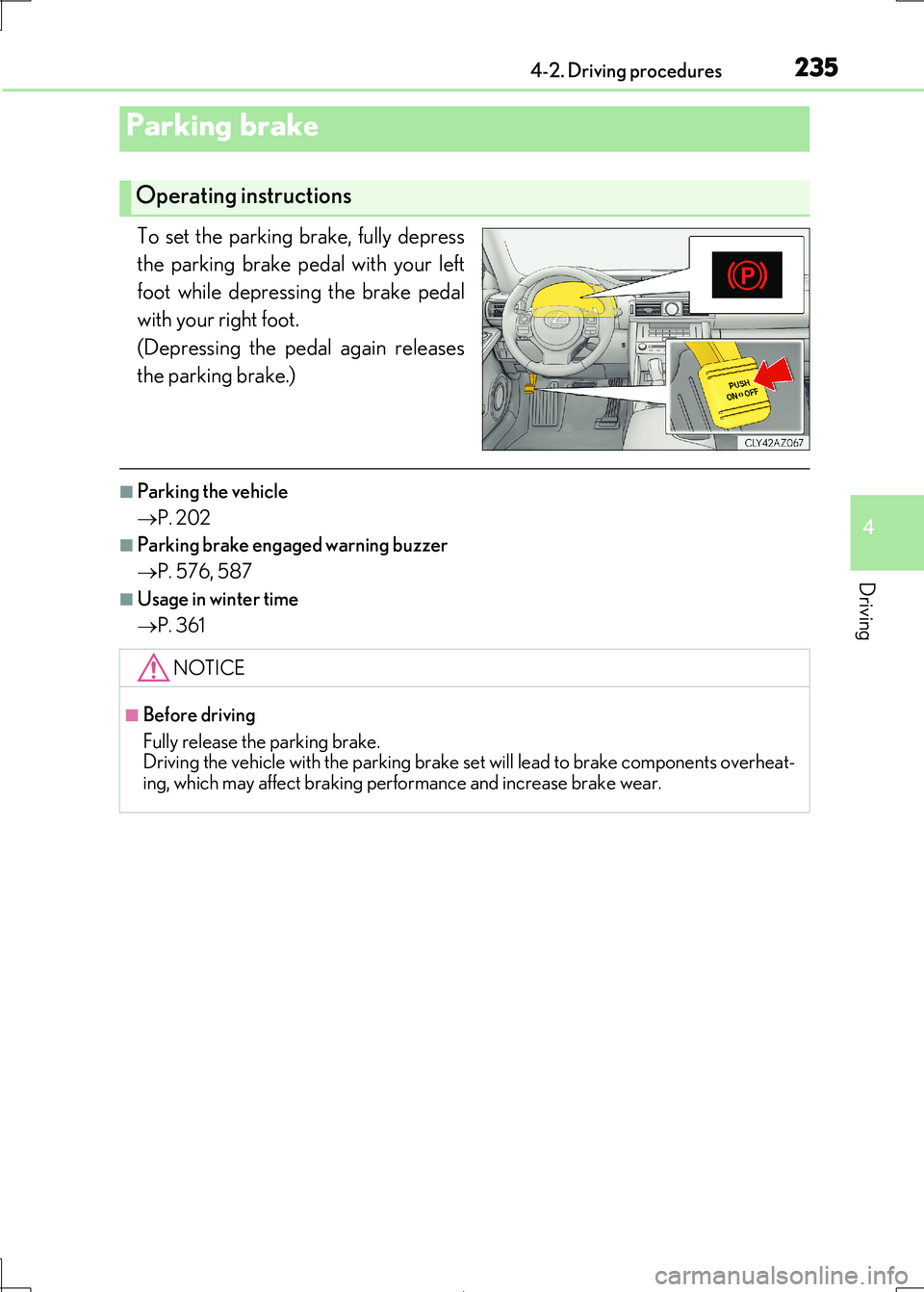
To set the parking brake, fully depress
the parking brake pedal with your left
foot while depressing the brake pedal
with your right foot.
(Depressing the pedal again releases
the parking brake.)
■Parking the vehicle
P. 202
■Parking brake engaged warning buzzer
P. 576, 587
■Usage in winter time
P. 361
Parking brake
Operating instructions
NOTICE
■Before driving
Fully release the parking brake. Driving the vehicle with the parking brake se t will lead to brake components overheat-
ing, which may affect braking performance and increase brake wear.
Page 238 of 692
2384-3. Operating the lights and wipers
IS300h_EE(OM53D89E)
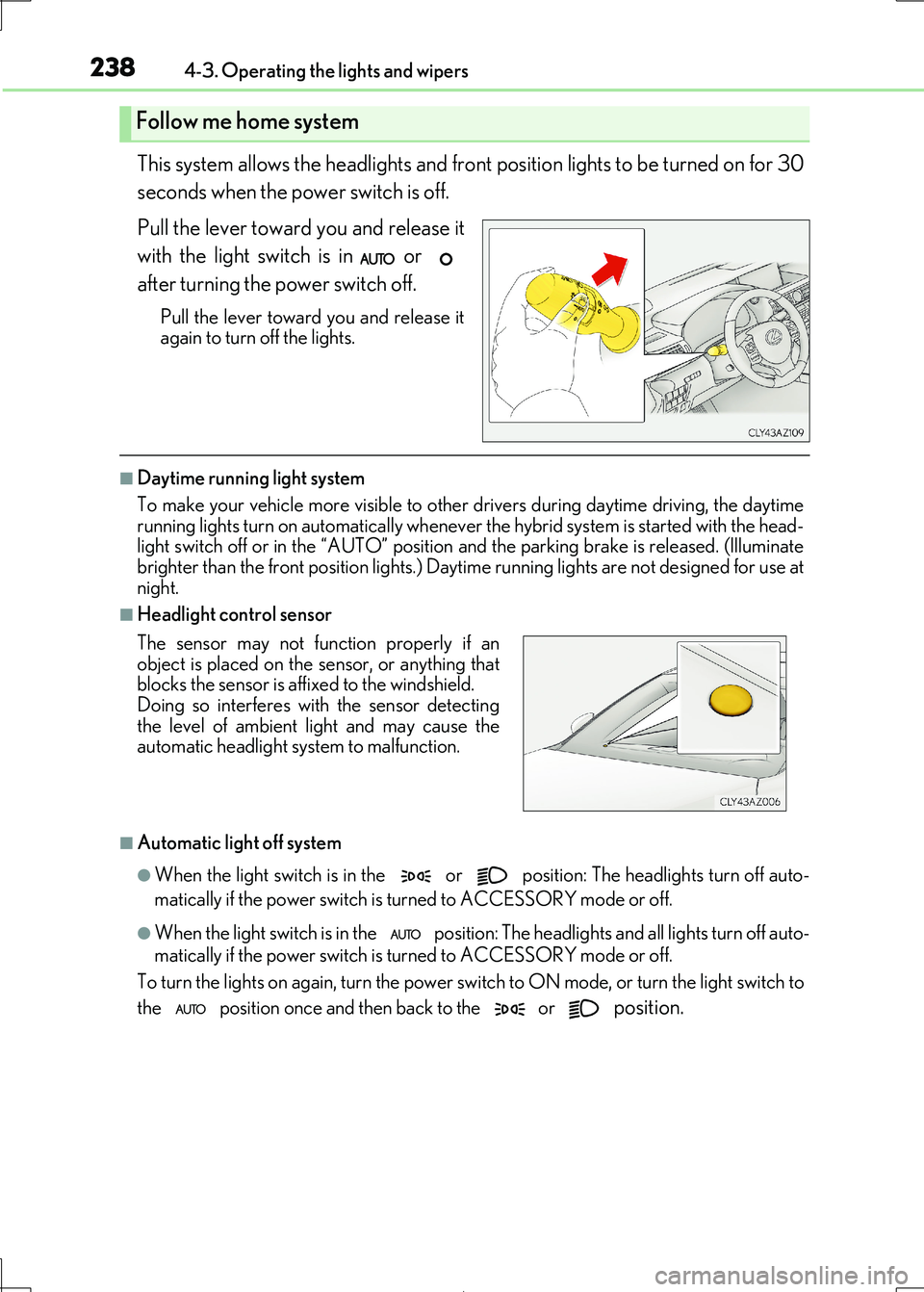
This system allows the headlights and front position lights to be turned on for 30
seconds when the power switch is off.
Pull the lever toward you and release it
with the light switch is in or
after turning the power switch off.
Pull the lever toward you and release it again to turn off the lights.
■Daytime running light system
To make your vehicle more visible to other drivers during daytime driving, the daytime
running lights turn on automatically whenever the hybrid system is started with the head-
light switch off or in the “AUTO” position and the parking brake is released. (Illuminate brighter than the front position lights.) Da ytime running lights are not designed for use at
night.
■Headlight control sensor
■Automatic light off system
●When the light switch is in the or position: The headlights turn off auto-
matically if the power switch is turned to ACCESSORY mode or off.
●When the light switch is in the position: The headlights and all lights turn off auto-
matically if the power switch is turned to ACCESSORY mode or off.
To turn the lights on again, turn the power switch to ON mode, or turn the light switch to
the position once and then back to the or position.
Follow me home system
The sensor may not function properly if an
object is placed on the sensor, or anything that blocks the sensor is affixed to the windshield.
Doing so interferes with the sensor detecting
the level of ambient li ght and may cause the automatic headlight syst em to malfunction.
Page 258 of 692
2584-5. Using the driving support systems
IS300h_EE(OM53D89E)
The pre-collision system is equipped with a sophisticated computer that will
record certain data, such as:
• Accelerator status
•Brake status
• Vehicle speed
• Operation status of the pre-collision system functions
• Information (such as the distance an d relative speed between your vehicle
and the vehicle ahead or other objects)
The pre-collision system does not record conversations, sounds or pictures.
●Data usage
Lexus may use the data recorded in this computer to diagnose malfunctions,
conduct research and develo pment, and improve quality.
Lexus will not disclose the recorded data to a third party except:
• With the consent of the vehicle owner or with the consent of the lessee if
the vehicle is leased
• In response to an official request by the police, a court of law or a govern-
ment agency
• For use by Lexus in a lawsuit
• For research purposes where the data is not tied to a specific vehicle or
vehicle owner
Vehicle data recording
Page 265 of 692
2654-5. Using the driving support systems
4
Driving
IS300h_EE(OM53D89E)
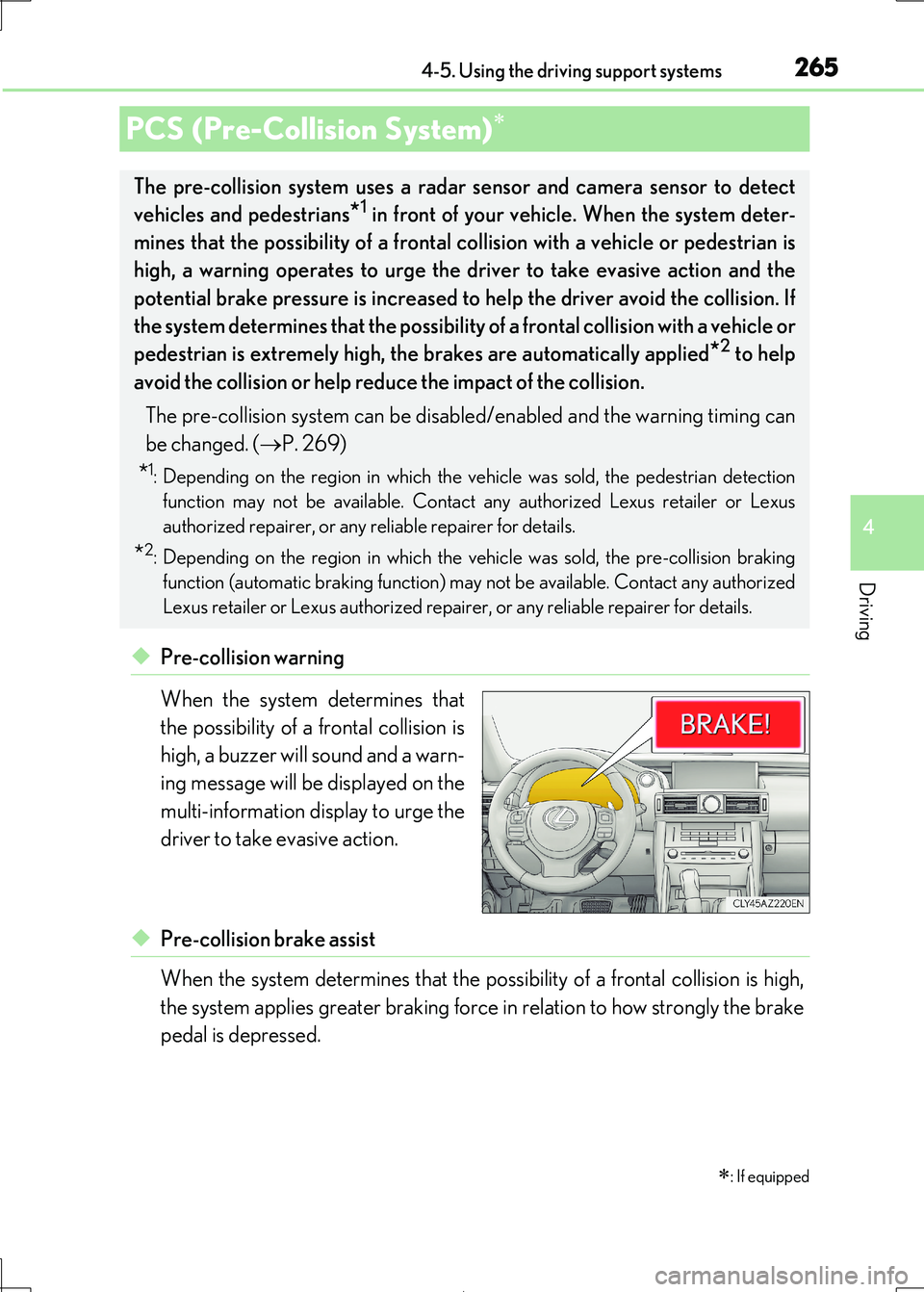
◆Pre-collision warning
When the system determines that
the possibility of a frontal collision is
high, a buzzer will sound and a warn-
ing message will be displayed on the
multi-information display to urge the
driver to take evasive action.
◆Pre-collision brake assist
When the system determines that the po ssibility of a frontal collision is high,
the system applies greater braking force in relation to how strongly the brake
pedal is depressed.
PCS (Pre-Collision System)
: If equipped
The pre-collision system uses a rada r sensor and camera sensor to detect
vehicles and pedestrians*1 in front of your vehicle. When the system deter-
mines that the possibility of a frontal collision with a vehicle or pedestrian is
high, a warning operates to urge the driver to take evasive action and the
potential brake pressure is increased to help the driver avoid the collision. If
the system determines that the possibility of a frontal collision with a vehicle or
pedestrian is extremely high, the brakes are automatically applied*2 to help
avoid the collision or help reduce the impact of the collision.
The pre-collision system can be disabl ed/enabled and the warning timing can
be changed. ( P. 269)
*1: Depending on the region in which the vehicle was sold, the pedestrian detection
function may not be available. Contact any authorized Lexus retailer or Lexus
authorized repairer, or any reliable repairer for details.
*2: Depending on the region in which the ve hicle was sold, the pre-collision braking
function (automatic braking function) may not be available. Contact any authorized
Lexus retailer or Lexus authorized repair er, or any reliable repairer for details.