ECU Lexus IS300h 2017 Repair Manual
[x] Cancel search | Manufacturer: LEXUS, Model Year: 2017, Model line: IS300h, Model: Lexus IS300h 2017Pages: 692, PDF Size: 163.7 MB
Page 342 of 692

3424-5. Using the driving support systems
IS300h_EE(OM53D89E)
■Conditions under which the BSM function may not function correctly
●The BSM function may not detect vehicles correctly in the following situations:
• When the sensor is misaligned due to a stro ng impact to the sensor or its surround-
ing area
• When mud, snow, ice, a sticker, etc. is covering the sensor or surrounding area on the rear bumper
• When driving on a road surface that is wet with standing water during bad weather,
such as heavy rain, snow, or fog • When multiple vehicles are approaching wi th only a small gap between each vehicle
• When the distance between your vehicle and a following vehicle is short
• When there is a significant difference in speed between your vehicle and the vehicle that enters the detection area
• When the difference in speed between your vehicle and another vehicle is changing
• When a vehicle enters a detection area traveling at about the same speed as your vehicle
• As your vehicle starts from a stop, a vehicle remains in the detection area
• When driving up and down consecutive steep inclines, such as hills, dips in the road, etc.
• When driving on roads with sharp bends, consecutive curves, or uneven surfaces
• When vehicle lanes are wide, or when drivin g on the edge of a lane, and the vehicle in an adjacent lane is fa r away from your vehicle
• When towing a trailer (vehicles with towing package)
• When items such as a bicycle carrier are installed on the rear of the vehicle • When there is a significant difference in height between your vehicle and the vehicle
that enters the detection area
• Immediately after the BSM function is turned on
●Instances of the BSM function unnecessarily detecting a vehicle and/or object may
increase in the following situations:
• When the sensor is misaligned due to a stro ng impact to the sensor or its surround- ing area
• When the distance between your vehicle and a guardrail, wall, etc. that enters the
detection area is short • When driving up and down consecutive steep inclines, such as hills, dips in the road,
etc.
• When vehicle lanes are narrow, or when driv ing on the edge of a lane, and a vehicle traveling in a lane other than the ad jacent lanes enters the detection area
• When driving on roads with sharp bends, consecutive curves, or uneven surfaces
• When the tires are slipping or spinning • When the distance between your vehicle and a following vehicle is short
• When a bicycle carrier or other accessory is installed to the rear of the vehicle
• When towing a trailer (vehicles with towing package)
Page 414 of 692
4145-7. Connecting Bluetooth®
IS300h_EE(OM53D89E)
Turn the Bluetooth® connection setting of your device set to on.
Go to “Bluetooth* setup”: “MENU” button “Setup” “Bluetooth*”
Move the controller to the left and then select “Add device”
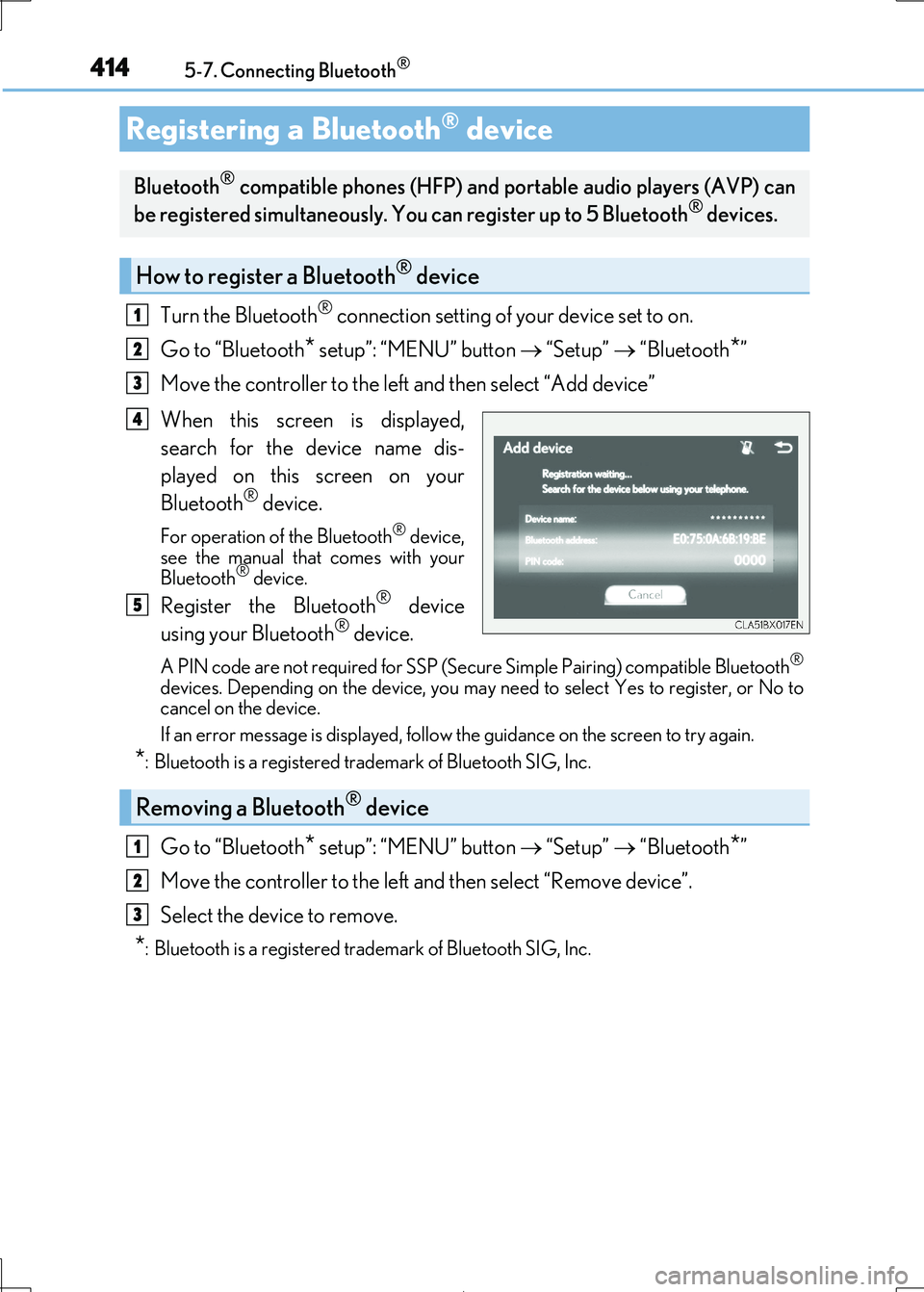
When this screen is displayed,
search for the device name dis-
played on this screen on your
Bluetooth® device.
For operation of the Bluetooth® device, see the manual that comes with your
Bluetooth® device.
Register the Bluetooth® device
using your Bluetooth® device.
A PIN code are not required for SSP (Secur e Simple Pairing) compatible Bluetooth®
devices. Depending on the device, you may need to select Yes to register, or No to cancel on the device.
If an error message is disp layed, follow the guidance on the screen to try again.
*: Bluetooth is a registered trademark of Bluetooth SIG, Inc.
Go to “Bluetooth* setup”: “MENU” button “Setup” “Bluetooth*”
Move the controller to the left and then select “Remove device”.
Select the device to remove.
*: Bluetooth is a registered trad emark of Bluetooth SIG, Inc.
Registering a Bluetooth® device
Bluetooth® compatible phones (HFP) and portable audio players (AVP) can
be registered simultaneously. You can register up to 5 Bluetooth® devices.
How to register a Bluetooth® device
1
2
3
4
5
Removing a Bluetooth® device
1
2
3
Page 441 of 692

4415-11. Bluetooth®
5
Lexus Display Audio system
IS300h_EE(OM53D89E)
In other situations
Even though all conceivable measures have been taken, the symptom status does not
change.
The cellular phone is not close enough to this system. Bring the cellular phone closer to this system.
The cellular phone is the most likely cause of the symptom.
Turn the cellular phone off, remove and reinstall the battery pack, and then
restart the cellular phone. Enable the cellular phone’s Bluetooth® connection.
Stop the cellular phone’s security software and close all applications.
Before using an application installed on the cellular phone, carefully check its source and how its operation might affect this system.
Page 488 of 692
4886-4. Using the storage features
IS300h_EE(OM53D89E)
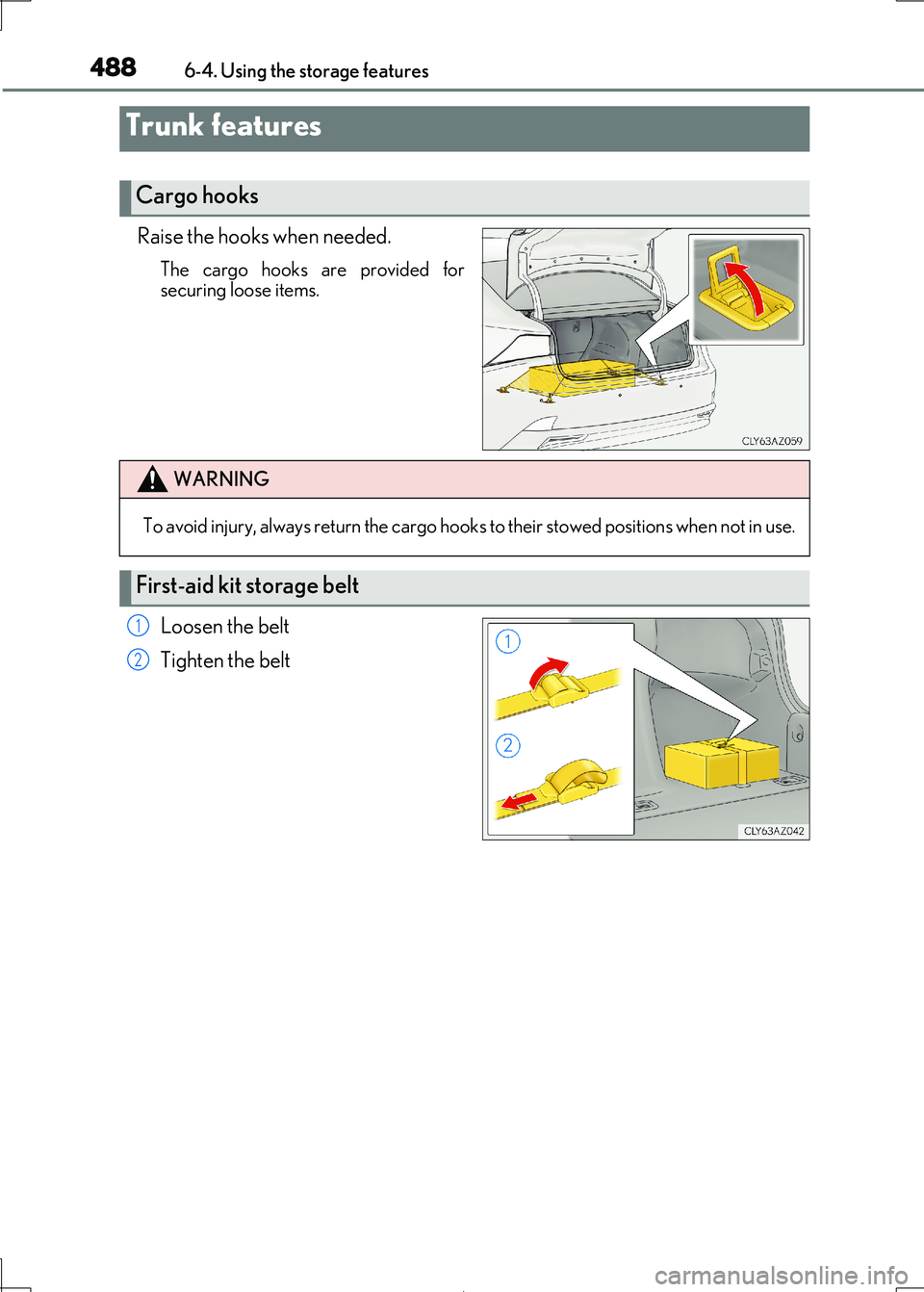
Raise the hooks when needed.
The cargo hooks are provided for
securing loose items.
Loosen the belt
Tighten the belt
Trunk features
Cargo hooks
WARNING
To avoid injury, always return the cargo hook s to their stowed positions when not in use.
First-aid kit storage belt
1
2
Page 489 of 692
4896-4. Using the storage features
6
Interior features
IS300h_EE(OM53D89E)
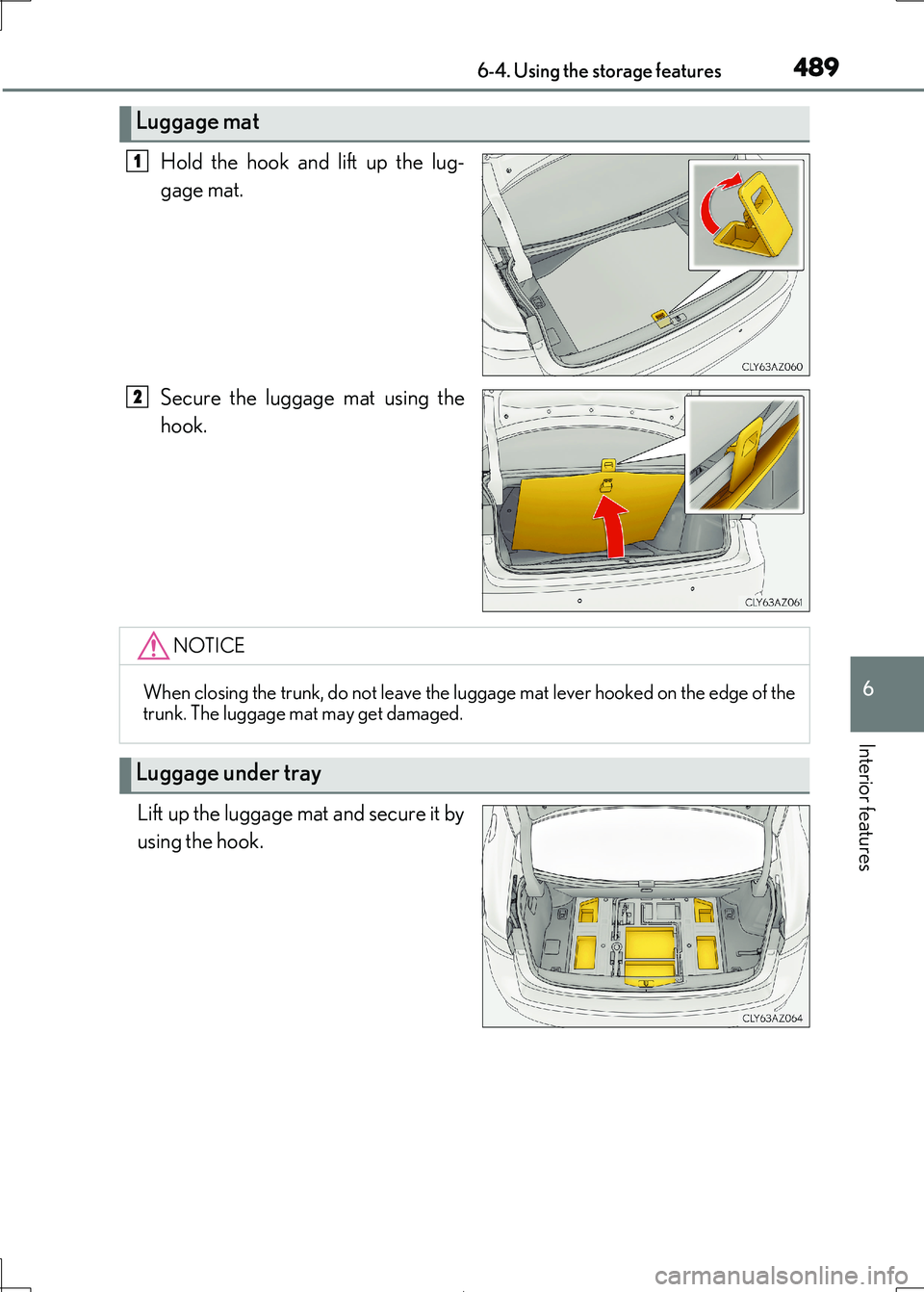
Hold the hook and lift up the lug-
gage mat.
Secure the luggage mat using the
hook.
Lift up the luggage mat and secure it by
using the hook.
Luggage mat
1
2
NOTICE
When closing the trunk, do not leave the luggage mat lever hooked on the edge of the
trunk. The luggage mat may get damaged.
Luggage under tray
Page 490 of 692
4906-4. Using the storage features
IS300h_EE(OM53D89E)
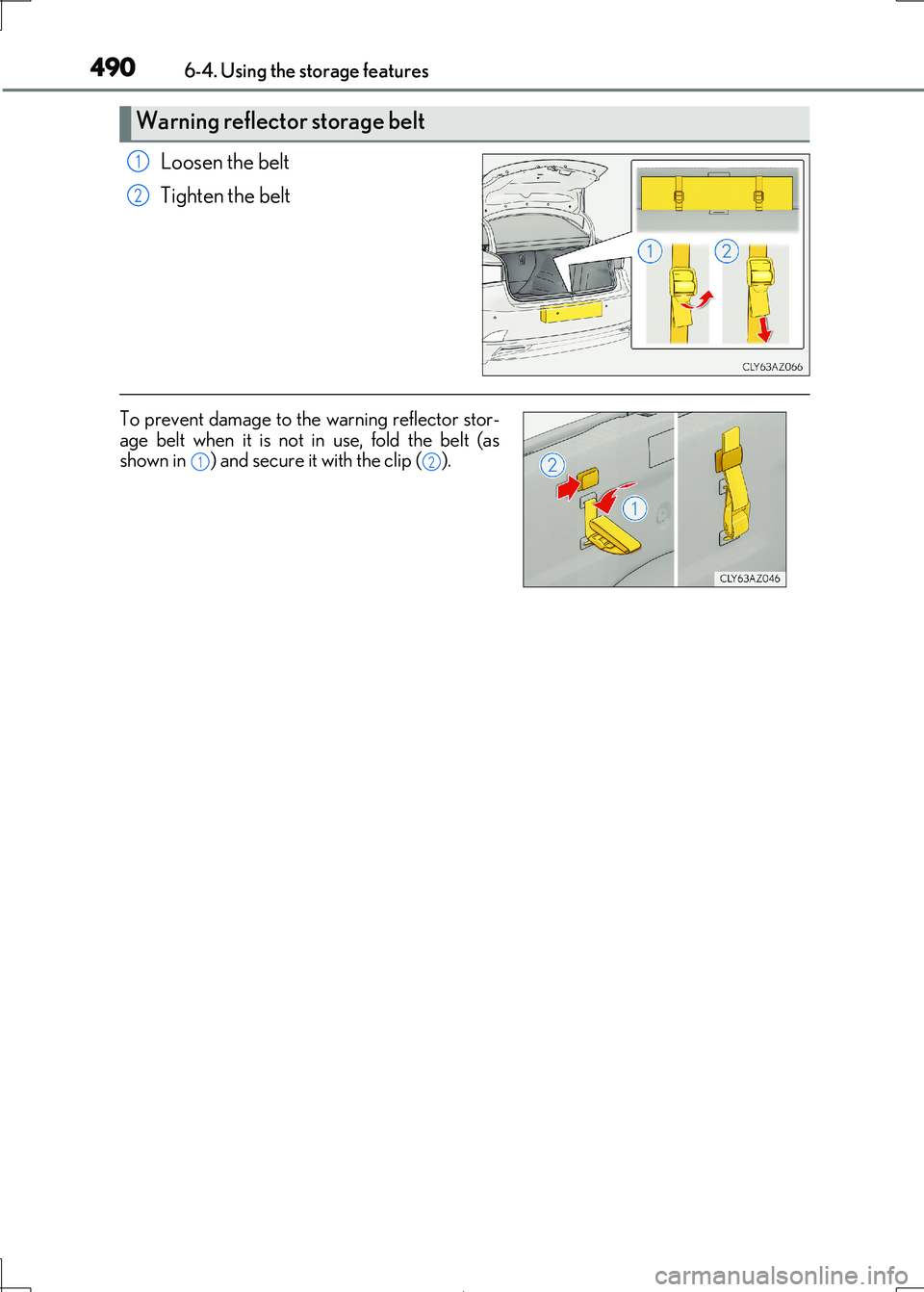
Loosen the belt
Tighten the belt
Warning reflector storage belt
1
2
To prevent damage to th e warning reflector stor- age belt when it is not in use, fold the belt (as
shown in ) and secure it with the clip ( ).12
Page 560 of 692
5607-3. Do-it-yourself maintenance
IS300h_EE(OM53D89E)
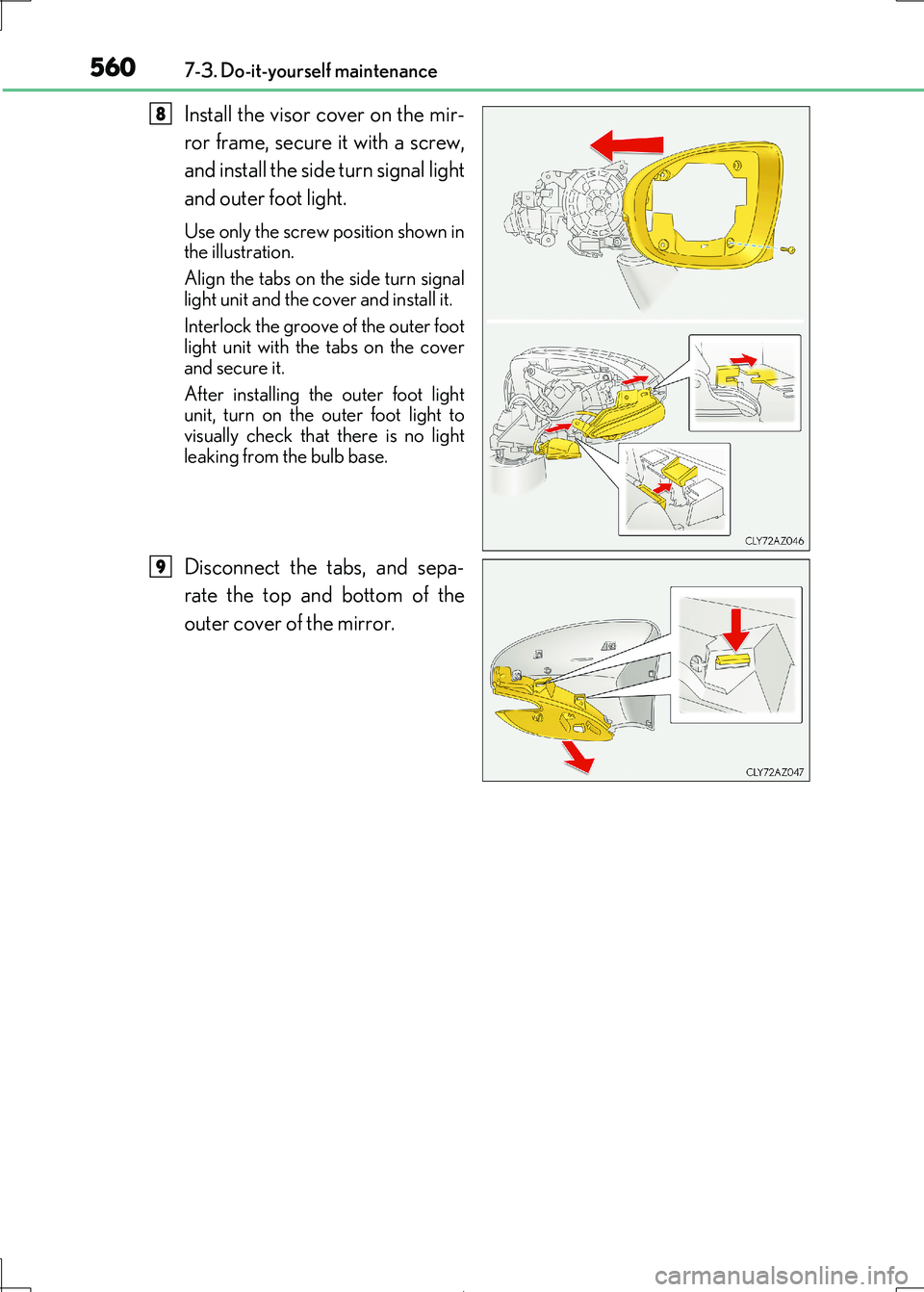
Install the visor cover on the mir-
ror frame, secure it with a screw,
and install the side turn signal light
and outer foot light.
Use only the screw position shown in
the illustration.
Align the tabs on the side turn signal
light unit and the co ver and install it.
Interlock the groove of the outer foot light unit with the tabs on the cover
and secure it.
After installing the outer foot light unit, turn on the outer foot light to
visually check that there is no light
leaking from the bulb base.
Disconnect the tabs, and sepa-
rate the top and bottom of the
outer cover of the mirror.
8
9
Page 561 of 692
5617-3. Do-it-yourself maintenance
7
Maintenance and care
IS300h_EE(OM53D89E)
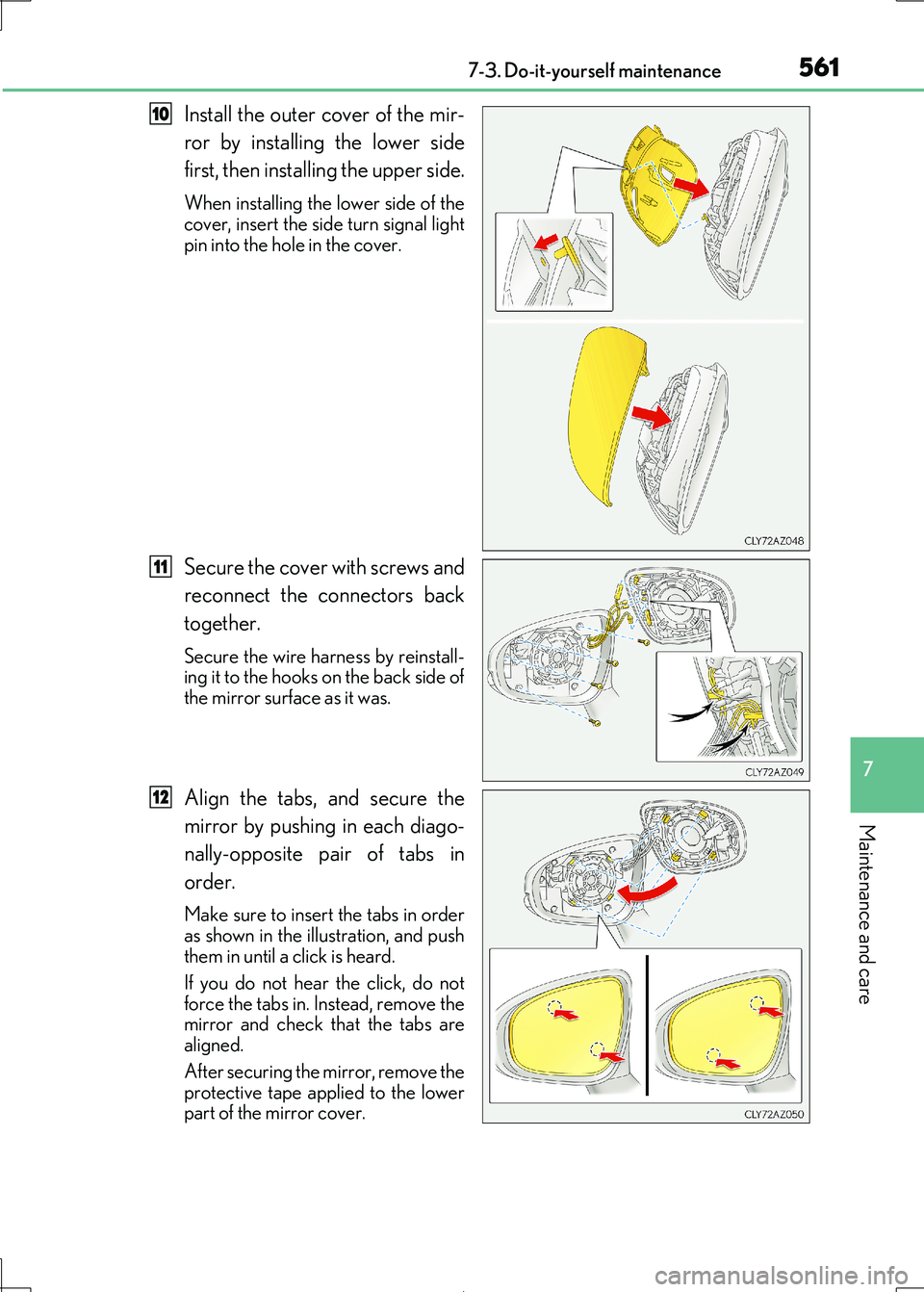
Install the outer cover of the mir-
ror by installing the lower side
first, then installing the upper side.
When installing the lower side of the
cover, insert the side turn signal light pin into the hole in the cover.
Secure the cover with screws and
reconnect the connectors back
together.
Secure the wire ha rness by reinstall-
ing it to the hooks on the back side of
the mirror surface as it was.
Align the tabs, and secure the
mirror by pushing in each diago-
nally-opposite pair of tabs in
order.
Make sure to insert the tabs in order
as shown in the illustration, and push
them in until a click is heard.
If you do not hear the click, do not
force the tabs in. Instead, remove the
mirror and check that the tabs are aligned.
After securing the mirror, remove the
protective tape applied to the lower part of the mirror cover.
10
11
12
Page 563 of 692
5637-3. Do-it-yourself maintenance
7
Maintenance and care
IS300h_EE(OM53D89E)
WARNING
■Replacing light bulbs
●Turn off the lights. Do not attempt to replace the bulb immediately after turning off the
lights.
The bulbs become very hot and may cause burns.
●Do not touch the glass portion of the light bu lb with bare hands. When it is unavoid-
able to hold the glass portion, use and hold with a clean dry cloth to avoid getting
moisture and oils on the bulb. Also, if the bulb is scratched or dropped, it may blow out or crack.
●Fully install light bulbs and any parts used to secure them. Failure to do so may result
in heat damage, fire, or water entering th e headlight unit. This may damage the head- lights or cause condensation to build up on the lens.
■To prevent damage or fire
●Make sure bulbs are fully seated and locked.
●Check the wattage of the bulb before installing to prevent heat damage.
NOTICE
■When replacing the outer foot lights
If the front window is stop ping you from conducting the replace operation properly,
open the window on the side you are working on to allow you enough space to work.
Continuing the operation without giving yourself enough space to work could lead you to scratch the vehicle.
Page 570 of 692
5708-2. Steps to take in an emergency
IS300h_EE(OM53D89E)
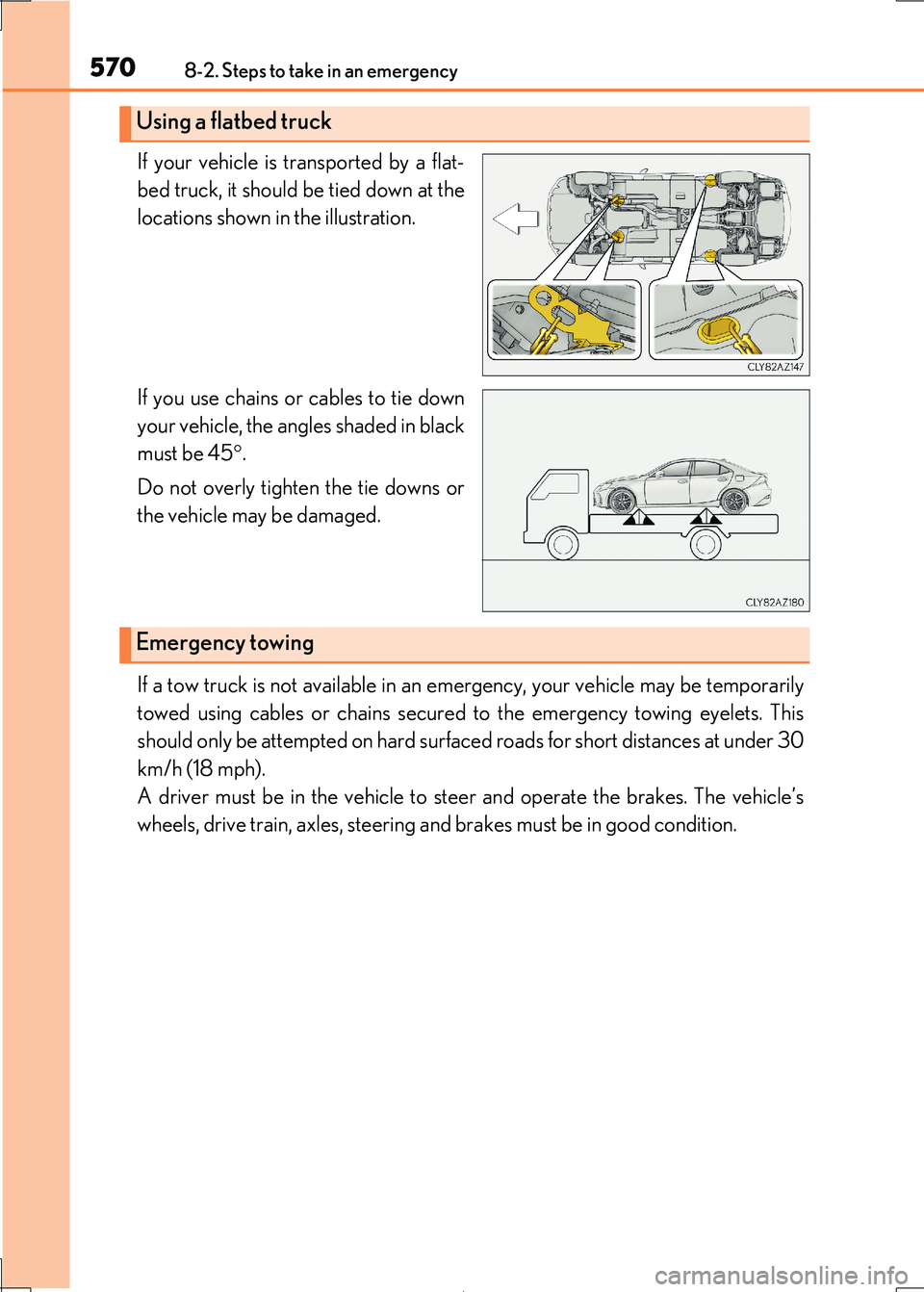
If your vehicle is transported by a flat-
bed truck, it should be tied down at the
locations shown in the illustration.
If you use chains or cables to tie down
your vehicle, the angles shaded in black
must be 45 .
Do not overly tighten the tie downs or
the vehicle may be damaged.
If a tow truck is not available in an em ergency, your vehicle may be temporarily
towed using cables or chains secured to the emergency towing eyelets. This
should only be attempted on hard surf aced roads for short distances at under 30
km/h (18 mph).
A driver must be in the vehicle to st eer and operate the brakes. The vehicle’s
wheels, drive train, axles, steering an d brakes must be in good condition.
Using a flatbed truck
Emergency towing