lane assist Lexus IS300h 2017 Owner's Manual
[x] Cancel search | Manufacturer: LEXUS, Model Year: 2017, Model line: IS300h, Model: Lexus IS300h 2017Pages: 692, PDF Size: 163.7 MB
Page 3 of 692
3
1
9
8
7
6
4
3
2
IS300h_EE(OM53D89E)
5
3-5. Opening, closing the windows
and moon roof
Power windows............................ 193
Moon roof ...................................... 197
4-1. Before driving
Driving the vehicle .....................202
Cargo and luggage ...................209
Trailer towing
(vehicles without
a towing package) ................... 210
Trailer towing
(vehicles with
a towing package) .....................211
4-2. Driving procedures
Power (ignition) switch ............. 219
EV drive mode ............................ 224
Hybrid transmission .................. 226
Turn signal lever .........................233
Parking brake ..............................235
ASC
(Active Sound Control)........236
4-3. Operating the lights and
wipers
Headlight switch ......................... 237
Automatic High Beam .............240
Fog light switch ........................... 244
Windshield wipers and
washer..........................................245
4-4. Refueling
Opening the fuel tank cap......253
4-5. Using the driving support
systems
Lexus Safety System+ .............. 257
PCS
(Pre-Collision System) ......... 265
LDA
(Lane Departure Alert
with steering co ntrol) ............ 279
RSA (Road Sign Assist).......... 288
Dynamic radar cruise
control..........................................293
Cruise control ............................ 305
Lexus parking
assist-sensor ............................. 309
Lexus parking assist
monitor ......................................... 318
BSM
(Blind Spot Monitor)..............334
• BSM function .........................340
• RCTA function ......................343
Driving mode select
switch .......................................... 348
Driving assist systems...............352
4-6. Driving tips
Hybrid vehicle driving tips..... 358
Winter driving tips ...................... 361
4Driving
Page 102 of 692

1022. Instrument cluster
IS300h_EE(OM53D89E)
The indicators inform the driver of the operating state of the vehicle’s various sys-
tems.
Indicators
Turn signal indicator
( P. 233)
*2
(if equipped)
LDA (Lane Departure
Alert) indicator ( P. 279)
Tail light indicator
( P. 237)
(if equipped)
Lexus parking assist-sensor
indicator ( P. 309)
Headlight high beam indi-
cator ( P. 237)
*1, 2 Slip indicator
( P. 353)
*1
(if equipped)
Automatic High Beam indi-
cator ( P. 240)
*1VSC OFF indicator
( P. 354)
Rear fog light indicator
( P. 244)
*1, 3
(if equipped)
PCS warning light
( P. 269)
(if equipped)
Cruise control indicator ( P. 293, 305)
*4, 5
(if equipped)
BSM (Blind Spot Monitor)
outside rear view mirror
indicators ( P. 334)
(if equipped)
Dynamic radar cruise con-
trol indicator ( P. 293)
*6Security indicator
( P. 86, 92)
(if equipped)
Cruise control “SET” indica-
tor ( P. 293, 305)
*7Low outside temperature
indicator ( P. 105)
(if equipped)
LDA (Lane Departure
Alert) indicator ( P. 279)
“READY” indicator
( P. 219)
(if equipped)
LDA (Lane Departure Alert) indicator ( P. 279) EV indicator ( P. 79)
Page 115 of 692
1152. Instrument cluster
2
Instrument cluster
IS300h_EE(OM53D89E)
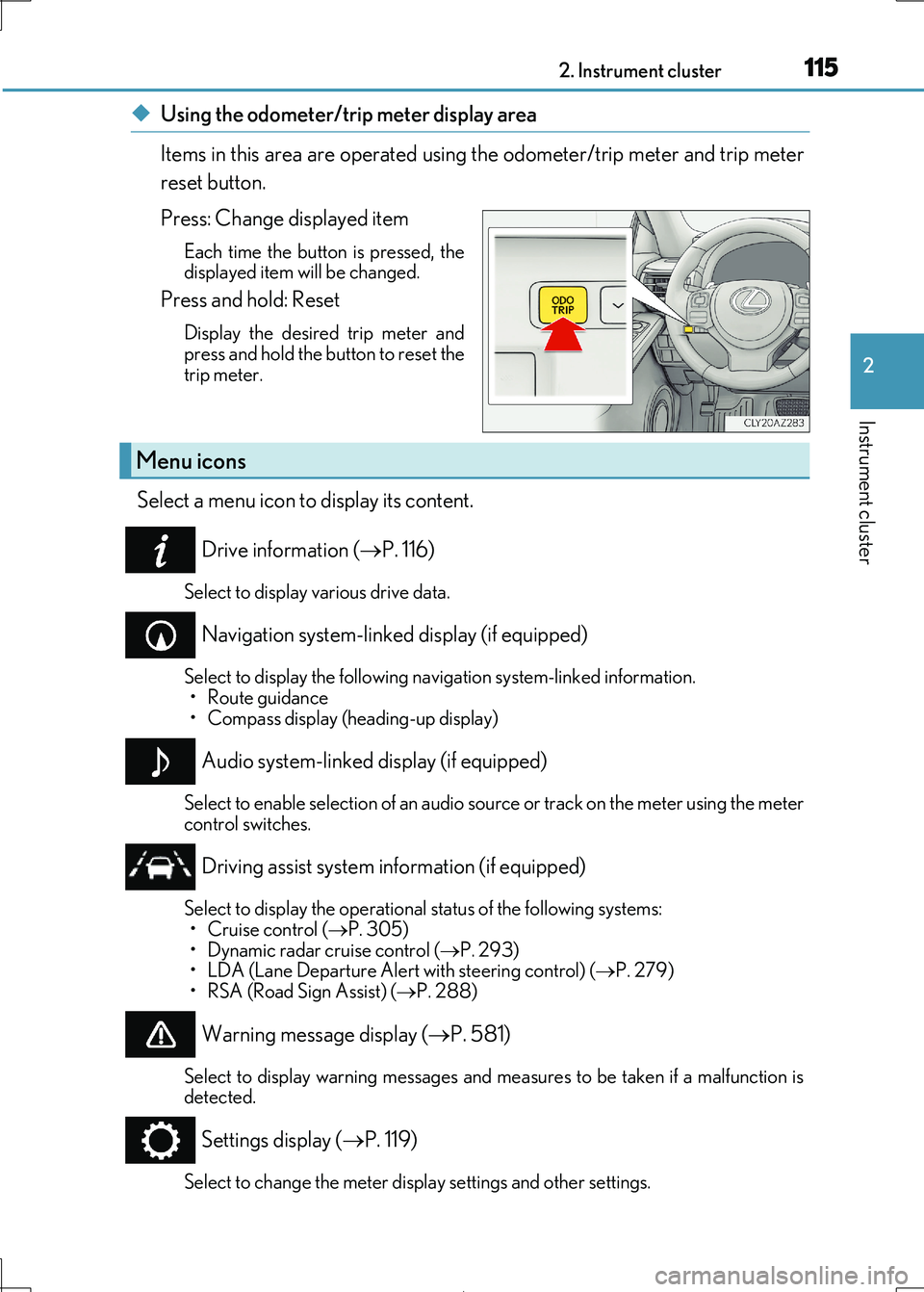
◆Using the odometer/trip meter display area
Items in this area are operated using the odometer/trip meter and trip meter
reset button.
Press: Change displayed item
Each time the button is pressed, the
displayed item will be changed.
Press and hold: Reset
Display the desired trip meter and
press and hold the button to reset the
trip meter.
Select a menu icon to display its content.
Drive information ( P. 116)
Select to display various drive data.
Navigation system-linked display (if equipped)
Select to display the following navigation system-linked information. • Route guidance
• Compass display (heading-up display)
Audio system-linked display (if equipped)
Select to enable selection of an audio source or track on the meter using the meter
control switches.
Driving assist system information (if equipped)
Select to display the operational status of the following systems:
• Cruise control ( P. 305)
• Dynamic radar cruise control ( P. 293) • LDA (Lane Departure Alert with steering control) ( P. 279)
• RSA (Road Sign Assist) ( P. 288)
Warning message display (P. 581)
Select to display warning messages and measures to be taken if a malfunction is
detected.
Settings display ( P. 119)
Select to change the meter display settings and other settings.
Menu icons
Page 119 of 692

1192. Instrument cluster
2
Instrument cluster
IS300h_EE(OM53D89E)
◆Changing settings
Use the meter control switches on the steering wheel to change settings.
Press or to select .
Operate the switches to select a desired item.
Change the setting by referring to the message displayed on the screen.
◆Setting items
■ LDA (Lane Departure Alert with steering control) (if equipped)
( P. 279)
The following LDA system settings can be changed:
Settings display ( )
1
2
3
ItemSettingsDetails
Steering assist On Select to enable/disable steering
wheel assistance.Off
Alert
Select to set a vibrator or buzzer as
the notification method used to warn the driver.
Alert sensitivityHighSelect to set the warning sensitivity.Normal
Sway warningOnSelect to enable/disable the vehicle
sway warning.Off
Sway sensitivity
High
Select to set the vehicle sway warning
sensitivity.Medium
Low
Page 201 of 692
201
4Driving
IS300h_EE(OM53D89E)
4-1. Before driving
Driving the vehicle .....................202
Cargo and luggage ...................209
Trailer towing (vehicles
without a towing
package) ...................................... 210
Trailer towing (vehicles with
a towing package) ..................... 211
4-2. Driving procedures
Power (ignition) switch ............. 219
EV drive mode ............................ 224
Hybrid transmission .................. 226
Turn signal lever .........................233
Parking brake ..............................235
ASC
(Active Sound Control)........ 236
4-3. Operating the lights
and wipers
Headlight switch ......................... 237
Automatic High Beam .............240
Fog light switch ........................... 244
Windshield wipers and
washer .........................................245
4-4. Refueling
Opening the fuel tank cap......253
4-5. Using the driving support
systems
Lexus Safety System+ .............. 257
PCS (Pre-Collision
System) ....................................... 265
LDA (Lane Departure Alert
with steering control) ............ 279
RSA (Road Sign Assist) ..........288
Dynamic radar cruise
control ......................................... 293
Cruise control .............................305
Lexus parking
assist-sensor..............................309
Lexus parking assist
monitor ......................................... 318
BSM
(Blind Spot Moni tor) ............. 334
• BSM function.........................340
• RCTA function...................... 343
Driving mode select
switch ...........................................348
Driving assist systems .............. 352
4-6. Driving tips
Hybrid vehicle
driving tips..................................358
Winter driving tips ...................... 361
Page 257 of 692
257
4
Driving
IS300h_EE(OM53D89E)
4-5. Using the driving support systems
◆PCS (Pre-Collision System)
P. 265
◆LDA (Lane Departure Alert with steering control)
P. 279
◆Automatic High Beam
P. 240
◆RSA (Road Sign Assist)
P. 288
◆Dynamic radar cruise control
P. 293
Lexus Safety System+
: If equipped
The Lexus Safety System+ consists of the following drive assist systems and
contributes to a safe and co mfortable driving experience:
WARNING
■Lexus Safety System+
The Lexus Safety System+ is designed to operate under the assumption that the driver
will drive safely, and is designed to help reduce the impact to the occupants and the vehicle in the case of a collision or assist the driver in normal driving conditions.
As there is a limit to the degree of reco gnition accuracy and control performance that
this system can provide, do not overly rely on this system. The driver is always responsi- ble for paying attention to the vehicl e's surroundings and driving safely.
Page 280 of 692
2804-5. Using the driving support systems
IS300h_EE(OM53D89E)
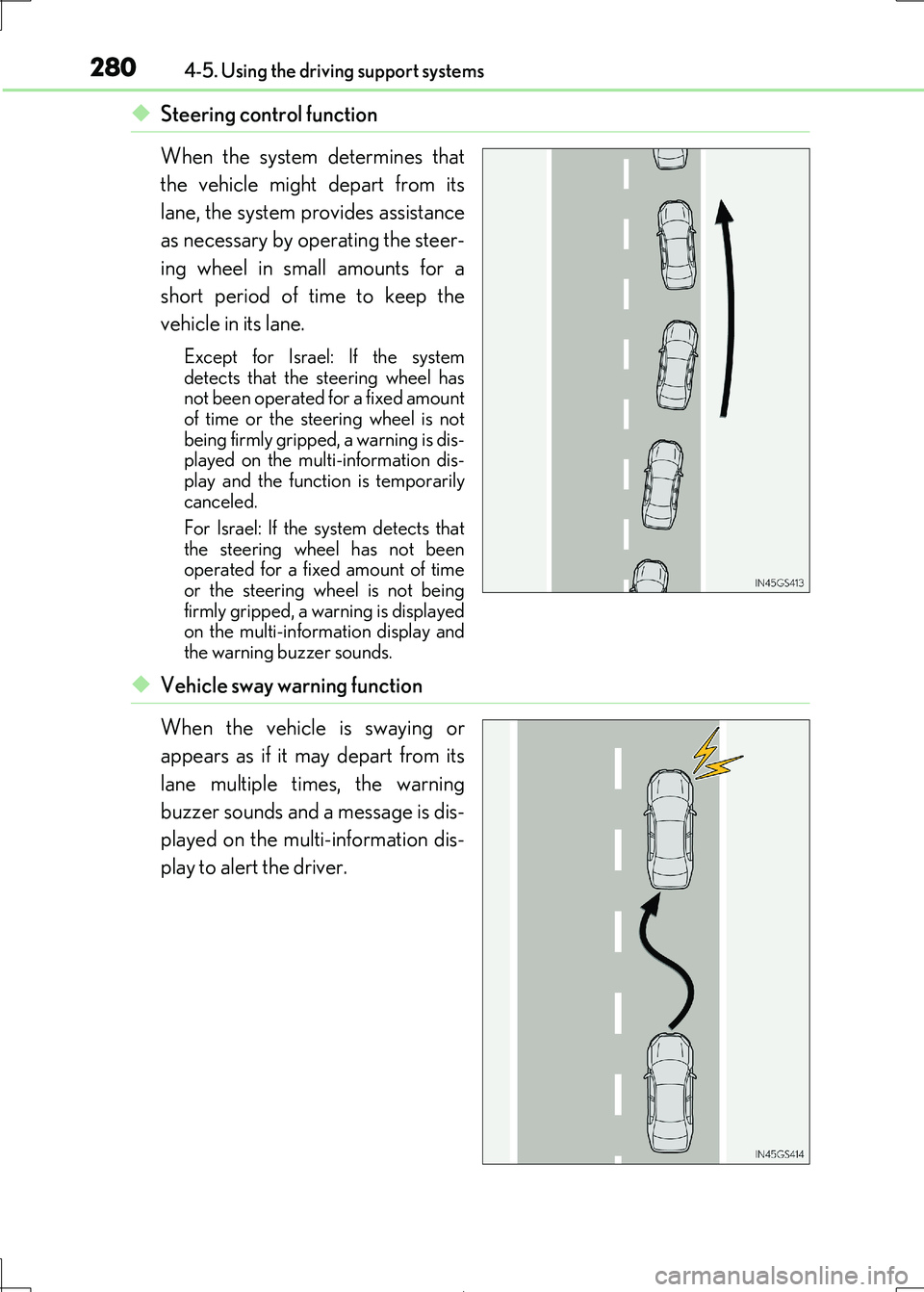
◆Steering control function
When the system determines that
the vehicle might depart from its
lane, the system provides assistance
as necessary by operating the steer-
ing wheel in small amounts for a
short period of time to keep the
vehicle in its lane.
Except for Israel: If the system
detects that the steering wheel has not been operated for a fixed amount
of time or the steering wheel is not
being firmly gripped, a warning is dis- played on the multi-information dis-
play and the function is temporarily
canceled.
For Israel: If the system detects that
the steering wheel has not been
operated for a fixed amount of time or the steering wheel is not being
firmly gripped, a wa rning is displayed
on the multi-information display and the warning buzzer sounds.
◆Vehicle sway warning function
When the vehicle is swaying or
appears as if it may depart from its
lane multiple times, the warning
buzzer sounds and a message is dis-
played on the multi-information dis-
play to alert the driver.
Page 283 of 692
2834-5. Using the driving support systems
4
Driving
IS300h_EE(OM53D89E)
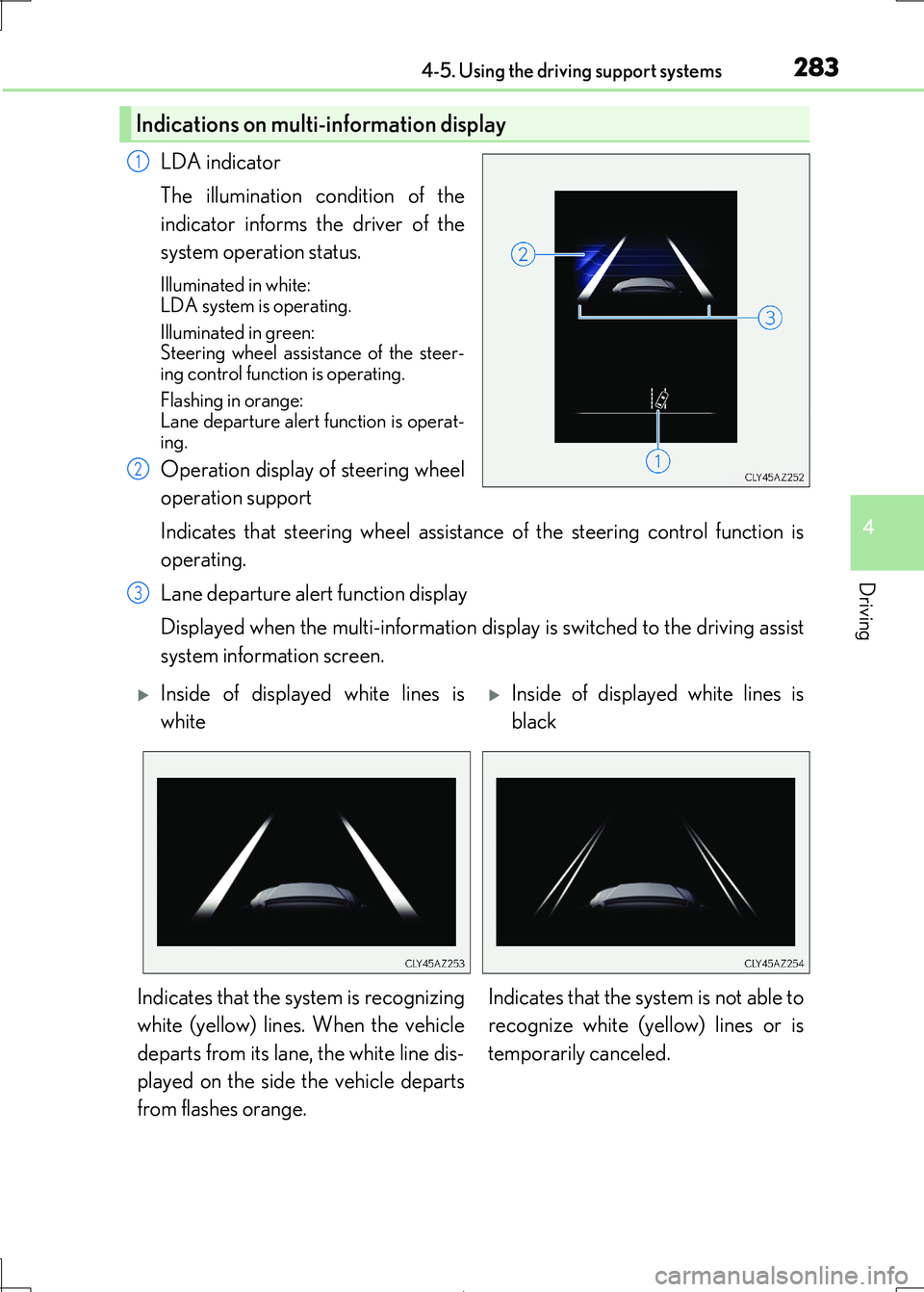
LDA indicator
The illumination condition of the
indicator informs the driver of the
system operation status.
Illuminated in white:
LDA system is operating.
Illuminated in green: Steering wheel assist ance of the steer-
ing control function is operating.
Flashing in orange: Lane departure alert function is operat-
ing.
Operation display of steering wheel
operation support
Indicates that steering wheel assistance of the steering control function is
operating.
Lane departure alert function display
Displayed when the multi-information disp lay is switched to the driving assist
system information screen.
Indications on multi-information display
1
2
3
Inside of displayed white lines is
white
Inside of displayed white lines is
black
Indicates that the system is recognizing
white (yellow) lines. When the vehicle
departs from its lane, the white line dis-
played on the side the vehicle departs
from flashes orange.
Indicates that the system is not able to
recognize white (ye llow) lines or is
temporarily canceled.
Page 284 of 692
2844-5. Using the driving support systems
IS300h_EE(OM53D89E)
■Operation conditions of each function
●Lane departure alert function
This function operates when all of the following conditions are met.
• LDA is turned on.
• Vehicle speed is approximately 50 km/h (32 mph) or more.
• System recognizes white (yellow) lines. • Width of traffic lane is approx imately 3 m (9.8 ft.) or more.
• Turn signal lever is not operated.
• Vehicle is driven on a stra ight road or around a gentle curve with a radius of more than approximately 150 m (492 ft.).
• No system malfunctions are detected. ( P. 575)
●Steering control function
This function operates when all of the follo wing conditions are met in addition to the
operation conditions for the lane departure alert function.
• Setting for Steering Assist in of the multi-information display is set to On.
( P. 119)
• Vehicle is not accelera ted or decelerated by a fixed amount or more. • Steering wheel is not operat ed with a steering force level suitable for changing
lanes.
• ABS, VSC, TRC and PCS are not operating. • TRC or VSC is not turned off.
• Except for Israel: Hands off steering wheel alert is not displayed. ( P. 285)
●Vehicle sway warning
This function operates when all of the following conditions are met.
• Setting for Sway Warning in of the multi-information display is set to On. ( P. 119)
• Vehicle speed is approximately 50 km/h (32 mph) or more.
• Width of traffic lane is approx imately 3 m (9.8 ft.) or more. • No system malfunctions are detected. ( P. 575)
Page 334 of 692
3344-5. Using the driving support systems
IS300h_EE(OM53D89E)
The Blind Spot Monitor is a system that has 2 functions:
●The BSM (Blind Spot Monitor) function
Assists the driver in making a decision when changing lanes
●The RCTA (Rear Crossing Traffic Alert) function
Assists the driver when backing up
These functions use same sensors.
BSM (Blind Spot Monitor)
: If equipped
Summary of the Blind Spot Monitor