trunk release Lexus IS300h 2017 Owner's Manual
[x] Cancel search | Manufacturer: LEXUS, Model Year: 2017, Model line: IS300h, Model: Lexus IS300h 2017Pages: 692, PDF Size: 163.7 MB
Page 17 of 692
17Pictorial index
IS300h_EE(OM53D89E)
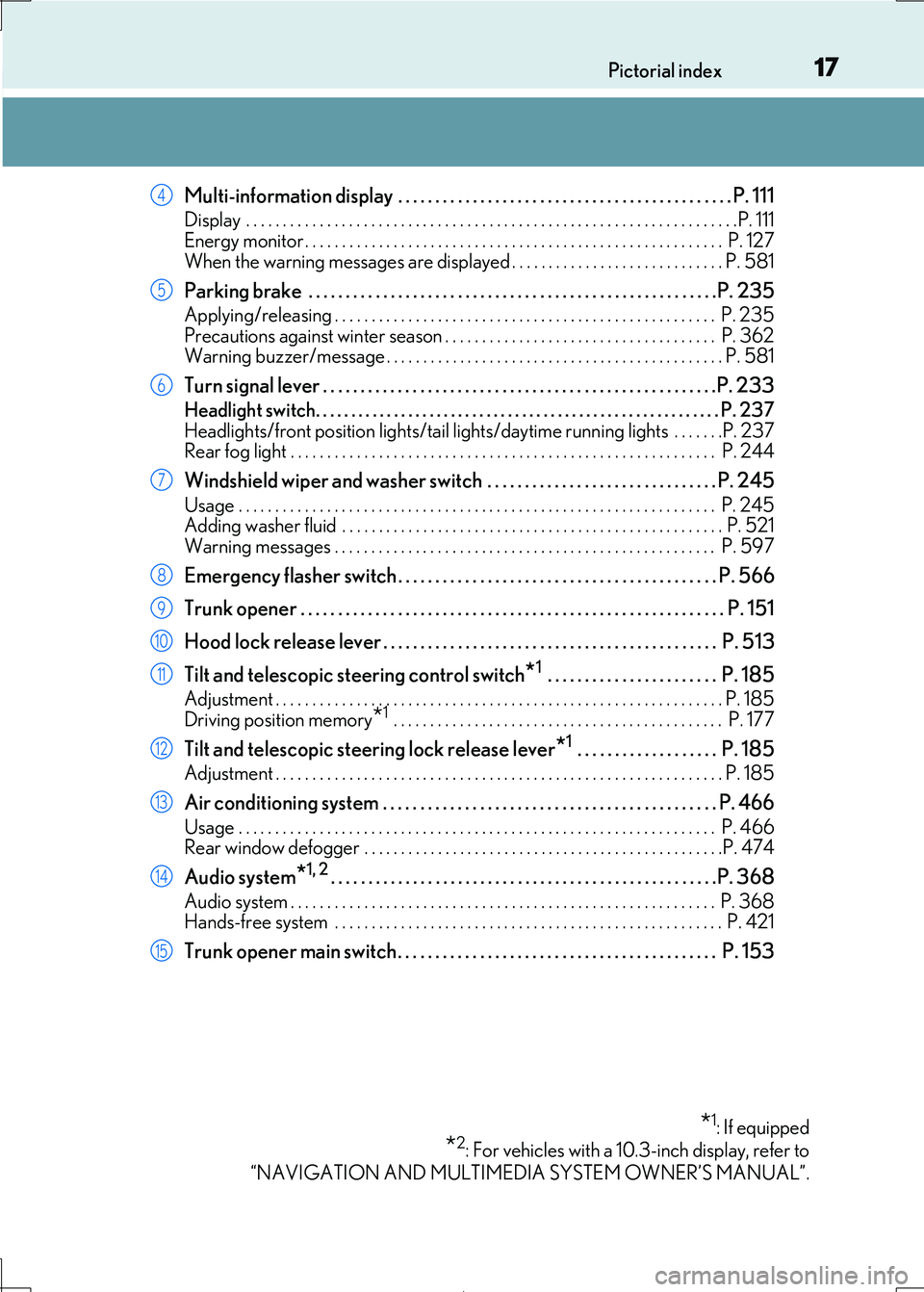
Multi-information display . . . . . . . . . . . . . . . . . . . . . . . . . . . . . . . . . . . . . . . . . . . . . P. 111
Display . . . . . . . . . . . . . . . . . . . . . . . . . . . . . . . . . . . . . . . . . . . . . . . . . . . . . . . . . . . . . . . . . . .P. 111
Energy monitor . . . . . . . . . . . . . . . . . . . . . . . . . . . . . . . . . . . . . . . . . . . . . . . . . . . . . . . . . P. 127
When the warning messages are displayed . . . . . . . . . . . . . . . . . . . . . . . . . . . . . P. 581
Parking brake . . . . . . . . . . . . . . . . . . . . . . . . . . . . . . . . . . . . . . . . . . . . . . . . . . . . . . .P. 2 35
Applying/releasing . . . . . . . . . . . . . . . . . . . . . . . . . . . . . . . . . . . . . . . . . . . . . . . . . . . . P. 235
Precautions against winter season . . . . . . . . . . . . . . . . . . . . . . . . . . . . . . . . . . . . . P. 362 Warning buzzer/message . . . . . . . . . . . . . . . . . . . . . . . . . . . . . . . . . . . . . . . . . . . . . . P. 581
Turn signal lever . . . . . . . . . . . . . . . . . . . . . . . . . . . . . . . . . . . . . . . . . . . . . . . . . . . . .P. 2 33
Headlight switch. . . . . . . . . . . . . . . . . . . . . . . . . . . . . . . . . . . . . . . . . . . . . . . . . . . . . . . . .P. 237
Headlights/front position ligh ts/tail lights/daytime running lights . . . . . . .P. 237 Rear fog light . . . . . . . . . . . . . . . . . . . . . . . . . . . . . . . . . . . . . . . . . . . . . . . . . . . . . . . . . . P. 244
Windshield wiper and washer switch . . . . . . . . . . . . . . . . . . . . . . . . . . . . . . . P. 245
Usage . . . . . . . . . . . . . . . . . . . . . . . . . . . . . . . . . . . . . . . . . . . . . . . . . . . . . . . . . . . . . . . . . P. 245 Adding washer fluid . . . . . . . . . . . . . . . . . . . . . . . . . . . . . . . . . . . . . . . . . . . . . . . . . . . . P. 521
Warning messages . . . . . . . . . . . . . . . . . . . . . . . . . . . . . . . . . . . . . . . . . . . . . . . . . . . . P. 597
Emergency flasher switch . . . . . . . . . . . . . . . . . . . . . . . . . . . . . . . . . . . . . . . . . . . P. 566
Trunk opener . . . . . . . . . . . . . . . . . . . . . . . . . . . . . . . . . . . . . . . . . . . . . . . . . . . . . . . . . P. 151
Hood lock release lever . . . . . . . . . . . . . . . . . . . . . . . . . . . . . . . . . . . . . . . . . . . . . P. 513
Tilt and telescopic steering control switch*1 . . . . . . . . . . . . . . . . . . . . . . . P. 185
Adjustment . . . . . . . . . . . . . . . . . . . . . . . . . . . . . . . . . . . . . . . . . . . . . . . . . . . . . . . . . . . . . P. 185
Driving position memory*1 . . . . . . . . . . . . . . . . . . . . . . . . . . . . . . . . . . . . . . . . . . . . . P. 177
Tilt and telescopic steering lock release lever*1 . . . . . . . . . . . . . . . . . . . P. 185
Adjustment . . . . . . . . . . . . . . . . . . . . . . . . . . . . . . . . . . . . . . . . . . . . . . . . . . . . . . . . . . . . . P. 185
Air conditioning system . . . . . . . . . . . . . . . . . . . . . . . . . . . . . . . . . . . . . . . . . . . . . P. 466
Usage . . . . . . . . . . . . . . . . . . . . . . . . . . . . . . . . . . . . . . . . . . . . . . . . . . . . . . . . . . . . . . . . . P. 466 Rear window defogger . . . . . . . . . . . . . . . . . . . . . . . . . . . . . . . . . . . . . . . . . . . . . . . . .P. 474
Audio system*1, 2. . . . . . . . . . . . . . . . . . . . . . . . . . . . . . . . . . . . . . . . . . . . . . . . . . . .P. 368
Audio system . . . . . . . . . . . . . . . . . . . . . . . . . . . . . . . . . . . . . . . . . . . . . . . . . . . . . . . . . . P. 368 Hands-free system . . . . . . . . . . . . . . . . . . . . . . . . . . . . . . . . . . . . . . . . . . . . . . . . . . . . . P. 421
Trunk opener main switch . . . . . . . . . . . . . . . . . . . . . . . . . . . . . . . . . . . . . . . . . . . P. 153
*1: If equipped
*2: For vehicles with a 10.3-inch display, refer to
“NAVIGATION AND MULTIMEDIA SYSTEM OWNER’S MANUAL”.
4
5
6
7
8
9
10
11
12
13
14
15
Page 25 of 692
25Pictorial index
IS300h_EE(OM53D89E)
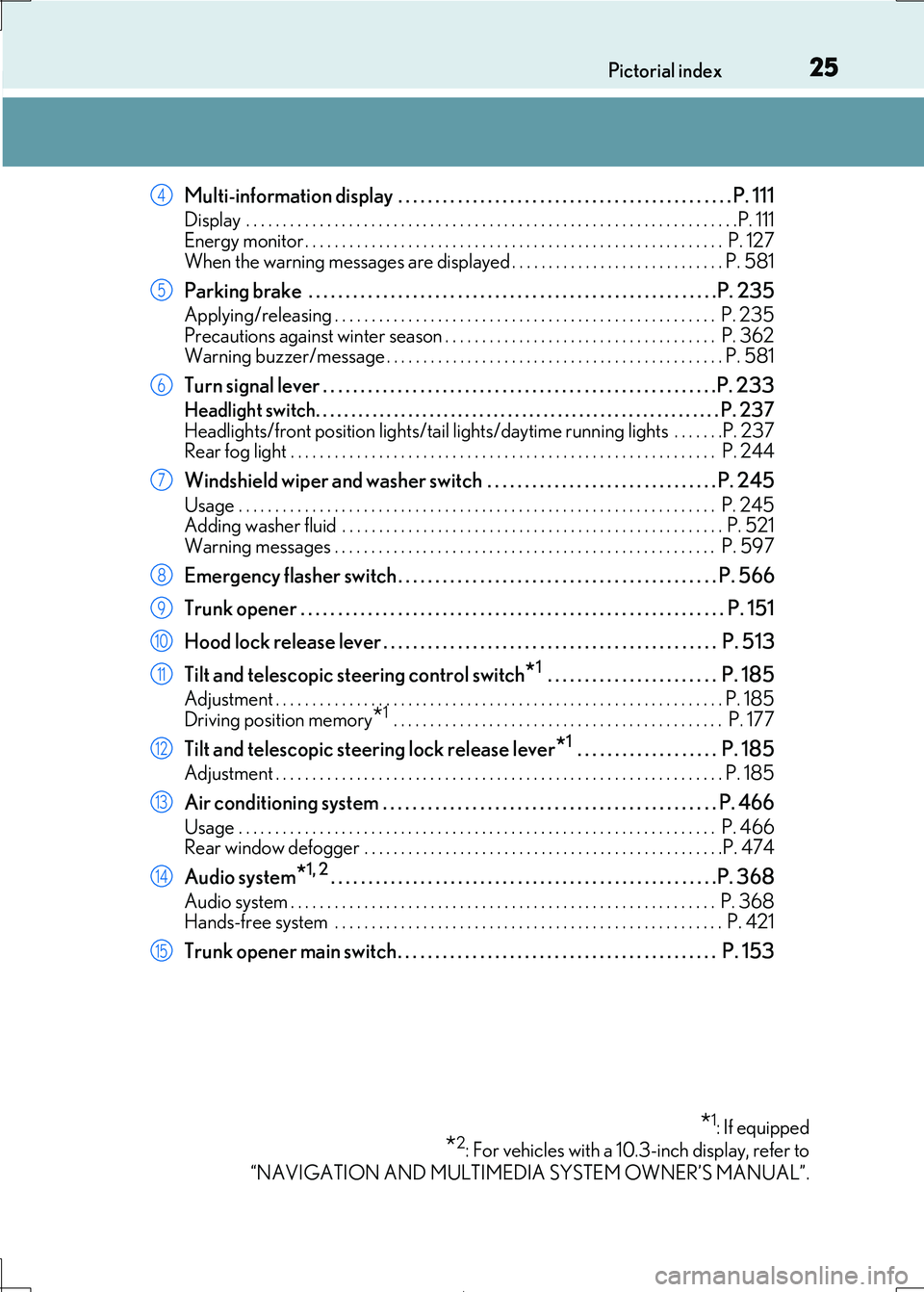
Multi-information display . . . . . . . . . . . . . . . . . . . . . . . . . . . . . . . . . . . . . . . . . . . . . P. 111
Display . . . . . . . . . . . . . . . . . . . . . . . . . . . . . . . . . . . . . . . . . . . . . . . . . . . . . . . . . . . . . . . . . . .P. 111
Energy monitor . . . . . . . . . . . . . . . . . . . . . . . . . . . . . . . . . . . . . . . . . . . . . . . . . . . . . . . . . P. 127
When the warning messages are displayed . . . . . . . . . . . . . . . . . . . . . . . . . . . . . P. 581
Parking brake . . . . . . . . . . . . . . . . . . . . . . . . . . . . . . . . . . . . . . . . . . . . . . . . . . . . . . .P. 2 35
Applying/releasing . . . . . . . . . . . . . . . . . . . . . . . . . . . . . . . . . . . . . . . . . . . . . . . . . . . . P. 235
Precautions against winter season . . . . . . . . . . . . . . . . . . . . . . . . . . . . . . . . . . . . . P. 362 Warning buzzer/message . . . . . . . . . . . . . . . . . . . . . . . . . . . . . . . . . . . . . . . . . . . . . . P. 581
Turn signal lever . . . . . . . . . . . . . . . . . . . . . . . . . . . . . . . . . . . . . . . . . . . . . . . . . . . . .P. 2 33
Headlight switch. . . . . . . . . . . . . . . . . . . . . . . . . . . . . . . . . . . . . . . . . . . . . . . . . . . . . . . . .P. 237
Headlights/front position ligh ts/tail lights/daytime running lights . . . . . . .P. 237 Rear fog light . . . . . . . . . . . . . . . . . . . . . . . . . . . . . . . . . . . . . . . . . . . . . . . . . . . . . . . . . . P. 244
Windshield wiper and washer switch . . . . . . . . . . . . . . . . . . . . . . . . . . . . . . . P. 245
Usage . . . . . . . . . . . . . . . . . . . . . . . . . . . . . . . . . . . . . . . . . . . . . . . . . . . . . . . . . . . . . . . . . P. 245 Adding washer fluid . . . . . . . . . . . . . . . . . . . . . . . . . . . . . . . . . . . . . . . . . . . . . . . . . . . . P. 521
Warning messages . . . . . . . . . . . . . . . . . . . . . . . . . . . . . . . . . . . . . . . . . . . . . . . . . . . . P. 597
Emergency flasher switch . . . . . . . . . . . . . . . . . . . . . . . . . . . . . . . . . . . . . . . . . . . P. 566
Trunk opener . . . . . . . . . . . . . . . . . . . . . . . . . . . . . . . . . . . . . . . . . . . . . . . . . . . . . . . . . P. 151
Hood lock release lever . . . . . . . . . . . . . . . . . . . . . . . . . . . . . . . . . . . . . . . . . . . . . P. 513
Tilt and telescopic steering control switch*1 . . . . . . . . . . . . . . . . . . . . . . . P. 185
Adjustment . . . . . . . . . . . . . . . . . . . . . . . . . . . . . . . . . . . . . . . . . . . . . . . . . . . . . . . . . . . . . P. 185
Driving position memory*1 . . . . . . . . . . . . . . . . . . . . . . . . . . . . . . . . . . . . . . . . . . . . . P. 177
Tilt and telescopic steering lock release lever*1 . . . . . . . . . . . . . . . . . . . P. 185
Adjustment . . . . . . . . . . . . . . . . . . . . . . . . . . . . . . . . . . . . . . . . . . . . . . . . . . . . . . . . . . . . . P. 185
Air conditioning system . . . . . . . . . . . . . . . . . . . . . . . . . . . . . . . . . . . . . . . . . . . . . P. 466
Usage . . . . . . . . . . . . . . . . . . . . . . . . . . . . . . . . . . . . . . . . . . . . . . . . . . . . . . . . . . . . . . . . . P. 466 Rear window defogger . . . . . . . . . . . . . . . . . . . . . . . . . . . . . . . . . . . . . . . . . . . . . . . . .P. 474
Audio system*1, 2. . . . . . . . . . . . . . . . . . . . . . . . . . . . . . . . . . . . . . . . . . . . . . . . . . . .P. 368
Audio system . . . . . . . . . . . . . . . . . . . . . . . . . . . . . . . . . . . . . . . . . . . . . . . . . . . . . . . . . . P. 368 Hands-free system . . . . . . . . . . . . . . . . . . . . . . . . . . . . . . . . . . . . . . . . . . . . . . . . . . . . . P. 421
Trunk opener main switch . . . . . . . . . . . . . . . . . . . . . . . . . . . . . . . . . . . . . . . . . . . P. 153
*1: If equipped
*2: For vehicles with a 10.3-inch display, refer to
“NAVIGATION AND MULTIMEDIA SYSTEM OWNER’S MANUAL”.
4
5
6
7
8
9
10
11
12
13
14
15
Page 80 of 692
801-2. Hybrid system
IS300h_EE(OM53D89E)
■After the 12-volt battery has discharged or when the terminal has been removed and
installed during exchange, etc.
The gasoline engine may not stop even if the vehicle is being driven by the hybrid battery
(traction battery). If this continues for a few days, contact any authorized Lexus retailer or
Lexus authorized repairer, or any reliable repairer.
■Sounds and vibrations specific to a hybrid vehicle
There may be no engine sound or vibration even though the vehicle is able to move with
the “READY” indicator is illuminated. For sa fety, apply the parking brake and make sure to shift the shift lever to P when parked.
The following sounds or vibrations may occu r when the hybrid system is operating and
are not a malfunction:
●Motor sounds may be heard from under the vehicle.
●Sounds may be heard from the hybrid battery (traction battery) behind the rear seats
when the hybrid system starts or stops.
●Relay operating sounds such as a snap or so ft clank will be emitted from the hybrid bat-
tery (traction battery), under the rear seats, when the hybrid system is started or
stopped.
●Sounds from the hybrid system may be heard when the trunk lid is open.
●Sounds may be heard from the transmission when the gasoline engine starts or stops,
when driving at low speeds, or during idling.
●Engine sounds may be heard when accelerating sharply.
●Sounds may be heard due to regenerative braking when the brake pedal is depressed
or as the accelerator pedal is released.
●Vibration may be felt when the ga soline engine starts or stops.
●Cooling fan sounds may be heard from the air intake vents on the both sides of the rear
seatback.
■Maintenance, repair, re cycling, and disposal
Contact any authorized Lexus retailer or Lexus authorized repairer, or any reliable
repairer regarding maintenance, repair, recycling and disposal. Do not dispose of the
vehicle yourself.
■Customization
Settings (e.g. on/off operation of the EV indicator) can be changed.
(Customizable features: P. 657)
Page 149 of 692
1493-2. Opening, closing and locking the doors and trunk
3
Operation of each component
IS300h_EE(OM53D89E)
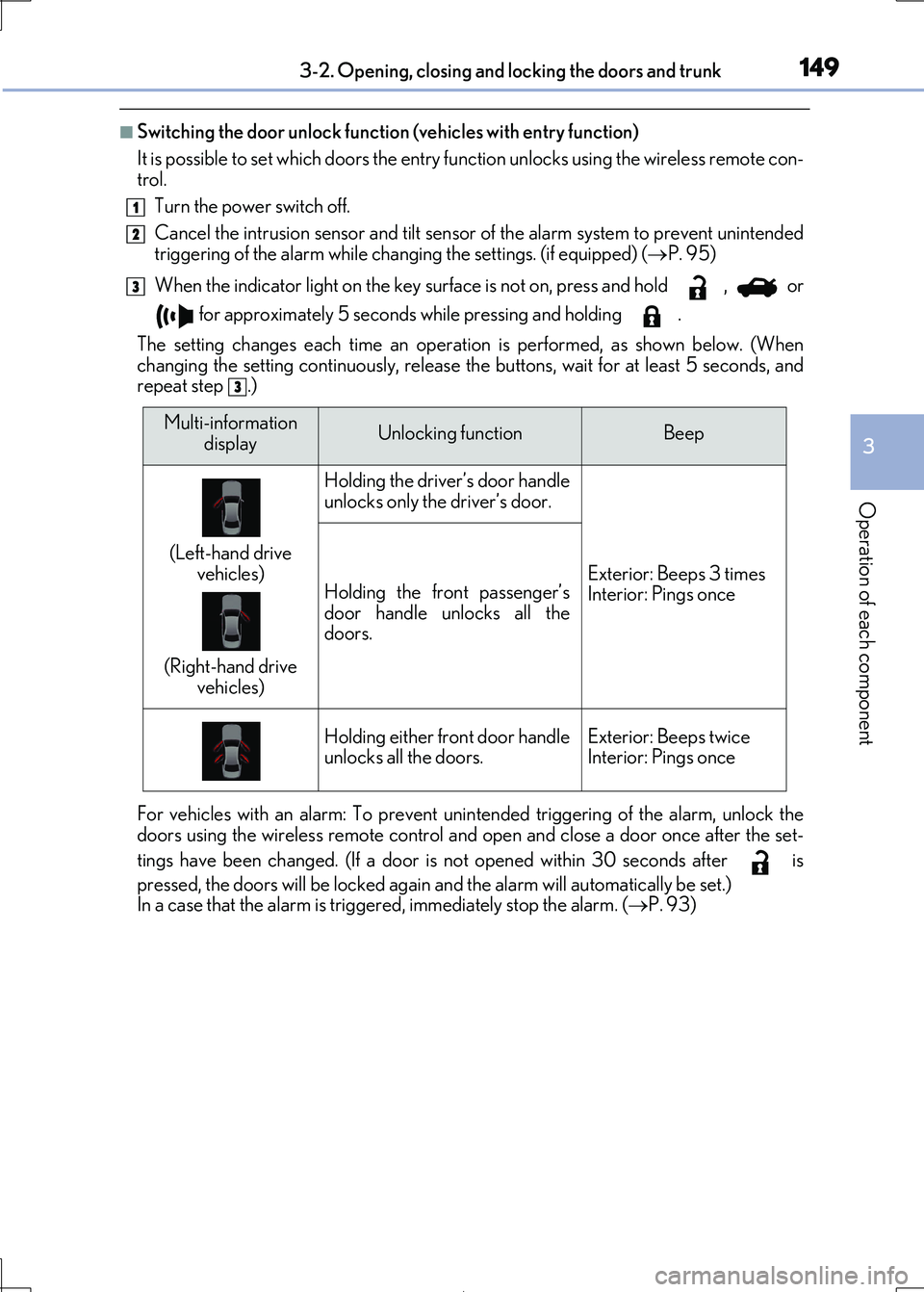
■Switching the door unlock function (vehicles with entry function)
It is possible to set which doors the entry fu nction unlocks using the wireless remote con-
trol.
Turn the power switch off.
Cancel the intrusion sensor and tilt sensor of the alarm system to prevent unintended
triggering of the alarm while changing the settings. (if equipped) ( P. 95)
When the indicator light on the key surface is not on, press and hold , or
for approximately 5 seconds while pressing and holding .
The setting changes each time an operatio n is performed, as shown below. (When
changing the setting continuously, release the buttons, wait for at least 5 seconds, and repeat step .)
For vehicles with an alarm: To prevent unin tended triggering of the alarm, unlock the doors using the wireless remote control and open and close a door once after the set-
tings have been changed. (If a door is not opened within 30 seconds after is
pressed, the doors will be locked again and the alarm will automatically be set.)
In a case that the alarm is triggered, immediately stop the alarm. ( P. 93)
1
2
3
3
Multi-information
displayUnlocking functionBeep
(Left-hand drive
vehicles)
(Right-hand drive
vehicles)
Holding the driver’s door handle
unlocks only the driver’s door.
Exterior: Beeps 3 times
Interior: Pings onceHolding the front passenger’s
door handle unlocks all the doors.
Holding either front door handleunlocks all the doors.Exterior: Beeps twiceInterior: Pings once
Page 150 of 692

1503-2. Opening, closing and locking the doors and trunk
IS300h_EE(OM53D89E)
■Impact detection door lock release system
In the event that the vehicle is subject to a strong impact, all the doors are unlocked. Depending on the force of the impact or the type of accident, however, the system may
not operate.
■Using the mechanical key
The doors can also be locked and unlocked with the mechanical key. ( P. 628)
■Conditions affecting the operation of the smart entry & start system or wireless remote
control
P. 159
■Customization
Settings (e.g. unlocking function using a key) can be changed. (Customizable features: P. 657)
WARNING
■To prevent an accident
Observe the following precauti ons while driving the vehicle. Failure to do so may result in a door open ing and an occupant being thrown out of the
vehicle, resulting in death or serious injury.
●Ensure that all doors are properly closed.
●Do not pull the inside handle of the doors while driving.
Be especially careful with the front doors, as the doors may be opened even if the
inside lock buttons ar e in locked position.
●Set the rear door child-protector locks when children are seated in the rear seats.
Page 154 of 692
1543-2. Opening, closing and locking the doors and trunk
IS300h_EE(OM53D89E)
■Trunk light (if equipped)
The trunk light turns on when the trunk is opened.
■Function to prevent the trunk being lo cked with the electronic key inside
●When all doors are locked, closing the trunk lid with the electronic key left inside the
trunk will sound an alarm.
In this case, the trunk lid can be opened pressing the trunk release button on the trunk lid.
●If the spare electronic key is put in the trunk with all the doors locked, the key confine-
ment prevention function is activated so the trunk can be opened. In order to prevent theft, take all electronic keys with you when leaving the vehicle.
●If the electronic key is put in the trunk with all the doors locked, the key may not be
detected depending on the location of the key and the surrounding radio wave condi- tions. In this case, the key confinement prev ention function cannot be activated, causing
the doors to lock when the trunk is closed. Make sure to check where the key is before
closing the trunk.
●The key confinement prevention function cannot be activated if any one of the doors is
unlocked. In this case, open the trunk using the trunk opener.
■Using the mechanical key
The trunk can be also opened using the mechanical key. ( P. 628)
■If the smart entry & start system or the wireless remote control does not operate prop-
erly
Use the mechanical key to unlock the trunk. ( P. 628)
Replace the key battery with a new one if it is depleted. (P. 549)
■When leaving a key to the vehicle with a parking attendant
P. 140
■Customization
The trunk unlocking operation can be changed. (Customizable features: P. 657)
Page 157 of 692

1573-2. Opening, closing and locking the doors and trunk
3
Operation of each component
IS300h_EE(OM53D89E)
●Locks and unlocks the doors (vehicles with entry function) (P. 144)
●Opens the trunk (vehicles with entry function) (P. 151)
●Starts the hybrid system (P. 219)
■Antenna location
■Effective range (areas within which the electronic key is detected)
Smart entry & start system
The following operations can be performed simply by carrying the electronic
key (including the card key) on your person, for example in your pocket. The
driver should always carry the electronic key.
Antennas outside the cabin (vehicles with
entry function)
Antennas inside the cabin
Antenna inside the trunk
Antenna outside the trunk (vehicles with
entry function)
When locking or unlocking the doors
(vehicles with entry function)
The system can be operated when the elec- tronic key is within about 0.7 m (2.3 ft.) of
an outside door handle. (Only the doors
detecting the key can be operated.)
When opening the trunk (vehicles with
entry function)
The system can be operated when the el ectronic key is within about 0.7 m (2.3
ft.) of the trunk release button.
When starting the hybrid system or changing power switch modes
The system can be operated when the electronic key is inside the vehicle.
1
2
3
4
Page 175 of 692
1753-3. Adjusting the seats
3
Operation of each component
IS300h_EE(OM53D89E)
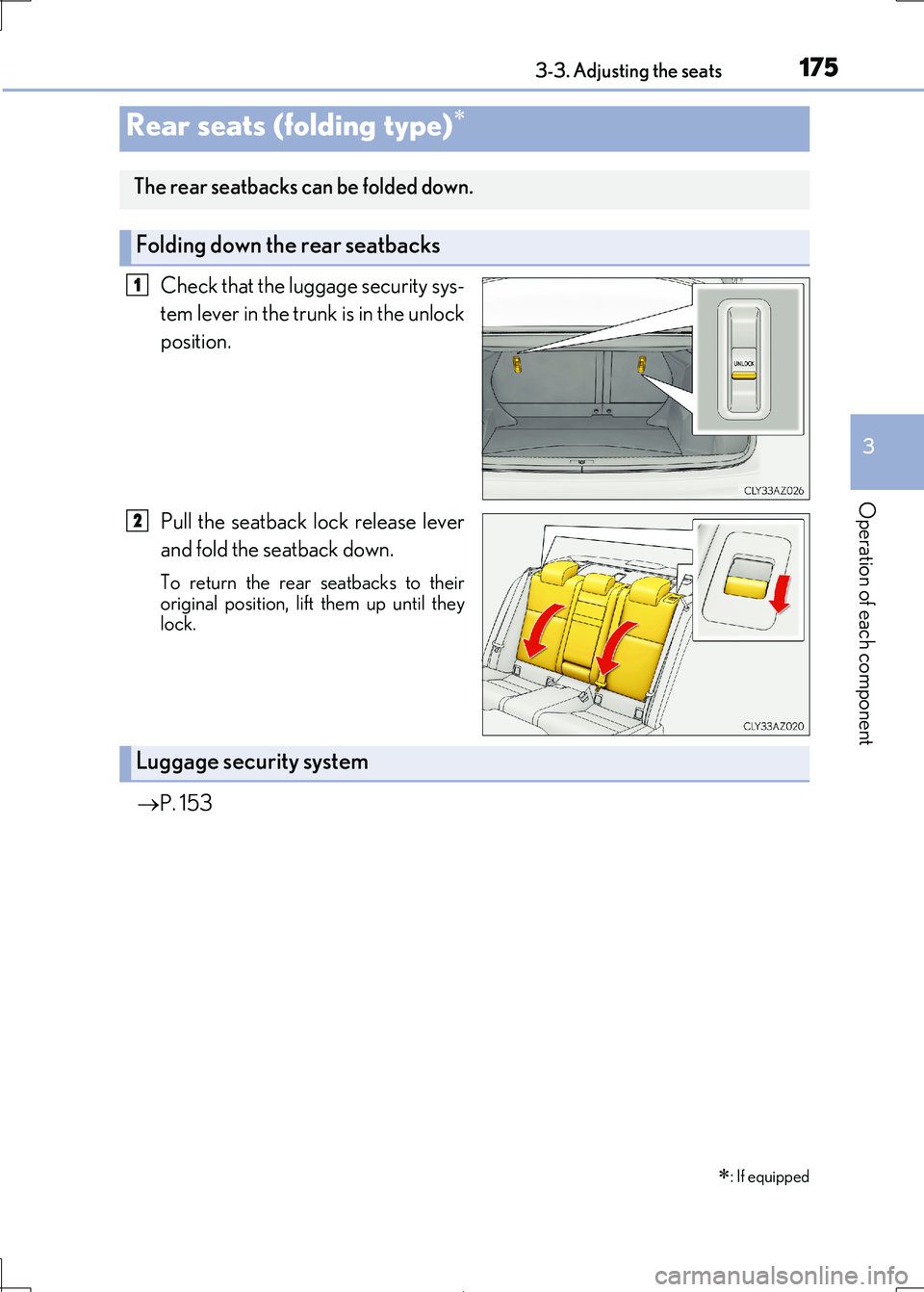
Check that the luggage security sys-
tem lever in the trunk is in the unlock
position.
Pull the seatback lock release lever
and fold the seatback down.
To return the rear seatbacks to their
original position, lift them up until they lock.
P. 153
Rear seats (folding type)
: If equipped
The rear seatbacks can be folded down.
Folding down the rear seatbacks
1
2
Luggage security system
Page 176 of 692
1763-3. Adjusting the seats
IS300h_EE(OM53D89E)
WARNING
Observe the following precautions. Failure to do so may result in death or serious injury.
■When folding the rear seatbacks down
●Do not fold the seatbacks down while driving.
●Stop the vehicle on level ground, set the parking brake and shift the shift lever to P.
●Do not allow anyone to sit on a folded seatback or in the trunk while driving.
●Do not allow children to enter the trunk.
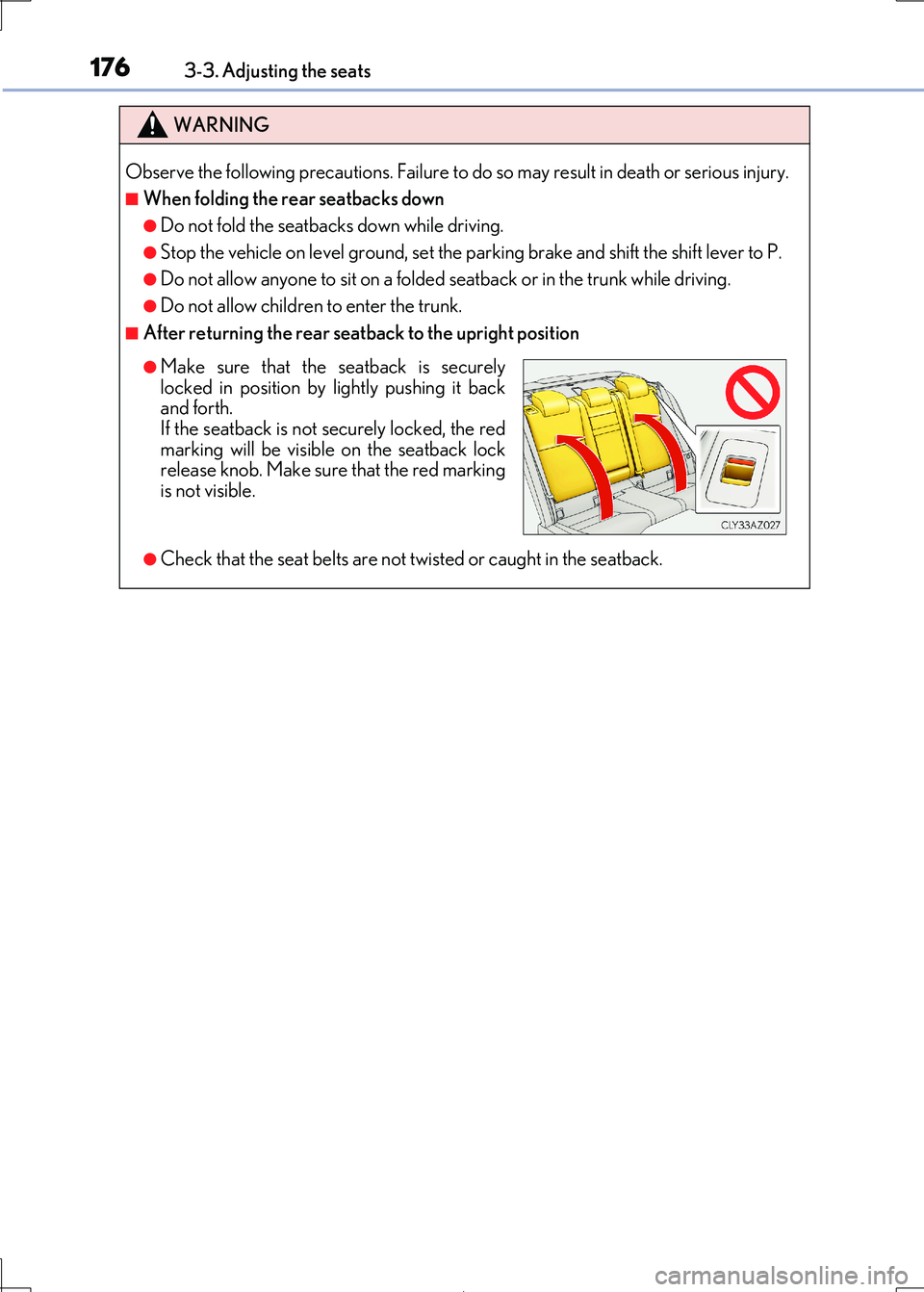
■After returning the rear seatback to the upright position
●Check that the seat belts are not twisted or caught in the seatback.
●Make sure that the seatback is securely
locked in position by lightly pushing it back
and forth. If the seatback is not securely locked, the red
marking will be visible on the seatback lock
release knob. Make sure that the red marking is not visible.
Page 584 of 692

5848-2. Steps to take in an emergency
IS300h_EE(OM53D89E)
Indicates that the hood is not fully closed If the vehicle reaches a speed of 5 km/h (3 mph),
flashes and a buzzer sounds to indicate that
the hood is not yet fully closed.
Close the hood.
Indicates that the trunk is not fully closed
If the vehicle reaches a speed of 5 km/h (3 mph),
flashes and a buzzer sounds to indicate that
the trunk is not yet fully closed. Close the trunk.
(If equipped)
Indicates a malfunction in the Lexus parking assists-sen-
sor The assist-sensors flash.
A buzzer also sounds.
Have the vehicle inspected by any authorized Lexus retailer or Lexus authorized repairer, or any reliable
repairer.
(If equipped)
Indicates that a Lexus parkin g assist-sensor is dirty or
covered with ice
A buzzer also sounds. Clean the sensor.
Indicates that the accelerator pedal is depressed while
the shift position is in N
A buzzer also sounds. Release the accelerator pedal and shift the shift
lever to D, S or R.
Warning messageDetails/Actions
(Flashes)