lights Lexus IS350 2020 / LEXUS 2020 IS300,IS350 (OM53F29U) Owner's Guide
[x] Cancel search | Manufacturer: LEXUS, Model Year: 2020, Model line: IS350, Model: Lexus IS350 2020Pages: 660, PDF Size: 10.84 MB
Page 120 of 660
1203-1. Key information
IS350 AWD/IS350/IS300 AWD/IS300_U
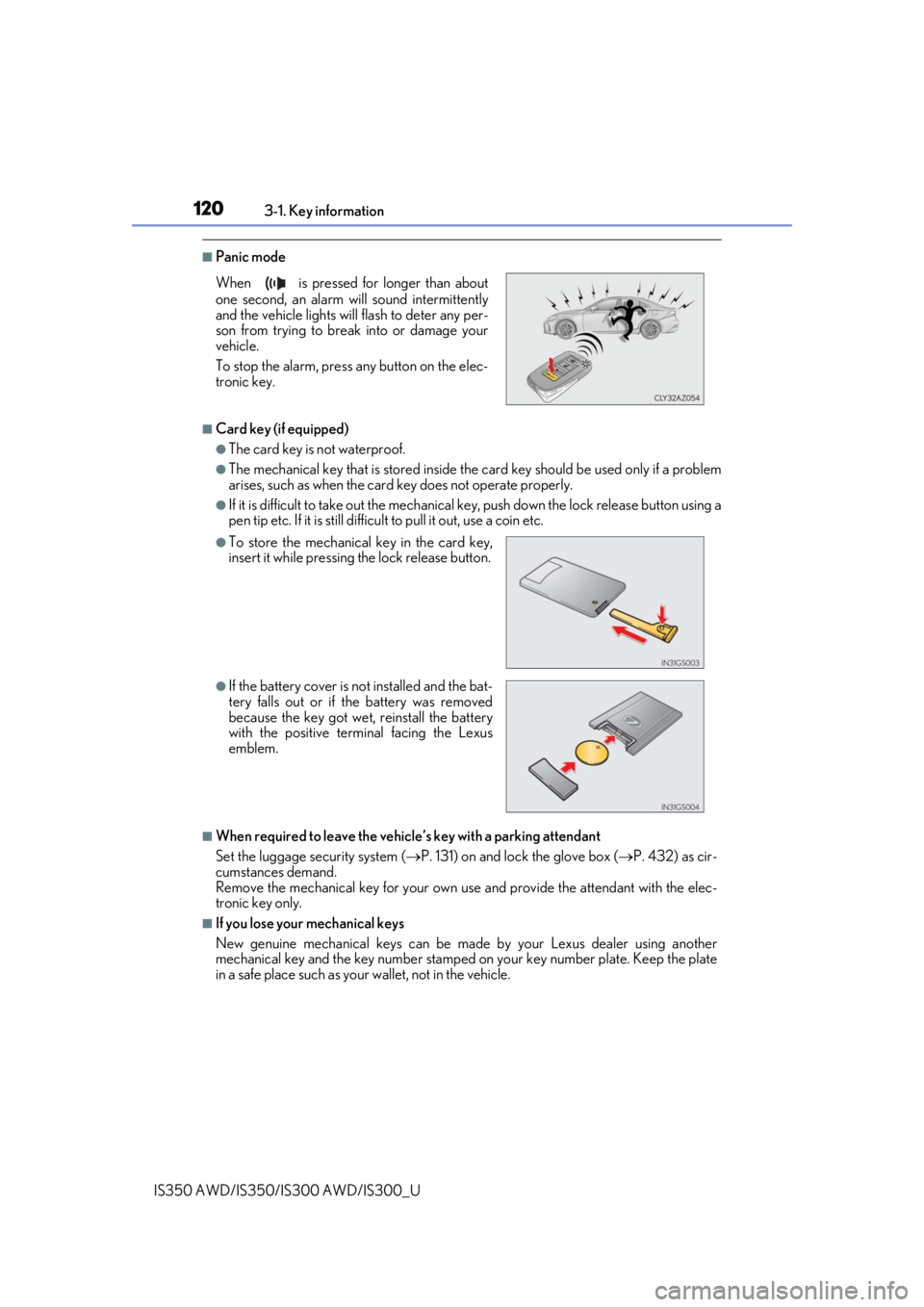
■Panic mode
■Card key (if equipped)
●The card key is not waterproof.
●The mechanical key that is stored inside the card key should be used only if a problem
arises, such as when the card key does not operate properly.
●If it is difficult to take out the mechanical key, push down the lock release button using a
pen tip etc. If it is still difficult to pull it out, use a coin etc.
■When required to leave the vehicle’s key with a parking attendant
Set the luggage security system ( P. 131) on and lock the glove box ( P. 432) as cir-
cumstances demand.
Remove the mechanical key for your own use and provide the attendant with the elec-
tronic key only.
■If you lose your mechanical keys
New genuine mechanical keys can be made by your Lexus dealer using another
mechanical key and the key number stamped on your key number plate. Keep the plate
in a safe place such as your wallet, not in the vehicle.
When is pressed for longer than about
one second, an alarm will sound intermittently
and the vehicle lights will flash to deter any per-
son from trying to break into or damage your
vehicle.
To stop the alarm, press any button on the elec-
tronic key.
●To store the mechanical key in the card key,
insert it while pressing the lock release button.
●If the battery cover is not installed and the bat-
tery falls out or if the battery was removed
because the key got wet, reinstall the battery
with the positive terminal facing the Lexus
emblem.
Page 125 of 660
1253-2. Opening, closing and locking the doors and trunk
3
Operation of each component
IS350 AWD/IS350/IS300 AWD/IS300_U
■Operation signals
A buzzer sounds and the emergency flashers flash to indicate that the doors have been
locked/unlocked. (Locked: once; Unlocked: twice)
A buzzer sounds to indicate that th e windows and moon roof are operating.
■Security feature
If a door is not opened within approximately 60 seconds after the vehicle is unlocked, the
security feature automatically locks the vehicle again.
■Welcome light illumination control
The front position, tail and license plate lights automatically turn on at night when the
doors are unlocked using the entry function or wireless remote control if the light switch
is in the “AUTO” position.
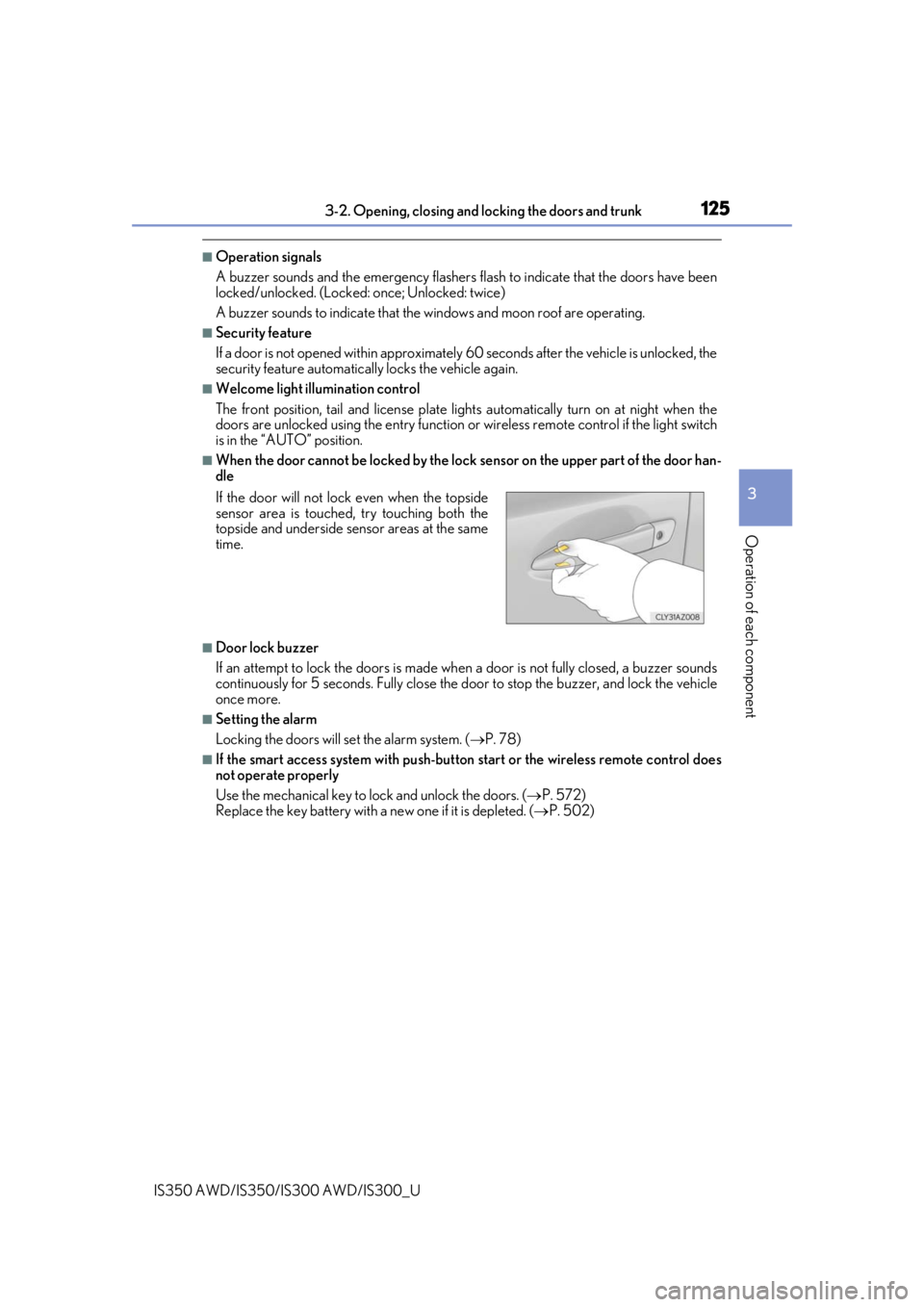
■When the door cannot be locked by the lock sensor on the upper part of the door han-
dle
■Door lock buzzer
If an attempt to lock the doors is made when a door is not fully closed, a buzzer sounds
continuously for 5 seconds. Fully close the d oor to stop the buzzer, and lock the vehicle
once more.
■Setting the alarm
Locking the doors will set the alarm system. ( P. 78)
■If the smart access system with push-button start or the wireless remote control does
not operate properly
Use the mechanical key to lock and unlock the doors. ( P. 572)
Replace the key battery with a new one if it is depleted. ( P. 502)
If the door will not lock even when the topside
sensor area is touched, try touching both the
topside and underside sensor areas at the same
time.
Page 157 of 660
1573-4. Adjusting the steering wheel and mirrors
3
Operation of each component
IS350 AWD/IS350/IS300 AWD/IS300_U
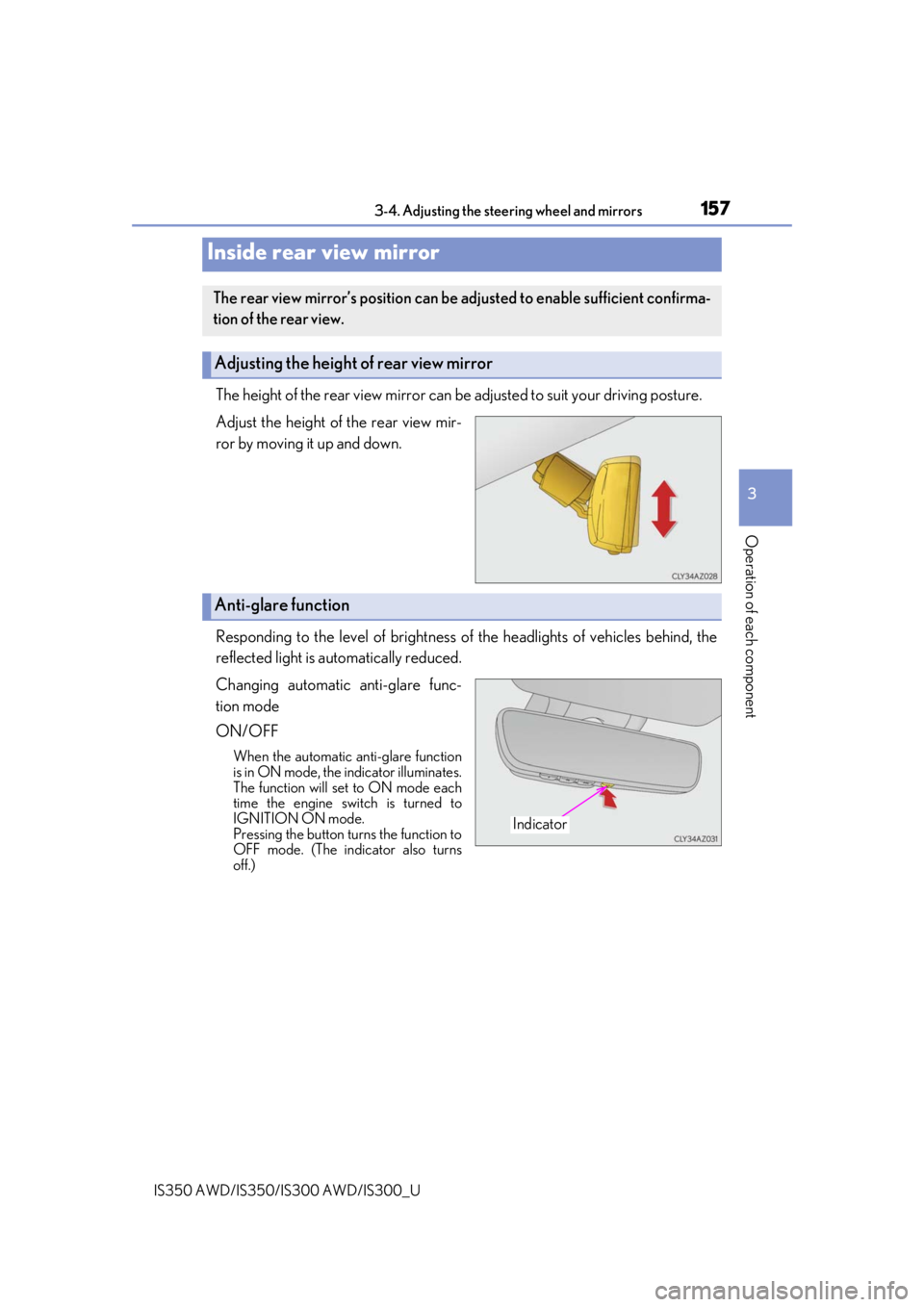
The height of the rear view mirror can be adjusted to suit your driving posture.
Adjust the height of the rear view mir-
ror by moving it up and down.
Responding to the level of brightness of the headlights of vehicles behind, the
reflected light is automatically reduced.
Changing automatic anti-glare func-
tion mode
ON/OFF
When the automatic anti-glare function
is in ON mode, the indicator illuminates.
The function will set to ON mode each
time the engine switch is turned to
IGNITION ON mode.
Pressing the button turns the function to
OFF mode. (The indicator also turns
off.)
Inside rear view mirror
The rear view mirror’s position can be adjusted to enable sufficient confirma-
tion of the rear view.
Adjusting the height of rear view mirror
Anti-glare function
Indicator
Page 171 of 660

171
Driving4
IS350 AWD/IS350/IS300 AWD/IS300_U
4-1. Before drivingDriving the vehicle ...................... 172
Cargo and luggage ....................180
Vehicle load limits ....................... 183
Trailer towing ................................ 184
Dinghy towing ..............................185
4-2. Driving procedures Engine (ignition) switch ............ 186
Automatic transm ission..............191
Turn signal lever........................... 198
Parking brake ............................. 200
ASC (Active Sound Control)......... 201
4-3. Operating the lights and wipers
Headlight switch .........................202
Automatic High Beam ............ 206
Windshield wipers and washer........................................... 210 4-4. Refueling
Opening the fuel tank cap ...... 218
4-5. Using the driving support systems
Lexus Safety System + ............. 222
PCS (Pre-Collision System) ......... 229
LDA (Lane Departure Alert with steering
control)........................................ 240
Dynamic radar cruise control ......................................... 248
Intuitive parking assist .............. 260
Lexus parking assist monitor ........................................ 269
BSM (Blind Spot Monitor) .....285
• BSM function .........................289
• RCTA function...................... 292
Driving mode select switch ........................................... 297
Driving assist systems ............... 301
4-6. Driving tips Winter driving tips .....................306
Page 199 of 660

1994-2. Driving procedures
4
Driving
IS350 AWD/IS350/IS300 AWD/IS300_U
■Turn signals can be operated when
The engine switch is in IGNITION ON mode.
■If the indicator flashes faster than usual
Check that a light bulb in the front or rear turn signal lights has not burned out.
■If the turn signals stop flashing befo re a lane change has been performed
Operate the lever again.
■Customization
The number of times the turn signals flas h during a lane change can be changed.
(Customizable feature P. 613)
Page 202 of 660
202
IS350 AWD/IS350/IS300 AWD/IS300_U4-3. Operating the lights and wipers
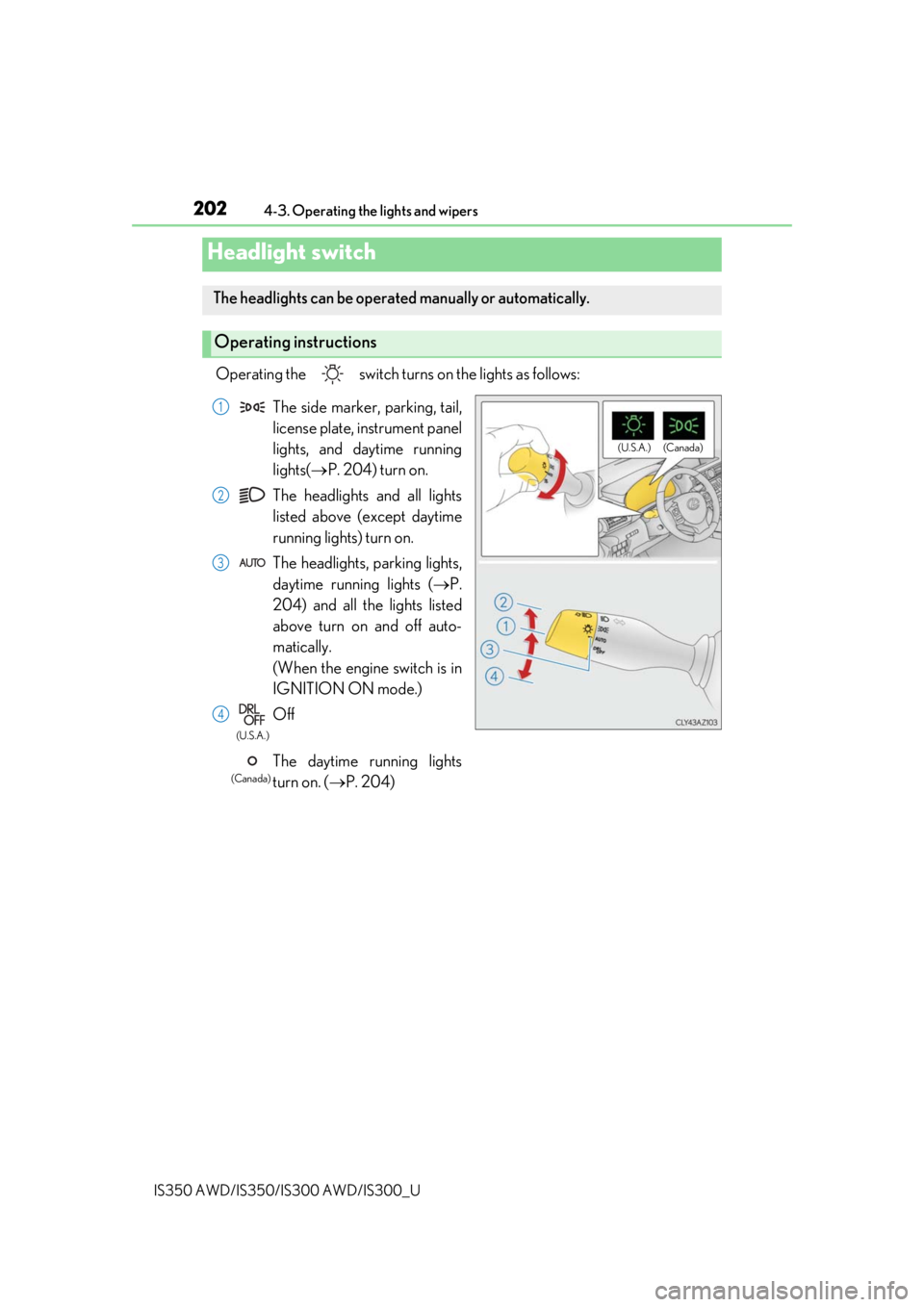
Operating the switch turn
s on the lights as follows:
Headlight switch
The headlights can be operated manually or automatically.
Operating instructions
(U.S.A.) (Canada)
The side marker, parking, tail,
license plate, instrument panel
lights, and daytime running
lights(P. 204) turn on.
The headlights and all lights
listed above (except daytime
running lights) turn on.
The headlights, parking lights,
daytime running lights ( P.
204) and all the lights listed
above turn on and off auto-
matically.
(When the engine switch is in
IG NITION ON mode.)
Off
The daytime
running lights
turn on. ( P. 204)
1
2
3
4
(U.S.A.)
(Canada)
Page 203 of 660
2034-3. Operating the lights and wipers
4
Driving
IS350 AWD/IS350/IS300 AWD/IS300_U
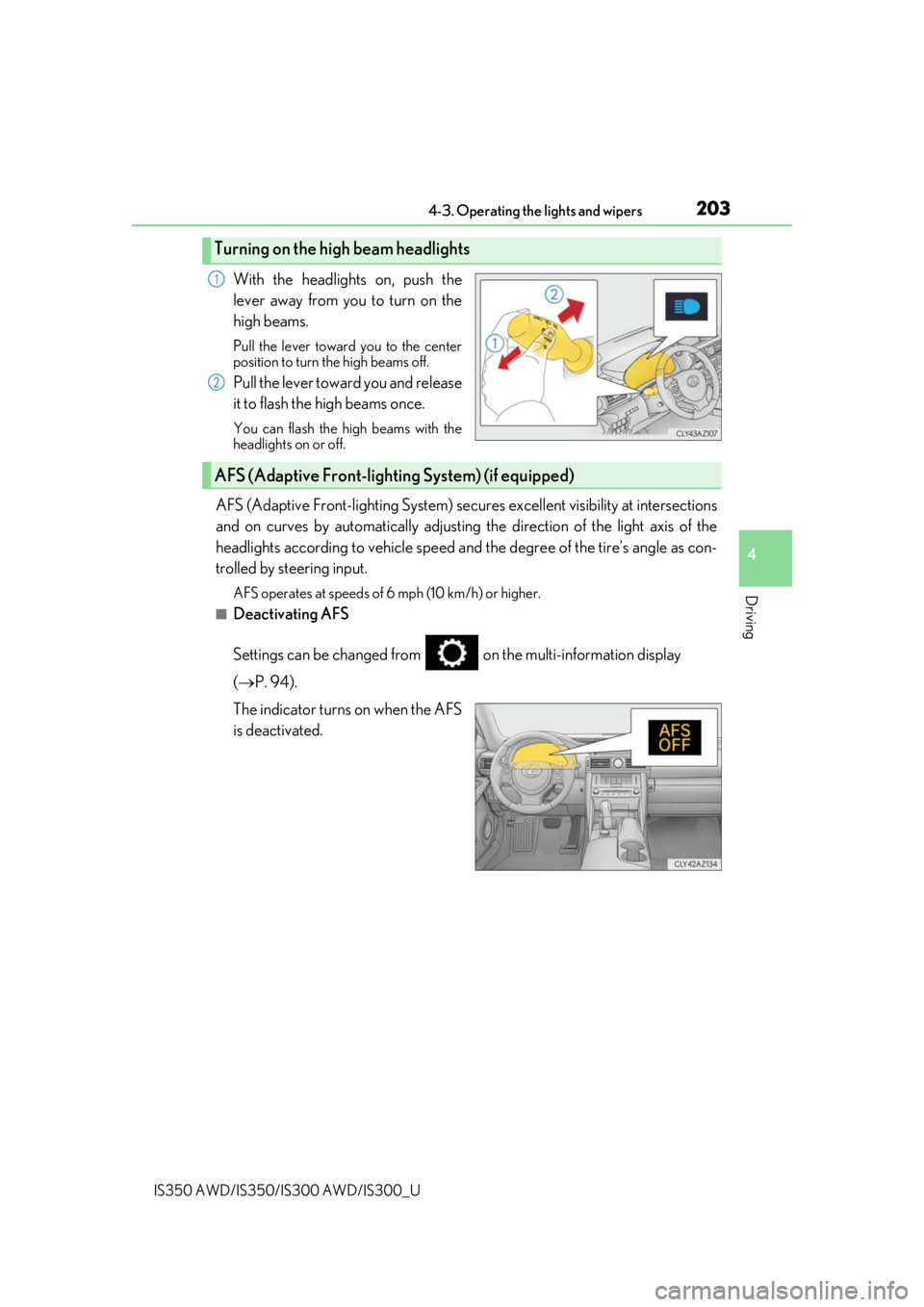
With the headlights on, push the
lever away from you to turn on the
high beams.
Pull the lever toward you to the center
position to turn the high beams off.
Pull the lever toward you and release
it to flash the high beams once.
You can flash the high beams with the
headlights on or off.
AFS (Adaptive Front-lighting System) secures excellent visibility at intersections
and on curves by automatically adjusting the direction of the light axis of the
headlights according to vehicle speed and the degree of the tire’s angle as con-
trolled by steering input.
AFS operates at speeds of 6 mph (10 km/h) or higher.
■Deactivating AFS
Settings can be changed from on the multi-information display
( P. 94).
The indicator turns on when the AFS
is deactivated.
Turning on the high beam headlights
1
2
AFS (Adaptive Front-lighting System) (if equipped)
Page 204 of 660
2044-3. Operating the lights and wipers
IS350 AWD/IS350/IS300 AWD/IS300_U
■Daytime running light system
●The daytime running lights illuminate using th e same lights as the parking lights and illu-
minate brighter than the parking lights.
●To make your vehicle more visible to other drivers during daytime driving, the daytime
running lights turn on automatically when a ll of the following conditions are met. (The
daytime running lights are not designed for use at night.)
• The engine is running
• The parking brake is released
• The headlight switch is in the (Canada only), or
* position
*: When the surroundings are bright
The daytime running lights remain on after they illuminate, even if the parking brake is set
again.
●For the U.S.A.: Daytime running lights can be turned off by operating the switch.
●Compared to turning on the headlights, the daytime running light system offers greater
durability and consumes less electricity, so it can help improve fuel economy.
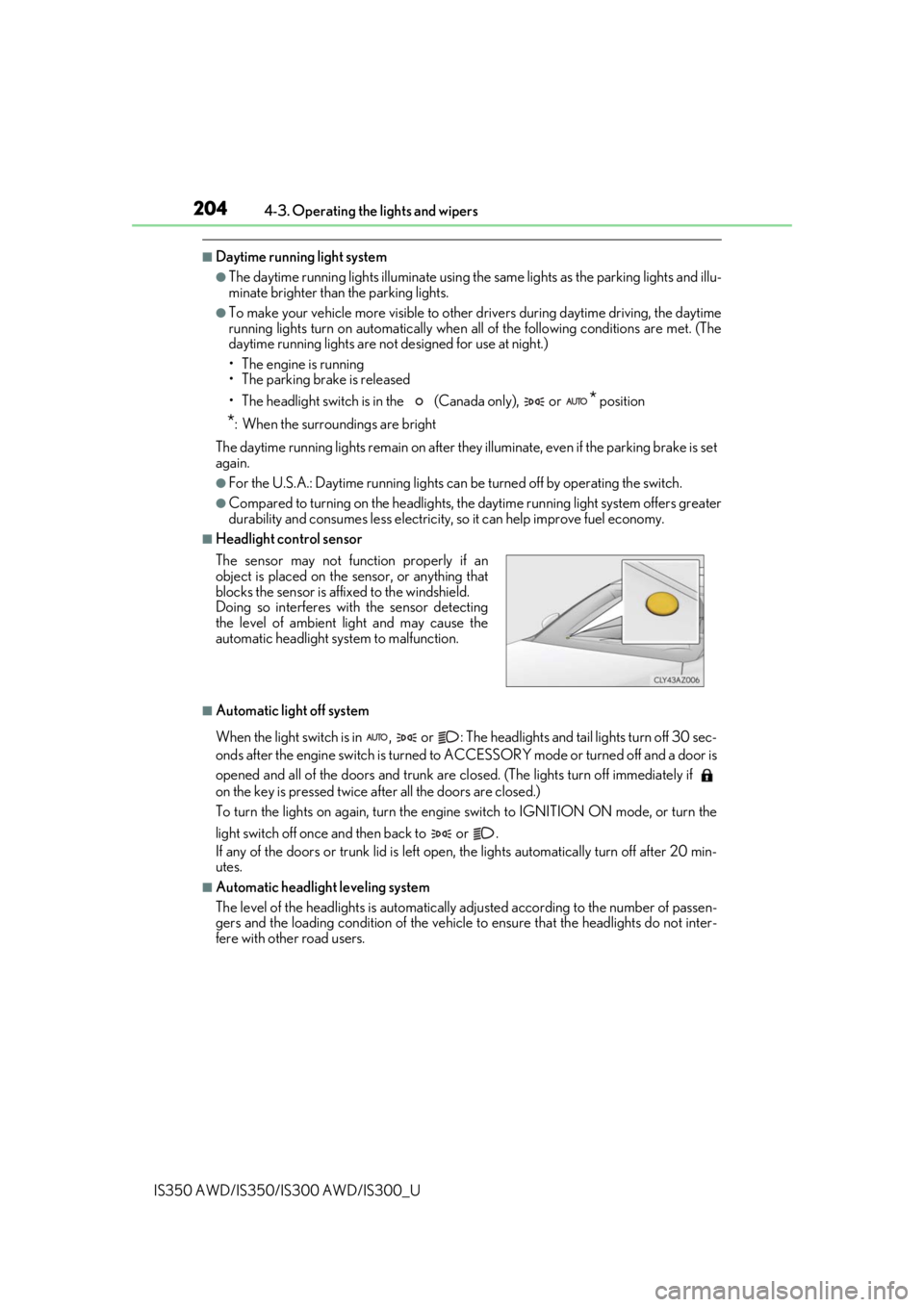
■Headlight control sensor
■Automatic light off system
When the light switch is in , or : Th e headlights and tail lights turn off 30 sec-
onds after the engine switch is turned to ACCESSORY mode or turned off and a door is
opened and all of the doors and trunk are cl osed. (The lights turn off immediately if
on the key is pressed twice af ter all the doors are closed.)
To turn the lights on again, turn the engine switch to IGNITION ON mode, or turn the
light switch off once and then back to or .
If any of the doors or trunk lid is left open , the lights automatically turn off after 20 min-
utes.
■Automatic headlight leveling system
The level of the headlights is automatically adjusted accordi ng to the number of passen-
gers and the loading condition of the vehicle to ensure that the headlights do not inter-
fere with other road users. The sensor may not function properly if an
object is placed on the sensor, or anything that
blocks the sensor is affixed to the windshield.
Doing so interferes with the sensor detecting
the level of ambient light and may cause the
automatic headlight system to malfunction.
Page 205 of 660

2054-3. Operating the lights and wipers
4
Driving
IS350 AWD/IS350/IS300 AWD/IS300_U
■Light reminder buzzer
A buzzer sounds when the engine switch is turned off or turned to ACCESSORY mode
and the driver’s door is opened while the lights are turned on.
■Customization
Settings (e.g. light sensor sensitivity) can be changed.
(Customizable features: P. 613)
NOTICE
■To prevent battery discharge
Do not leave the lights on longer than necessary when the engine is not running.
Page 206 of 660
2064-3. Operating the lights and wipers
IS350 AWD/IS350/IS300 AWD/IS300_U
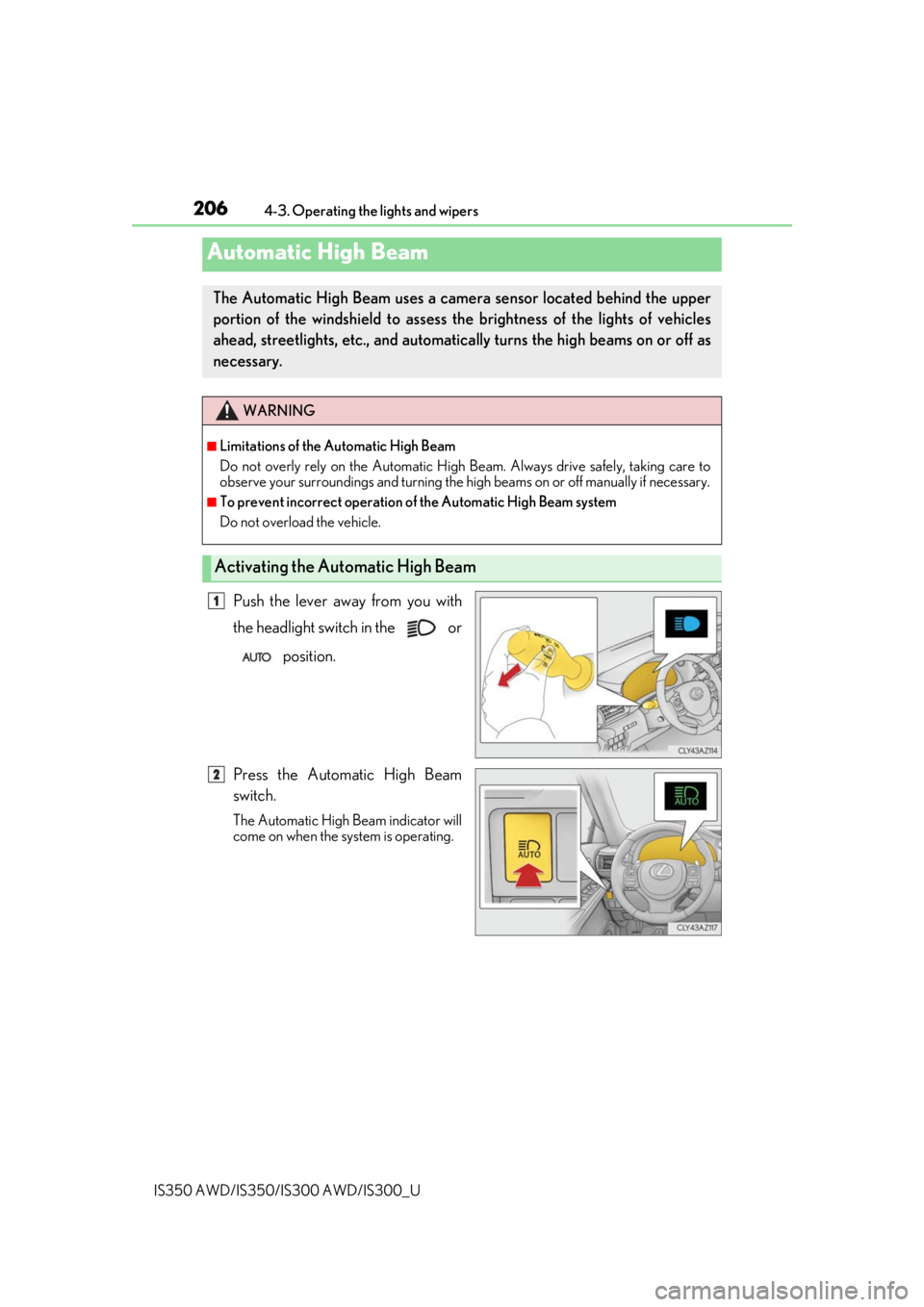
Push the lever away from you with
the headlight switch in the or position.
Press the Automatic High Beam
switch.
The Automatic High Beam indicator will
come on when the system is operating.
Automatic High Beam
The Automatic High Beam uses a came ra sensor located behind the upper
portion of the windshield to assess the brightness of the lights of vehicles
ahead, streetlights, etc., and automatically turns the high beams on or off as
necessary.
WARNING
■Limitations of the Automatic High Beam
Do not overly rely on the Automatic High Beam. Always drive safely, taking care to
observe your surroundings and turning the hi gh beams on or off manually if necessary.
■To prevent incorrect operation of the Automatic High Beam system
Do not overload the vehicle.
Activating the Automatic High Beam
1
2