air condition lexus LC500h 2018 Owner's Manual / LEXUS 2018 LC500,LC500H OWNER'S MANUAL (OM11405U)
[x] Cancel search | Manufacturer: LEXUS, Model Year: 2018, Model line: LC500h, Model: Lexus LC500h 2018Pages: 432, PDF Size: 6.88 MB
Page 1 of 432

LC500_LC500h_OM_OM11405U_(U)
1
2
3
4
5
6
7
8
9
Pictorial indexSearch by illustration
For safety
and securityMake sure to read through them
(Main topics: Child seat, theft deterrent system)
Vehicle status
information and
indicatorsReading driving-related information
(Main topics: Meters, multi-information display)
Before drivingOpening and closing the doors and windows,
adjustment before driving
(Main topics: Keys, doors, seats)
DrivingOperations and advice which are necessary for driving
(Main topics: Starting engine
Interior featuresUsage of the interior features
(Main topics: Air conditioner, storage features)
Maintenance
and careCaring for your vehicle and maintenance procedures
(Main topics: Interior and exterior, light bulbs)
When trouble
arisesWhat to do in case of malfunction and emergency
(Main topics: Battery discharge, flat tire)
Vehicle
specificationsVehicle specifications, customizable features
(Main topics: Fuel, oil, tire inflation pressure)
For ownersReporting safety defects for U.S. owners, and seat belt,
SRS airbag and headlight aim instructions for Canadian
owners
IndexSearch by symptom
Search alphabetically
Page 3 of 432

3TABLE OF CONTENTS
LC500_LC500h_OM_OM11405U_(U)
1
2
3
4
5
6
7
8
9
Power (ignition) switch (LC500h) ............................................................ 143
EV drive mode (LC500h)........ 147
Automatic transmission (LC500) ............................................................ 149
Hybrid transmission (LC500h) ............................................................ 155
Turn signal lever.............................. 161
Parking brake ................................. 162
Brake Hold....................................... 165
4-3. Operating the lights and wipers Headlight switch ............................ 167
Automatic High Beam ................ 170
Windshield wipers and washer 172
4-4. Refueling Opening the fuel tank cap......... 176
4-5. Using the driving support systems Lexus Safety System+ ................. 178
PCS (Pre-Collision System)..... 184
LKA (Lane-Keeping Assist) ...... 191
Dynamic radar crui se control with
full-speed range.......................... 198
Driving mode select switch...... 208
Intuitive parking assist ................ 209
BSM (Blind Spot Monitor) ........ 215
Active rear wing ........................... 224
Driving assist systems ................. 226
4-6. Driving tips Hybrid vehicle driving tips (LC500h) ..................................... 231
Winter driving tips ....................... 233
5-1. Remote Touch Remote Touch ............................... 2365-2. Lexus Climate Concierge
Lexus Climate Concierge........ 240
5-3. Using the air conditioning system Automatic air conditioning system........................................................... 242
Heated steering wheel/seat heat- ers/seat ventilators................... 249
5-4. Using the interior lights Interior lights list ............................ 252
5-5. Using the storage features List of storage features .............. 254
Trunk features ............................... 256
5-6. Using the other interior features Other interior features .............. 258
Garage door opener ................. 260
Lexus Enform Safety Connect 266
Lexus Enform Remote ............... 270
Lexus Enform Service Connect ............................................................ 271
6-1. Maintenance and care Cleaning and protecting the vehi-cle exterior.................................... 274
Cleaning and protecting the vehi- cle interior ..................................... 277
6-2. Maintenance Maintenance re quirements .....282
General maintenance................ 283
Emission inspection and mainte- nance (I/M) program
s ............286
6-3. Do-it-yourself maintenance Do-it-yourself service precautions.......................................................... 287
Hood ................................................. 289
5Interior features
6Maintenance and care
Page 4 of 432

4TABLE OF CONTENTS
LC500_LC500h_OM_OM11405U_(U)
Positioning a floor jack...............289
Engine compartment................... 291
12-volt battery................................ 298
Tires .................................................... 301
Replacing the tire ......................... 309
Tire inflation pressure .................. 313
Wheels............................................... 315
Air conditioning filter...................316
Electronic key battery ................. 318
Checking and replacing fuses . 319
Headlight aim................................. 323
Light bulbs ....................................... 324
7-1. Essential information Emergency flashers..................... 326
If your vehicle has to be stopped in an emergency ............................. 326
7-2. Steps to take in an emergency If your vehicle needs to be towed........................................................... 328
If you think something is wrong ........................................................... 332
Fuel pump shut off system (LC500)....................................... 333
If a warning light turns on or a warn- ing buzzer sounds ..................... 334
If a warning message is displayed ........................................................... 344
If you have a flat tire..................... 350
If the engine will not start (LC500) ............................................................ 351
If the hybrid system will not start (LC500h) .................................... 352
If you lose your keys .................... 354If the fuel filler door cannot be
opened .......................................... 354
If the electronic key does not oper- ate properly ................................. 355
If the 12-volt battery is discharged .......................................................... 357
If your vehicle overheats (LC500) .......................................................... 364
If your vehicle overheats (LC500h) .......................................................... 366
If the vehicle becomes stuck ... 370
8-1. Specifications Maintenance data (fuel, oil level, etc.) ................................................. 372
Fuel information............................. 381
Tire information ............................ 383
8-2. Customization Customizable features ............... 391
8-3. Items to initialize Items to initialize ........................... 403
9-1. For owners Reporting safety defects for U.S. owners ........................................... 406
Seat belt instructions for Canadian owners (in French) ................... 406
SRS airbag instructions for Cana- dian owners (in French) ......... 408
Headlight aim instructions for Canadian owners (in French) 414
7When trouble arises
8Vehicle specifications
9For owners
Page 15 of 432

15Pictorial index
LC500_LC500h_OM_OM11405U_(U)
Applying/releasing ............................................................................................................P .162
Precautions against winter season ............................................................................ P.234
Warning buzzer/message................................................................................ P.338, 345
Turn signal lever ....................................................................................................... P.161
Headlight switch...................................................................................................... P.167
Headlights/parking lights/tail lights/daytime running lights ............................P.167
Windshield wiper and washer switch ................................................................ P.172
Usage.......................................................................................................................... ............. P.172
Adding washer fluid ......................................................................................................... P.2 97
Warning messages .......................................................................................................... P.345
Emergency flasher switch ...................................................................................P.326
Hood lock release lever ...................................................................................... P.289
Tilt and telescopic steering contro l switch................................ .................... ... P.121
Adjustment ..................................................................................................................... ........ P.121
Driving position memory .................................................................................................. P.116
Air conditioning system .......................................................................................P.242
Usage.......................................................................................................................... ........... P.242
Rear window defogger................................................................................................... P.243
Audio system
*
Trunk opener main switch .................................................................................... P.106
*: Refer to “NAVIGATION SYSTEM OWNER’S MANUAL”.
F
G
H
I
J
K
L
M
Page 30 of 432

301-1. For safe use
LC500_LC500h_OM_OM11405U_(U)
Front passenger’s seat belt buckle switch
Front impact sensors
Your vehicle is equipped with ADVANCED AIRBAGS designed based on the US
motor vehicle safety standards (FMVSS208). The airbag sensor assembly (ECU)
controls airbag deployment based on information obtained from the sensors etc.
shown in the system components diagram above. This information includes crash
severity and occupant information. As the airbags deploy, a chemical reaction in
the inflators quickly fills the airbags with no n-toxic gas to help restrain the motion of
the occupants.
■If the SRS airbags deploy (inflate)
●Slight abrasions, burns, bruising etc., may
be sustained from SRS airbags, due to the
extremely high speed deployment (infla-
tion) by hot gases.
●A loud noise and white powder will be
emitted.
●Parts of the airbag module (steering
wheel hub, airbag cover and inflator) as
well as the front seat s, parts of the front
and rear pillars, and r oof side rails may be
hot for several minutes. The airbag itself
may also be hot.
●The windshield may crack.
●For Lexus Enform Safety Connect sub-
scribers, if any of the following situations
occur, the system is designed to send an
emergency call to the response center,
notifying them of the vehicle’s location
(without needing to push the “SOS” but-
ton) and an agent will attempt to speak
with the occupants to ascertain the level
of emergency and assi stance required. If
the occupants are unable to communi-
cate, the agent automatically treats the
call as an emergency and helps to dis-
patch the necessary emergency ser-
vices.( P.266)
• An SRS airbag is deployed.
• A seat belt pretensioner is activated.
• The vehicle is involved in a severe rear- end collision.
■SRS airbag deployment conditions (SRS
front airbags)
●The SRS front airbags will deploy in the
event of an impact that exceeds the set threshold level (the
level of force corre-
sponding to an approximately 12 - 18
mph [20 - 30 km/h] frontal collision with
a fixed wall that does not move or
deform).
However, this threshold velocity will be con-
siderably higher in the following situations:
• If the vehicle strikes an object, such as a parked vehicle or sign pole, which can
move or deform on impact
• If the vehicle is involved in an underride collision, such as a collision in which the
front of the vehicle underrides, or goes
under, the bed of a truck
●Depending on the type of collision, it is
possible that only the seat belt preten-
sioners will activate.
●The SRS front airbags for the front pas-
senger will not activate if there is no pas-
senger sitting in the front passenger seat.
However, the SRS front airbags for the
front passenger may deploy if luggage is
put in the seat, even if the seat is unoccu-
pied.
■SRS airbag deployment conditions (SRS
side and curtain shield airbags)
●The SRS side and curtain shield airbags
will deploy in the event of an impact that
exceeds the set threshold level (the level
of force corresponding to the impact
force produced by an approximately
3300 lb. [1500 kg] vehicle colliding with
the vehicle cabin from a direction per-
pendicular to the vehicle orientation at an
approximate speed of 12 - 18 mph [20 -
30 km/h]).
●Both SRS curtain shield airbags may
deploy in the event of a severe side colli-
P
Q
Page 31 of 432
311-1. For safe use
LC500_LC500h_OM_OM11405U_(U)
1
For safety and security
sion.
●Both SRS curtain shield airbags will
deploy in the event of vehicle rollover.
●Both SRS curtain shield airbags may also
deploy in the event of a severe frontal col-
lision.
■Conditions under which the SRS air-
bags may deploy (inf late), other than a
collision
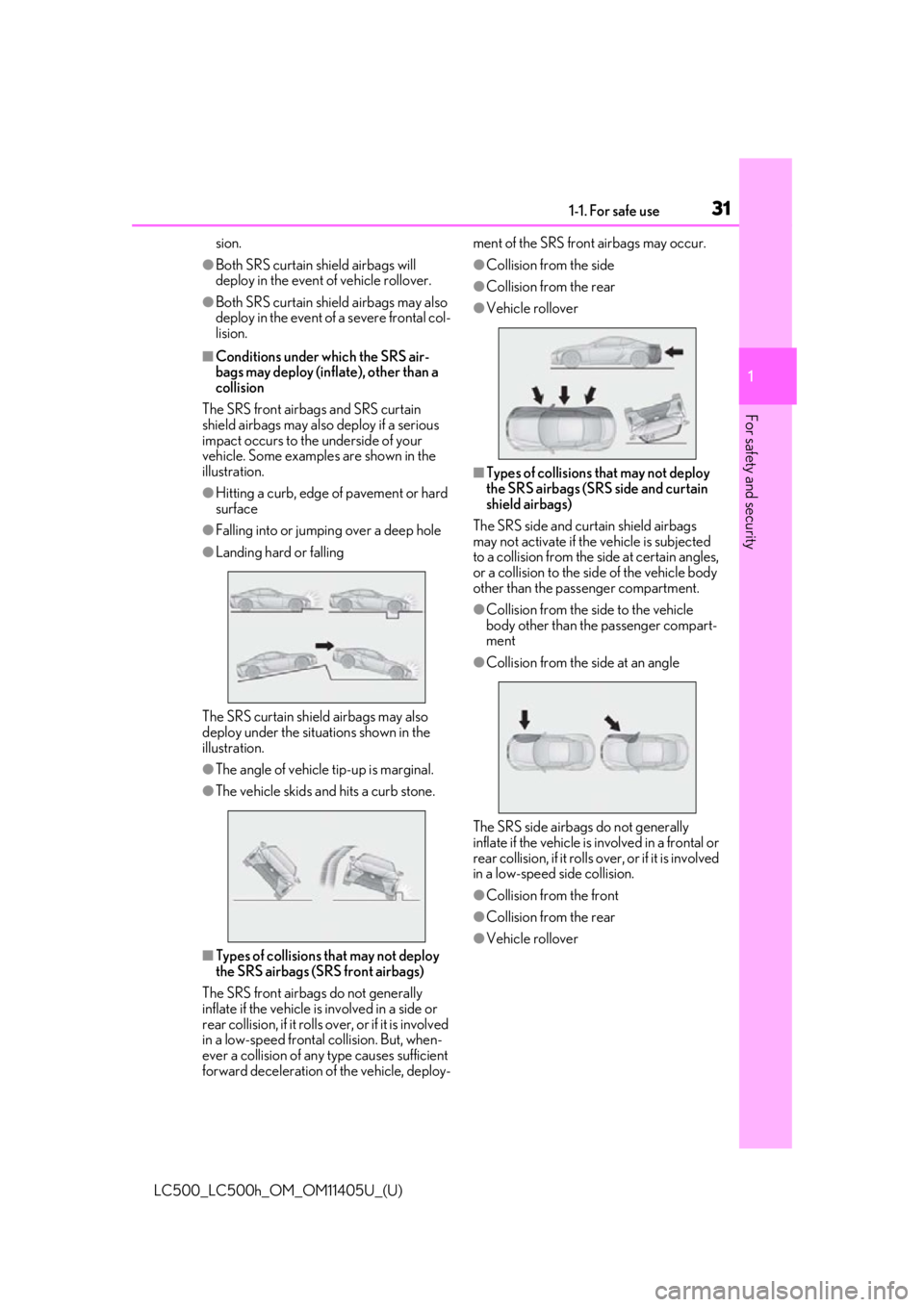
The SRS front airbags and SRS curtain
shield airbags may also deploy if a serious
impact occurs to the underside of your
vehicle. Some examples are shown in the
illustration.
●Hitting a curb, edge of pavement or hard
surface
●Falling into or jumping over a deep hole
●Landing hard or falling
The SRS curtain shield airbags may also
deploy under the situations shown in the
illustration.
●The angle of vehicle tip-up is marginal.
●The vehicle skids and hits a curb stone.
■Types of collisions that may not deploy
the SRS airbags (SRS front airbags)
The SRS front airbag s do not generally
inflate if the vehicle is involved in a side or
rear collision, if it rolls ov er, or if it is involved
in a low-speed frontal collision. But, when-
ever a collision of any type causes sufficient
forward deceleration of the vehicle, deploy- ment of the SRS fron
t airbags may occur.
●Collision from the side
●Collision from the rear
●Vehicle rollover
■Types of collisions that may not deploy
the SRS airbags (SRS side and curtain
shield airbags)
The SRS side and curtain shield airbags
may not activate if the vehicle is subjected
to a collision from the side at certain angles,
or a collision to the side of the vehicle body
other than the passenger compartment.
●Collision from the side to the vehicle
body other than the passenger compart-
ment
●Collision from the side at an angle
The SRS side airbags do not generally
inflate if the vehicle is involved in a frontal or
rear collision, if it rolls over, or if it is involved
in a low-speed side collision.
●Collision from the front
●Collision from the rear
●Vehicle rollover
Page 38 of 432
381-1. For safe use
LC500_LC500h_OM_OM11405U_(U)
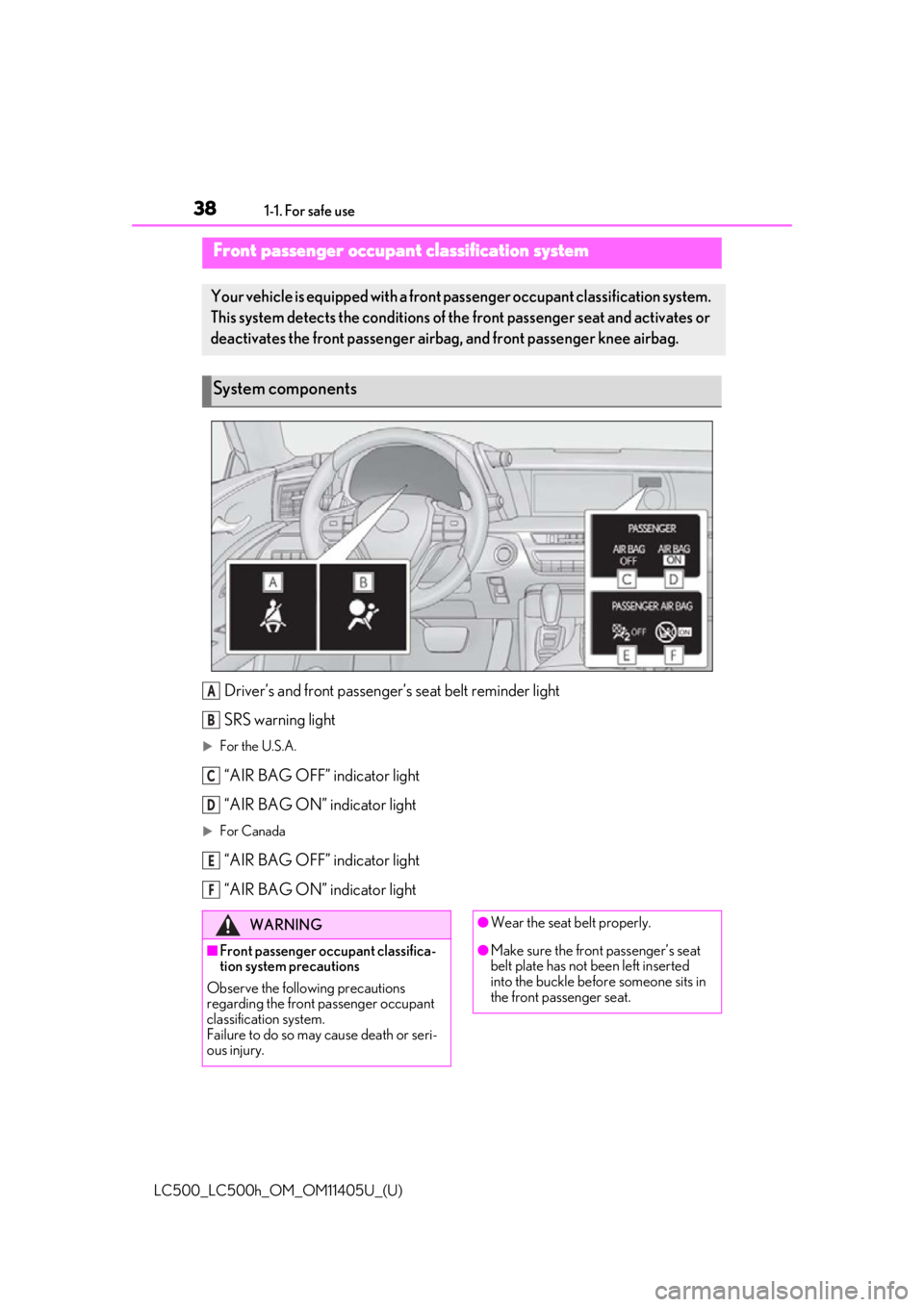
Driver’s and front passenger’s seat belt reminder light
SRS warning light
For the U.S.A.
“AIR BAG OFF” indicator light
“AIR BAG ON” indicator light
For Canada
“AIR BAG OFF” indicator light
“AIR BAG ON” indicator light
Front passenger occupant classification system
Your vehicle is equipped with a front pa ssenger occupant classification system.
This system detects the conditions of th e front passenger seat and activates or
deactivates the front passenger airbag , and front passenger knee airbag.
System components
A
B
C
D
E
F
WARNING
■Front passenger occupant classifica-
tion system precautions
Observe the following precautions
regarding the front passenger occupant
classification system.
Failure to do so may cause death or seri-
ous injury.
●Wear the seat belt properly.
●Make sure the front passenger’s seat
belt plate has not been left inserted
into the buckle before someone sits in
the front passenger seat.
Page 40 of 432
401-1. For safe use
LC500_LC500h_OM_OM11405U_(U)
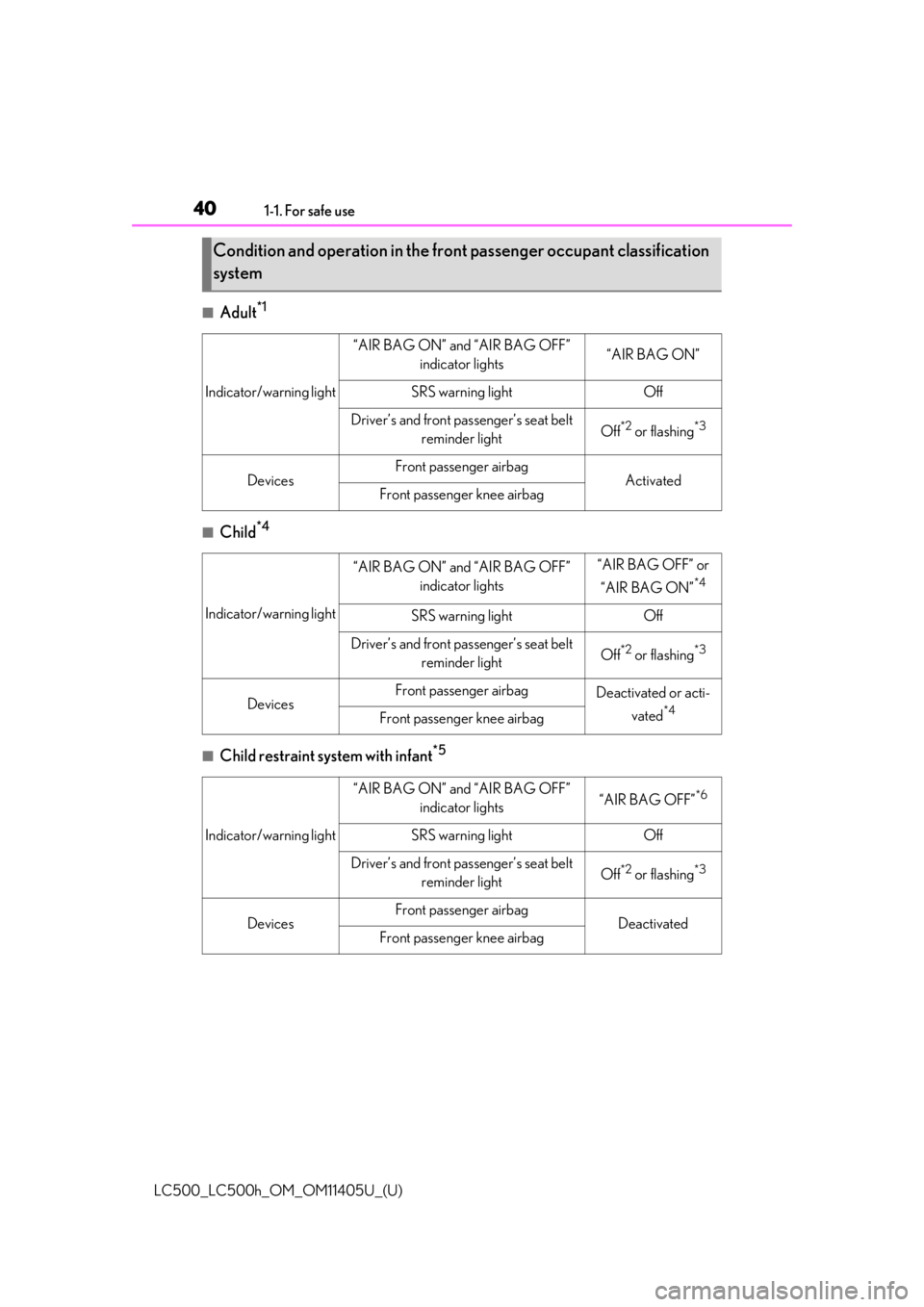
■Adult*1
■Child*4
■Child restraint system with infant*5
Condition and operation in the front passenger occupant classification
system
Indicator/warning light
“AIR BAG ON” and “AIR BAG OFF” indicator lights“AIR BAG ON”
SRS warning lightOff
Driver’s and front passenger’s seat belt reminder lightOff*2 or flashing*3
DevicesFront passenger airbagActivatedFront passenger knee airbag
Indicator/warning light
“AIR BAG ON” and “AIR BAG OFF” indicator lights“AIR BAG OFF” or
“AIR BAG ON”
*4
SRS warning lightOff
Driver’s and front passenger’s seat belt reminder lightOff*2 or flashing*3
DevicesFront passenger airbagDeactivated or acti-
vated
*4Front passenger knee airbag
Indicator/warning light
“AIR BAG ON” and “AIR BAG OFF” indicator lights“AIR BAG OFF”*6
SRS warning lightOff
Driver’s and front passenger’s seat belt reminder lightOff*2 or flashing*3
DevicesFront passenger airbagDeactivatedFront passenger knee airbag
Page 57 of 432
571-3. Hybrid system
LC500_LC500h_OM_OM11405U_(U)
1
For safety and security
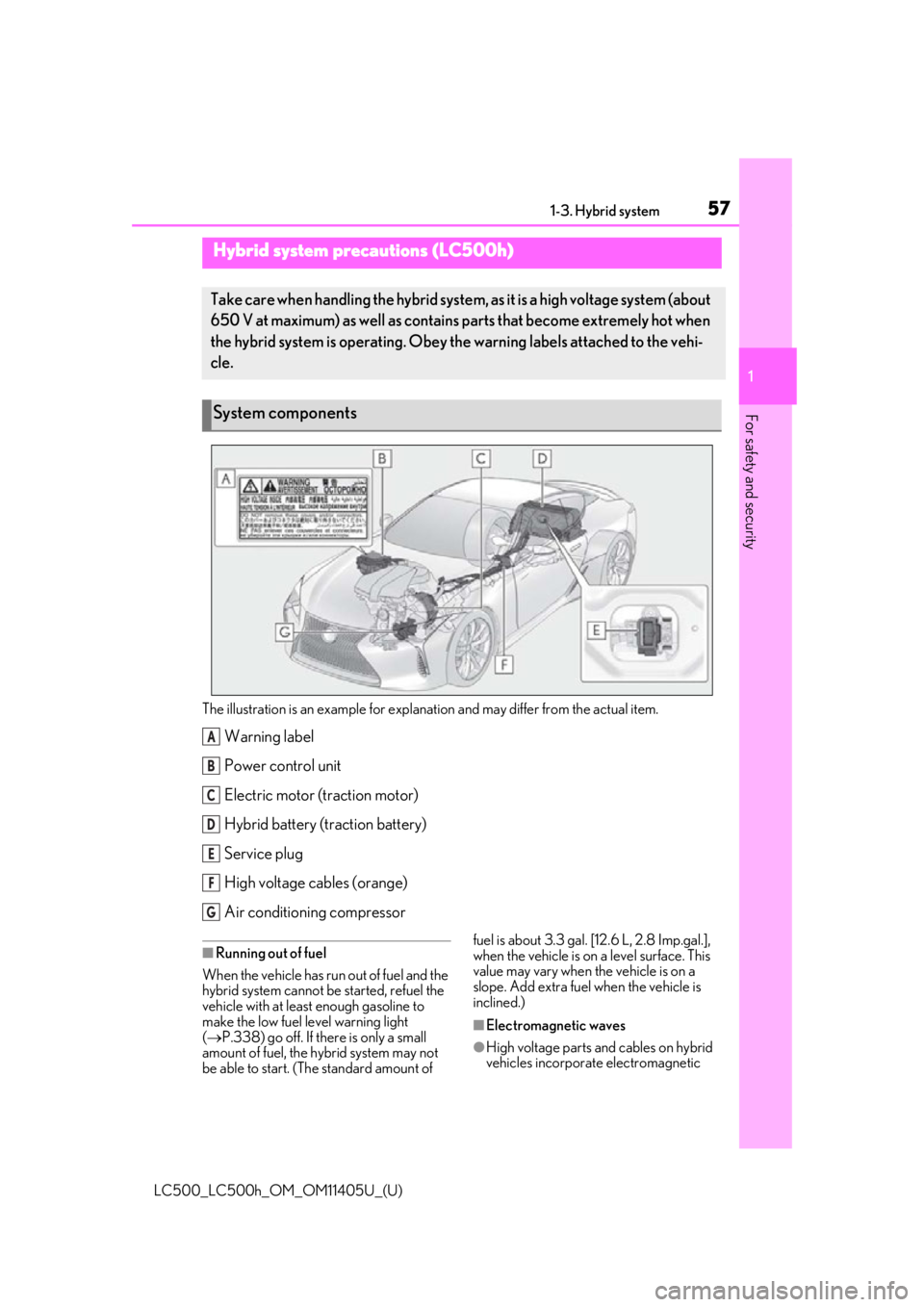
The illustration is an example for explanation and may differ from the actual item.
Warning label
Power control unit
Electric motor (traction motor)
Hybrid battery (traction battery)
Service plug
High voltage cables (orange)
Air conditioning compressor
■Running out of fuel
When the vehicle has run out of fuel and the
hybrid system cannot be started, refuel the
vehicle with at least enough gasoline to
make the low fuel level warning light
( P.338) go off. If there is only a small
amount of fuel, the hybrid system may not
be able to start. (The standard amount of fuel is about 3.3 gal. [12.6 L, 2.8 Imp.gal.],
when the vehicle is on a level surface. This
value may vary when the vehicle is on a
slope. Add extra fuel when the vehicle is
inclined.)
■Electromagnetic waves
●High voltage parts and cables on hybrid
vehicles incorporate electromagnetic
Hybrid system precautions (LC500h)
Take care when handling the hybrid system,
as it is a high voltage system (about
650 V at maximum) as well as contains parts that become extremely hot when
the hybrid system is operating. Obey th e warning labels attached to the vehi-
cle.
System components
A
B
C
D
E
F
G
Page 108 of 432
1083-2. Opening, closing and locking the doors and trunk
LC500_LC500h_OM_OM11405U_(U)
■Battery-saving function
The battery-saving fu nction will be acti-
vated in order to prevent the electronic key
battery and the 12-volt battery from being
discharged while the vehicle is not in opera-
tion for a long time.
●In the following situations, the smart
access system with pu sh-button start may
take some time to unlock the doors.
• The electronic key has been left within
approximately 6 ft. (2 m) of the outside of
the vehicle for 10 minutes or longer.
• The smart access system with push-but-
ton start has not been used for 5 days or
longer.
●If the smart access system with push-but-
ton start has not been used for 14 days or
longer, the doors cannot be unlocked at
the passenger door. In this case, push the
depression on the front edge the driver’s
door handle, or use the wireless remote
control or mechanical key, to unlock the
doors.
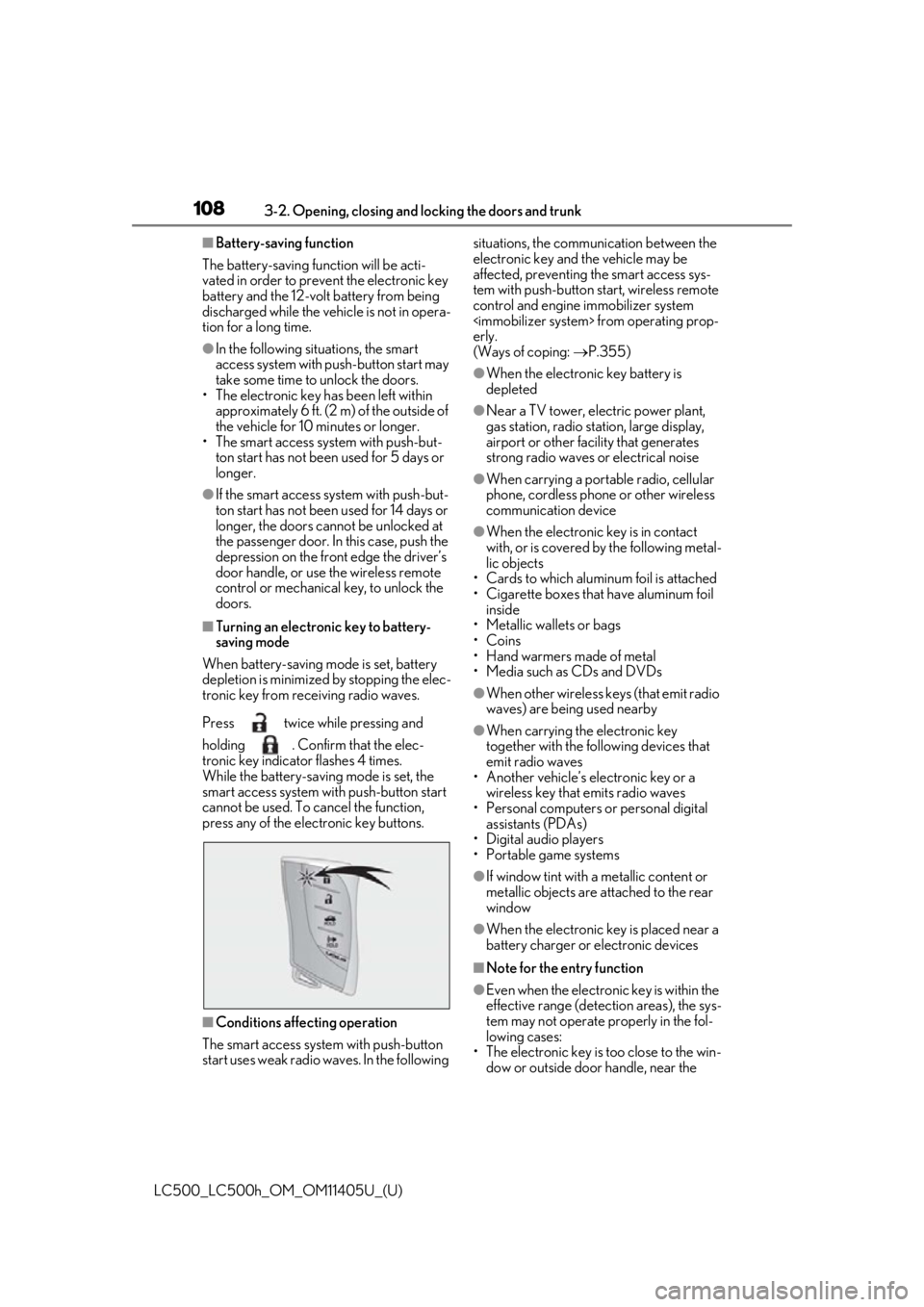
■Turning an electronic key to battery-
saving mode
When battery-saving mode is set, battery
depletion is minimized by stopping the elec-
tronic key from re ceiving radio waves.
Press twice while pressing and
holding . Confirm that the elec-
tronic key indicator flashes 4 times.
While the battery-saving mode is set, the
smart access system with push-button start
cannot be used. To cancel the function,
press any of the electronic key buttons.
■Conditions affe cting operation
The smart access system with push-button
start uses weak radio waves. In the following situations, the communication between the
electronic key and the vehicle may be
affected, preventing
the smart access sys-
tem with push-button start, wireless remote
control and engine immobilizer system
erly.
(Ways of coping: P.355)
●When the electronic key battery is
depleted
●Near a TV tower, electric power plant,
gas station, radio stat ion, large display,
airport or other fac ility that generates
strong radio waves or electrical noise
●When carrying a portable radio, cellular
phone, cordless phone or other wireless
communication device
●When the electronic key is in contact
with, or is covered by the following metal-
lic objects
• Cards to which aluminum foil is attached
• Cigarette boxes that have aluminum foil inside
• Metallic wallets or bags
•Coins
• Hand warmers made of metal
• Media such as CDs and DVDs
●When other wireless keys (that emit radio
waves) are being used nearby
●When carrying the electronic key
together with the following devices that
emit radio waves
• Another vehicle’s electronic key or a
wireless key that emits radio waves
• Personal computers or personal digital assistants (PDAs)
• Digital audio players
• Portable game systems
●If window tint with a metallic content or
metallic objects are attached to the rear
window
●When the electronic key is placed near a
battery charger or electronic devices
■Note for the entry function
●Even when the electronic key is within the
effective range (detection areas), the sys-
tem may not operate properly in the fol-
lowing cases:
• The electronic key is too close to the win- dow or outside door handle, near the