door lock lexus LC500h 2018 Owner's Manual / LEXUS 2018 LC500,LC500H OWNER'S MANUAL (OM11405U)
[x] Cancel search | Manufacturer: LEXUS, Model Year: 2018, Model line: LC500h, Model: Lexus LC500h 2018Pages: 432, PDF Size: 6.88 MB
Page 2 of 432
2
LC500_LC500h_OM_OM11405U_(U)TABLE OF CONTENTS
For your information ......................................
6
Reading this manual .................................... 10
How to search ................................................. 11
Pictorial index ................................................. 12
1-1. For safe use Before driving .................................... 22
For safe driving.................................. 23
Seat belts ............................................. 24
SRS airbags ....................................... 28
Pop Up Hood ................................... 36
Front passenger occupant classifi- cation system ................................. 38
Exhaust gas precautions ............... 42
1-2. Child safety Riding with children........................ 43
Child restraint systems ................. 43
1-3. Hybrid system Hybrid system fe atures (LC500h)
.............................................................. 54
Hybrid system precautions (LC500h) ....................................... 57
1-4. Theft deterrent system Engine immobilize r system
Alarm.................................................... 64
Theft prevention labels (U.S.A.) 65
2-1. Instrument cluster Warning lights and indicators .... 68
Gauges and meters ........................ 74
Multi-information display............. 78
Head-up display .............................. 84Energy monitor/consumption
screen ............................................... 89
3-1. Key information Keys ....................................................... 96
3-2. Opening, closing and locking the doors and trunk
Doors .................................................... 99
Trunk .................................................. 103
Smart access system with push-but- ton start .......................................... 106
3-3. Adjusting the seats Front seats.......................................... 114
Driving position memory ............. 116
Head restraints ................................ 119
3-4. Adjusting the steering wheel and mirrors
Steering wheel ................................. 121
Inside rear view mirror ................ 122
Outside rear view mirrors.......... 123
3-5. Opening and closing the windows Power windows .............................. 125
4-1. Before driving Driving the vehicle........................ 130
Cargo and luggage...................... 136
Vehicle load limits......................... 138
Trailer towing.................................. 139
Dinghy towing ................................ 139
4-2. Driving procedures Engine (ignition) switch (LC500)........................................................... 140
1For safety and security
2Vehicle status information and
indicators
3Before driving
4Driving
Page 12 of 432
12Pictorial index
Pictorial index
■Exterior
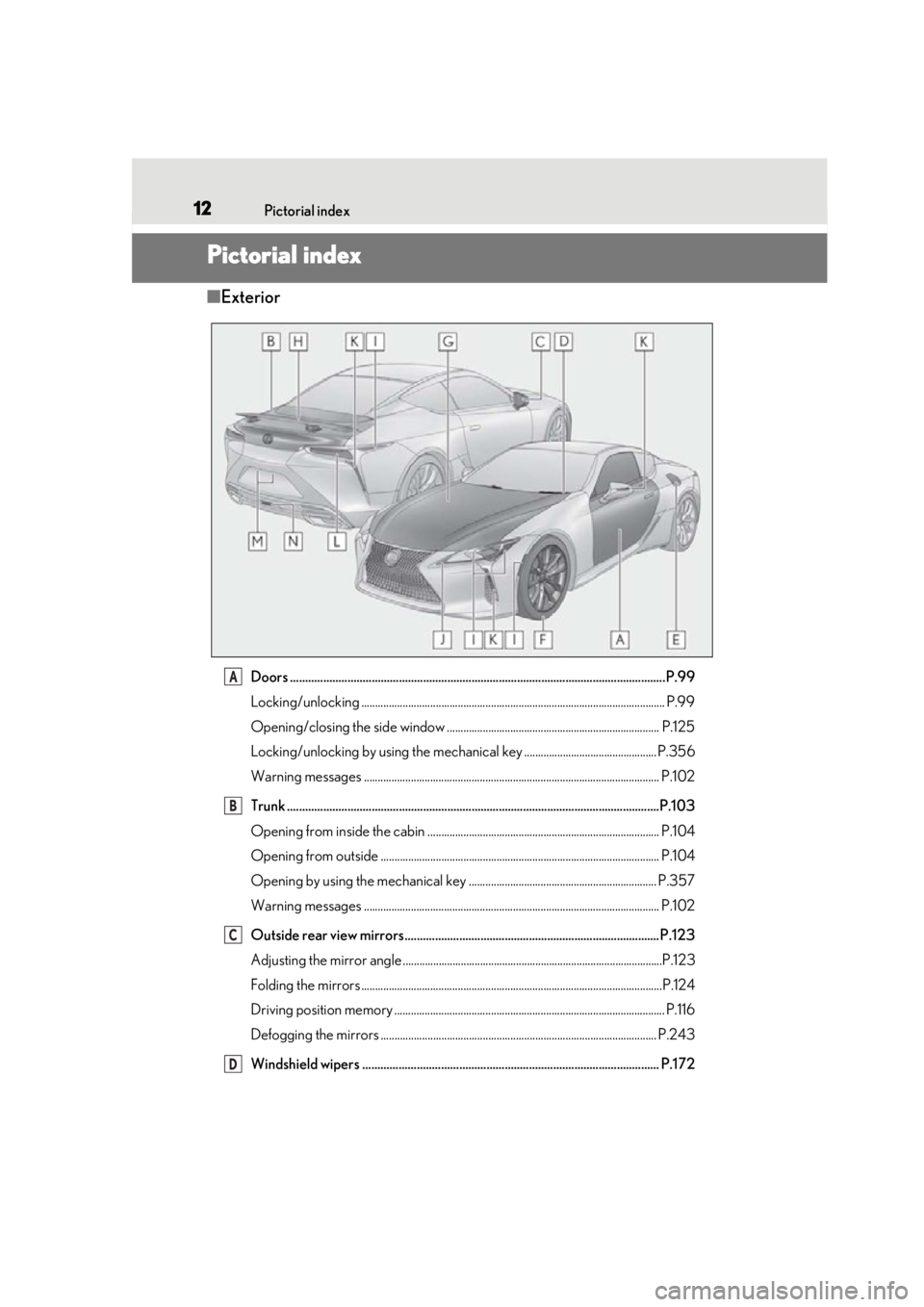
Doors .......................................................................................................................... ..P.99
Locking/unlocking .............................................................................................................. P.99
Opening/closing the side window ............................................................................. P.125
Locking/unlocking by using th e mechanical key ................................................ P.356
Warning messages ........................................................................................................... P.10 2
Trunk .......................................................................................................................... .P.103
Opening from inside the cabin .................................................................................... P.104
Opening from outside ..................................................................................................... P.104
Opening by using the mechanical key .................................................................... P.357
Warning messages ........................................................................................................... P.10 2
Outside rear view mirrors....................................................................................P.123
Adjusting the mirror angle ..............................................................................................P.123
Folding the mirrors ............................................................................................................ .P.124
Driving position memory .................................................................................................. P.116
Defogging the mirrors .................................................................................................... P.243
Windshield wipers .................................................................................................. P.172A
B
C
D
Page 17 of 432
17Pictorial index
LC500_LC500h_OM_OM11405U_(U)
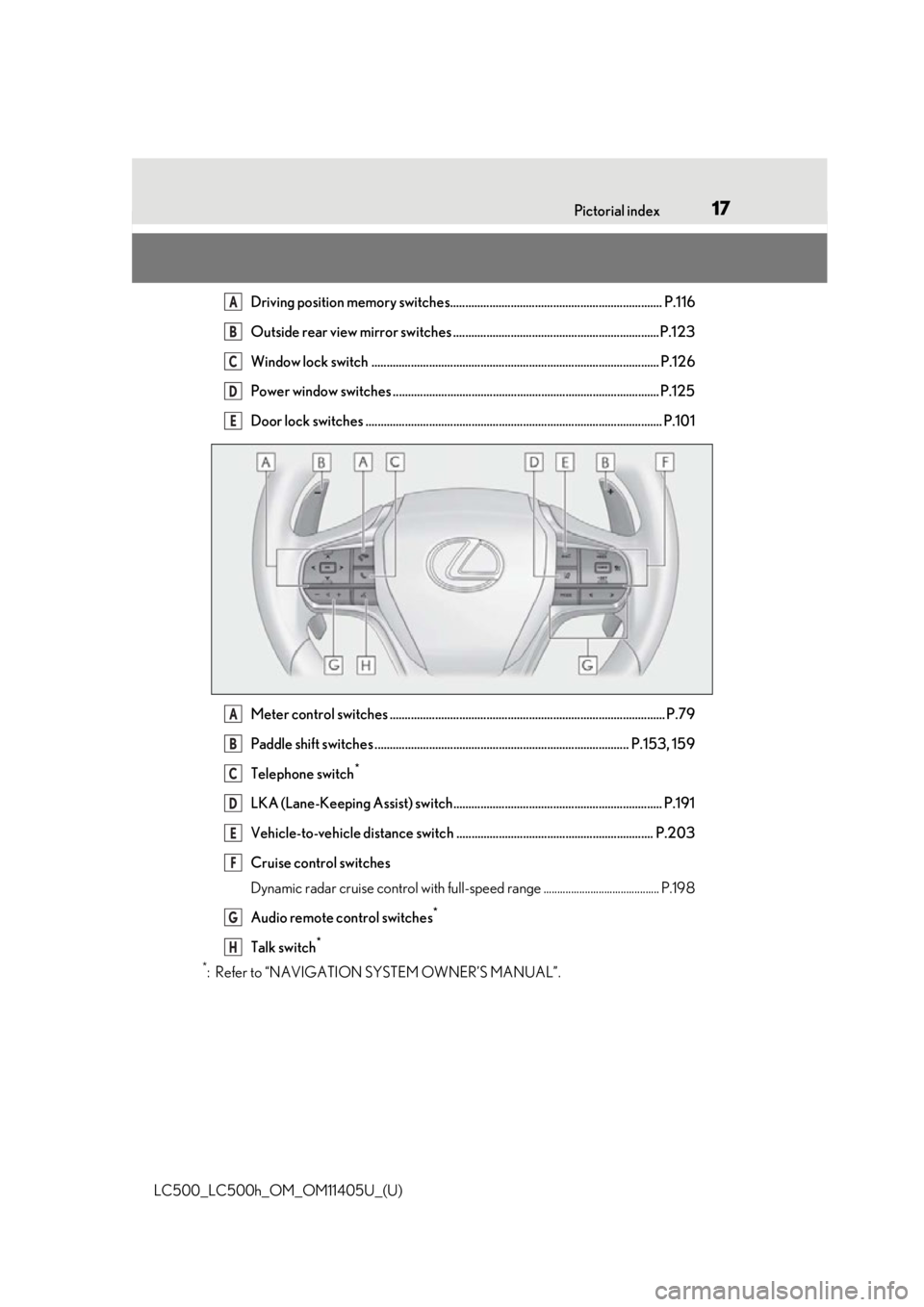
Driving position memory switches...................................................................... P.116
Outside rear view mirror switches ....................................................................P.123
Window lock switch ............................................................................................... P.126
Power window switches ........................................................................................ P.125
Door lock switches .................................................................................................. P.101
Meter control switches ........................................................................................... P.79
Paddle shift switches .................................................................................... P.153, 159
Telephone switch
*
LKA (Lane-Keeping Assist) switch..................................................................... P.191
Vehicle-to-vehicle distance switch ................................................................. P.203
Cruise control switches
Dynamic radar cruise control with full-spee d range .......................................... P.198
Audio remote control switches
*
Talk switch*
*
: Refer to “NAVIGATION SYSTEM OWNER’S MANUAL”.
A
B
C
D
E
A
B
C
D
E
F
G
H
Page 64 of 432
641-4. Theft deterrent system
LC500_LC500h_OM_OM11405U_(U)
■Items to check before locking the
vehicle
To prevent unexpected triggering of
the alarm and vehicle theft, make sure
of the following:
Nobody is in the vehicle.
The windows are closed before the
alarm is set.
No valuables or other personal
items are left in the vehicle.
■Setting
Close the doors, trunk and hood, and
lock both side doors. The system will
be set automatically after 30 seconds.
The indicator light changes from being on
to flashing when the system is set.
■Canceling or stopping
Do one of the following to deactivate
or stop the alarms:
Unlock the doors or open the trunk.
Turn the engine switch
TION ON mode
start the engine
(The alarm will be deactivated or
stopped after a few seconds.)
■System maintenance
The vehicle has a maintenance-free type
alarm system.
■Triggering of the alarm
The alarm may be triggered in the following
situations:
(Stopping the alarm deactivates the alarm
system.)
●A person inside the vehicle opens a door,
the trunk or hood, or unlocks the vehicle
using a door lock switch.
●The 12-volt battery is recharged or
replaced when the vehicle is locked.
( P.361)
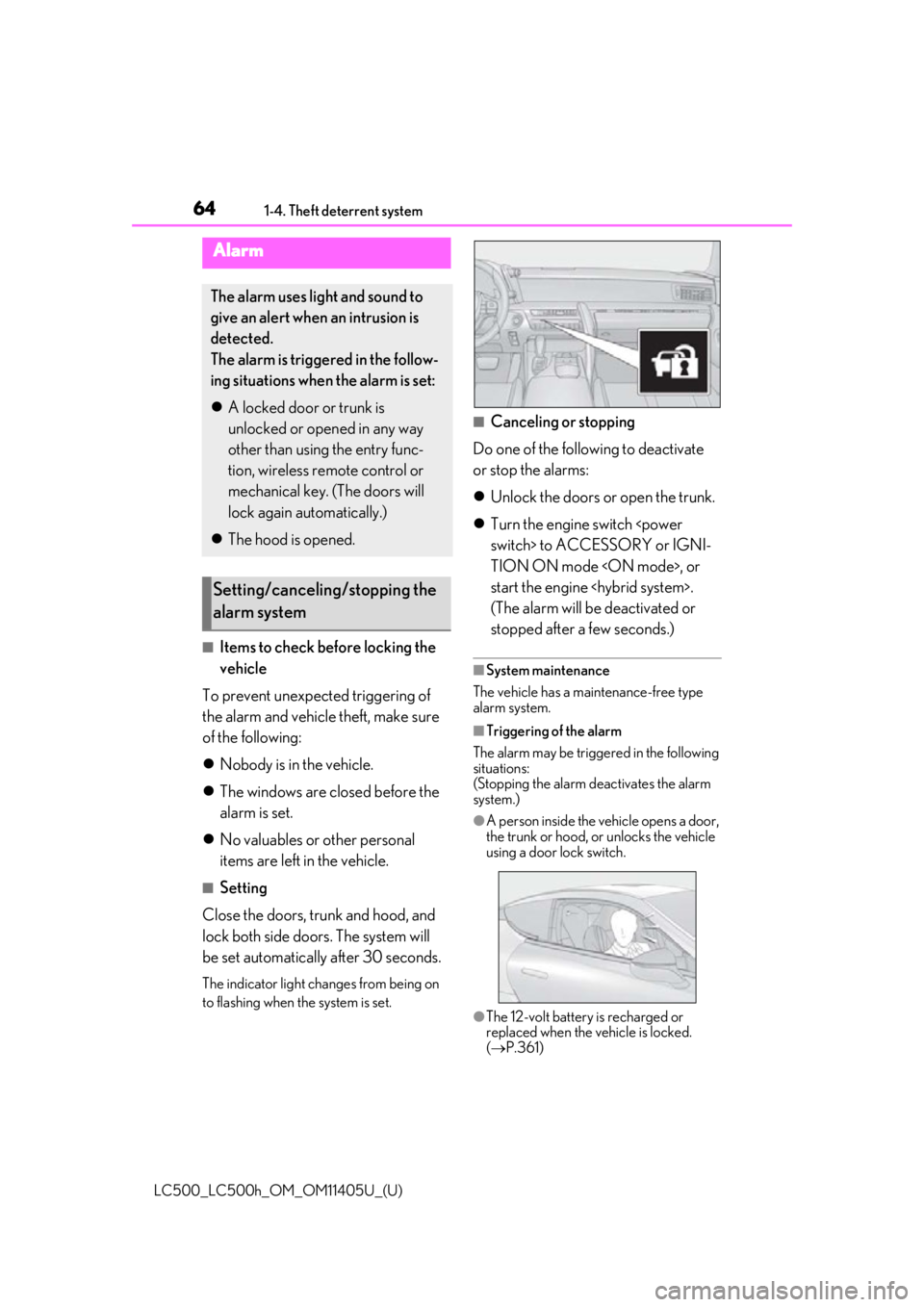
Alarm
The alarm uses light and sound to
give an alert when an intrusion is
detected.
The alarm is triggered in the follow-
ing situations when the alarm is set:
A locked door or trunk is
unlocked or opened in any way
other than using the entry func-
tion, wireless remote control or
mechanical key. (The doors will
lock again automatically.)
The hood is opened.
Setting/canceling/stopping the
alarm system
Page 65 of 432
651-4. Theft deterrent system
LC500_LC500h_OM_OM11405U_(U)
1
For safety and security
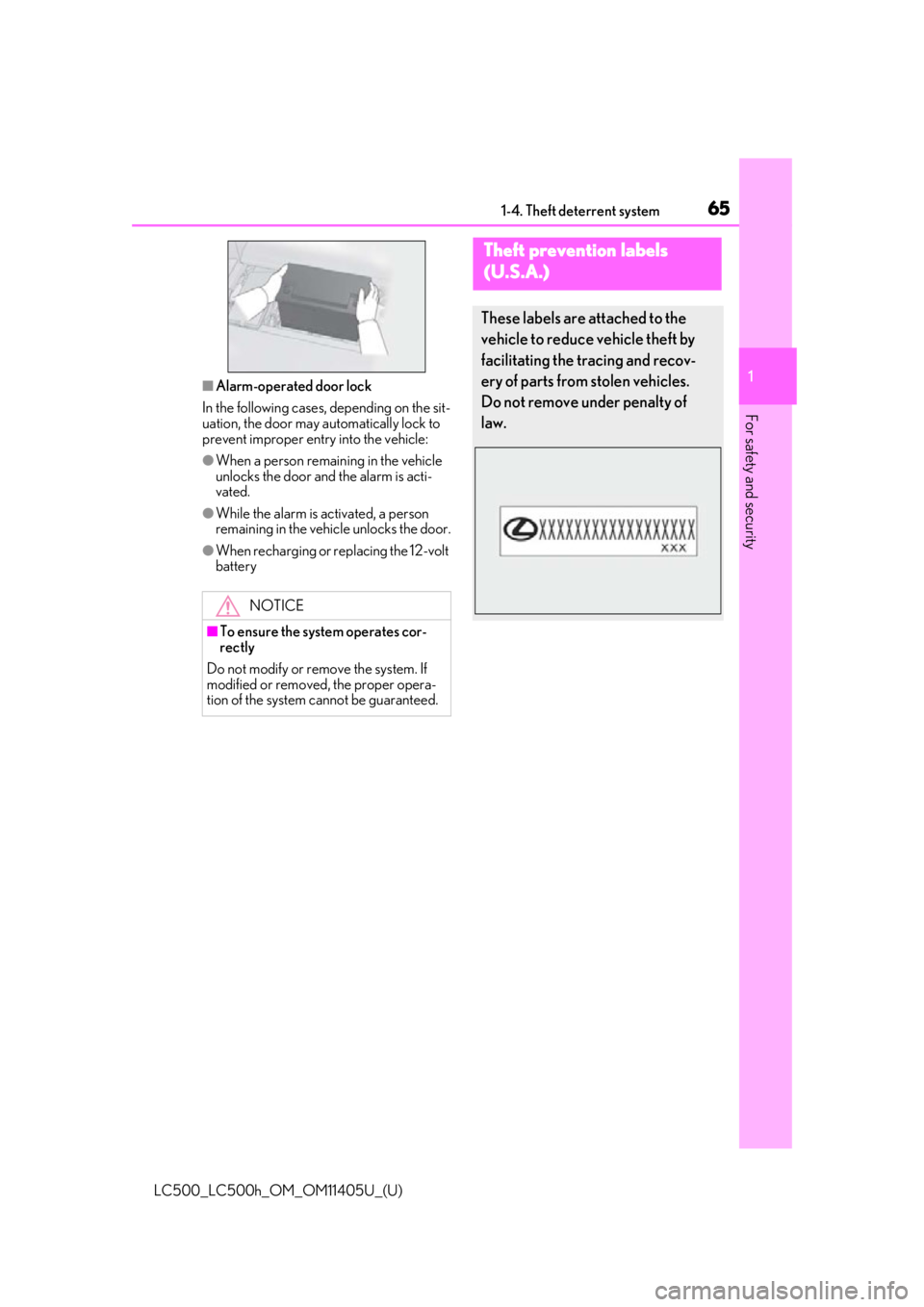
■Alarm-operated door lock
In the following cases, depending on the sit-
uation, the door may automatically lock to
prevent improper entry into the vehicle:
●When a person remaining in the vehicle
unlocks the door and the alarm is acti-
vated.
●While the alarm is activated, a person
remaining in the vehicle unlocks the door.
●When recharging or replacing the 12-volt
battery
NOTICE
■To ensure the system operates cor-
rectly
Do not modify or remove the system. If
modified or removed, the proper opera-
tion of the system cannot be guaranteed.
Theft prevention labels
(U.S.A.)
These labels are attached to the
vehicle to reduce vehicle theft by
facilitating the tracing and recov-
ery of parts from stolen vehicles.
Do not remove under penalty of
law.
Page 84 of 432
842-1. Instrument cluster
LC500_LC500h_OM_OM11405U_(U)
sage will be displayed.
■Suggestion to turn off the head-
lights
If the headlights are left on for a certain
amount of time after the engine switch
suggestion message will be displayed
asking if you wish to turn the headlights
off.
When the headlight switch is in the
“AUTO” position: To turn the headlights
off, select “Yes”.
If a front door is op ened after the engine
switch
suggestion message will not be displayed.
■Suggestion to unlock the power
windows
If it is attempt to close the passenger’s
side window using the power window
switch on the driver’s door, a sugges-
tion message will be displayed.
■Customization
The suggestion function can be turned
on/off. (Customizable features: P.391)
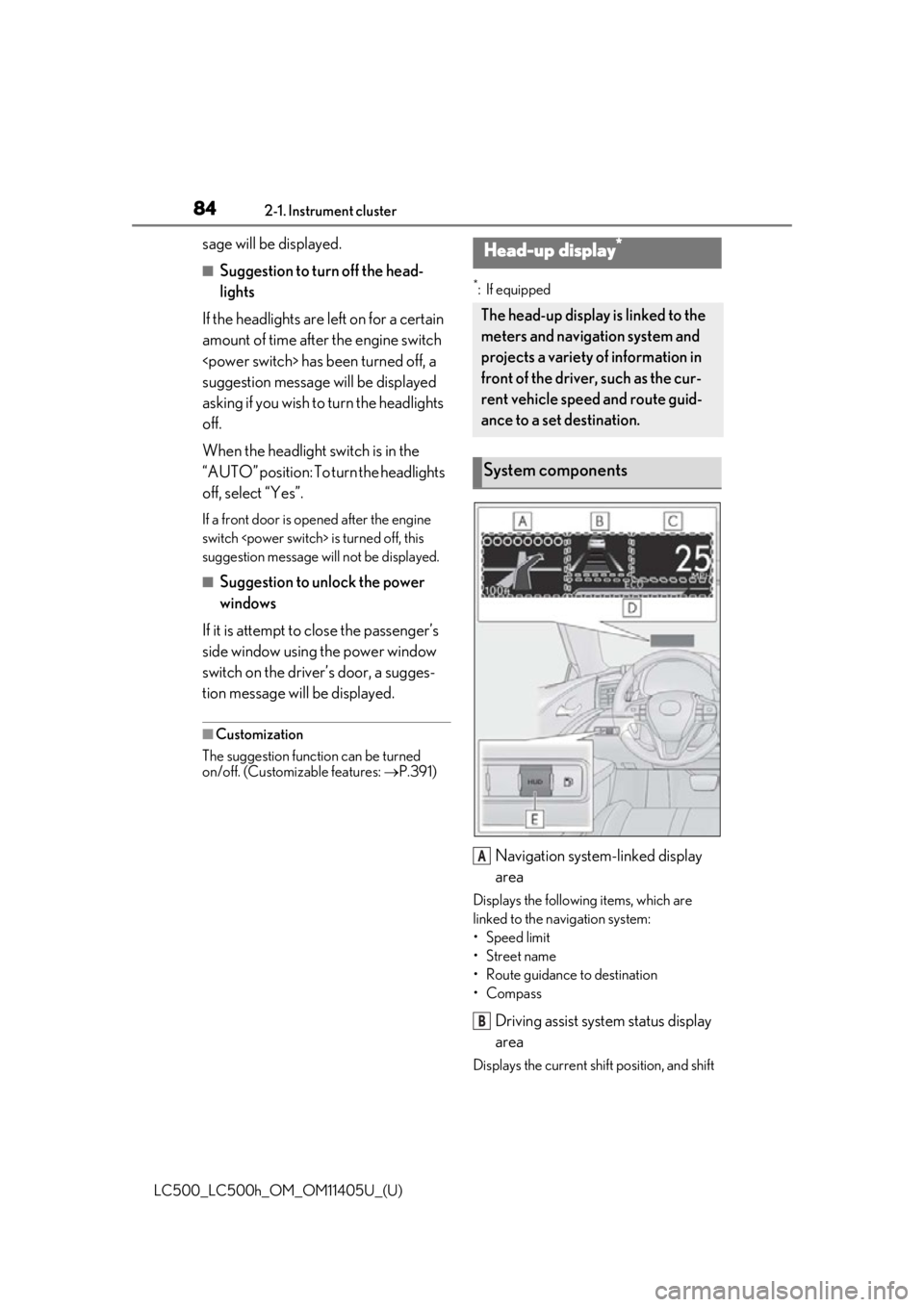
*: If equipped
Navigation system-linked display
area
Displays the following items, which are
linked to the navigation system:
•Speed limit
• Street name
• Route guidance to destination
•Compass
Driving assist system status display
area
Displays the current sh ift position, and shift
Head-up display*
The head-up display is linked to the
meters and navigation system and
projects a variety of information in
front of the driver, such as the cur-
rent vehicle speed and route guid-
ance to a set destination.
System components
A
B
Page 95 of 432
95
LC500_LC500h_OM_OM11405U_(U)
3
3
Before driving
Before driving
3-1. Key informationKeys ................................................... 96
3-2. Opening, closing and locking the doors and trunk
Doors................................................. 99
Trunk................................................ 103
Smart access system with push- button start ................................. 106
3-3. Adjusting the seats Front seats ...................................... 114
Driving position memory ......... 116
Head restraints............................. 119
3-4. Adjusting the steering wheel and mirrors
Steering wheel.............................. 121
Inside rear view mirror............. 122
Outside rear view mirrors ...... 123
3-5. Opening and closing the win- dows
Power windows........................... 125
Page 96 of 432
963-1. Key information
LC500_LC500h_OM_OM11405U_(U)
3-1.Key information
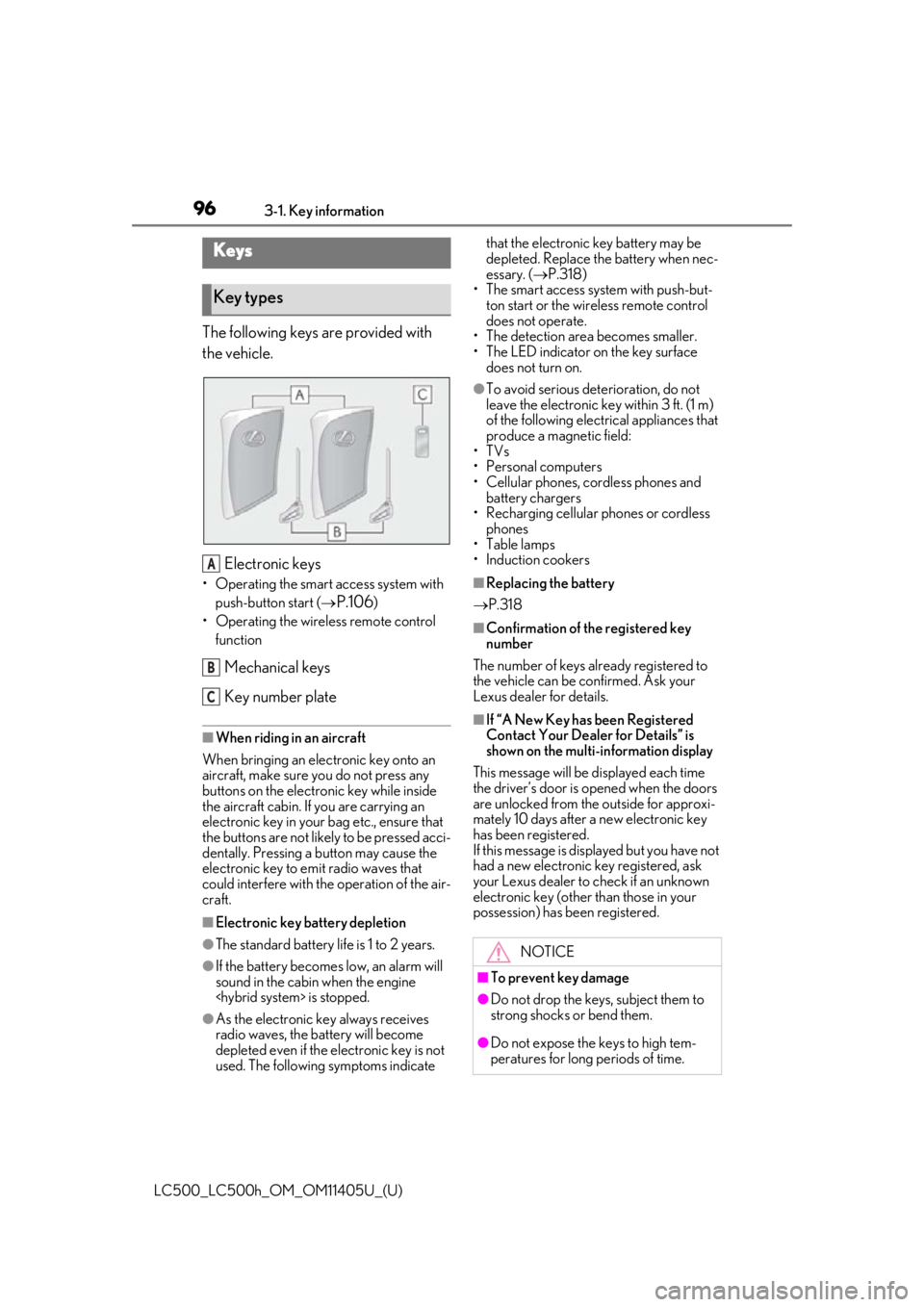
The following keys are provided with
the vehicle.
Electronic keys
• Operating the smart access system with push-button start (
P.106)
• Operating the wireless remote control function
Mechanical keys
Key number plate
■When riding in an aircraft
When bringing an elec tronic key onto an
aircraft, make sure you do not press any
buttons on the electronic key while inside
the aircraft cabin. If you are carrying an
electronic key in your bag etc., ensure that
the buttons are not likely to be pressed acci-
dentally. Pressing a button may cause the
electronic key to em it radio waves that
could interfere with the operation of the air-
craft.
■Electronic key battery depletion
●The standard battery life is 1 to 2 years.
●If the battery becomes low, an alarm will
sound in the cabin when the engine
●As the electronic ke y always receives
radio waves, the battery will become
depleted even if the electronic key is not
used. The following symptoms indicate that the electronic key battery may be
depleted. Replace the battery when nec-
essary. (
P.318)
• The smart access system with push-but- ton start or the wireless remote control
does not operate.
• The detection area becomes smaller.
• The LED indicator on the key surface does not turn on.
●To avoid serious dete rioration, do not
leave the electronic key within 3 ft. (1 m)
of the following electrical appliances that
produce a magnetic field:
•TVs
• Personal computers
• Cellular phones, cordless phones and battery chargers
• Recharging cellular phones or cordless
phones
•Table lamps
• Induction cookers
■Replacing the battery
P.318
■Confirmation of the registered key
number
The number of keys already registered to
the vehicle can be confirmed. Ask your
Lexus dealer for details.
■If “A New Key has been Registered
Contact Your Dealer for Details” is
shown on the multi-information display
This message will be displayed each time
the driver’s door is opened when the doors
are unlocked from the outside for approxi-
mately 10 days after a new electronic key
has been registered.
If this message is disp layed but you have not
had a new electronic key registered, ask
your Lexus dealer to check if an unknown
electronic key (other than those in your
possession) has be en registered.
Keys
Key types
A
B
C
NOTICE
■To prevent key damage
●Do not drop the keys, subject them to
strong shocks or bend them.
●Do not expose the keys to high tem-
peratures for long periods of time.
Page 97 of 432
973-1. Key information
LC500_LC500h_OM_OM11405U_(U)
3
Before driving
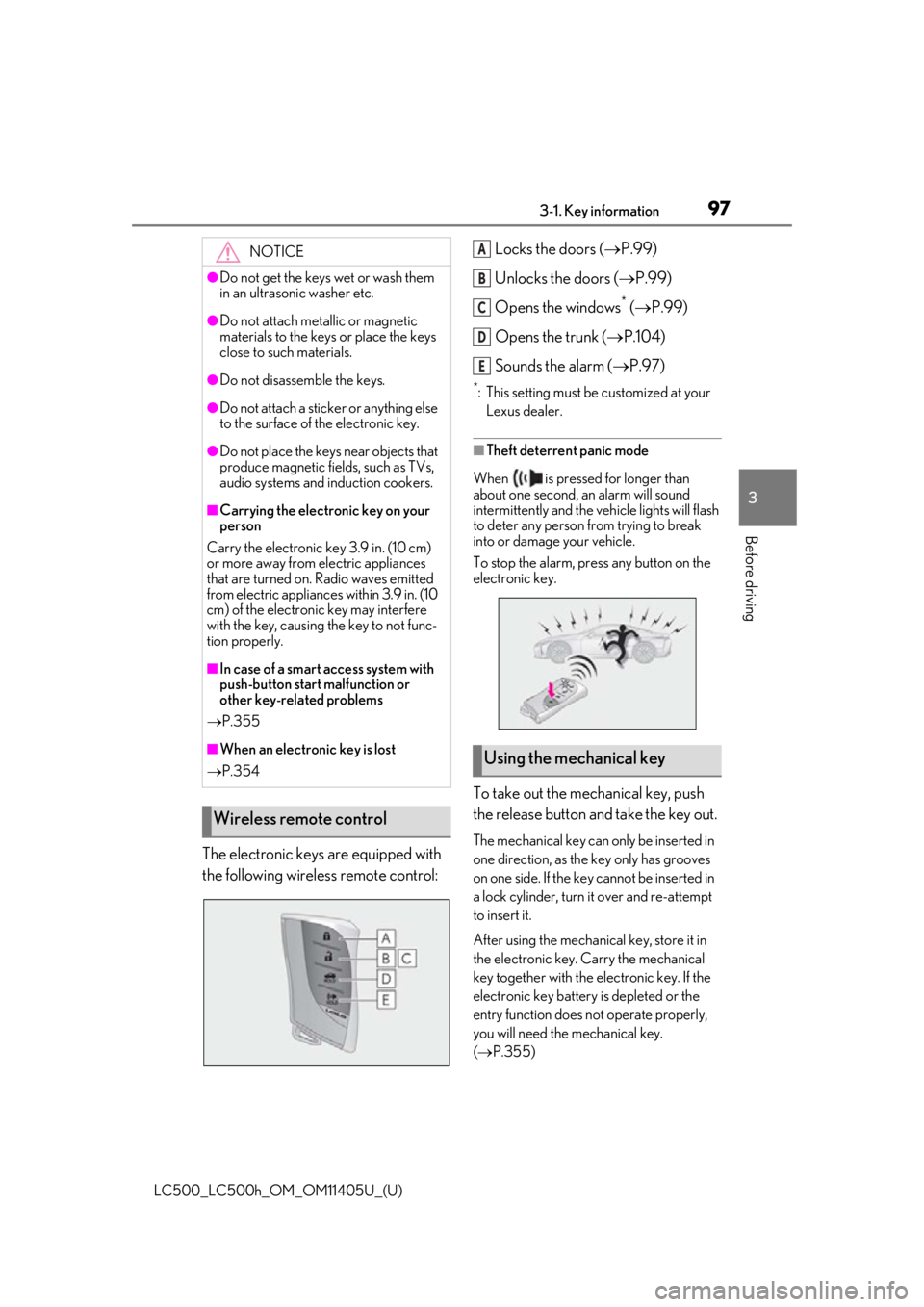
The electronic keys are equipped with
the following wireless remote control: Locks the doors (
P.99)
Unlocks the doors ( P.99)
Opens the windows
* ( P.99)
Opens the trunk ( P.104)
Sounds the alarm ( P.97)
*: This setting must be customized at your
Lexus dealer.
■Theft deterrent panic mode
When is pressed for longer than
about one second, an alarm will sound
intermittently and the vehicle lights will flash
to deter any person from trying to break
into or damage your vehicle.
To stop the alarm, press any button on the
electronic key.
To take out the mechanical key, push
the release button and take the key out.
The mechanical key can only be inserted in
one direction, as the key only has grooves
on one side. If the key cannot be inserted in
a lock cylinder, turn it over and re-attempt
to insert it.
After using the mechanical key, store it in
the electronic key. Carry the mechanical
key together with the electronic key. If the
electronic key battery is depleted or the
entry function does not operate properly,
you will need the mechanical key.
( P.355)
NOTICE
●Do not get the keys wet or wash them
in an ultrasonic washer etc.
●Do not attach metallic or magnetic
materials to the keys or place the keys
close to such materials.
●Do not disassemb le the keys.
●Do not attach a sticker or anything else
to the surface of the electronic key.
●Do not place the keys near objects that
produce magnetic fields, such as TVs,
audio systems and induction cookers.
■Carrying the electronic key on your
person
Carry the electronic key 3.9 in. (10 cm)
or more away from electric appliances
that are turned on. Radio waves emitted
from electric applianc es within 3.9 in. (10
cm) of the electronic key may interfere
with the key, causing the key to not func-
tion properly.
■In case of a smart access system with
push-button start malfunction or
other key-related problems
P.355
■When an electronic key is lost
P.354
Wireless remote control
Using the mechanical key
A
B
C
D
E
Page 99 of 432
993-2. Opening, closing and locking the doors and trunk
LC500_LC500h_OM_OM11405U_(U)
3
Before driving
3-2.Opening, closing and locking the doors and trunk
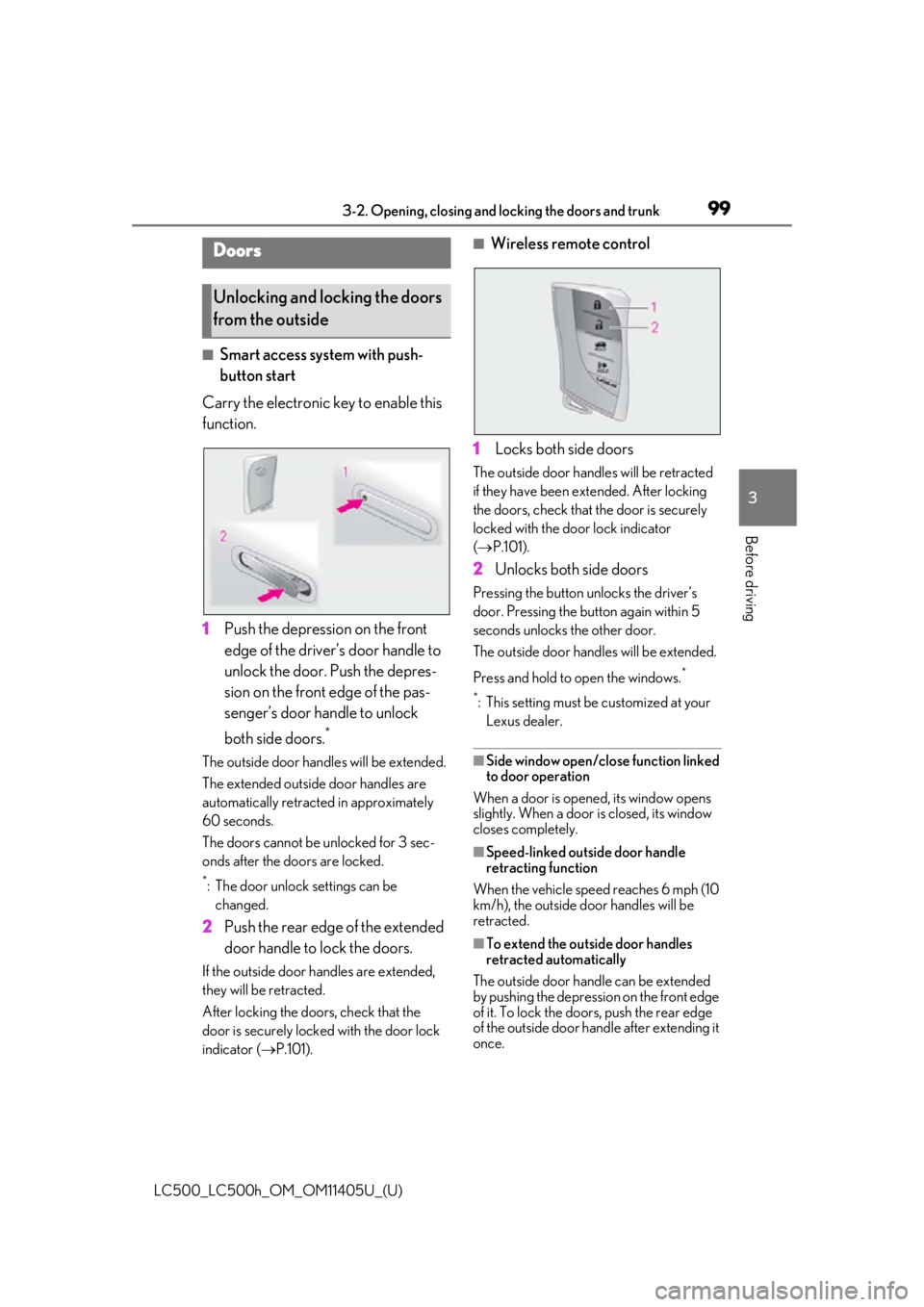
■Smart access system with push-
button start
Carry the electronic key to enable this
function.
1 Push the depression on the front
edge of the driver’s door handle to
unlock the door. Push the depres-
sion on the front edge of the pas-
senger’s door handle to unlock
both side doors.
*
The outside door hand les will be extended.
The extended outside door handles are
automatically retracted in approximately
60 seconds.
The doors cannot be unlocked for 3 sec-
onds after the doors are locked.
*: The door unlock settings can be changed.
2 Push the rear edge of the extended
door handle to lock the doors.
If the outside door handles are extended,
they will be retracted.
After locking the doors, check that the
door is securely locked with the door lock
indicator ( P.101).
■Wireless remote control
1 Locks both side doors
The outside door handles will be retracted
if they have been ex tended. After locking
the doors, check that the door is securely
locked with the door lock indicator
( P.101).
2 Unlocks both side doors
Pressing the button unlocks the driver’s
door. Pressing the button again within 5
seconds unlocks the other door.
The outside door handles will be extended.
Press and hold to open the windows.
*
*
: This setting must be customized at your Lexus dealer.
■Side window open/close function linked
to door operation
When a door is opened, its window opens
slightly. When a door is closed, its window
closes completely.
■Speed-linked outside door handle
retracting function
When the vehicle speed reaches 6 mph (10
km/h), the outside door handles will be
retracted.
■To extend the outside door handles
retracted automatically
The outside door hand le can be extended
by pushing the depression on the front edge
of it. To lock the door s, push the rear edge
of the outside door handle after extending it
once.
Doors
Unlocking and locking the doors
from the outside