phone lexus LC500h 2018 Owner's Manual / LEXUS 2018 LC500, LC500H OWNER'S MANUAL QUICK GUIDE (OM11444U)
[x] Cancel search | Manufacturer: LEXUS, Model Year: 2018, Model line: LC500h, Model: Lexus LC500h 2018Pages: 110, PDF Size: 2.04 MB
Page 2 of 110
2
LC500_LC500h_QG_OM11444U_(U)
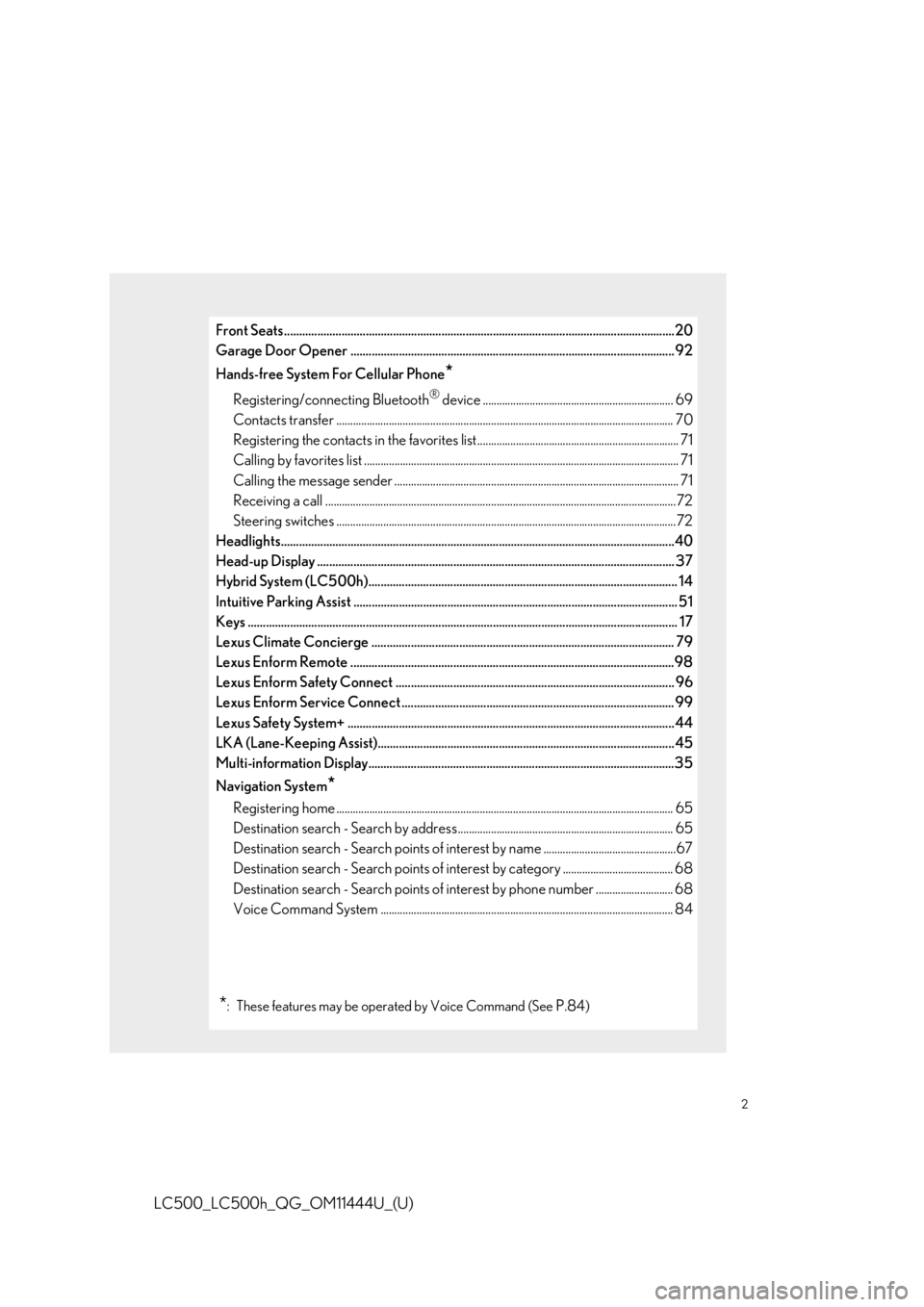
Front Seats.................................................................................................................................20
Garage Door Opener ........................................................................................................... 92
Hands-free System For Cellular Phone
*
Registering/connecting Bluetooth® device ..................................................................... 69
Contacts transfer .............................................................................................................. ............ 70
Registering the contacts in the favorites list......................................................................... 71
Calling by favorites list ...................................................................................................... ............ 71
Calling the message sender ..................................................................................................... .. 71
Receiving a call ............................................................................................................... ................72
Steering switches .............................................................................................................. .............72
Headlights..................................................................................................................................40
Head-up Display ................................................................................................................ ...... 37
Hybrid System (LC500h)...................................................................................................... 14
Intuitive Parking Assist ....................................................................................................... .... 51
Keys ........................................................................................................................... ................... 17
Lexus Climate Concierge .................................................................................................... 79
Lexus Enform Remote ...........................................................................................................9 8
Lexus Enform Safety Connect ............................................................................................ 96
Lexus Enform Service Connect .......................................................................................... 99
Lexus Safety System+ ........................................................................................................... .44
LKA (Lane-Keeping Assist).................................................................................................. 45
Multi-information Display.....................................................................................................3 5
Navigation System
*
Registering home ............................................................................................................... ........... 65
Destination search - Search by address .............................................................................. 65
Destination search - Search points of interest by name ................................................67
Destination search - Search points of intere st by category ........................................ 68
Destination search - Search points of interest by phone number ............................ 68
Voice Command System .......................................................................................................... 8 4
*: These features may be operated by Voice Command (See P.84)
Page 9 of 110
9
LC500_LC500h_QG_OM11444U_(U)
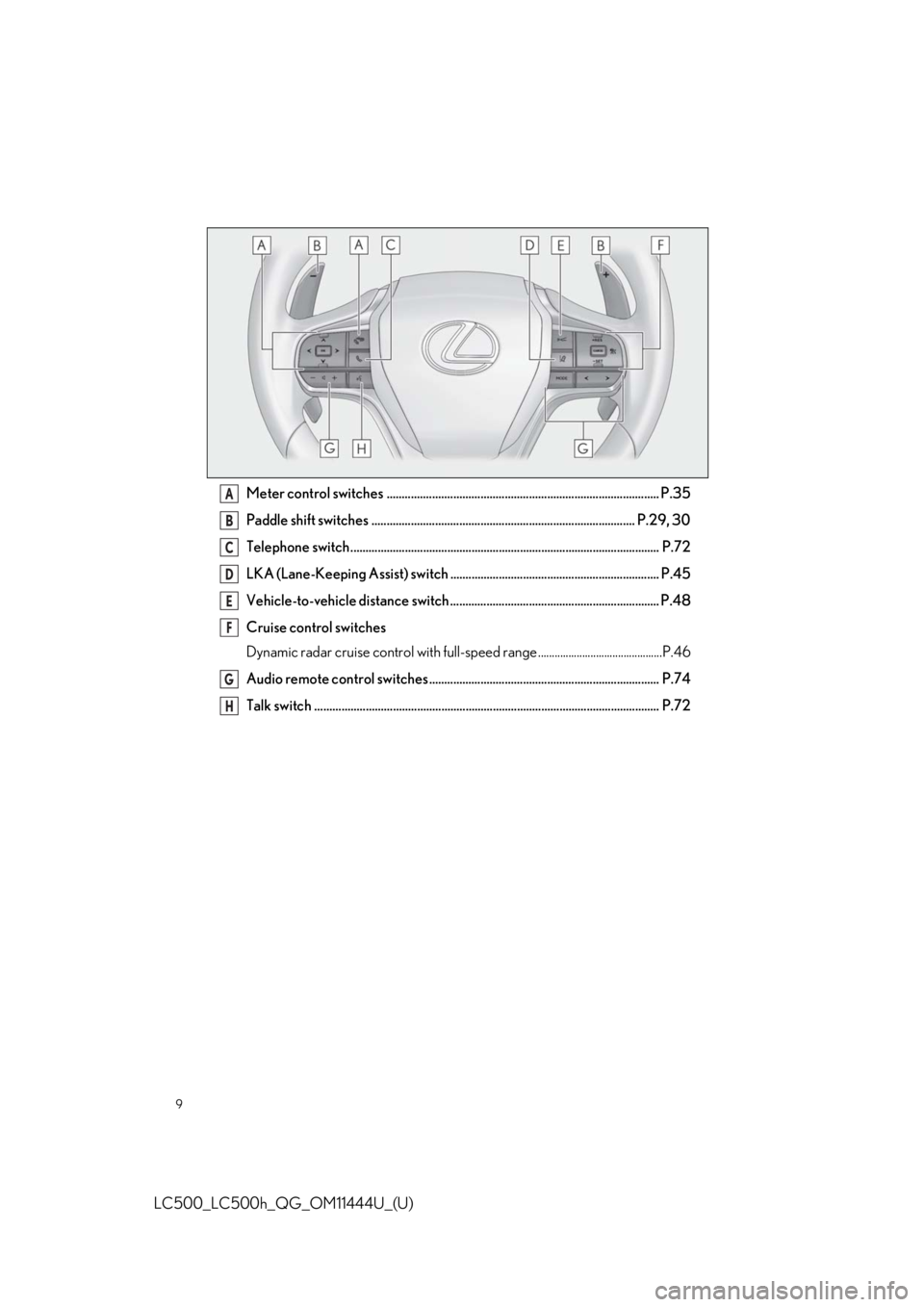
Meter control switches .......................................................................................... P.35
Paddle shift switches ....................................................................................... P.29, 30
Telephone switch...................................................................................................... P.72
LKA (Lane-Keeping Assist) switch ..................................................................... P.45
Vehicle-to-vehicle distance switch ..................................................................... P.48
Cruise control switches
Dynamic radar cruise control with full-speed range .............................................P.46
Audio remote control switches ............................................................................ P.74
Talk switch .................................................................................................................. P.72A
B
C
D
E
F
G
H
Page 67 of 110
67
LC500_LC500h_QG_OM11444U_(U)
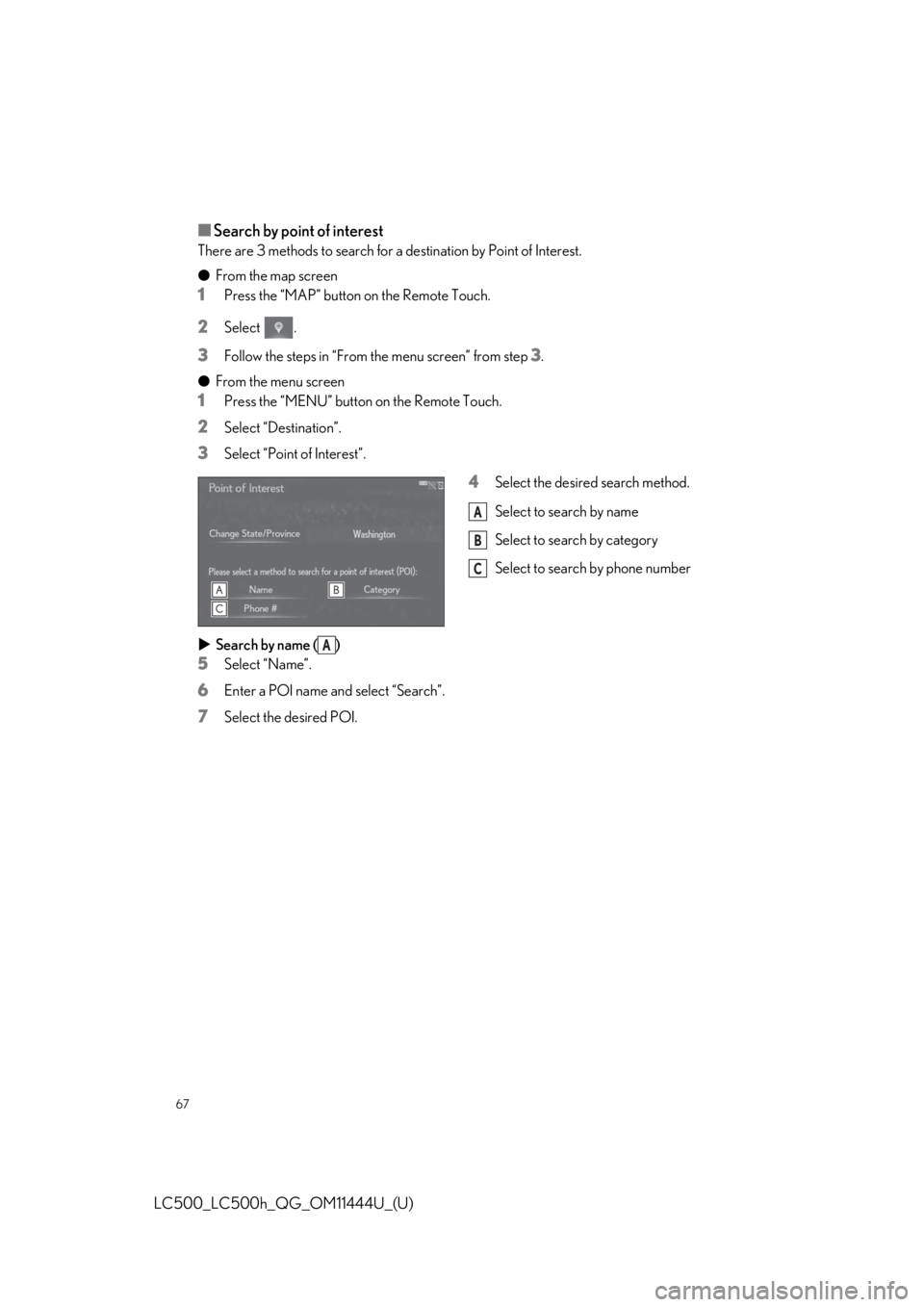
■Search by point of interest
There are 3 methods to search for a destination by Point of Interest.
●From the map screen
1Press the “MAP” button on the Remote Touch.
2Select .
3Follow the steps in “From the menu screen” from step 3.
● From the menu screen
1Press the “MENU” button on the Remote Touch.
2Select “Destination”.
3Select “Point of Interest”.
4Select the desired search method.
Select to search by name
Select to search by category
Select to search by phone number
Search by name ( )
5Select “Name”.
6Enter a POI name and select “Search”.
7Select the desired POI.
A
B
C
A
Page 68 of 110
68
LC500_LC500h_QG_OM11444U_(U)
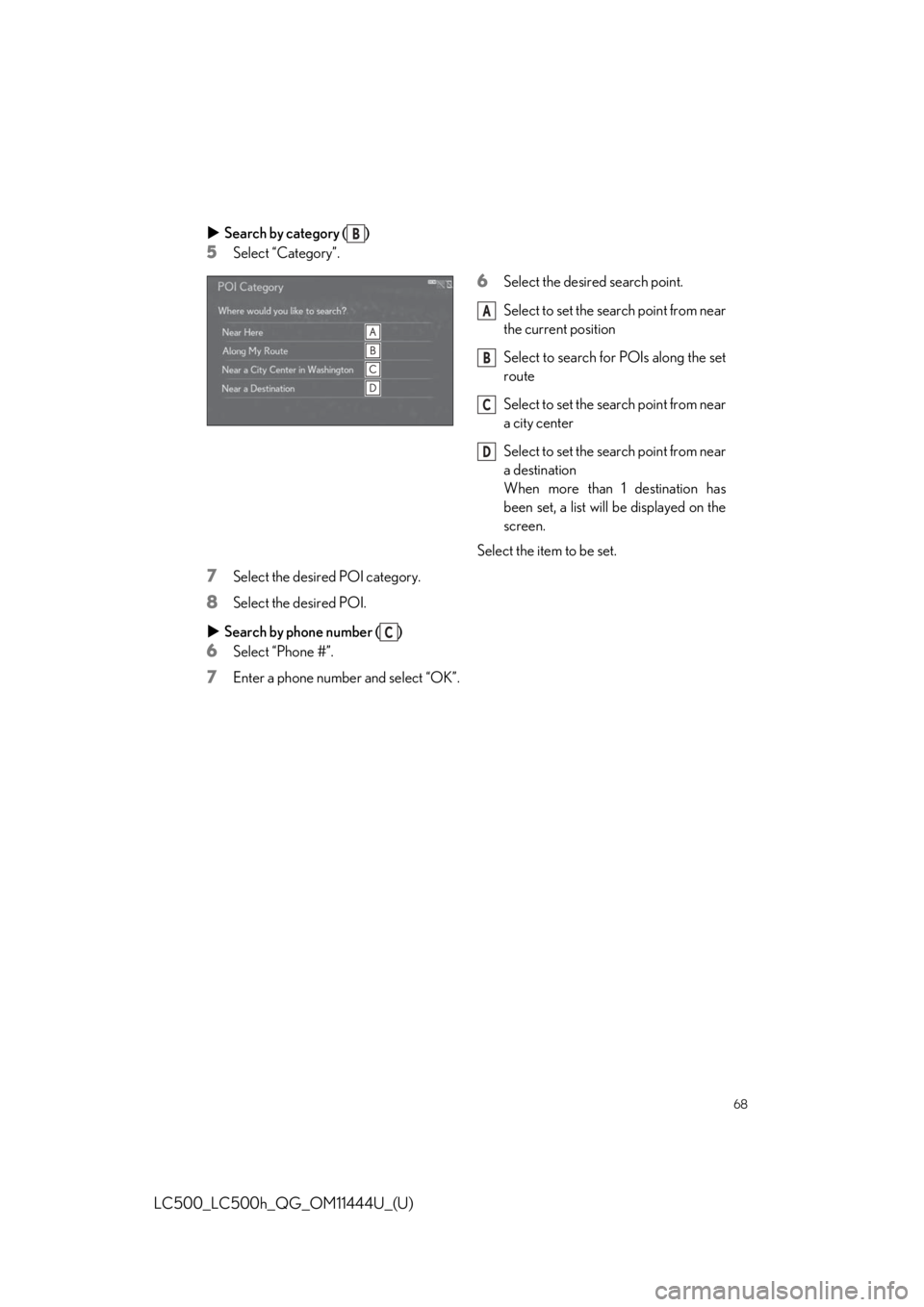
Search by category ( )
5Select “Category”.
6Select the desired search point.
Select to set the search point from near
the current position
Select to search for POIs along the set
route
Select to set the search point from near
a city center
Select to set the search point from near
a destination
When more than 1 destination has
been set, a list will be displayed on the
screen.
Select the item to be set.
7Select the desired POI category.
8Select the desired POI.
Search by phone number ( )
6Select “Phone #”.
7Enter a phone number and select “OK”.
B
A
B
C
D
C
Page 69 of 110
69
LC500_LC500h_QG_OM11444U_(U)
To use the hands-free system, it is necessary to register a Bluetooth® phone with the system.
Please refer to the cellular phone manufacturer’s user guide for pairing procedures, or go to
http://www.lexus.com/MobileLink
to find approved Bluetooth® phones for this system.
1Turn the Bluetooth® connection setting of your cellular phone on.
2Press the “MENU” button on the Remote Touch.
Please refer to P.58 for the Remote Touch operation.
3Select “Setup”.
4Select “Bluetooth*” on the sub menu.
Operations up to this point can also be performed by pressing the switch on the
steering wheel.
5Depending on situation, the di fferent screen is displayed.
● If there is a registered devi ce, select “Add New Device”.
● If there is no registered device, select “Yes”.
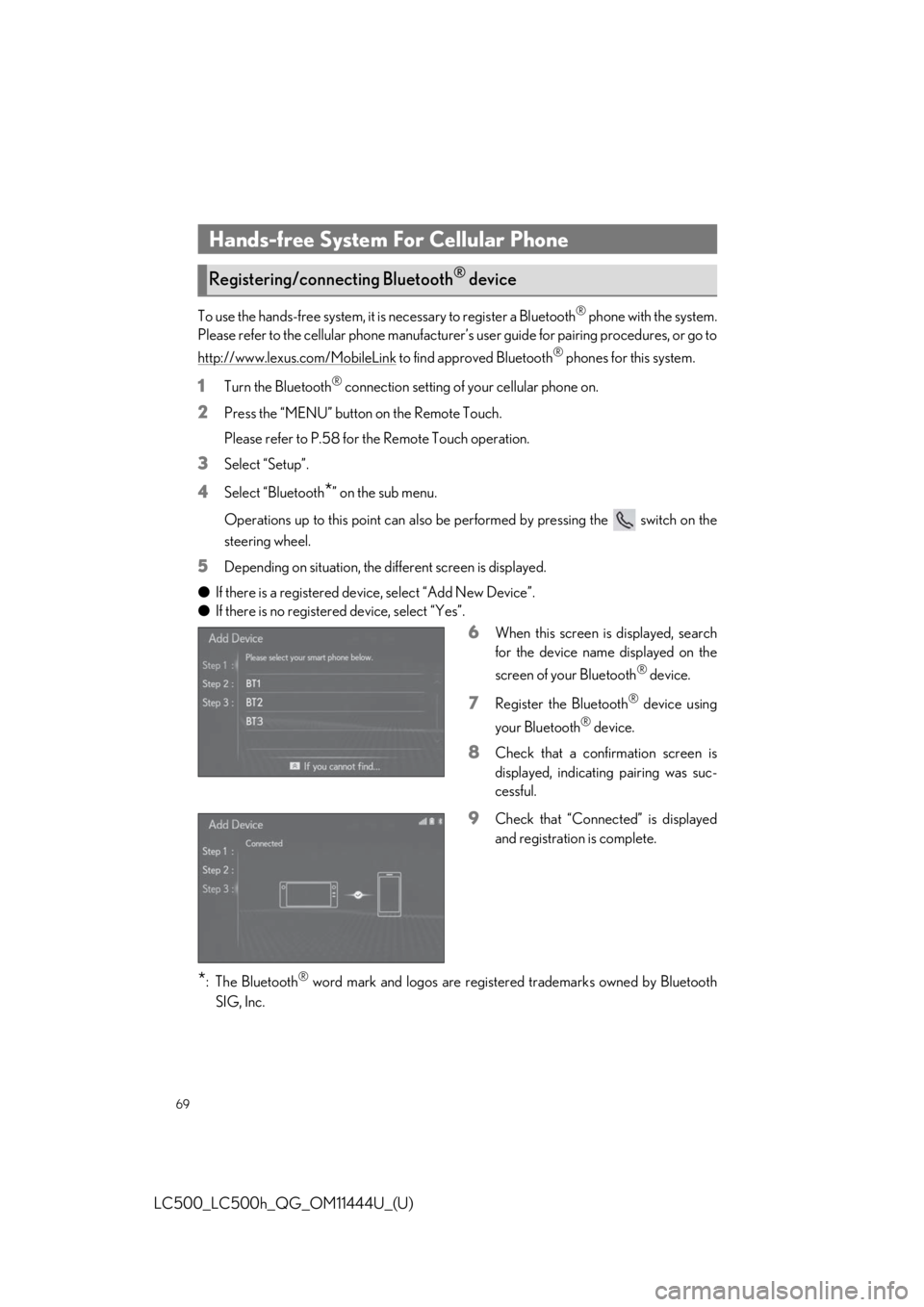
6When this screen is displayed, search
for the device name displayed on the
screen of your Bluetooth
® device.
7Register the Bluetooth® device using
your Bluetooth
® device.
8Check that a confirmation screen is
displayed, indicating pairing was suc-
cessful.
9Check that “Connect ed” is displayed
and registration is complete.
*: The Bluetooth® word mark and logos are register ed trademarks owned by Bluetooth
SIG, Inc.
Hands-free System For Cellular Phone
Registering/connecting Bluetooth® device
Page 70 of 110
70
LC500_LC500h_QG_OM11444U_(U)
1Press the “MENU” button on the Remote Touch.
Please refer to P.58 for the Remote Touch operation.
2Select “Setup”.
3Select “Phone” on the sub menu.
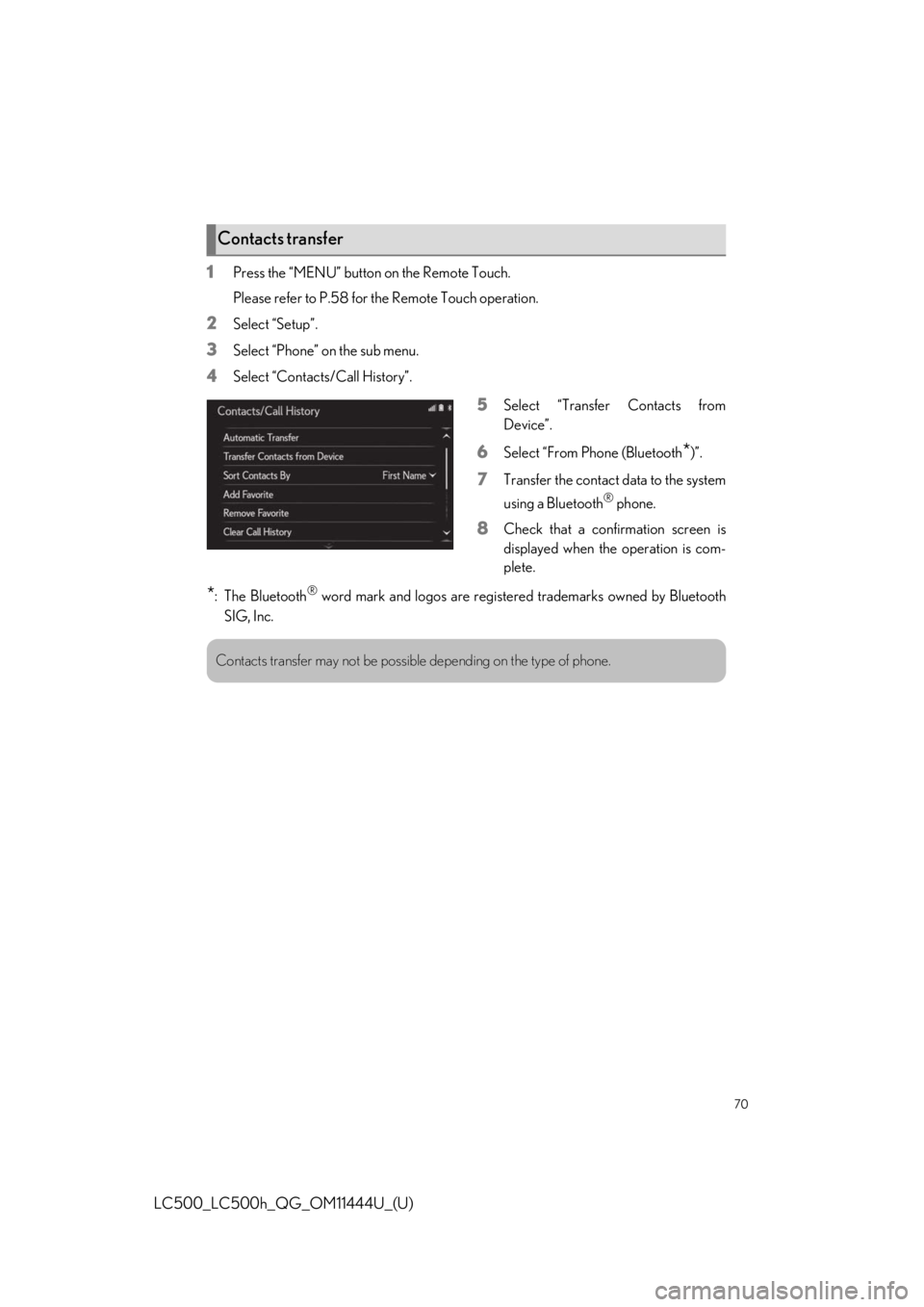
4Select “Contacts/Call History”.
5Select “Transfer Contacts from
Device”.
6Select “From Phone (Bluetooth*)”.
7Transfer the contact data to the system
using a Bluetooth
® phone.
8Check that a confirmation screen is
displayed when the operation is com-
plete.
*: The Bluetooth® word mark and logos are registered trademarks owned by Bluetooth
SIG, Inc.
Contacts transfer
Contacts transfer may not be possible depending on the type of phone.
Page 71 of 110
71
LC500_LC500h_QG_OM11444U_(U)
1Press the “MENU” button on the Remote Touch.
Please refer to P.58 for the Remote Touch operation.
2Select “Setup”.
3Select “Phone” on the sub menu.
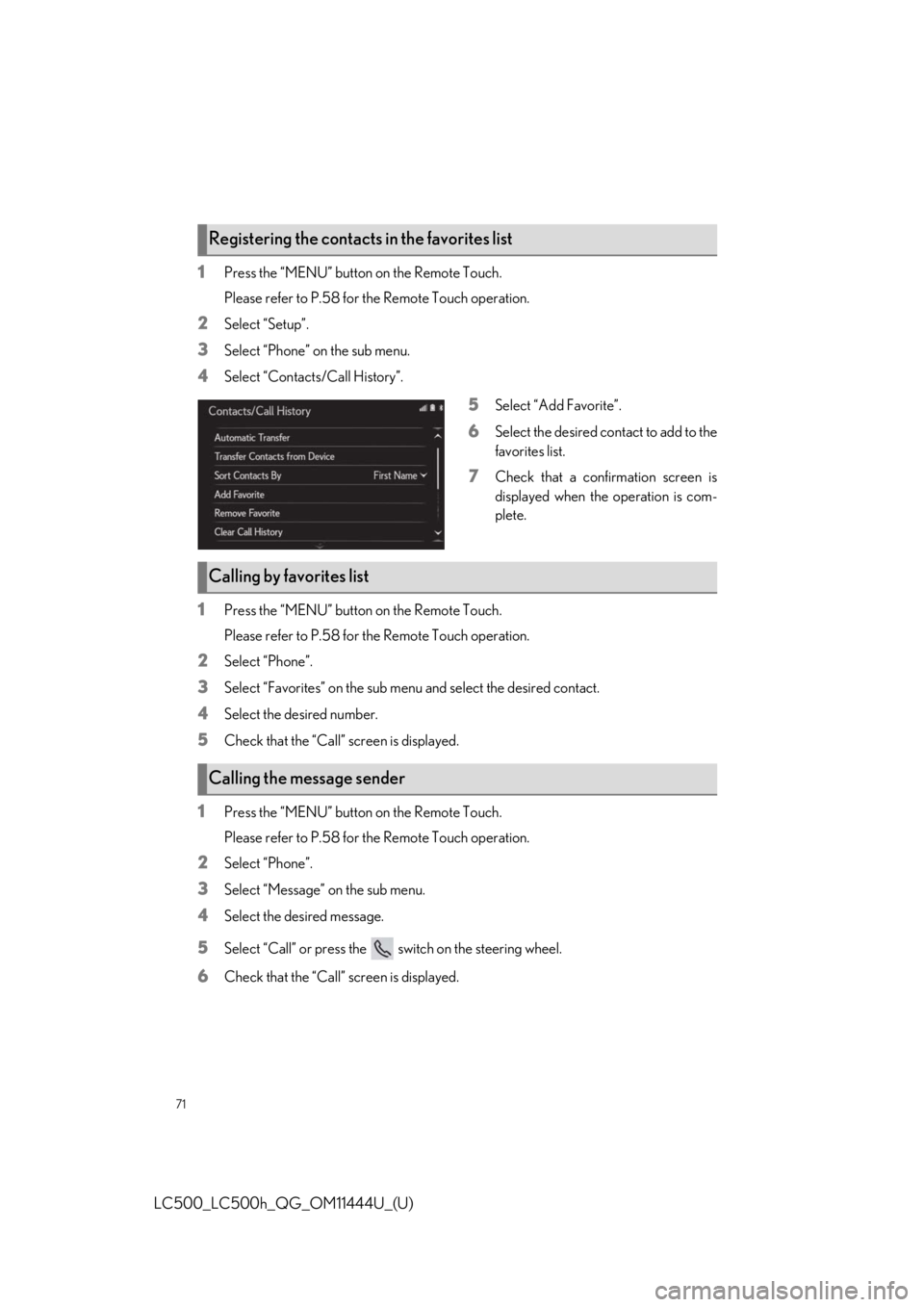
4Select “Contacts/Call History”.
5Select “Add Favorite”.
6Select the desired contact to add to the
favorites list.
7Check that a confirmation screen is
displayed when the operation is com-
plete.
1Press the “MENU” button on the Remote Touch.
Please refer to P.58 for the Remote Touch operation.
2Select “Phone”.
3Select “Favorites” on the sub menu and select the desired contact.
4Select the desired number.
5Check that the “Call” screen is displayed.
1Press the “MENU” button on the Remote Touch.
Please refer to P.58 for the Remote Touch operation.
2Select “Phone”.
3Select “Message” on the sub menu.
4Select the desired message.
5Select “Call” or press the switch on the steering wheel.
6Check that the “Call” screen is displayed.
Registering the contacts in the favorites list
Calling by favorites list
Calling the message sender
Page 72 of 110
72
LC500_LC500h_QG_OM11444U_(U)
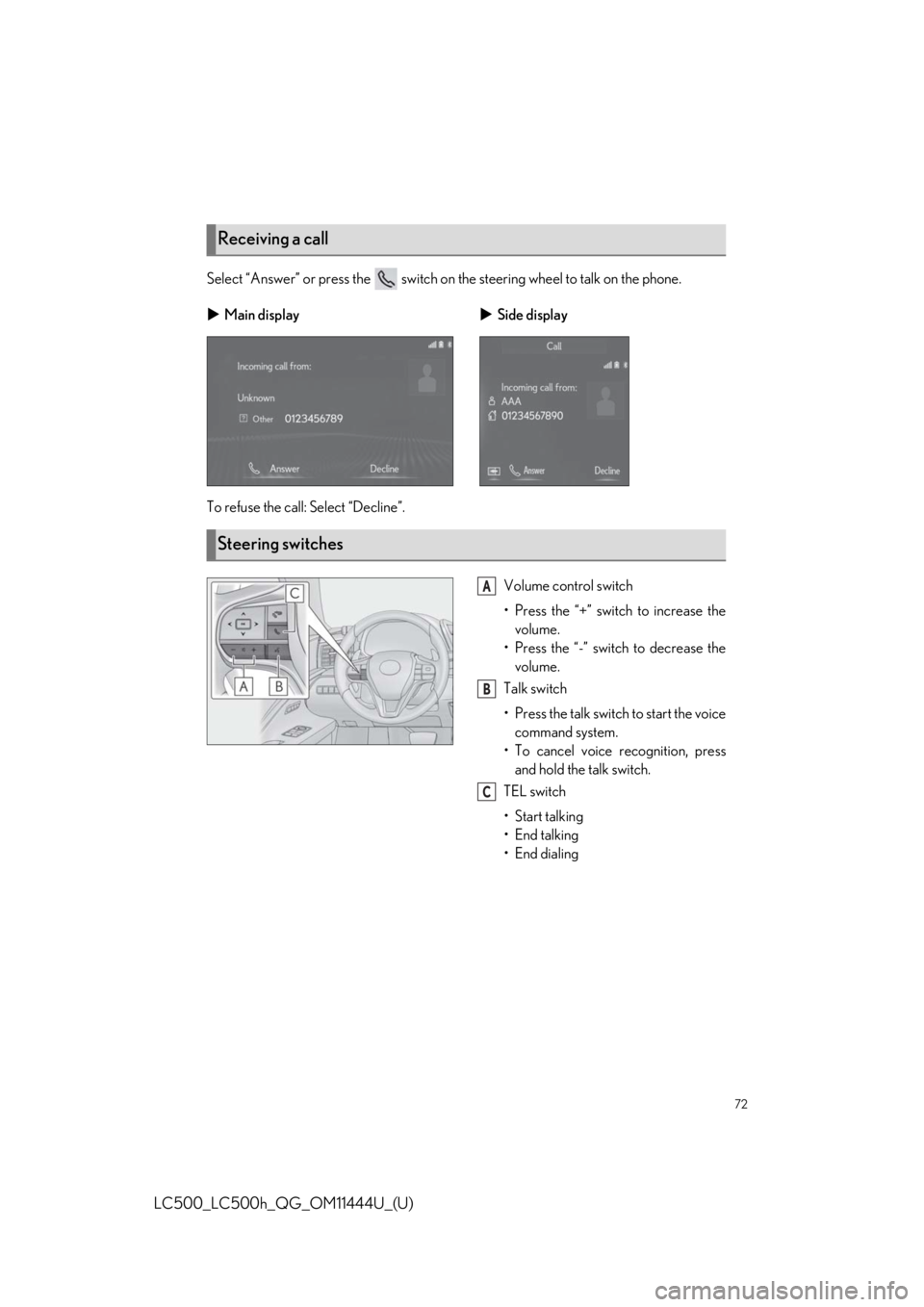
Select “Answer” or press the switch on the steering wheel to talk on the phone.
To refuse the call: Select “Decline”.Volume control switch
• Press the “+” switch to increase thevolume.
• Press the “-” switch to decrease the volume.
Talk switch
• Press the talk switch to start the voice command system.
• To cancel voice recognition, press and hold the talk switch.
TEL switch
• Start talking
• End talking
• End dialing
Receiving a call
Main display Side display
Steering switches
A
B
C
Page 84 of 110
84
LC500_LC500h_QG_OM11444U_(U)
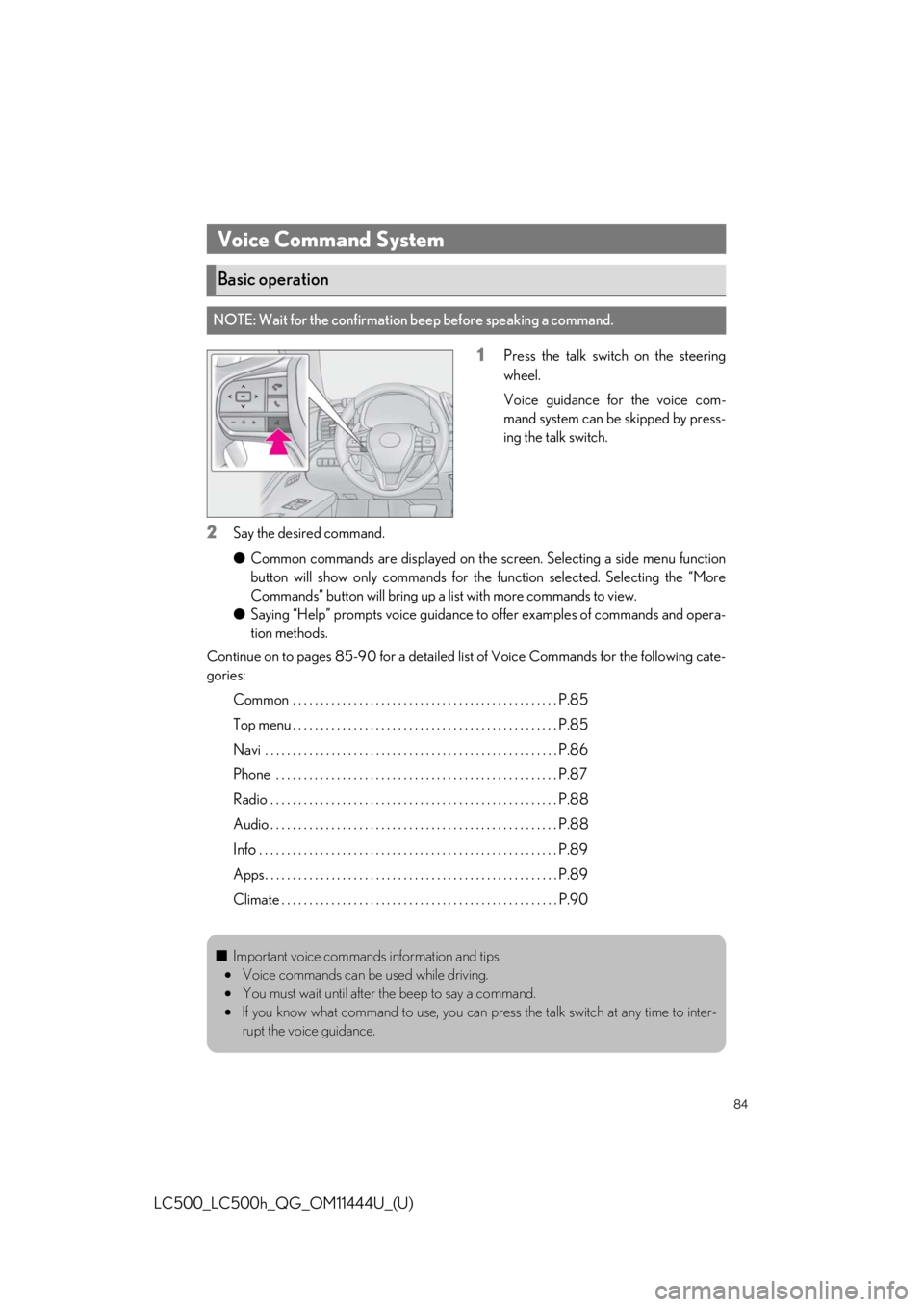
1Press the talk switch on the steering
wheel.
Voice guidance for the voice com-
mand system can be skipped by press-
ing the talk switch.
2Say the desired command.
●Common commands are displayed on the sc reen. Selecting a side menu function
button will show only commands for the function selected. Selecting the “More
Commands” button will bring up a list with more commands to view.
● Saying “Help” prompts voice guidance to offer examples of commands and opera-
tion methods.
Continue on to pages 85-90 for a detailed list of Voice Commands for the following cate-
gories:
Common . . . . . . . . . . . . . . . . . . . . . . . . . . . . . . . . . . . . . . . . . . . . . . . . P.85
Top menu . . . . . . . . . . . . . . . . . . . . . . . . . . . . . . . . . . . . . . . . . . . . . . . . P.85
Navi . . . . . . . . . . . . . . . . . . . . . . . . . . . . . . . . . . . . . . . . . . . . . . . . . . . . . P.86
Phone . . . . . . . . . . . . . . . . . . . . . . . . . . . . . . . . . . . . . . . . . . . . . . . . . . . P.87
Radio . . . . . . . . . . . . . . . . . . . . . . . . . . . . . . . . . . . . . . . . . . . . . . . . . . . . P.88
Audio . . . . . . . . . . . . . . . . . . . . . . . . . . . . . . . . . . . . . . . . . . . . . . . . . . . . P.88
Info . . . . . . . . . . . . . . . . . . . . . . . . . . . . . . . . . . . . . . . . . . . . . . . . . . . . . . P.89
Apps . . . . . . . . . . . . . . . . . . . . . . . . . . . . . . . . . . . . . . . . . . . . . . . . . . . . . P.89
Climate . . . . . . . . . . . . . . . . . . . . . . . . . . . . . . . . . . . . . . . . . . . . . . . . . . P.90
Voice Command System
Basic operation
NOTE: Wait for the confirmation beep before speaking a command.
■Important voice commands information and tips
• Voice commands can be used while driving.
• You must wait until after the beep to say a command.
• If you know what command to use, you can press the talk switch at any time to inter-
rupt the voice guidance.
Page 87 of 110
87
LC500_LC500h_QG_OM11444U_(U)
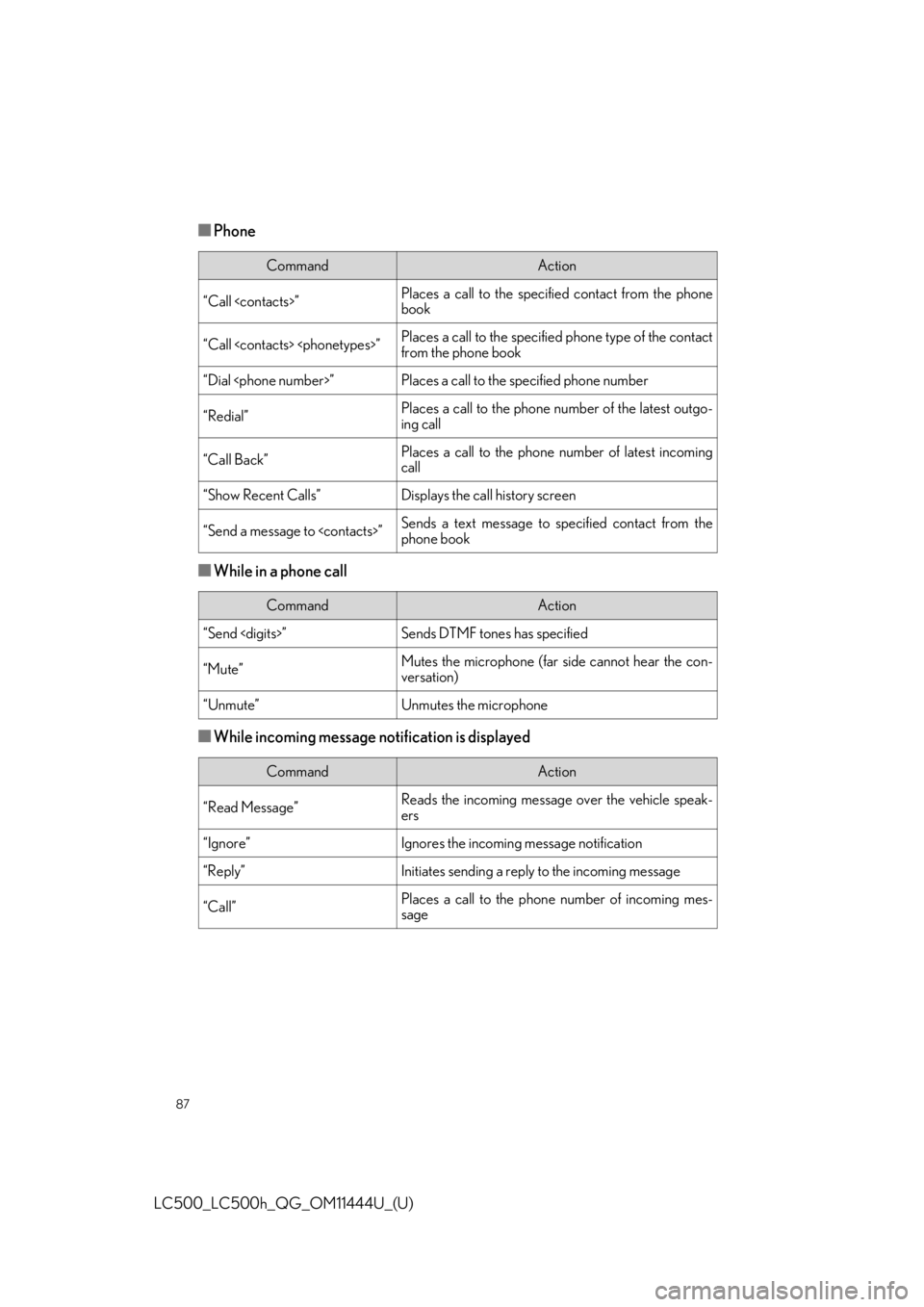
■Phone
■While in a phone call
■While incoming message notification is displayed
CommandAction
“Call
book
“Call
from the phone book
“Dial
“Redial”Places a call to the phone number of the latest outgo-
ing call
“Call Back”Places a call to the phone number of latest incoming
call
“Show Recent Calls”Displays the call history screen
“Send a message to
phone book
CommandAction
“Send
“Mute”Mutes the microphone (far side cannot hear the con-
versation)
“Unmute”Unmutes the microphone
CommandAction
“Read Message”Reads the incoming message over the vehicle speak-
ers
“Ignore”Ignores the incoming message notification
“Reply”Initiates sending a reply to the incoming message
“Call”Places a call to the phone number of incoming mes-
sage