lock lexus LFA 2012 Technical Information / LEXUS 2012 LFA (OM77006U) Owner's Guide
[x] Cancel search | Manufacturer: LEXUS, Model Year: 2012, Model line: LFA, Model: Lexus LFA 2012Pages: 420, PDF Size: 5.02 MB
Page 83 of 420
81
1-7. Safety information
1
Before driving
Installing child restraints using a seat belt (child restraint lock function belt)
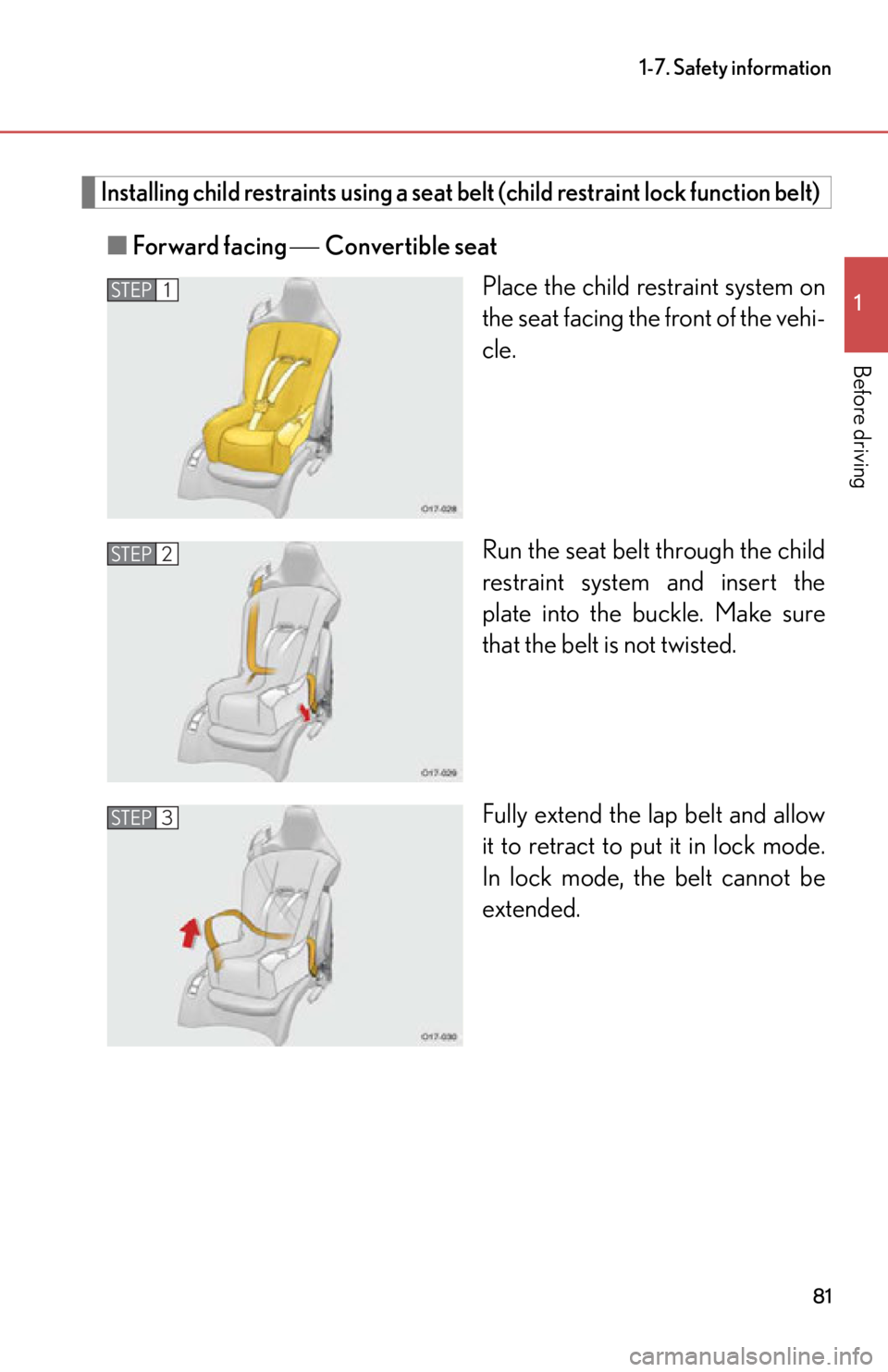
■Forward facing Convertible seat
Place the child restraint system on
the seat facing the front of the vehi-
cle.
Run the seat belt through the child
restraint system and insert the
plate into the buckle. Make sure
that the belt is not twisted.
Fully extend the lap belt and allow
it to retract to put it in lock mode.
In lock mode, th e belt cannot be
extended.
STEP1
STEP2
STEP3
Page 87 of 420

85
1-7. Safety information
1
Before driving
CAUTION
■When installing a child restraint system
●Ensure that the belt and plate are securely locked and the seat belt is not twisted.
●Push and pull the child restraint system from side to side and forward to be sure it
is secure.
●After securing a child restraint system, never adjust the seat.
●Follow all installation instructions provid ed by the child restraint system manufac-
turer.
Page 90 of 420

88
2-1.Driving procedures
Driving the vehicle
The following procedures should be observed to ensure safe driving:
■Starting the engine
P. 9 8
■ Driving
With the brake pedal depressed, select 1st gear. ( P. 1 0 2 )
Check that “D1” or “1” is displayed on the gear indicator.
Release the parking brake. ( P. 113)
Gradually release the brake pedal and gently depress the accel-
erator pedal to accelerate the vehicle.
■ Stopping
Depress the brake pedal.
If necessary, set the parking brake.
If the vehicle is to be stopped for an extended period of time, select
Neutral. ( P. 1 0 3 )
■Parking the vehicle
Depress the brake pedal.
Set the parking brake. ( P. 113)
Select 1st gear or Reverse. ( P. 1 0 2 )
Check that “D1”, “1” or “R” is displayed on the gear indicator.
Turn the ignition switch to the “LOCK” position to stop the
engine.
Check that “D1” or “R” is no long er displayed on the gear indicator.
Lock the door, making sure that you have the key on your person.
STEP1
STEP2
STEP3
STEP1
STEP2
STEP1
STEP2
STEP3
STEP4
STEP5
Page 96 of 420

94
2-1. Driving procedures
CAUTION
●Do not leave a door or window open if the curved glass is coated with a metal-
lized film such as a silver-colored one. Reflected sunlight may cause the glass to
act as a lens, causing a fire.
●Always apply the parking brake, select 1st gear or Reverse, stop the engine and
lock the vehicle.
Do not leave the vehicle unattend ed while the engine is running.
●Do not stop the engine without first chec king the gear indicator to confirm that
either 1st gear or Reverse is selected.
●Do not leave the engine running in an area with snow build-up, or where it is
snowing. If snowbanks build up around the vehicle while the engine is running,
exhaust gases may collect and enter the vehi cle. This may lead to death or a seri-
ous health hazard.
●Do not touch the hood grilles, bezels in the
radiator grilles, or exhaust pipes and sur-
rounding area while the engine is running
or immediately after tu rning the engine off.
Doing so may cause burns.
Page 101 of 420
99
2-1. Driving procedures
2
When driving
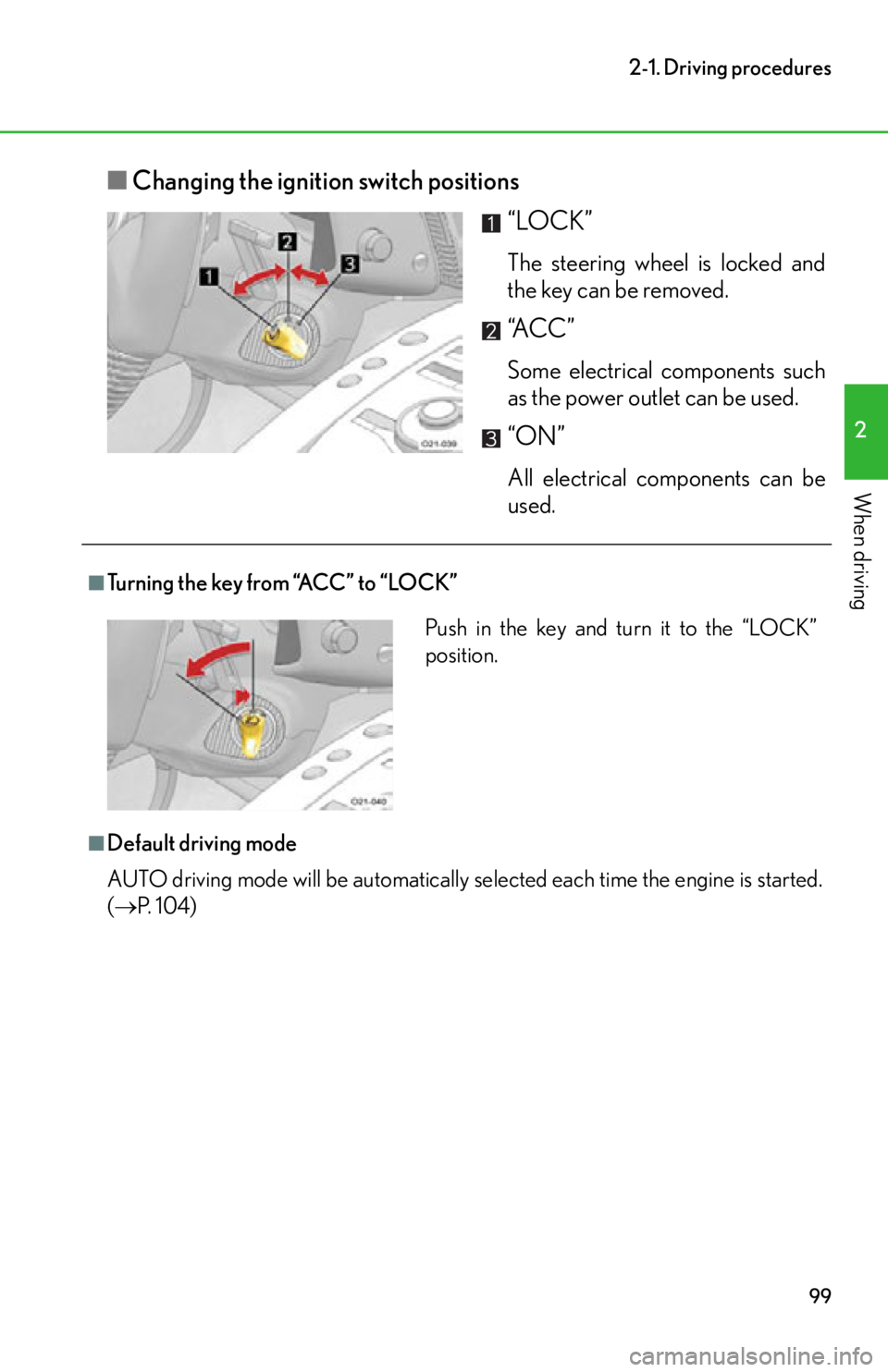
■Changing the ignition switch positions
“LOCK”
The steering wheel is locked and
the key can be removed.
“A C C ”
Some electrical components such
as the power outlet can be used.
“ON”
All electrical components can be
used.
■Turning the key from “ACC” to “LOCK”
■Default driving mode
AUTO driving mode will be automatically se lected each time the engine is started.
( P. 1 0 4 )
Push in the key and turn it to the “LOCK”
position.
Page 102 of 420
100
2-1. Driving procedures
■If the engine does not start
●Repeat the procedure again. If the engine does not start after a few tries, the
“ENGINE START” switch may be malfunctioning. Have the vehicle inspected
by your Lexus dealer.
●Check to make sure that the brake pedal is firmly depressed and that “N” is dis-
played in the gear indicator. (If the brake pedal is not depressed or “N” is not
displayed, the engine will not start.)
●The engine immobilizer system may not have been deactivated. ( P. 5 3 )
●In order to protect the engine, the engine may not start when the engine coolant
temperature or the engine oil temperature is below -13 F (-25C). In that case,
a buzzer will sound and “Temp low Engine cannot be started” will be shown on
the meter. ( P. 3 2 7 )
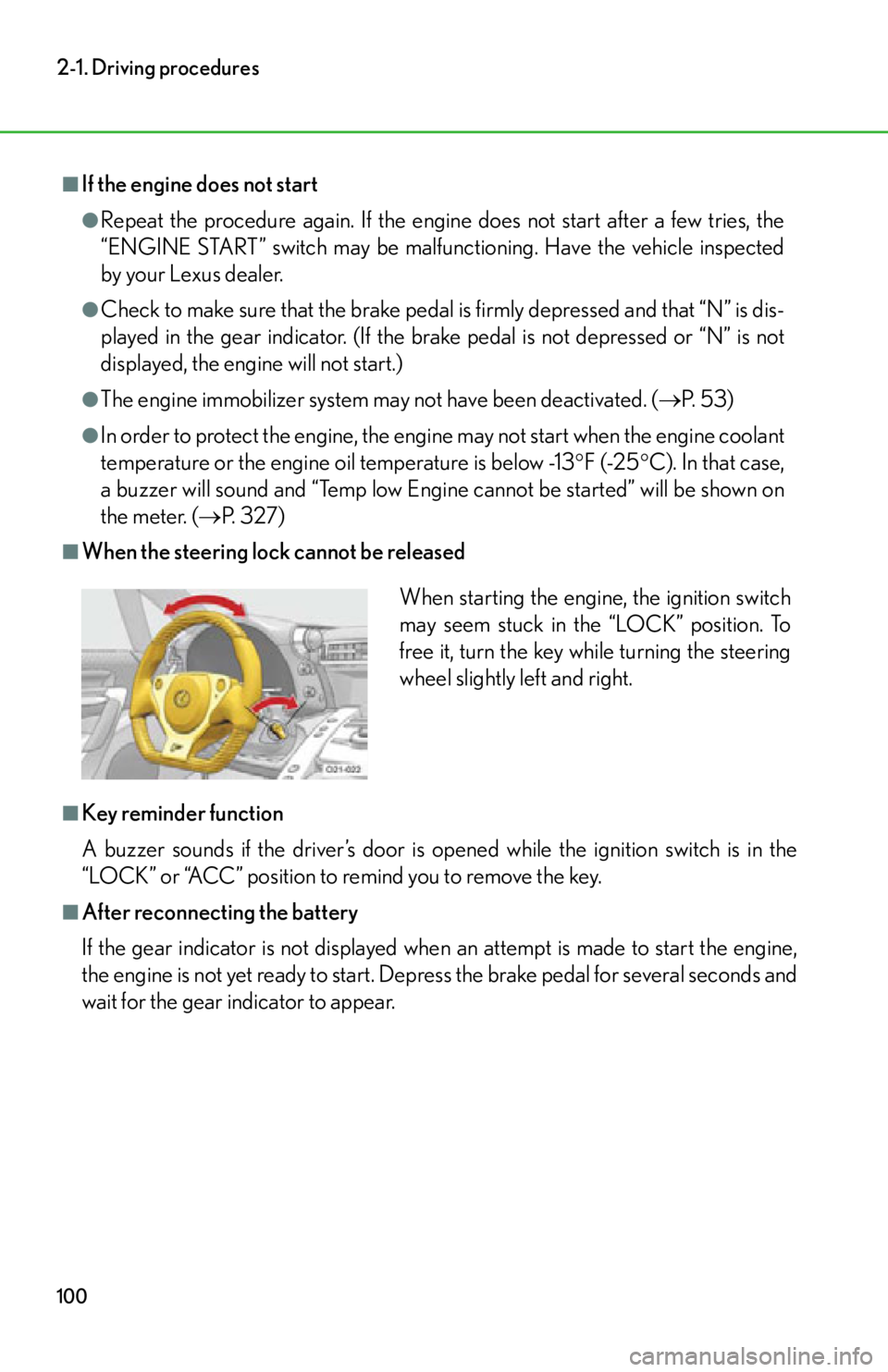
■When the steering lock cannot be released
■Key reminder function
A buzzer sounds if the driver’s door is opened while the ignition switch is in the
“LOCK” or “ACC” position to remind you to remove the key.
■After reconnecting the battery
If the gear indicator is not displayed when an attempt is made to start the engine,
the engine is not yet ready to start. Depr ess the brake pedal for several seconds and
wait for the gear indicator to appear.
When starting the engine, the ignition switch
may seem stuck in the “LOCK” position. To
free it, turn the key while turning the steering
wheel slightly left and right.
Page 103 of 420

101
2-1. Driving procedures
2
When driving
CAUTION
■When starting the engine
Always start the engine while sitting in the driver’s seat. Do not press the accelera-
tor pedal while starting the engine under any circumstances.
Doing so may cause an accident, resulting in death or serious injury.
■Caution when driving
Do not turn the ignition switch to the “LOCK” position while driving. An accident
may result if the engine is stopped while driving.
If you must turn the engine off while the vehicle is moving (due to an emergency),
turn the ignition switch on ly to the “ACC” position. (P. 355)
NOTICE
■To prevent battery discharge
Do not leave the ignition switch in the “A CC” or “ON” position for long periods of
time without the engine running.
■When starting the engine
●Do not race a cold engine.
●If the engine becomes difficult to start or stalls frequently, have the engine
checked immediately.
Page 115 of 420

113
2-1. Driving procedures
2
When driving
Parking brake
For the parking brake, an electrical parking brake system is adopted.
Press the switch to set the park-
ing brake.
If the parking brake switch is oper-
ated when the ignition switch is not
in the “ON” position, the parking
brake indicator light will come on
and stay on for a while.
Press and hold the parking brake
switch if an emergency occurs and
it is necessary to operate the park-
ing brake while driving. The park-
ing brake is applied only while the
switch is being pressed.
Pull the switch to release the
parking brake.
Operate the parking brake switch
while depressing the brake pedal.
Make sure that the parking brake
indicator light goes off.
U.S.A.
Canada
■Parking brake operation
●When the ignition switch is not in th e “ON” position, the parking brake cannot
be released using the parking brake switch.
●If the parking brake is operated repeated ly over a short period of time, the sys-
tem may restrict operation to prevent over heating. In this case, “Parking brake
overheat” is shown on the meter. ( P. 3 2 7 )
■Parking brake operation sound
The motor sounds when the parking brake operates. This does not indicate a mal-
function.
■Parking brake indicator light
When the ignition switch is turned to the “ACC” or “LOCK” position with the park-
ing brake set, the parking brake indicator light will stay on for a while. This does not
indicate a malfunction.
Page 117 of 420

115
2-1. Driving procedures
2
When driving
Horn
To sound the horn, press the pad in
the middle of the steering wheel.
■After adjusting the steering wheel
Make sure that the steering wheel is securely locked.
The horn may not sound if the steering wheel is not securely locked. (P. 4 1 )
Page 119 of 420

117
2-2. Instrument cluster
2
When driving
Speedometer
Tachometer
Gear indicator (P. 1 0 4 )
Driving mode indicator ( P. 1 0 4 )
Trip information display
Displays trip meter, fuel economy and other driving information ( P. 118)
Odometer
Engine oil temperature gauge
Displays the engine oil temperature. If the engine oil temperature becomes
284 F (140 C) or higher, a buzzer will sound and this display will flash.
( P. 313)
Clock ( P. 1 4 8 )
Engine oil pressure gauge
Displays the pressure of the engine oil in the engine. If the oil pressure drops,
a buzzer will sound and a warning message will be displayed. ( P. 3 2 4 )
Fuel gauge
Displays remaining fuel quantity an d reminds the driver to refuel. (P. 3 1 5 )
Outside temperature display
Engine coolant temperature gauge
Displays engine coolant temperature. If the engine coolant temperature
exceeds 244 F (118 C), a buzzer will sound and this display will flash.
( P. 313)
Menu
Allows driver to set various functions and check vehicle status. ( P. 1 2 4 )
Displays warning messages in case of a malfunction. ( P. 3 2 2 )