lock lexus LFA 2012 Technical Information / LEXUS 2012 LFA (OM77006U) Service Manual
[x] Cancel search | Manufacturer: LEXUS, Model Year: 2012, Model line: LFA, Model: Lexus LFA 2012Pages: 420, PDF Size: 5.02 MB
Page 127 of 420
125
2-2. Instrument cluster
2
When driving
■Control pad
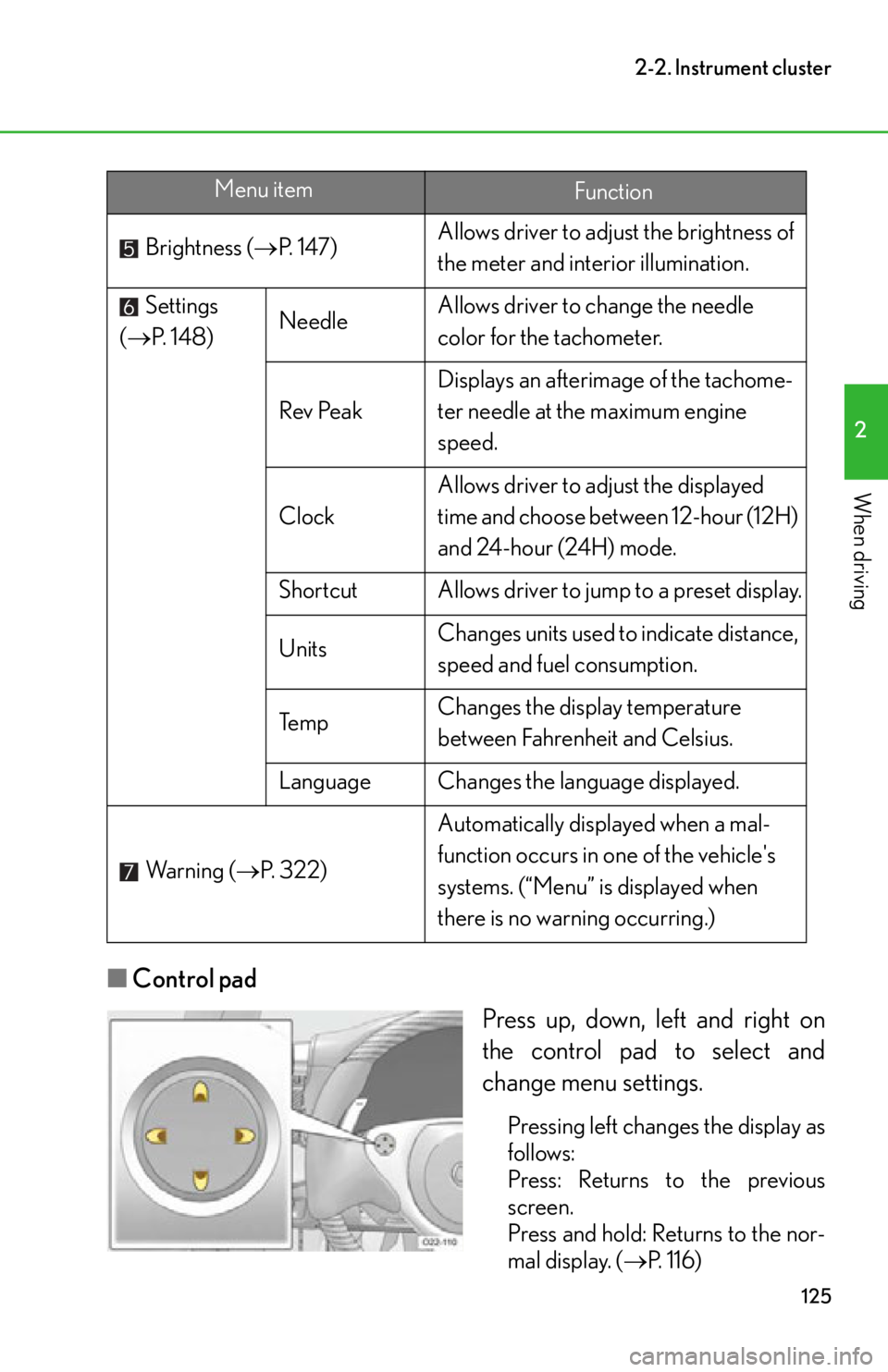
Press up, down, left and right on
the control pad to select and
change menu settings.
Pressing left changes the display as
follows:
Press: Returns to the previous
screen.
Press and hold: Returns to the nor-
mal display. (P. 116)
Brightness (
P. 1 4 7 ) Allows driver to adju
st the brightness of
the meter and interior illumination.
Settings
( P. 1 4 8 ) Needle
Allows driver to change the needle
color for the tachometer.
Rev Peak Displays an afterimage of the tachome-
ter needle at th
e maximum engine
speed.
Clock Allows driver to adjust the displayed
time and choose between 12-hour (12H)
and 24-hour (24H) mode.
Shortcut Allows driver to jump to a preset display.
Units Changes units used to indicate distance,
speed and fuel consumption.
Te m p Changes the display temperature
between Fahrenheit and Celsius.
Language Changes the language displayed.
Wa r n i n g ( P. 322) Automatically displayed when a mal-
function occurs in one of the vehicle's
systems. (“Menu” is displayed when
there is no warning occurring.)
Menu itemFunction
Page 150 of 420
148
2-2. Instrument cluster
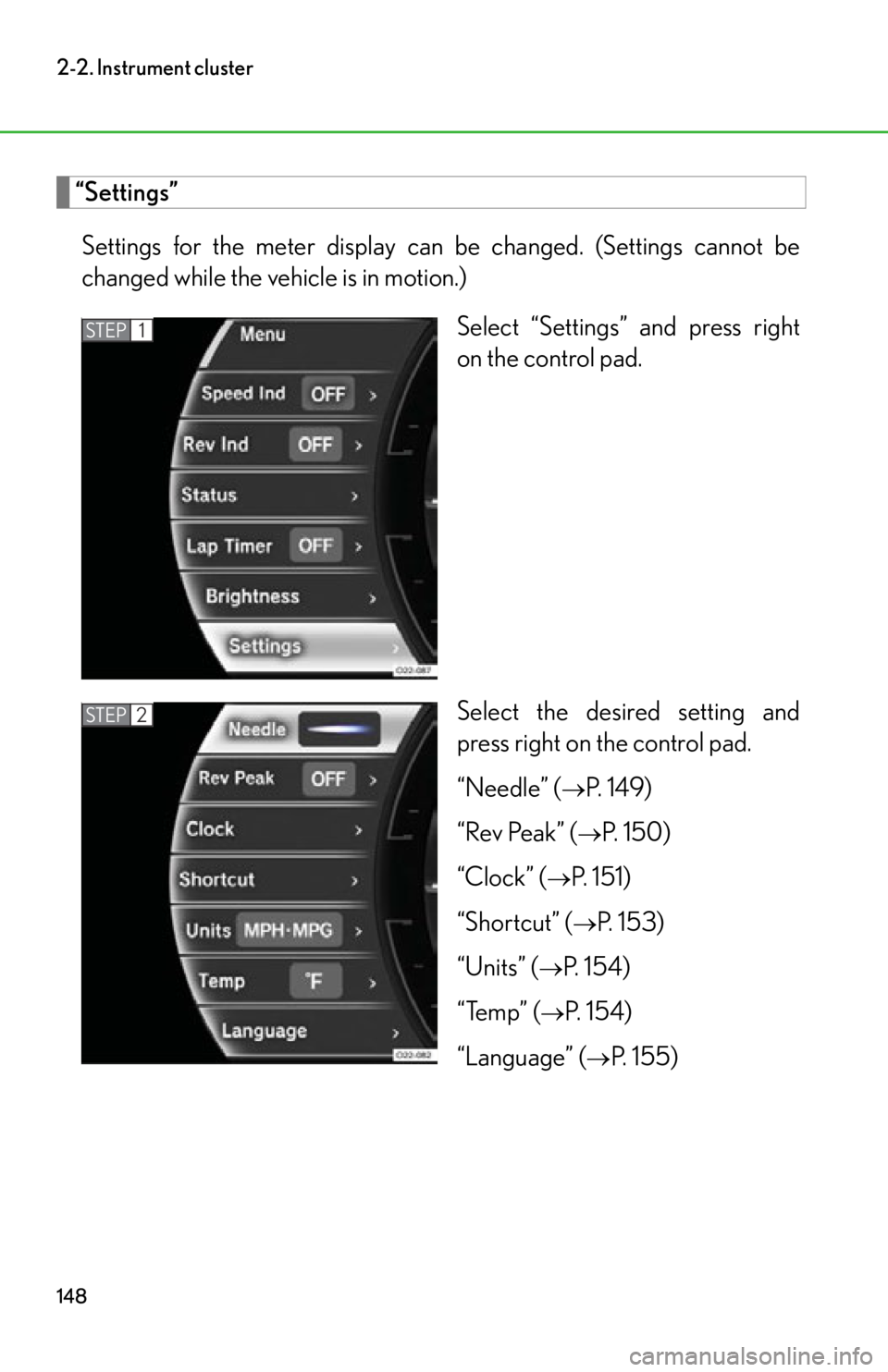
“Settings”Settings for the meter display can be changed. (Settings cannot be
changed while the vehicle is in motion.) Select “Settings” and press right
on the control pad.
Select the desired setting and
press right on the control pad.
“Needle” (
P. 1 4 9 )
“Rev Peak” (
P. 150)
“Clock” (
P. 151)
“Shortcut” (
P. 153)
“Units” (
P. 1 5 4 )
“Temp” (
P. 1 5 4 )
“Language” (
P. 155)
STEP1
STEP2
Page 153 of 420
151
2-2. Instrument cluster
2
When driving
■“Clock”
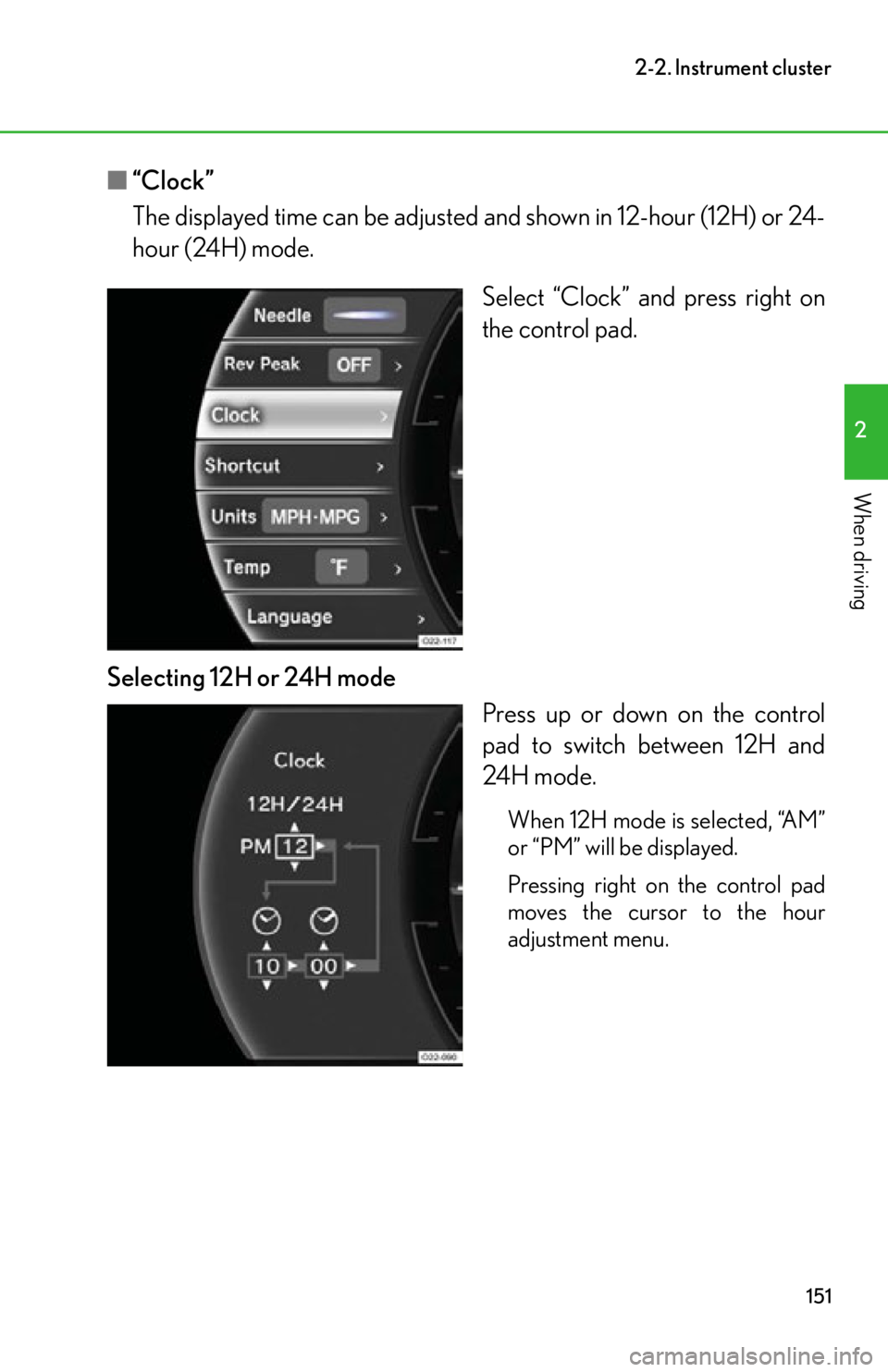
The displayed time can be adjusted and shown in 12-hour (12H) or 24-
hour (24H) mode.
Select “Clock” and press right on
the control pad.
Selecting 12H or 24H mode Press up or down on the control
pad to switch between 12H and
24H mode.
When 12H mode is selected, “AM”
or “PM” will be displayed.
Pressing right on the control pad
moves the cursor to the hour
adjustment menu.
Page 154 of 420
152
2-2. Instrument cluster
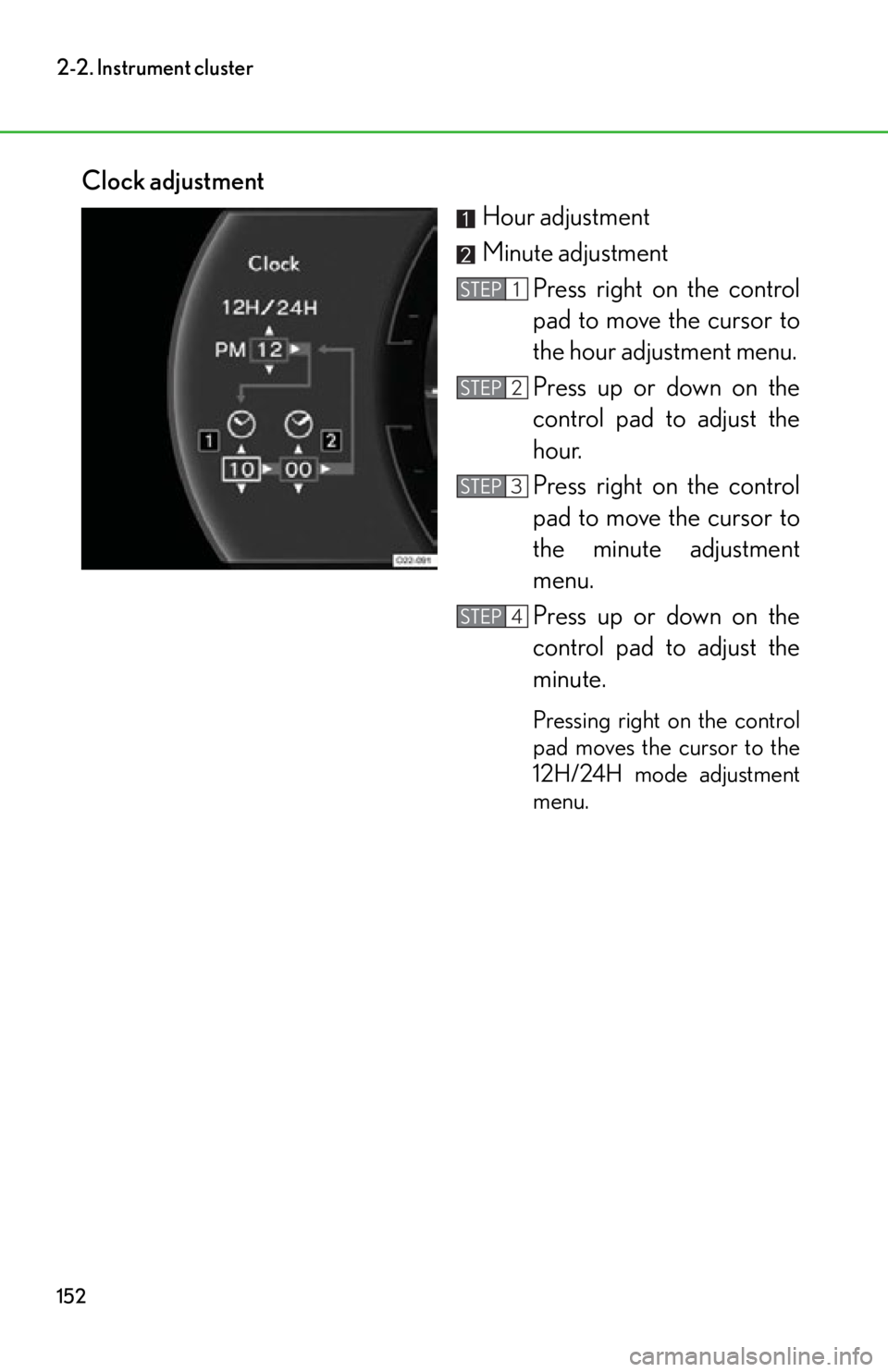
Clock adjustmentHour adjustment
Minute adjustmentPress right on the control
pad to move the cursor to
the hour adjustment menu.
Press up or down on the
control pad to adjust the
hour.
Press right on the control
pad to move the cursor to
the minute adjustment
menu.
Press up or down on the
control pad to adjust the
minute.
Pressing right on the control
pad moves the cursor to the
12H/24H mode adjustment
menu.
STEP1
STEP2
STEP3
STEP4
Page 159 of 420

157
2-2. Instrument cluster
2
When driving
■Using the “Lap Timer”
●When the “Lap Timer” function is turned “OFF” or the engine is stopped while a
lap is being timed, the lap timer will stop and the lap time up to that point will be
recorded.
●If the lap time being recorded ends with the same time as the fastest lap, the
newer time will be saved as the fastest lap time.
●If the lap time exceeds “9:59:59.99”, the display will return to “0:00:00.00” but
the total time will be recorded.
●If a warning message is displayed when a lap time is being measured, the lap
time will still continue to be recorded.
Operating the control pad while the warning message is shown returns the dis-
play to the stopwatch but the warning message will continue to appear until the
warning is resolved.
●In the normal display, the current measurement time and the latest lap time will
be displayed.
■Changing the temperature measurement unit
When the “Temp” measurement unit is ch anged, the air conditioning system tem-
perature setting, air outlet s and fan speed characteristic s may be changed. This is
normal and does not indicate a malfunction.
■If the battery is disconnected or discharges
“Lap Timer” data and “Clock” settings will be reset.
Page 161 of 420
159
2-3. Operating the lights and windshield wipers
2
When driving
■Daytime running light system (Canada only)
To make your vehicle more visible to other drivers, the headlights and tail lights turn
on automatically whenever the engine is started and the parking brake is released.
■Automatic light off system
●When the headlights come on: The headlights and tail lights turn off 30 seconds
after a door is opened and closed if the ignition switch is turned to the “ACC” or
“LOCK” position. (The light turns off immediately if on the key is pressed
after both side doors are locked.)
●When only the tail lights come on: The tail lights turn off automatically if the igni-
tion switch is turned to the “ACC” or “LOCK” position and the driver’s door is
opened.
To turn the lights on again, turn the ignition switch to the “ON” position, or turn the
light switch to once and then back to or
.
NOTICE
■To prevent battery discharge
Do not leave the lights on longer than necessary when the engine is not running.
Page 163 of 420
161
2-3. Operating the lights and windshield wipers
2
When driving
■The windshield wipers and wa sher can be operated when
The ignition switch is in the “ON” position.
■Effects of vehicle speed on wiper operation
The time until the drip prevention wiper sweep occurs is changed depending on
vehicle speed.
When low speed wiper operation is selected , wiper operation will be switched from
low speed to intermittent wiper operatio n only when the vehicle is stationary.
(However, when the intermittent wiper interv al adjuster is adjusted to the highest
level, the mode will not switch.)
■Wiper reverse motion
If snow or similar substances build up around the windshield and prevent the wiper
from moving smoothly, the wiper may reverse direction before the end of its stroke
in order to secure driver vi sibility and to protect the system. This is normal and does
not indicate a malfunction.
■If no windshield washer fluid sprays
Check that the washer nozzles are not blocked if there is washer fluid in the wind-
shield washer fluid reservoir.
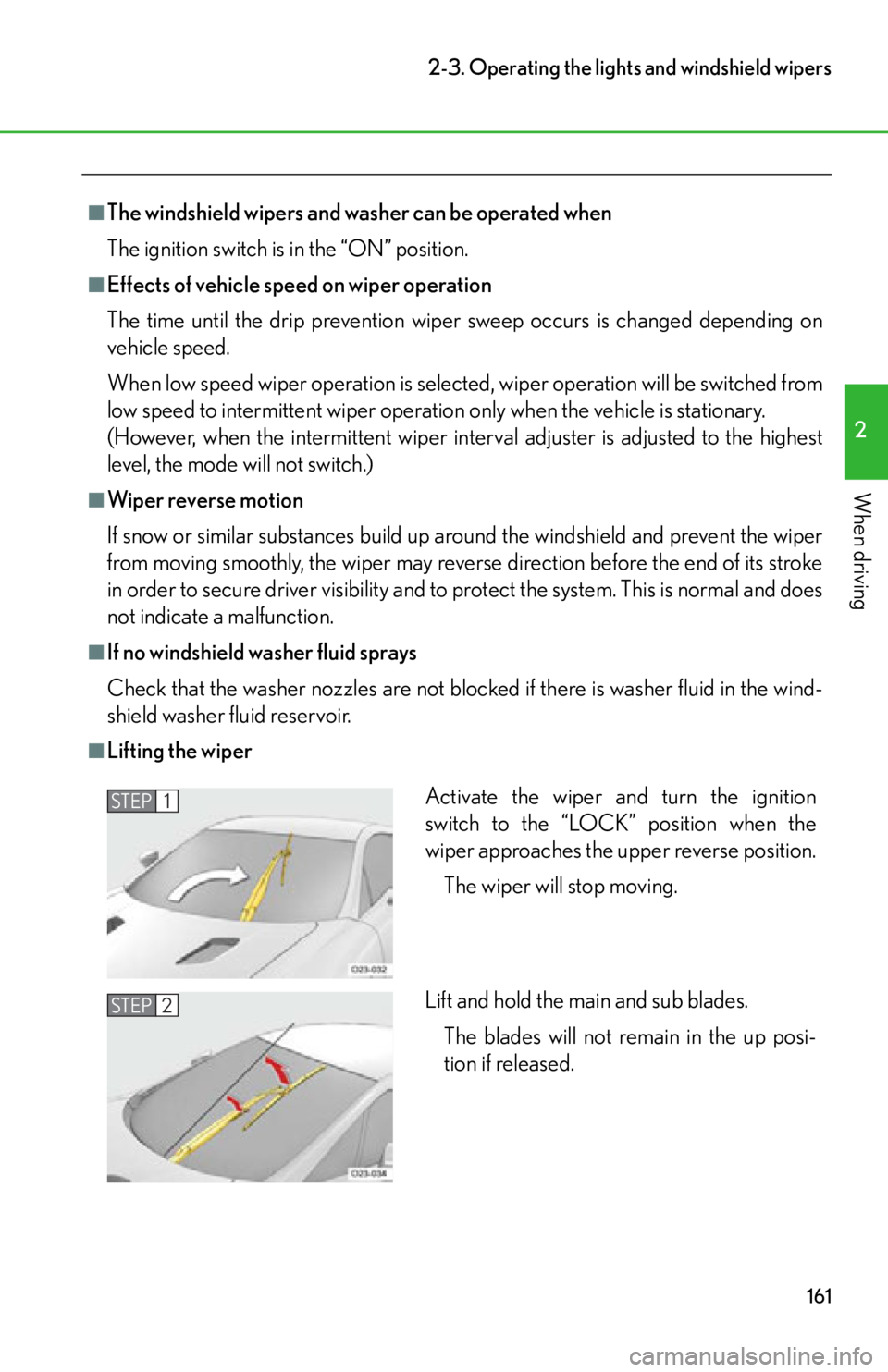
■Lifting the wiper
Activate the wiper and turn the ignition
switch to the “LOCK” position when the
wiper approaches the upper reverse position.
The wiper will stop moving.
Lift and hold the main and sub blades. The blades will not remain in the up posi-
tion if released.STEP1
STEP2
Page 168 of 420

166
2-4. Using other driving systems
Driving assist systems
To help enhance driving safety and performance, the following systems oper-
ate automatically in response to various driving situations. Be aware, however,
that these systems are supplementary and should not be relied upon too
heavily when operating the vehicle.
■ ABS (Anti-lock Brake System)
Helps to prevent wheel lock when the br akes are applied suddenly, or if the
brakes are applied while driving on a slippery road surface.
■ Brake assist
Generates an increased level of braking force after the brake pedal is
depressed when the system de tects a panic stop situation.
■VSC (Vehicle Stability Control)
Helps the driver to control skidding when swerving suddenly or turning on
slippery road surfaces.
■ TRAC (Traction Control)
Helps to maintain drive power and prevent the drive wheels from spinning
when starting the vehicle or accelerating on slippery roads.
■Hill-start assist control
Helps to reduce the vehicle’s rolling backward distance when starting on an
incline or slippery slope.
■EPS (Electric Power Steering)
Employs an electric motor to reduce the amount of effort needed to turn the
steering wheel.
■VDIM (Vehicle Dynamics Integrated Management)
Provides integrated control of the ABS, brake assist, VSC, TRAC, and hill-
start assist control systems.
Helps to maintain vehicle stability when swerving on slippery road surfaces
by controlling the brakes and engine output.
When switched to SPORT driving mode, the control characteristics of the
VDIM system are altered.
■ Active rear wing
P. 1 7 1
Page 180 of 420

178
2-5. Driving information
CAUTION
■Things that must not be carried in the luggage compartment
The following things may cause a fire if loaded in the luggage compartment:
●Receptacles containing gasoline
●Aerosol cans
■Storage precautions
Observe the following precautions.
Failure to do so may result in death or serious injury.
●Stow cargo and luggage in the lugga ge compartment whenever possible.
●Do not place cargo or luggage in or on the following locations as the item may
get under the brake or accelerator pedal and prevent the pedals from being
depressed properly, block the driver’s vision, or hit the driver or passenger, caus-
ing an accident:
• At the feet of the driver
• On the passenger seat (when stacking items)
• On the package tray
• On the instrument panel
•On the dashboard
●Secure all items in the occupant compartment, as they may shift and injure some-
one during sudden braking, sudden swerving or an accident.
●Never allow anyone to ride in the luggage compartment. It is not designed for
passengers. The passenger should ride in th e seat with the seat belt properly fas-
tened. Otherwise, the passenger is much more likely to suffer death or serious
bodily injury, in the event of sudden br aking, sudden swerving or an accident.
■Capacity and distribution
●Do not exceed the maximum axle weight ra ting or the total vehicle weight rating.
●Even if the total load of occupant’s weight and the cargo load is less than the total
load capacity, do not apply the load unevenly. Improper loading may cause dete-
rioration of steering or braking control which may cause death or serious injury.
Page 186 of 420
184
2-5. Driving information
NOTICE
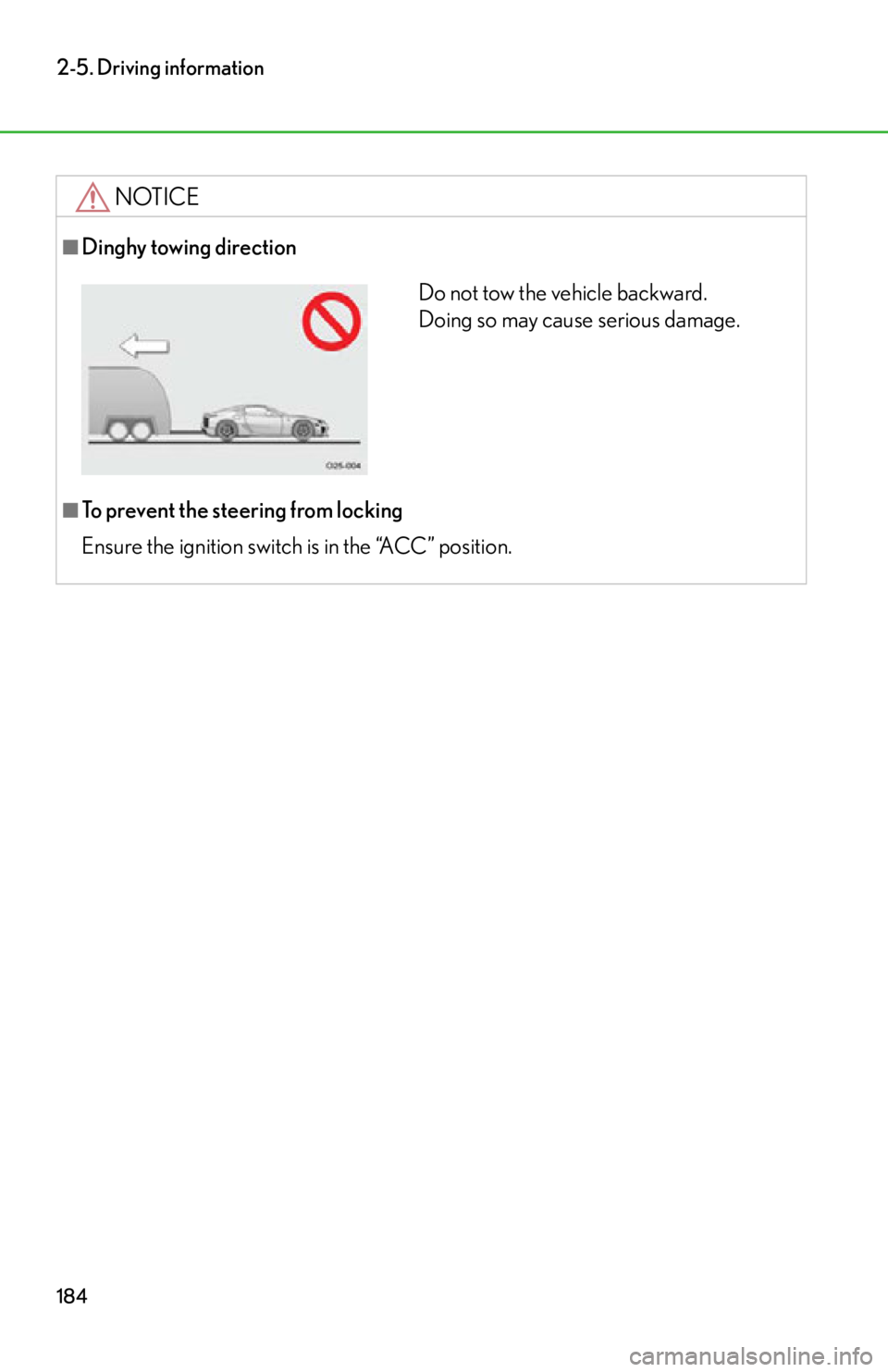
■Dinghy towing direction
■To prevent the steering from locking
Ensure the ignition switch is in the “ACC” position.
Do not tow the vehicle backward.
Doing so may cause serious damage.