lexus LFA 2012 Technical Information / LEXUS 2012 LFA (OM77006U) Manual PDF
LFA 2012
Lexus
Lexus
https://www.carmanualsonline.info/img/36/30117/w960_30117-0.png
lexus LFA 2012 Technical Information / LEXUS 2012 LFA (OM77006U) Manual PDF
Page 337 of 420
5
When trouble arises
335
5-2. Steps to take in an emergency
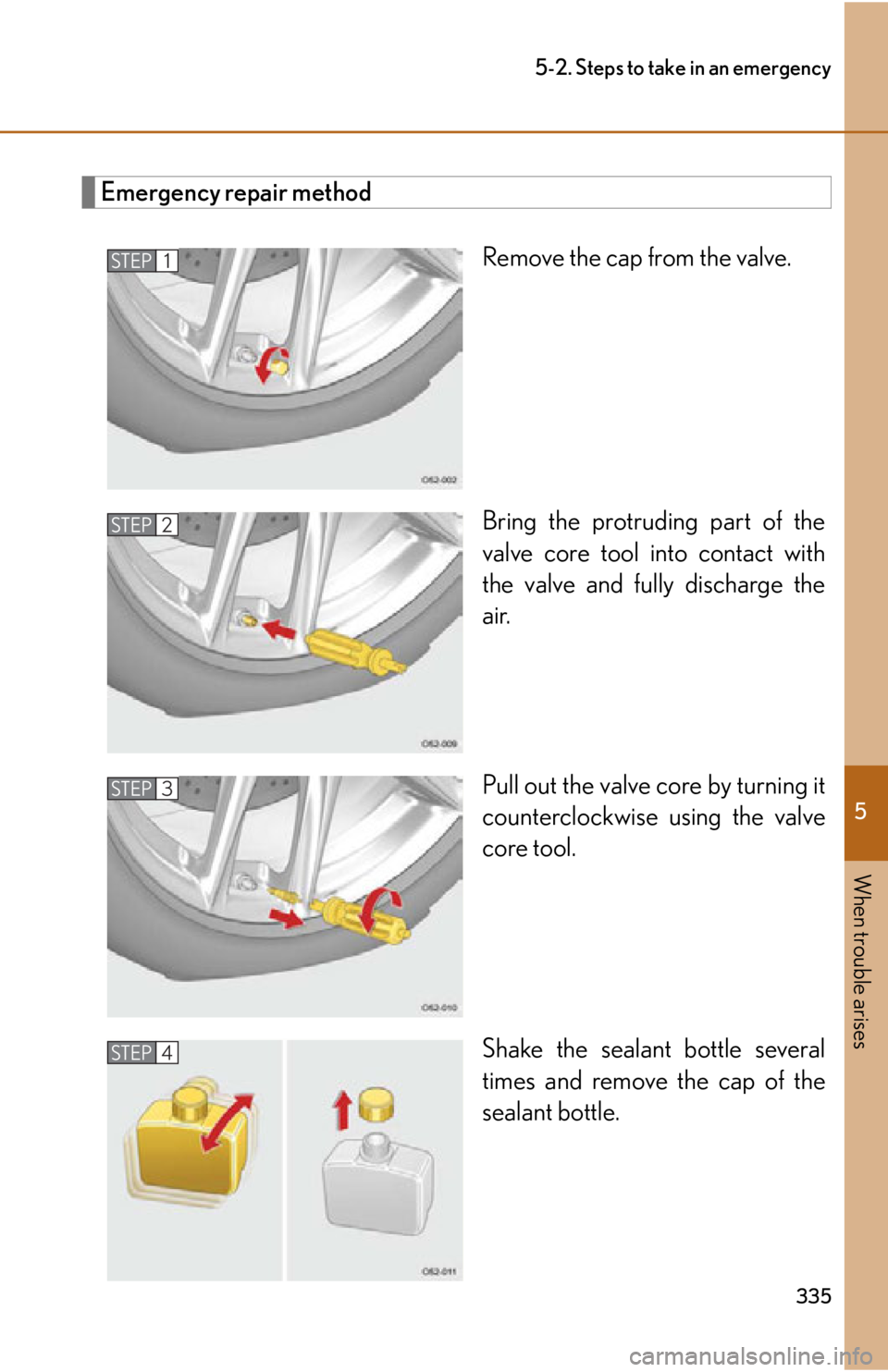
Emergency repair methodRemove the cap from the valve.
Bring the protruding part of the
valve core tool into contact with
the valve and fully discharge the
air.
Pull out the valve core by turning it
counterclockwise using the valve
core tool.
Shake the sealant bottle several
times and remove the cap of the
sealant bottle.
STEP1
STEP2
STEP3
STEP4
Page 339 of 420
5
When trouble arises
337
5-2. Steps to take in an emergency
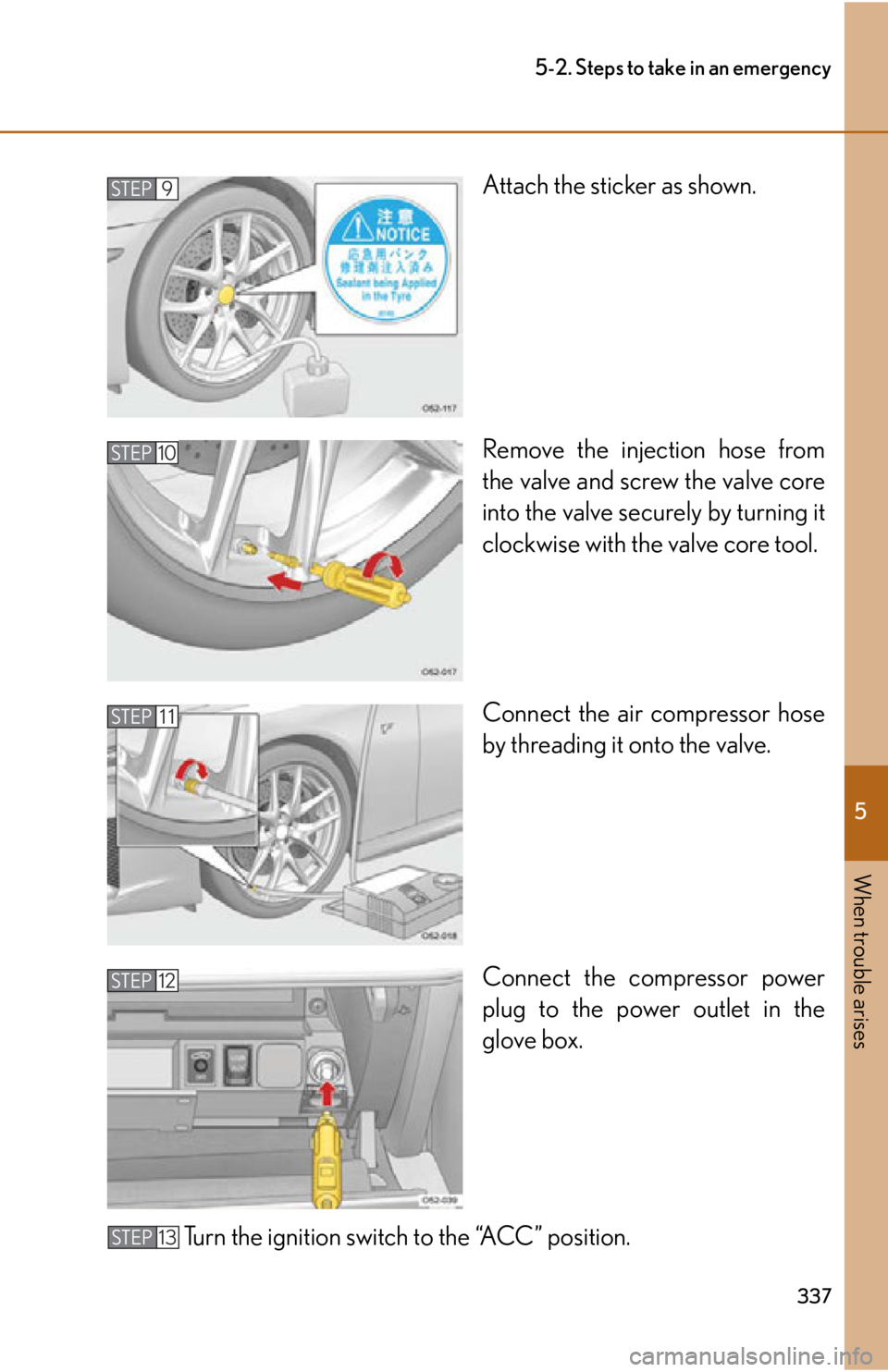
Attach the sticker as shown.
Remove the injection hose from
the valve and screw the valve core
into the valve securely by turning it
clockwise with the valve core tool.
Connect the air compressor hose
by threading it onto the valve.
Connect the compressor power
plug to the power outlet in the
glove box.
Turn the ignition switch to the “ACC” position.STEP9
STEP10
STEP 11
STEP 12
STEP 13
Page 347 of 420
5
When trouble arises
345
5-2. Steps to take in an emergency
If the parking brake cannot be released
In the event that the battery is discharged or switch operation does not
release the parking brake, the parking brake can be released manually using
the procedure below. This procedure should be performed only if necessary,
such as in an emergency.
If the switch cannot be operated even when the battery is normal, the parking
brake system may be malfunctioning. Have the vehicle inspected by your
Lexus dealer immediately.
■ Before releasing the parking brake manually
●Select 1st gear or Reverse.
● Turn the ignition switch to the “LOCK” position.
● Check that the parking brake indicator is off.
● Chock the tires.
Releasing the parking brake manually
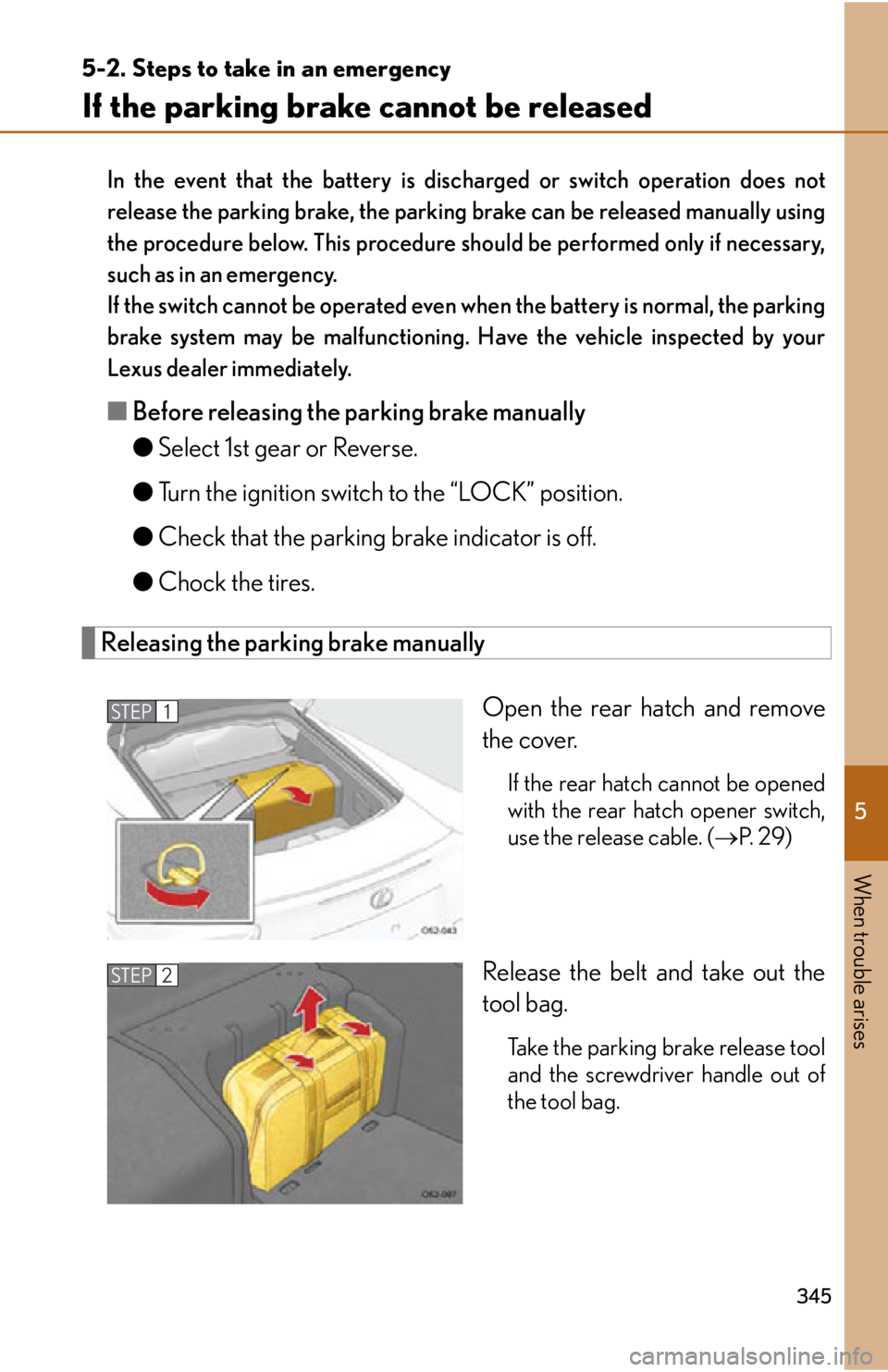
Open the rear hatch and remove
the cover.
If the rear hatch cannot be opened
with the rear hatch opener switch,
use the release cable. (P. 2 9 )
Release the belt and take out the
tool bag.
Take the parking brake release tool
and the screwdriver handle out of
the tool bag.
STEP1
STEP2
Page 348 of 420
346
5-2. Steps to take in an emergency
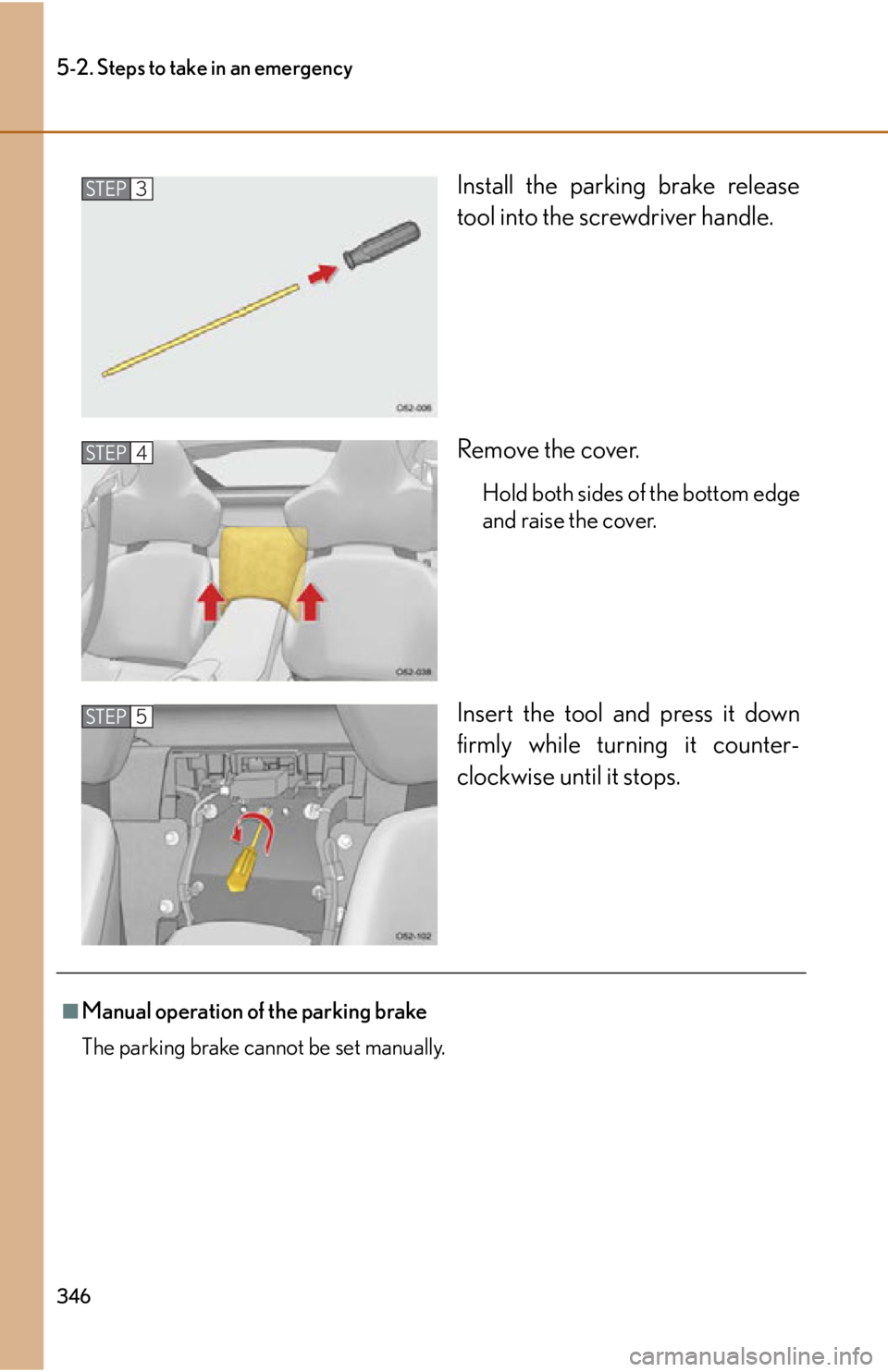
Install the parking brake release
tool into the screwdriver handle.
Remove the cover.
Hold both sides of the bottom edge
and raise the cover.
Insert the tool and press it down
firmly while turning it counter-
clockwise until it stops.
STEP3
STEP4
STEP5
■Manual operation of the parking brake
The parking brake cannot be set manually.
Page 349 of 420
5
When trouble arises
347
5-2. Steps to take in an emergency
CAUTION
■When releasing the parking brake manually
●Select 1st gear or Reverse, turn the ignition switch to the “LOCK” position and
chock the tires.
Failure to do so may cause the vehicle to move, resulting in an accident.
●Turn the ignition switch to the “LOCK” position and check that the parking brake
indicator is off.
Failure to do so may cause the system to operate and turn the parking brake
release tool that is inserted, resulting in an injury.
Page 358 of 420
356
5-2. Steps to take in an emergency
CAUTION
■If the engine has to be turned off while driving
●If the engine is turned off, the power assist for the brakes and steering may not
function, making braking and steering more difficult. Decelerate as much as pos-
sible before turning off the engine.
●Never attempt to remove the key, as doing so will lock the steering wheel.
Page 361 of 420
359
6-1. Specifications
6
Vehicle specifications
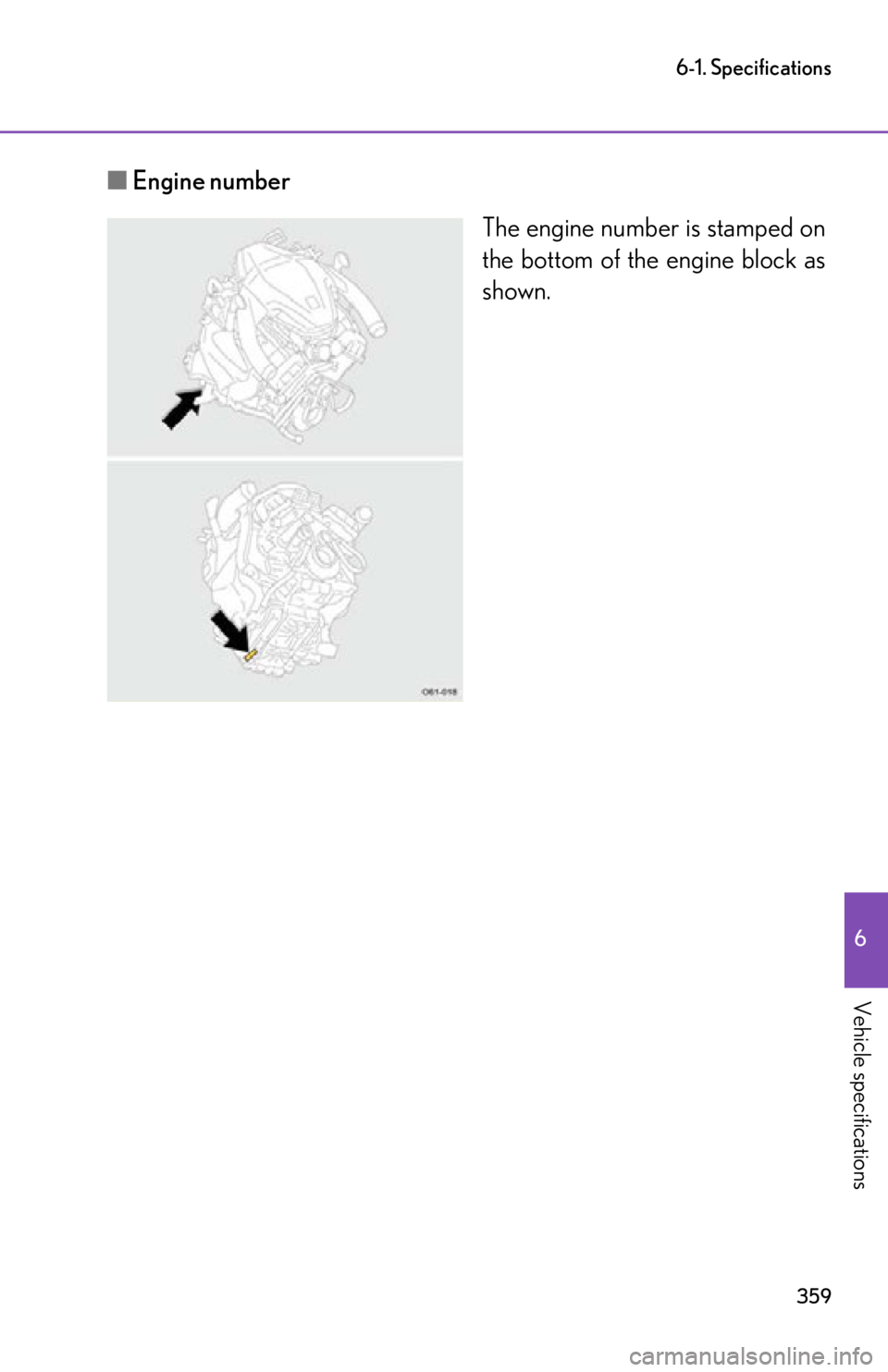
■Engine number
The engine number is stamped on
the bottom of the engine block as
shown.
Page 385 of 420

383
6
Vehicle specifications
6-2.Customization
Customizable features
Your vehicle includes a variety of electronic features that can be personalized
to suit your preferences. Programming these preferences requires special-
ized equipment and may be performed by your Lexus dealer.
Some function settings are changed simultaneously with other functions being
customized. Contact your Lexus dealer for further details.
ItemFunctionDefault settingCustomized setting
Wireless
remote con-
trol
(
P. 22) Unlocking operation
Driver's door
unlocked in one
step, both side
doors unlocked
in two stepsBoth side doors
unlocked in one
step
Automatic door lock
function to be activated if
a door is not opened after
being unlocked On
Off
Time elapsed before auto-
matic door lock function is
activated if a door is not
opened after being
unlocked 60 seconds
30 seconds
120 seconds
Operation signal
(Emergency flashers) On
Off
Operation signal
(Buzzer) Off
On
Door lock buzzer
(Buzzer sounding if an
attempt to lock the doors
is made when a door is
not fully closed) Off
On
Page 386 of 420
384
6-2. Customization
Door lock
(
P. 2 5 )Unlocking using a key
Driver's door
unlocked in one
step, both side
doors unlocked
in two stepsBoth side doors
unlocked in one
step
Speed-detecting auto-
matic door lock function Off On
Opening driver's door
unlocks both side doors Off On
Pow e r e a s y
access system
(
P. 3 2 ) Auto away function Off On
Pow e r w i n -
dows
(
P. 4 6 ) Key linked operation Off
Open and close
Open onlyClose only
Wireless remote control
linked operation Off Open only
Automatic
light control
system
(
P. 1 5 8 ) Ti m e e l a p s e d b e f o r e
headlights automatically
turn off after doors are
closed
30 seconds0 seconds
60 seconds
90 seconds
ASG
(Automated
Sequential
Gearbox)
(
P. 1 0 2 ) Reverse warning buzzer Intermittent Once
ItemFunctionDefault settingCustomized
setting
Page 387 of 420
385
6-2. Customization
6
Vehicle specifications
Illumination
(
P. 2 0 7 )Time elapsed before lights
turn off
15 seconds7. 5 s e c o n d s
30 seconds
Operation when the
doors are unlocked On Off
Operation after the igni-
tion switch is turned to the
“LOCK” position On Off
Seat belt
reminder
(
P. 3 1 5 ) Vehicle speed linked seat
belt reminder buzzer
On
Off
ItemFunctionDefault settingCustomized
setting