head LEXUS LS430 2003 Factory Repair Manual
[x] Cancel search | Manufacturer: LEXUS, Model Year: 2003, Model line: LS430, Model: LEXUS LS430 2003Pages: 4500, PDF Size: 87.45 MB
Page 4409 of 4500
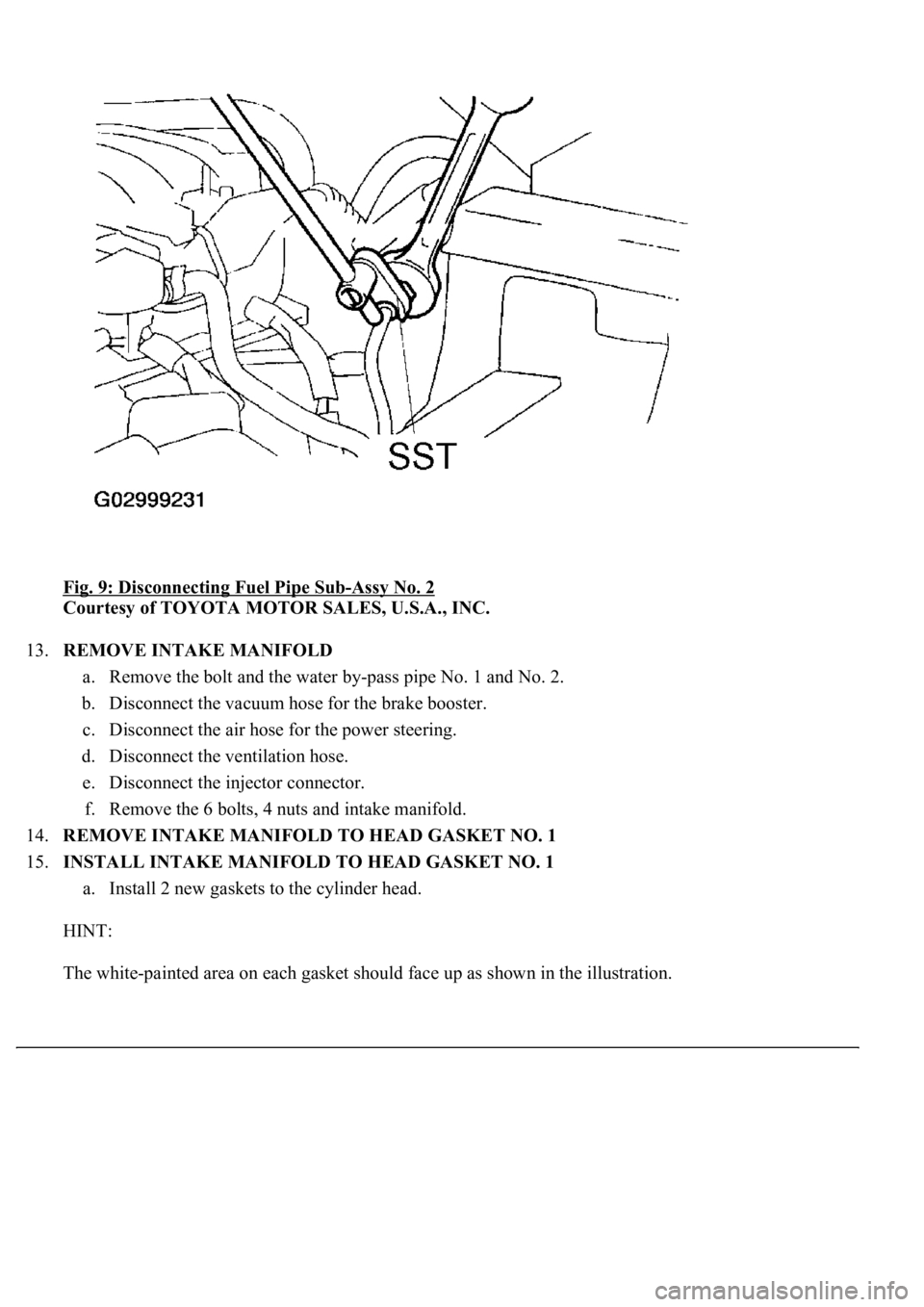
Fig. 9: Disconnecting Fuel Pipe Sub-Assy No. 2
Courtesy of TOYOTA MOTOR SALES, U.S.A., INC.
13.REMOVE INTAKE MANIFOLD
a. Remove the bolt and the water by-pass pipe No. 1 and No. 2.
b. Disconnect the vacuum hose for the brake booster.
c. Disconnect the air hose for the power steering.
d. Disconnect the ventilation hose.
e. Disconnect the injector connector.
f. Remove the 6 bolts, 4 nuts and intake manifold.
14.REMOVE INTAKE MANIFOLD TO HEAD GASKET NO. 1
15.INSTALL INTAKE MANIFOLD TO HEAD GASKET NO. 1
a. Install 2 new gaskets to the cylinder head.
HINT:
The white-painted area on each gasket should face up as shown in the illustration.
Page 4410 of 4500
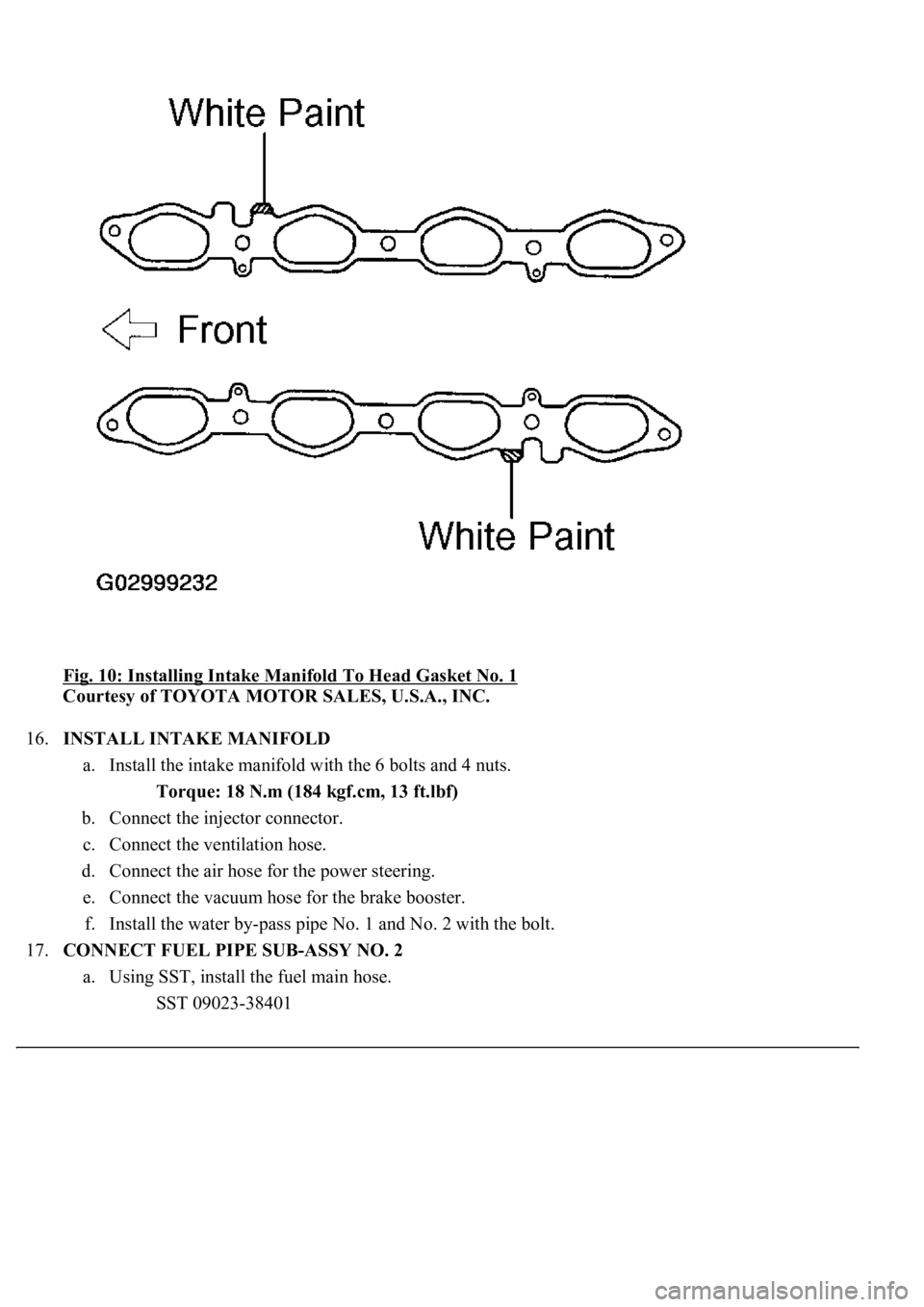
Fig. 10: Installing Intake Manifold To Head Gasket No. 1
Courtesy of TOYOTA MOTOR SALES, U.S.A., INC.
16.INSTALL INTAKE MANIFOLD
a. Install the intake manifold with the 6 bolts and 4 nuts.
Torque: 18 N.m (184 kgf.cm, 13 ft.lbf)
b. Connect the injector connector.
c. Connect the ventilation hose.
d. Connect the air hose for the power steering.
e. Connect the vacuum hose for the brake booster.
f. Install the water by-pass pipe No. 1 and No. 2 with the bolt.
17.CONNECT FUEL PIPE SUB-ASSY NO. 2
a. Using SST, install the fuel main hose.
SST 09023-38401
Page 4449 of 4500
as follows.
1. To solve sound problems, etc. caused by using components of different manufacturers
through signal standardization.
2. To allow each manufacturer to concentrate on developing products they do best. From this,
reasonably priced products can be produced.
HINT:
If a +B or GND short is detected in the AVC-LAN circuit, communication is interrupted and
the audio system will stop functioning.
If an audio system is equipped with a navigation system, the multi-display unit acts as the
master unit.
If the navigation system is not equipped, the audio head unit acts as the master unit instead. I
f
the radio and navigation assy is equipped, it is the master unit.
The radio receiver assy provides resistance to make communication possible.
The car audio system with an AVC-LAN circuit has a diagnostic function.
Each component has a specified number (3-digit) called a physical address. Each function
has a number (2-digit) called a logical address.
5.Communication system outline
a. Components of the navigation system communicate with each other via the AVC-LAN.
b. Radio receiver assy has enough resistance (60 to 80 ohms) necessary for transmitting the
communication. This is essential for communication.
c. If a short circuit or open circuit occurs in the AVC-LAN circuit, communication is interrupted and
the navigation system will stop functioning.
6.Diagnostic function outline
a. The audio system has a diagnostic function (the result is indicated on the master unit).
b. A 3-digit hexadecimal component code (physical address) is allocated to each component on the
AVC-LAN. Using this code, the component in the diagnostic function can be displayed.
7.Bluetooth outline
a. BLUETOOTH is a new wireless connection technology that uses the 2.4 GHz frequency band. This
makes it possible to connect a cellular phone (BLUETOOTH capable phone*1) to the multi-display
(BLUETOOTH system is built in), and use a hands-free function with the cellular phone in a
pocket or bag. As a result, it is not necessary to use a connector for the cellular phone.
*1: Some versions of BLUETOOTH capable cellular phone may not function.
HINT:
The communication performance of BLUETOOTH may vary depending on obstructions or radio
wave conditions between communication devices, electromagnetic radiation, communication
device sensitivit
y, or antenna capacity.
Page 4486 of 4500

Fig. 47: Displaying Vehicle Signal Check Mode Screen
Courtesy of TOYOTA MOTOR SALES, U.S.A., INC.
Screen Description
NAME CONTENTS
HINT:
Only items sending a vehicle signal will be displayed.
This screen is updated once per second when input signals to the vehicle are changed.
3.NAVIGATION CHECK
a. Navigation Check MENU Screen
NameContents
BatteryBattery voltage is displayed.
PKBParking brake ON/OFF state is displayed.
REVReverse signal ON/OFF state is displayed.
IGIG switch ON/OFF state is displayed.
ADIM/TCANBrightness state DIM (with)/ BRIGHT (without) is displayed.
SPEEDThe vehicle speed, displayed in km/h.
TAILTAIL signal (Head lamp dimmer switch) ON/OFF state is displayed.