LEXUS LS430 2003 Factory Manual PDF
LS430 2003
LEXUS
LEXUS
https://www.carmanualsonline.info/img/36/57050/w960_57050-0.png
LEXUS LS430 2003 Factory Manual PDF
Page 4182 of 4500
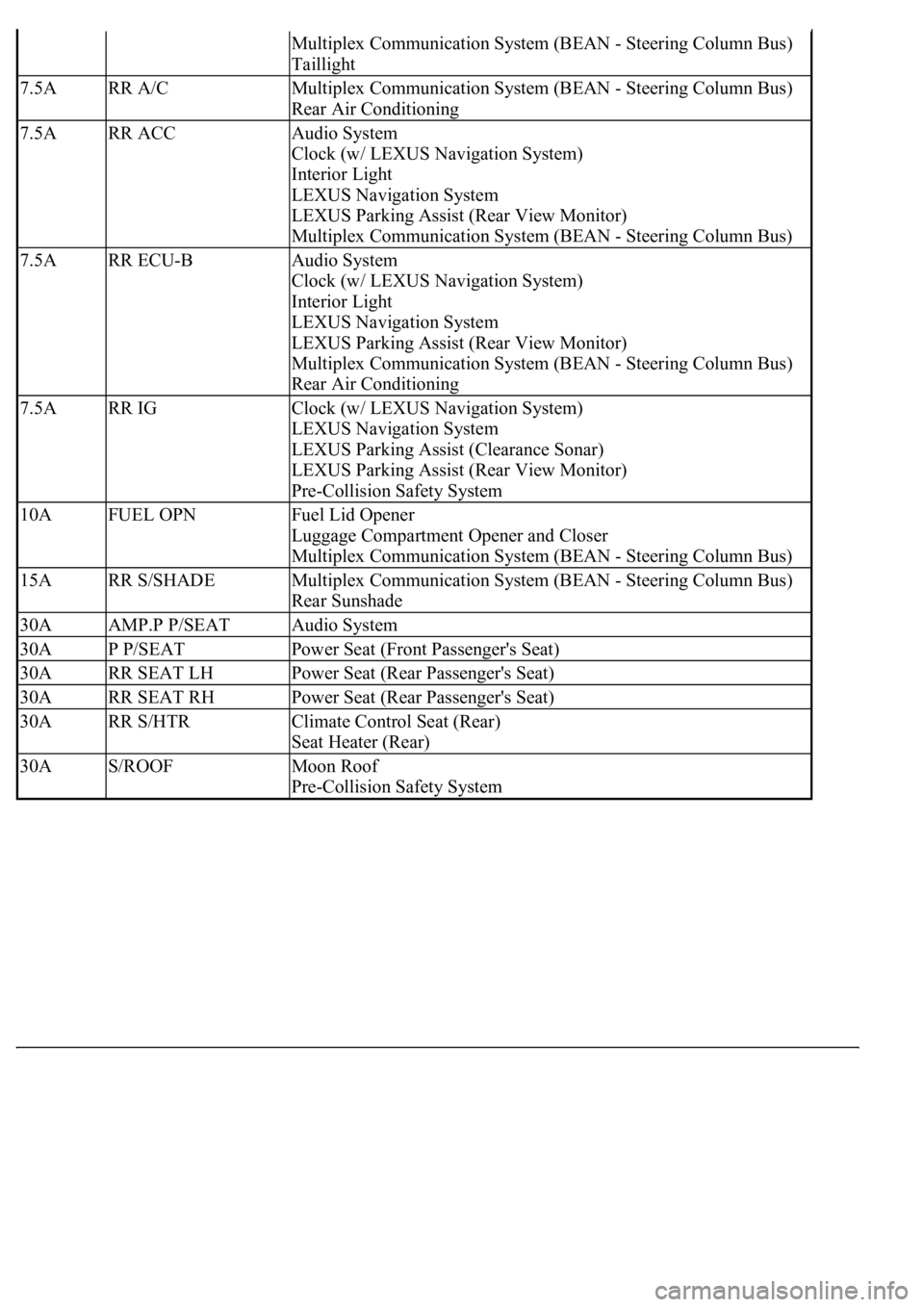
Multiplex Communication System (BEAN - Steering Column Bus)
Taillight
7.5ARR A/CMultiplex Communication System (BEAN - Steering Column Bus)
Rear Air Conditioning
7.5ARR ACCAudio System
Clock (w/ LEXUS Navigation System)
Interior Light
LEXUS Navigation System
LEXUS Parking Assist (Rear View Monitor)
Multiplex Communication System (BEAN - Steering Column Bus)
7.5ARR ECU-BAudio System
Clock (w/ LEXUS Navigation System)
Interior Light
LEXUS Navigation System
LEXUS Parking Assist (Rear View Monitor)
Multiplex Communication System (BEAN - Steering Column Bus)
Rear Air Conditioning
7.5ARR IGClock (w/ LEXUS Navigation System)
LEXUS Navigation System
LEXUS Parking Assist (Clearance Sonar)
LEXUS Parking Assist (Rear View Monitor)
Pre-Collision Safety System
10AFUEL OPNFuel Lid Opener
Luggage Compartment Opener and Closer
Multiplex Communication System (BEAN - Steering Column Bus)
15ARR S/SHADEMultiplex Communication System (BEAN - Steering Column Bus)
Rear Sunshade
30AAMP.P P/SEATAudio System
30AP P/SEATPower Seat (Front Passenger's Seat)
30ARR SEAT LHPower Seat (Rear Passenger's Seat)
30ARR SEAT RHPower Seat (Rear Passenger's Seat)
30ARR S/HTRClimate Control Seat (Rear)
Seat Heater (Rear)
30AS/ROOFMoon Roof
Pre-Collision Safety System
Page 4367 of 4500
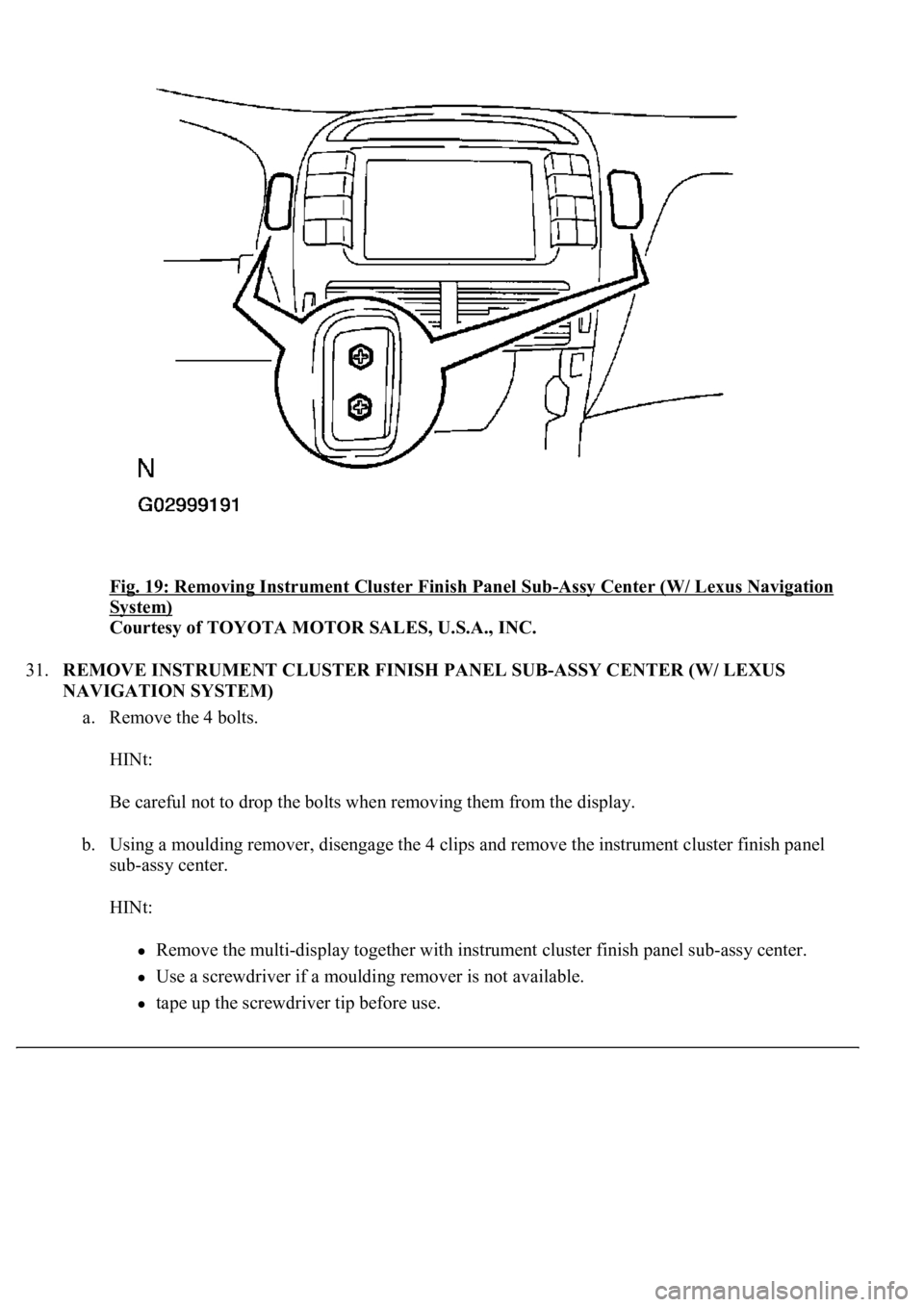
Fig. 19: Removing Instrument Cluster Finish Panel Sub-Assy Center (W/ Lexus Navigation
System)
Courtesy of TOYOTA MOTOR SALES, U.S.A., INC.
31.REMOVE INSTRUMENT CLUSTER FINISH PANEL SUB-ASSY CENTER (W/ LEXUS
NAVIGATION SYSTEM)
a. Remove the 4 bolts.
HINt:
Be careful not to drop the bolts when removing them from the display.
b. Using a moulding remover, disengage the 4 clips and remove the instrument cluster finish panel
sub-assy center.
HINt:
Remove the multi-display together with instrument cluster finish panel sub-assy center.
Use a screwdriver if a moulding remover is not available.
tape up the screwdriver tip before use.
Page 4368 of 4500
c. Disconnect the connectors.
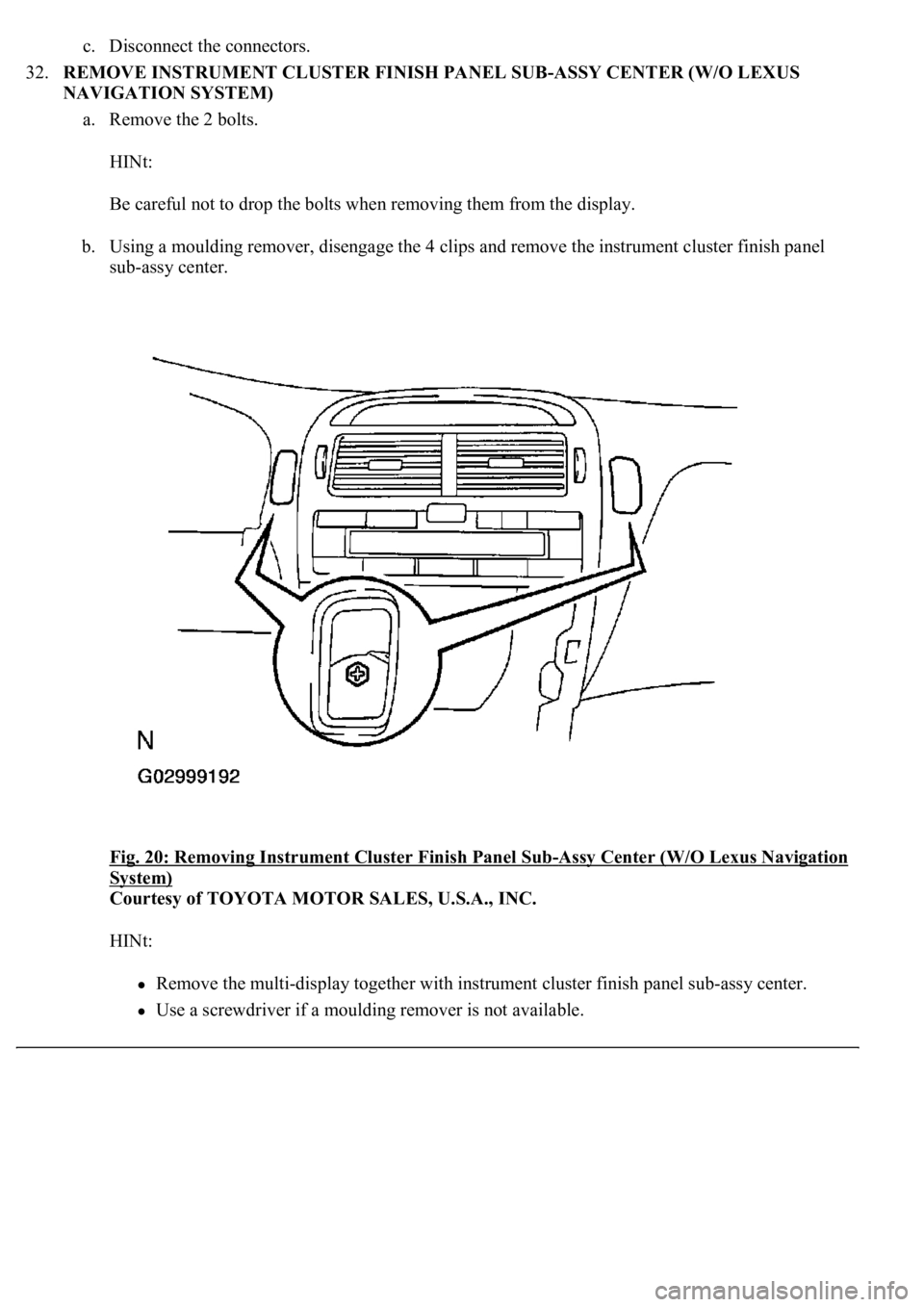
32.REMOVE INSTRUMENT CLUSTER FINISH PANEL SUB-ASSY CENTER (W/O LEXUS
NAVIGATION SYSTEM)
a. Remove the 2 bolts.
HINt:
Be careful not to drop the bolts when removing them from the display.
b. Using a moulding remover, disengage the 4 clips and remove the instrument cluster finish panel
sub-assy center.
Fig. 20: Removing Instrument Cluster Finish Panel Sub
-Assy Center (W/O Lexus Navigation
System)
Courtesy of TOYOTA MOTOR SALES, U.S.A., INC.
HINt:
Remove the multi-display together with instrument cluster finish panel sub-assy center.
Use a screwdriver if a moulding remover is not available.
Page 4381 of 4500
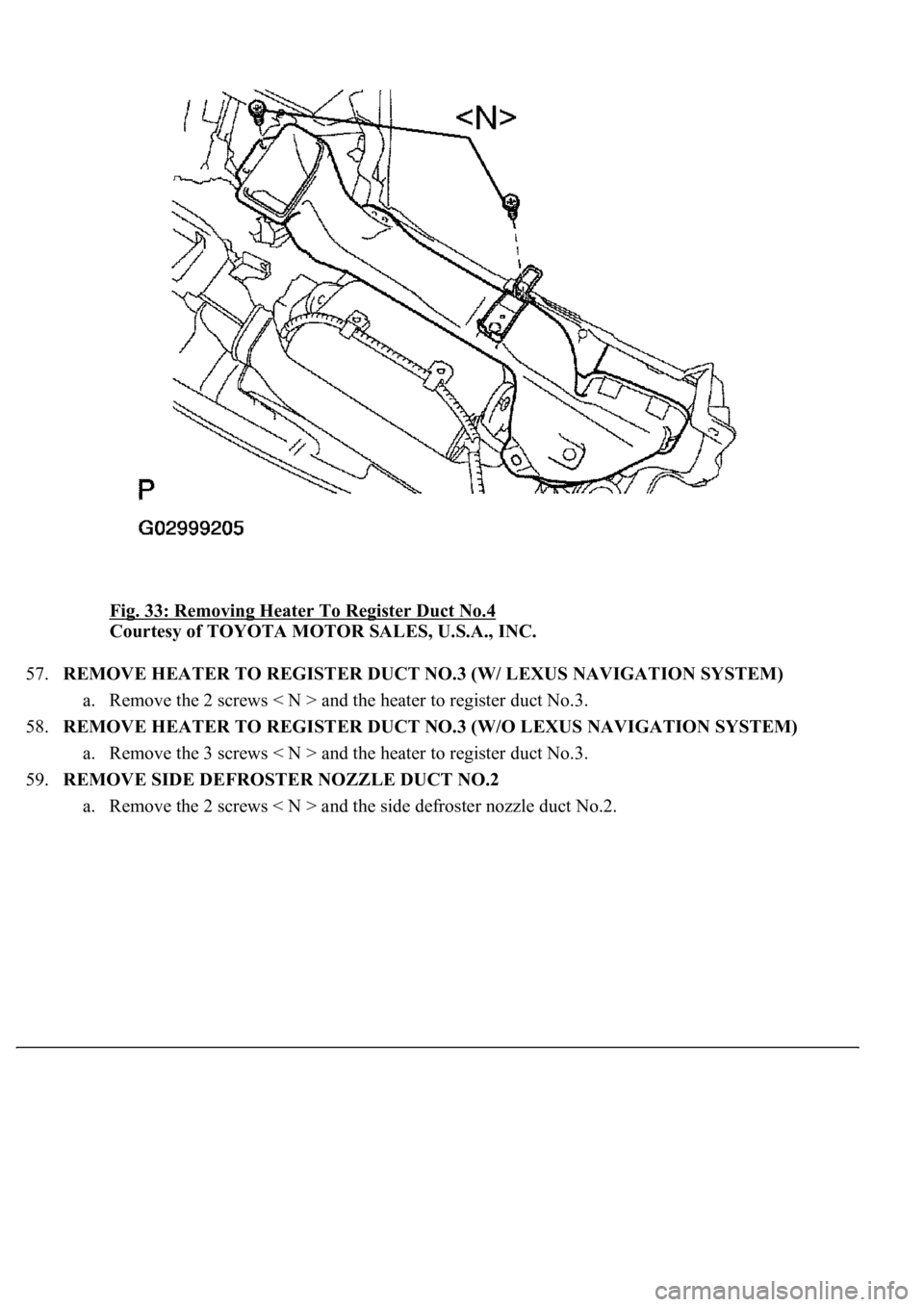
Fig. 33: Removing Heater To Register Duct No.4
Courtesy of TOYOTA MOTOR SALES, U.S.A., INC.
57.REMOVE HEATER TO REGISTER DUCT NO.3 (W/ LEXUS NAVIGATION SYSTEM)
a. Remove the 2 screws < N > and the heater to register duct No.3.
58.REMOVE HEATER TO REGISTER DUCT NO.3 (W/O LEXUS NAVIGATION SYSTEM)
a. Remove the 3 screws < N > and the heater to register duct No.3.
59.REMOVE SIDE DEFROSTER NOZZLE DUCT NO.2
a. Remove the 2 screws < N > and the side defroster nozzle duct No.2.
Page 4383 of 4500
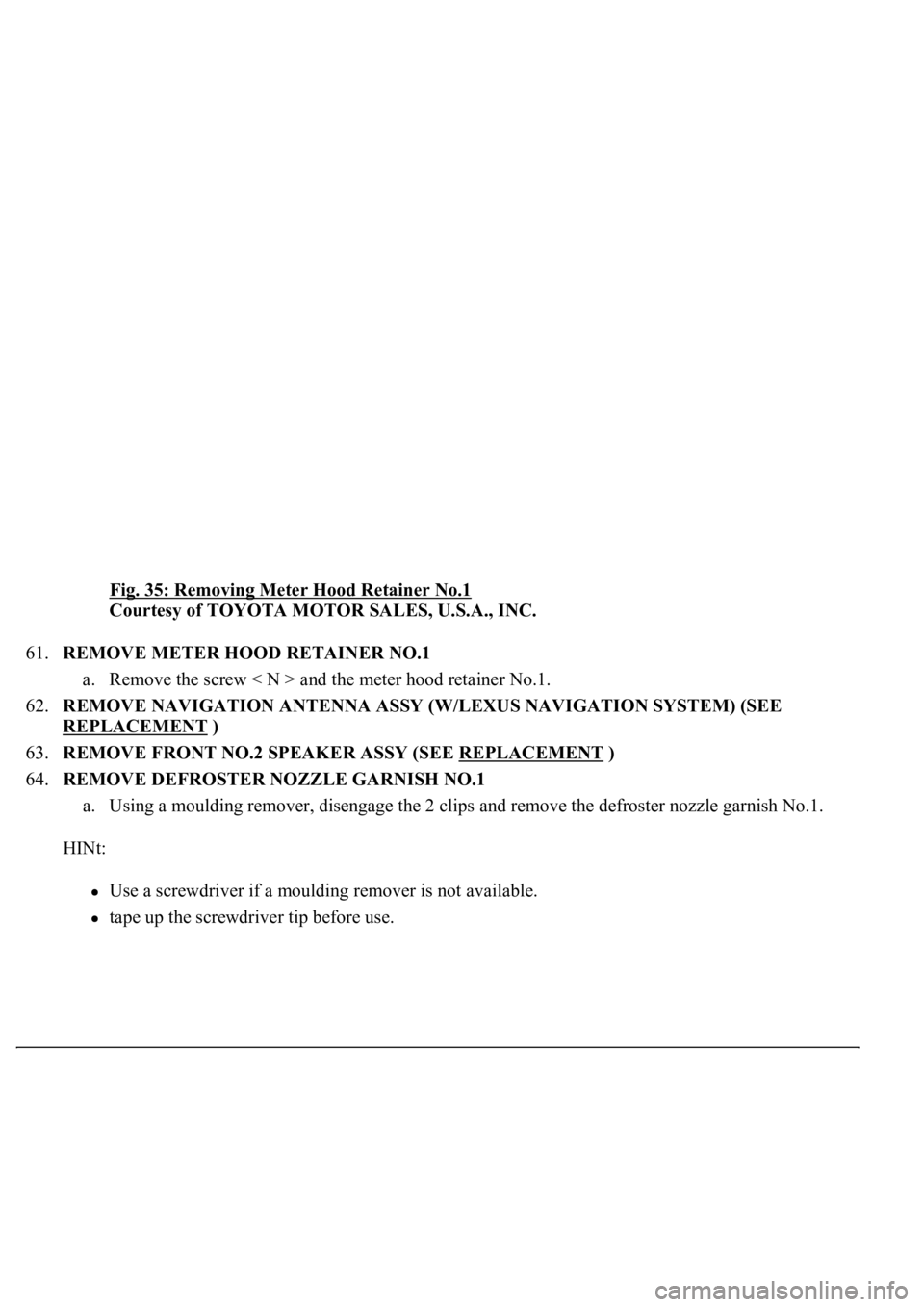
Fig. 35: Removing Meter Hood Retainer No.1
Courtesy of TOYOTA MOTOR SALES, U.S.A., INC.
61.REMOVE METER HOOD RETAINER NO.1
a. Remove the screw < N > and the meter hood retainer No.1.
62.REMOVE NAVIGATION ANTENNA ASSY (W/LEXUS NAVIGATION SYSTEM) (SEE
REPLACEMENT
)
63.REMOVE FRONT NO.2 SPEAKER ASSY (SEE REPLACEMENT
)
64.REMOVE DEFROSTER NOZZLE GARNISH NO.1
a. Using a moulding remover, disengage the 2 clips and remove the defroster nozzle garnish No.1.
HINt:
Use a screwdriver if a moulding remover is not available.
tape up the screwdriver tip before use.
Page 4441 of 4500
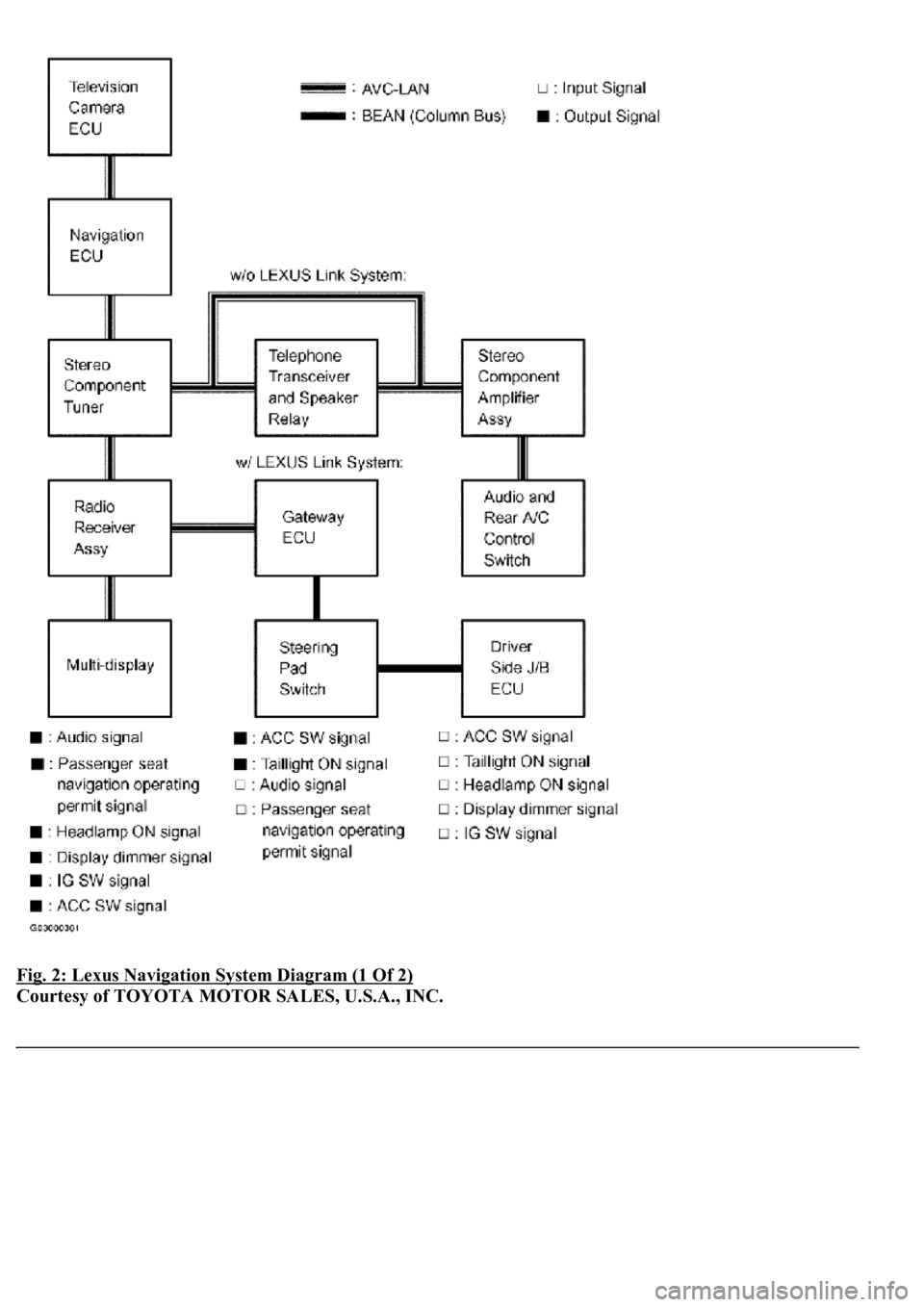
Fig. 2: Lexus Navigation System Diagram (1 Of 2)
Courtesy of TOYOTA MOTOR SALES, U.S.A., INC.
Page 4442 of 4500
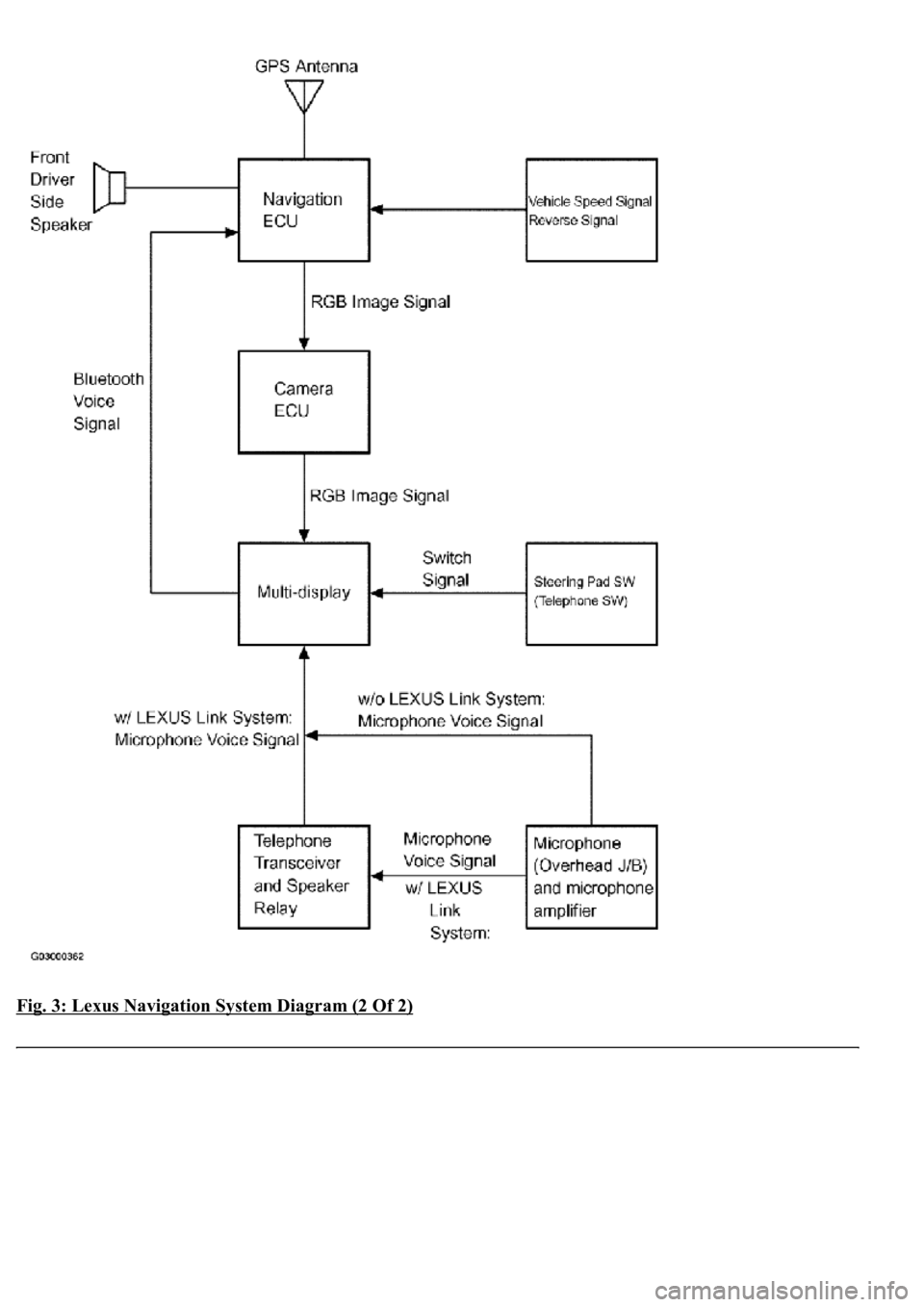
Fig. 3: Lexus Navigation System Diagram (2 Of 2)
Page 4443 of 4500
Courtesy of TOYOTA MOTOR SALES, U.S.A., INC.
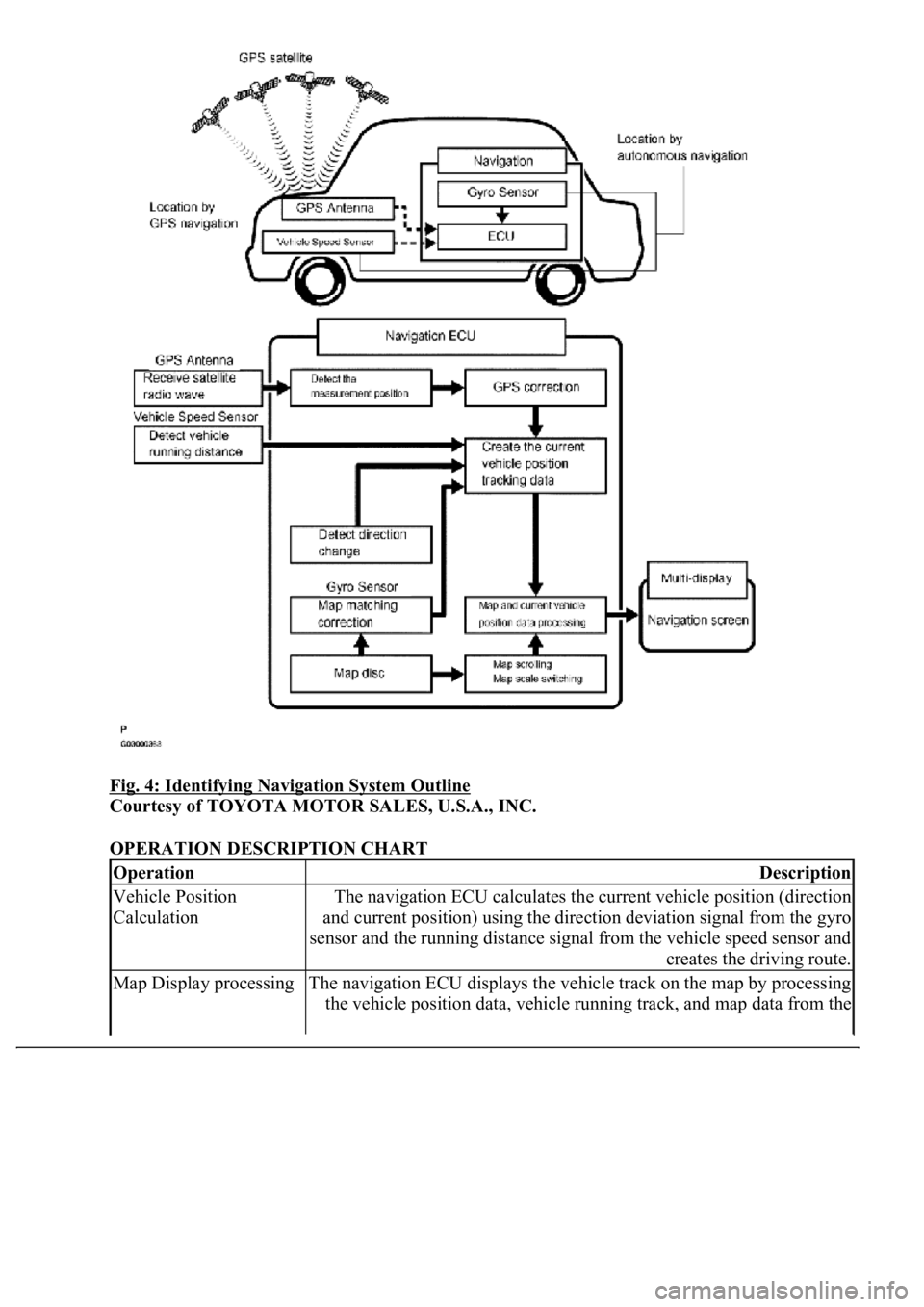
1.Navigation system outline
a. Vehicle position tracking methods
It is essential that the navigation system correctly tracks the current vehicle position and displays it
on the map. There are 2 methods to track the current vehicle position: autonomous (dead
reckoning) and GPS* (satellite) navigation. Both navigation methods are used in conjunction with
each other.
* GPS (Global Positionin
g System)
Page 4444 of 4500
Fig. 4: Identifying Navigation System Outline
Courtesy of TOYOTA MOTOR SALES, U.S.A., INC.
OPERATION DESCRIPTION CHART
OperationDescription
Vehicle Position
CalculationThe navigation ECU calculates the current vehicle position (direction
and current position) using the direction deviation signal from the gyro
sensor and the running distance signal from the vehicle speed sensor and
creates the driving route.
Map Display processingThe navigation ECU displays the vehicle track on the map by processing
the vehicle position data, vehicle running track, and map data from the
Page 4448 of 4500
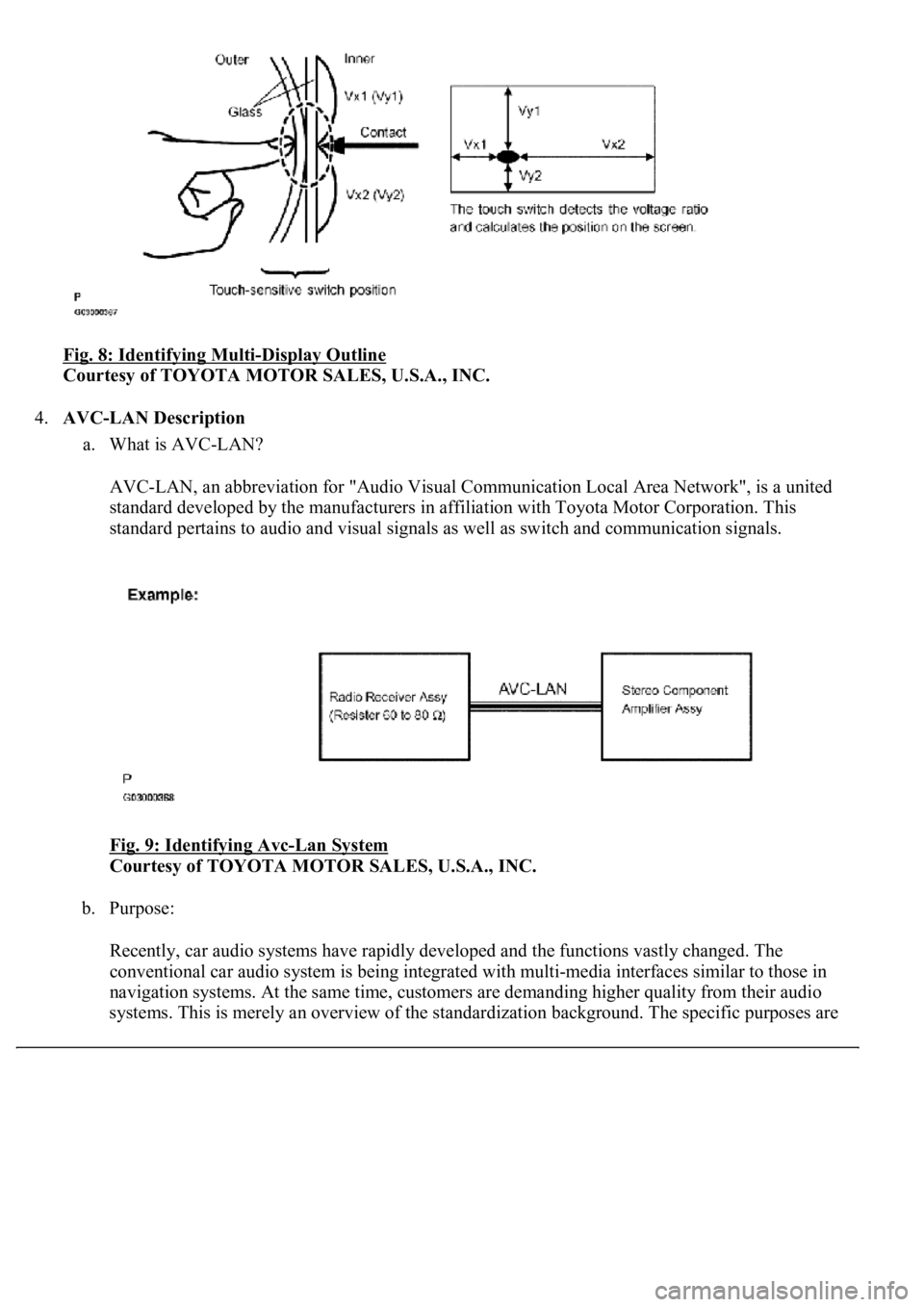
Fig. 8: Identifying Multi-Display Outline
Courtesy of TOYOTA MOTOR SALES, U.S.A., INC.
4.AVC-LAN Description
a. What is AVC-LAN?
AVC-LAN, an abbreviation for "Audio Visual Communication Local Area Network", is a united
standard developed by the manufacturers in affiliation with Toyota Motor Corporation. This
standard pertains to audio and visual signals as well as switch and communication signals.
Fig. 9: Identifying Avc
-Lan System
Courtesy of TOYOTA MOTOR SALES, U.S.A., INC.
b. Purpose:
Recently, car audio systems have rapidly developed and the functions vastly changed. The
conventional car audio system is being integrated with multi-media interfaces similar to those in
navigation systems. At the same time, customers are demanding higher quality from their audio
s
ystems. This is merely an overview of the standardization background. The specific purposes are