change time LEXUS LS430 2003 Factory Repair Manual
[x] Cancel search | Manufacturer: LEXUS, Model Year: 2003, Model line: LS430, Model: LEXUS LS430 2003Pages: 4500, PDF Size: 87.45 MB
Page 30 of 4500
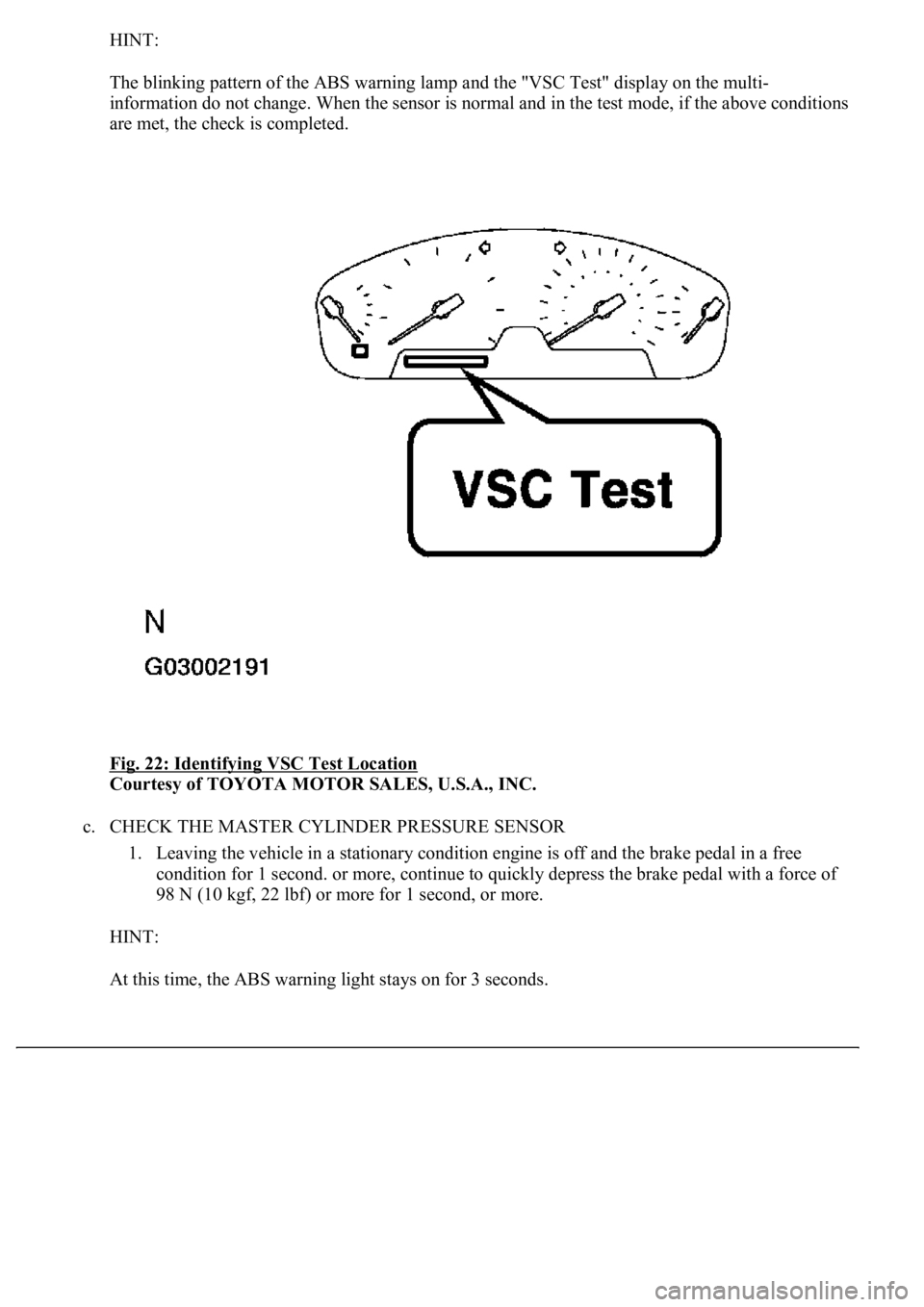
HINT:
The blinking pattern of the ABS warning lamp and the "VSC Test" display on the multi-
information do not change. When the sensor is normal and in the test mode, if the above conditions
are met, the check is completed.
Fig. 22: Identifying VSC Test Location
Courtesy of TOYOTA MOTOR SALES, U.S.A., INC.
c. CHECK THE MASTER CYLINDER PRESSURE SENSOR
1. Leaving the vehicle in a stationary condition engine is off and the brake pedal in a free
condition for 1 second. or more, continue to quickly depress the brake pedal with a force of
98 N (10 kgf, 22 lbf) or more for 1 second, or more.
HINT:
At this time, the ABS warnin
g light stays on for 3 seconds.
Page 222 of 4500
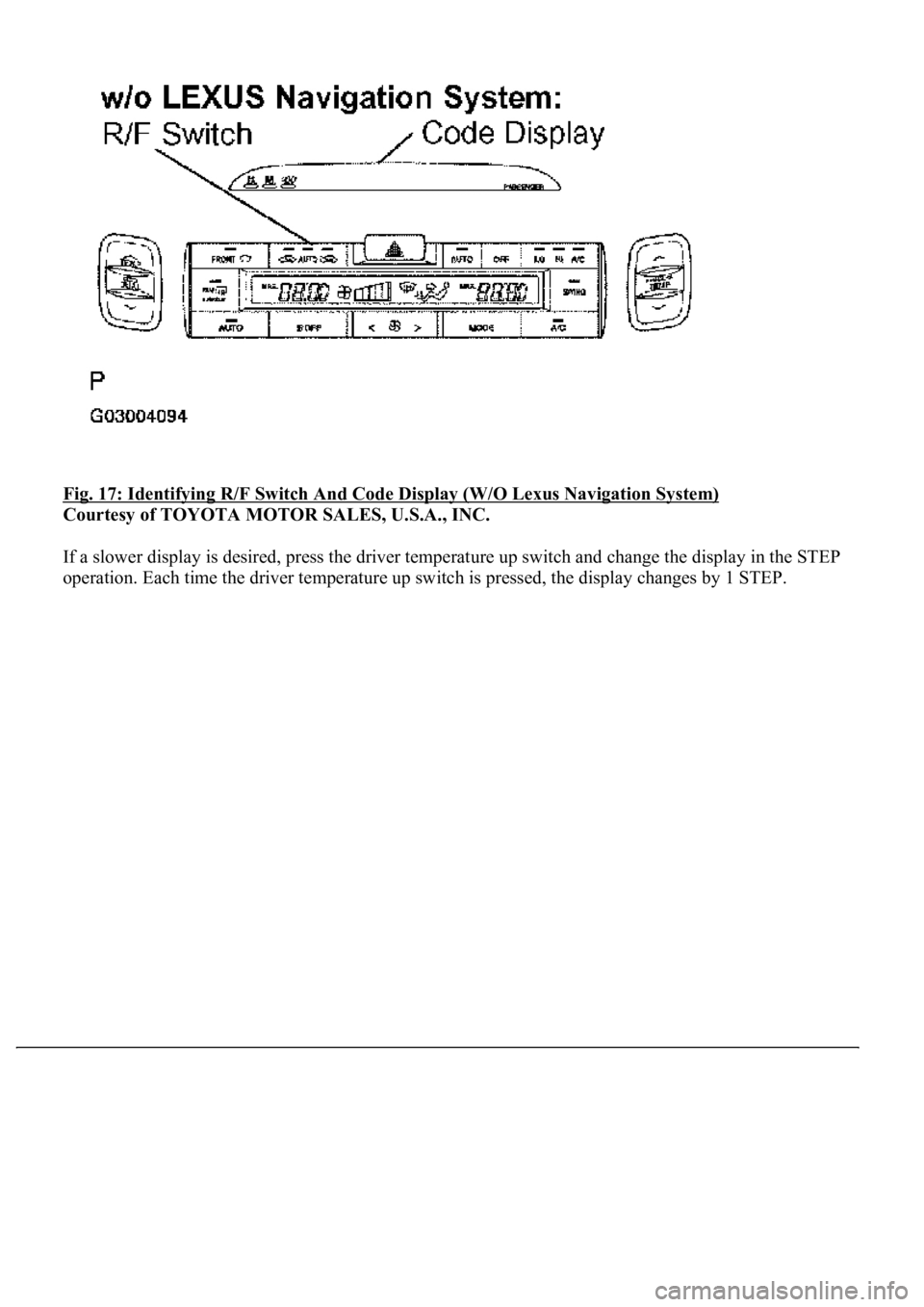
Fig. 17: Identifying R/F Switch And Code Display (W/O Lexus Navigation System)
Courtesy of TOYOTA MOTOR SALES, U.S.A., INC.
If a slower display is desired, press the driver temperature up switch and change the display in the STEP
operation. Each time the driver temperature up switch is pressed, the display changes by 1 STEP.
Page 229 of 4500

DATA LIST / ENGINE AND ECT / ALL:
DATA LIST / ENGINE AND ECT / ALL
2.ACTIVE TEST
HINT:
Performing the ACTIVE TEST
using the hand-held tester allows the relays, VSV, actuators and so on to
operate without parts removal. Performing the ACTIVE TEST
as the first STEP of troubleshooting is
one way to shorten labor time.
It is possible to display the DATA LIST on the hand-held tester during the ACTIVE TEST.
a. Connect the hand-held tester to the DLC3.
b. Turn the ignition switch to the ON position.
c. From the display on tester, perform the "ACTIVE TEST
".
ACTIVE TEST / AIR CONDITIONER:
ACTIVE TEST / AIR CONDITIONER
FOOT AIR
LEAKFoot air leak / ON, OFFCustomized value will be displayed-
DESTINATION
Destination / DOMEST, USA,
EUROPE, AUSTRAL,
MIDEAST, NO INFO
Changes with destinations-
REAR SOLAR
SENSRear solar sensor / min.: 0 max.:
255Changes depending on brightness-
NOX GAS SENSEmission gas Nox sensor / min.: 0
max.: 255Increases as the gas amount increases-
ItemMeasurement Item / Display
(Range)Normal ConditionDiagnostic
Note
REG PRESS
SENSRegulator pressure sensor / min.:
0 max.: 255Actual regulator pressure is displayed-
FILTER FLOW
VOLFilter flow volume / min.: 0 max.:
65535Actual filter flow volume is displayed-
REG CTRL
CURRNTRegulator control current / min.: 0
A max.: 255 A--
HUMIDITY
SENSHumidity sensor / min.: 0% max.:
100%Actual room humidity is displayed-
#CODESNumber of Trouble Codes / min.:
0 max.: 255Number of DTCs will be displayed-
ItemMeasurement Item/Display (Range)Normal ConditionDiagnostic Note
A/C SIGA/C signal/ ON or OFFA/C ON: ON-
Page 241 of 4500
1.STEP MOTORS INITIALIZING FUNCTION
STEP motor initializing procedure (Automatic initializing)
1. When the battery is reconnected and the ignition switch is turned to the ON position for the first
time, the initializing function of the STEP motors is activated. In this case, the "FRONT DEF"
indicator blinks.
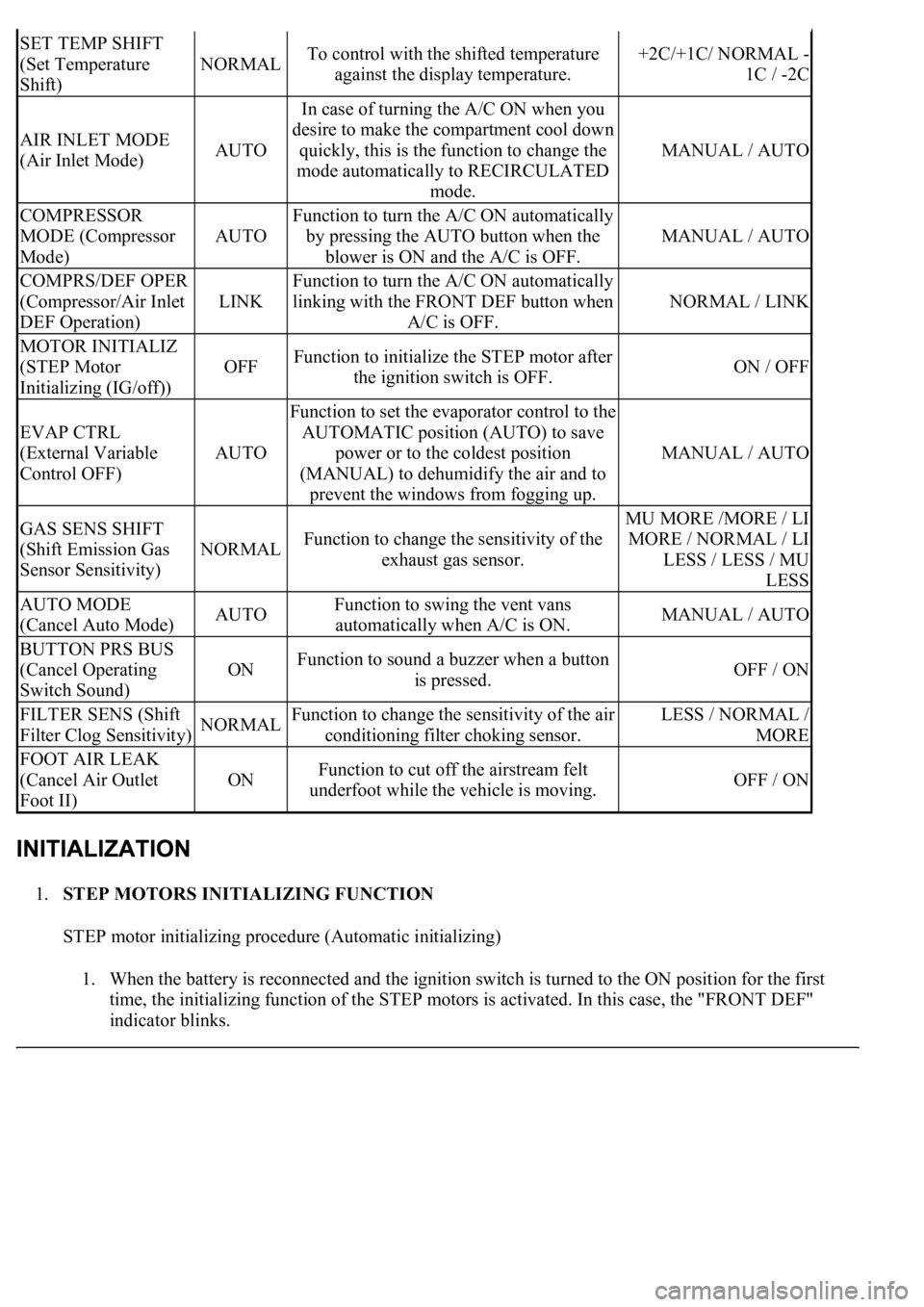
SET TEMP SHIFT
(Set Temperature
Shift)
NORMALTo control with the shifted temperature
against the display temperature.+2C/+1C/ NORMAL -
1C / -2C
AIR INLET MODE
(Air Inlet Mode)AUTO
In case of turning the A/C ON when you
desire to make the compartment cool down
quickly, this is the function to change the
mode automatically to RECIRCULATED
mode.
MANUAL / AUTO
COMPRESSOR
MODE (Compressor
Mode)
AUTO
Function to turn the A/C ON automatically
by pressing the AUTO button when the
blower is ON and the A/C is OFF.
MANUAL / AUTO
COMPRS/DEF OPER
(Compressor/Air Inlet
DEF Operation)
LINK
Function to turn the A/C ON automatically
linking with the FRONT DEF button when
A/C is OFF.
NORMAL / LINK
MOTOR INITIALIZ
(STEP Motor
Initializing (IG/off))
OFFFunction to initialize the STEP motor after
the ignition switch is OFF.ON / OFF
EVAP CTRL
(External Variable
Control OFF)
AUTO
Function to set the evaporator control to the
AUTOMATIC position (AUTO) to save
power or to the coldest position
(MANUAL) to dehumidify the air and to
prevent the windows from fogging up.
MANUAL / AUTO
GAS SENS SHIFT
(Shift Emission Gas
Sensor Sensitivity)
NORMALFunction to change the sensitivity of the
exhaust gas sensor.
MU MORE /MORE / LI
MORE / NORMAL / LI
LESS / LESS / MU
LESS
AUTO MODE
(Cancel Auto Mode)AUTOFunction to swing the vent vans
automatically when A/C is ON.MANUAL / AUTO
BUTTON PRS BUS
(Cancel Operating
Switch Sound)
ONFunction to sound a buzzer when a button
is pressed.OFF / ON
FILTER SENS (Shift
Filter Clog Sensitivity)NORMALFunction to change the sensitivity of the air
conditioning filter choking sensor.LESS / NORMAL /
MORE
FOOT AIR LEAK
(Cancel Air Outlet
Foot II)
ONFunction to cut off the airstream felt
underfoot while the vehicle is moving.OFF / ON
Page 499 of 4500
Proceed to troubleshooting following the flow chart, regardless of whether or not DTC C1711, C1712, C1713
or C1714 is displayed.
1.RECONFIRM DTC
a. Check DTCs (SEE DTC CHECK/CLEAR
).
1. Confirm if DTC C1761 and/or C1774 is recorded.
OK:
DTC C1761 and/or C1774 is not output.
HINT:
If either DTC C1761 (ECU malfunction) (SEE DTC C1761 ECU MALFUNCTION
or DTC C1774
POWER SOURCE CIRCUIT ) is displayed, carry out the necessary inspection. If they are output at the
same time, carry out the necessary inspection for DTC C1774 first.
NG: REPAIR CIRCUIT INDICATED BY OUTPUT CODE
OK:Go to next step
2.READ VALUE ON HAND-HELD TESTER
a. Connect the hand-held tester to the DLC3.
b. Turn the ignition switch to the ON position and turn the hand-held tester main switch on.
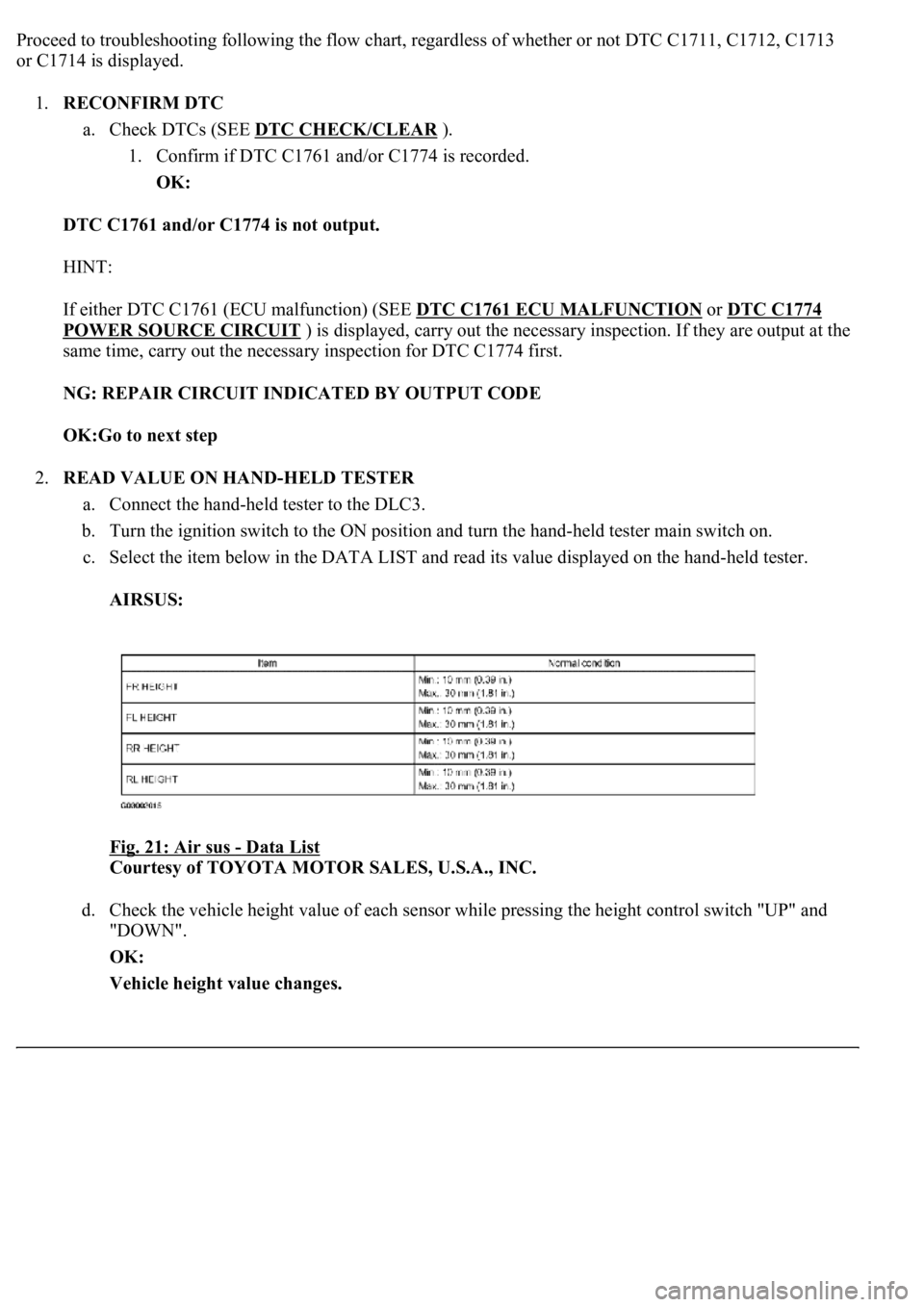
c. Select the item below in the DATA LIST and read its value displayed on the hand-held tester.
AIRSUS:
Fig. 21: Air sus
- Data List
Courtesy of TOYOTA MOTOR SALES, U.S.A., INC.
d. Check the vehicle height value of each sensor while pressing the height control switch "UP" and
"DOWN".
OK:
Vehicle height value changes.
Page 705 of 4500
By converting the digital signals to analog, it can play music and other things. In general, CD
players can play 4.7-inch (12 cm) or 3.2-inch (8 cm) disc.
HINT:
Do not disassemble any part of the CD player.
Do not apply oil to the CD player.
Do not insert anything but a CD into the CD player.
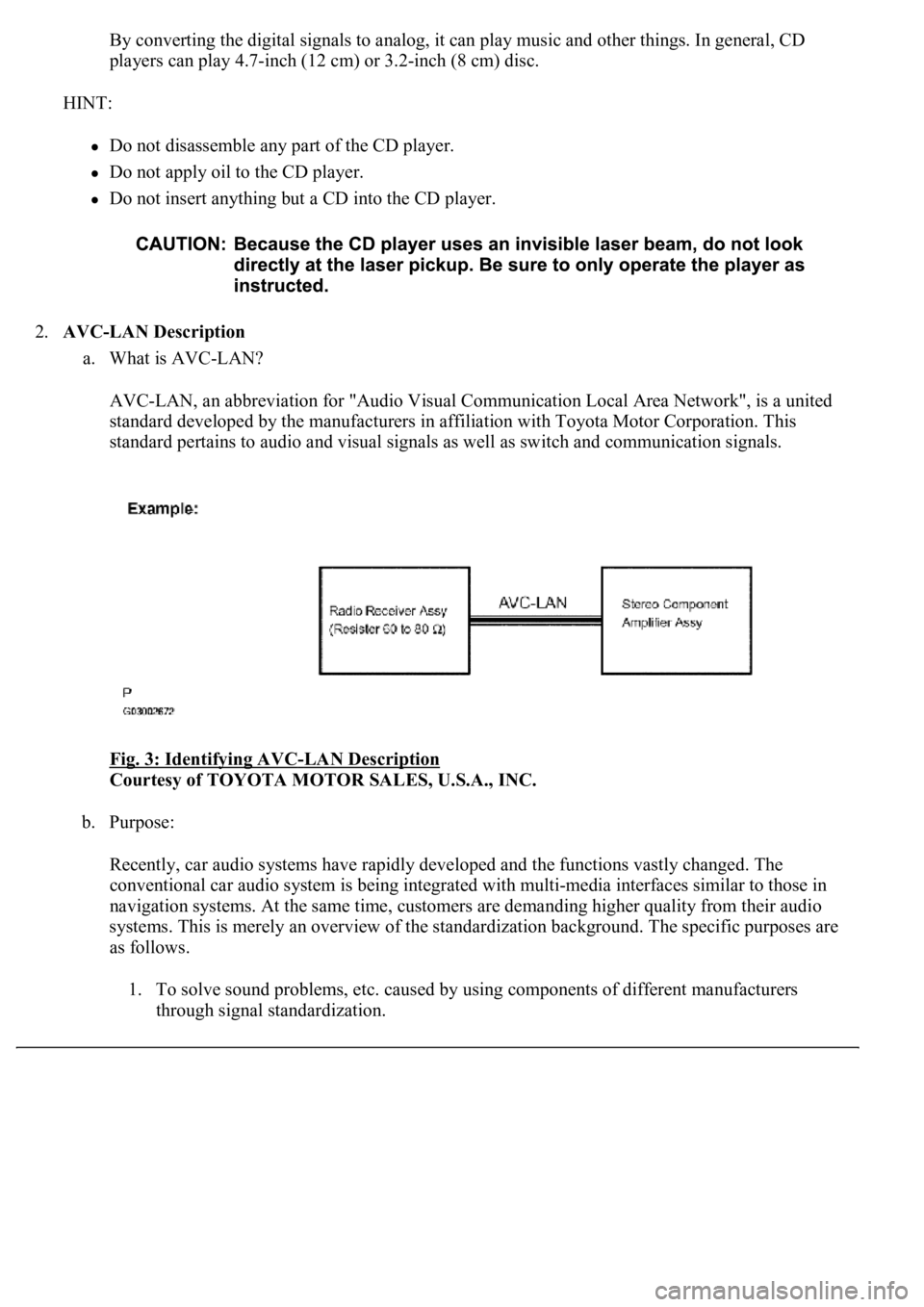
2.AVC-LAN Description
a. What is AVC-LAN?
AVC-LAN, an abbreviation for "Audio Visual Communication Local Area Network", is a united
standard developed by the manufacturers in affiliation with Toyota Motor Corporation. This
standard pertains to audio and visual signals as well as switch and communication signals.
Fig. 3: Identifying AVC
-LAN Description
Courtesy of TOYOTA MOTOR SALES, U.S.A., INC.
b. Purpose:
Recently, car audio systems have rapidly developed and the functions vastly changed. The
conventional car audio system is being integrated with multi-media interfaces similar to those in
navigation systems. At the same time, customers are demanding higher quality from their audio
systems. This is merely an overview of the standardization background. The specific purposes are
as follows.
1. To solve sound problems, etc. caused by using components of different manufacturers
through signal standardization.
Page 1021 of 4500
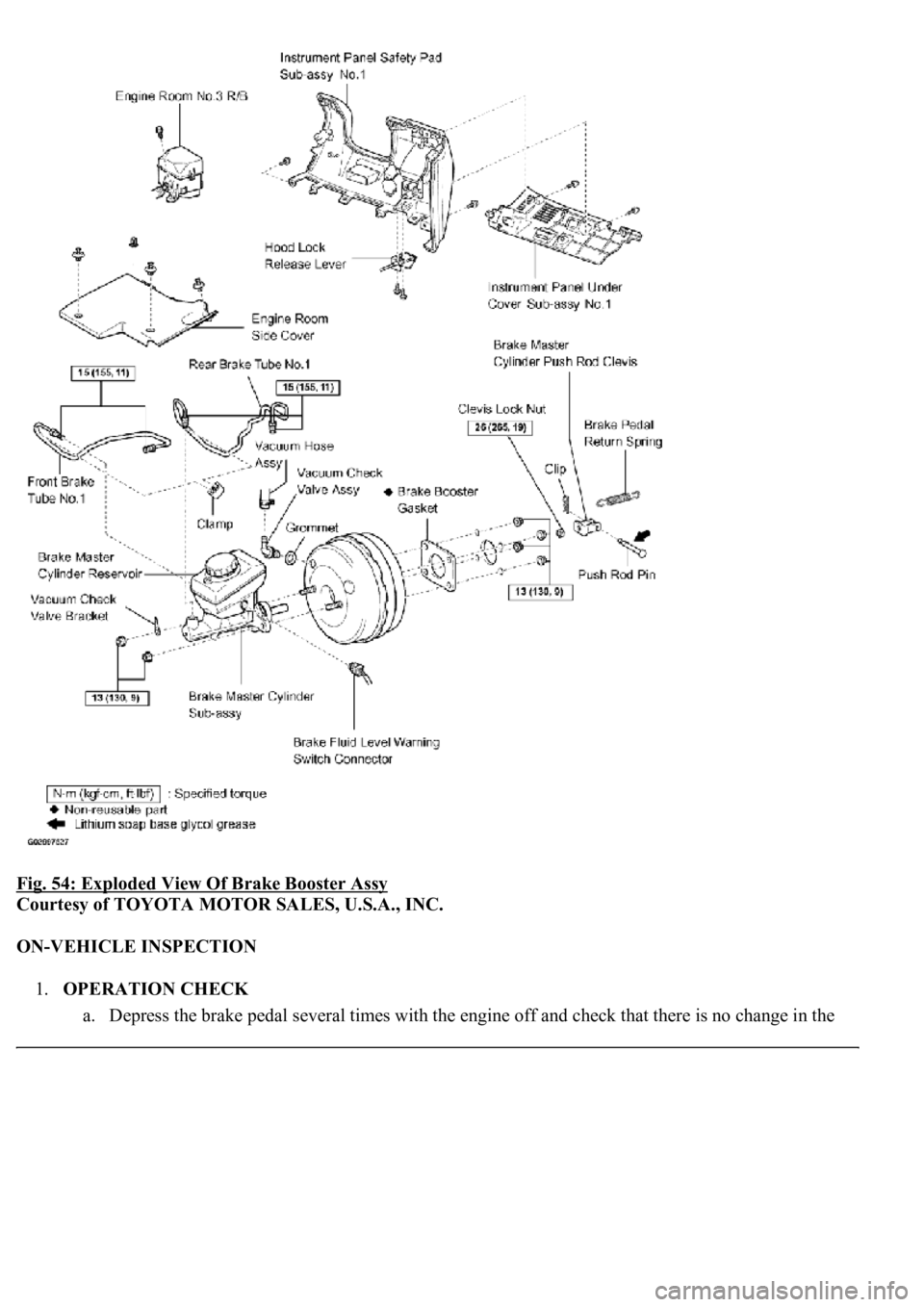
Fig. 54: Exploded View Of Brake Booster Assy
Courtesy of TOYOTA MOTOR SALES, U.S.A., INC.
ON-VEHICLE INSPECTION
1.OPERATION CHECK
a. Depress the brake pedal several times with the en
gine off and check that there is no change in the
Page 1022 of 4500
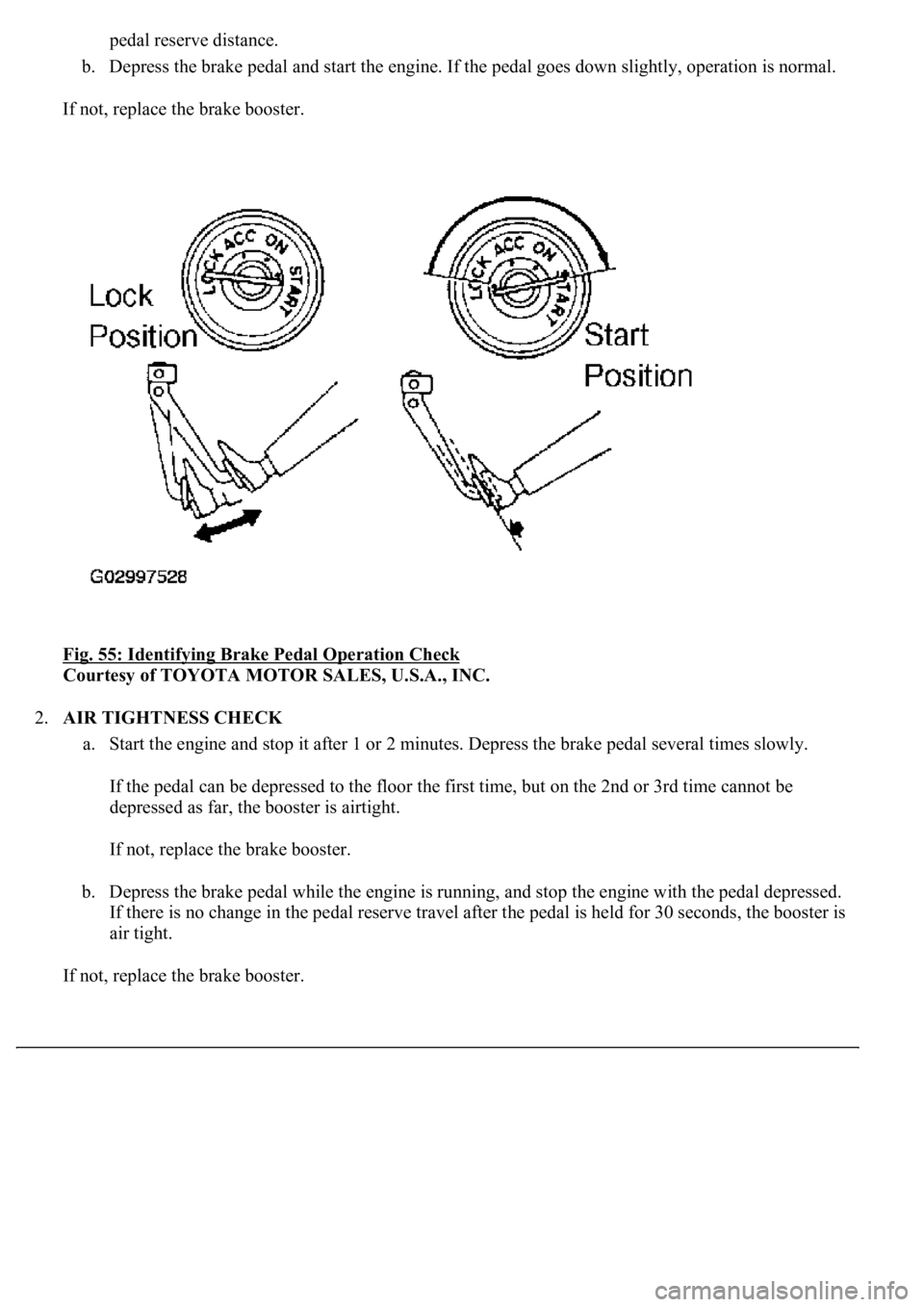
pedal reserve distance.
b. Depress the brake pedal and start the engine. If the pedal goes down slightly, operation is normal.
If not, replace the brake booster.
Fig. 55: Identifying Brake Pedal Operation Check
Courtesy of TOYOTA MOTOR SALES, U.S.A., INC.
2.AIR TIGHTNESS CHECK
a. Start the engine and stop it after 1 or 2 minutes. Depress the brake pedal several times slowly.
If the pedal can be depressed to the floor the first time, but on the 2nd or 3rd time cannot be
depressed as far, the booster is airtight.
If not, replace the brake booster.
b. Depress the brake pedal while the engine is running, and stop the engine with the pedal depressed.
If there is no change in the pedal reserve travel after the pedal is held for 30 seconds, the booster is
air tight.
If not, replace the brake booster.
Page 1518 of 4500

DISPLAY
DISPLAY ITEM DESCRIPTION
Check the circuits for each problem symptom in the order given in the table below, and proceed to the relevant
troubleshooting page.
REV RNG SENS
(Reverse range
sensor)
Fsde2,RFunction to set available sensors when shift
position is R.ALL/Fcrn4,R/Fsde2,R
NON-P/R RNG
SEN (Non P/R range
sensor)
FFunction to set available sensors when shift
position is not P or R.ALL/F,Rcrn2/F
SENSOR COND/N
(Sensor condition N
range)
ONFunction to make sensors available when shift
position is N.OFF/ON
F SIDE DIST SEN
(Front side distance
sensor)
LONG
Function to change maximum distance that front
side sensors are able to detect. (SHORT: 375
mm (14.76 in.), LONG: 500 mm (19.69 in.))
SHORT / LONG
DISPLAY (ITEM)DEFAULTCONTENTSSETTING
APPRCH DISP
OFF (Approach
display off)
OFF
Function to make multi-information display turn
off when vehicle starts to leave obstacles which
are within approximately 250 mm (9.84 in.) of
vehicle.
ON/OFF
DISP TIMEOUT
(Display timeout
time)
INVALID
Function to change time until multi-information
display turns off when detected distance by
sensors does not change.
5s/10s/20s/INVALID
SONAR DISP OFF
(Sonar display off
time)
3s
Function to change time until multi-information
display turns off after sensors stop detecting
obstacle.
1s/2s/3s/4s
Page 1750 of 4500
INSPECTION ).
b. Computer area
The items from "Range Over ***/Range Approx ***" to "BLANK" can be changed with the
DISP1 (switch) of the steering pad switch.
c. Graphic area
Open Door Display:
<0037004b004800030047004c00560053004f0044005c0003004c005600030056004b0052005a00510003005a004b00480051000300440051005c00030052004900030057004b00480003004700520052005500560003004400550048000300520053004800
51005600110003[
HINT:
If the warning item other than the door warning is detected at the same time, the master warning
comes on/blinks in accordance to direction from the displayed item in the warning area.
Park Sonar Display:
See HOW TO PROCEED WITH TROUBLESHOOTING for details on the park sonar display.
The display blinks when the clearance is the closest.
Others:
The items "COMPASS", "OUTSIDE TEMPERATURE" and "BLANK" can be changed with the
DISP2 (switch) of the steering pad switch.
While +B is connected, the mode that was on when the ignition switch was turned off the last time
is displayed.
When the display is changed from radar cruise, it is displayed for only 6 seconds and then returns
to the radar cruise display.
While the radar cruise is on, "RADAR CRUISE READY" is displayed in the warning area if the
park sonar and door open displays are in the graphic area.
Radar Cruise Display:
See HOW TO PROCEED WITH TROUBLESHOOTING for details on the radar cruise
display.
The radar cruise set display is interrupted for only 6 seconds while the park sonar and/or open door
(displays) are on.
<0037004b004800030047004c00560053004f0044005c000300450055004c0051004e00560003005a004b004800510003005a004400550051004c0051004a00030057004b0048000300470055004c00590048005500030057004b0044005700030057004b00
4800030047004c0056005700440051004600480003005a004c[th other vehicles is getting to be too
close. This warning has priority over all.
1.VEHICLE BROUGHT TO WORKSHOP
2.(SEE CUSTOMER PROBLEM ANALYSIS CHECK
)
3.PROBLEM SYMPTOM CONFIRMATION (SEE PROBLEM SYMPTOMS TABLE
)
4.CHECK MULTIPLEX COMMUNICATION SYSTEM (SEE HOW TO PROCEED WITH
TROUBLESHOOTING )
a. Check for DTC outputs