window LEXUS LS430 2003 Factory Repair Manual
[x] Cancel search | Manufacturer: LEXUS, Model Year: 2003, Model line: LS430, Model: LEXUS LS430 2003Pages: 4500, PDF Size: 87.45 MB
Page 241 of 4500
1.STEP MOTORS INITIALIZING FUNCTION
STEP motor initializing procedure (Automatic initializing)
1. When the battery is reconnected and the ignition switch is turned to the ON position for the first
time, the initializing function of the STEP motors is activated. In this case, the "FRONT DEF"
indicator blinks.
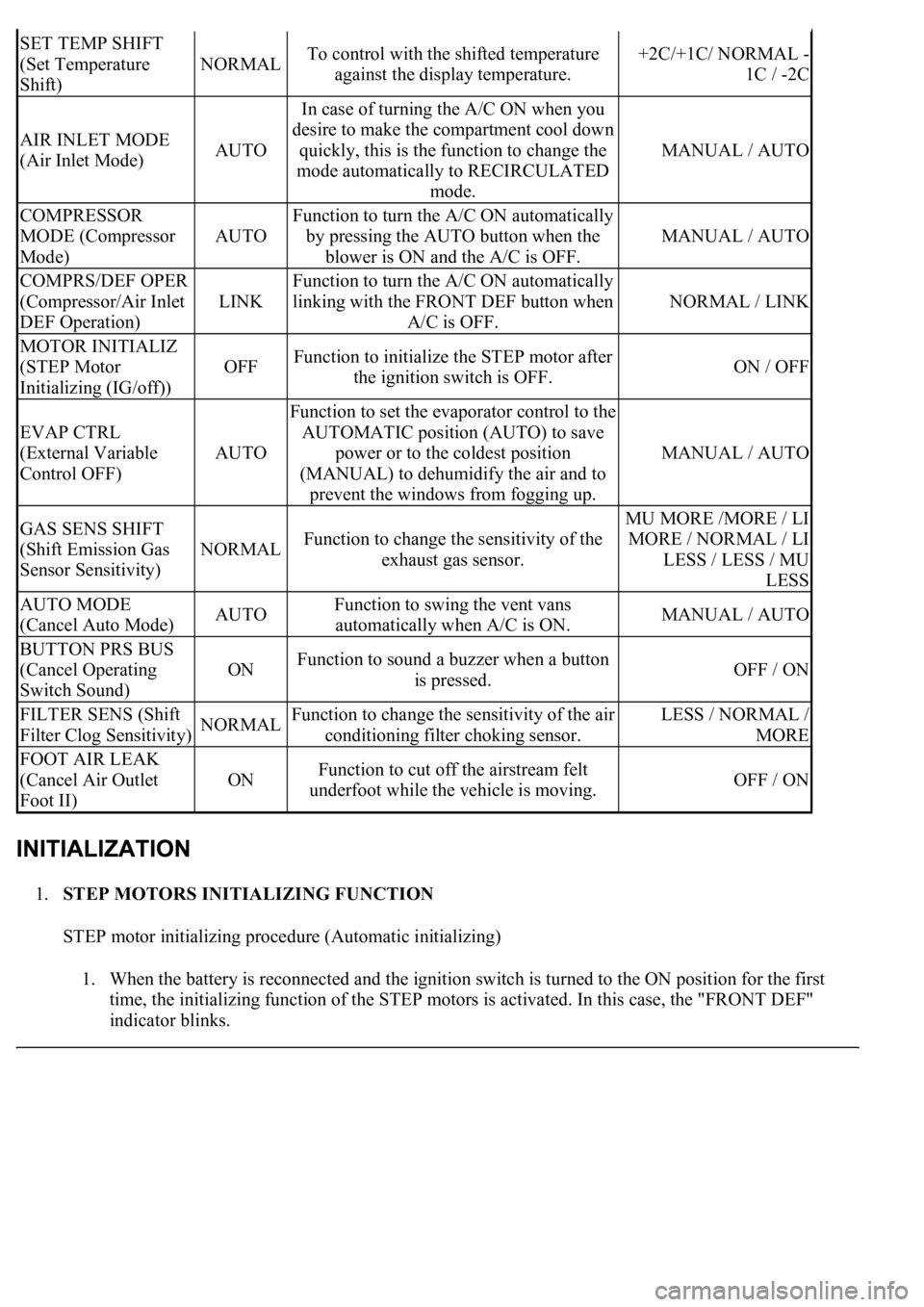
SET TEMP SHIFT
(Set Temperature
Shift)
NORMALTo control with the shifted temperature
against the display temperature.+2C/+1C/ NORMAL -
1C / -2C
AIR INLET MODE
(Air Inlet Mode)AUTO
In case of turning the A/C ON when you
desire to make the compartment cool down
quickly, this is the function to change the
mode automatically to RECIRCULATED
mode.
MANUAL / AUTO
COMPRESSOR
MODE (Compressor
Mode)
AUTO
Function to turn the A/C ON automatically
by pressing the AUTO button when the
blower is ON and the A/C is OFF.
MANUAL / AUTO
COMPRS/DEF OPER
(Compressor/Air Inlet
DEF Operation)
LINK
Function to turn the A/C ON automatically
linking with the FRONT DEF button when
A/C is OFF.
NORMAL / LINK
MOTOR INITIALIZ
(STEP Motor
Initializing (IG/off))
OFFFunction to initialize the STEP motor after
the ignition switch is OFF.ON / OFF
EVAP CTRL
(External Variable
Control OFF)
AUTO
Function to set the evaporator control to the
AUTOMATIC position (AUTO) to save
power or to the coldest position
(MANUAL) to dehumidify the air and to
prevent the windows from fogging up.
MANUAL / AUTO
GAS SENS SHIFT
(Shift Emission Gas
Sensor Sensitivity)
NORMALFunction to change the sensitivity of the
exhaust gas sensor.
MU MORE /MORE / LI
MORE / NORMAL / LI
LESS / LESS / MU
LESS
AUTO MODE
(Cancel Auto Mode)AUTOFunction to swing the vent vans
automatically when A/C is ON.MANUAL / AUTO
BUTTON PRS BUS
(Cancel Operating
Switch Sound)
ONFunction to sound a buzzer when a button
is pressed.OFF / ON
FILTER SENS (Shift
Filter Clog Sensitivity)NORMALFunction to change the sensitivity of the air
conditioning filter choking sensor.LESS / NORMAL /
MORE
FOOT AIR LEAK
(Cancel Air Outlet
Foot II)
ONFunction to cut off the airstream felt
underfoot while the vehicle is moving.OFF / ON
Page 642 of 4500
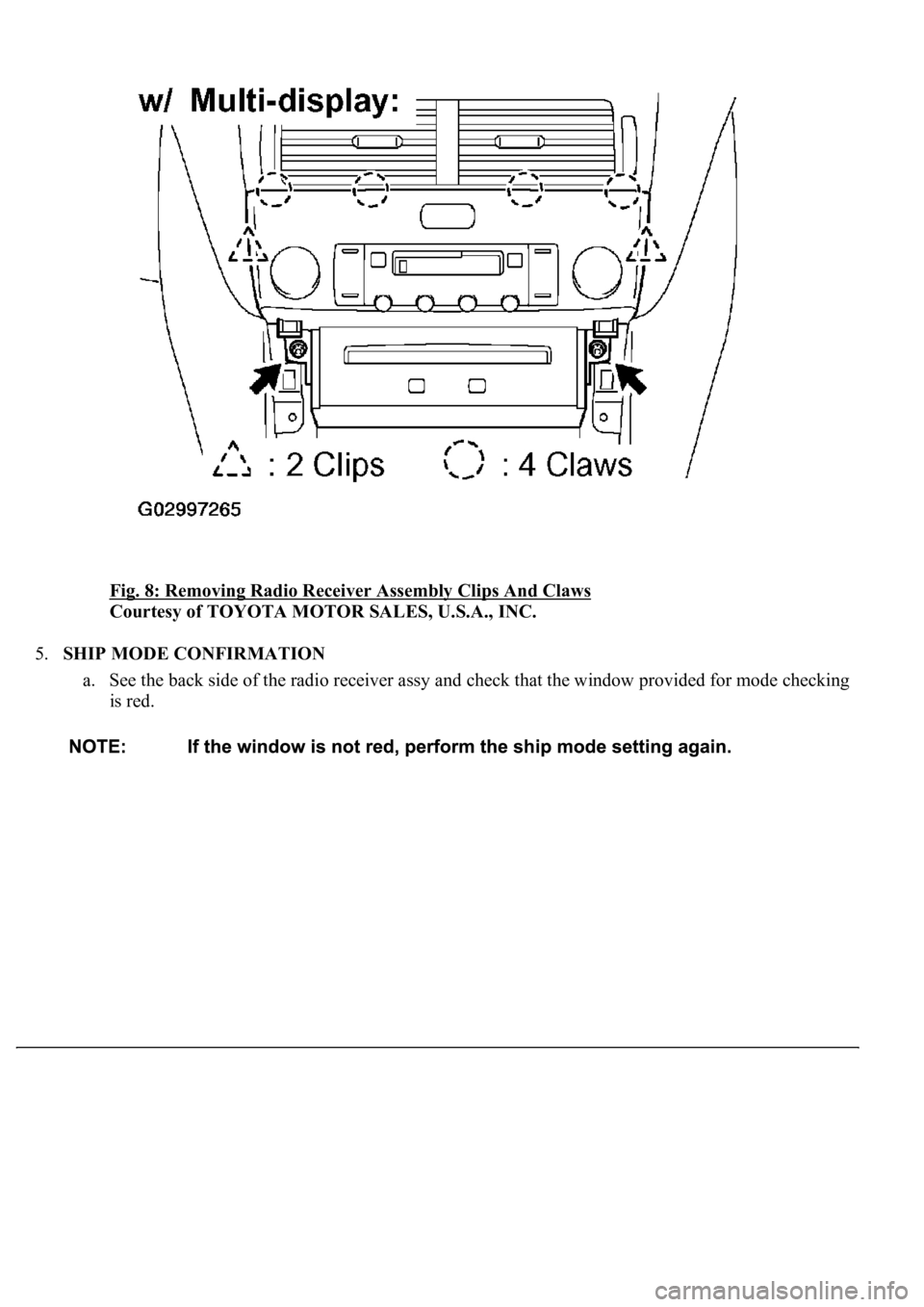
Fig. 8: Removing Radio Receiver Assembly Clips And Claws
Courtesy of TOYOTA MOTOR SALES, U.S.A., INC.
5.SHIP MODE CONFIRMATION
a. See the back side of the radio receiver assy and check that the window provided for mode checking
is red.
Page 668 of 4500
See COMPONENTS .
See LOCATION .
Installation is in the reverse order of removal.
The procedure for the left side is the same as that for the right side. The procedure for right side is shown
below.
1.REMOVE POWER WINDOW REGULATOR MASTER SWITCH ASSY (See OVERHAUL
)
2.REMOVE FRONT DOOR INSIDE HANDLE BEZEL RH (See OVERHAUL
)
3.REMOVE FRONT DOOR TRIM BOARD SUB-ASSY RH (See step 4 on OVERHAUL
)
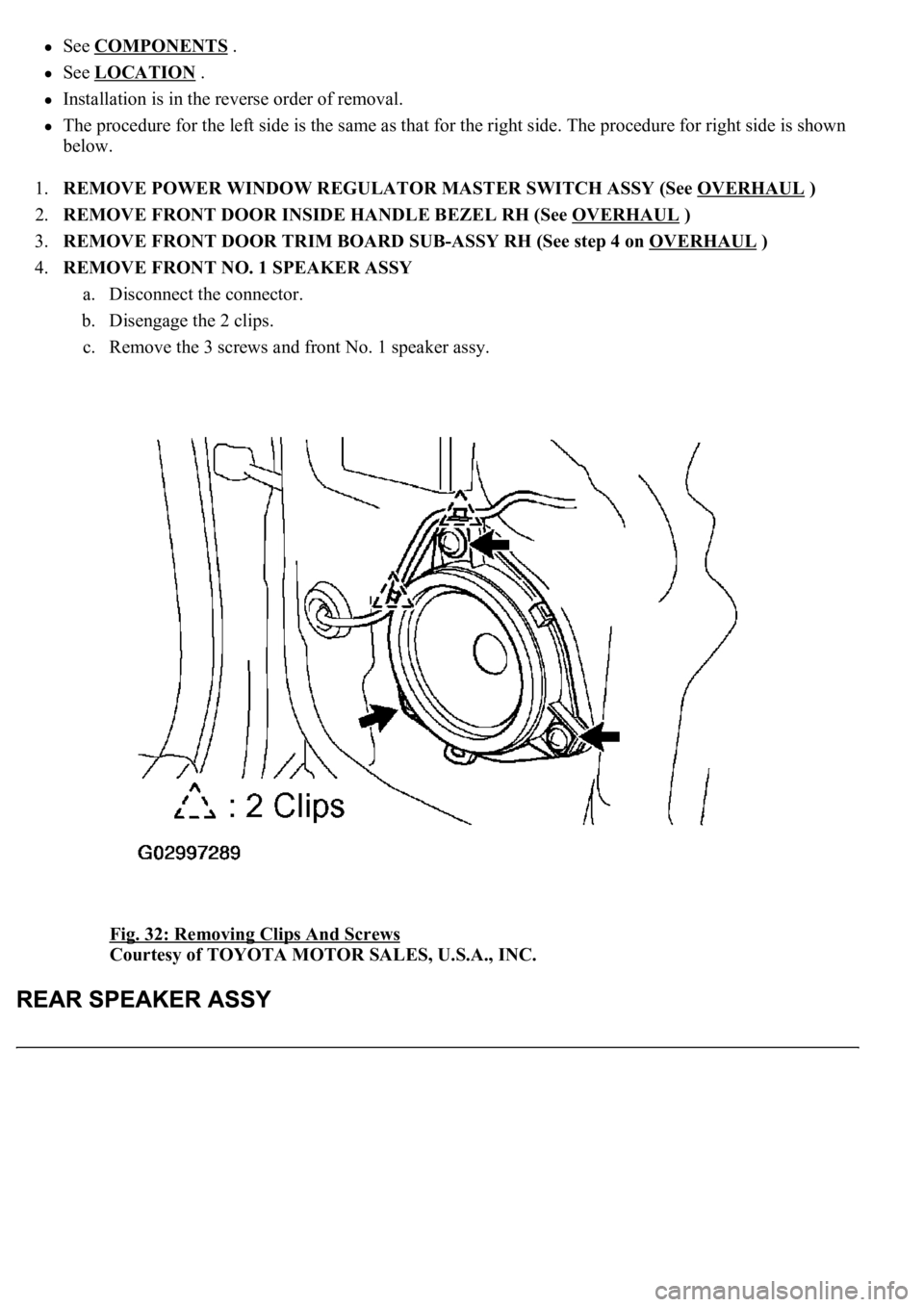
4.REMOVE FRONT NO. 1 SPEAKER ASSY
a. Disconnect the connector.
b. Disengage the 2 clips.
c. Remove the 3 screws and front No. 1 speaker assy.
Fig. 32: Removing Clips And Screws
Courtesy of TOYOTA MOTOR SALES, U.S.A., INC.
Page 669 of 4500
REPLACEMENT
HINT:
See COMPONENTS
See LOCATION
Installation is in the reverse order of removal.
The procedure for the left side is the same as that for the right side. The procedure for right side is shown
below.
1.REMOVE SIDE TRIM BOARD COVER FRONT RH (See OVERHAUL
)
2.REMOVE SIDE REAR CURTAIN ASSY RH (W/ REAR CURTAIN SUB-ASSY) (See step 4 on
OVERHAUL
)
3.REMOVE POWER WINDOW REGULATOR SWITCH ASSY REAR (See step 18 on
OVERHAUL
)
4.REMOVE REAR DOOR INSIDE HANDLE BEZEL RH (See step 3 on OVERHAUL
)
5.REMOVE REAR DOOR TRIM BOARD SUB-ASSY RH (See step 5 on OVERHAUL
)
6.REMOVE REAR SPEAKER ASSY
a. Disconnect the connector.
b. Remove the 3 screws and rear speaker assy.
Page 670 of 4500
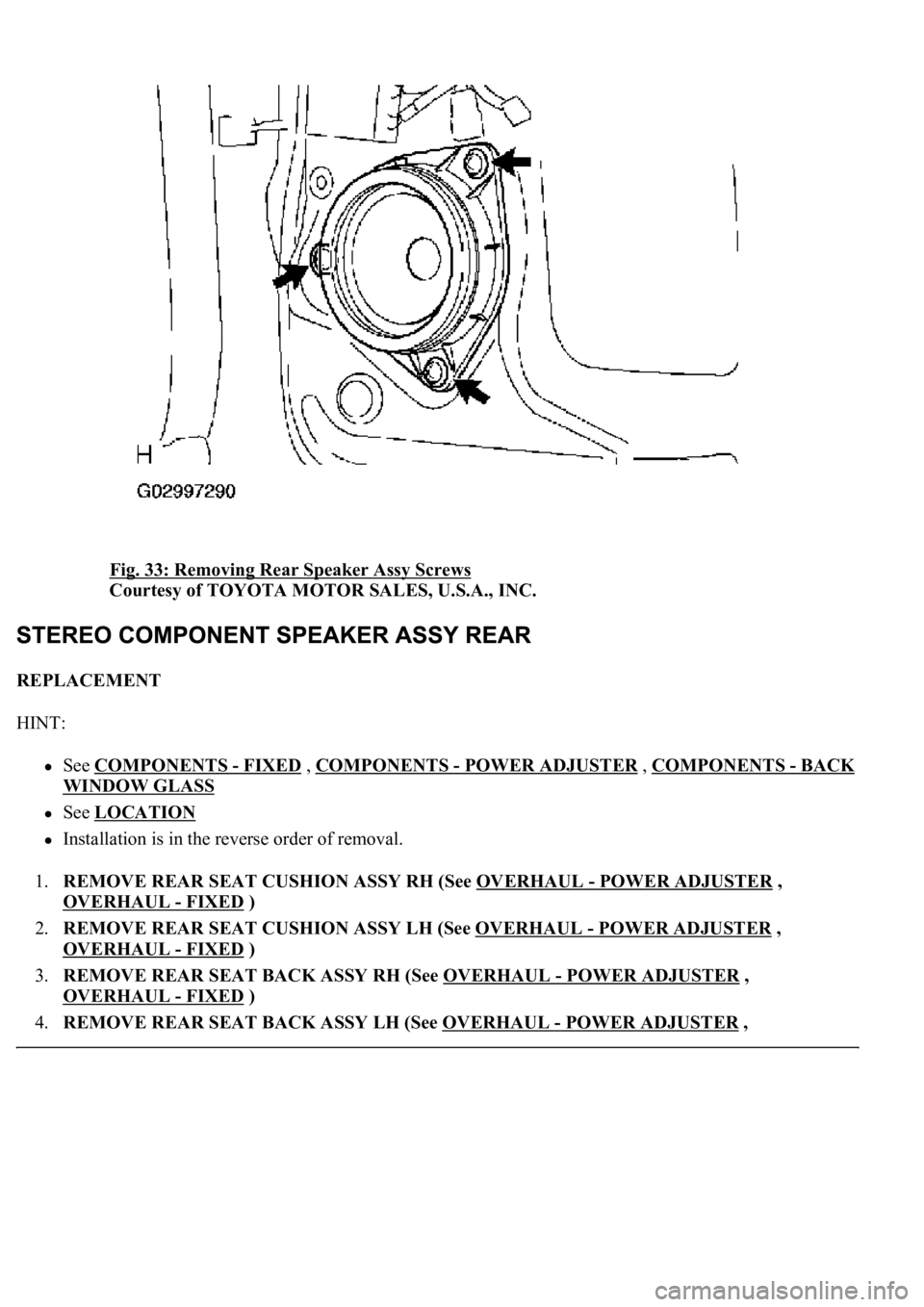
Fig. 33: Removing Rear Speaker Assy Screws
Courtesy of TOYOTA MOTOR SALES, U.S.A., INC.
REPLACEMENT
HINT:
See COMPONENTS - FIXED , COMPONENTS - POWER ADJUSTER , COMPONENTS -BACK
WINDOW GLASS
See LOCATION
Installation is in the reverse order of removal.
1.REMOVE REAR SEAT CUSHION ASSY RH (See OVERHAUL
- POWER ADJUSTER ,
OVERHAUL
- FIXED )
2.REMOVE REAR SEAT CUSHION ASSY LH (See OVERHAUL
- POWER ADJUSTER ,
OVERHAUL
- FIXED )
3.REMOVE REAR SEAT BACK ASSY RH (See OVERHAUL
- POWER ADJUSTER ,
OVERHAUL
- FIXED )
4.REMOVE REAR SEAT BACK ASSY LH (See OVERHAUL
- POWER ADJUSTER ,
Page 673 of 4500
REPLACEMENT
HINT:
See COMPONENTS .
See LOCATION .
Installation is in the reverse order of removal.
The procedure for the left side is the same as that for the right side. The procedure for right side is shown
below.
1.REMOVE SIDE TRIM BOARD COVER FRONT RH (See OVERHAUL
)
2.REMOVE SIDE REAR CURTAIN ASSY RH (W/ REAR CURTAIN SUB-ASSY) (See step 4 on
OVERHAUL
)
3.REMOVE POWER WINDOW REGULATOR SWITCH ASSY REAR (See step 18 on
OVERHAUL
)
4.REMOVE REAR DOOR INSIDE HANDLE BEZEL RH (See OVERHAUL
)
5.REMOVE REAR DOOR TRIM BOARD SUB-ASSY RH (See step 5 on OVERHAUL
)
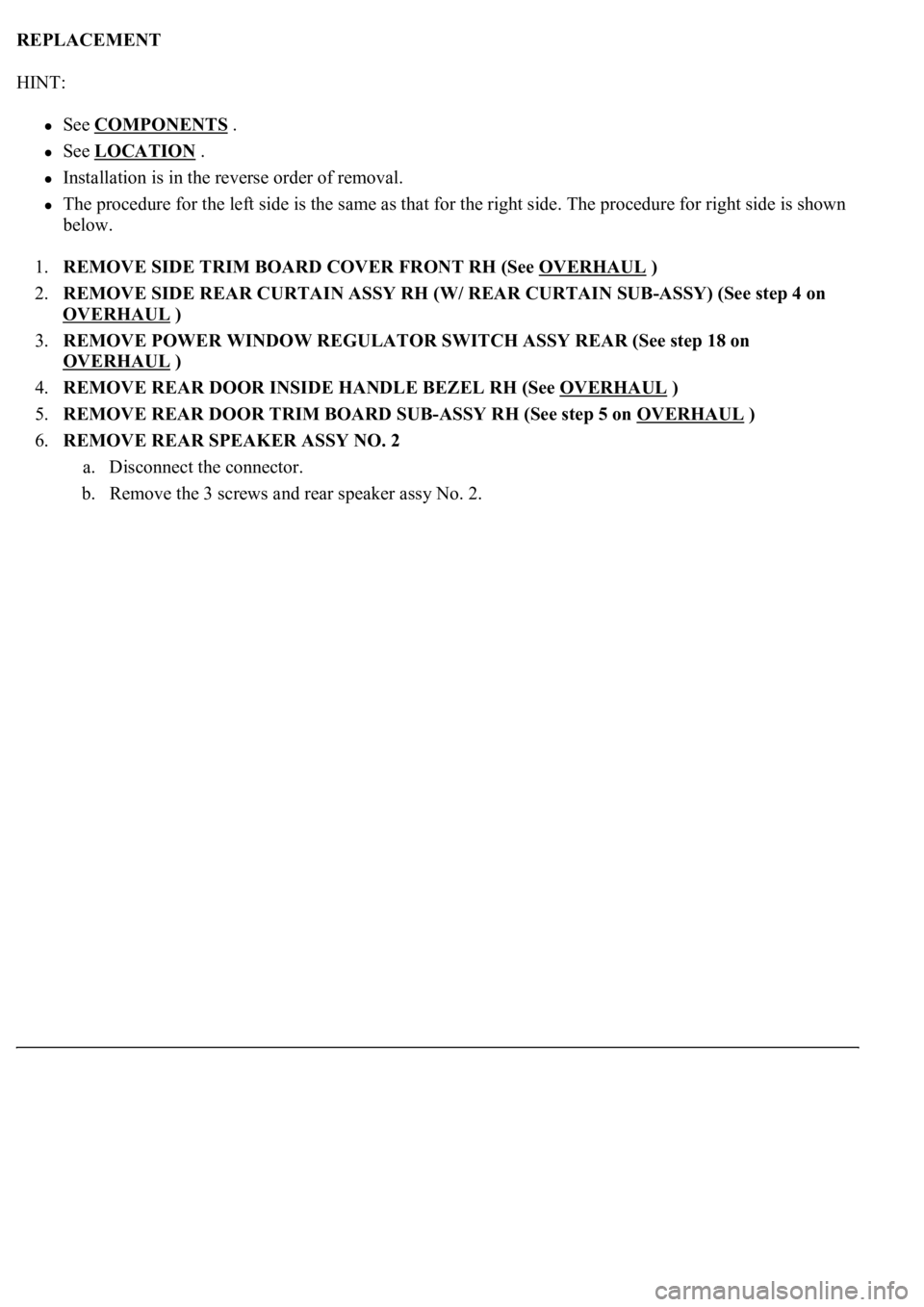
6.REMOVE REAR SPEAKER ASSY NO. 2
a. Disconnect the connector.
b. Remove the 3 screws and rear speaker assy No. 2.
Page 684 of 4500
1.REMOVE SWITCH BASE HOLE COVER (See REPLACEMENT )
2.REMOVE INSTRUMENT PANEL SAFETY PAD SUB-ASSY NO. 1 (See step 19 on
REPLACEMENT
)
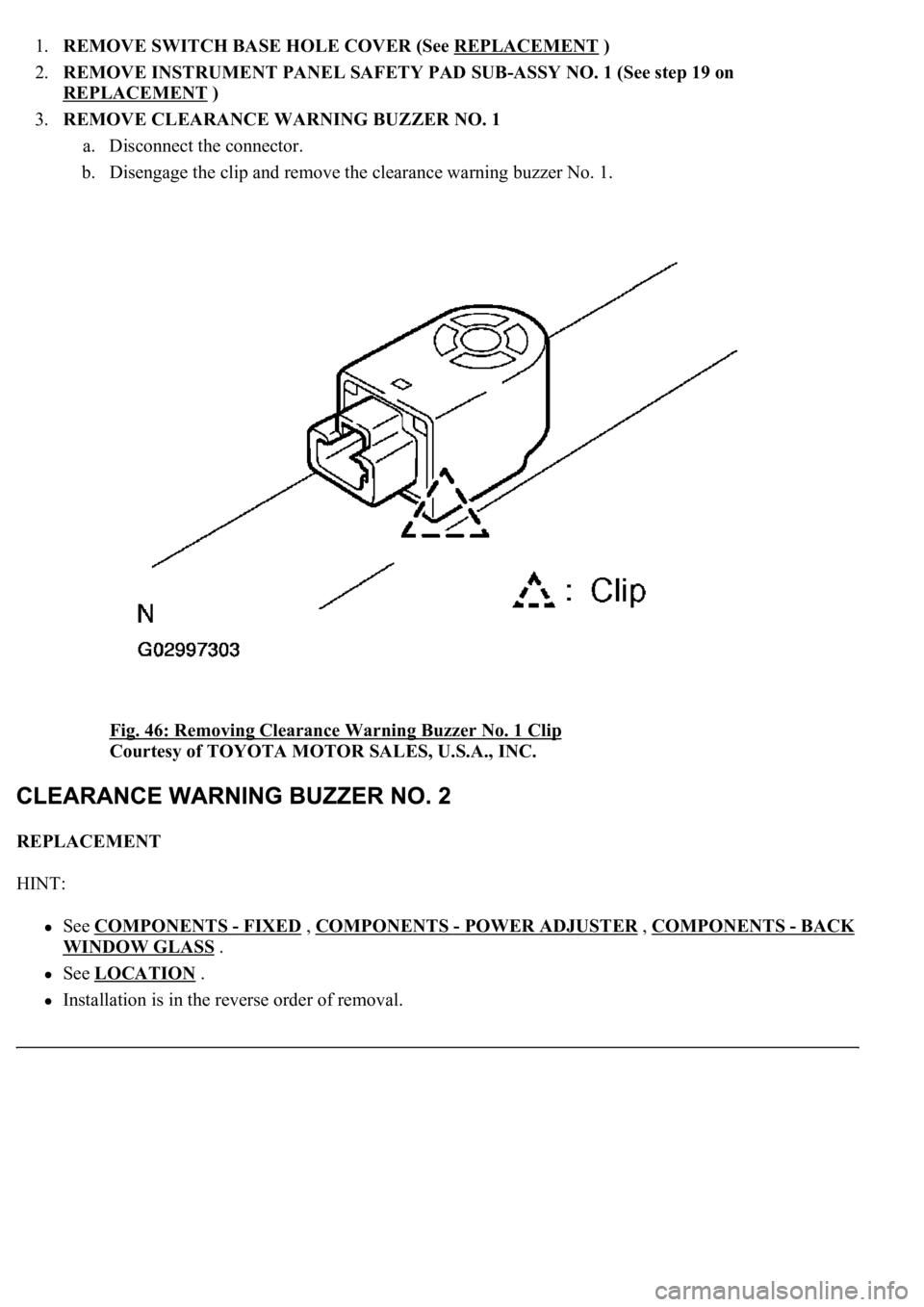
3.REMOVE CLEARANCE WARNING BUZZER NO. 1
a. Disconnect the connector.
b. Disengage the clip and remove the clearance warning buzzer No. 1.
Fig. 46: Removing Clearance Warning Buzzer No. 1 Clip
Courtesy of TOYOTA MOTOR SALES, U.S.A., INC.
REPLACEMENT
HINT:
See COMPONENTS - FIXED , COMPONENTS - POWER ADJUSTER , COMPONENTS -BACK
WINDOW GLASS .
See LOCATION .
Installation is in the reverse order of removal.
Page 749 of 4500
NG: REPLACE THE CD
OK: Go to next step
3.CHECK RADIO RECEIVER ASSY
a. Insert another CD and check if it is ejected.
OK: The disc is ejected.
NG: REPLACE RADIO RECEIVER ASSY (SEE REPLACEMENT
)
OK: NORMAL OPERATION
INSPECTION PROCEDURE
1.CHECK SPEAKERS
a. Check the speaker unit installed condition.
1. Check that each speaker is securely installed.
OK: The problem goes away.
HINT:
The radio has a noise prevention function to reduce noise when listening to the radio. If a loud noise
occurs, check whether the ground at the antenna mounting base and the noise prevention unit are installed
and wired correctly.
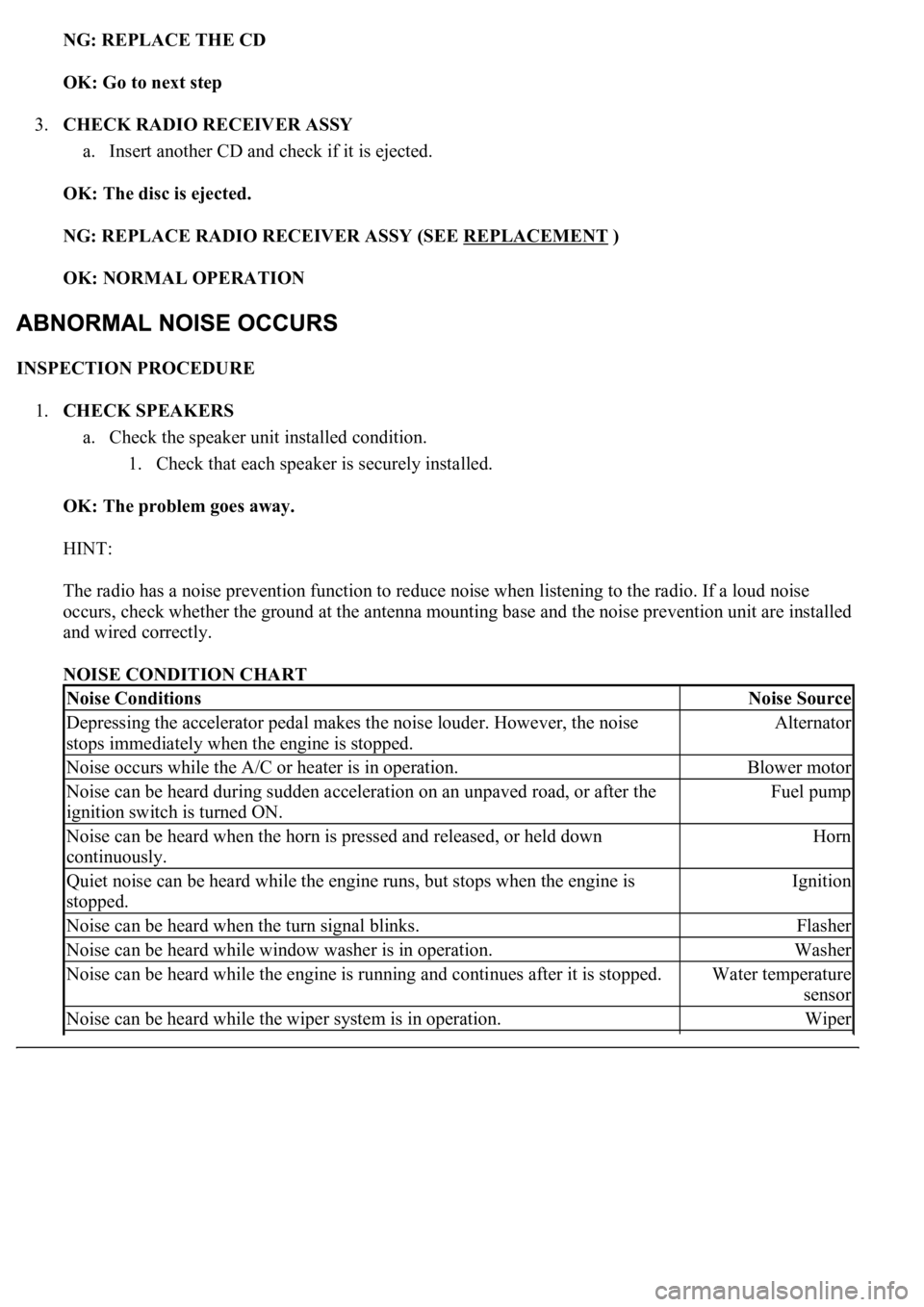
NOISE CONDITION CHART
Noise ConditionsNoise Source
Depressing the accelerator pedal makes the noise louder. However, the noise
stops immediately when the engine is stopped.Alternator
Noise occurs while the A/C or heater is in operation.Blower motor
Noise can be heard during sudden acceleration on an unpaved road, or after the
ignition switch is turned ON.Fuel pump
Noise can be heard when the horn is pressed and released, or held down
continuously.Horn
<00340058004c00480057000300510052004c0056004800030046004400510003004500480003004b00480044005500470003005a004b004c004f004800030057004b0048000300480051004a004c0051004800030055005800510056000f00030045005800
570003005600570052005300560003005a004b004800510003[the engine is
stopped.Ignition
Noise can be heard when the turn signal blinks.Flasher
Noise can be heard while window washer is in operation.Washer
Noise can be heard while the engine is running and continues after it is stopped.Water temperature
sensor
Noise can be heard while the wiper system is in operation.Wiper
Page 1991 of 4500
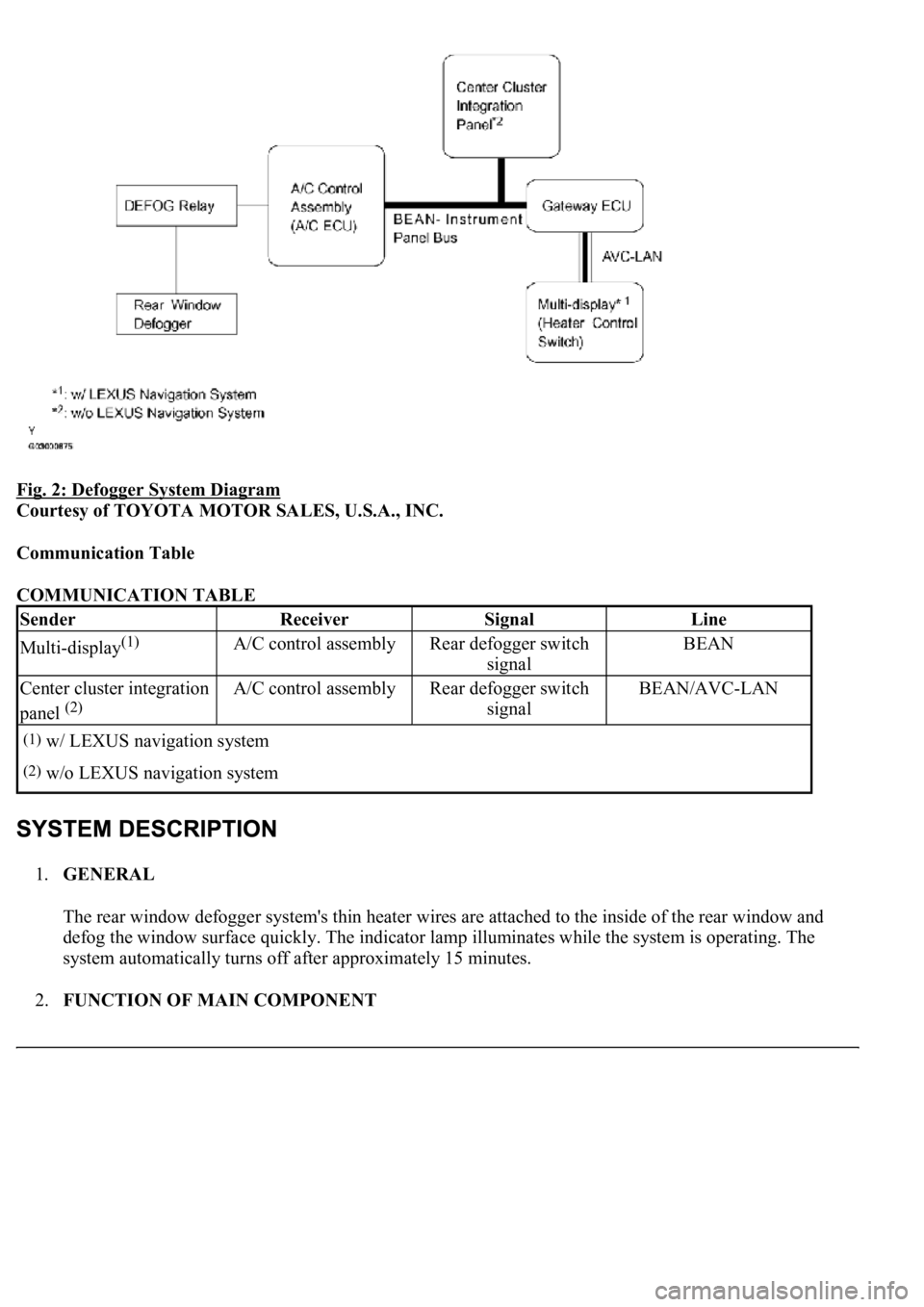
Fig. 2: Defogger System Diagram
Courtesy of TOYOTA MOTOR SALES, U.S.A., INC.
Communication Table
COMMUNICATION TABLE
1.GENERAL
The rear window defogger system's thin heater wires are attached to the inside of the rear window and
defog the window surface quickly. The indicator lamp illuminates while the system is operating. The
system automatically turns off after approximately 15 minutes.
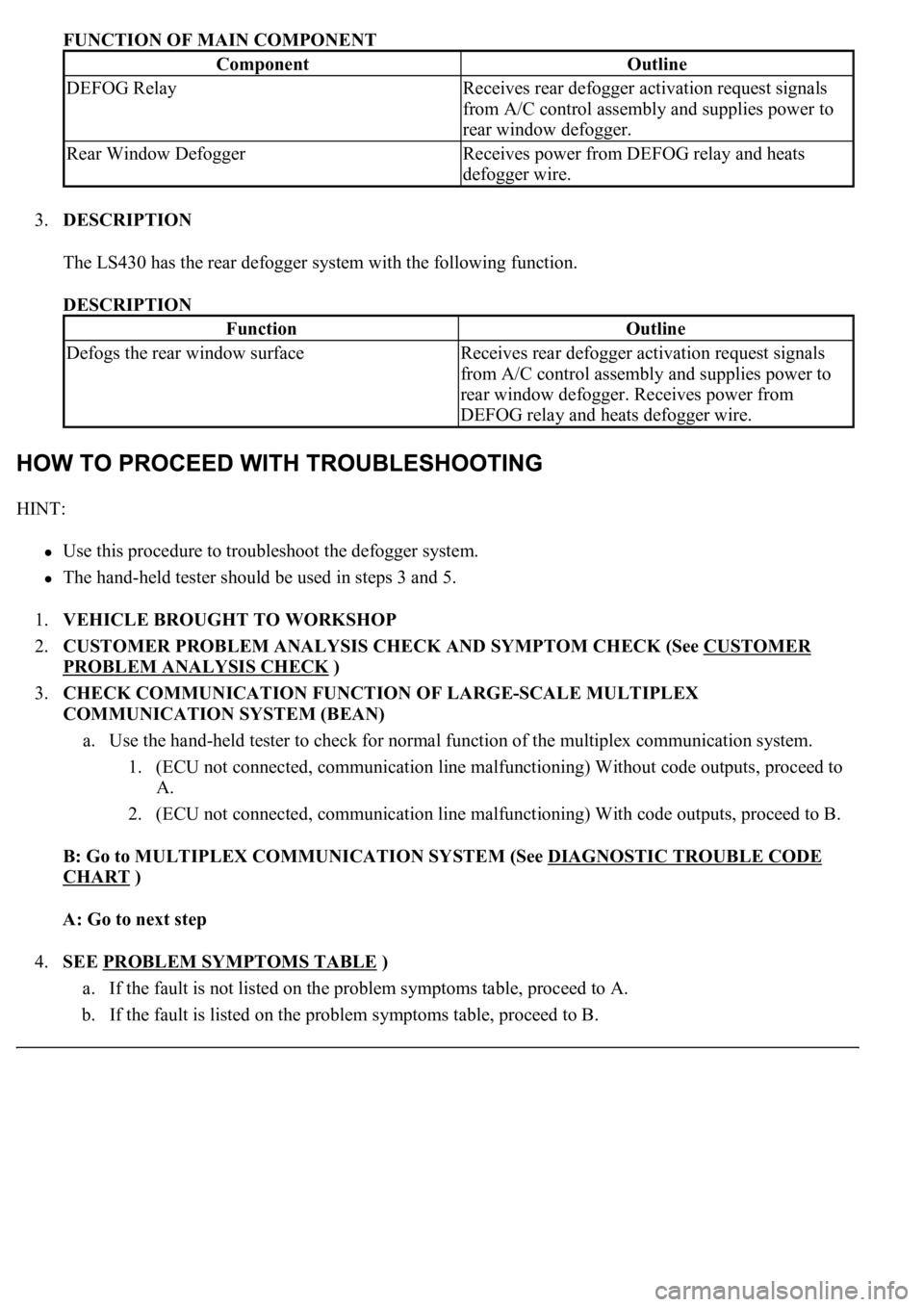
2.FUNCTION OF MAIN COMPONENT
SenderReceiverSignalLine
Multi-display(1)A/C control assemblyRear defogger switch
signalBEAN
Center cluster integration
panel
(2)
A/C control assemblyRear defogger switch
signalBEAN/AVC-LAN
(1)w/ LEXUS navigation system
(2)w/o LEXUS navigation system
Page 1992 of 4500
FUNCTION OF MAIN COMPONENT
3.DESCRIPTION
The LS430 has the rear defogger system with the following function.
DESCRIPTION
HINT:
<00380056004800030057004b004c00560003005300550052004600480047005800550048000300570052000300570055005200580045004f00480056004b00520052005700030057004b004800030047004800490052004a004a0048005500030056005c00
56005700480050001100030003[
<0037004b00480003004b0044005100470010004b0048004f0047000300570048005600570048005500030056004b00520058004f0047000300450048000300580056004800470003004c005100030056005700480053005600030016000300440051004700
030018001100030003[
1.VEHICLE BROUGHT TO WORKSHOP
2.CUSTOMER PROBLEM ANALYSIS CHECK AND SYMPTOM CHECK (See CUSTOMER
PROBLEM ANALYSIS CHECK )
3.CHECK COMMUNICATION FUNCTION OF LARGE-SCALE MULTIPLEX
COMMUNICATION SYSTEM (BEAN)
a. Use the hand-held tester to check for normal function of the multiplex communication system.
1. (ECU not connected, communication line malfunctioning) Without code outputs, proceed to
A.
2. (ECU not connected, communication line malfunctioning) With code outputs, proceed to B.
B: Go to MULTIPLEX COMMUNICATION SYSTEM (See DIAGNOSTIC TROUBLE CODE
CHART )
A: Go to next step
4.SEE PROBLEM SYMPTOMS TABLE
)
a. If the fault is not listed on the problem symptoms table, proceed to A.
b. If the fault is listed on the problem symptoms table, proceed to B.
ComponentOutline
DEFOG RelayReceives rear defogger activation request signals
from A/C control assembly and supplies power to
rear window defogger.
Rear Window DefoggerReceives power from DEFOG relay and heats
defogger wire.
FunctionOutline
Defogs the rear window surfaceReceives rear defogger activation request signals
from A/C control assembly and supplies power to
rear window defogger. Receives power from
DEFOG relay and heats defogger wire.