light LEXUS LS430 2006 User Guide
[x] Cancel search | Manufacturer: LEXUS, Model Year: 2006, Model line: LS430, Model: LEXUS LS430 2006Pages: 419, PDF Size: 11.19 MB
Page 20 of 419
4
1-1. Key information
■When to use the master keys and valet key
●Use the master keys for normal daily use.
●For added security, lock the trunk lid opener and the glove box with a master
key and provide the parking attendant with the valet key.
■Key number plate
Keep the plate in a safe place such as your wallet, not in the vehicle. In the event that
a
key is lost, a new key can be made at your Lexus dealer using the key number
plate.
NOTICE
■To prevent key damage
●Do not bend the keys, expose them to high temperatures by placing them in
direct sunlight, or get them wet.
●Do not expose the keys to electromagneti c materials or any material that blocks
electromagnetic waves.
Page 26 of 419
10
1-2. Opening, closing and locking the doors and trunk
■Maintaining the key
●The average key battery life is 1 to 3 years. If the battery is low, replace with a new
one. ( P.295 )
●If the smart key continually receives stro ng electromagnetic waves over a period
of time, the battery can run down abnormally quickly. Always keep keys at least 3
ft. (1 m) from the following electrical appliances:
•TVs
•Personal computers
• Cellular phone/ cordless phone recharger units
• Electric light stands
• Fluorescent desk lights
■Security feature
If a door is not opened for approximately 3
0 seconds after the vehicle is unlocked,
the anti-theft system automatically locks the vehicle again.
■Certification for the smart access system (for vehicles sold in U.S.A)
This device complies with Part 15 of the FCC Rules. Operation is subject to the fol -
lowing two conditions: (1) This device may not cause harmful interference, and (2) this
de
vice must accept any interference receiv ed, including interference that may cause
undesired operation.
F CC I D : M OZ R O -1 T Y-1
MADE IN JAPAN
FCC ID: NI4B11UE
MADE IN JAPAN
FCC ID: PENASAT1
MADE IN JAPAN
Page 28 of 419

12
1-2. Opening, closing and locking the doors and trunk
Wireless remote control
■2-step unlocking function
When you push the UNLOCK button, the driver's door is unlocked. Pushing the
butto
n again within 3 seco nds unlocks the other doors.
■Sounding an alarm
Push the PANIC button for about 2 to 3 seconds. An alarm sounds to deter any
per
son from trying to break into or damage your vehicle.
If you want to stop the alarm, push any button.
This function does not work when the ignition switch is in the ON position.
■Operating indicator
Doors : A buzzer sounds and the hazard lights flash. (Lock: Once, Unlock: Twice)
Trunk : A buzzer sounds.
The wireless remote control can be used to lock and unlock the vehicle and
the trunk from outside the vehicle.
Locks doors
Push and hold to sound alarm.
Unlocks all doors, and opens
the windows and moon roof
(pu
sh and hold)
Opens the trunk
Ty p e A Ty p e B1
2
3
Page 36 of 419
20
1-2. Opening, closing and locking the doors and trunk
Locking the trunk lid opener feature
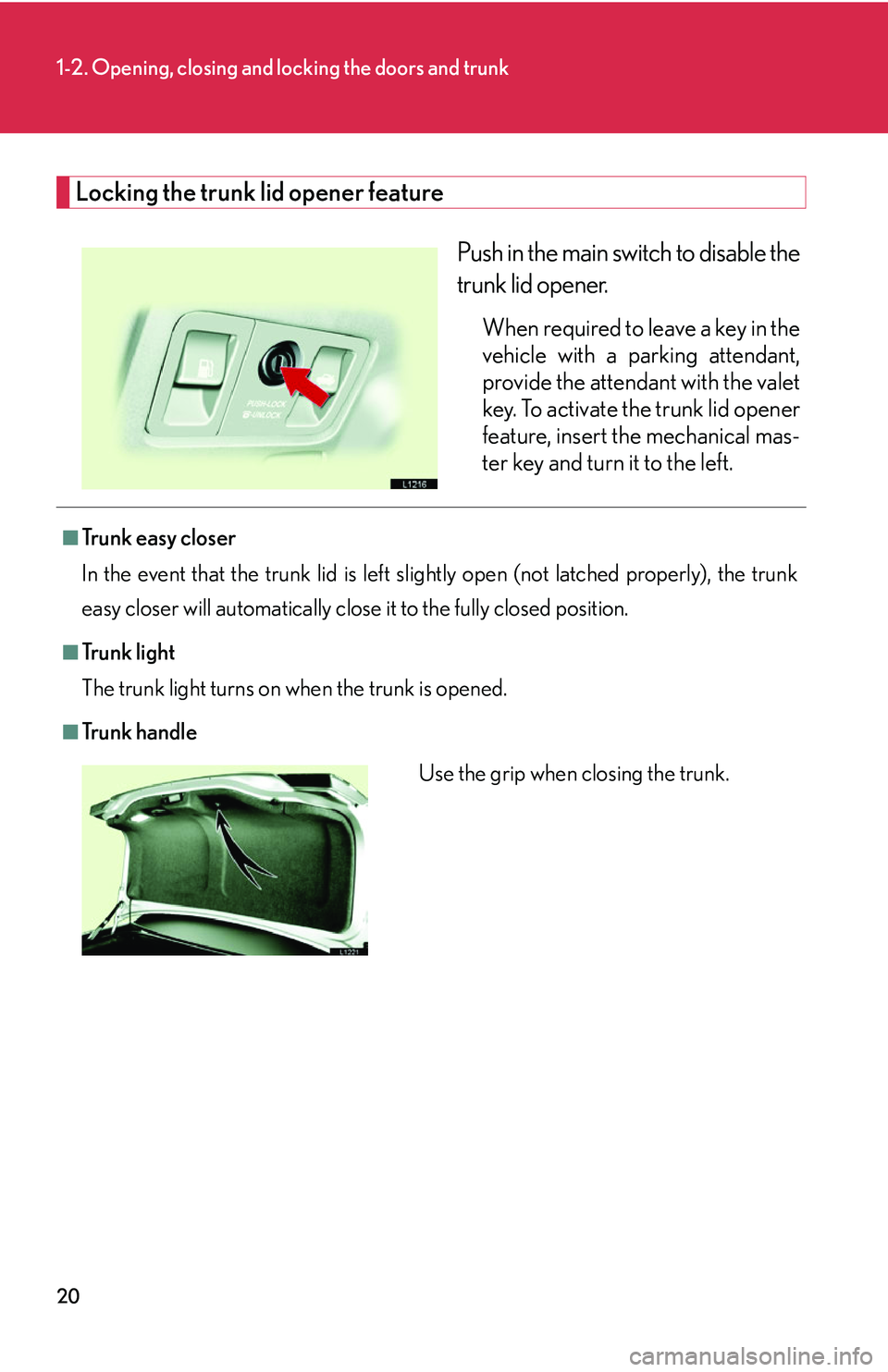
Push in the main switch to disable the
trunk lid opener.
When required to leave a key in the
vehicle with a parking attendant,
provide the attendant with the valet
key. To activate the trunk lid opener
feature, insert the mechanical mas-
ter key and turn it to the left.
■Tr u n k e a s y c l o s e r
In the event that the trunk lid is left slig h
tly open (not latched properly), the trunk
easy closer will automatically close it to the fully closed position.
■Tr u n k l i g h t
The trunk light turns on when the trunk is opened.
■Tr u n k h a n d l e
Use the grip when closing the trunk.
Page 58 of 419
42
1-3. Adjustable components
Auto anti-glare mirror
■To prevent sensor error
CAUTION
■Caution while driving
Do not adjust the position of the mirror while driving.
Doing so may lead to mishandling of the v
ehicle and an accident, or resulting in
death or serious injury.
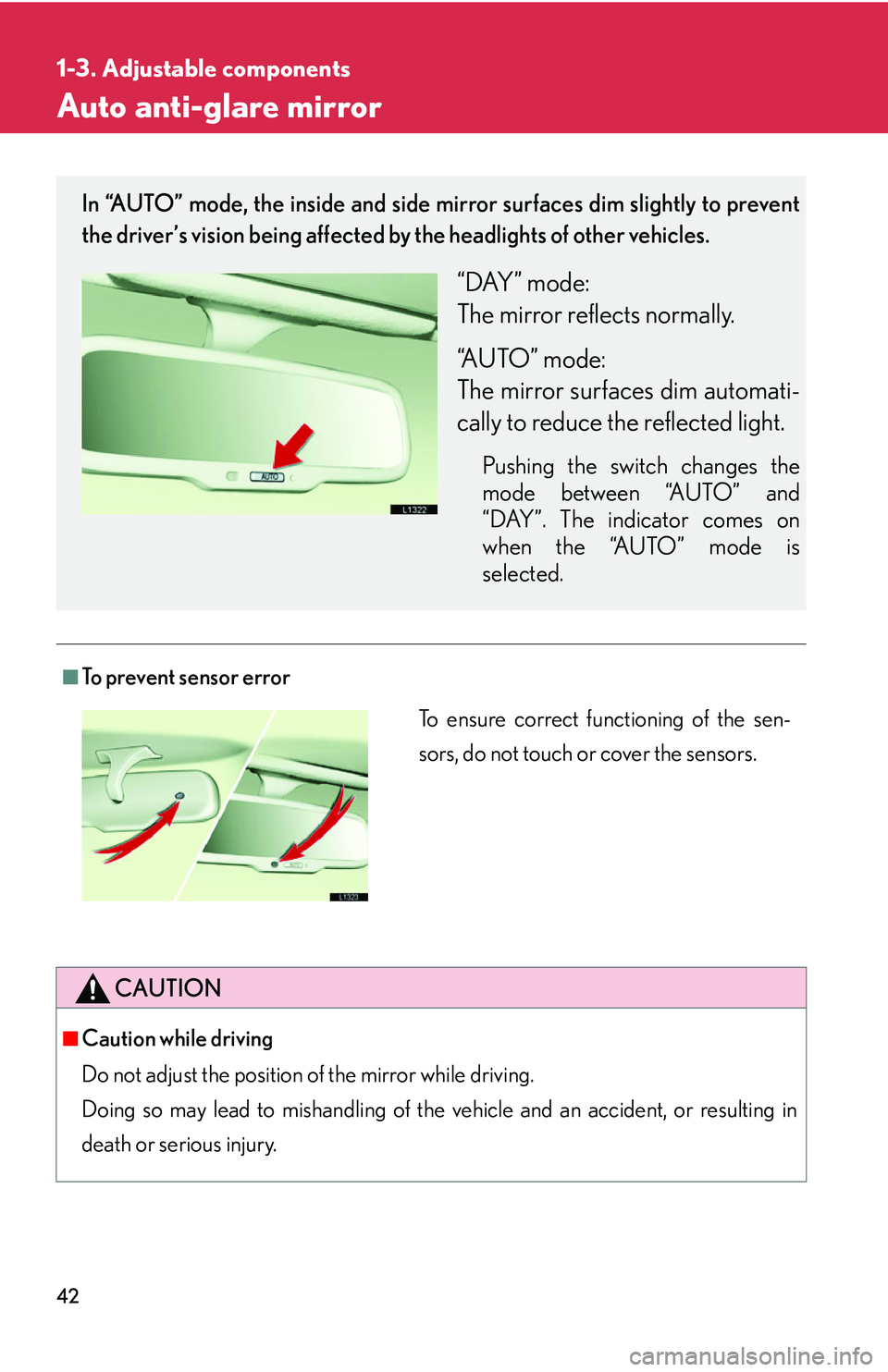
In “AUTO” mode, the inside and side mirror surfaces dim slightly to prevent
the driver’s vision being affected by the headlights of other vehicles.
“DAY” mode:
The mirror reflects normally.
“AUTO” mode:
The mirror surfaces dim automati-
cally to reduce the reflected light.
Pushing the switch changes the
mode between “AUTO” and
“DAY”. The indicator comes on
when the “AUTO” mode is
selected.
To ensure correct functioning of the sen-
sors, do not touch or cover the sensors.
Page 59 of 419
43
1
1-3. Adjustable components
Before driving
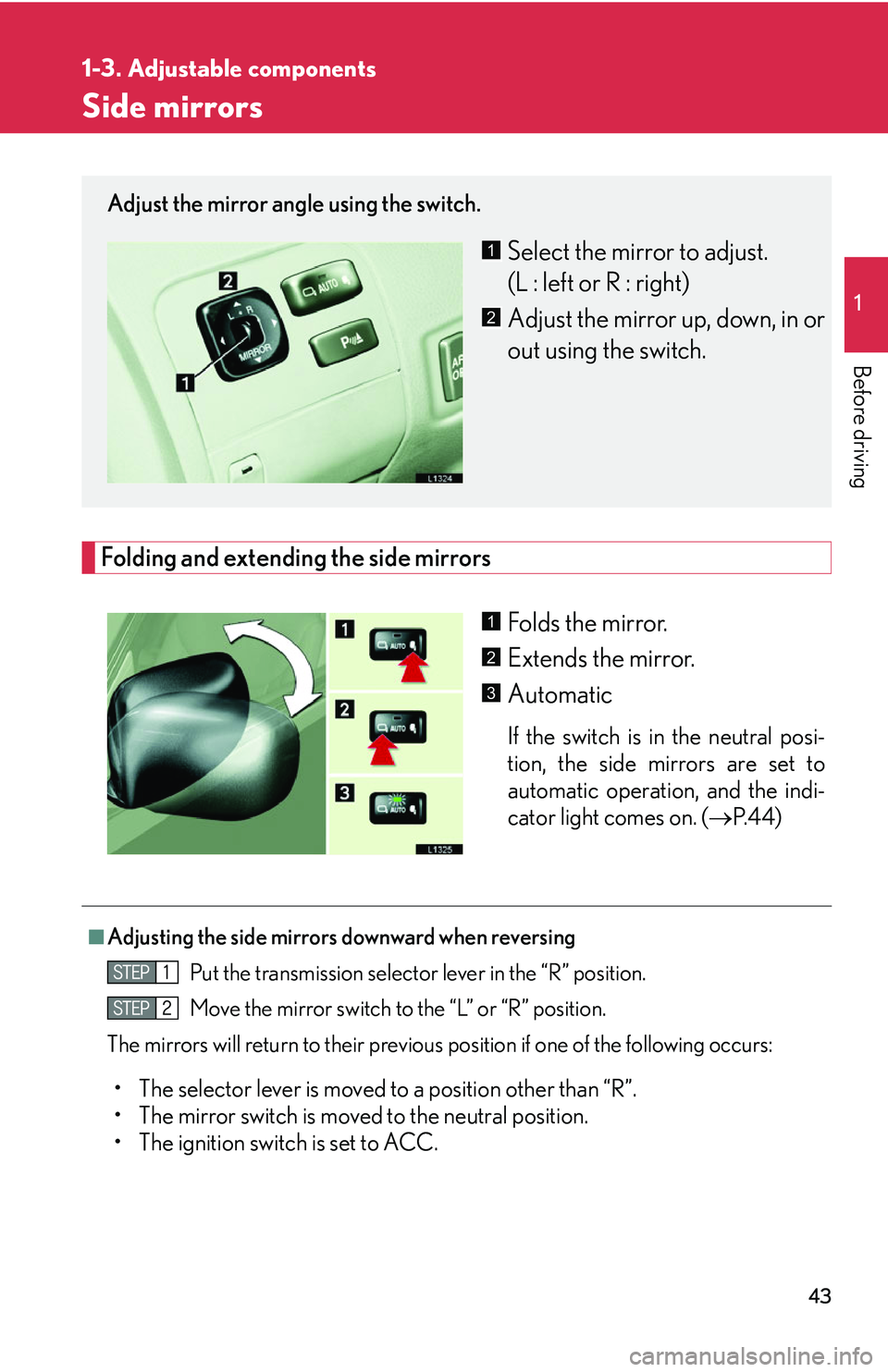
Side mirrors
Folding and extending the side mirrors
Folds the mirror.
Extends the mirror.
Automatic
If the switch is in the neutral posi-
tion, the side mirrors are set to
au
tomatic operation, and the indi -
cator light comes on. ( P.44 )
Adjust the mirror angle using the switch.
Select the mirror to adjust.
(L : left or R : right)
Adjust the mirror up, down, in or
out using the switch.1
2
1
2
3
■Adjusting the side mirrors downward when reversing
Put the transmission selector lever in the “R” position.
Move the mirror switch to the “L” or “R” position.
The mirrors will return to their previous pos
ition if one of the following occurs:
• The selector lever is moved to a position other than “R”.
• The mirror switch is moved to the neutral position.
• The ignition switch is set to ACC.
Page 60 of 419
44
1-3. Adjustable components
■Side mirror operating conditions
The ignition switch must b
e turned to ACC or ON.
■When the mirrors are fogged up
Turn on the mirror heaters to defog the mirrors. ( P.
1 7 0 )
■Ignition switch integrated automatic operation
If the AUTO indicator light is on, the mirrors are in automatic operation mode.
• If the ignition switch is in the ACC or ON position, the rear view mirrors are
automatically extended and folded, if the ignition switch is turned to the
OFF position.
CAUTION
■When driving the vehicle
Observe the following precautions while driving.
Failing to do so may result in losing control of the vehicle and cause an accident,
r
esulting in serious injury or even death.
• Do not adjust the mirror while driving.
• Do not drive with the mirrors folded backward.
• Both the driver and passenger side rear view mirrors must be extended and pr
operly adjusted before driving.
■When the mirror heaters are operating
Do not touch the mirror surface, as the mirror surface becomes hot.
NOTICE
■If the mirror gets icy
Do not scrape the mirror face. Use a spray de-icer to de-ice the mirror.
Page 62 of 419
46
1-4. Opening and closing the windows and moon roof
■Power window operating conditions
The ignition switch must b
e turned to ON.
■Integrated door lock window operation
The power windows can be opened and closed using the key or wireless remote
co
ntrol. ( P.12 , P. 15)
This feature can be deactivated. ( P.
3 8 4 )
■Retained accessory power operation
The power windows can be operated for approximately 45 seconds after the
engine ha
s been stopped. They cannot, however, be operated if the driver’s door is
opened.
■Jam protection function
If an object becomes caught between th e
window and the window frame, window
travel is stopped and the window is opened slightly.
■Initializing the power windows
After the battery is reconnected, replaced or recharged, you will need to initialize
the po
wer windows; otherwise the jam prot ection function will not operate cor-
rectly.
To initialize the power windows:
Lower each window halfway using the power window switches on the
door for that window.
Close each window and continue hold ing the
switch for a second, after
the window has fully closed.
Make sure the windows open and close correctly. If not, see your Lexus dealer.
Page 64 of 419
48
1-4. Opening and closing the windows and moon roof
Moon roof
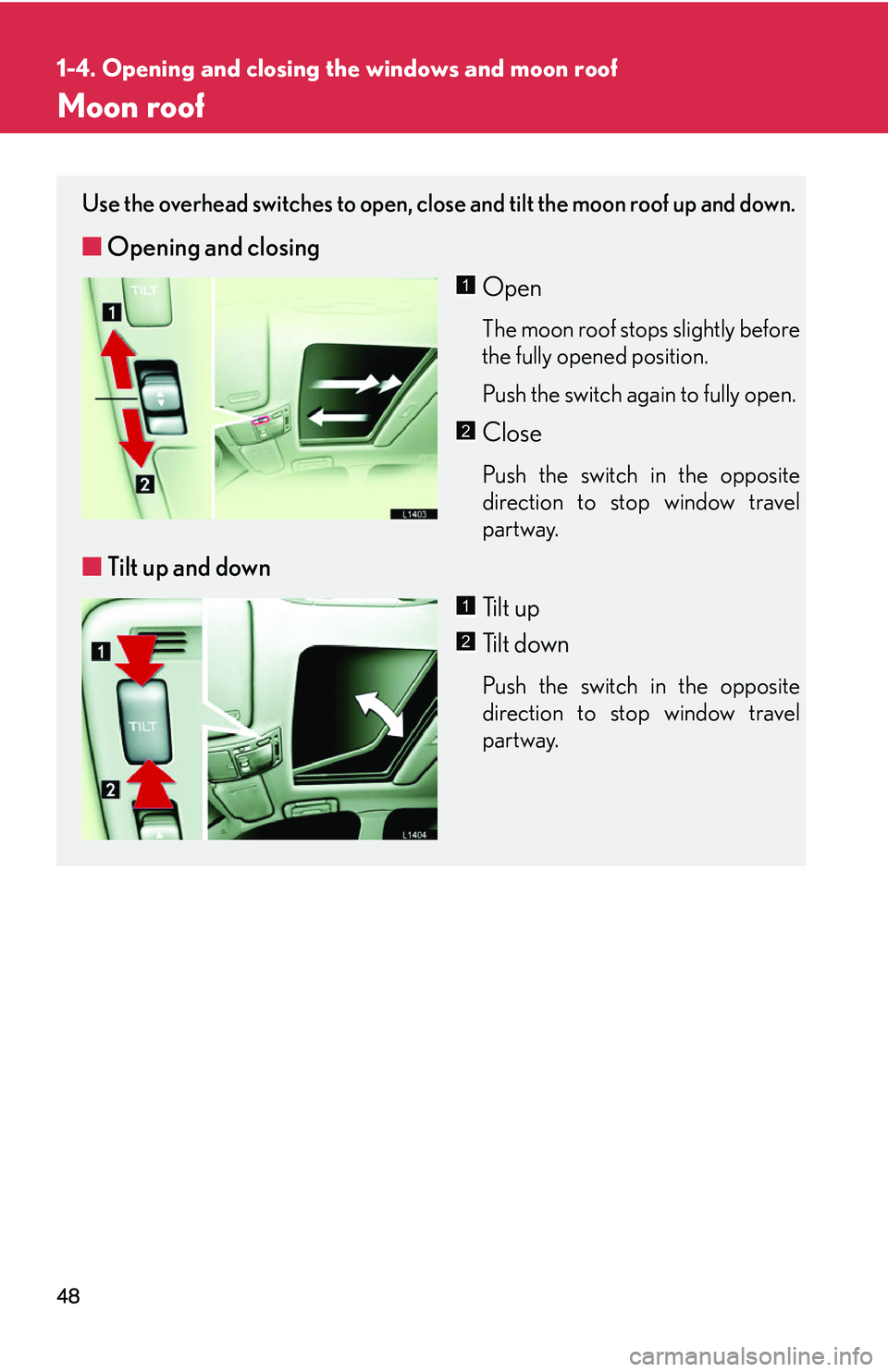
Use the overhead switches to open, close and tilt the moon roof up and down.
■Opening and closing
Open
The moon roof stops slightly before
the fully opened position.
Push the switch again to fully open.
Close
Push the switch in the opposite
direction to stop window travel
partway.
■Tilt up and down
Ti l t u p
Tilt down
Push the switch in the opposite
direction to stop window travel
partway.
1
2
1
2
Page 65 of 419
49
1-4. Opening and closing the windows and moon roof
1
Before driving
■Moon roof operating conditions
The ignition switch must b
e turned to ON.
■Integrated door lock moon roof operation
The moon roof can be opened and closed, using the key or wireless remote control.
( P.
12 , P. 15)
■Retained accessory power operation
The moon roof can be operated for approximately 45 seconds after the engine has
b
een turned off. It cannot, however, be operated if the driver’s door is opened.
■Jam protection function
If an object is detected between the m oon
roof and the frame during automatic
close or automatic tilt down, travel is stopped and the moon roof opens slightly.
■Initializing the moon roof
After the battery is reconnected, replaced or recharged, you will need to initialize
the moon r
oof, otherwise the jam protecti on function will not operate correctly.
To initialize the moon roof, push and hold the “TILT” switch until the moon roof tilts
al
l the way up and then automatically returns slightly.
Make sure the moon roof opens and closes correctly. If not, see your Lexus dealer.
■Opening and closing the sunshade
The sunshade can be opened and closed manually; however, it will be opened if the
m
oon roof is opened.
■Sunshade
The sunshade can be manually opened and closed.