light LEXUS LS430 2006 Service Manual
[x] Cancel search | Manufacturer: LEXUS, Model Year: 2006, Model line: LS430, Model: LEXUS LS430 2006Pages: 419, PDF Size: 11.19 MB
Page 129 of 419
113
2-3. Operating the headlight and windshield wipers
2
When driving
Fog light switch
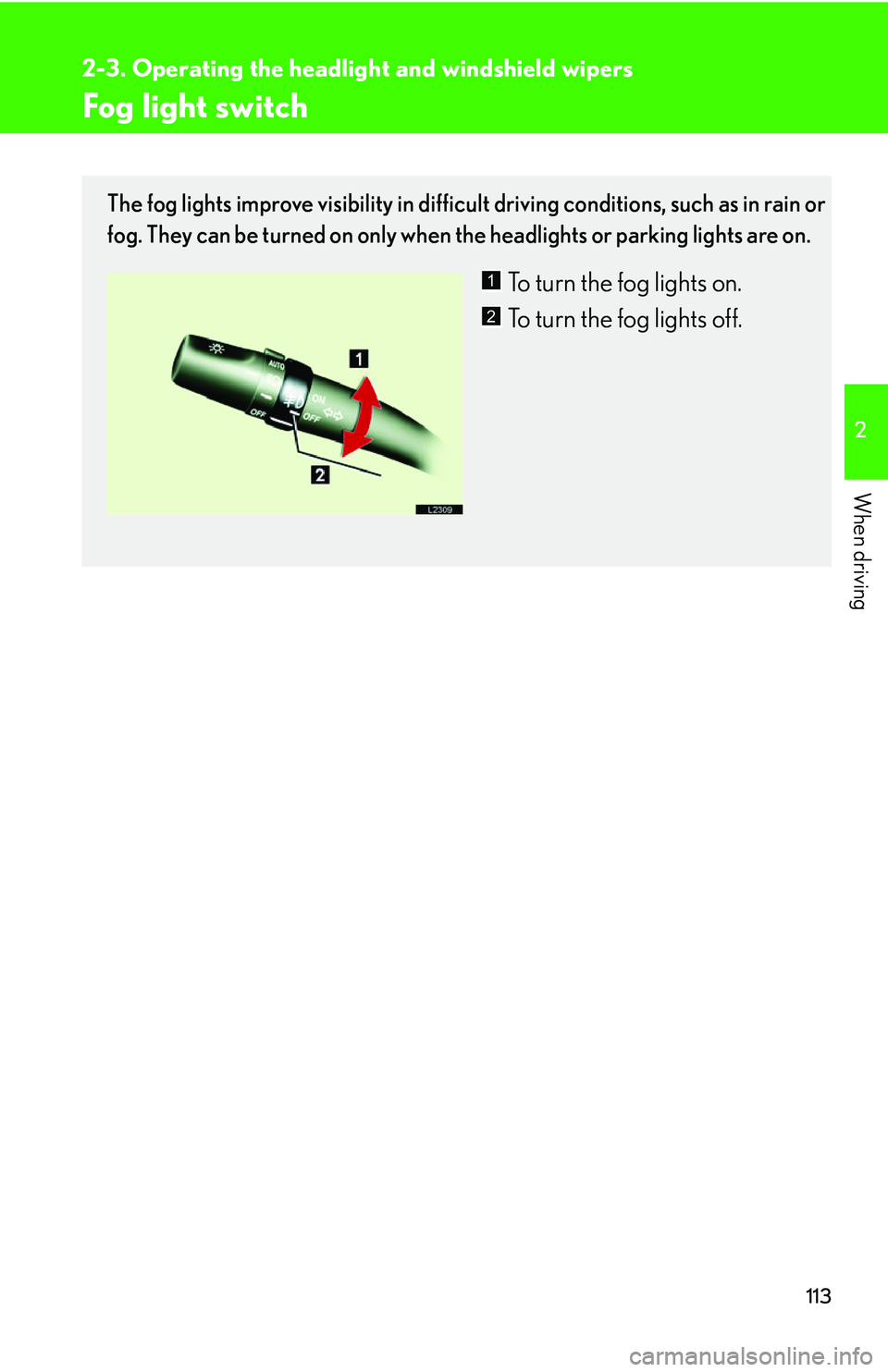
The fog lights improve visibility in difficult driving conditions, such as in rain or
fog. They can be turned on only when the headlights or parking lights are on.
To turn the fog lights on.
To turn the fog lights off.1
2
Page 130 of 419
114
2-3. Operating the headlight and windshield wipers
Windshield wipers and washer
■Windshield wiper and washer operating conditions
The ignition switch must be turn
ed to ON position.
■If no windshield washer fluid sprays
Check that there is washer fluid
in the windshield washer fluid reservoir, and that the
washer nozzles are not blocked.
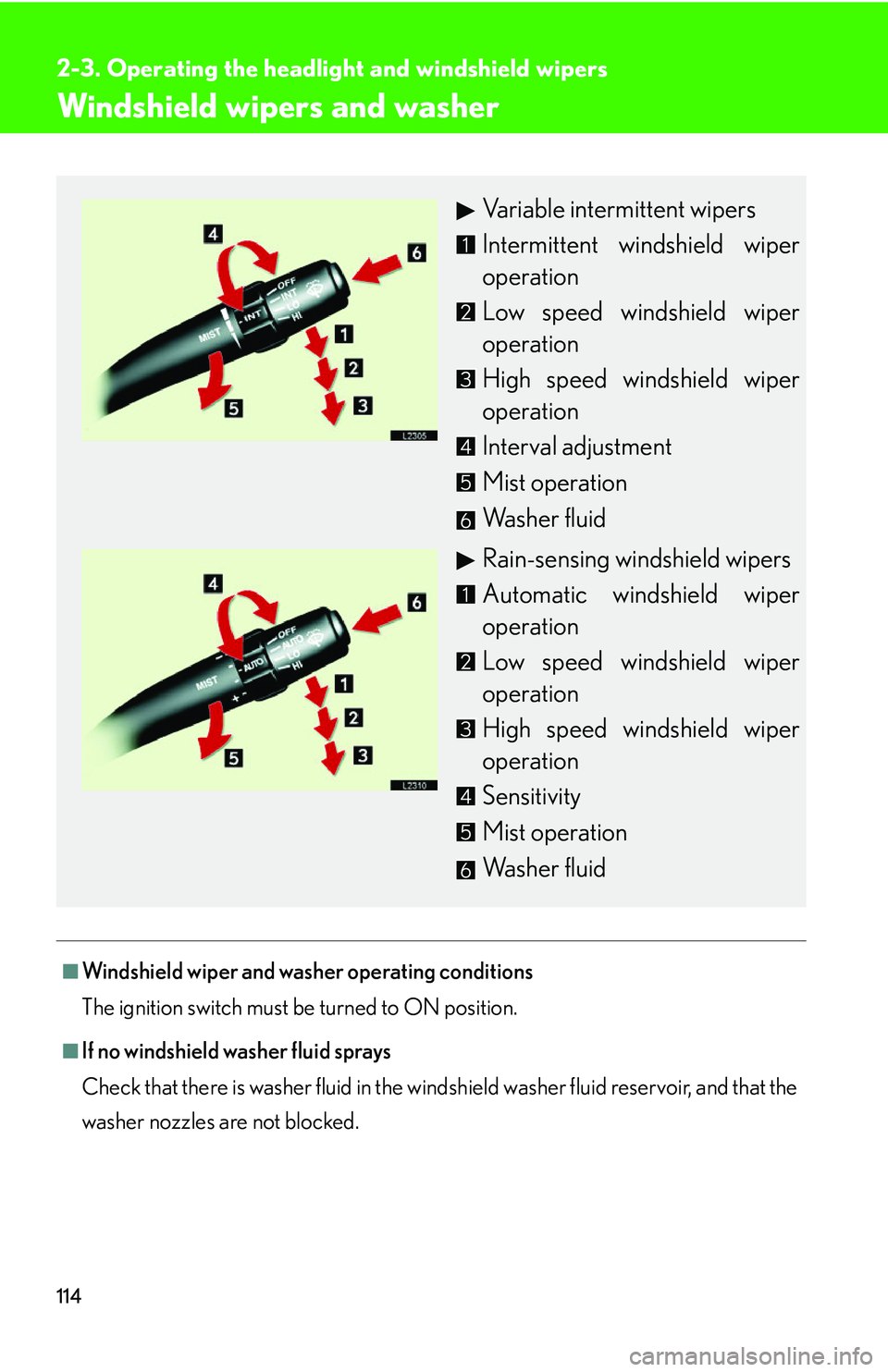
Variable intermittent wipers
Intermittent windshield wiper
operation
Low speed windshield wiper
operation
High speed windshield wiper
operation
Interval adjustment
Mist operation
Washer fluid
Rain-sensing windshield wipers
Automatic windshield wiper
operation
Low speed windshield wiper
operation
High speed windshield wiper
operation
Sensitivity
Mist operation
Washer fluid
Page 131 of 419
115
2-3. Operating the headlight and windshield wipers
2
When driving
■Intermittent operation features
The time interval between sweeps decreases as vehicle speed increases. When
v
ehicle speed exceeds 12 mph (20 km/h) with the interval adjusted in the lowest
position, the time interval is set to the minimum 1.5 seconds.
If you stop the vehicle with the wiper switch in the “LO” position, the wipers auto -
matically change to intermittent operation.* This will not happen if the interval
adjuster is set
to the lowest position.
*This feature can be deactivated. ( P. 3 8 4 )
■Windshield wiper features
●When the washer button is pressed with the wipers OFF, the wipers will make 3
sweeps, then pause, then a final sweep to completely clear the windshield*. The
length of the pause will depend on the vehicle speed. The last sweep will not
happen if the vehicle is traveling above 106 mph (170 km/h).
*The last single sweep can be deactivated. ( P. 3 8 4 )
●When the windshield washer switch is pushed with the headlights on, the head -
light cleaners automatically operate once.
●The rear window and outside rear view mirror defoggers automatically turn on
when you operate the wipers.
Page 132 of 419
116
2-3. Operating the headlight and windshield wipers
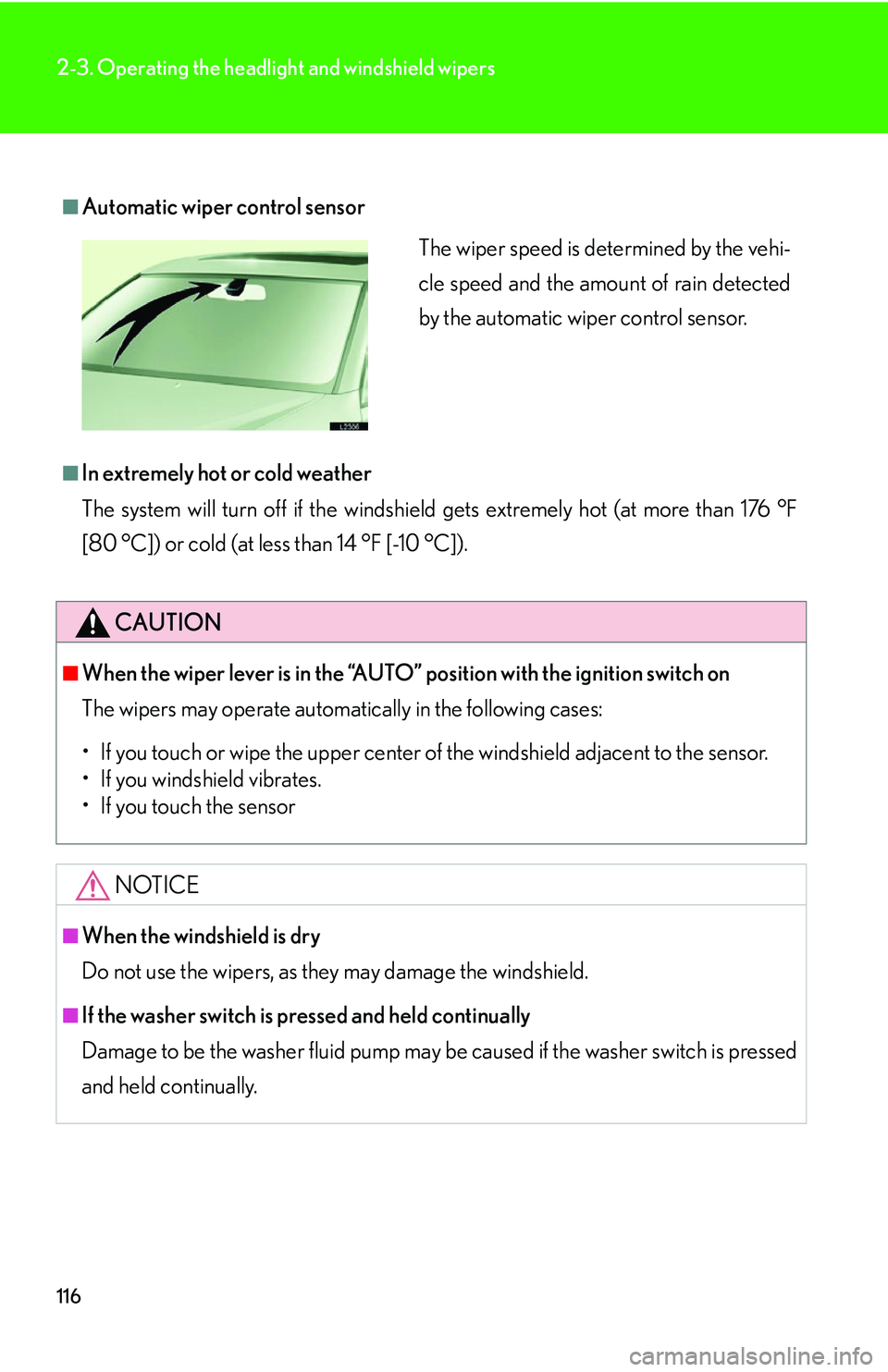
■Automatic wiper control sensor
■In extremely hot or cold weather
The system will turn off if the windshield gets extremely hot (at more than 176 °F
[80 °C]) or cold (at less than 14 °F [-10 °C]).
CAUTION
■When the wiper lever is in the “AUTO” position with the ignition switch on
The wipers may operate automatically in the following cases:
• If you touch or wipe the uppe
r center of the windshield adjacent to the sensor.
• If you windshield vibrates.
• If you touch the sensor
NOTICE
■When the windshield is dry
Do not use the wipers, as they may damage the windshield.
■If the washer switch is pressed and held continually
Damage to be the washer fluid pump may be caused if the washer switch is pressed
and he
ld continually.
The wiper speed is determined by the vehi-
cle speed and the amount of rain detected
by the automatic wiper control sensor.
Page 133 of 419
117
2-3. Operating the headlight and windshield wipers
2
When driving
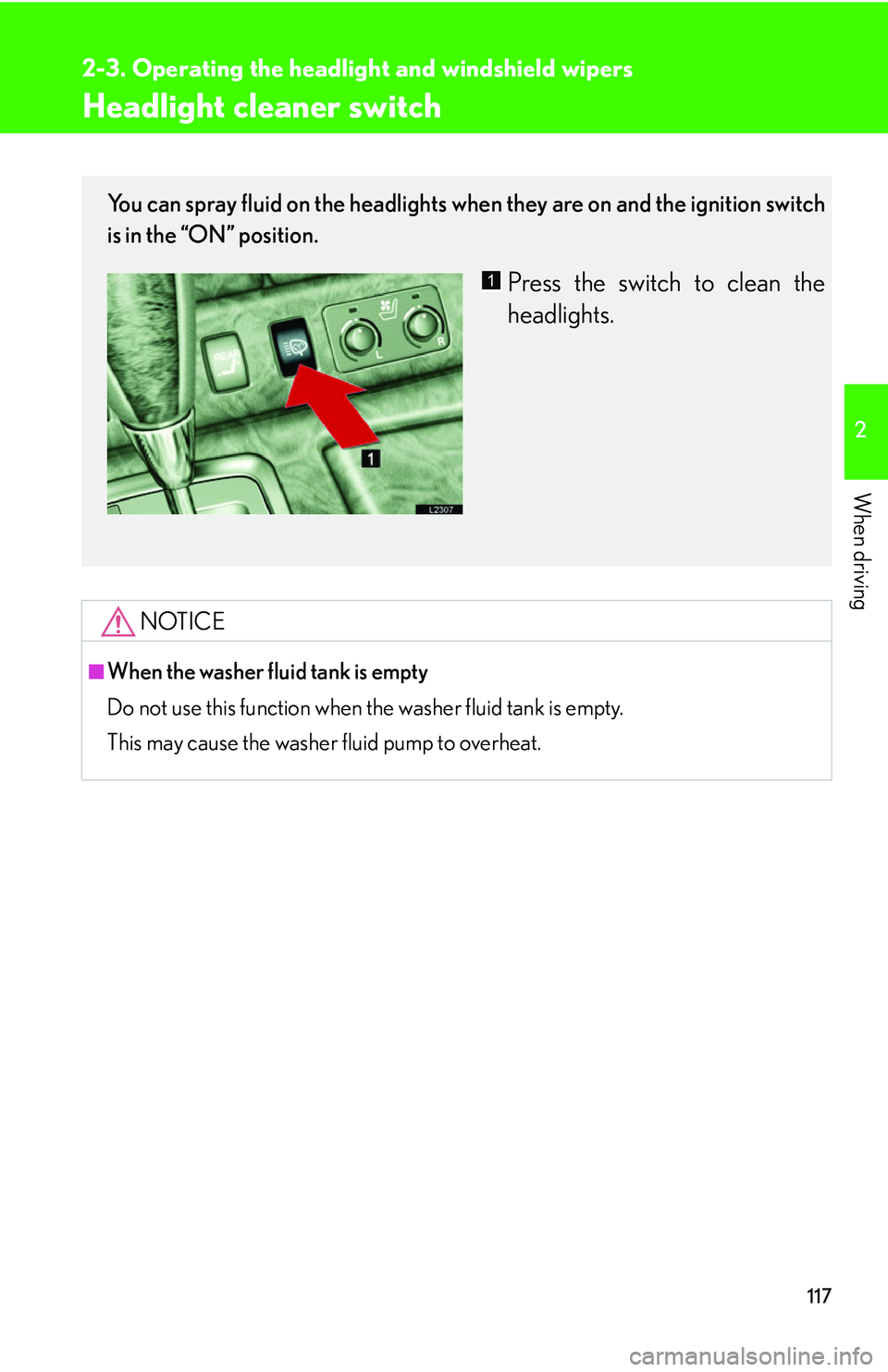
Headlight cleaner switch
NOTICE
■When the washer fluid tank is empty
Do not use this function when the washer fluid tank is empty.
This may cause the washer fluid pump to overheat.
You can spray fluid on the headlights when they are on and the ignition switch
is in the “ON” position.
Press the switch to clean the
headlights.1
Page 137 of 419
121
2-4. Using other driving systems
2
When driving
■Objects which may not be detected
●Wires or ropes.
●Objects with a surface area too small to reflect ultrasonic waves such as a
chain-link fence.
●Sound wave absorbing objects such as cotton or snow.
●Objects with a sharp edge.
●Shorter objects.
●Tall objects with the upper part projected.
■Operating condition
The ignition switch must b
e turned to ON.
■Park assist graphics (vehicles equippe d with the Navigation system) System
The park assist graphics also appear on the n
avigation display. For details, see the
separate “Navigation System Owner’s Manual”.
■Certification for the Lexus park assist system (Canada)
This ISM device complies with Canadian ICES-001.
■Failure warnings
If a system error is detected, the master warning light comes on, 5 beeps sound, the
fo
llowing warning message appears, and gr aphic information indicates the faulty
sensor. ( P.334 )
■Customization
The volume of the beeps can be changed. ( P. 3 8 4 )
Page 140 of 419
124
2-4. Using other driving systems
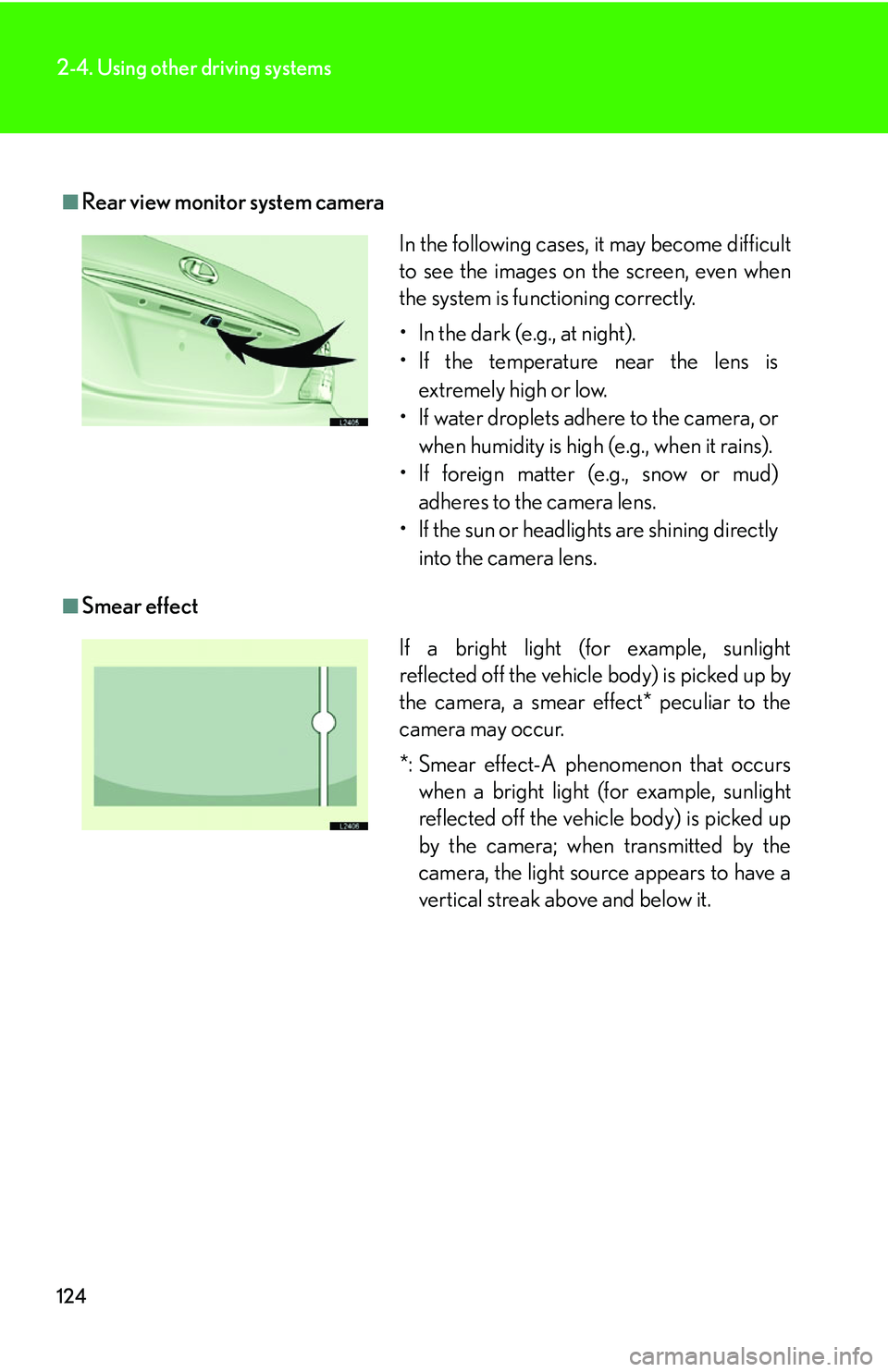
■Rear view monitor system camera
■Smear effect
In the following cases, it may become difficult
to see the images on the screen, even when
the system is functioning correctly.
• In the dark (e.g., at night).
• If the temperature near the lens is extremely high or low.
• If water droplets adhere to the camera, or when humidity is high (e.g., when it rains).
• If foreign matter (e.g., snow or mud) adheres to the camera lens.
• If the sun or headlights are shining directly
into the camera lens.
If a bright light (for example, sunlight
reflected off the vehicle body) is picked up by
the camera, a smear effect* peculiar to the
camera may occur.
*: Smear effect-A phenomenon that occurs when a bright light (for example, sunlight
reflected off the vehicle body) is picked up
by the camera; when transmitted by the
camera, the light source appears to have a
vertical streak above and below it.
Page 141 of 419
125
2-4. Using other driving systems
2
When driving
CAUTION
■When using the rear view monitor system, observe these precautions to avoid an
accident that could result in death or serious injuries.
●Never depend solely on the monitor system when reversing.
●Always check visually and with the mirrors to confirm your intended path is clear.
●Depicted distances between objects and flat surfaces differ from actual dis-
tances.
●Do not use the system if the trunk is open.
■Conditions which may affect the rear view monitor system
●If the back of the vehicle is hit, the camera’s position and mounting angle may
change. See your Lexus dealer.
●Rapid temperature changes, such as when hot water is poured on the vehicle in
cold weather, may cause the system to function abnormally.
●If the camera lens is dirty, it cannot transmit a clear image. Rinse with water and
wipe with a soft cloth. If extremely dirty, wash with a mild cleanser and rinse.
●The displayed image may be darker and mo ving images may be slightly distorted
when the system is cold.
Page 144 of 419
128
2-4. Using other driving systems
■Automatic cruise control cancellation
Cruise control is automatically cancelled
in any of the following situations.
• Actual vehicle speed is more than 10 mph
(16 km/h) below the preset vehicle
speed.
• Vehicle speed is less than 25 mph (40 km/h).
• The slip indicator light blinks and a warning tone sounds.
■If the cruise control indicator light flashes
Turn the ON-OFF switch off once, and then reactivate the system. There may be a
malfunction in the cruise control system if the indicator light does not come on,
flashes again or goes out after it comes on. Have the vehicle inspected by your
Lexus dealer.
CAUTION
■To avoid inadvertent cruise control activation
Keep the ON-OFF switch off when not in use.
■Locations unsuitable for cruise control
●Do not use cruise control in any of the following situations.
Doing so may result in control of the v
ehicle being lost and may cause an acci -
dent.
• In heavy traffic.
• On roads with sharp bends.
• On slippery roads, such as th o
se covered with ice or snow.
• On steep hills.
• On winding roads.
Page 148 of 419
132
2-4. Using other driving systems
■Setting vehicle speed
Settings can be made when the vehicle
is traveling above 28 mph (45 km/h).
■Unsuitable conditions
You cannot set the speed in the following conditions:
• When the selector lever is in a position other than D, 4, 5, or 6.
• When driving in adverse weather conditions.
■Automatic cruise control cancellation
In the following cases, the preset speed is can ce
lled. If the system is restored, cruise
control enters the ready mode.
• The slip indicator light blinks and a warning tone sounds.
• The anti-lock braking system activates.
• Foreign matter adheres to the sensor.
• The driving pattern selector sw it
ch is set to “SNOW” mode.
• The wipers are operated at high speed (radar), or either high or low speeds (l
aser). This includes high and low speed operation with the wiper lever in the
AUTO position.
• The vehicle’s speed falls below 25 mph (40 km/h). In this case, you must apply th
e brakes manually to slow the vehicle.
If the preset speed automatically cancels out for other than the above reasons, the
sy
stem may have malfunctioned. Do not operate the dynamic radar/laser cruise
control. You may continue driving, howe ver have your vehicle checked by your
Lexus dealer at the earliest opportunity.